AIlice
1.0.0


بداية سريعة • العرض التوضيحي • التطوير • Twitter • Reddit
22 يونيو 2024: لقد دخلنا عصر مساعدي الذكاء الاصطناعى الذين يشبهون جارفيس المحليين! تمكننا أحدث LLMS مفتوح المصدر من أداء المهام المعقدة محليًا! انقر هنا لمعرفة المزيد.
Ailice هو عميل الذكاء الاصطناعي المستقل بشكل كامل ، للأغراض العامة . يهدف هذا المشروع إلى إنشاء مساعد ذكاء اصطناعي مستقل ، على غرار Jarvis ، استنادًا إلى LLM مفتوح المصدر. يحقق Ailice هذا الهدف من خلال بناء "كمبيوتر نص" يستخدم نموذج لغة كبير (LLM) كمعالج أساسي له. حاليًا ، يوضح Ailice الكفاءة في مجموعة من المهام ، بما في ذلك البحوث المواضيعية ، والترميز ، وإدارة النظام ، ومراجعات الأدب ، والمهام الهجينة المعقدة التي تتجاوز هذه القدرات الأساسية.
وصل Ailice إلى أداء شبه مثالي في المهام اليومية باستخدام GPT-4 ويخطو خطوات نحو تطبيق عملي مع أحدث نماذج مفتوحة المصدر.
سنحقق في النهاية التطور الذاتي لعوامل الذكاء الاصطناعي . وهذا يعني أن وكلاء الذكاء الاصطناعى سيبنيون بشكل مستقل توسعات خاصة بهم وأنواع جديدة من الوكلاء ، ويطلقون معارف LLM وقدرات التفكير في العالم الحقيقي بسلاسة.
لفهم قدرات Ailice الحالية ، شاهد مقاطع الفيديو التالية:
تشمل الميزات الفنية الرئيسية لـ Ailice:
تثبيت وتشغيل ailice مع الأوامر التالية. بمجرد إطلاق Ailice ، استخدم متصفحًا لفتح صفحة الويب التي يوفرها ، ستظهر واجهة حوار. إصدار الأوامر إلى ailice من خلال المحادثة لإنجاز مختلف المهام. لاستخدامك الأول ، يمكنك تجربة الأوامر المقدمة في الأشياء الرائعة التي يمكننا القيام بها للتعرف بسرعة.
git clone https://github.com/myshell-ai/AIlice.git
cd AIlice
pip install -e .
ailice_web --modelID=oai:gpt-4o --contextWindowRatio=0.2دعنا ندرج بعض حالات الاستخدام النموذجية. كثيرا ما أستخدم هذه الأمثلة لاختبار ailice أثناء التطوير ، وضمان أداء مستقر. ومع ذلك ، حتى مع هذه الاختبارات ، تتأثر نتائج التنفيذ بالنموذج المختار ، وإصدار الكود ، وحتى وقت الاختبار. (قد يعاني GPT-4 من انخفاض في الأداء تحت الأحمال العالية. يمكن أن تؤدي بعض العوامل العشوائية أيضًا إلى نتائج مختلفة من تشغيل النموذج عدة مرات. في بعض الأحيان يؤدي LLM بذكاء شديد ، ولكن في أوقات أخرى لا) بالإضافة إلى ذلك ، فإن Ailice هو عامل استنادًا إلى التعاون متعدد الوكلاء ، وبصفتك مستخدمًا ، فأنت أيضًا أحد "الوكلاء". وبالتالي ، عندما تتطلب Ailice معلومات إضافية ، فإنها ستسعى للحصول على مدخلات منك ، ودقة تفاصيلك أمر بالغ الأهمية لنجاحها. علاوة على ذلك ، إذا كان تنفيذ المهمة قصيرًا ، فيمكنك توجيهها في الاتجاه الصحيح ، وسوف تقوم بتصحيح نهجها.
النقطة الأخيرة التي يجب ملاحظتها هي أن Ailice تفتقر حاليًا إلى آلية التحكم في وقت التشغيل ، لذلك قد تتعثر في حلقة أو تعمل لفترة طويلة. عند استخدام LLM تجاري ، تحتاج إلى مراقبة عملها عن كثب.
"يرجى سرد محتويات الدليل الحالي."
"ابحث عن ملاحظات محاضرة ديفيد تونغ QFT وقم بتنزيلها على مجلد" الفيزياء "في الدليل الحالي. قد تحتاج إلى إنشاء المجلد أولاً."
"نشر موقع ويب مباشر على هذا الجهاز باستخدام Flask Framework. تأكد من إمكانية الوصول عند 0.0.0.0:59001. يجب أن يحتوي الموقع على صفحة واحدة قادرة على عرض جميع الصور الموجودة في دليل" الصور "." هذا واحد مثير للاهتمام بشكل خاص. نحن نعلم أنه لا يمكن القيام بالرسم في بيئة Docker ، ويجب نسخ جميع إخراج الملفات الذي ننشئه باستخدام أمر "Docker CP" لرؤيته. ولكن يمكنك السماح لـ Ailice بحل هذه المشكلة بمفرده: نشر موقع ويب في الحاوية وفقًا للمطالبة أعلاه (يوصى باستخدام المنافذ بين 59001 و 59200 تم تعيين المنفذ) ، وسيتم عرض الصور في الدليل تلقائيًا على صفحة الويب. وبهذه الطريقة ، يمكنك رؤية محتوى الصورة الذي تم إنشاؤه ديناميكيًا على المضيف. يمكنك أيضًا محاولة السماح لها بالتكرار لإنتاج وظائف أكثر تعقيدًا. إذا كنت لا ترى أي صور على الصفحة ، فيرجى التحقق مما إذا كان مجلد "الصور" في موقع الويب يختلف عن مجلد "الصور" هنا (على سبيل المثال ، قد يكون تحت "Static/Images").
"يرجى استخدام برمجة Python لحل المهام التالية: الحصول على بيانات السعر الخاصة بـ BTC-USDT لمدة ستة أشهر ورسمها إلى رسم بياني ، وحفظها في دليل" الصور "." إذا نجحت في نشر موقع الويب أعلاه ، فيمكنك الآن رؤية منحنى سعر BTC مباشرة على الصفحة.
"ابحث عن العملية على المنفذ 59001 وإنهائها." سيؤدي ذلك إلى إنهاء برنامج خدمة الموقع الذي تم إنشاؤه للتو.
"يرجى استخدام cadquery لتنفيذ كوب." هذه أيضًا محاولة مثيرة للاهتمام للغاية. Cadquery هي حزمة Python التي تستخدم برمجة Python لنمذجة CAD. نحاول استخدام Ailice لإنشاء نماذج ثلاثية الأبعاد تلقائيًا! هذا يمكن أن يمنحنا لمحة عن كيفية أن يكون الحدس الهندسي الناضج في وجهة نظر LLM العالمية. بالطبع ، بعد تنفيذ الدعم متعدد الوسائط ، يمكننا تمكين Ailice من رؤية النماذج التي تنشئها ، مما يسمح بمزيد من التعديلات وإنشاء حلقة ردود فعل فعالة للغاية. وبهذه الطريقة ، قد يكون من الممكن تحقيق النمذجة ثلاثية الأبعاد التي يتم التحكم فيها باللغة.
"يرجى البحث في الإنترنت عن 100 برامج تعليمية في مختلف فروع الفيزياء وتنزيل ملفات PDF التي تجدها إلى مجلد يسمى" Physics ". ليست هناك حاجة للتحقق من محتوى PDFs ، نحتاج فقط إلى مجموعة خشنة في الوقت الحالي." يعد استخدام Ailice لتحقيق جمع مجموعة البيانات التلقائي والبناء أحد أهدافنا المستمرة. حاليًا ، لا يزال لدى الباحث الذي يعمل في هذه الوظيفة بعض أوجه القصور ، لكنه قادر بالفعل على تقديم بعض النتائج المثيرة للاهتمام.
"يرجى إجراء تحقيق في أدوات OPF Open Oct Open Open ، مع التركيز على القادرين على التعرف على الصيغ الرياضية وتحويلها إلى رمز Latex. توحيد النتائج في تقرير."
1. ابحث عن فيديو محاضرات Feynmann على YouTube وقم بتنزيلها على Feynmann/ Subdir. تحتاج إلى إنشاء المجلد أولاً. 2. استخراج الصوت من مقاطع الفيديو هذه وحفظها إلى Feynmann/Audio. 3. قم بتحويل هذه الملفات الصوتية إلى رسالة نصية ودمجها في مستند نصي. تحتاج أولاً إلى الانتقال إلى الوجه والعثور على الصفحة لـ Whisper-Large-V3 ، وتحديد موقع رمز المثال ، والرجوع إلى رمز العينة لإنجاز هذا. 4. ابحث عن إجابة هذا السؤال من الملفات النصية التي استخرجتها للتو: لماذا نحتاج إلى مضادات الجسيمات؟ هذه مهمة متعددة الخطوات قائمة على المطالبة حيث تحتاج إلى التفاعل مع Ailice خطوة بخطوة لإكمال المهمة. بطبيعة الحال ، قد تكون هناك أحداث غير متوقعة على طول الطريق ، لذلك ستحتاج إلى الحفاظ على التواصل الجيد مع Ailice لحل أي مشكلات تواجهها ( باستخدام زر "المقاطعة" لمقاطعة Ailice في أي وقت وإعطاء موجه هو خيار جيد! ). أخيرًا ، استنادًا إلى محتوى الفيديو الذي تم تنزيله ، يمكنك طرح سؤال متعلق بالفيزياء. بمجرد أن تتلقى الإجابة ، يمكنك أن تنظر إلى الوراء ومعرفة إلى أي مدى اجتمعت معًا.
1. استخدم SDXL لإنشاء صورة "قطة برتقالية سمين". تحتاج إلى العثور على نموذج رمز في صفحة HuggingFace الخاصة به كمرجع لإكمال أعمال البرمجة وتوليد الصور. احفظ الصورة إلى الدليل الحالي وعرضها. 2. الآن دعونا ننفذ موقع ويب من صفحة واحدة. تتمثل وظيفة صفحة الويب في تحويل وصف النص الذي أدخله المستخدم إلى صورة وعرضها. الرجوع إلى رمز النص إلى الصورة من قبل. يعمل الموقع على 127.0.0.1:59102. احفظ الرمز إلى ./image_gen قبل تشغيله ؛ قد تحتاج إلى إنشاء المجلد أولاً.
"يرجى كتابة وحدة تحويلة. وظيفة الوحدة هي الحصول على محتوى الصفحات ذات الصلة على الويكي من خلال الكلمات الرئيسية." يمكن لـ Ailice إنشاء وحدات تفاعل خارجي (نسميها منفردات Ext) بمفردها ، وبالتالي تمنعها بامتداد غير محدود. كل ما يتطلبه الأمر هو بعض المطالبات منك. بمجرد إنشاء الوحدة النمطية ، يمكنك إرشاد Ailice بالقول ، "يرجى تحميل وحدة الويكي التي تم تنفيذها حديثًا واستخدامها للاستعلام عن الدخول على النسبية."
يحتاج الوكلاء إلى التفاعل مع جوانب مختلفة من البيئة المحيطة ، غالبًا ما تكون بيئة التشغيل الخاصة بهم أكثر تعقيدًا من البرامج النموذجية. قد يستغرق الأمر وقتًا طويلاً لتثبيت التبعيات ، ولكن لحسن الحظ ، يتم ذلك بشكل تلقائي.
لتشغيل Ailice ، تحتاج إلى التأكد من تثبيت Chrome بشكل صحيح. إذا كنت بحاجة إلى تنفيذ التعليمات البرمجية في بيئة افتراضية آمنة ، فأنت بحاجة أيضًا إلى تثبيت Docker .
إذا كنت ترغب في تشغيل Ailice في جهاز افتراضي ، تأكد من إيقاف تشغيل Hyper-V (وإلا لا يمكن تثبيت llama.cpp). في بيئة VirtualBox ، يمكنك تعطيلها باتباع هذه الخطوات: تعطيل PAE/NX و VT-X/AMD-V (Hyper-V) على إعدادات VirtualBox لـ VM. تعيين واجهة paravirtualization على الافتراضي ، تعطيل الترحيل المتداخلة.
يمكنك استخدام الأمر التالي لتثبيت Ailice (يوصى بشدة باستخدام أدوات مثل Conda لإنشاء بيئة افتراضية جديدة لتثبيت Ailice ، وذلك لتجنب تعارضات التبعية):
git clone https://github.com/myshell-ai/AIlice.git
cd AIlice
pip install -e .
سيتم تشغيل Ailice المثبت افتراضيًا ببطء لأنه يستخدم وحدة المعالجة المركزية كأجهزة استنتاج لوحدة الذاكرة على المدى الطويل. لذلك ، يوصى بشدة بتثبيت دعم تسريع GPU:
ailice_turboللمستخدمين الذين يحتاجون إلى استخدام نماذج Huggingface/الحوار الصوتي/النموذج وظائف القراءة/PDF ، يمكنك استخدام أحد الأوامر التالية (تثبيت الكثير من الميزات يزيد من احتمال تعارضات التبعية ، لذلك يوصى بتثبيت فقط الأجزاء اللازمة):
pip install -e .[huggingface]
pip install -e .[speech]
pip install -e .[finetuning]
pip install -e .[pdf-reading]
يمكنك تشغيل ailice الآن! استخدم الأوامر في الاستخدام.
بشكل افتراضي ، يتم تقييد وحدة Google في Ailice ، ويمكن أن يؤدي الاستخدام المتكرر إلى أخطاء تتطلب بعض الوقت لحلها. هذه حقيقة محرجة في عصر الذكاء الاصطناعي. تسمح محركات البحث التقليدية فقط بالوصول إلى مستخدمين حقيقيين ، ولا يقع وكلاء الذكاء الاصطناعي حاليًا ضمن فئة "المستخدمين الأصليين". على الرغم من أن لدينا حلول بديلة ، إلا أنها تتطلب تكوين مفتاح API ، والذي يضع حاجزًا كبيرًا للدخول للمستخدمين العاديين. ومع ذلك ، بالنسبة للمستخدمين الذين يحتاجون إلى وصول متكرر إلى Google ، أفترض أنك ستكون على استعداد لتحمل متاعب التقدم بطلب للحصول على مفتاح واجهة برمجة التطبيقات الرسمية من Google (نشير إلى Search JSON API المخصصة ، مما يتطلب منك تحديد الإنترنت بالكامل على الإنترنت على وقت الخلق) لمهام البحث. لهؤلاء المستخدمين ، يرجى فتح config.json واستخدام التكوين التالي:
 {
    ...
    "services": {
        ...
        "google": {
          "cmd": "python3 -m ailice.modules.AGoogleAPI --addr=ipc:///tmp/AGoogle.ipc --api_key=YOUR_API_KEY --cse_id=YOUR_CSE_ID",
          "addr": "ipc:///tmp/AGoogle.ipc"
        },
        ...
    }
}
وتثبيت Google-api-Python-Client:
pip install google-api-python-clientثم ببساطة إعادة تشغيل ailice.
افتراضيًا ، يستخدم تنفيذ الكود البيئة المحلية. لمنع أخطاء الذكاء الاصطناعي المحتملة التي تؤدي إلى خسائر لا رجعة فيها ، يوصى بتثبيت Docker ، وإنشاء حاوية ، وتعديل ملف تكوين Ailice (سيوفر Ailice موقع ملف التكوين عند بدء التشغيل). قم بتكوين وحدة تنفيذ الكود الخاصة بها (ascripter) للعمل في بيئة افتراضية.
docker build -t env4scripter .
docker run -d -p 127.0.0.1:59000-59200:59000-59200 --name scripter env4scripter
في حالتي ، عند بدء تشغيل Ailice ، يخبرني أن ملف التكوين موجود في ~/.config/ailice/config.json ، لذلك أقوم بتعديله بالطريقة التالية
nano ~ /.config/ailice/config.jsonتعديل "Scripter" ضمن "الخدمات":
 {
    ...
    "services": {
        ...
        "scripter": {"cmd": "docker start scripter",
                     "addr": "tcp://127.0.0.1:59000"},
    }
}
الآن بعد أن تم تكوين البيئة.
نظرًا لحالة التطوير المستمرة لـ Ailice ، قد يؤدي تحديث الكود إلى مشكلات عدم التوافق بين ملف التكوين الحالي وحاوية Docker مع الرمز الجديد. الحل الأكثر شمولية لهذا السيناريو هو حذف ملف التكوين (مع التأكد من حفظ أي مفاتيح API مسبقًا) والحاوية ، ثم قم بإعادة التثبيت الكامل. ومع ذلك ، بالنسبة لمعظم المواقف ، يمكنك معالجة المشكلة بمجرد حذف ملف التكوين وتحديث وحدة Ailice داخل الحاوية .
rm ~ /.config/ailice/config.json
cd Ailice
docker cp ailice/__init__.py scripter:scripter/ailice/__init__.py
docker cp ailice/common/__init__.py scripter:scripter/ailice/common/__init__.py
docker cp ailice/common/ADataType.py scripter:scripter/ailice/common/ADataType.py
docker cp ailice/common/lightRPC.py scripter:scripter/ailice/common/lightRPC.py
docker cp ailice/modules/__init__.py scripter:scripter/ailice/modules/__init__.py
docker cp ailice/modules/AScripter.py scripter:scripter/ailice/modules/AScripter.py
docker cp ailice/modules/AScrollablePage.py scripter:scripter/ailice/modules/AScrollablePage.py
docker restart scripterيمكنك نسخ أمر مباشرة من حالات الاستخدام النموذجية أدناه لتشغيل Ailice.
ailice_web --modelID=oai:gpt-4o --contextWindowRatio=0.2
ailice_web --modelID=anthropic:claude-3-5-sonnet-20240620 --contextWindowRatio=0.1
ailice_web --modelID=oai:gpt-4-1106-preview --chatHistoryPath=./chat_history
ailice_web --modelID=anthropic:claude-3-opus-20240229 --prompt= " researcher "
ailice_web --modelID=mistral:mistral-large-latest
ailice_web --modelID=deepseek:deepseek-chat
ailice_web --modelID=hf:Open-Orca/Mistral-7B-OpenOrca --quantization=8bit --contextWindowRatio=0.6
ailice_web --modelID=hf:NousResearch/Nous-Hermes-2-Mixtral-8x7B-DPO --quantization=4bit --contextWindowRatio=0.3
ailice_web --modelID=hf:Phind/Phind-CodeLlama-34B-v2 --prompt= " coder-proxy " --quantization=4bit --contextWindowRatio=0.6
ailice_web --modelID=groq:llama3-70b-8192
ailice_web   # Use models configured individually for different agents under the agentModelConfig field in config.json.
ailice_web --modelID=openrouter:openrouter/auto
ailice_web --modelID=openrouter:mistralai/mixtral-8x22b-instruct
ailice_web --modelID=openrouter:qwen/qwen-2-72b-instruct
ailice_web --modelID=lm-studio:qwen2-72b --contextWindowRatio=0.5
تجدر الإشارة إلى أن حالة الاستخدام الأخيرة تتطلب منك تكوين خدمة استنتاج LLM أولاً ، يرجى الرجوع إلى كيفية إضافة دعم LLM. يمكن باستخدام أطراف الاستدلال مثل LM Studio استخدام موارد الأجهزة المحدودة لدعم النماذج الكبيرة ، وتوفير سرعة استنتاج أسرع وسرعة بدء تشغيل Ailice بشكل أسرع ، مما يجعلها أكثر ملاءمة للمستخدمين العاديين.
عندما تقوم بتشغيله لأول مرة ، سيُطلب منك إدخال مفتاح API من Openai. إذا كنت ترغب فقط في استخدام LLM Open Source ، فأنت لا تحتاج إلى إدخاله. يمكنك أيضًا تعديل مفتاح API عن طريق تحرير ملف config.json. يرجى ملاحظة أنه في المرة الأولى عند استخدام LLM مفتوح المصدر ، سيستغرق الأمر وقتًا طويلاً لتنزيل أوزان النموذج ، يرجى التأكد من أن لديك وقتًا كافيًا ومساحة للقرص.
عندما تقوم بتشغيل مفتاح الكلام لأول مرة ، قد تحتاج إلى الانتظار لفترة طويلة عند بدء التشغيل. وذلك لأن أوزان التعرف على الكلام ونماذج TTS يتم تنزيلها في الخلفية.
كما هو موضح في الأمثلة ، يمكنك استخدام الوكيل من خلال AILICE_WEB ، فإنه يوفر واجهة حوار الويب. يمكنك عرض القيمة الافتراضية لكل معلمة باستخدام
ailice_web --helpيمكن تخصيص القيم الافتراضية لجميع وسيطات سطر الأوامر عن طريق تعديل المعلمات المقابلة في config.json.
يسمى ملف التكوين الخاص بـ Ailice config.json ، وسيتم إخراج موقعه إلى سطر الأوامر عند بدء تشغيل Ailice. في هذا القسم ، سنقدم كيفية تكوين وحدات التفاعل الخارجي من خلال ملف التكوين.
في Ailice ، نستخدم مصطلح "الوحدة النمطية" للإشارة على وجه التحديد إلى المكونات التي توفر وظائف للتفاعل مع العالم الخارجي. كل وحدة تعمل كعملية مستقلة ؛ يمكن أن تعمل في برامج مختلفة أو بيئات الأجهزة من العملية الأساسية ، مما يجعل ailice قادرة على توزيعها. نحن نقدم سلسلة من تكوينات الوحدة النمطية الأساسية في ملف التكوين المطلوب لتشغيل Ailice (مثل قاعدة بيانات المتجهات ، والبحث ، والمتصفح ، وتنفيذ التعليمات البرمجية ، إلخ). يمكنك أيضًا إضافة تكوينات لأي وحدات طرف ثالث وتوفير عنوان وقت تشغيل الوحدة النمطية والمنفذ بعد أن يتم تشغيل Ailice لتمكين التحميل التلقائي. تكوين الوحدة بسيط للغاية ، ويتألف من عنصرين فقط:
  "services" : {
    ...
    "scripter" : { "cmd" : " python3 -m ailice.modules.AScripter --addr=tcp://127.0.0.1:59000 " ,
	               "addr" : " tcp://127.0.0.1:59000 " },
    ...
  }
من بين هذه ، تحت "CMD" هو سطر أوامر يستخدم لبدء عملية الوحدة النمطية. عند بدء تشغيل Ailice ، تقوم تلقائيًا بتشغيل هذه الأوامر لبدء الوحدات النمطية. يمكن للمستخدمين تحديد أي أمر ، مما يوفر مرونة كبيرة. يمكنك بدء عملية الوحدة النمطية محليًا أو استخدام Docker لبدء عملية في بيئة افتراضية ، أو حتى بدء عملية عن بُعد. تحتوي بعض الوحدات على تطبيقات متعددة (مثل Google/Storage) ، ويمكنك التكوين هنا للتبديل إلى تطبيق آخر.
يشير "addr" إلى العنوان ورقم المنفذ لعملية الوحدة النمطية. قد يتم الخلط بين المستخدمين من حقيقة أن العديد من الوحدات في التكوين الافتراضي لها كل من "CMD" و "addr" التي تحتوي على عناوين وأرقام المنافذ ، مما يسبب التكرار. وذلك لأن "CMD" يمكن ، من حيث المبدأ ، أن يحتوي على أي أمر (قد يتضمن عناوين وأرقام المنافذ ، أو لا شيء على الإطلاق). لذلك ، من الضروري وجود عنصر منفصل "addr" لإبلاغ Ailice كيفية الوصول إلى عملية الوحدة النمطية.
المقاطعات. المقاطعات هي وضع التفاعل الثاني الذي يدعمه Ailice ، والذي يتيح لك المقاطعة وتوفير مطالبات لوكلاء Ailice في أي وقت لتصحيح الأخطاء أو تقديم التوجيه . في AILICE_WEB ، أثناء تنفيذ مهمة Ailice ، يظهر زر المقاطعة على الجانب الأيمن من مربع الإدخال. يتوقف الضغط على تنفيذ Ailice وينتظر رسالتك السريعة. يمكنك إدخال المطالبة الخاصة بك في مربع الإدخال واضغط على Enter لإرسال الرسالة إلى الوكيل الذي يقوم حاليًا بتنفيذ المهام الفرعية. يتطلب الاستخدام المبرق لهذه الميزة فهمًا جيدًا لأعمال Ailice ، وخاصة بنية شجرة الاتصال بالوكيل. يتضمن أيضًا التركيز أكثر على نافذة سطر الأوامر بدلاً من واجهة الحوار أثناء تنفيذ مهمة Ailice. بشكل عام ، هذه ميزة مفيدة للغاية ، وخاصة على إعدادات نموذج اللغة الأقل قوة.
استخدم أولاً GPT-4 لتشغيل بعض حالات الاستخدام البسيطة بنجاح ، ثم أعد تشغيل النموذج بأقل قوة (ولكن أرخص/مفتوح المصدر) لمواصلة تشغيل مهام جديدة بناءً على تاريخ المحادثة السابق . وبهذه الطريقة ، يعد التاريخ الذي توفره GPT-4 مثالًا ناجحًا ، حيث يوفر مرجعًا قيمة لنماذج أخرى وزيادة فرص النجاح بشكل كبير.
تم تحديثه في 23 أغسطس 2024.
في الوقت الحالي ، يمكن لـ Ailice التعامل مع المهام الأكثر تعقيدًا باستخدام نموذج Open Source 72B (QWEN-2-72B-instruct على 4090x2) ، مع اقتراب أداء نماذج GPT-4. بالنظر إلى انخفاض تكلفة النماذج مفتوحة المصدر ، نوصي بشدة بالمستخدمين لبدء استخدامها. علاوة على ذلك ، يضمن توطين عمليات LLM حماية الخصوصية المطلقة ، وهي جودة نادرة في تطبيقات الذكاء الاصطناعي في عصرنا. انقر هنا لمعرفة كيفية تشغيل هذا النموذج محليًا. بالنسبة للمستخدمين الذين لا تكفي ظروف GPU الخاصة بهم تشغيل نماذج كبيرة ، فإن هذه ليست مشكلة. يمكنك استخدام خدمة الاستدلال عبر الإنترنت (مثل OpenRouter ، وسيتم ذكر ذلك بعد ذلك) للوصول إلى هذه النماذج مفتوحة المصدر (على الرغم من أن هذه التضحيات خصوصية). على الرغم من أن النماذج المفتوحة المصدر لا يمكنها بعد منافسة نماذج GPT-4 التجارية بالكامل ، إلا أنه يمكنك جعل الوكلاء يتفوقون من خلال الاستفادة من نماذج مختلفة وفقًا لنقاط القوة والضعف. للحصول على التفاصيل ، يرجى الرجوع إلى استخدام نماذج مختلفة في عوامل مختلفة.
يوفر Claude-3-5-Sonnet-20240620 أفضل أداء.
كما توفر GPT-4O و GPT-4-1106-Preview أداءً من المستوى الأعلى. ولكن نظرًا لوقت المدى الطويل للوكيل والاستهلاك الكبير للرموز ، يرجى استخدام النماذج التجارية بحذر. يعمل GPT-4O-Mini جيدًا ، وعلى الرغم من أنه ليس من الدرجة الأولى ، فإن سعره المنخفض يجعل هذا النموذج جذابًا للغاية. GPT-4-TURBO / GPT-3.5-TURBO كسول بشكل مدهش ، ولم نتمكن مطلقًا من العثور على تعبير موجه مستقر.
من بين النماذج المفتوحة المصدر ، تشمل النماذج التي عادة ما تؤدي بشكل جيد:
Meta-llama-3.1-405b-instruct هي لطيفة ، ولكنها أكبر من أن تكون عملية على الكمبيوتر الشخصي.
بالنسبة للمستخدمين الذين لا تكفي إمكانيات الأجهزة الذين لا تكفيون في تشغيل نماذج مفتوحة المصدر محليًا والذين غير قادرين على الحصول على مفاتيح API للنماذج التجارية ، يمكنهم تجربة الخيارات التالية:
OpenRouter يمكن لهذه الخدمة توجيه طلبات الاستدلال الخاصة بك إلى العديد من النماذج المفتوحة أو التجارية دون الحاجة إلى نشر نماذج مفتوحة المصدر محليًا أو التقدم للحصول على مفاتيح API لمختلف الطرز التجارية. إنه خيار رائع. يدعم Ailice تلقائيًا جميع النماذج في OpenRouter. يمكنك اختيار Autorouter: OpenRouter/Auto للسماح للتواصل التلقائي تلقائيًا ، أو يمكنك تحديد أي نموذج محدد تم تكوينه في ملف config.json. شكرا babybirdprd على التوصية OpenRouter لي.
Groq: Llama3-70B-8192 بالطبع ، يدعم Ailice أيضًا نماذج أخرى بموجب Groq. تتمثل إحدى المشكلات في التشغيل تحت GROQ إلى أنه من السهل تجاوز حدود المعدل ، بحيث لا يمكن استخدامها إلا في تجارب بسيطة.
سنختار نموذجًا مفتوح المصدر الأفضل أداءً حاليًا لتوفير مرجع لمستخدمي نماذج المصدر المفتوح.
الأفضل بين جميع النماذج: Qwen-2-72B-instruct . هذا هو أول نموذج مفتوح المصدر ذي القيمة العملية . إنه تقدم رائع! لديها قدرات التفكير القريبة من GPT-4 ، ولكن ليس هناك بعد. مع تدخل المستخدم النشط من خلال ميزة المقاطعة ، يمكن إكمال العديد من المهام الأكثر تعقيدًا بنجاح.
ثاني أفضل نماذج أداء: Mixtral-8x22b-instruct و meta-llama/meta-llama-3-70b-instruct . تجدر الإشارة إلى أن نماذج سلسلة LLAMA3 يبدو أنها تظهر انخفاضًا كبيرًا في الأداء بعد القياس الكمي ، مما يقلل من قيمتها العملية. يمكنك استخدامها مع Groq.
إذا وجدت نموذجًا أفضل ، فيرجى إبلاغي بذلك.
بالنسبة للاعبين المتقدمين ، من المحتم تجربة المزيد من النماذج. لحسن الحظ ، ليس من الصعب تحقيق هذا.
لنماذج Openai/Mistral/Anthropic/Groq ، لا تحتاج إلى فعل أي شيء. ما عليك سوى استخدام ModelId الذي يتكون من اسم النموذج الرسمي الملحق بـ "OAI:"/"MISTRAL:"/"Anthropic:"/"Groq:" profix. إذا كنت بحاجة إلى استخدام نموذج لا يتم تضمينه في القائمة المدعومة من Ailice ، فيمكنك حل ذلك عن طريق إضافة إدخال لهذا النموذج في ملف config.json. تتمثل طريقة إضافتها في الإشارة مباشرة إلى إدخال نموذج مماثل ، وتعديل ContextWindow إلى القيمة الفعلية ، والحفاظ على نظام Systemasuser متسقًا مع النموذج المماثل ، وتعيين ARGS إلى DICT فارغ.
يمكنك استخدام أي خادم استدلال من طرف ثالث متوافق مع واجهة برمجة تطبيقات Openai لاستبدال وظائف الاستدلال LLM المدمجة في Ailice. ما عليك سوى استخدام تنسيق التكوين نفسه مثل نماذج Openai وتعديل BaseUrl و Apkivey و ContextWindow وغيرها من المعلمات (في الواقع ، هذه هي الطريقة التي تدعم بها النماذج Groq).
بالنسبة لخوادم الاستدلال التي لا تدعم API Openai ، يمكنك محاولة استخدام Litellm لتحويلها إلى واجهة برمجة تطبيقات متوافقة مع OpenAI (لدينا مثال أدناه).
من المهم أن نلاحظ أنه نظرًا لوجود العديد من رسائل النظام في سجلات محادثة Ailice ، والتي ليست حالة استخدام شائعة لـ LLM ، يعتمد مستوى الدعم لهذا على التنفيذ المحدد لخوادم الاستدلال هذه. في هذه الحالة ، يمكنك تعيين معلمة SystemAsuser على صواب للتحايل على المشكلة. على الرغم من أن هذا قد يمنع النموذج من تشغيل Ailice في أدائه الأمثل ، إلا أنه يتيح لنا أيضًا أن نكون متوافقين مع خوادم الاستدلال الفعالة المختلفة. بالنسبة للمستخدم العادي ، فإن الفوائد تفوق العيوب.
نستخدم Ollama كمثال لشرح كيفية إضافة دعم لمثل هذه الخدمات. أولاً ، نحتاج إلى استخدام Litellm لتحويل واجهة Ollama إلى تنسيق متوافق مع Openai.
pip install litellm
ollama pull mistral-openorca
litellm --model ollama/mistral-openorca --api_base http://localhost:11434 --temperature 0.0 --max_tokens 8192
بعد ذلك ، أضف دعمًا لهذه الخدمة في ملف config.json (سيتم مطالب موقع هذا الملف عند إطلاق Ailice).
{
  "maxMemory" : {},
  "quantization" : null ,
  "models" : {
    "oai" : {
      ...
    },
    "ollama" : {
      "modelWrapper" : " AModelChatGPT " ,
      "apikey" : " fake-key " ,
      "baseURL" : " http://localhost:8000 " ,
      "modelList" : {
        "mistral-openorca" : {
          "formatter" : " AFormatterGPT " ,
          "contextWindow" : 8192 ,
          "systemAsUser" : false ,
          "args" : {}
        }
      }
    },
    ...
  },
  ...
}
الآن يمكننا تشغيل ailice:
ailice_web --modelID=ollama:mistral-openorcaفي هذا المثال ، سوف نستخدم LM Studio لتشغيل النموذج الأكثر فتحًا التي رأيتها على الإطلاق: QWEN2-72B-instruct-q3_k_s.gguf ، حيث يعمل على تشغيل Ailice على الجهاز المحلي.
قم بتنزيل أوزان نموذج QWEN2-72B-instruct-q3_k_s.gguf باستخدام استوديو LM.
في نافذة LM Studio "Ocalserver" ، قم بتعيين N_GPU_Layers على -1 إذا كنت ترغب في استخدام GPU فقط. اضبط معلمة "طول السياق" على اليسار إلى 16384 (أو قيمة أصغر بناءً على ذاكرتك المتاحة) ، وقم بتغيير "سياسة تجاوز السياق" إلى "إبقاء مطالبة النظام ورسالة المستخدم الأولى ، تقطع الوسط".
تشغيل الخدمة. نحن نفترض أن عنوان الخدمة هو "http: // localhost: 1234/v1/".
ثم ، نفتح config.json ونقوم بالتعديلات التالية:
{
  "maxMemory" : {},
  "quantization" : null ,
  "models" : {
    "oai" : {
      ...
    },
    "lm-studio" : {
      "modelWrapper" : " AModelChatGPT " ,
      "apikey" : " fakekey " ,
      "baseURL" : " http://localhost:1234/v1/ " ,
      "modelList" : {
        "qwen2-72b" : {
          "formatter" : " AFormatterGPT " ,
          "contextWindow" : 32764 ,
          "systemAsUser" : true ,
          "args" : {}
        }
      }
    },
    ...
  },
  ...
}
وأخيرا ، تشغيل ailice. يمكنك ضبط معلمة "ContextWindowRatio" بناءً على VRAM أو مساحة الذاكرة المتاحة. أكبر المعلمة ، مطلوب مساحة VRAM.
ailice_web --modelID=lm-studio:qwen2-72b --contextWindowRatio=0.5على غرار ما فعلناه في القسم السابق ، بعد أن نستخدم LM Studio لتنزيل وتشغيل LLAVA ، نقوم بتعديل ملف التكوين على النحو التالي:
{
  "maxMemory" : {},
  "quantization" : null ,
  "models" : {
    "oai" : {
      ...
    },
    "lm-studio" : {
      "modelWrapper" : " AModelChatGPT " ,
      "apikey" : " fakekey " ,
      "baseURL" : " http://localhost:1234/v1/ " ,
      "modelList" : {
        "llava-1.6-34b" : {
          "formatter" : " AFormatterGPTVision " ,
          "contextWindow" : 4096 ,
          "systemAsUser" : true ,
          "args" : {}
        }
      },
    },
    ...
  },
  ...
}
ومع ذلك ، تجدر الإشارة إلى أن النموذج الحالي متعدد الوسائط مفتوح المصدر لا يكفي من كافية لأداء مهام الوكيل ، لذلك هذا المثال مخصص للمطورين بدلاً من المستخدمين.
بالنسبة للطرز المفتوحة المصدر على LuggingFace ، تحتاج فقط إلى معرفة المعلومات التالية لإضافة دعم للموديلات الجديدة: عنوان LuggingFace للنموذج ، وتنسيق المطالبة بالطراز ، وطول نافذة السياق. عادةً ما يكون سطر رمز واحد كافياً لإضافة نموذج جديد ، ولكن في بعض الأحيان تكون محظوظًا وتحتاج إلى حوالي عشرة خطوط من التعليمات البرمجية.
فيما يلي الطريقة الكاملة لإضافة دعم LLM الجديد:
افتح config.json ، يجب عليك إضافة تكوين LLM الجديد في models.hf.modellist ، والذي يبدو ما يلي:
{
  "maxMemory" : {},
  "quantization" : null ,
  "models" : {
    "hf" : {
      "modelWrapper" : " AModelCausalLM " ,
      "modelList" : {
        "meta-llama/Llama-2-13b-chat-hf" : {
          "formatter" : " AFormatterLLAMA2 " ,
          "contextWindow" : 4096 ,
          "systemAsUser" : false ,
          "args" : {}
        },
        "meta-llama/Llama-2-70b-chat-hf" : {
          "formatter" : " AFormatterLLAMA2 " ,
          "contextWindow" : 4096 ,
          "systemAsUser" : false ,
          "args" : {}
        },
        ...
      }
    },
  ...
  }
...
}
"Formatter" هو فئة تحدد تنسيق مطالبة LLM. يمكنك العثور على تعريفاتها في Core/LLM/Aformatter. يمكنك قراءة هذه الرموز لتحديد التنسيق المطلوب للنموذج الذي تريد إضافته. في حال لم تجدها ، فأنت بحاجة إلى كتابة واحدة بنفسك. لحسن الحظ ، يعد Formatter أمرًا بسيطًا للغاية ويمكن إكماله في أكثر من عشرة خطوط من التعليمات البرمجية. أعتقد أنك سوف تفهم كيفية القيام بذلك بعد قراءة عدد قليل من رموز المصدر التنسيق.
نافذة السياق هي خاصية يكون لها LLM من بنية المحولات عادة. يحدد طول النص الذي يمكن للنموذج معالجته في وقت واحد. تحتاج إلى تعيين نافذة السياق للنموذج الجديد على مفتاح "ContextWindow".
"Systemasuser": نستخدم دور "النظام" كمرسل للرسالة التي تم إرجاعها بواسطة استدعاء الوظائف. ومع ذلك ، ليس كل LLMs لديها تعريف واضح لدور النظام ، وليس هناك ما يضمن أن LLM يمكن أن تتكيف مع هذا النهج. لذلك نحن بحاجة إلى استخدام Systemasuser لتعيين ما إذا كان سيتم إرجاع النص بواسطة استدعاء الوظيفة في رسائل المستخدم. حاول تعيينه على خطأ أولاً.
كل شيء يتم! استخدم "HF:" كبادئة لاسم النموذج لتشكيل نموذج ، واستخدم نموذج النموذج الجديد كمعلمة الأوامر لبدء ailice!
Ailice لديه وضعان تشغيل. يستخدم أحد الوضع LLM واحد لقيادة جميع العوامل ، بينما يسمح الآخر لكل نوع من الوكلاء بتحديد LLM المقابل. يمكّننا الوضع الأخير من الجمع بين إمكانيات النماذج المفتوحة والمصادر التجارية بشكل أفضل ، وتحقيق أداء أفضل بتكلفة أقل. لاستخدام الوضع الثاني ، تحتاج إلى تكوين عنصر AgentModelConfig في config.json أولاً:
  "modelID" : " " ,
  "agentModelConfig" : {
    "DEFAULT" : " openrouter:qwen/qwen-2-72b-instruct " ,
    "coder" : " openrouter:deepseek/deepseek-coder "
  },
أولاً ، تأكد من ضبط القيمة الافتراضية لـ ModelID على سلسلة فارغة ، ثم قم بتكوين LLM المقابلة لكل نوع من أنواع الوكيل في AgentModelConfig.
أخيرًا ، يمكنك تحقيق وضع التشغيل الثاني من خلال عدم تحديد ModelId:
ailice_webالمبادئ الأساسية عند تصميم ailice هي:
دعونا نشرح بإيجاز هذه المبادئ الأساسية.
بدءًا من المستوى الأكثر وضوحًا ، يجعل البناء المذهل الديناميكي للغاية أنه من غير المرجح أن يسقط الوكيل في حلقة. يؤثر تدفق المتغيرات الجديدة من البيئة الخارجية باستمرار على LLM ، مما يساعده على تجنب هذا المأخ. علاوة على ذلك ، فإن تغذية LLM مع جميع المعلومات المتاحة حاليًا يمكن أن تحسن إنتاجها بشكل كبير. For example, in automated programming, error messages from interpreters or command lines assist the LLM in continuously modifying the code until the correct result is achieved. Lastly, in dynamic prompt construction, new information in the prompts may also come from other agents, which acts as a form of linked inference computation, making the system's computational mechanisms more complex, varied, and capable of producing richer behaviors.
Separating computational tasks is, from a practical standpoint, due to our limited context window. We cannot expect to complete a complex task within a window of a few thousand tokens. If we can decompose a complex task so that each subtask is solved within limited resources, that would be an ideal outcome. In traditional computing models, we have always taken advantage of this, but in new computing centered around LLMs, this is not easy to achieve. The issue is that if one subtask fails, the entire task is at risk of failure. Recursion is even more challenging: how do you ensure that with each call, the LLM solves a part of the subproblem rather than passing the entire burden to the next level of the call? We have solved the first problem with the IACT architecture in Ailice, and the second problem is theoretically not difficult to solve, but it likely requires a smarter LLM.
The third principle is what everyone is currently working on: having multiple intelligent agents interact and cooperate to complete more complex tasks. The implementation of this principle actually addresses the aforementioned issue of subtask failure. Multi-agent collaboration is crucial for the fault tolerance of agents in operation. In fact, this may be one of the biggest differences between the new computational paradigm and traditional computing: traditional computing is precise and error-free, assigning subtasks only through unidirectional communication (function calls), whereas the new computational paradigm is error-prone and requires bidirectional communication between computing units to correct errors. This will be explained in detail in the following section on the IACT framework.
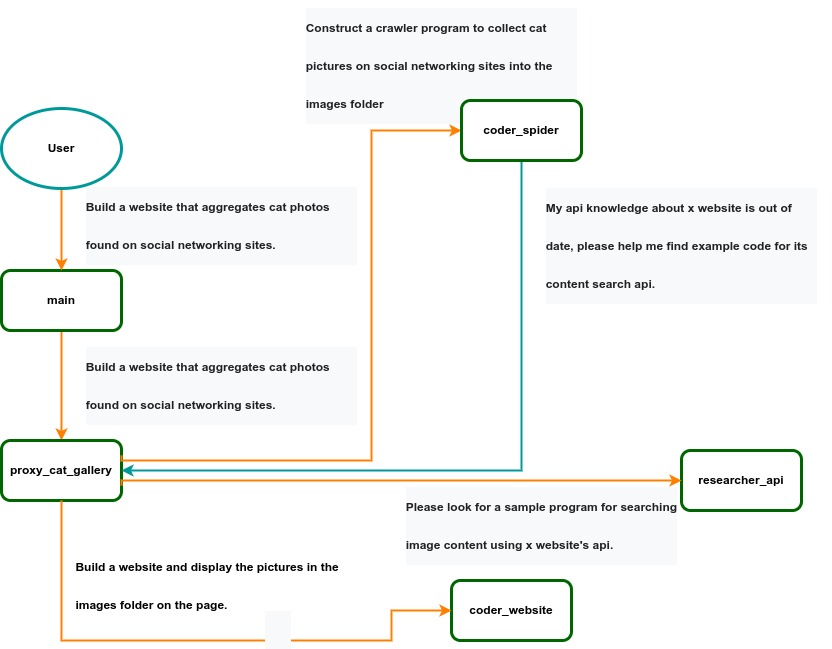 IACT Architecture Diagram. A user requirement to build a page for image collection and display is dynamically decomposed into two tasks: coder_spider and coder_website. When coder_spider encounters difficulties, it proactively seeks assistance from its caller, proxy_cat_gallery. Proxy_cat_gallery then creates another agent, researcher_api, and employs it to address the issue.
Ailice can be regarded as a computer powered by a LLM , and its features include:
Representing input, output, programs, and data in text form.
Using LLM as the processor.
Breaking down computational tasks through successive calls to basic computing units (analogous to functions in traditional computing), which are essentially various functional agents.
Therefore, user-input text commands are executed as a kind of program, decomposed into various "subprograms", and addressed by different agents , forming the fundamental architecture of Ailice. In the following, we will provide a detailed explanation of the nature of these basic computing units.
A natural idea is to let LLM solve certain problems (such as information retrieval, document understanding, etc.) through multi-round dialogues with external callers and peripheral modules in the simplest computational unit. We temporarily call this computational unit a "function". Then, by analogy with traditional computing, we allow functions to call each other, and finally add the concept of threads to implement multi-agent interaction. However, we can have a much simpler and more elegant computational model than this.
The key here is that the "function" that wraps LLM reasoning can actually be called and returned multiple times. A "function" with coder functionality can pause work and return a query statement to its caller when it encounters unclear requirements during coding. If the caller is still unclear about the answer, it continues to ask the next higher level caller. This process can even go all the way to the final user's chat window. When new information is added, the caller will reactivate the coder's execution process by passing in the supplementary information. It can be seen that this "function" is not a traditional function, but an object that can be called multiple times. The high intelligence of LLM makes this interesting property possible. You can also see it as agents strung together by calling relationships, where each agent can create and call more sub-agents, and can also dialogue with its caller to obtain supplementary information or report its progress . In Ailice, we call this computational unit "AProcessor" (essentially what we referred to as an agent). Its code is located in core/AProcessor.py.
Next, we will elaborate on the structure inside AProcessor. The interior of AProcessor is a multi-round dialogue. The "program" that defines the function of AProcessor is a prompt generation mechanism, which generates the prompt for each round of dialogue from the dialogue history. The dialogue is one-to-many. After the external caller inputs the request, LLM will have multiple rounds of dialogue with the peripheral modules (we call them SYSTEM), LLM outputs function calls in various grammatical forms, and the system calls the peripheral modules to generate results and puts the results in the reply message. LLM finally gets the answer and responds to the external caller, ending this call. But because the dialogue history is still preserved, the caller can call in again to continue executing more tasks.
The last part we want to introduce is the parsing module for LLM output. In fact, we regard the output text of LLM as a "script" of semi-natural language and semi-formal language, and use a simple interpreter to execute it . We can use regular expressions to express a carefully designed grammatical structure, parse it into a function call and execute it. Under this design, we can design more flexible function call grammar forms, such as a section with a certain fixed title (such as "UPDATE MEMORY"), which can also be directly parsed out and trigger the execution of an action. This implicit function call does not need to make LLM aware of its existence, but only needs to make it strictly follow a certain format convention. For the most hardcore possibility, we have left room. The interpreter here can not only use regular expressions for pattern matching, its Eval function is recursive. We don't know what this will be used for, but it seems not bad to leave a cool possibility, right? Therefore, inside AProcessor, the calculation is alternately completed by LLM and the interpreter, their outputs are each other's inputs, forming a cycle.
In Ailice, the interpreter is one of the most crucial components within an agent. We use the interpreter to map texts from the LLM output that match specific patterns to actions, including function calls, variable definitions and references, and any user-defined actions. Sometimes these actions directly interact with peripheral modules, affecting the external world; other times, they are used to modify the agent's internal state, thereby influencing its future prompts.
The basic structure of the interpreter is straightforward: a list of pattern-action pairs. Patterns are defined by regular expressions, and actions are specified by a Python function with type annotations. Given that syntactic structures can be nested, we refer to the overarching structure as the entry pattern. During runtime, the interpreter actively detects these entry patterns in the LLM output text. Upon detecting an entry pattern (and if the corresponding action returns data), it immediately terminates the LLM generation to execute the relevant action.
The design of agents in Ailice encompasses two fundamental aspects: the logic for generating prompts based on dialogue history and the agent's internal state, and a set of pattern-action pairs. Essentially, the agent implements the interpreter framework with a set of pattern-action pairs; it becomes an integral part of the interpreter. The agent's internal state is one of the targets for the interpreter's actions, with changes to the agent's internal state influencing the direction of future prompts.
Generating prompts from dialogue history and the internal state is nearly a standardized process, although developers still have the freedom to choose entirely different generation logic. The primary challenge for developers is to create a system prompt template, which is pivotal for the agent and often demands the most effort to perfect. However, this task revolves entirely around crafting natural language prompts.
Ailice utilizes a simple scripting language embedded within text to map the text-based capabilities of LLMs to the real world. This straightforward scripting language includes non-nested function calls and mechanisms for creating and referencing variables, as well as operations for concatenating text content . Its purpose is to enable LLMs to exert influence on the world more naturally: from smoother text manipulation abilities to simple function invocation mechanisms, and multimodal variable operation capabilities. Finally, it should be noted that for the designers of agents, they always have the freedom to extend new syntax for this scripting language. What is introduced here is a minimal standard syntax structure.
The basic syntax is as follows:
Variable Definition: VAR_NAME := <!|"SOME_CONTENT"|!>
Function Calls/Variable References/Text Concatenation: !FUNC-NAME<!|"...", '...', VAR_NAME1, "Execute the following code: n" + VAR_NAME2, ...|!>
The basic variable types are str/AImage/various multimodal types. The str type is consistent with Python's string syntax, supporting triple quotes and escape characters.
This constitutes the entirety of the embedded scripting language.
The variable definition mechanism introduces a way to extend the context window, allowing LLMs to record important content into variables to prevent forgetting. During system operation, various variables are automatically defined. For example, if a block of code wrapped in triple backticks is detected within a text message, a variable is automatically created to store the code, enabling the LLM to reference the variable to execute the code, thus avoiding the time and token costs associated with copying the code in full. Furthermore, some module functions may return data in multimodal types rather than text. In such cases, the system automatically defines these as variables of the corresponding multimodal type, allowing the LLM to reference them (the LLM might send them to another module for processing).
In the long run, LLMs are bound to evolve into multimodal models capable of seeing and hearing. Therefore, the exchanges between Ailice's agents should be in rich text , not just plain text. While Markdown provides some capability for marking up multimodal content, it is insufficient. Hence, we will need an extended version of Markdown in the future to include various embedded multimodal data such as videos and audio.
Let's take images as an example to illustrate the multimodal mechanism in Ailice. When agents receive text containing Markdown-marked images, the system automatically inputs them into a multimodal model to ensure the model can see these contents. Markdown typically uses paths or URLs for marking, so we have expanded the Markdown syntax to allow the use of variable names to reference multimodal content.
Another minor issue is how different agents with their own internal variable lists exchange multimodal variables. This is simple: the system automatically checks whether a message sent from one agent to another contains internal variable names. If it does, the variable content is passed along to the next agent.
Why do we go to the trouble of implementing an additional multimodal variable mechanism when marking multimodal content with paths and URLs is much more convenient? This is because marking multimodal content based on local file paths is only feasible when Ailice runs entirely in a local environment, which is not the design intent. Ailice is meant to be distributed, with the core and modules potentially running on different computers, and it might even load services running on the internet to provide certain computations. This makes returning complete multimodal data more attractive. Of course, these designs made for the future might be over-engineering, and if so, we will modify them in the future.
One of the goals of Ailice is to achieve introspection and self-expansion (which is why our logo features a butterfly with its reflection in the water). This would enable her to understand her own code and build new functionalities, including new external interaction modules (ie new functions) and new types of agents (APrompt class) . As a result, the knowledge and capabilities of LLMs would be more thoroughly unleashed.
Implementing self-expansion involves two parts. On one hand, new modules and new types of agents (APrompt class) need to be dynamically loaded during runtime and naturally integrated into the computational system to participate in processing, which we refer to as dynamic loading. On the other hand, Ailice needs the ability to construct new modules and agent types.
The dynamic loading mechanism itself is of great significance: it represents a novel software update mechanism . We can allow Ailice to search for its own extension code on the internet, check the code for security, fix bugs and compatibility issues, and ultimately run the extension as part of itself. Therefore, Ailice developers only need to place their contributed code on the internet, without the need to merge into the main codebase or consider any other installation methods. The implementation of the dynamic loading mechanism is continuously improving. Its core lies in the extension packages providing some text describing their functions. During runtime, each agent in Ailice finds suitable functions or agent types to solve sub-problems for itself through semantic matching and other means.
Building new modules is a relatively simple task, as the interface constraints that modules need to meet are very straightforward. We can teach LLMs to construct new modules through an example. The more complex task is the self-construction of new agent types (APrompt class), which requires a good understanding of Ailice's overall architecture. The construction of system prompts is particularly delicate and is a challenging task even for humans. Therefore, we pin our hopes on more powerful LLMs in the future to achieve introspection, allowing Ailice to understand herself by reading her own source code (for something as complex as a program, the best way to introduce it is to present itself), thereby constructing better new agents .
For developing Agents, the main loop of Ailice is located in the AiliceMain.py or ui/app.py files. To further understand the construction of an agent, you need to read the code in the "prompts" folder, by reading these code you can understand how an agent's prompts are dynamically constructed.
For developers who want to understand the internal operation logic of Ailice, please read core/AProcessor.py and core/Interpreter.py. These two files contain approximately three hundred lines of code in total, but they contain the basic framework of Ailice.
In this project, achieving the desired functionality of the AI Agent is the primary goal. The secondary goal is code clarity and simplicity . The implementation of the AI Agent is still an exploratory topic, so we aim to minimize rigid components in the software (such as architecture/interfaces imposing constraints on future development) and provide maximum flexibility for the application layer (eg, prompt classes) . Abstraction, deduplication, and decoupling are not immediate priorities.
When implementing a feature, always choose the best method rather than the most obvious one . The metric for "best" often includes traits such as trivializing the problem from a higher perspective, maintaining code clarity and simplicity, and ensuring that changes do not significantly increase overall complexity or limit the software's future possibilities.
Adding comments is not mandatory unless absolutely necessary; strive to make the code clear enough to be self-explanatory . While this may not be an issue for developers who appreciate comments, in the AI era, we can generate detailed code explanations at any time, eliminating the need for unstructured, hard-to-maintain comments.
Follow the principle of Occam's razor when adding code; never add unnecessary lines .
Functions or methods in the core should not exceed 60 lines .
While there are no explicit coding style constraints, maintain consistency or similarity with the original code in terms of naming and case usage to avoid readability burdens.
Ailice aims to achieve multimodal and self-expanding features within a scale of less than 5000 lines, reaching its final form at the current stage. The pursuit of concise code is not only because succinct code often represents a better implementation, but also because it enables AI to develop introspective capabilities early on and facilitates better self-expansion. Please adhere to the above rules and approach each line of code with diligence.
Ailice's fundamental tasks are twofold: one is to fully unleash the capabilities of LLM based on text into the real world; the other is to explore better mechanisms for long-term memory and forming a coherent understanding of vast amounts of text . Our development efforts revolve around these two focal points.
If you are interested in the development of Ailice itself, you may consider the following directions:
Explore improved long-term memory mechanisms to enhance the capabilities of each Agent. We need a long-term memory mechanism that enables consistent understanding of large amounts of content and facilitates association . The most feasible option at the moment is to replace vector database with knowledge graph, which will greatly benefit the comprehension of long texts/codes and enable us to build genuine personal AI assistants.
Multimodal support. The support for the multimodal model has been completed, and the current development focus is shifting towards the multimodal support of peripheral modules. We need a module that operates computers based on screenshots and simulates mouse/keyboard actions.
Self-expanding support. Our goal is to enable language models to autonomously code and implement new peripheral modules/agent types and dynamically load them for immediate use . This capability will enable self-expansion, empowering the system to seamlessly integrate new functionalities. We've completed most of the functionality, but we still need to develop the capability to construct new types of agents.
Richer UI interface . We need to organize the agents output into a tree structure in dialog window and dynamically update the output of all agents. And accept user input on the web interface and transfer it to scripter's standard input, which is especially needed when using sudo.
Develop Agents with various functionalities based on the current framework.
Explore the application of IACT architecture on complex tasks. By utilizing an interactive agents call tree, we can break down large documents for improved reading comprehension, as well as decompose complex software engineering tasks into smaller modules, completing the entire project build and testing through iterations. This requires a series of intricate prompt designs and testing efforts, but it holds an exciting promise for the future. The IACT architecture significantly alleviates the resource constraints imposed by the context window, allowing us to dynamically adapt to more intricate tasks.
Build rich external interaction modules using self-expansion mechanisms! This will be accomplished in AiliceEVO.
In addition to the tasks mentioned above, we should also start actively contemplating the possibility of creating a smaller LLM that possesses lower knowledge content but higher reasoning abilities .





