AIlice
1.0.0


เริ่มต้นอย่างรวดเร็ว•การสาธิต•การพัฒนา• Twitter • Reddit
22 มิ.ย. 2024: เราได้เข้าสู่ยุคของผู้ช่วย AI ของ Jarvis ที่ทำงานในท้องถิ่น! LLM โอเพนซอร์สล่าสุดช่วยให้เราสามารถทำงานที่ซับซ้อนในพื้นที่! คลิกที่นี่เพื่อเรียนรู้เพิ่มเติม
AILICE เป็น เอเจนต์ AI ที่เป็นอิสระและเป็นอิสระ อย่างเต็มที่ โครงการนี้มีจุดมุ่งหมายเพื่อสร้างผู้ช่วยปัญญาประดิษฐ์แบบสแตนด์อโลนคล้ายกับจาร์วิสตาม LLM โอเพนซอร์ซ Ailice บรรลุเป้าหมายนี้โดยการสร้าง "คอมพิวเตอร์ข้อความ" ที่ใช้รูปแบบภาษาขนาดใหญ่ (LLM) เป็นโปรเซสเซอร์หลัก ปัจจุบัน AILICE แสดงให้เห็นถึงความเชี่ยวชาญในหลากหลายงานรวมถึง การวิจัยเฉพาะเรื่องการเข้ารหัสการจัดการระบบการทบทวนวรรณกรรมและงานไฮบริดที่ซับซ้อน ซึ่งนอกเหนือไปจากความสามารถพื้นฐานเหล่านี้
AILICE ได้ถึงประสิทธิภาพที่สมบูรณ์แบบในงานประจำวันโดยใช้ GPT-4 และกำลังก้าวไปสู่การใช้งานจริงด้วยโมเดลโอเพนซอร์ซล่าสุด
ในที่สุดเราจะบรรลุ การวิวัฒนาการของตัวแทน AI นั่นคือตัวแทน AI จะสร้างการขยายคุณสมบัติของตนเองและตัวแทนประเภทใหม่อย่างอิสระปลดปล่อยความรู้และความสามารถในการใช้เหตุผลของ LLM ในโลกแห่งความเป็นจริงอย่างราบรื่น
เพื่อให้เข้าใจถึงความสามารถในปัจจุบันของ Ailice ดูวิดีโอต่อไปนี้:
คุณสมบัติทางเทคนิคที่สำคัญของ AILICE ได้แก่ :
ติดตั้งและเรียกใช้ AILICE ด้วยคำสั่งต่อไปนี้ เมื่อเปิดตัว AILICE แล้วให้ใช้เบราว์เซอร์เพื่อเปิดหน้าเว็บที่มีให้อินเทอร์เฟซการสนทนาจะปรากฏขึ้น ออกคำสั่งไปยัง AILICE ผ่านการสนทนาเพื่อให้งานต่าง ๆ สำเร็จ สำหรับการใช้งานครั้งแรกของคุณคุณสามารถลองใช้คำสั่งที่ให้ไว้ในสิ่งดีๆที่เราสามารถทำได้เพื่อทำความคุ้นเคยอย่างรวดเร็ว
git clone https://github.com/myshell-ai/AIlice.git
cd AIlice
pip install -e .
ailice_web --modelID=oai:gpt-4o --contextWindowRatio=0.2มาแสดงรายการกรณีการใช้งานทั่วไป ฉันมักจะใช้ตัวอย่างเหล่านี้เพื่อทดสอบ AILICE ในระหว่างการพัฒนาเพื่อให้มั่นใจถึงประสิทธิภาพที่มั่นคง อย่างไรก็ตามแม้จะมีการทดสอบเหล่านี้ผลการดำเนินการได้รับอิทธิพลจากรุ่นที่เลือกรุ่นรหัสและแม้แต่เวลาทดสอบ (GPT-4 อาจประสบกับประสิทธิภาพที่ลดลงภายใต้โหลดสูงปัจจัยสุ่มบางอย่างสามารถนำไปสู่ผลลัพธ์ที่แตกต่างจากการเรียกใช้โมเดลหลายครั้งบางครั้ง LLM ทำงานได้อย่างชาญฉลาด แต่บางครั้งก็ไม่ได้) นอกจากนี้ Ailice เป็นตัวแทน จากความร่วมมือหลายตัวแทนและในฐานะผู้ใช้คุณยังเป็นหนึ่งใน "ตัวแทน" ดังนั้นเมื่อ AILICE ต้องการข้อมูลเพิ่มเติมมันจะแสวงหาข้อมูลจากคุณและรายละเอียดของคุณอย่างละเอียดเป็นสิ่งสำคัญสำหรับความสำเร็จของเธอ นอกจากนี้หากการดำเนินงานสั้น ๆ คุณสามารถแนะนำเธอในทิศทางที่ถูกต้องและเธอจะแก้ไขวิธีการของเธอ
จุดสุดท้ายที่ควรทราบคือในปัจจุบัน Ailice ขาดกลไกการควบคุมเวลาทำงานดังนั้นเธออาจติดอยู่ในวงหรือวิ่งเป็นระยะเวลานาน เมื่อใช้ LLM เชิงพาณิชย์คุณต้องตรวจสอบการทำงานของเธออย่างใกล้ชิด
"โปรดแสดงรายการเนื้อหาของไดเรกทอรีปัจจุบัน"
"ค้นหาบันทึกการบรรยาย QFT ของ David Tong และดาวน์โหลดไปยังโฟลเดอร์" ฟิสิกส์ "ในไดเรกทอรีปัจจุบันคุณอาจต้องสร้างโฟลเดอร์ก่อน"
"ปรับใช้เว็บไซต์ที่ตรงไปตรงมาบนเครื่องนี้โดยใช้ Flask Framework ตรวจสอบให้แน่ใจว่าการเข้าถึงที่ 0.0.0.0:59001 เว็บไซต์ควรมีหน้าเดียวที่สามารถแสดงภาพทั้งหมดที่อยู่ในไดเรกทอรี 'รูปภาพ' อันนี้น่าสนใจเป็นพิเศษ เรารู้ว่าการวาดภาพไม่สามารถทำได้ในสภาพแวดล้อม Docker และเอาต์พุตไฟล์ทั้งหมดที่เราสร้างต้องถูกคัดลอกโดยใช้คำสั่ง "Docker CP" เพื่อดู แต่คุณสามารถปล่อยให้ Ailice แก้ปัญหานี้ได้ด้วยตัวเอง: ปรับใช้เว็บไซต์ในคอนเทนเนอร์ตามพรอมต์ข้างต้น (ขอแนะนำให้ใช้พอร์ตระหว่าง 59001 และ 59200 ที่ได้รับการแมปพอร์ต) ภาพในไดเรกทอรีจะแสดงโดยอัตโนมัติ หน้าเว็บ ด้วยวิธีนี้คุณสามารถเห็นเนื้อหาภาพที่สร้างขึ้นบนโฮสต์แบบไดนามิก คุณยังสามารถพยายามให้เธอวนซ้ำเพื่อสร้างฟังก์ชั่นที่ซับซ้อนมากขึ้น หากคุณไม่เห็นภาพใด ๆ ในหน้าโปรดตรวจสอบว่าโฟลเดอร์ "รูปภาพ" ของเว็บไซต์แตกต่างจากโฟลเดอร์ "รูปภาพ" ที่นี่หรือไม่ (ตัวอย่างเช่นอาจอยู่ภายใต้ "คงที่/ภาพ")
"โปรดใช้การเขียนโปรแกรม Python เพื่อแก้ไขงานต่อไปนี้: รับข้อมูลราคาของ BTC-USDT เป็นเวลาหกเดือนและดึงมันลงในกราฟและบันทึกไว้ในไดเรกทอรี 'รูปภาพ' หากคุณใช้งานเว็บไซต์ด้านบนสำเร็จตอนนี้คุณสามารถดูเส้นโค้งราคา BTC ได้โดยตรงบนหน้าเว็บ
"ค้นหากระบวนการบนพอร์ต 59001 และยุติ" สิ่งนี้จะยุติโปรแกรมบริการเว็บไซต์ที่เพิ่งจัดตั้งขึ้น
"โปรดใช้ Cadquery เพื่อใช้ถ้วย" นี่เป็นความพยายามที่น่าสนใจมาก Cadquery เป็นแพ็คเกจ Python ที่ใช้การเขียนโปรแกรม Python สำหรับการสร้างแบบจำลอง CAD เราพยายามใช้ AILICE เพื่อสร้างรุ่น 3 มิติโดยอัตโนมัติ! สิ่งนี้สามารถทำให้เราได้เห็นว่าสัญชาตญาณทางเรขาคณิตที่เป็นผู้ใหญ่สามารถอยู่ในมุมมองโลกของ LLM ได้อย่างไร แน่นอนหลังจากใช้การสนับสนุนหลายรูปแบบเราสามารถเปิดใช้งาน Ailice เพื่อดูโมเดลที่เธอสร้างขึ้นเพื่อให้สามารถปรับเปลี่ยนเพิ่มเติมและสร้างวงตอบรับที่มีประสิทธิภาพสูง ด้วยวิธีนี้อาจเป็นไปได้ที่จะบรรลุการสร้างแบบจำลอง 3 มิติที่ควบคุมด้วยภาษาที่ใช้งานได้อย่างแท้จริง
"โปรดค้นหาอินเทอร์เน็ตสำหรับ 100 บทช่วยสอนในสาขาฟิสิกส์ต่าง ๆ และดาวน์โหลดไฟล์ PDF ที่คุณพบไปยังโฟลเดอร์ชื่อ 'ฟิสิกส์' ไม่จำเป็นต้องตรวจสอบเนื้อหาของ PDF เราต้องมีคอลเลกชันคร่าวๆตอนนี้เท่านั้น" การใช้ประโยชน์จาก AILICE เพื่อให้ได้การรวบรวมชุดข้อมูลอัตโนมัติและการก่อสร้างเป็นหนึ่งในวัตถุประสงค์อย่างต่อเนื่องของเรา ปัจจุบันนักวิจัยที่ใช้สำหรับฟังก์ชั่นนี้ยังคงมีข้อบกพร่องอยู่บ้าง แต่ก็มีความสามารถในการให้ผลลัพธ์ที่น่าสนใจอยู่แล้ว
"โปรดดำเนินการตรวจสอบเครื่องมือ PDF OCR โอเพ่นซอร์สโดยมุ่งเน้นไปที่ผู้ที่สามารถรับรู้สูตรทางคณิตศาสตร์และแปลงเป็นรหัส LaTex ได้รวมการค้นพบไว้ในรายงาน"
1. ค้นหาวิดีโอการบรรยายของ Feynmann บน YouTube และดาวน์โหลดไปยัง Feynmann/ Subdir คุณต้องสร้างโฟลเดอร์ก่อน 2. แยกเสียงออกจากวิดีโอเหล่านี้และบันทึกลงใน Feynmann/Audio 3. แปลงไฟล์เสียงเหล่านี้เป็นข้อความและรวมเข้ากับเอกสารข้อความ คุณต้องไปที่ Hugging Face ก่อนและค้นหาหน้าเว็บสำหรับ Whisper-Large-V3 ค้นหารหัสตัวอย่างและดูรหัสตัวอย่างเพื่อให้เสร็จสิ้น 4. ค้นหาคำตอบสำหรับคำถามนี้จากไฟล์ข้อความที่คุณเพิ่งแยก: ทำไมเราต้อง antiparticles? นี่เป็นงานที่มีหลายขั้นตอนที่คุณต้องโต้ตอบกับ AILICE ทีละขั้นตอนเพื่อให้งานเสร็จสมบูรณ์ โดยธรรมชาติอาจมีเหตุการณ์ที่ไม่คาดคิดไปพร้อมกันดังนั้นคุณจะต้องรักษาการสื่อสารที่ดีกับ AILICE เพื่อแก้ไขปัญหาใด ๆ ที่คุณพบ ( โดยใช้ปุ่ม "ขัดจังหวะ" เพื่อขัดจังหวะ AILICE ได้ตลอดเวลาและให้พรอมต์เป็นตัวเลือกที่ดี! ). ในที่สุดจากเนื้อหาของวิดีโอที่ดาวน์โหลดคุณสามารถถามคำถามที่เกี่ยวข้องกับฟิสิกส์ได้ เมื่อคุณได้รับคำตอบคุณสามารถมองย้อนกลับไปและดูว่าคุณมารวมกันได้ไกลแค่ไหน
1. ใช้ SDXL เพื่อสร้างภาพของ "แมวส้มอ้วน" คุณต้องค้นหารหัสตัวอย่างในหน้า HuggingFace เพื่ออ้างอิงเพื่อให้การเขียนโปรแกรมและการสร้างภาพเสร็จสมบูรณ์ บันทึกภาพไปยังไดเรกทอรีปัจจุบันและแสดง 2. ตอนนี้เรามาใช้เว็บไซต์หน้าเดียว ฟังก์ชั่นของหน้าเว็บคือการแปลงคำอธิบายข้อความที่ผู้ใช้ป้อนลงในภาพและแสดง อ้างถึงรหัสข้อความถึงภาพจากก่อนหน้านี้ เว็บไซต์ทำงานบน 127.0.0.1:59102 บันทึกรหัสเป็น ./image_gen ก่อนที่จะเรียกใช้ คุณอาจต้องสร้างโฟลเดอร์ก่อน
"โปรดเขียนโมดูล ext. ฟังก์ชั่นของโมดูลคือการได้รับเนื้อหาของหน้าเว็บที่เกี่ยวข้องบนวิกิผ่านคำหลัก" AILICE สามารถสร้างโมดูลปฏิสัมพันธ์ภายนอก (เราเรียกมันว่าโมดูล ext) ด้วยตัวเองดังนั้นจึงทำให้เธอมีความสามารถในการขยายไม่ จำกัด สิ่งที่ต้องทำคือพรอมต์จากคุณ เมื่อโมดูลถูกสร้างขึ้นแล้วคุณสามารถสอน AILICE ได้โดยพูดว่า "โปรดโหลดโมดูล Wiki ที่ดำเนินการใหม่และใช้มันเพื่อสอบถามรายการเกี่ยวกับสัมพัทธภาพ"
ตัวแทนจำเป็นต้องโต้ตอบกับแง่มุมต่าง ๆ ของสภาพแวดล้อมโดยรอบสภาพแวดล้อมการทำงานของพวกเขามักจะซับซ้อนกว่าซอฟต์แวร์ทั่วไป อาจใช้เวลานานในการติดตั้งการพึ่งพา แต่โชคดีที่สิ่งนี้ทำได้โดยอัตโนมัติ
ในการเรียกใช้ AILICE คุณต้องตรวจสอบให้แน่ใจว่ามีการติดตั้ง โครเมี่ยม อย่างถูกต้อง หากคุณต้องการเรียกใช้รหัสในสภาพแวดล้อมเสมือนจริงที่ปลอดภัยคุณต้องติดตั้ง Docker ด้วย
หากคุณต้องการเรียกใช้ AILICE ในเครื่องเสมือนให้แน่ใจว่าไม่สามารถปิด Hyper-V (มิฉะนั้น llama.cpp ไม่สามารถติดตั้งได้) ในสภาพแวดล้อม VirtualBox คุณสามารถปิดการใช้งานได้โดยทำตามขั้นตอนเหล่านี้: ปิดใช้งาน PAE/NX และ VT-X/AMD-V (Hyper-V) ในการตั้งค่า VirtualBox สำหรับ VM ตั้งค่าอินเตอร์เฟส paravirtualization เป็นค่าเริ่มต้นปิดการใช้งานเพจซ้อนกัน
คุณสามารถใช้คำสั่งต่อไปนี้เพื่อติดตั้ง AILICE (ขอแนะนำอย่างยิ่งให้ใช้เครื่องมือเช่น CONDA เพื่อสร้างสภาพแวดล้อมเสมือนจริงใหม่เพื่อติดตั้ง AILICE เพื่อหลีกเลี่ยงความขัดแย้งในการพึ่งพา):
git clone https://github.com/myshell-ai/AIlice.git
cd AIlice
pip install -e .
AILICE ที่ติดตั้งโดยค่าเริ่มต้นจะทำงานช้าเพราะใช้ CPU เป็นฮาร์ดแวร์การอนุมานของโมดูลหน่วยความจำระยะยาว ดังนั้นขอแนะนำอย่างยิ่งให้ติดตั้งการสนับสนุนการเร่งความเร็ว GPU:
ailice_turboสำหรับผู้ใช้ที่จำเป็นต้องใช้ฟังก์ชั่นการอ่านแบบจำลอง/การปรับแต่งเสียง/โมเดลการปรับแต่ง/PDF แบบจำลองการปรับแต่ง/PDF คุณสามารถใช้หนึ่งในคำสั่งต่อไปนี้ (การติดตั้งคุณสมบัติมากเกินไปเพิ่มโอกาสของความขัดแย้งในการพึ่งพา ชิ้นส่วนที่จำเป็น):
pip install -e .[huggingface]
pip install -e .[speech]
pip install -e .[finetuning]
pip install -e .[pdf-reading]
คุณสามารถเรียกใช้ Ailice ได้แล้ว! ใช้คำสั่งในการใช้งาน
โดยค่าเริ่มต้นโมดูล Google ใน AILICE จะถูก จำกัด และการใช้ซ้ำอาจนำไปสู่ข้อผิดพลาดที่ต้องใช้เวลาในการแก้ไข นี่เป็นความจริงที่น่าอึดอัดใจในยุค AI; เครื่องมือค้นหาแบบดั้งเดิมอนุญาตให้เข้าถึงผู้ใช้ของแท้เท่านั้นและตัวแทน AI ในปัจจุบันไม่อยู่ในหมวดหมู่ของ 'ผู้ใช้ของแท้' ในขณะที่เรามีโซลูชันทางเลือกพวกเขาทั้งหมดต้องการการกำหนดค่าคีย์ API ซึ่งกำหนดอุปสรรคสูงสำหรับการเข้าสำหรับผู้ใช้ทั่วไป อย่างไรก็ตามสำหรับผู้ใช้ที่ต้องการเข้าถึง Google บ่อยครั้งฉันคิดว่าคุณยินดีที่จะอดทน เวลาแห่งการสร้าง) สำหรับงานค้นหา สำหรับผู้ใช้เหล่านี้โปรดเปิด config.json และใช้การกำหนดค่าต่อไปนี้:
 {
    ...
    "services": {
        ...
        "google": {
          "cmd": "python3 -m ailice.modules.AGoogleAPI --addr=ipc:///tmp/AGoogle.ipc --api_key=YOUR_API_KEY --cse_id=YOUR_CSE_ID",
          "addr": "ipc:///tmp/AGoogle.ipc"
        },
        ...
    }
}
และติดตั้ง Google-Api-Python-client:
pip install google-api-python-clientจากนั้นรีสตาร์ท AILICE
โดยค่าเริ่มต้นการดำเนินการรหัสใช้สภาพแวดล้อมในท้องถิ่น เพื่อป้องกันข้อผิดพลาด AI ที่อาจเกิดขึ้นซึ่งนำไปสู่การสูญเสียที่กลับไม่ได้ขอแนะนำให้ติดตั้ง Docker สร้างคอนเทนเนอร์และแก้ไขไฟล์การกำหนดค่าของ Ailice (AILICE จะให้ตำแหน่งไฟล์การกำหนดค่าเมื่อเริ่มต้น) กำหนดค่าโมดูลการดำเนินการรหัส (Ascripter) เพื่อทำงานภายในสภาพแวดล้อมเสมือนจริง
docker build -t env4scripter .
docker run -d -p 127.0.0.1:59000-59200:59000-59200 --name scripter env4scripter
ในกรณีของฉันเมื่อ AILICE เริ่มต้นจะแจ้งให้ฉันทราบว่าไฟล์การกำหนดค่าอยู่ที่ ~/.Config/ailice/config.json ดังนั้นฉันจะแก้ไขด้วยวิธีต่อไปนี้
nano ~ /.config/ailice/config.jsonแก้ไข "Scripter" ภายใต้ "บริการ":
 {
    ...
    "services": {
        ...
        "scripter": {"cmd": "docker start scripter",
                     "addr": "tcp://127.0.0.1:59000"},
    }
}
ตอนนี้การกำหนดค่าสภาพแวดล้อมได้ดำเนินการแล้ว
เนื่องจากสถานะการพัฒนาอย่างต่อเนื่องของ AILICE การอัปเดตรหัสอาจส่งผลให้เกิดปัญหาความไม่ลงรอยกันระหว่างไฟล์การกำหนดค่าที่มีอยู่และคอนเทนเนอร์ Docker ด้วยรหัสใหม่ ทางออกที่ละเอียดที่สุดสำหรับสถานการณ์นี้คือการลบไฟล์การกำหนดค่า (ตรวจสอบให้แน่ใจว่าได้บันทึกปุ่ม API ใด ๆ ล่วงหน้า) และคอนเทนเนอร์จากนั้นทำการติดตั้งใหม่ทั้งหมด อย่างไรก็ตามสำหรับสถานการณ์ส่วนใหญ่คุณสามารถแก้ไขปัญหาได้โดยเพียงแค่ ลบไฟล์การกำหนดค่า และ อัปเดตโมดูล AILICE ภายในคอนเทนเนอร์
rm ~ /.config/ailice/config.json
cd Ailice
docker cp ailice/__init__.py scripter:scripter/ailice/__init__.py
docker cp ailice/common/__init__.py scripter:scripter/ailice/common/__init__.py
docker cp ailice/common/ADataType.py scripter:scripter/ailice/common/ADataType.py
docker cp ailice/common/lightRPC.py scripter:scripter/ailice/common/lightRPC.py
docker cp ailice/modules/__init__.py scripter:scripter/ailice/modules/__init__.py
docker cp ailice/modules/AScripter.py scripter:scripter/ailice/modules/AScripter.py
docker cp ailice/modules/AScrollablePage.py scripter:scripter/ailice/modules/AScrollablePage.py
docker restart scripterคุณสามารถคัดลอกคำสั่งโดยตรงจากกรณีการใช้งานทั่วไปด้านล่างเพื่อเรียกใช้ AILICE
ailice_web --modelID=oai:gpt-4o --contextWindowRatio=0.2
ailice_web --modelID=anthropic:claude-3-5-sonnet-20240620 --contextWindowRatio=0.1
ailice_web --modelID=oai:gpt-4-1106-preview --chatHistoryPath=./chat_history
ailice_web --modelID=anthropic:claude-3-opus-20240229 --prompt= " researcher "
ailice_web --modelID=mistral:mistral-large-latest
ailice_web --modelID=deepseek:deepseek-chat
ailice_web --modelID=hf:Open-Orca/Mistral-7B-OpenOrca --quantization=8bit --contextWindowRatio=0.6
ailice_web --modelID=hf:NousResearch/Nous-Hermes-2-Mixtral-8x7B-DPO --quantization=4bit --contextWindowRatio=0.3
ailice_web --modelID=hf:Phind/Phind-CodeLlama-34B-v2 --prompt= " coder-proxy " --quantization=4bit --contextWindowRatio=0.6
ailice_web --modelID=groq:llama3-70b-8192
ailice_web   # Use models configured individually for different agents under the agentModelConfig field in config.json.
ailice_web --modelID=openrouter:openrouter/auto
ailice_web --modelID=openrouter:mistralai/mixtral-8x22b-instruct
ailice_web --modelID=openrouter:qwen/qwen-2-72b-instruct
ailice_web --modelID=lm-studio:qwen2-72b --contextWindowRatio=0.5
ควรสังเกตว่ากรณีการใช้งานล่าสุดคุณต้องกำหนดค่าบริการการอนุมาน LLM ก่อนโปรดดูวิธีเพิ่มการสนับสนุน LLM การใช้เฟรมเวิร์กการอนุมานเช่น LM Studio สามารถใช้ทรัพยากรฮาร์ดแวร์ที่ จำกัด เพื่อรองรับรุ่นที่มีขนาดใหญ่ขึ้นให้ความเร็วการอนุมานที่เร็วขึ้นและความเร็วในการเริ่มต้น AILICE ที่เร็วขึ้นทำให้เหมาะสำหรับผู้ใช้ทั่วไป
เมื่อคุณเรียกใช้เป็นครั้งแรกคุณจะถูกขอให้เข้าสู่ Api-Key of Openai หากคุณต้องการใช้ LLM โอเพนซอร์สเท่านั้นคุณไม่จำเป็นต้องป้อน นอกจากนี้คุณยังสามารถแก้ไข API-KEY โดยแก้ไขไฟล์ config.json โปรดทราบว่าครั้งแรกที่ใช้ LLM โอเพนซอร์สจะใช้เวลานานในการดาวน์โหลดน้ำหนักรุ่นโปรดตรวจสอบให้แน่ใจว่าคุณมีเวลาและพื้นที่ดิสก์เพียงพอ
เมื่อคุณเปิดสวิตช์ Speechon เป็นครั้งแรกคุณอาจต้องรอเป็นเวลานานในการเริ่มต้น นี่เป็นเพราะน้ำหนักของการจดจำคำพูดและโมเดล TTS กำลังถูกดาวน์โหลดในพื้นหลัง
ดังที่แสดงในตัวอย่างคุณสามารถใช้เอเจนต์ผ่าน AILICE_WEB มันมีอินเทอร์เฟซบทสนทนาเว็บ คุณสามารถดูค่าเริ่มต้นของแต่ละพารามิเตอร์โดยใช้
ailice_web --helpค่าเริ่มต้นสำหรับอาร์กิวเมนต์บรรทัดคำสั่งทั้งหมดสามารถปรับแต่งได้โดยการแก้ไขพารามิเตอร์ที่เกี่ยวข้องใน config.json
ไฟล์การกำหนดค่าของ AILICE มีชื่อว่า config.json และตำแหน่งของมันจะถูกส่งไปยังบรรทัดคำสั่งเมื่อ AILICE เริ่มต้นขึ้น ในส่วนนี้เราจะแนะนำวิธีกำหนดค่าโมดูลการโต้ตอบภายนอกผ่านไฟล์การกำหนดค่า
ใน AILICE เราใช้คำว่า "โมดูล" เพื่ออ้างถึงส่วนประกอบที่ให้ฟังก์ชั่นสำหรับการโต้ตอบกับโลกภายนอกโดยเฉพาะ แต่ละโมดูลทำงานเป็นกระบวนการอิสระ พวกเขาสามารถทำงานในสภาพแวดล้อมซอฟต์แวร์หรือฮาร์ดแวร์ที่แตกต่างกันจากกระบวนการหลักทำให้ AILICE สามารถแจกจ่ายได้ เราจัดเตรียมชุดของการกำหนดค่าโมดูลพื้นฐานในไฟล์กำหนดค่าที่จำเป็นสำหรับการดำเนินการของ AILICE (เช่นฐานข้อมูลเวกเตอร์การค้นหาเบราว์เซอร์การดำเนินการรหัส ฯลฯ ) นอกจากนี้คุณยังสามารถเพิ่มการกำหนดค่าสำหรับโมดูลบุคคลที่สามใด ๆ และระบุที่อยู่และพอร์ตของโมดูลรันไทม์ของโมดูลหลังจาก AILICE เปิดใช้งานเพื่อเปิดใช้งานการโหลดอัตโนมัติ การกำหนดค่าโมดูลนั้นง่ายมากประกอบด้วยสองรายการเท่านั้น:
  "services" : {
    ...
    "scripter" : { "cmd" : " python3 -m ailice.modules.AScripter --addr=tcp://127.0.0.1:59000 " ,
	               "addr" : " tcp://127.0.0.1:59000 " },
    ...
  }
ในกลุ่มคนเหล่านี้ภายใต้ "CMD" เป็นบรรทัดคำสั่งที่ใช้ในการเริ่มต้นกระบวนการของโมดูล เมื่อ AILICE เริ่มต้นจะเรียกใช้คำสั่งเหล่านี้โดยอัตโนมัติเพื่อเรียกใช้โมดูล ผู้ใช้สามารถระบุคำสั่งใด ๆ ให้ความยืดหยุ่นที่สำคัญ คุณสามารถเริ่มกระบวนการของโมดูลในเครื่องหรือใช้ Docker เพื่อเริ่มกระบวนการในสภาพแวดล้อมเสมือนจริงหรือแม้แต่เริ่มกระบวนการระยะไกล โมดูลบางอย่างมีการใช้งานหลายอย่าง (เช่น Google/Storage) และคุณสามารถกำหนดค่าที่นี่เพื่อเปลี่ยนไปใช้การใช้งานอื่น
"Addr" หมายถึงที่อยู่และหมายเลขพอร์ตของกระบวนการโมดูล ผู้ใช้อาจสับสนกับข้อเท็จจริงที่ว่าโมดูลจำนวนมากในการกำหนดค่าเริ่มต้นมีทั้ง "CMD" และ "ADDR" ที่มีที่อยู่และหมายเลขพอร์ตทำให้เกิดความซ้ำซ้อน นี่เป็นเพราะหลักการ "CMD" สามารถมีคำสั่งใด ๆ (ซึ่งอาจรวมถึงที่อยู่และหมายเลขพอร์ตหรือไม่มีเลย) ดังนั้นรายการ "addr" แยกต่างหากจึงจำเป็นต้องแจ้งให้ทราบถึงวิธีการเข้าถึงกระบวนการโมดูล
ขัดจังหวะ การขัดจังหวะเป็นโหมดการโต้ตอบครั้งที่สองที่สนับสนุนโดย AILICE ซึ่งช่วยให้คุณสามารถขัดจังหวะและให้คำแนะนำแก่ตัวแทนของ Ailice ได้ตลอดเวลาเพื่อแก้ไขข้อผิดพลาดหรือให้คำแนะนำ ใน AILICE_WEB ระหว่างการดำเนินงานของ Ailice ปุ่มขัดจังหวะจะปรากฏขึ้นที่ด้านขวาของกล่องอินพุต กดมันหยุดการดำเนินการของ Ailice และรอข้อความแจ้งของคุณ คุณสามารถป้อนพรอมต์ของคุณลงในกล่องอินพุตและกด ENTER เพื่อส่งข้อความไปยังเอเจนต์ในปัจจุบันที่ใช้งาน subtask การใช้งานที่เชี่ยวชาญของคุณลักษณะนี้ต้องมีความเข้าใจที่ดีเกี่ยวกับการทำงานของ Ailice โดยเฉพาะสถาปัตยกรรม Agent Call Tree นอกจากนี้ยังเกี่ยวข้องกับการมุ่งเน้นไปที่หน้าต่างบรรทัดคำสั่งมากกว่าอินเทอร์เฟซบทสนทนาระหว่างการดำเนินงานของ Ailice โดยรวมแล้วนี่เป็นคุณสมบัติที่มีประโยชน์อย่างมากโดยเฉพาะอย่างยิ่งในการตั้งค่าแบบจำลองภาษาที่มีประสิทธิภาพน้อยกว่า
ก่อนอื่นใช้ GPT-4 เพื่อใช้กรณีการใช้งานง่าย ๆ จากนั้นรีสตาร์ท AILICE ด้วยโมเดลที่ทรงพลังน้อยกว่า (แต่ราคาถูก/โอเพ่นซอร์ส) เพื่อดำเนินการต่องานใหม่ตามประวัติการสนทนาก่อนหน้านี้ ด้วยวิธีนี้ประวัติที่จัดทำโดย GPT-4 ทำหน้าที่เป็นตัวอย่างที่ประสบความสำเร็จนำเสนอการอ้างอิงที่มีค่าสำหรับรุ่นอื่น ๆ และเพิ่มโอกาสในการประสบความสำเร็จอย่างมีนัยสำคัญ
อัปเดตเมื่อวันที่ 23 สิงหาคม 2567
ปัจจุบัน AILICE สามารถ จัดการงานที่ซับซ้อนมากขึ้นโดยใช้โมเดลโอเพ่นซอร์ส 72B ในพื้นที่ (QWEN-2-72B-Instruct ที่ทำงานบน 4090x2) โดยมีประสิทธิภาพใกล้เคียงกับรุ่น GPT-4 เมื่อพิจารณาถึงค่าใช้จ่ายที่ต่ำของโมเดลโอเพนซอร์ซเราขอแนะนำให้ผู้ใช้เริ่มใช้ ยิ่งไปกว่านั้นการดำเนินงาน LLM การแปลความมั่นใจในการป้องกันความเป็นส่วนตัวอย่างแน่นอนคุณภาพที่หายากในแอปพลิเคชัน AI ในเวลาของเรา คลิกที่นี่เพื่อเรียนรู้วิธีเรียกใช้โมเดลนี้ในเครื่อง สำหรับผู้ใช้ที่มีเงื่อนไข GPU ไม่เพียงพอที่จะเรียกใช้โมเดลขนาดใหญ่นี่ไม่ใช่ปัญหา คุณสามารถใช้บริการการอนุมานออนไลน์ (เช่น OpenRouter สิ่งนี้จะถูกกล่าวถึงถัดไป) เพื่อเข้าถึงโมเดลโอเพนซอร์ซเหล่านี้ (แม้ว่าจะเป็นการเสียสละความเป็นส่วนตัว) แม้ว่าโมเดลโอเพนซอร์ซจะยังไม่สามารถแข่งขันกับรุ่น GPT-4 เชิงพาณิชย์ได้อย่างเต็มที่ แต่คุณสามารถทำให้ตัวแทนได้ดีเยี่ยมโดยใช้ประโยชน์จากรุ่นที่แตกต่างกันตามจุดแข็งและจุดอ่อนของพวกเขา สำหรับรายละเอียดโปรดดูการใช้โมเดลที่แตกต่างกันในตัวแทนที่แตกต่างกัน
Claude-3-5-Sonnet-201240620 ให้ประสิทธิภาพที่ดีที่สุด
GPT-4O และ GPT-4-1106-PREVIEW ยังมีประสิทธิภาพสูงสุด แต่เนื่องจากเวลาทำงานที่ยาวนานของตัวแทนและการบริโภคโทเค็นที่ยอดเยี่ยมโปรดใช้โมเดลเชิงพาณิชย์ด้วยความระมัดระวัง GPT-4O-MINI ทำงานได้ดีมากและถึงแม้ว่ามันจะไม่ได้อยู่ในอันดับต้น ๆ แต่ราคาที่ต่ำทำให้รุ่นนี้น่าสนใจมาก GPT-4-turbo / GPT-3.5-turbo นั้นขี้เกียจอย่างน่าประหลาดใจและเราไม่เคยสามารถหาการแสดงออกที่รวดเร็ว
ในบรรดาโมเดลโอเพนซอร์ซรุ่นที่มักจะทำงานได้ดีรวมถึง:
Meta-Llama-3.1-405B-Instruct นั้นดี แต่ใหญ่เกินไปที่จะใช้งานได้จริงบนพีซี
สำหรับผู้ใช้ที่มีความสามารถด้านฮาร์ดแวร์ไม่เพียงพอที่จะเรียกใช้โมเดลโอเพนซอร์ซในพื้นที่และผู้ที่ไม่สามารถรับคีย์ API สำหรับรุ่นเชิงพาณิชย์ได้พวกเขาสามารถลองเลือกตัวเลือกต่อไปนี้:
OpenRouter บริการนี้สามารถกำหนดเส้นทางคำขอการอนุมานของคุณไปยังโมเดลโอเพ่นซอร์สหรือโมเดลเชิงพาณิชย์ที่หลากหลายโดยไม่จำเป็นต้องปรับใช้โมเดลโอเพนซอร์ซในเครื่องหรือใช้สำหรับคีย์ API สำหรับรุ่นเชิงพาณิชย์ต่างๆ เป็นตัวเลือกที่ยอดเยี่ยม Ailice รองรับทุกรุ่นใน OpenRouter โดยอัตโนมัติ คุณสามารถเลือก Autorouter: OpenRouter/Auto เพื่อให้ Autorouter กำหนดเส้นทางให้คุณโดยอัตโนมัติหรือคุณสามารถระบุรุ่นเฉพาะที่กำหนดค่าไว้ในไฟล์ config.json ขอบคุณ @babybirdprd ที่แนะนำ OpenRouter ให้ฉัน
GROQ: LLAMA3-70B-8192 แน่นอน AILICE ยังรองรับรุ่นอื่น ๆ ภายใต้ GROQ ปัญหาหนึ่งของการรันภายใต้ GROQ คือมันง่ายที่จะเกินขีด จำกัด อัตราดังนั้นจึงสามารถใช้สำหรับการทดลองง่ายๆเท่านั้น
เราจะเลือกโมเดลโอเพนซอร์ซที่มีประสิทธิภาพดีที่สุดในปัจจุบันเพื่อให้ข้อมูลอ้างอิงสำหรับผู้ใช้รุ่นโอเพนซอร์ซ
สิ่งที่ดีที่สุดในทุกรุ่น: Qwen-2-72B-Instruct นี่เป็น โมเดลโอเพ่นซอร์สแรกที่มีคุณค่าในทางปฏิบัติ มันเป็นความก้าวหน้าที่ยอดเยี่ยม! มันมีความสามารถในการใช้เหตุผลใกล้กับ GPT-4 แม้ว่าจะยังไม่ค่อยมี ด้วยการแทรกแซงของผู้ใช้ที่ใช้งานผ่านคุณสมบัติการขัดจังหวะงานที่ซับซ้อนอีกมากมายสามารถทำได้สำเร็จ
โมเดลการแสดงที่ดีที่สุดอันดับสอง: Mixtral-8x22b-Instruct และ Meta-Llama/Meta-Llama-3-70B-Instruct เป็นที่น่าสังเกตว่ารุ่น Llama3 Series ดูเหมือนจะแสดงประสิทธิภาพที่ลดลงอย่างมีนัยสำคัญหลังจากการวัดปริมาณซึ่งช่วยลดคุณค่าในทางปฏิบัติของพวกเขา คุณสามารถใช้กับ Groq
หากคุณพบโมเดลที่ดีกว่าโปรดแจ้งให้เราทราบ
สำหรับผู้เล่นขั้นสูงมันเป็นสิ่งที่หลีกเลี่ยงไม่ได้ที่จะลองใช้โมเดลเพิ่มเติม โชคดีที่นี่ไม่ใช่เรื่องยากที่จะบรรลุ
สำหรับโมเดล OpenAI/MISTRAL/MANTHOPIC/GROQ คุณไม่จำเป็นต้องทำอะไรเลย เพียงแค่ใช้ ModelID ซึ่งประกอบด้วยชื่อรุ่นอย่างเป็นทางการต่อผนวกเข้ากับ "OAI:"/"Mistral:"/"มานุษยวิทยา:"/"GROQ:" คำนำหน้า หากคุณต้องการใช้โมเดลที่ไม่รวมอยู่ในรายการที่รองรับของ Ailice คุณสามารถแก้ไขได้โดยการเพิ่มรายการสำหรับรุ่นนี้ในไฟล์ config.json วิธีการเพิ่มคือการอ้างอิงรายการของโมเดลที่คล้ายกันโดยตรงปรับเปลี่ยน บริบทของ Window เป็นค่าจริงทำให้ Systemasuser สอดคล้องกับโมเดลที่คล้ายกันและตั้ง ค่า args ให้ว่างเปล่า
คุณสามารถใช้เซิร์ฟเวอร์การอนุมานของบุคคลที่สามที่เข้ากันได้กับ OpenAI API เพื่อแทนที่ฟังก์ชั่นการอนุมาน LLM ในตัวใน AILICE เพียงใช้รูปแบบการกำหนดค่าเดียวกันกับโมเดล OpenAI และปรับเปลี่ยน BaseUrl, Apikey, ContextWindow และพารามิเตอร์อื่น ๆ (ที่จริงแล้วนี่คือวิธีที่ AILICE รองรับรุ่น GROQ)
สำหรับเซิร์ฟเวอร์การอนุมานที่ไม่รองรับ OpenAI API คุณสามารถลองใช้ Litellm เพื่อแปลงเป็น API ที่เข้ากันได้กับ OpenAI (เรามีตัวอย่างด้านล่าง)
เป็นสิ่งสำคัญที่จะต้องทราบว่าเนื่องจากการมีข้อความระบบจำนวนมากในบันทึกการสนทนาของ Ailice ซึ่งไม่ใช่กรณีการใช้งานทั่วไปสำหรับ LLM ระดับการสนับสนุนสำหรับสิ่งนี้ขึ้นอยู่กับการใช้งานเฉพาะของเซิร์ฟเวอร์การอนุมานเหล่านี้ ในกรณีนี้คุณสามารถตั้งค่าพารามิเตอร์ Systemasuser เป็น True เพื่อหลีกเลี่ยงปัญหา แม้ว่าสิ่งนี้อาจป้องกันไม่ให้โมเดลใช้ AILICE ตามประสิทธิภาพที่ดีที่สุด แต่ก็ช่วยให้เราสามารถใช้งานได้กับเซิร์ฟเวอร์การอนุมานที่มีประสิทธิภาพ สำหรับผู้ใช้โดยเฉลี่ยผลประโยชน์นั้นมีค่ามากกว่าข้อเสีย
เราใช้ Ollama เป็นตัวอย่างเพื่ออธิบายวิธีเพิ่มการสนับสนุนสำหรับบริการดังกล่าว ก่อนอื่นเราต้องใช้ Litellm เพื่อแปลงอินเทอร์เฟซของ Ollama ให้เป็นรูปแบบที่เข้ากันได้กับ OpenAI
pip install litellm
ollama pull mistral-openorca
litellm --model ollama/mistral-openorca --api_base http://localhost:11434 --temperature 0.0 --max_tokens 8192
จากนั้นเพิ่มการสนับสนุนสำหรับบริการนี้ในไฟล์ config.json (ตำแหน่งของไฟล์นี้จะได้รับแจ้งเมื่อมีการเปิดตัว AILICE)
{
  "maxMemory" : {},
  "quantization" : null ,
  "models" : {
    "oai" : {
      ...
    },
    "ollama" : {
      "modelWrapper" : " AModelChatGPT " ,
      "apikey" : " fake-key " ,
      "baseURL" : " http://localhost:8000 " ,
      "modelList" : {
        "mistral-openorca" : {
          "formatter" : " AFormatterGPT " ,
          "contextWindow" : 8192 ,
          "systemAsUser" : false ,
          "args" : {}
        }
      }
    },
    ...
  },
  ...
}
ตอนนี้เราสามารถเรียกใช้ AILICE:
ailice_web --modelID=ollama:mistral-openorcaในตัวอย่างนี้เราจะใช้ LM Studio เพื่อเรียกใช้โมเดลโอเพ่นซอร์สมากที่สุดที่ฉันเคยเห็น: QWEN2-72B-Instruct-Q3_K_S.GGUF ทำให้ AILICE ทำงานบนเครื่องท้องถิ่น
ดาวน์โหลดน้ำหนักรุ่นของ QWEN2-72B-Instruct-Q3_K_S.GGUF โดยใช้ LM Studio
ในหน้าต่าง "localserver" ของ LM Studio ตั้งค่า n_gpu_layers เป็น -1 หากคุณต้องการใช้ GPU เท่านั้น ปรับพารามิเตอร์ 'ความยาวบริบท' ทางด้านซ้ายเป็น 16384 (หรือค่าที่เล็กกว่าตามหน่วยความจำที่มีอยู่ของคุณ) และเปลี่ยน 'นโยบายการล้นบริบท' เป็น 'ให้ระบบแจ้งและข้อความผู้ใช้แรกตัดทอนกลาง'
เรียกใช้บริการ เราถือว่าที่อยู่ของบริการคือ "http: // localhost: 1234/v1/"
จากนั้นเราเปิด config.json และทำการแก้ไขต่อไปนี้:
{
  "maxMemory" : {},
  "quantization" : null ,
  "models" : {
    "oai" : {
      ...
    },
    "lm-studio" : {
      "modelWrapper" : " AModelChatGPT " ,
      "apikey" : " fakekey " ,
      "baseURL" : " http://localhost:1234/v1/ " ,
      "modelList" : {
        "qwen2-72b" : {
          "formatter" : " AFormatterGPT " ,
          "contextWindow" : 32764 ,
          "systemAsUser" : true ,
          "args" : {}
        }
      }
    },
    ...
  },
  ...
}
ในที่สุดเรียกใช้ Ailice คุณสามารถปรับพารามิเตอร์ 'ContextWindowRatio' ตาม VRAM หรือพื้นที่หน่วยความจำที่มีอยู่ของคุณ ยิ่งพารามิเตอร์ที่ใหญ่ขึ้นจำเป็นต้องใช้พื้นที่ VRAM มากขึ้นเท่านั้น
ailice_web --modelID=lm-studio:qwen2-72b --contextWindowRatio=0.5คล้ายกับสิ่งที่เราทำในส่วนก่อนหน้าหลังจากเราใช้ LM Studio เพื่อดาวน์โหลดและเรียกใช้ LLAVA เราจะแก้ไขไฟล์การกำหนดค่าดังนี้:
{
  "maxMemory" : {},
  "quantization" : null ,
  "models" : {
    "oai" : {
      ...
    },
    "lm-studio" : {
      "modelWrapper" : " AModelChatGPT " ,
      "apikey" : " fakekey " ,
      "baseURL" : " http://localhost:1234/v1/ " ,
      "modelList" : {
        "llava-1.6-34b" : {
          "formatter" : " AFormatterGPTVision " ,
          "contextWindow" : 4096 ,
          "systemAsUser" : true ,
          "args" : {}
        }
      },
    },
    ...
  },
  ...
}
อย่างไรก็ตามควรสังเกตว่าโมเดลหลายโมดอลโอเพนซอร์สปัจจุบันยังห่างไกลจากการทำงานของตัวแทนดังนั้นตัวอย่างนี้สำหรับนักพัฒนามากกว่าผู้ใช้
สำหรับโมเดลโอเพนซอร์สบน HuggingFace คุณจะต้องทราบข้อมูลต่อไปนี้เพื่อเพิ่มการสนับสนุนสำหรับรุ่นใหม่: ที่อยู่ HuggingFace ของโมเดลรูปแบบพรอมต์ของโมเดลและความยาวหน้าต่างบริบท โดยปกติแล้วรหัสหนึ่งบรรทัดก็เพียงพอที่จะเพิ่มโมเดลใหม่ แต่บางครั้งคุณก็โชคไม่ดีและคุณต้องการรหัสโหลบรรทัด
นี่คือวิธีการที่สมบูรณ์ในการเพิ่มการสนับสนุน LLM ใหม่:
เปิด config.json คุณควรเพิ่มการกำหนดค่าใหม่ LLM ลงใน models.hf.modellist ซึ่งดูเหมือนต่อไปนี้:
{
  "maxMemory" : {},
  "quantization" : null ,
  "models" : {
    "hf" : {
      "modelWrapper" : " AModelCausalLM " ,
      "modelList" : {
        "meta-llama/Llama-2-13b-chat-hf" : {
          "formatter" : " AFormatterLLAMA2 " ,
          "contextWindow" : 4096 ,
          "systemAsUser" : false ,
          "args" : {}
        },
        "meta-llama/Llama-2-70b-chat-hf" : {
          "formatter" : " AFormatterLLAMA2 " ,
          "contextWindow" : 4096 ,
          "systemAsUser" : false ,
          "args" : {}
        },
        ...
      }
    },
  ...
  }
...
}
"Formatter" เป็นคลาสที่กำหนดรูปแบบพรอมต์ของ LLM คุณสามารถค้นหาคำจำกัดความของพวกเขาใน core/llm/aformatter คุณสามารถอ่านรหัสเหล่านี้เพื่อกำหนดรูปแบบที่จำเป็นสำหรับรุ่นที่คุณต้องการเพิ่ม ในกรณีที่คุณไม่พบคุณต้องเขียนด้วยตัวเอง โชคดีที่ Formatter เป็นสิ่งที่ง่ายมากและสามารถทำให้เสร็จในรหัสมากกว่าหนึ่งโหล ฉันเชื่อว่าคุณจะเข้าใจวิธีการทำหลังจากอ่านรหัสแหล่งที่มาสองสามตัว
หน้าต่างบริบทเป็นคุณสมบัติที่ LLM ของสถาปัตยกรรมหม้อแปลงมักจะมี มันกำหนดความยาวของข้อความที่โมเดลสามารถประมวลผลได้ในครั้งเดียว คุณต้องตั้งค่าหน้าต่างบริบทของโมเดลใหม่เป็นปุ่ม "ContextWindow"
"Systemasuser": เราใช้บทบาท "ระบบ" เป็นผู้ส่งข้อความที่ส่งคืนโดยการเรียกใช้ฟังก์ชัน อย่างไรก็ตาม LLM ทั้งหมดไม่ได้มีคำจำกัดความที่ชัดเจนของบทบาทระบบและไม่มีการรับประกันว่า LLM สามารถปรับให้เข้ากับวิธีการนี้ได้ ดังนั้นเราจำเป็นต้องใช้ Systemasuser เพื่อตั้งค่าว่าจะวางข้อความที่ส่งคืนโดยการเรียกใช้ฟังก์ชันในข้อความผู้ใช้หรือไม่ พยายามตั้งค่าเป็นเท็จก่อน
ทุกอย่างเสร็จแล้ว! ใช้ "HF:" เป็นคำนำหน้าไปยังชื่อรุ่นเพื่อสร้าง ModelID และใช้ ModelID ของโมเดลใหม่เป็นพารามิเตอร์คำสั่งเพื่อเริ่ม AILICE!
AILICE มีสองโหมดการทำงาน โหมดหนึ่งใช้ LLM เดียวเพื่อขับเอเจนต์ทั้งหมดในขณะที่อีกโหมดหนึ่งอนุญาตให้เอเจนต์แต่ละประเภทระบุ LLM ที่สอดคล้องกัน โหมดหลังช่วยให้เราสามารถรวมความสามารถของโมเดลโอเพนซอร์ซและโมเดลเชิงพาณิชย์ได้ดีขึ้นเพื่อให้ได้ประสิทธิภาพที่ดีขึ้นในราคาที่ต่ำกว่า ในการใช้โหมดที่สองคุณต้องกำหนดค่ารายการ AgentModelConfig ใน config.json ก่อน:
  "modelID" : " " ,
  "agentModelConfig" : {
    "DEFAULT" : " openrouter:qwen/qwen-2-72b-instruct " ,
    "coder" : " openrouter:deepseek/deepseek-coder "
  },
ก่อนอื่นตรวจสอบให้แน่ใจว่าค่าเริ่มต้นสำหรับ modelId ถูกตั้งค่าเป็นสตริงว่างจากนั้นกำหนดค่า LLM ที่เกี่ยวข้องสำหรับแต่ละประเภทของเอเจนต์ใน AgentModelConfig
ในที่สุดคุณสามารถบรรลุโหมดการทำงานที่สองโดยไม่ระบุ ModelID:
ailice_webหลักการพื้นฐานเมื่อออกแบบ ailice คือ:
เรามาอธิบายหลักการพื้นฐานเหล่านี้สั้น ๆ
การเริ่มต้นจากระดับที่ชัดเจนที่สุดการก่อสร้างที่มีการเปลี่ยนแปลงที่มีพลวัตสูงทำให้เอเจนต์มีโอกาสน้อยที่จะตกอยู่ในวง การไหลบ่าเข้ามาของตัวแปรใหม่จากสภาพแวดล้อมภายนอกส่งผลกระทบต่อ LLM อย่างต่อเนื่องช่วยให้หลีกเลี่ยงข้อผิดพลาดนั้น นอกจากนี้การให้อาหาร LLM ด้วยข้อมูลที่มีอยู่ทั้งหมดในปัจจุบันสามารถปรับปรุงผลลัพธ์ได้อย่างมาก For example, in automated programming, error messages from interpreters or command lines assist the LLM in continuously modifying the code until the correct result is achieved. Lastly, in dynamic prompt construction, new information in the prompts may also come from other agents, which acts as a form of linked inference computation, making the system's computational mechanisms more complex, varied, and capable of producing richer behaviors.
Separating computational tasks is, from a practical standpoint, due to our limited context window. We cannot expect to complete a complex task within a window of a few thousand tokens. If we can decompose a complex task so that each subtask is solved within limited resources, that would be an ideal outcome. In traditional computing models, we have always taken advantage of this, but in new computing centered around LLMs, this is not easy to achieve. The issue is that if one subtask fails, the entire task is at risk of failure. Recursion is even more challenging: how do you ensure that with each call, the LLM solves a part of the subproblem rather than passing the entire burden to the next level of the call? We have solved the first problem with the IACT architecture in Ailice, and the second problem is theoretically not difficult to solve, but it likely requires a smarter LLM.
The third principle is what everyone is currently working on: having multiple intelligent agents interact and cooperate to complete more complex tasks. The implementation of this principle actually addresses the aforementioned issue of subtask failure. Multi-agent collaboration is crucial for the fault tolerance of agents in operation. In fact, this may be one of the biggest differences between the new computational paradigm and traditional computing: traditional computing is precise and error-free, assigning subtasks only through unidirectional communication (function calls), whereas the new computational paradigm is error-prone and requires bidirectional communication between computing units to correct errors. This will be explained in detail in the following section on the IACT framework.
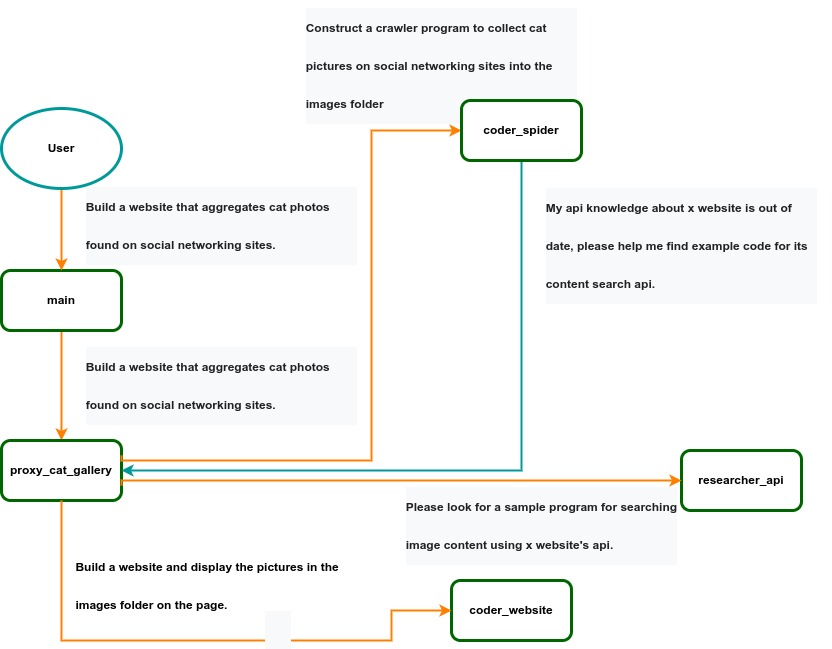 IACT Architecture Diagram. A user requirement to build a page for image collection and display is dynamically decomposed into two tasks: coder_spider and coder_website. When coder_spider encounters difficulties, it proactively seeks assistance from its caller, proxy_cat_gallery. Proxy_cat_gallery then creates another agent, researcher_api, and employs it to address the issue.
Ailice can be regarded as a computer powered by a LLM , and its features include:
Representing input, output, programs, and data in text form.
Using LLM as the processor.
Breaking down computational tasks through successive calls to basic computing units (analogous to functions in traditional computing), which are essentially various functional agents.
Therefore, user-input text commands are executed as a kind of program, decomposed into various "subprograms", and addressed by different agents , forming the fundamental architecture of Ailice. In the following, we will provide a detailed explanation of the nature of these basic computing units.
A natural idea is to let LLM solve certain problems (such as information retrieval, document understanding, etc.) through multi-round dialogues with external callers and peripheral modules in the simplest computational unit. We temporarily call this computational unit a "function". Then, by analogy with traditional computing, we allow functions to call each other, and finally add the concept of threads to implement multi-agent interaction. However, we can have a much simpler and more elegant computational model than this.
The key here is that the "function" that wraps LLM reasoning can actually be called and returned multiple times. A "function" with coder functionality can pause work and return a query statement to its caller when it encounters unclear requirements during coding. If the caller is still unclear about the answer, it continues to ask the next higher level caller. This process can even go all the way to the final user's chat window. When new information is added, the caller will reactivate the coder's execution process by passing in the supplementary information. It can be seen that this "function" is not a traditional function, but an object that can be called multiple times. The high intelligence of LLM makes this interesting property possible. You can also see it as agents strung together by calling relationships, where each agent can create and call more sub-agents, and can also dialogue with its caller to obtain supplementary information or report its progress . In Ailice, we call this computational unit "AProcessor" (essentially what we referred to as an agent). Its code is located in core/AProcessor.py.
Next, we will elaborate on the structure inside AProcessor. The interior of AProcessor is a multi-round dialogue. The "program" that defines the function of AProcessor is a prompt generation mechanism, which generates the prompt for each round of dialogue from the dialogue history. The dialogue is one-to-many. After the external caller inputs the request, LLM will have multiple rounds of dialogue with the peripheral modules (we call them SYSTEM), LLM outputs function calls in various grammatical forms, and the system calls the peripheral modules to generate results and puts the results in the reply message. LLM finally gets the answer and responds to the external caller, ending this call. But because the dialogue history is still preserved, the caller can call in again to continue executing more tasks.
The last part we want to introduce is the parsing module for LLM output. In fact, we regard the output text of LLM as a "script" of semi-natural language and semi-formal language, and use a simple interpreter to execute it . We can use regular expressions to express a carefully designed grammatical structure, parse it into a function call and execute it. Under this design, we can design more flexible function call grammar forms, such as a section with a certain fixed title (such as "UPDATE MEMORY"), which can also be directly parsed out and trigger the execution of an action. This implicit function call does not need to make LLM aware of its existence, but only needs to make it strictly follow a certain format convention. For the most hardcore possibility, we have left room. The interpreter here can not only use regular expressions for pattern matching, its Eval function is recursive. We don't know what this will be used for, but it seems not bad to leave a cool possibility, right? Therefore, inside AProcessor, the calculation is alternately completed by LLM and the interpreter, their outputs are each other's inputs, forming a cycle.
In Ailice, the interpreter is one of the most crucial components within an agent. We use the interpreter to map texts from the LLM output that match specific patterns to actions, including function calls, variable definitions and references, and any user-defined actions. Sometimes these actions directly interact with peripheral modules, affecting the external world; other times, they are used to modify the agent's internal state, thereby influencing its future prompts.
The basic structure of the interpreter is straightforward: a list of pattern-action pairs. Patterns are defined by regular expressions, and actions are specified by a Python function with type annotations. Given that syntactic structures can be nested, we refer to the overarching structure as the entry pattern. During runtime, the interpreter actively detects these entry patterns in the LLM output text. Upon detecting an entry pattern (and if the corresponding action returns data), it immediately terminates the LLM generation to execute the relevant action.
The design of agents in Ailice encompasses two fundamental aspects: the logic for generating prompts based on dialogue history and the agent's internal state, and a set of pattern-action pairs. Essentially, the agent implements the interpreter framework with a set of pattern-action pairs; it becomes an integral part of the interpreter. The agent's internal state is one of the targets for the interpreter's actions, with changes to the agent's internal state influencing the direction of future prompts.
Generating prompts from dialogue history and the internal state is nearly a standardized process, although developers still have the freedom to choose entirely different generation logic. The primary challenge for developers is to create a system prompt template, which is pivotal for the agent and often demands the most effort to perfect. However, this task revolves entirely around crafting natural language prompts.
Ailice utilizes a simple scripting language embedded within text to map the text-based capabilities of LLMs to the real world. This straightforward scripting language includes non-nested function calls and mechanisms for creating and referencing variables, as well as operations for concatenating text content . Its purpose is to enable LLMs to exert influence on the world more naturally: from smoother text manipulation abilities to simple function invocation mechanisms, and multimodal variable operation capabilities. Finally, it should be noted that for the designers of agents, they always have the freedom to extend new syntax for this scripting language. What is introduced here is a minimal standard syntax structure.
The basic syntax is as follows:
Variable Definition: VAR_NAME := <!|"SOME_CONTENT"|!>
Function Calls/Variable References/Text Concatenation: !FUNC-NAME<!|"...", '...', VAR_NAME1, "Execute the following code: n" + VAR_NAME2, ...|!>
The basic variable types are str/AImage/various multimodal types. The str type is consistent with Python's string syntax, supporting triple quotes and escape characters.
This constitutes the entirety of the embedded scripting language.
The variable definition mechanism introduces a way to extend the context window, allowing LLMs to record important content into variables to prevent forgetting. During system operation, various variables are automatically defined. For example, if a block of code wrapped in triple backticks is detected within a text message, a variable is automatically created to store the code, enabling the LLM to reference the variable to execute the code, thus avoiding the time and token costs associated with copying the code in full. Furthermore, some module functions may return data in multimodal types rather than text. In such cases, the system automatically defines these as variables of the corresponding multimodal type, allowing the LLM to reference them (the LLM might send them to another module for processing).
In the long run, LLMs are bound to evolve into multimodal models capable of seeing and hearing. Therefore, the exchanges between Ailice's agents should be in rich text , not just plain text. While Markdown provides some capability for marking up multimodal content, it is insufficient. Hence, we will need an extended version of Markdown in the future to include various embedded multimodal data such as videos and audio.
Let's take images as an example to illustrate the multimodal mechanism in Ailice. When agents receive text containing Markdown-marked images, the system automatically inputs them into a multimodal model to ensure the model can see these contents. Markdown typically uses paths or URLs for marking, so we have expanded the Markdown syntax to allow the use of variable names to reference multimodal content.
Another minor issue is how different agents with their own internal variable lists exchange multimodal variables. This is simple: the system automatically checks whether a message sent from one agent to another contains internal variable names. If it does, the variable content is passed along to the next agent.
Why do we go to the trouble of implementing an additional multimodal variable mechanism when marking multimodal content with paths and URLs is much more convenient? This is because marking multimodal content based on local file paths is only feasible when Ailice runs entirely in a local environment, which is not the design intent. Ailice is meant to be distributed, with the core and modules potentially running on different computers, and it might even load services running on the internet to provide certain computations. This makes returning complete multimodal data more attractive. Of course, these designs made for the future might be over-engineering, and if so, we will modify them in the future.
One of the goals of Ailice is to achieve introspection and self-expansion (which is why our logo features a butterfly with its reflection in the water). This would enable her to understand her own code and build new functionalities, including new external interaction modules (ie new functions) and new types of agents (APrompt class) . As a result, the knowledge and capabilities of LLMs would be more thoroughly unleashed.
Implementing self-expansion involves two parts. On one hand, new modules and new types of agents (APrompt class) need to be dynamically loaded during runtime and naturally integrated into the computational system to participate in processing, which we refer to as dynamic loading. On the other hand, Ailice needs the ability to construct new modules and agent types.
The dynamic loading mechanism itself is of great significance: it represents a novel software update mechanism . We can allow Ailice to search for its own extension code on the internet, check the code for security, fix bugs and compatibility issues, and ultimately run the extension as part of itself. Therefore, Ailice developers only need to place their contributed code on the internet, without the need to merge into the main codebase or consider any other installation methods. The implementation of the dynamic loading mechanism is continuously improving. Its core lies in the extension packages providing some text describing their functions. During runtime, each agent in Ailice finds suitable functions or agent types to solve sub-problems for itself through semantic matching and other means.
Building new modules is a relatively simple task, as the interface constraints that modules need to meet are very straightforward. We can teach LLMs to construct new modules through an example. The more complex task is the self-construction of new agent types (APrompt class), which requires a good understanding of Ailice's overall architecture. The construction of system prompts is particularly delicate and is a challenging task even for humans. Therefore, we pin our hopes on more powerful LLMs in the future to achieve introspection, allowing Ailice to understand herself by reading her own source code (for something as complex as a program, the best way to introduce it is to present itself), thereby constructing better new agents .
For developing Agents, the main loop of Ailice is located in the AiliceMain.py or ui/app.py files. To further understand the construction of an agent, you need to read the code in the "prompts" folder, by reading these code you can understand how an agent's prompts are dynamically constructed.
For developers who want to understand the internal operation logic of Ailice, please read core/AProcessor.py and core/Interpreter.py. These two files contain approximately three hundred lines of code in total, but they contain the basic framework of Ailice.
In this project, achieving the desired functionality of the AI Agent is the primary goal. The secondary goal is code clarity and simplicity . The implementation of the AI Agent is still an exploratory topic, so we aim to minimize rigid components in the software (such as architecture/interfaces imposing constraints on future development) and provide maximum flexibility for the application layer (eg, prompt classes) . Abstraction, deduplication, and decoupling are not immediate priorities.
When implementing a feature, always choose the best method rather than the most obvious one . The metric for "best" often includes traits such as trivializing the problem from a higher perspective, maintaining code clarity and simplicity, and ensuring that changes do not significantly increase overall complexity or limit the software's future possibilities.
Adding comments is not mandatory unless absolutely necessary; strive to make the code clear enough to be self-explanatory . While this may not be an issue for developers who appreciate comments, in the AI era, we can generate detailed code explanations at any time, eliminating the need for unstructured, hard-to-maintain comments.
Follow the principle of Occam's razor when adding code; never add unnecessary lines .
Functions or methods in the core should not exceed 60 lines .
While there are no explicit coding style constraints, maintain consistency or similarity with the original code in terms of naming and case usage to avoid readability burdens.
Ailice aims to achieve multimodal and self-expanding features within a scale of less than 5000 lines, reaching its final form at the current stage. The pursuit of concise code is not only because succinct code often represents a better implementation, but also because it enables AI to develop introspective capabilities early on and facilitates better self-expansion. Please adhere to the above rules and approach each line of code with diligence.
Ailice's fundamental tasks are twofold: one is to fully unleash the capabilities of LLM based on text into the real world; the other is to explore better mechanisms for long-term memory and forming a coherent understanding of vast amounts of text . Our development efforts revolve around these two focal points.
If you are interested in the development of Ailice itself, you may consider the following directions:
Explore improved long-term memory mechanisms to enhance the capabilities of each Agent. We need a long-term memory mechanism that enables consistent understanding of large amounts of content and facilitates association . The most feasible option at the moment is to replace vector database with knowledge graph, which will greatly benefit the comprehension of long texts/codes and enable us to build genuine personal AI assistants.
Multimodal support. The support for the multimodal model has been completed, and the current development focus is shifting towards the multimodal support of peripheral modules. We need a module that operates computers based on screenshots and simulates mouse/keyboard actions.
Self-expanding support. Our goal is to enable language models to autonomously code and implement new peripheral modules/agent types and dynamically load them for immediate use . This capability will enable self-expansion, empowering the system to seamlessly integrate new functionalities. We've completed most of the functionality, but we still need to develop the capability to construct new types of agents.
Richer UI interface . We need to organize the agents output into a tree structure in dialog window and dynamically update the output of all agents. And accept user input on the web interface and transfer it to scripter's standard input, which is especially needed when using sudo.
Develop Agents with various functionalities based on the current framework.
Explore the application of IACT architecture on complex tasks. By utilizing an interactive agents call tree, we can break down large documents for improved reading comprehension, as well as decompose complex software engineering tasks into smaller modules, completing the entire project build and testing through iterations. This requires a series of intricate prompt designs and testing efforts, but it holds an exciting promise for the future. The IACT architecture significantly alleviates the resource constraints imposed by the context window, allowing us to dynamically adapt to more intricate tasks.
Build rich external interaction modules using self-expansion mechanisms! This will be accomplished in AiliceEVO.
In addition to the tasks mentioned above, we should also start actively contemplating the possibility of creating a smaller LLM that possesses lower knowledge content but higher reasoning abilities .





