AIlice
1.0.0


빠른 시작 • 데모 • 개발 • 트위터 • Reddit
2024 년 6 월 22 일 : 우리는 현지에서 Jarvis와 같은 AI 조수의 시대에 들어갔다! 최신 Open-Source LLM을 통해 복잡한 작업을 로컬에서 수행 할 수 있습니다! 자세한 내용은 여기를 클릭하십시오.
Ailice는 완전히 자율적 인 일반 목적 AI 에이전트 입니다. 이 프로젝트는 Open-Source LLM을 기반으로 Jarvis와 유사한 독립형 인공 지능 어시스턴트를 만드는 것을 목표로합니다. Ailice는 대형 언어 모델 (LLM)을 핵심 프로세서로 사용하는 "텍스트 컴퓨터"를 구축 하여이 목표를 달성합니다. 현재 Ailice는 주제별 연구, 코딩, 시스템 관리, 문헌 검토 및 이러한 기본 기능을 넘어서는 복잡한 하이브리드 작업을 포함한 다양한 작업에 대한 숙련도를 보여줍니다.
Ailice는 GPT-4를 사용하여 일상적인 작업에서 거의 완벽한 성능에 도달했으며 최신 오픈 소스 모델을 사용하여 실용적인 응용 프로그램을 향해 나아가고 있습니다.
우리는 궁극적으로 AI 요원의 자기 진화를 달성 할 것입니다. 즉, AI 에이전트는 자체 기능 확장 및 새로운 유형의 에이전트를 자율적으로 구축하여 LLM의 지식과 추론 능력을 실제 세계에 원활하게 방출합니다.
Ailice의 현재 능력을 이해하려면 다음 비디오를보십시오.
Ailice의 주요 기술 기능은 다음과 같습니다.
다음 명령으로 Ailice를 설치하고 실행하십시오. Ailice가 시작되면 브라우저를 사용하여 제공하는 웹 페이지를 열면 대화 인터페이스가 나타납니다. 다양한 작업을 수행하기 위해 대화를 통해 Ailice에 명령을 내립니다. 첫 번째 사용을 위해, 당신은 우리가 할 수있는 멋진 일에 제공된 명령을 빠르게 익히기 위해 시도 할 수 있습니다.
git clone https://github.com/myshell-ai/AIlice.git
cd AIlice
pip install -e .
ailice_web --modelID=oai:gpt-4o --contextWindowRatio=0.2전형적인 사용 사례를 나열하겠습니다. 나는 이러한 예제를 자주 사용하여 개발 중에 Ailice를 테스트하여 안정적인 성능을 보장합니다. 그러나 이러한 테스트에서도 실행 결과는 선택한 모델, 코드 버전 및 테스트 시간의 영향을받습니다. (GPT-4는 높은 부하에서 성능 감소를 경험할 수 있습니다. 일부 임의의 요소는 모델을 여러 번 실행할 때 다른 결과를 초래할 수 있습니다. 때로는 LLM이 매우 지능적으로 수행되지만 다른 경우에는 Ailice가 에이전트입니다. 다중 에이전트 협력을 기반으로하고 사용자로서 귀하는 "에이전트"중 하나입니다. 따라서 Ailice에 추가 정보가 필요할 때, 그것은 당신의 의견을 구할 것이며, 세부 사항의 철저함은 그녀의 성공에 중요합니다. 또한 작업 실행이 부족하면 올바른 방향으로 그녀를 안내 할 수 있으며 그녀는 그녀의 접근 방식을 바로 잡을 것입니다.
마지막으로 주목해야 할 점은 Ailice에는 현재 런 타임 제어 메커니즘이 없으므로 루프에 갇히거나 장기간 달리기를 할 수 있습니다. 상용 LLM을 사용하는 경우 그녀의 작업을 면밀히 모니터링해야합니다.
"현재 디렉토리의 내용을 나열하십시오."
"David Tong의 QFT 강의 노트를 찾아 현재 디렉토리의"Physics "폴더로 다운로드하십시오. 먼저 폴더를 만들어야 할 수도 있습니다."
"플라스크 프레임 워크를 사용 하여이 컴퓨터에 간단한 웹 사이트를 배포하십시오. 0.0.0.0:59001의 접근성을 보장하십시오. 웹 사이트에는 '이미지'디렉토리에있는 모든 이미지를 표시 할 수있는 단일 페이지가 있어야합니다." 이것은 특히 흥미 롭습니다. 도면은 Docker 환경에서 도면을 수행 할 수 없으며, 우리가 생성하는 모든 파일 출력은 "Docker CP"명령을 사용하여 복사해야합니다. 그러나 Ailice 가이 문제를 자체적으로 해결할 수 있습니다. 위의 프롬프트에 따라 컨테이너에 웹 사이트를 배포 할 수 있습니다 (포트 매핑 된 59001에서 59200 사이의 포트를 사용하는 것이 좋습니다). 디렉토리의 이미지는 자동으로 표시됩니다. 웹 페이지. 이런 식으로 호스트에서 생성 된 이미지 컨텐츠를 동적으로 볼 수 있습니다. 당신은 또한 그녀가 반복하여 더 복잡한 기능을 생산하도록 시도 할 수 있습니다. 페이지에 이미지가 표시되지 않으면 웹 사이트의 "이미지"폴더가 여기에서 "이미지"폴더와 다른지 확인하십시오 (예 : "static/images"아래에있을 수 있음).
"Python Programming을 사용하여 다음 작업을 해결하십시오. 6 개월 동안 BTC-USDT의 가격 데이터를 얻고 그래프로 그려 '이미지'디렉토리에 저장하십시오." 위 웹 사이트를 성공적으로 배포 한 경우 이제 페이지에서 BTC 가격 곡선을 직접 볼 수 있습니다.
"포트 59001에서 프로세스를 찾아 종료하십시오." 이것은 방금 설립 된 웹 사이트 서비스 프로그램을 종료합니다.
"CadQuery를 사용하여 컵을 구현하십시오." 이것은 또한 매우 흥미로운 시도입니다. CadQuery는 CAD 모델링에 Python 프로그래밍을 사용하는 Python 패키지입니다. 우리는 Ailice를 사용하여 3D 모델을 자동으로 구축하려고합니다! 이것은 우리에게 LLM의 세계관에서 성숙한 기하학적 직관이 얼마나 될 수 있는지를 엿볼 수 있습니다. 물론, 멀티 모달 지원을 구현 한 후에는 Ailice가 생성 한 모델을 볼 수있어 추가 조정을 허용하고 매우 효과적인 피드백 루프를 설정할 수 있습니다. 이런 식으로, 진정으로 사용 가능한 언어 제어 3D 모델링을 달성 할 수 있습니다.
"다양한 물리 지점에서 100 개의 자습서를 검색하고 'Physics'라는 폴더에 찾은 PDF 파일을 다운로드하십시오. PDF의 내용을 확인할 필요가 없으므로 지금은 대략적인 컬렉션 만 필요합니다." Ailice를 사용하여 자동 데이터 세트 수집 및 구성을 달성하는 것이 지속적인 목표 중 하나입니다. 현재이 기능에 사용 된 연구원은 여전히 몇 가지 결함이 있지만 이미 흥미로운 결과를 제공 할 수 있습니다.
"수학 공식을 인식하고 라텍스 코드로 변환 할 수있는 사람들에 중점을 두어 Open-Source PDF OCR 도구에 대한 조사를 수행하십시오. 결과를 보고서로 통합하십시오."
1. YouTube에서 Feynmann 강의 비디오를 찾아 Feynmann/ Subdir로 다운로드하십시오. 먼저 폴더를 만들어야합니다. 2.이 비디오에서 오디오를 추출하여 Feynmann/Audio에 저장하십시오. 3.이 오디오 파일을 텍스트로 변환하여 텍스트 문서로 병합하십시오. 먼저 Hugging Face로 가서 Whisper-Large-V3의 페이지를 찾아 예제 코드를 찾은 다음 샘플 코드를 참조하여이를 수행해야합니다. 4. 방금 추출한 텍스트 파일 에서이 질문에 대한 답을 찾으십시오. 왜 우리는 반 인itticles가 필요합니까? 이것은 작업을 완료하기 위해 Ailice와 단계별로 상호 작용 해야하는 다단계 프롬프트 기반 작업입니다. 당연히 예상치 못한 이벤트가있을 수 있으므로 Ailice와의 의사 소통을 유지하여 발생하는 모든 문제를 해결해야합니다 ( 언제든지 "인터럽트"버튼을 사용하여 Ailice를 방해하고 프롬프트를 제공합니다! ). 마지막으로 다운로드 된 비디오의 내용을 바탕으로 Ailice에게 물리 관련 질문을 요청할 수 있습니다. 답을 받으면 되돌아보고 얼마나 멀리 모이는 지 볼 수 있습니다.
1. SDXL을 사용하여 "뚱뚱한 오렌지 고양이"의 이미지를 생성하십시오. 프로그래밍 및 이미지 생성 작업을 완료하기위한 참조로 Huggingface 페이지에서 샘플 코드를 찾아야합니다. 이미지를 현재 디렉토리에 저장하고 표시하십시오. 2. 이제 단일 페이지 웹 사이트를 구현합시다. 웹 페이지의 기능은 사용자가 입력 한 텍스트 설명을 이미지로 변환하여 표시하는 것입니다. 이전의 텍스트-이미지 코드를 참조하십시오. 웹 사이트는 127.0.0.1:59102로 실행됩니다. 코드를 실행하기 전에 ./image_gen에 코드를 저장하십시오. 먼저 폴더를 만들어야 할 수도 있습니다.
"모듈의 기능은 키워드를 통해 위키에서 관련 페이지의 내용을 얻는 것입니다." Ailice는 외부 상호 작용 모듈을 구성 할 수 있습니다 (우리는이를 확장 대분자라고 함). 필요한 것은 당신의 몇 가지 프롬프트입니다. 모듈이 구성되면 "새로 구현 된 Wiki 모듈을로드하여 상대성에 대한 항목을 쿼리하는 데 활용하십시오."
에이전트는 주변 환경의 다양한 측면과 상호 작용해야하며 운영 환경은 종종 일반적인 소프트웨어보다 더 복잡합니다. 종속성을 설치하는 데 시간이 오래 걸릴 수 있지만 다행히도 기본적으로 자동으로 수행됩니다.
Ailice를 실행하려면 Chrome 이 올바르게 설치되어 있는지 확인해야합니다. 보안 가상 환경에서 코드를 실행 해야하는 경우 Docker 도 설치해야합니다.
가상 시스템에서 Ailice를 실행하려면 Hyper-V가 꺼져 있는지 확인하십시오 (그렇지 않으면 llama.cpp를 설치할 수 없습니다). VirtualBox 환경에서는 VM의 VirtualBox 설정에서 PAE/NX 및 VT-X/AMD-V (Hyper-V)를 비활성화하여 비활성화 할 수 있습니다. 기본적으로 파라비어링 인터페이스를 설정하고 중첩 페이징을 비활성화하십시오.
다음 명령을 사용하여 Ailice를 설치할 수 있습니다 (Conda와 같은 도구를 사용하여 의존성 충돌을 피하기 위해 Ailice를 설치하기위한 새로운 가상 환경을 만드는 것이 좋습니다).
git clone https://github.com/myshell-ai/AIlice.git
cd AIlice
pip install -e .
기본적으로 설치된 Ailice는 CPU를 장기 메모리 모듈의 추론 하드웨어로 사용하기 때문에 천천히 실행됩니다. 따라서 GPU 가속 지원을 설치하는 것이 좋습니다.
ailice_turboHuggingface 모델/음성 대화/모델 미세 조정/PDF 읽기 기능을 사용해야하는 사용자의 경우 다음 명령 중 하나를 사용할 수 있습니다 (너무 많은 기능을 설치하면 종속성 충돌 가능성이 높아 지므로 설치하는 것이 좋습니다. 필요한 부품) :
pip install -e .[huggingface]
pip install -e .[speech]
pip install -e .[finetuning]
pip install -e .[pdf-reading]
당신은 지금 Ailice를 실행할 수 있습니다! 사용법에서 명령을 사용하십시오.
기본적으로 Ailice의 Google 모듈은 제한되며 반복적 인 사용으로 인해 해결해야 할 시간이 필요한 오류가 발생할 수 있습니다. 이것은 AI 시대의 어색한 현실입니다. 기존 검색 엔진은 진정한 사용자에게만 액세스 할 수 있으며 AI 에이전트는 현재 '진정한 사용자'범주에 속하지 않습니다. 대체 솔루션이 있지만 모두 API 키를 구성해야하므로 일반 사용자를위한 높은 장벽을 설정합니다. 그러나 Google에 자주 액세스 할 수있는 사용자의 경우 Google의 공식 API 키 신청의 번거 로움을 인내 할 것이라고 가정합니다 (우리는 사용자 정의 검색 JSON API를 언급하고 있습니다. 검색 작업에 대한 생성 시간). 이 사용자의 경우 config.json을 열고 다음 구성을 사용하십시오.
 {
    ...
    "services": {
        ...
        "google": {
          "cmd": "python3 -m ailice.modules.AGoogleAPI --addr=ipc:///tmp/AGoogle.ipc --api_key=YOUR_API_KEY --cse_id=YOUR_CSE_ID",
          "addr": "ipc:///tmp/AGoogle.ipc"
        },
        ...
    }
}
Google-Api-Python-Client를 설치하십시오.
pip install google-api-python-client그런 다음 Ailice를 다시 시작하십시오.
기본적으로 코드 실행은 로컬 환경을 사용합니다. 돌이킬 수없는 손실로 이어지는 잠재적 인 AI 오류를 방지하려면 Docker를 설치하고 컨테이너를 만들고 Ailice의 구성 파일을 수정하는 것이 좋습니다 (Ailice는 시작시 구성 파일 위치를 제공합니다). 가상 환경 내에서 작동하도록 코드 실행 모듈 (Ascripter)을 구성하십시오.
docker build -t env4scripter .
docker run -d -p 127.0.0.1:59000-59200:59000-59200 --name scripter env4scripter
필자의 경우 Ailice가 시작되면 구성 파일이 ~/.config/ailice/config.json에 있음을 알려줍니다.
nano ~ /.config/ailice/config.json"서비스"에서 "Scripter"를 수정하십시오 : "서비스":
 {
    ...
    "services": {
        ...
        "scripter": {"cmd": "docker start scripter",
                     "addr": "tcp://127.0.0.1:59000"},
    }
}
이제 환경 구성이 완료되었습니다.
Ailice의 진행중인 개발 상태로 인해 코드를 업데이트하면 기존 구성 파일과 새 코드가있는 Docker 컨테이너간에 비 호환성 문제가 발생할 수 있습니다. 이 시나리오의 가장 철저한 솔루션은 구성 파일 (미리 API 키를 저장해야 함)과 컨테이너를 삭제 한 다음 완전히 재설치하는 것입니다. 그러나 대부분의 상황에서는 구성 파일을 삭제 하고 컨테이너 내에서 Ailice 모듈을 업데이트하여 문제를 해결할 수 있습니다.
rm ~ /.config/ailice/config.json
cd Ailice
docker cp ailice/__init__.py scripter:scripter/ailice/__init__.py
docker cp ailice/common/__init__.py scripter:scripter/ailice/common/__init__.py
docker cp ailice/common/ADataType.py scripter:scripter/ailice/common/ADataType.py
docker cp ailice/common/lightRPC.py scripter:scripter/ailice/common/lightRPC.py
docker cp ailice/modules/__init__.py scripter:scripter/ailice/modules/__init__.py
docker cp ailice/modules/AScripter.py scripter:scripter/ailice/modules/AScripter.py
docker cp ailice/modules/AScrollablePage.py scripter:scripter/ailice/modules/AScrollablePage.py
docker restart scripter아래의 일반적인 사용 사례에서 명령을 직접 복사하여 Ailice를 실행할 수 있습니다.
ailice_web --modelID=oai:gpt-4o --contextWindowRatio=0.2
ailice_web --modelID=anthropic:claude-3-5-sonnet-20240620 --contextWindowRatio=0.1
ailice_web --modelID=oai:gpt-4-1106-preview --chatHistoryPath=./chat_history
ailice_web --modelID=anthropic:claude-3-opus-20240229 --prompt= " researcher "
ailice_web --modelID=mistral:mistral-large-latest
ailice_web --modelID=deepseek:deepseek-chat
ailice_web --modelID=hf:Open-Orca/Mistral-7B-OpenOrca --quantization=8bit --contextWindowRatio=0.6
ailice_web --modelID=hf:NousResearch/Nous-Hermes-2-Mixtral-8x7B-DPO --quantization=4bit --contextWindowRatio=0.3
ailice_web --modelID=hf:Phind/Phind-CodeLlama-34B-v2 --prompt= " coder-proxy " --quantization=4bit --contextWindowRatio=0.6
ailice_web --modelID=groq:llama3-70b-8192
ailice_web   # Use models configured individually for different agents under the agentModelConfig field in config.json.
ailice_web --modelID=openrouter:openrouter/auto
ailice_web --modelID=openrouter:mistralai/mixtral-8x22b-instruct
ailice_web --modelID=openrouter:qwen/qwen-2-72b-instruct
ailice_web --modelID=lm-studio:qwen2-72b --contextWindowRatio=0.5
마지막 사용 사례는 먼저 LLM 추론 서비스를 구성해야합니다. LLM 지원을 추가하는 방법을 참조하십시오. LM Studio와 같은 추론 프레임 워크를 사용하면 제한된 하드웨어 리소스를 사용하여 더 큰 모델을 지원하고 더 빠른 추론 속도와 더 빠른 Ailice 스타트 업 속도를 제공하여 일반 사용자에게 더 적합합니다.
처음으로 실행하면 Openai의 Api-Key에 입력하라는 요청을받습니다. 오픈 소스 LLM 만 사용하려면 입력 할 필요가 없습니다. config.json 파일을 편집하여 API-Key를 수정할 수도 있습니다. 오픈 소스 LLM을 처음 사용할 때 모델 가중치를 다운로드하는 데 시간이 오래 걸리면 충분한 시간과 디스크 공간이 있는지 확인하십시오.
Speechon 스위치를 처음으로 켜면 시작시 오랫동안 기다려야 할 수도 있습니다. 음성 인식 및 TTS 모델의 가중치가 백그라운드에서 다운로드되기 때문입니다.
예제에 표시된 것처럼 Ailice_web를 통해 에이전트를 사용할 수 있습니다. 웹 대화 인터페이스를 제공합니다. 사용하여 각 매개 변수의 기본값을 볼 수 있습니다.
ailice_web --helpConfig.json에서 해당 매개 변수를 수정하여 모든 명령 줄 인수의 기본값을 사용자 정의 할 수 있습니다.
ailice의 구성 파일은 config.json이라는 이름을 지정하고 Ailice가 시작되면 위치가 명령 줄로 출력됩니다. 이 섹션에서는 구성 파일을 통해 외부 상호 작용 모듈을 구성하는 방법을 소개합니다.
Ailice에서는 "모듈"이라는 용어를 사용하여 외부 세계와 상호 작용하기위한 기능을 제공하는 구성 요소를 구체적으로 참조합니다. 각 모듈은 독립적 인 프로세스로 실행됩니다. 핵심 프로세스에서 다른 소프트웨어 또는 하드웨어 환경에서 실행할 수있어 Ailice가 배포 할 수 있습니다. Ailice의 작동에 필요한 구성 파일 (예 : 벡터 데이터베이스, 검색, 브라우저, 코드 실행 등)에 일련의 기본 모듈 구성을 제공합니다. 또한 타사 모듈에 대한 구성을 추가하고 Ailice가 자동로드를 가능하게하기 위해 Ailice가 UP을 실행 한 후 모듈 런타임 주소 및 포트를 제공 할 수 있습니다. 모듈 구성은 매우 간단하며 두 가지 항목만으로 구성됩니다.
  "services" : {
    ...
    "scripter" : { "cmd" : " python3 -m ailice.modules.AScripter --addr=tcp://127.0.0.1:59000 " ,
	               "addr" : " tcp://127.0.0.1:59000 " },
    ...
  }
이 중 "CMD" 아래에는 모듈의 프로세스를 시작하는 데 사용되는 명령 줄이 있습니다. Ailice가 시작되면 자동으로 이러한 명령을 실행하여 모듈을 시작합니다. 사용자는 모든 명령을 지정하여 상당한 유연성을 제공 할 수 있습니다. 모듈의 프로세스를 로컬로 시작하거나 Docker를 활용하여 가상 환경에서 프로세스를 시작하거나 원격 프로세스를 시작할 수도 있습니다. 일부 모듈에는 Google/Storage와 같은 여러 구현이 있으며 여기에서 다른 구현으로 전환 할 수 있습니다.
"Addr"는 모듈 프로세스의 주소 및 포트 번호를 나타냅니다. 기본 구성의 많은 모듈에는 주소와 포트 번호가 포함 된 "CMD"및 "addr"가 모두 있으므로 중복성을 유발한다는 사실로 인해 사용자가 혼란 스러울 수 있습니다. "CMD"는 원칙적으로 어떤 명령을 포함 할 수 있기 때문입니다 (주소와 포트 번호를 포함하거나 전혀 포함 할 수 있음). 따라서 Ailice에 모듈 프로세스에 액세스하는 방법을 알리려면 별도의 "ADDR"항목이 필요합니다.
인터럽트. 인터럽트는 Ailice가 지원하는 두 번째 상호 작용 모드로, 언제든지 Ailice의 에이전트에게 오류를 수정하거나 지침을 제공 할 수 있습니다 . Ailice_web에서 Ailice의 작업 실행 중에 입력 상자의 오른쪽에 인터럽트 버튼이 나타납니다. 눌러서 Ailice의 실행을 일시 중지하고 프롬프트 메시지를 기다립니다. 입력 상자에 프롬프트를 입력하고 Enter를 눌러 현재 하위 작업을 실행하는 에이전트에게 메시지를 보낼 수 있습니다. 이 기능을 능숙하게 사용하려면 Ailice의 작업, 특히 에이전트 호출 트리 아키텍처를 잘 이해해야합니다. 또한 Ailice의 작업 실행 중에 대화 인터페이스 대신 명령 줄 창에 더 집중하는 것도 포함됩니다. 전반적으로 이것은 특히 덜 강력한 언어 모델 설정에서 매우 유용한 기능입니다.
먼저 GPT-4를 사용하여 일부 간단한 사용 사례를 성공적으로 실행 한 다음 덜 강력한 (그러나 저렴한/오픈 소스) 모델로 Ailice를 다시 시작하여 이전 대화 기록을 기반으로 새로운 작업을 계속 실행하십시오 . 이런 식으로 GPT-4가 제공 한 역사는 성공적인 예가되며 다른 모델에 대한 귀중한 참조를 제공하고 성공 가능성을 크게 증가시킵니다.
2024 년 8 월 23 일에 업데이트.
현재 Ailice는 로컬에서 실행되는 72B 오픈 소스 모델 (4090X2에서 실행되는 QWEN-2-72B-비수 구조)을 사용하여보다 복잡한 작업을 처리 할 수 있으며 성능은 GPT-4 레벨 모델의 성능에 접근 할 수 있습니다. 오픈 소스 모델의 저렴한 비용을 고려할 때 사용자가이를 사용하는 것이 좋습니다. 또한 LLM 운영을 현지화하면 당시 AI 애플리케이션에서 드문 품질 인 절대 개인 정보 보호를 보장합니다. 이 모델을 로컬로 실행하는 방법을 알아 보려면 여기를 클릭하십시오. GPU 조건이 대형 모델을 실행하기에 불충분 한 사용자의 경우 문제가되지 않습니다. 온라인 추론 서비스 (예 : OpenRouter, 다음에 언급 될 예정)를 사용하여 이러한 오픈 소스 모델 (이 희생 프라이버시)에 액세스 할 수 있습니다. 오픈 소스 모델은 아직 상용 GPT-4 레벨 모델을 완전히 경쟁 할 수는 없지만 강점과 약점에 따라 다른 모델을 활용하여 에이전트를 능가 할 수 있습니다. 자세한 내용은 다른 에이전트에서 다른 모델 사용을 참조하십시오.
Claude-3-5-Sonnet-20240620은 최고의 성능을 제공합니다.
GPT-4O 및 GPT-4-1106- 프리뷰 도 최상위 성능을 제공합니다. 그러나 에이전트의 장시간 시간과 토큰 소비로 인해 상업용 모델을주의해서 사용하십시오. GPT-4O-MINI는 매우 잘 작동하며 최고는 아니지만 저렴한 가격은이 모델을 매우 매력적으로 만듭니다. GPT-4-Turbo / GPT-3.5-Turbo는 놀랍게도 게으르며 안정적인 프롬프트 표현을 찾을 수 없었습니다.
오픈 소스 모델 중에서 일반적으로 잘 수행되는 모델은 다음과 같습니다.
Meta-Llama-3.1-405B- 강조는 좋지만 PC에서 실용적 이기에는 너무 큽니다.
하드웨어 기능이 로컬로 오픈 소스 모델을 실행하기에 불충분하고 상용 모델에 대한 API 키를 얻을 수없는 사용자의 경우 다음 옵션을 시도 할 수 있습니다.
OpenRouter 이 서비스는 오픈 소스 모델을 로컬로 배포하거나 다양한 상용 모델에 대한 API 키를 신청할 필요없이 추론 요청을 다양한 오픈 소스 또는 상용 모델로 전환 할 수 있습니다. 환상적인 선택입니다. Ailice는 OpenRouter의 모든 모델을 자동으로 지원합니다. Autorouter : OpenRouter/Auto를 선택하여 자동으로 자동으로 라우팅하거나 Config.json 파일에 구성된 특정 모델을 지정할 수 있습니다. 나에게 OpenRouter를 추천 해 주신 @BabyBirdPrd에게 감사드립니다.
Groq : LLAMA3-70B-8192 물론 Ailice는 Groq의 다른 모델도 지원합니다. Groq에서 실행되는 한 가지 문제는 속도 제한을 초과하기 쉽기 때문에 간단한 실험에만 사용할 수 있다는 것입니다.
오픈 소스 모델 사용자를위한 참조를 제공하기 위해 현재 가장 성능이 좋은 오픈 소스 모델을 선택할 것입니다.
모든 모델 중에서 가장 좋은 것 : Qwen-2-72b-비 구조 . 이것은 실용적인 가치를 가진 최초의 오픈 소스 모델 입니다. 그것은 큰 진보입니다! 그것은 아직 GPT-4에 가까운 추론 능력을 가지고 있지만 아직 거기에는 없었습니다. 인터럽트 기능을 통해 활발한 사용자 중재를 통해 더 복잡한 작업이 성공적으로 완료 될 수 있습니다.
두 번째로 높은 성능 모델 : Mixtral-8x22B-비 구조 및 메타 롤라/메타-롤라마 -3-70b 비축 . LLAMA3 시리즈 모델은 양자화 후 상당한 성능 감소를 나타내는 것으로 보이며, 이는 실질적인 가치를 줄입니다. Groq와 함께 사용할 수 있습니다.
더 나은 모델을 찾으면 알려주십시오.
고급 플레이어의 경우 더 많은 모델을 시도하는 것은 불가피합니다. 다행히도 이것은 달성하기 어렵지 않습니다.
Openai/Mistral/Anthropic/Groq 모델의 경우 아무것도 할 필요가 없습니다. "Oai :"/"Mistral :"/"Anthropic :"/"Groq :"접두사에 추가 된 공식 모델 이름으로 구성된 ModelID를 사용하십시오. Ailice의 지원되는 목록에 포함되지 않은 모델을 사용해야하는 경우 config.json 파일 에서이 모델의 항목을 추가하여이를 해결할 수 있습니다. 추가하는 방법은 유사한 모델의 진입을 직접 참조하고 컨텍스트 와인 DOW를 실제 값으로 수정하고 SystemAsuser를 유사한 모델과 일치하게 유지하고 Args를 비어있는 DICT로 설정하는 것입니다.
OpenAI API와 호환되는 타사 추론 서버를 사용하여 Ailice의 내장 LLM 추론 기능을 대체 할 수 있습니다. OpenAI 모델과 동일한 구성 형식을 사용하고 BaseUrl, Apikey, ContextWindow 및 기타 매개 변수를 수정하십시오 (실제로 Ailice가 Groq 모델을 지원하는 방법).
OpenAI API를 지원하지 않는 추론 서버의 경우 Litellm을 사용하여 OpenAI 호환 API로 변환 할 수 있습니다 (아래 예제).
LLM의 공통 사용 사례가 아닌 Ailice의 대화 기록에 많은 시스템 메시지가 있으므로 이에 대한 지원 수준은 이러한 추론 서버의 특정 구현에 달려 있습니다. 이 경우 SystemAsuser 매개 변수를 TRUE로 설정하여 문제를 우회 할 수 있습니다. 이로 인해 모델이 최적의 성능으로 Ailice를 실행하지 못하지만 다양한 효율적인 추론 서버와 호환 될 수 있습니다. 평균 사용자의 경우 혜택이 단점보다 중요합니다.
우리는 Ollama를 예로 사용하여 그러한 서비스에 대한 지원을 추가하는 방법을 설명합니다. 먼저 Litellm을 사용하여 Ollama의 인터페이스를 OpenAI와 호환되는 형식으로 변환해야합니다.
pip install litellm
ollama pull mistral-openorca
litellm --model ollama/mistral-openorca --api_base http://localhost:11434 --temperature 0.0 --max_tokens 8192
그런 다음 config.json 파일 에서이 서비스에 대한 지원을 추가하십시오 (Ailice가 시작될 때이 파일의 위치가 프롬프트됩니다).
{
  "maxMemory" : {},
  "quantization" : null ,
  "models" : {
    "oai" : {
      ...
    },
    "ollama" : {
      "modelWrapper" : " AModelChatGPT " ,
      "apikey" : " fake-key " ,
      "baseURL" : " http://localhost:8000 " ,
      "modelList" : {
        "mistral-openorca" : {
          "formatter" : " AFormatterGPT " ,
          "contextWindow" : 8192 ,
          "systemAsUser" : false ,
          "args" : {}
        }
      }
    },
    ...
  },
  ...
}
이제 우리는 Ailice를 실행할 수 있습니다.
ailice_web --modelID=ollama:mistral-openorca이 예에서는 LM Studio를 사용하여 내가 본 것 중 가장 오픈 소스 모델을 실행할 것입니다 : QWEN2-72B-Instruct-Q3_K_S.GGUF , Ailice를 로컬 컴퓨터에서 실행하도록 전원을 공급합니다.
LM Studio를 사용하여 QWEN2-72B-Instruct-Q3_K_S.GGUF 의 모델 가중치를 다운로드하십시오.
LM Studio의 "Localserver"창에서 GPU 만 사용하려면 N_GPU_Layers를 -1로 설정하십시오. 왼쪽에서 '컨텍스트 길이'매개 변수를 16384 (또는 사용 가능한 메모리를 기준으로 작은 값)를 조정하고 '컨텍스트 오버 플로우 정책'을 변경하여 '시스템 프롬프트를 유지하고 첫 번째 사용자 메시지 인 중간을 자릅니다'.
서비스를 실행하십시오. 서비스 주소가 "http : // localhost : 1234/v1/"이라고 가정합니다.
그런 다음 config.json을 열고 다음과 같은 수정을합니다.
{
  "maxMemory" : {},
  "quantization" : null ,
  "models" : {
    "oai" : {
      ...
    },
    "lm-studio" : {
      "modelWrapper" : " AModelChatGPT " ,
      "apikey" : " fakekey " ,
      "baseURL" : " http://localhost:1234/v1/ " ,
      "modelList" : {
        "qwen2-72b" : {
          "formatter" : " AFormatterGPT " ,
          "contextWindow" : 32764 ,
          "systemAsUser" : true ,
          "args" : {}
        }
      }
    },
    ...
  },
  ...
}
마지막으로, run ailice. 사용 가능한 VRAM 또는 메모리 공간을 기반으로 'ContextWindowRatio'매개 변수를 조정할 수 있습니다. 매개 변수가 클수록 VRAM 공간이 많아집니다.
ailice_web --modelID=lm-studio:qwen2-72b --contextWindowRatio=0.5이전 섹션에서 수행 한 작업과 유사하게 LM Studio를 사용하여 LLAVA를 다운로드하고 실행 한 후 다음과 같이 구성 파일을 수정합니다.
{
  "maxMemory" : {},
  "quantization" : null ,
  "models" : {
    "oai" : {
      ...
    },
    "lm-studio" : {
      "modelWrapper" : " AModelChatGPT " ,
      "apikey" : " fakekey " ,
      "baseURL" : " http://localhost:1234/v1/ " ,
      "modelList" : {
        "llava-1.6-34b" : {
          "formatter" : " AFormatterGPTVision " ,
          "contextWindow" : 4096 ,
          "systemAsUser" : true ,
          "args" : {}
        }
      },
    },
    ...
  },
  ...
}
그러나 현재 오픈 소스 멀티 모달 모델은 에이전트 작업을 수행하기에 충분하지 않으므로이 예는 사용자보다 개발자를위한 것입니다.
Huggingface의 오픈 소스 모델의 경우 모델의 Huggingface 주소, 모델의 신속한 형식 및 컨텍스트 창 길이에 대한 지원을 추가하기 위해 다음 정보 만 알아야합니다. 일반적으로 한 줄의 코드는 새 모델을 추가하기에 충분하지만 때로는 운이 좋지 않으며 약 12 줄의 코드가 필요합니다.
새로운 LLM 지원을 추가하는 전체 방법은 다음과 같습니다.
config.json을 엽니 다. new llm의 구성을 models.hf.modellist에 추가해야한다.
{
  "maxMemory" : {},
  "quantization" : null ,
  "models" : {
    "hf" : {
      "modelWrapper" : " AModelCausalLM " ,
      "modelList" : {
        "meta-llama/Llama-2-13b-chat-hf" : {
          "formatter" : " AFormatterLLAMA2 " ,
          "contextWindow" : 4096 ,
          "systemAsUser" : false ,
          "args" : {}
        },
        "meta-llama/Llama-2-70b-chat-hf" : {
          "formatter" : " AFormatterLLAMA2 " ,
          "contextWindow" : 4096 ,
          "systemAsUser" : false ,
          "args" : {}
        },
        ...
      }
    },
  ...
  }
...
}
"Formatter"는 LLM의 프롬프트 형식을 정의하는 클래스입니다. Core/LLM/Aformatter에서 해당 정의를 찾을 수 있습니다. 이 코드를 읽고 추가하려는 모델에 필요한 형식을 결정할 수 있습니다. 당신이 그것을 찾지 못하면, 당신은 직접 써야합니다. 다행스럽게도 Formatter는 매우 간단한 것이며 12 줄 이상의 코드로 완성 될 수 있습니다. 나는 당신이 몇 개의 포맷터 소스 코드를 읽은 후에 그것을하는 방법을 이해할 것이라고 믿습니다.
컨텍스트 창은 변압기 아키텍처의 LLM이 일반적으로 가지고있는 속성입니다. 모델이 한 번에 처리 할 수있는 텍스트 길이를 결정합니다. 새 모델의 컨텍스트 창을 "ContextWindow"키로 설정해야합니다.
"SystemAsuser": 우리는 "System"역할을 함수 호출에 의해 반환 된 메시지의 발신자로 사용합니다. 그러나 모든 LLM이 시스템 역할에 대한 명확한 정의를 갖는 것은 아니며 LLM 이이 접근법에 적응할 수 있다는 보장은 없습니다. 따라서 SystemAsuser를 사용하여 사용자 메시지에 함수 호출에 의해 반환 된 텍스트를 넣을지 여부를 설정해야합니다. 먼저 false로 설정하십시오.
모든 것이 끝났습니다! "hf :"를 모델 이름으로 접두사로 사용하여 modelid를 형성하고 새 모델의 modelId를 명령 매개 변수로 사용하여 Ailice를 시작하십시오!
Ailice에는 두 가지 작동 모드가 있습니다. 한 모드는 단일 LLM을 사용하여 모든 에이전트를 구동하는 반면, 다른 모드는 각 유형의 에이전트가 해당 LLM을 지정하도록 허용합니다. 후자의 모드를 통해 우리는 오픈 소스 모델과 상용 모델의 기능을 더 잘 결합하여 저렴한 비용으로 더 나은 성능을 달성 할 수 있습니다. 두 번째 모드를 사용하려면 config.json에서 AgentModelConfig 항목을 구성해야합니다.
  "modelID" : " " ,
  "agentModelConfig" : {
    "DEFAULT" : " openrouter:qwen/qwen-2-72b-instruct " ,
    "coder" : " openrouter:deepseek/deepseek-coder "
  },
먼저 ModelId의 기본값이 빈 문자열로 설정되어 있는지 확인한 다음 AgentModelConfig의 각 유형의 에이전트에 해당하는 LLM을 구성하십시오.
마지막으로 ModelID를 지정하지 않음으로써 두 번째 작동 모드를 달성 할 수 있습니다.
ailice_webAilice를 설계 할 때의 기본 원칙은 다음과 같습니다.
이러한 기본 원칙을 간단히 설명해 봅시다.
가장 명백한 수준에서 시작하여 매우 역동적 인 프롬프트 구조는 에이전트가 루프에 빠질 가능성이 적습니다. 외부 환경에서 새로운 변수의 유입은 LLM에 지속적으로 영향을 미쳐 함정을 피할 수 있도록 도와줍니다. 또한 LLM에 현재 사용 가능한 모든 정보를 공급하면 출력을 크게 향상시킬 수 있습니다. For example, in automated programming, error messages from interpreters or command lines assist the LLM in continuously modifying the code until the correct result is achieved. Lastly, in dynamic prompt construction, new information in the prompts may also come from other agents, which acts as a form of linked inference computation, making the system's computational mechanisms more complex, varied, and capable of producing richer behaviors.
Separating computational tasks is, from a practical standpoint, due to our limited context window. We cannot expect to complete a complex task within a window of a few thousand tokens. If we can decompose a complex task so that each subtask is solved within limited resources, that would be an ideal outcome. In traditional computing models, we have always taken advantage of this, but in new computing centered around LLMs, this is not easy to achieve. The issue is that if one subtask fails, the entire task is at risk of failure. Recursion is even more challenging: how do you ensure that with each call, the LLM solves a part of the subproblem rather than passing the entire burden to the next level of the call? We have solved the first problem with the IACT architecture in Ailice, and the second problem is theoretically not difficult to solve, but it likely requires a smarter LLM.
The third principle is what everyone is currently working on: having multiple intelligent agents interact and cooperate to complete more complex tasks. The implementation of this principle actually addresses the aforementioned issue of subtask failure. Multi-agent collaboration is crucial for the fault tolerance of agents in operation. In fact, this may be one of the biggest differences between the new computational paradigm and traditional computing: traditional computing is precise and error-free, assigning subtasks only through unidirectional communication (function calls), whereas the new computational paradigm is error-prone and requires bidirectional communication between computing units to correct errors. This will be explained in detail in the following section on the IACT framework.
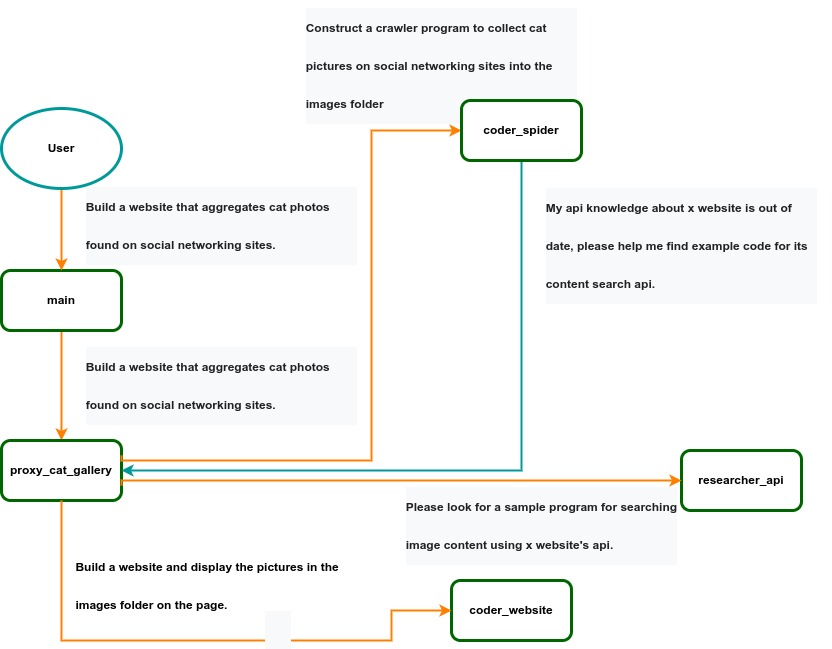 IACT Architecture Diagram. A user requirement to build a page for image collection and display is dynamically decomposed into two tasks: coder_spider and coder_website. When coder_spider encounters difficulties, it proactively seeks assistance from its caller, proxy_cat_gallery. Proxy_cat_gallery then creates another agent, researcher_api, and employs it to address the issue.
Ailice can be regarded as a computer powered by a LLM , and its features include:
Representing input, output, programs, and data in text form.
Using LLM as the processor.
Breaking down computational tasks through successive calls to basic computing units (analogous to functions in traditional computing), which are essentially various functional agents.
Therefore, user-input text commands are executed as a kind of program, decomposed into various "subprograms", and addressed by different agents , forming the fundamental architecture of Ailice. In the following, we will provide a detailed explanation of the nature of these basic computing units.
A natural idea is to let LLM solve certain problems (such as information retrieval, document understanding, etc.) through multi-round dialogues with external callers and peripheral modules in the simplest computational unit. We temporarily call this computational unit a "function". Then, by analogy with traditional computing, we allow functions to call each other, and finally add the concept of threads to implement multi-agent interaction. However, we can have a much simpler and more elegant computational model than this.
The key here is that the "function" that wraps LLM reasoning can actually be called and returned multiple times. A "function" with coder functionality can pause work and return a query statement to its caller when it encounters unclear requirements during coding. If the caller is still unclear about the answer, it continues to ask the next higher level caller. This process can even go all the way to the final user's chat window. When new information is added, the caller will reactivate the coder's execution process by passing in the supplementary information. It can be seen that this "function" is not a traditional function, but an object that can be called multiple times. The high intelligence of LLM makes this interesting property possible. You can also see it as agents strung together by calling relationships, where each agent can create and call more sub-agents, and can also dialogue with its caller to obtain supplementary information or report its progress . In Ailice, we call this computational unit "AProcessor" (essentially what we referred to as an agent). Its code is located in core/AProcessor.py.
Next, we will elaborate on the structure inside AProcessor. The interior of AProcessor is a multi-round dialogue. The "program" that defines the function of AProcessor is a prompt generation mechanism, which generates the prompt for each round of dialogue from the dialogue history. The dialogue is one-to-many. After the external caller inputs the request, LLM will have multiple rounds of dialogue with the peripheral modules (we call them SYSTEM), LLM outputs function calls in various grammatical forms, and the system calls the peripheral modules to generate results and puts the results in the reply message. LLM finally gets the answer and responds to the external caller, ending this call. But because the dialogue history is still preserved, the caller can call in again to continue executing more tasks.
The last part we want to introduce is the parsing module for LLM output. In fact, we regard the output text of LLM as a "script" of semi-natural language and semi-formal language, and use a simple interpreter to execute it . We can use regular expressions to express a carefully designed grammatical structure, parse it into a function call and execute it. Under this design, we can design more flexible function call grammar forms, such as a section with a certain fixed title (such as "UPDATE MEMORY"), which can also be directly parsed out and trigger the execution of an action. This implicit function call does not need to make LLM aware of its existence, but only needs to make it strictly follow a certain format convention. For the most hardcore possibility, we have left room. The interpreter here can not only use regular expressions for pattern matching, its Eval function is recursive. We don't know what this will be used for, but it seems not bad to leave a cool possibility, right? Therefore, inside AProcessor, the calculation is alternately completed by LLM and the interpreter, their outputs are each other's inputs, forming a cycle.
In Ailice, the interpreter is one of the most crucial components within an agent. We use the interpreter to map texts from the LLM output that match specific patterns to actions, including function calls, variable definitions and references, and any user-defined actions. Sometimes these actions directly interact with peripheral modules, affecting the external world; other times, they are used to modify the agent's internal state, thereby influencing its future prompts.
The basic structure of the interpreter is straightforward: a list of pattern-action pairs. Patterns are defined by regular expressions, and actions are specified by a Python function with type annotations. Given that syntactic structures can be nested, we refer to the overarching structure as the entry pattern. During runtime, the interpreter actively detects these entry patterns in the LLM output text. Upon detecting an entry pattern (and if the corresponding action returns data), it immediately terminates the LLM generation to execute the relevant action.
The design of agents in Ailice encompasses two fundamental aspects: the logic for generating prompts based on dialogue history and the agent's internal state, and a set of pattern-action pairs. Essentially, the agent implements the interpreter framework with a set of pattern-action pairs; it becomes an integral part of the interpreter. The agent's internal state is one of the targets for the interpreter's actions, with changes to the agent's internal state influencing the direction of future prompts.
Generating prompts from dialogue history and the internal state is nearly a standardized process, although developers still have the freedom to choose entirely different generation logic. The primary challenge for developers is to create a system prompt template, which is pivotal for the agent and often demands the most effort to perfect. However, this task revolves entirely around crafting natural language prompts.
Ailice utilizes a simple scripting language embedded within text to map the text-based capabilities of LLMs to the real world. This straightforward scripting language includes non-nested function calls and mechanisms for creating and referencing variables, as well as operations for concatenating text content . Its purpose is to enable LLMs to exert influence on the world more naturally: from smoother text manipulation abilities to simple function invocation mechanisms, and multimodal variable operation capabilities. Finally, it should be noted that for the designers of agents, they always have the freedom to extend new syntax for this scripting language. What is introduced here is a minimal standard syntax structure.
The basic syntax is as follows:
Variable Definition: VAR_NAME := <!|"SOME_CONTENT"|!>
Function Calls/Variable References/Text Concatenation: !FUNC-NAME<!|"...", '...', VAR_NAME1, "Execute the following code: n" + VAR_NAME2, ...|!>
The basic variable types are str/AImage/various multimodal types. The str type is consistent with Python's string syntax, supporting triple quotes and escape characters.
This constitutes the entirety of the embedded scripting language.
The variable definition mechanism introduces a way to extend the context window, allowing LLMs to record important content into variables to prevent forgetting. During system operation, various variables are automatically defined. For example, if a block of code wrapped in triple backticks is detected within a text message, a variable is automatically created to store the code, enabling the LLM to reference the variable to execute the code, thus avoiding the time and token costs associated with copying the code in full. Furthermore, some module functions may return data in multimodal types rather than text. In such cases, the system automatically defines these as variables of the corresponding multimodal type, allowing the LLM to reference them (the LLM might send them to another module for processing).
In the long run, LLMs are bound to evolve into multimodal models capable of seeing and hearing. Therefore, the exchanges between Ailice's agents should be in rich text , not just plain text. While Markdown provides some capability for marking up multimodal content, it is insufficient. Hence, we will need an extended version of Markdown in the future to include various embedded multimodal data such as videos and audio.
Let's take images as an example to illustrate the multimodal mechanism in Ailice. When agents receive text containing Markdown-marked images, the system automatically inputs them into a multimodal model to ensure the model can see these contents. Markdown typically uses paths or URLs for marking, so we have expanded the Markdown syntax to allow the use of variable names to reference multimodal content.
Another minor issue is how different agents with their own internal variable lists exchange multimodal variables. This is simple: the system automatically checks whether a message sent from one agent to another contains internal variable names. If it does, the variable content is passed along to the next agent.
Why do we go to the trouble of implementing an additional multimodal variable mechanism when marking multimodal content with paths and URLs is much more convenient? This is because marking multimodal content based on local file paths is only feasible when Ailice runs entirely in a local environment, which is not the design intent. Ailice is meant to be distributed, with the core and modules potentially running on different computers, and it might even load services running on the internet to provide certain computations. This makes returning complete multimodal data more attractive. Of course, these designs made for the future might be over-engineering, and if so, we will modify them in the future.
One of the goals of Ailice is to achieve introspection and self-expansion (which is why our logo features a butterfly with its reflection in the water). This would enable her to understand her own code and build new functionalities, including new external interaction modules (ie new functions) and new types of agents (APrompt class) . As a result, the knowledge and capabilities of LLMs would be more thoroughly unleashed.
Implementing self-expansion involves two parts. On one hand, new modules and new types of agents (APrompt class) need to be dynamically loaded during runtime and naturally integrated into the computational system to participate in processing, which we refer to as dynamic loading. On the other hand, Ailice needs the ability to construct new modules and agent types.
The dynamic loading mechanism itself is of great significance: it represents a novel software update mechanism . We can allow Ailice to search for its own extension code on the internet, check the code for security, fix bugs and compatibility issues, and ultimately run the extension as part of itself. Therefore, Ailice developers only need to place their contributed code on the internet, without the need to merge into the main codebase or consider any other installation methods. The implementation of the dynamic loading mechanism is continuously improving. Its core lies in the extension packages providing some text describing their functions. During runtime, each agent in Ailice finds suitable functions or agent types to solve sub-problems for itself through semantic matching and other means.
Building new modules is a relatively simple task, as the interface constraints that modules need to meet are very straightforward. We can teach LLMs to construct new modules through an example. The more complex task is the self-construction of new agent types (APrompt class), which requires a good understanding of Ailice's overall architecture. The construction of system prompts is particularly delicate and is a challenging task even for humans. Therefore, we pin our hopes on more powerful LLMs in the future to achieve introspection, allowing Ailice to understand herself by reading her own source code (for something as complex as a program, the best way to introduce it is to present itself), thereby constructing better new agents .
For developing Agents, the main loop of Ailice is located in the AiliceMain.py or ui/app.py files. To further understand the construction of an agent, you need to read the code in the "prompts" folder, by reading these code you can understand how an agent's prompts are dynamically constructed.
For developers who want to understand the internal operation logic of Ailice, please read core/AProcessor.py and core/Interpreter.py. These two files contain approximately three hundred lines of code in total, but they contain the basic framework of Ailice.
In this project, achieving the desired functionality of the AI Agent is the primary goal. The secondary goal is code clarity and simplicity . The implementation of the AI Agent is still an exploratory topic, so we aim to minimize rigid components in the software (such as architecture/interfaces imposing constraints on future development) and provide maximum flexibility for the application layer (eg, prompt classes) . Abstraction, deduplication, and decoupling are not immediate priorities.
When implementing a feature, always choose the best method rather than the most obvious one . The metric for "best" often includes traits such as trivializing the problem from a higher perspective, maintaining code clarity and simplicity, and ensuring that changes do not significantly increase overall complexity or limit the software's future possibilities.
Adding comments is not mandatory unless absolutely necessary; strive to make the code clear enough to be self-explanatory . While this may not be an issue for developers who appreciate comments, in the AI era, we can generate detailed code explanations at any time, eliminating the need for unstructured, hard-to-maintain comments.
Follow the principle of Occam's razor when adding code; never add unnecessary lines .
Functions or methods in the core should not exceed 60 lines .
While there are no explicit coding style constraints, maintain consistency or similarity with the original code in terms of naming and case usage to avoid readability burdens.
Ailice aims to achieve multimodal and self-expanding features within a scale of less than 5000 lines, reaching its final form at the current stage. The pursuit of concise code is not only because succinct code often represents a better implementation, but also because it enables AI to develop introspective capabilities early on and facilitates better self-expansion. Please adhere to the above rules and approach each line of code with diligence.
Ailice's fundamental tasks are twofold: one is to fully unleash the capabilities of LLM based on text into the real world; the other is to explore better mechanisms for long-term memory and forming a coherent understanding of vast amounts of text . Our development efforts revolve around these two focal points.
If you are interested in the development of Ailice itself, you may consider the following directions:
Explore improved long-term memory mechanisms to enhance the capabilities of each Agent. We need a long-term memory mechanism that enables consistent understanding of large amounts of content and facilitates association . The most feasible option at the moment is to replace vector database with knowledge graph, which will greatly benefit the comprehension of long texts/codes and enable us to build genuine personal AI assistants.
Multimodal support. The support for the multimodal model has been completed, and the current development focus is shifting towards the multimodal support of peripheral modules. We need a module that operates computers based on screenshots and simulates mouse/keyboard actions.
Self-expanding support. Our goal is to enable language models to autonomously code and implement new peripheral modules/agent types and dynamically load them for immediate use . This capability will enable self-expansion, empowering the system to seamlessly integrate new functionalities. We've completed most of the functionality, but we still need to develop the capability to construct new types of agents.
Richer UI interface . We need to organize the agents output into a tree structure in dialog window and dynamically update the output of all agents. And accept user input on the web interface and transfer it to scripter's standard input, which is especially needed when using sudo.
Develop Agents with various functionalities based on the current framework.
Explore the application of IACT architecture on complex tasks. By utilizing an interactive agents call tree, we can break down large documents for improved reading comprehension, as well as decompose complex software engineering tasks into smaller modules, completing the entire project build and testing through iterations. This requires a series of intricate prompt designs and testing efforts, but it holds an exciting promise for the future. The IACT architecture significantly alleviates the resource constraints imposed by the context window, allowing us to dynamically adapt to more intricate tasks.
Build rich external interaction modules using self-expansion mechanisms! This will be accomplished in AiliceEVO.
In addition to the tasks mentioned above, we should also start actively contemplating the possibility of creating a smaller LLM that possesses lower knowledge content but higher reasoning abilities .





