LLM Finetuning Toolkit
v0.2.3

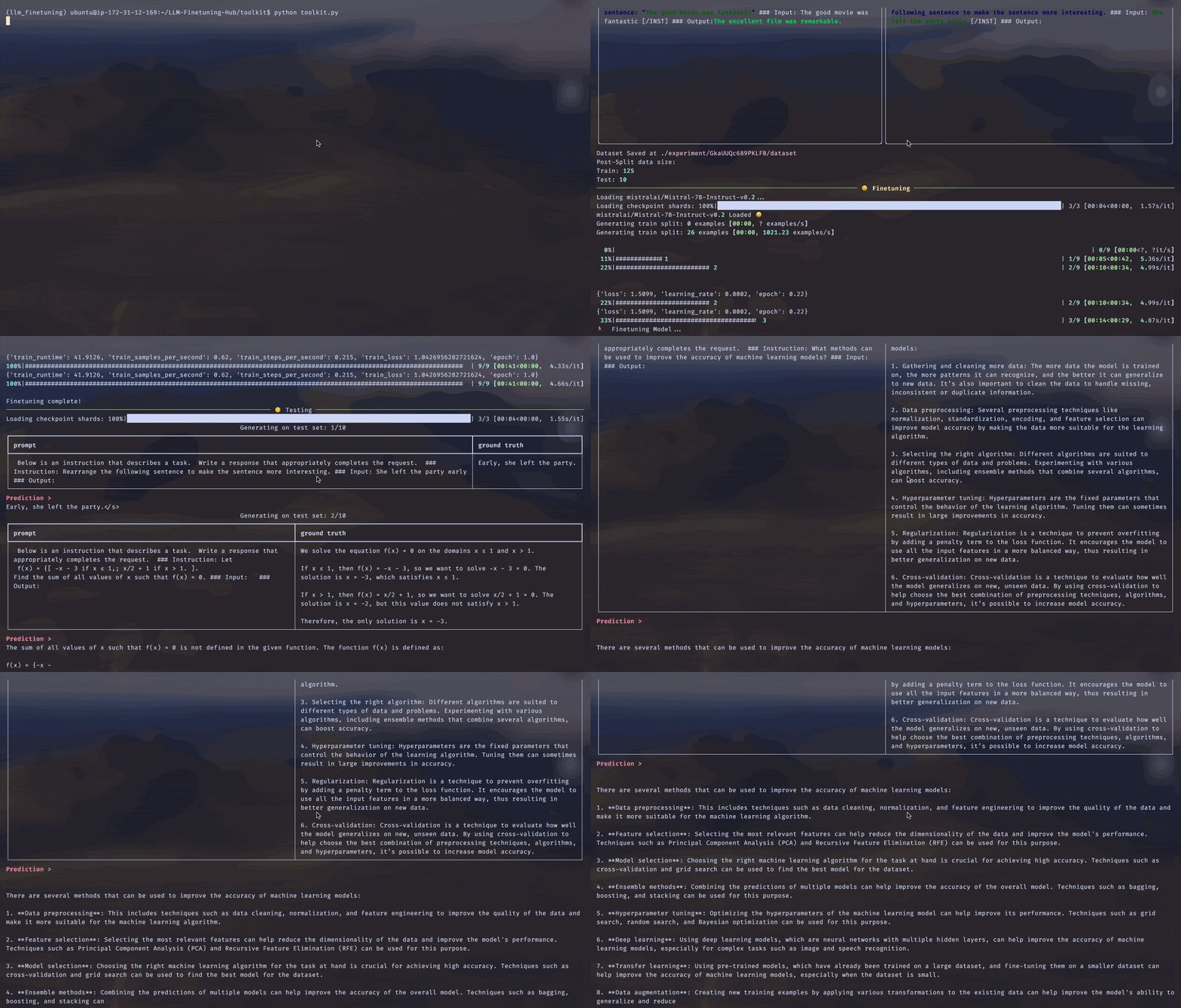
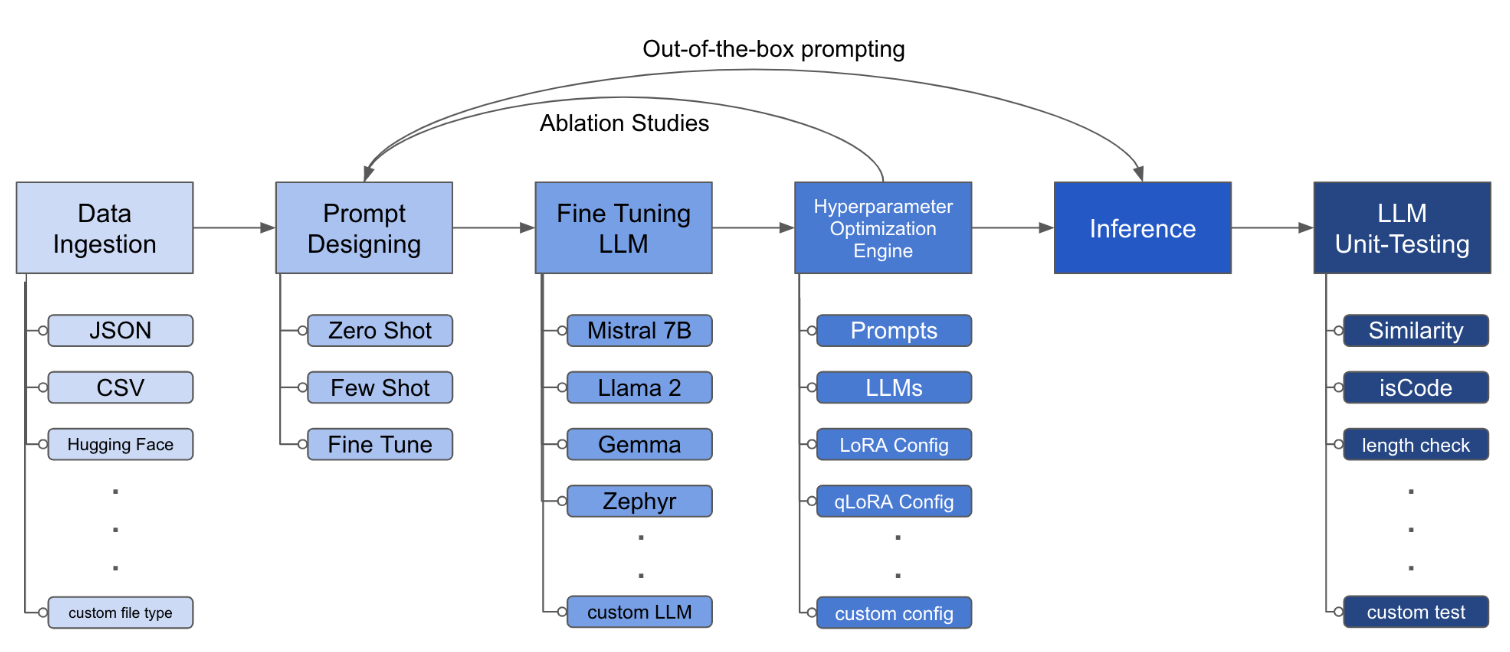
LLM Finetuning Toolkit은 데이터에 대한 일련의 LLM 미세 조정 실험을 시작하고 결과를 수집하기위한 구성 기반 CLI 도구입니다. 하나의 단일 yaml 구성 파일에서 일반적인 실험 파이프 라인의 모든 요소 - 프롬프트 , 오픈 소스 LLM , 최적화 전략 및 LLM 테스트를 제어합니다.
PIPX는 별도의 가상 환경에 패키지 및 종속성을 설치합니다.
pipx install llm-toolkitpip install llm-toolkit이 안내서에는이 툴킷을 최대한 활용할 수있는 3 단계가 포함되어 있습니다.
llmtune generate config
llmtune run ./config.yml
첫 번째 명령은 유용한 스타터 config.yml 파일을 생성하고 현재 작업 디렉토리에 저장됩니다. 이는 사용자에게 신속하게 시작하고 추가 수정을위한 기반으로 제공됩니다.
그런 다음 두 번째 명령은 기본 YAML 구성 파일 config.yaml 에 지정된 설정을 사용하여 미세 조정 프로세스를 시작합니다.
구성 파일은 툴킷의 동작을 정의하는 중앙 부분입니다. Yaml 형식으로 작성되며 데이터 수집, 모델 정의, 교육, 추론 및 품질 보증과 같은 프로세스의 다양한 측면을 제어하는 여러 섹션으로 구성됩니다. 우리는 중요한 섹션 중 일부를 강조합니다.
지원되는 모델에 대한 플래시 항목을 활성화합니다. 먼저 flash-attn 설치하십시오.
PIPX
pipx inject llm-toolkit flash-attn --pip-args=--no-build-isolation씨
pip install flash-attn --no-build-isolation
그런 다음 구성 파일에 추가하십시오.
 model :
  torch_dtype : " bfloat16 " # or "float16" if using older GPU
  attn_implementation : " flash_attention_2 "
데이터 수집이 어떻게 보일 수 있는지에 대한 예 :
 data :
  file_type : " huggingface "
  path : " yahma/alpaca-cleaned "
  prompt :
    # ## Instruction: {instruction}
    # ## Input: {input}
    # ## Output:
  prompt_stub : { output }
  test_size : 0.1 # Proportion of test as % of total; if integer then # of samples
  train_size : 0.9 # Proportion of train as % of total; if integer then # of samples
train_test_split_seed : 42 file_type : " json "
path : " <path to your data file> file_type : " csv "
path : " <path to your data file> 프롬프트 필드는 LLM을 미세 조정하는 지침을 작성하는 데 도움이됩니다. {} 브래킷에 언급 된 특정 열에서 데이터 세트에있는 데이터를 읽습니다. 제공된 예에서는 데이터 파일에 열 이름 ( instruction , input 및 output 이있을 것으로 예상됩니다.
프롬프트 필드는 미세 조정 중에 prompt 및 prompt_stub 모두 사용합니다. 그러나 테스트 중에는 prompt 섹션 만 미세 조정 된 LLM에 대한 입력으로 사용됩니다.
 model :
  hf_model_ckpt : " NousResearch/Llama-2-7b-hf "
  quantize : true
  bitsandbytes :
    load_in_4bit : true
    bnb_4bit_compute_dtype : " bf16 "
    bnb_4bit_quant_type : " nf4 "

# LoRA Params -------------------
lora :
  task_type : " CAUSAL_LM "
  r : 32
  lora_dropout : 0.1
  target_modules :
    - q_proj
    - v_proj
    - k_proj
    - o_proj
    - up_proj
    - down_proj
- gate_proj hf_model_ckpt : " mistralai/Mistral-7B-v0.1 " hf_model_ckpt : " tiiuae/falcon-7b "r 및 Dropout과 같은 LORA의 매개 변수를 변경할 수 있습니다. lora :
r : 64
lora_dropout : 0.25 qa :
llm_metrics :
- length_test
- word_overlap_test 이 구성은 미세 조정을 실행하고 디렉토리 ./experiment/[unique_hash] 아래에서 결과를 저장합니다. 각 고유 한 구성은 고유 한 해시를 생성하므로 도구가 중단 된 위치를 자동으로 선택할 수 있습니다. 예를 들어, 교육 중간에서 종료 해야하는 경우 스크립트를 다시 시작하여 프로그램은 디렉토리 아래에서 생성 된 기존 데이터 세트를 다시 수행하지 않고 자동으로로드합니다.
스크립트가 실행되면이 독특한 아티팩트가 표시됩니다.
/dataset # generated pkl file in hf datasets format
/model # peft model weights in hf format
/results # csv of prompt, ground truth, and predicted values
/qa # csv of test results: e.g. vector similarity between ground truth and prediction
모든 변경 사항이 YAML 파일에 통합되면 간단히 사용하여 사용자 정의 미세 조정 실험을 실행할 수 있습니다!
python toolkit.py --config-path < path to custom YAML file >미세 조정 워크 플로는 일반적으로 다양한 LLM, 프롬프트 설계 및 최적화 기술에서 절제 연구를 실행하는 것을 포함합니다. 런닝 절제 연구를 지원하기 위해 구성 파일을 변경할 수 있습니다.
 data :
  file_type : " huggingface "
  path : " yahma/alpaca-cleaned "
  prompt :
    - >-
      This is the first prompt template to iterate over
      ### Input: {input}
      ### Output:
    - >-
      This is the second prompt template
      ### Instruction: {instruction}
      ### Input: {input}
      ### Output:
  prompt_stub : { output }
  test_size : 0.1 # Proportion of test as % of total; if integer then # of samples
  train_size : 0.9 # Proportion of train as % of total; if integer then # of samples
train_test_split_seed : 42 model :
hf_model_ckpt :
[
" NousResearch/Llama-2-7b-hf " ,
mistralai/Mistral-7B-v0.1",
" tiiuae/falcon-7b " ,
]
quantize : true
bitsandbytes :
load_in_4bit : true
bnb_4bit_compute_dtype : " bf16 "
bnb_4bit_quant_type : " nf4 " lora :
r : [16, 32, 64]
lora_dropout : [0.25, 0.50] 툴킷은 개발자가 특정 요구에 맞게 기능을 사용자 정의하고 향상시킬 수있는 모듈 식 및 확장 가능한 아키텍처를 제공합니다. 데이터 수집, 미세 조정, 추론 및 품질 보증 테스트와 같은 툴킷의 각 구성 요소는 쉽게 확장 할 수 있도록 설계되었습니다.
이 툴킷에 대한 오픈 소스 기부금은 환영 받고 권장됩니다. 기여하고 싶다면 Contrations.md를 참조하십시오.





