LLM Finetuning Toolkit
v0.2.3

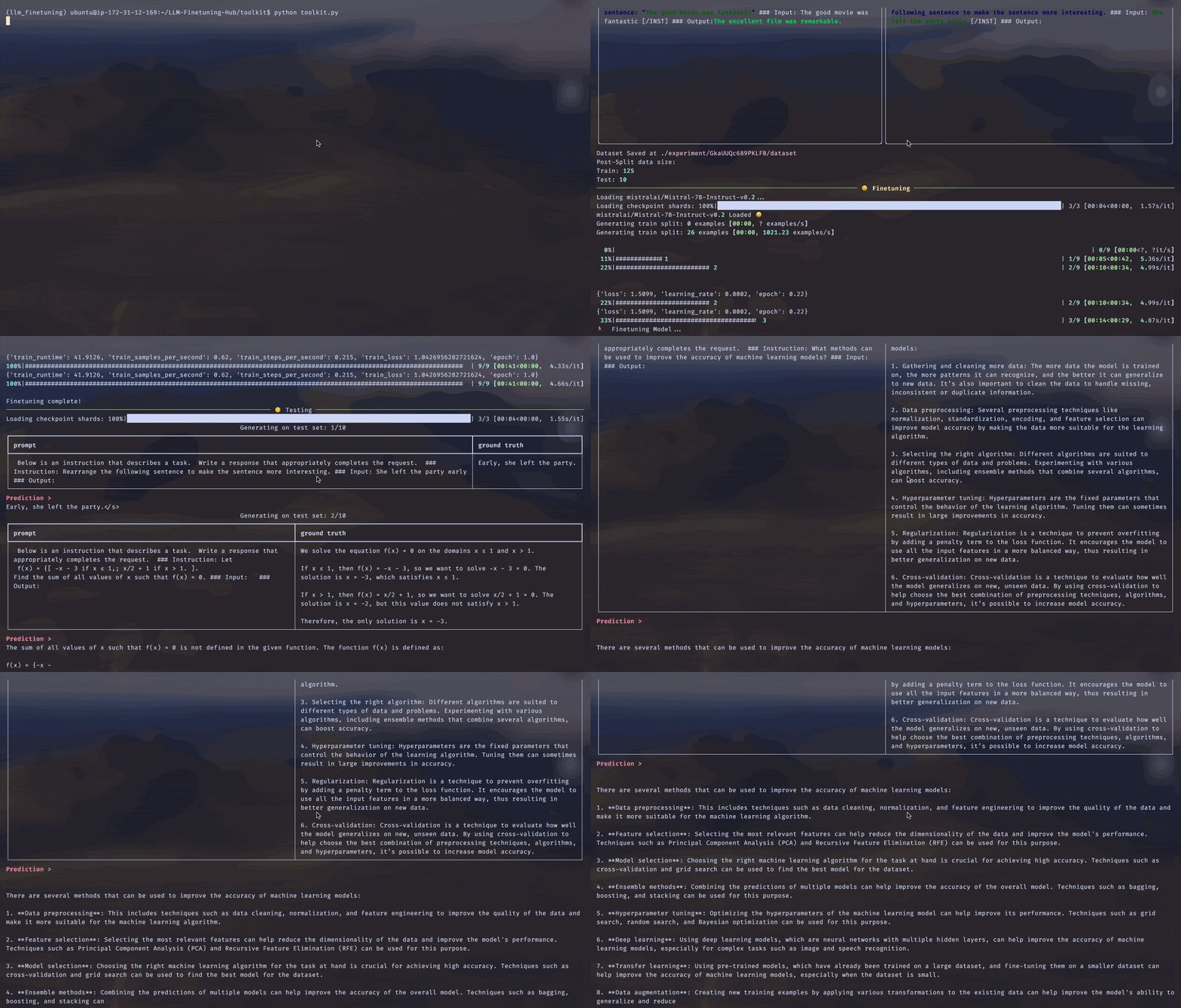
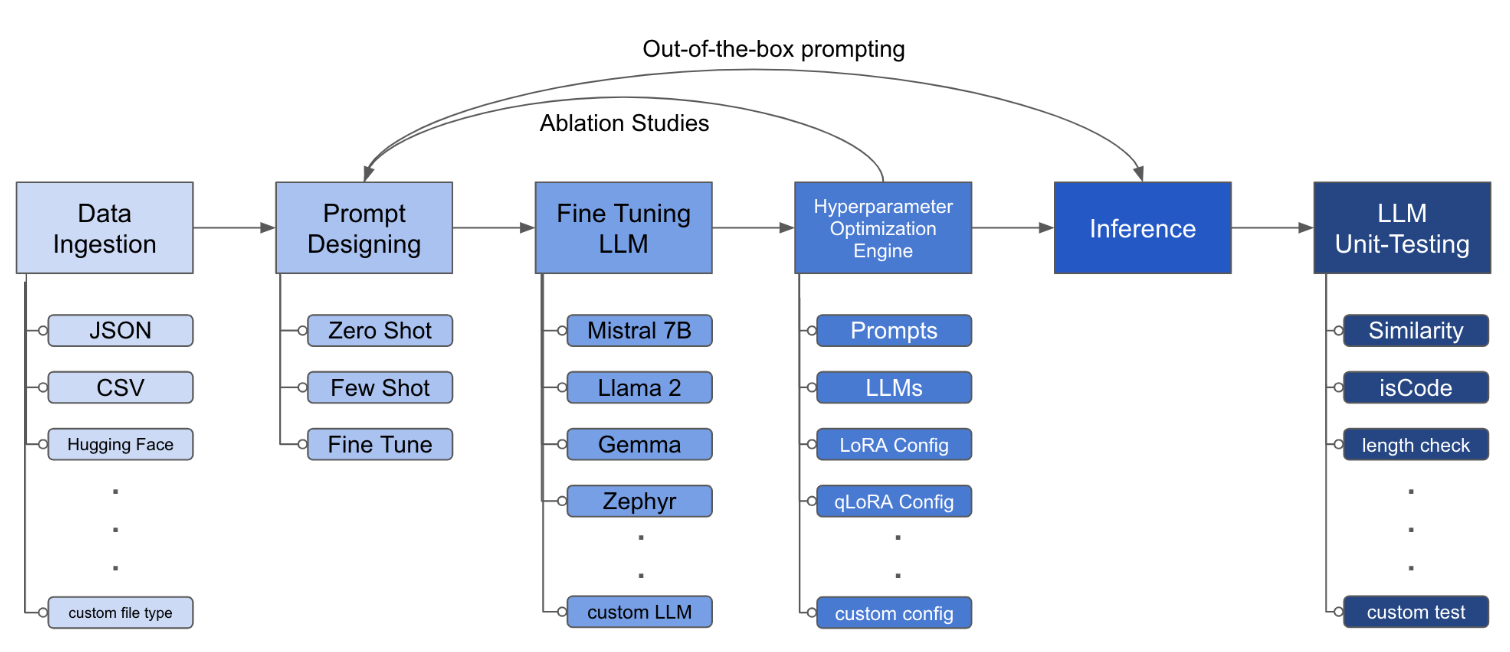
LLM Finetuning Toolkitは、データに関する一連のLLM微調整実験を開始し、結果を収集するための構成ベースのCLIツールです。 1つのyaml構成ファイルから、典型的な実験パイプラインのすべての要素 -プロンプト、オープンソースLLM 、最適化戦略、 LLMテストを制御します。
PIPXは、別の仮想環境にパッケージと依存関係をインストールします
pipx install llm-toolkitpip install llm-toolkitこのガイドには、このツールキットを最大限に活用できる3つのステージが含まれています。
llmtune generate config
llmtune run ./config.yml最初のコマンドは、役立つスターターconfig.ymlファイルを生成し、現在の作業ディレクトリに保存します。これは、迅速に開始するためにユーザーに提供され、さらなる変更のベースとして提供されます。
次に、2番目のコマンドは、デフォルトのYAML構成ファイルconfig.yamlで指定された設定を使用して、微調整プロセスを開始します。
構成ファイルは、ツールキットの動作を定義する中央の部分です。 YAML形式で記述されており、データの摂取、モデル定義、トレーニング、推論、品質保証など、プロセスのさまざまな側面を制御するいくつかのセクションで構成されています。いくつかの重要なセクションを強調します。
サポートされているモデルのフラッシュアテンションを有効にする。最初にflash-attnをインストールします:
PIPX
pipx inject llm-toolkit flash-attn --pip-args=--no-build-isolationピップ
pip install flash-attn --no-build-isolation
次に、構成ファイルに追加します。
 model :
  torch_dtype : " bfloat16 " # or "float16" if using older GPU
attn_implementation : " flash_attention_2 " データの摂取がどのように見えるかの例:
 data :
  file_type : " huggingface "
  path : " yahma/alpaca-cleaned "
  prompt :
    # ## Instruction: {instruction}
    # ## Input: {input}
    # ## Output:
  prompt_stub : { output }
  test_size : 0.1 # Proportion of test as % of total; if integer then # of samples
  train_size : 0.9 # Proportion of train as % of total; if integer then # of samples
train_test_split_seed : 42 file_type : " json "
path : " <path to your data file> file_type : " csv "
path : " <path to your data file>プロンプトフィールドは、LLMを微調整するための指示を作成するのに役立ちます。データセットに存在する{}ブラケットに記載されている特定の列からのデータを読み取ります。提供されている例では、データファイルが列名、 instruction 、 input 、 outputを持つことが期待されています。
プロンプトフィールドは、微調整中にpromptとprompt_stubの両方を使用します。ただし、テスト中に、微調整されたLLMへの入力としてpromptセクションのみが使用されます。
 model :
  hf_model_ckpt : " NousResearch/Llama-2-7b-hf "
  quantize : true
  bitsandbytes :
    load_in_4bit : true
    bnb_4bit_compute_dtype : " bf16 "
    bnb_4bit_quant_type : " nf4 "

# LoRA Params -------------------
lora :
  task_type : " CAUSAL_LM "
  r : 32
  lora_dropout : 0.1
  target_modules :
    - q_proj
    - v_proj
    - k_proj
    - o_proj
    - up_proj
    - down_proj
- gate_proj hf_model_ckpt : " mistralai/Mistral-7B-v0.1 " hf_model_ckpt : " tiiuae/falcon-7b "rやドロップアウトなど、LORAのパラメーターを変更できます。 lora :
r : 64
lora_dropout : 0.25 qa :
llm_metrics :
- length_test
- word_overlap_testこの構成は、微調整を実行し、Directory ./experiment/[unique_hash]の下で結果を保存します。各ユニークな構成は一意のハッシュを生成するため、ツールが中断されたところから自動的にピックアップできます。たとえば、スクリプトを再開することにより、トレーニングの途中で終了する必要がある場合、プログラムは、ディレクトリの下で生成された既存のデータセットを自動的にロードします。
スクリプトが実行された後、これらの明確なアーティファクトが表示されます。
/dataset # generated pkl file in hf datasets format
/model # peft model weights in hf format
/results # csv of prompt, ground truth, and predicted values
/qa # csv of test results: e.g. vector similarity between ground truth and prediction
すべての変更がYAMLファイルに組み込まれたら、それを使用してカスタム微調整実験を実行できます!
python toolkit.py --config-path < path to custom YAML file >微調整ワークフローには、通常、さまざまなLLMでアブレーション研究、迅速な設計、最適化技術を実行することが含まれます。構成ファイルを変更して、アブレーションの実行研究をサポートすることができます。
 data :
  file_type : " huggingface "
  path : " yahma/alpaca-cleaned "
  prompt :
    - >-
      This is the first prompt template to iterate over
      ### Input: {input}
      ### Output:
    - >-
      This is the second prompt template
      ### Instruction: {instruction}
      ### Input: {input}
      ### Output:
  prompt_stub : { output }
  test_size : 0.1 # Proportion of test as % of total; if integer then # of samples
  train_size : 0.9 # Proportion of train as % of total; if integer then # of samples
train_test_split_seed : 42 model :
hf_model_ckpt :
[
" NousResearch/Llama-2-7b-hf " ,
mistralai/Mistral-7B-v0.1",
" tiiuae/falcon-7b " ,
]
quantize : true
bitsandbytes :
load_in_4bit : true
bnb_4bit_compute_dtype : " bf16 "
bnb_4bit_quant_type : " nf4 " lora :
r : [16, 32, 64]
lora_dropout : [0.25, 0.50] このツールキットは、開発者が特定のニーズに合わせて機能をカスタマイズおよび強化できるようにするモジュール式および拡張可能なアーキテクチャを提供します。データの摂取、微調整、推論、品質保証テストなど、ツールキットの各コンポーネントは、簡単に拡張できるように設計されています。
このツールキットへのオープンソースの貢献は歓迎され、奨励されています。貢献したい場合は、Convributing.mdをご覧ください。





