Dreambooth Stable Diffusion
1.0.0

Vast.ai에서 달리기를 위해
Google Colab에서 실행 중입니다
로컬 PC (Windows)에서 실행하려면
로컬 PC (Ubuntu)에서 실행하기 위해
복도 디지털의 Dreambooth 튜토리얼을 Joepenna의 Repo에 적용합니다
Joepenna의 Dreambooth에서 캡션을 사용합니다

안녕! 제 이름은 Joe Penna입니다.
Mysteryguitarman 에서 내 YouTube 동영상 몇 개를 보았을 것입니다. 저는 이제 장편 영화 감독입니다. 북극이나 스토 웨이를 보았을 수도 있습니다.
내 영화의 경우 특정 배우, 소품, 위치 등을 훈련시킬 수 있어야합니다. 따라서 사람들의 얼굴을 훈련시키기 위해 @xavierxiao의 리포를 많은 변경을 수행했습니다.
내가 작업중 인 영화에 대한 모든 테스트를 발표 할 수는 없지만 내 얼굴로 테스트 할 때 트위터 페이지 (@mysteryguitarm)에 출시됩니다.
이 테스트의 많은 부분은 내 친구 인 Corridordigital의 Niko와 함께 이루어졌습니다. 이 repo를 찾은 방법 일 수도 있습니다!
나는 실제로 코더가 아닙니다. 나는 단지 고집이 많고 인터넷 검색을 두려워하지 않습니다. 결국, 일부 똑똑한 사람들이 합류하여 기여하고 있습니다. 이 repo에서, 구체적으로 : @djbielejeski @gammagec @mrsaad –- 그러나 우리의 불일치 속의 다른 많은 사람들!
이것은 더 이상 내 repo가 아닙니다. 이것은 사람들과의 Wanna-see-see-dreambooth-on-sd-Working-Well의 repo입니다!
이제, 당신이 이것을하고 싶다면 ... 아래의 경고를 먼저 읽으십시오.
그들의 기술을 연마하는 데 몇 년을 보낸 사람들의 노력과 창의성을 존중합시다.
기술적 측면으로 :
이 구현은 잠재적 인 공간을 보존하는 방법에 대한 Google의 아이디어를 완전히 구현하지는 않습니다.
두 과목을 연속적으로 훈련시키는 쉬운 방법은없는 것 같습니다. 가지 치기 전에 11-12GB 파일로 끝납니다.
~2gb 까지 크런치하는 고름이 있습니다. 모범 사례는 토큰을 유명인 이름으로 변경하는 것입니다 ( 참고 : 수업이 아닌 토큰 - 프롬프트는 : Chris Evans person )입니다. 여기 내 아내가 토큰을 제외하고 똑같은 설정으로 훈련을 받았습니다.
참고 runpod는 정기적으로 기본 Docker 이미지를 업그레이드하여 Repo가 작동하지 않을 수 있습니다. YouTube 동영상은 최신 상태가 없지만 여전히 가이드로 따라갈 수 있습니다. 다음과 같은 변경 사항이있는 일반적인 runpod youtube 비디오/튜토리얼을 따라 가십시오.
내 포드 페이지 내에서
runpod/pytorch:3.10-2.0.1-120-develrunpod/pytorch:3.10-2.0.1-118-runtimerunpod/pytorch:3.10-2.0.0-117runpod/pytorch:3.10-1.13.1-116runpod에 가입하십시오. 여기에서 내 추천 링크를 자유롭게 사용하여 비용을 지불 할 필요가 없지만 (하지만 그렇습니다).
로그인 한 후 SECURE CLOUD 또는 COMMUNITY CLOUD 선택하십시오.
느린 다운로드에 시간과 돈을 낭비하지 않도록 "높은"간격 속도를 찾으십시오.
RTX 3090, RTX 4090 또는 RTX A5000과 같은 최소 24GB VRAM을 선택하십시오.
아래의 비디오 지침을 따르십시오.
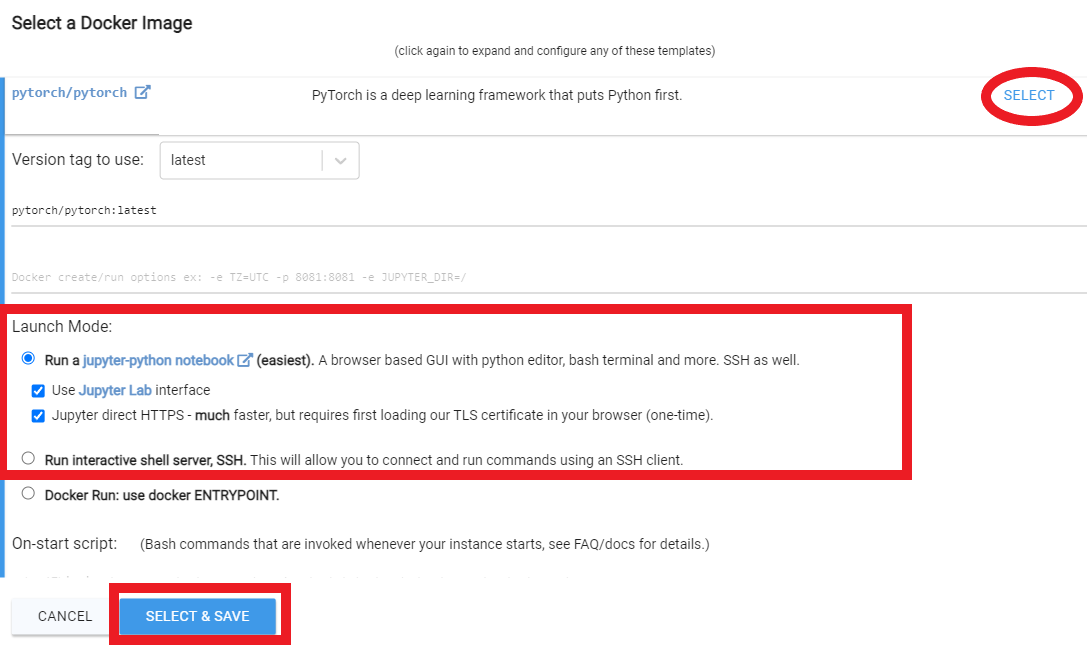
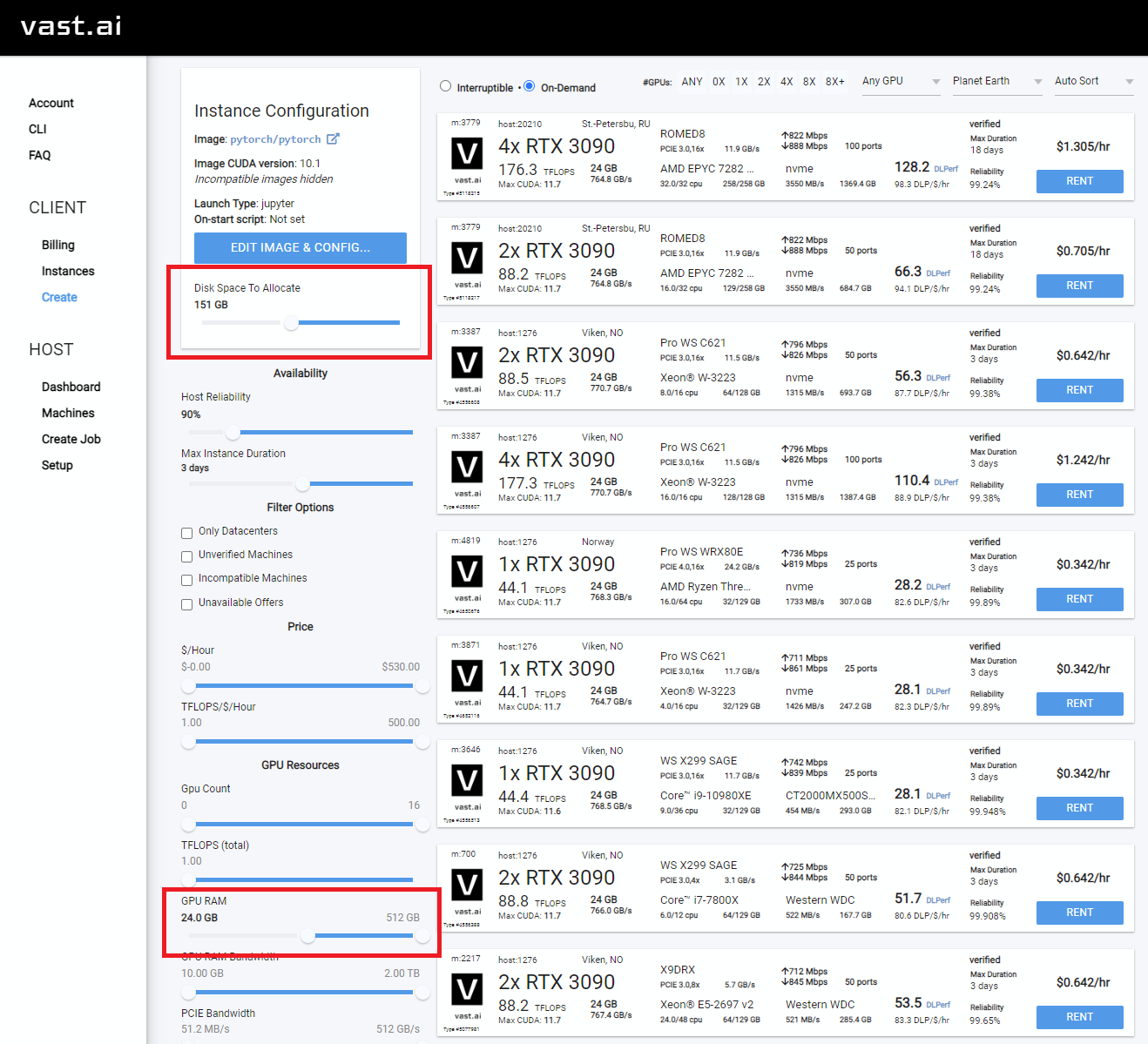
Rent 클릭 한 다음 인스턴스 페이지로 이동하여 Open 클릭하십시오. 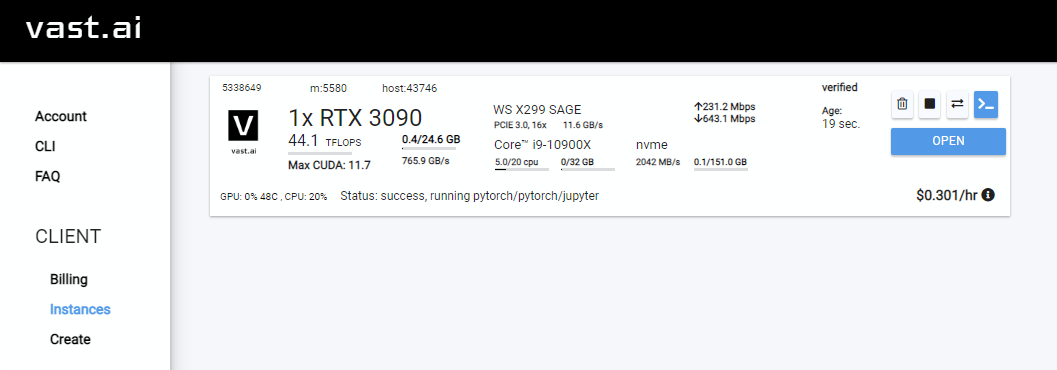
Notebook -> Python 3 클릭하십시오 (이 다음 단계를 여러 가지 방법으로 수행 할 수 있지만 일반적 으로이 작업을 수행 할 수 있습니다). 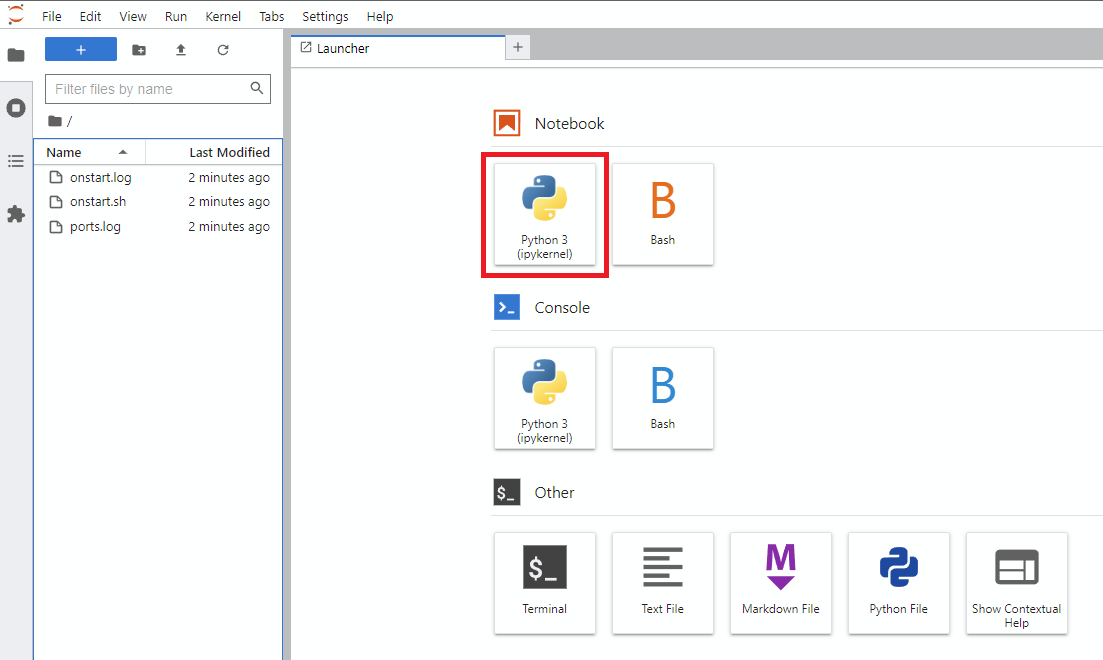
!git clone https://github.com/JoePenna/Dreambooth-Stable-Diffusion.gitrun 클릭하십시오 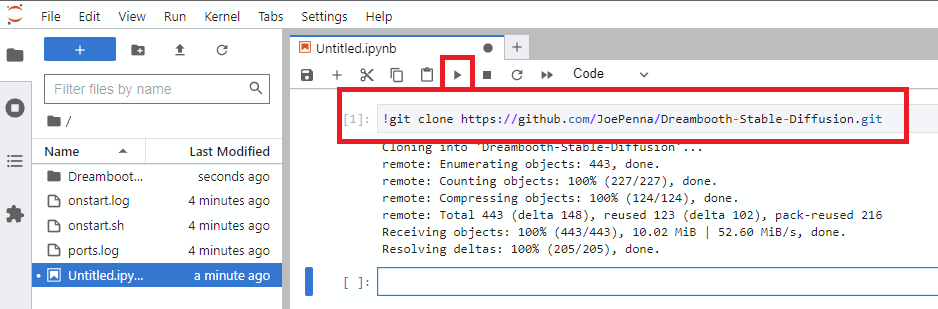
Dreambooth-Stable-Diffusion 디렉토리로 이동하여 dreambooth_simple_joepenna.ipynb 또는 dreambooth_runpod_joepenna.ipynb 파일을여십시오. 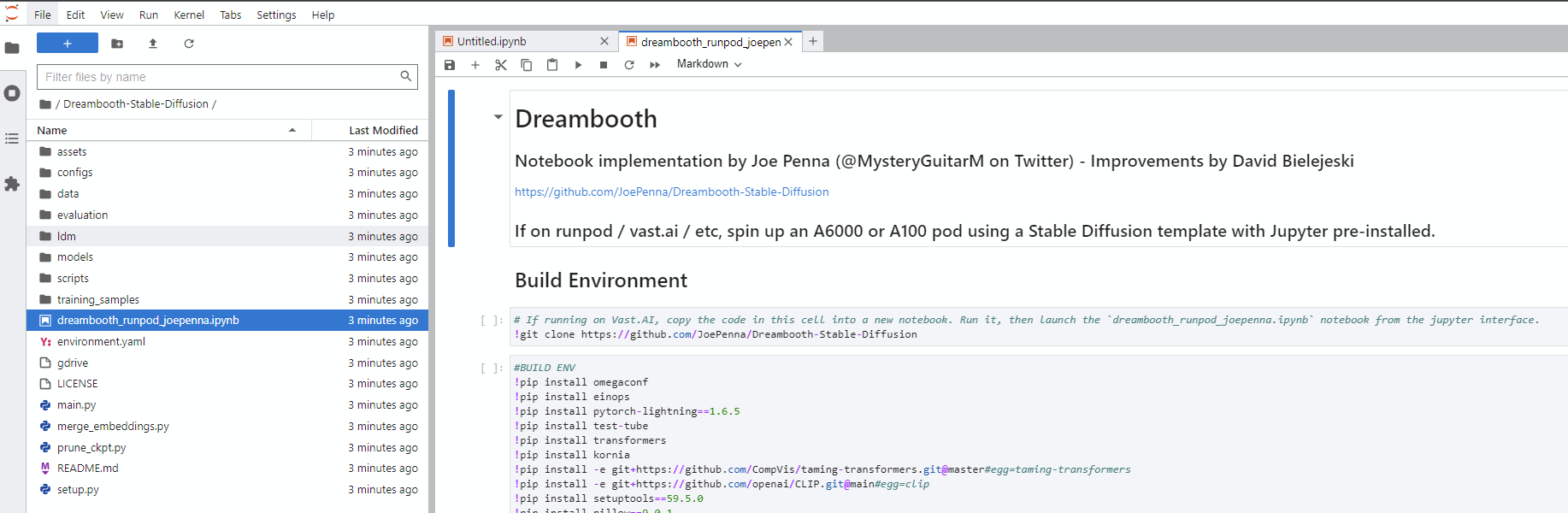
cmd 를 엽니 다C:>git clone https://github.com/JoePenna/Dreambooth-Stable-DiffusionC:>cd Dreambooth-Stable-Diffusioncmd > python -m venv dreambooth_joepenna
cmd > dreambooth_joepennaScriptsactivate.bat
cmd > pip install torch == 1.13.1+cu117 torchvision == 0.14.1+cu117 --extra-index-url https://download.pytorch.org/whl/cu117
cmd > pip install -r requirements.txt cmd> python "main.py" --project_name "ProjectName" --training_model "C:v1-5-pruned-emaonly-pruned.ckpt" --regularization_images "C:regularization_images" --training_images "C:training_images" --max_training_steps 2000 --class_word "person" --token "zwx" --flip_p 0 --learning_rate 1.0e-06 --save_every_x_steps 250
cmd > deactivate Anaconda Prompt (miniconda3)(base) C:>git clone https://github.com/JoePenna/Dreambooth-Stable-Diffusion(base) C:>cd Dreambooth-Stable-Diffusion(base) C:Dreambooth-Stable-Diffusion > conda env create -f environment.yaml
(base) C:Dreambooth-Stable-Diffusion > conda activate dreambooth_joepenna cmd> python "main.py" --project_name "ProjectName" --training_model "C:v1-5-pruned-emaonly-pruned.ckpt" --regularization_images "C:regularization_images" --training_images "C:training_images" --max_training_steps 2000 --class_word "person" --token "zwx" --flip_p 0 --learning_rate 1.0e-06 --save_every_x_steps 250
cmd > conda deactivate {
"class_word": "woman",
"config_date_time": "2023-04-08T16-54-00",
"debug": false,
"flip_percent": 0.0,
"gpu": 0,
"learning_rate": 1e-06,
"max_training_steps": 3500,
"model_path": "D:\stable-diffusion\models\v1-5-pruned-emaonly-pruned.ckpt",
"model_repo_id": "",
"project_config_filename": "my-config.json",
"project_name": "<token> project",
"regularization_images_folder_path": "D:\stable-diffusion\regularization_images\Stable-Diffusion-Regularization-Images-person_ddim\person_ddim",
"save_every_x_steps": 250,
"schema": 1,
"seed": 23,
"token": "<token>",
"token_only": false,
"training_images": [
"001@a photo of <token> looking down.png",
"002-DUPLICATE@a close photo of <token> smiling wearing a black sweatshirt.png",
"002@a photo of <token> wearing a black sweatshirt sitting on a blue couch.png",
"003@a photo of <token> smiling wearing a red flannel shirt with a door in the background.png",
"004@a photo of <token> wearing a purple sweater dress standing with her arms crossed in front of a piano.png",
"005@a close photo of <token> with her hand on her chin.png",
"005@a photo of <token> with her hand on her chin wearing a dark green coat and a red turtleneck.png",
"006@a close photo of <token>.png",
"007@a close photo of <token>.png",
"008@a photo of <token> wearing a purple turtleneck and earings.png",
"009@a close photo of <token> wearing a red flannel shirt with her hand on her head.png",
"011@a close photo of <token> wearing a black shirt.png",
"012@a close photo of <token> smirking wearing a gray hooded sweatshirt.png",
"013@a photo of <token> standing in front of a desk.png",
"014@a close photo of <token> standing in a kitchen.png",
"015@a photo of <token> wearing a pink sweater with her hand on her forehead sitting on a couch with leaves in the background.png",
"016@a photo of <token> wearing a black shirt standing in front of a door.png",
"017@a photo of <token> smiling wearing a black v-neck sweater sitting on a couch in front of a lamp.png",
"019@a photo of <token> wearing a blue v-neck shirt in front of a door.png",
"020@a photo of <token> looking down with her hand on her face wearing a black sweater.png",
"021@a close photo of <token> pursing her lips wearing a pink hooded sweatshirt.png",
"022@a photo of <token> looking off into the distance wearing a striped shirt.png",
"023@a photo of <token> smiling wearing a blue beanie holding a wine glass with a kitchen table in the background.png",
"024@a close photo of <token> looking at the camera.png"
],
"training_images_count": 24,
"training_images_folder_path": "D:\stable-diffusion\training_images\24 Images - captioned"
}
python "main.py" --config_file_path "path/to/the/my-config.json"
Dreambooth_helpers arguments.py
| 명령 | 유형 | 예 | 설명 |
|---|---|---|---|
--config_file_path | 끈 | "C:\Users\David\Dreambooth Configs\my-config.json" | 경로를 사용할 구성 파일입니다 |
--project_name | 끈 | "My Project Name" | 프로젝트의 이름 |
--debug | 부 | False | 선택적 기본값은 False 입니다. 디버그 로깅을 활성화합니다 |
--seed | int | 23 | 선택적 기본값은 23 입니다. Seed_everything의 시드 |
--max_training_steps | int | 3000 | 실행하기위한 교육 단계 수 |
--token | 끈 | "owhx" | 훈련 된 모델을 대표하려는 독특한 토큰. |
--token_only | 부 | False | 선택적 기본값은 False 입니다. 토큰을 사용하고 클래스가없는 훈련. |
--training_model | 끈 | "D:\stable-diffusion\models\v1-5-pruned-emaonly-pruned.ckpt" | 모델로가는 길 (model.ckpt) |
--training_images | 끈 | "D:\stable-diffusion\training_images\24 Images - captioned" | 교육 이미지 디렉토리로가는 길 |
--regularization_images | 끈 | "D:\stable-diffusion\regularization_images\Stable-Diffusion-Regularization-Images-person_ddim\person_ddim" | 정규화 이미지가있는 디렉토리 경로 |
--class_word | 끈 | "woman" | Class_word를 훈련하려는 이미지의 범주와 일치시킵니다. 예 : man , woman , dog 또는 artstyle . |
--flip_p | 뜨다 | 0.0 | 선택적 기본값은 0.5 입니다. 플립 백분율. 예 : 0.5 로 설정된 경우 교육 이미지가 50%의 시간을 뒤집습니다. 이를 통해 더 많은 교육 이미지를 포함하지 않고도 데이터 세트를 확장 할 수 있습니다. 이것은 대부분의 사람들의 얼굴이 완벽하게 대칭이 아니기 때문에 얼굴 훈련의 결과가 더 나빠질 수 있습니다. |
--learning_rate | 뜨다 | 1.0e-06 | 선택적 기본값은 1.0e-06 (0.000001)입니다. 학습 속도를 설정하십시오. 과학적 표기법을 받아들입니다. |
--save_every_x_steps | int | 250 | 선택적 기본값은 0 입니다. X 단계마다 검사 점을 저장합니다. at 0 max_training_steps 에 도달하면 훈련이 끝날 때만 저장됩니다. |
--gpu | int | 0 | 선택적 기본값은 0 입니다. 훈련에 사용할 0 이외의 GPU를 지정하십시오. 다중 GPU 지원은 현재 구현되지 않았습니다. |
python "main.py" --project_name "My Project Name" --max_training_steps 3000 --token "owhx" --training_model "D:\stable-diffusion\models\v1-5-pruned-emaonly-pruned.ckpt" --training_images "D:\stable-diffusion\training_images\24 Images - captioned" --regularization_images "D:\stable-diffusion\regularization_images\Stable-Diffusion-Regularization-Images-person_ddim\person_ddim" --class_word "woman" --flip_p 0.0 --save_every_x_steps 500
캡션이 지원됩니다. 다음은 우리가이를 구현하는 방법에 대한 안내서입니다.
토큰이 effy이고 클래스가 사람이고 데이터 루트가 /Train이라고 가정 해 봅시다.
training_images/img-001.jpg 는 effy person 과 함께 캡션됩니다
파일 이름의 @ 기호 다음에 추가하여 캡션을 추가하여 캡션을 사용자 정의 할 수 있습니다.
/training_images/img-001@a photo of effy => a photo of effy
캡션에서 두 개의 토큰을 사용하여 대문자 S 및 C 대문자 C를 사용하여 주제와 클래스를 나타낼 수 있습니다.
/training_images/img-001@S being a good C.jpg => effy being a good person
새 주제를 만들려면 폴더 만 만들면됩니다. 그래서:
/training_images/bingo/img-001.jpg => bingo person
수업은 동일하게 유지되지만 이제는 주제가 바뀌 었습니다.
다시 - 토큰은 이제 빙고입니다.
/training_images/bingo/img-001@S is being silly.jpg => bingo is being silly
하나의 폴더가 더 깊고 클래스를 변경할 수 있습니다 : /training_images/bingo/dog/img-001@S being a good C.jpg => bingo being a good dog
No Comes the Kicker : 한 레벨이 더 깊고 이미지 그룹을 캡션 할 수 있습니다 : /training_images/effy/person/a picture of/img-001.jpg => a picture of effy person
이 repo의 코드의 대부분은 Rinon Gal ET에 의해 작성되었습니다. Al, 텍스트 반전 연구 논문의 저자. MIT 팀과 Google 연구원 모두와 관련하여 정규화 이미지와 사전 손실 보존 ( "Dreambooth"의 아이디어)에 대한 몇 가지 아이디어가 추가되었지만 "이전에 알려진 리포" 로 이름을 바꾸고 있습니다. Dreambooth "" .
대체 구현은 아래의 "대체 옵션"을 참조하십시오.
ground truth (진정한 그림,주의 : 매우 아름다운 여자) 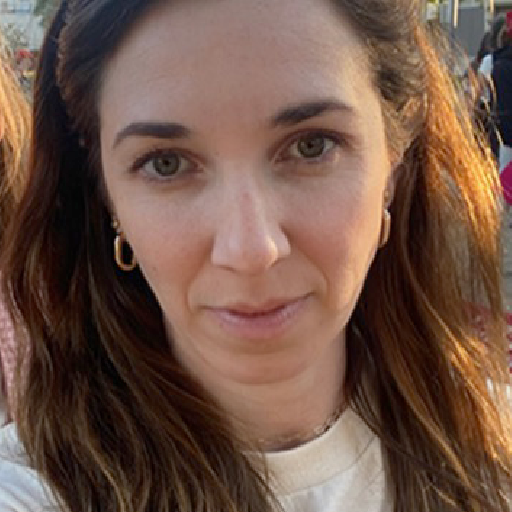
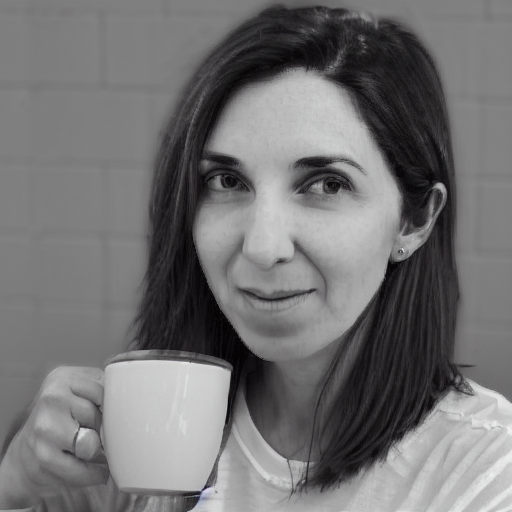
아래의 모든 이미지에 대해 동일한 프롬프트 :
sks person | woman person | Natalie Portman person | Kate Mara person |
|---|---|---|---|
 | 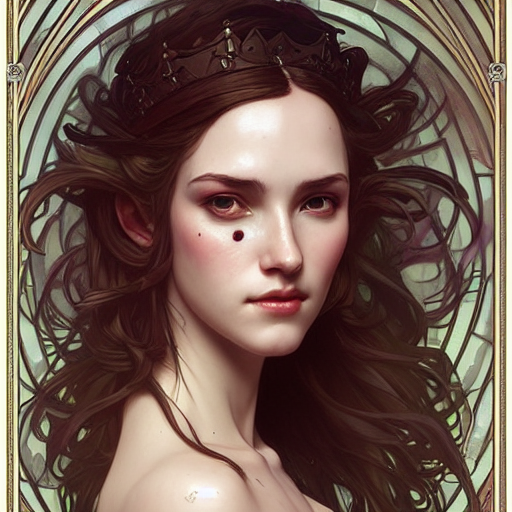 | 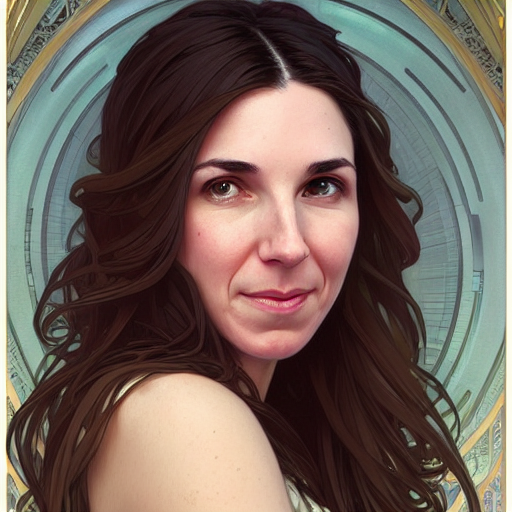 | 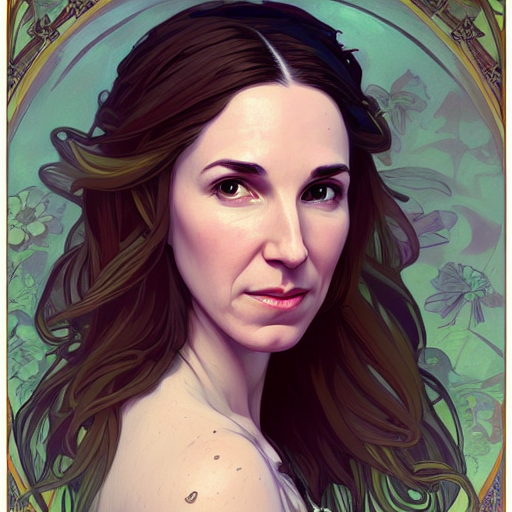 |
당신의 토큰만으로 프롬프트. 즉 "Joepenna Person"대신 "Joepenna"
수업 person 에서 joepenna 와 함께 훈련을받은 경우 모델은 다음과 같이 알고 있어야합니다.
joepenna person
예제 프롬프트 :
잘못된 ( joepenna 따르는 person )
portrait photograph of joepenna 35mm film vintage glass
∎ 이것은 옳습니다 ( person joepenna 이후에 포함되어 있음)
portrait photograph of joepenna person 35mm film vintage glass
당신은 때때로 Joepenna와 함께 당신처럼 보이는 사람을 얻을 수도 있지만 (특히 너무 많은 단계를 위해 훈련을받은 경우), 그것은 현재 Dreambooth의 반복이 토큰으로 너무 많은 것을 과도하게 만들어서 그 토큰으로 피를 흘리기 때문입니다.
훈련하는 동안 안정적인 것은 당신이 사람이라는 것을 알지 못합니다. 그것이 보는 것을 모방 할 것입니다.
따라서 이것이 교육 이미지라면 다음과 같습니다.
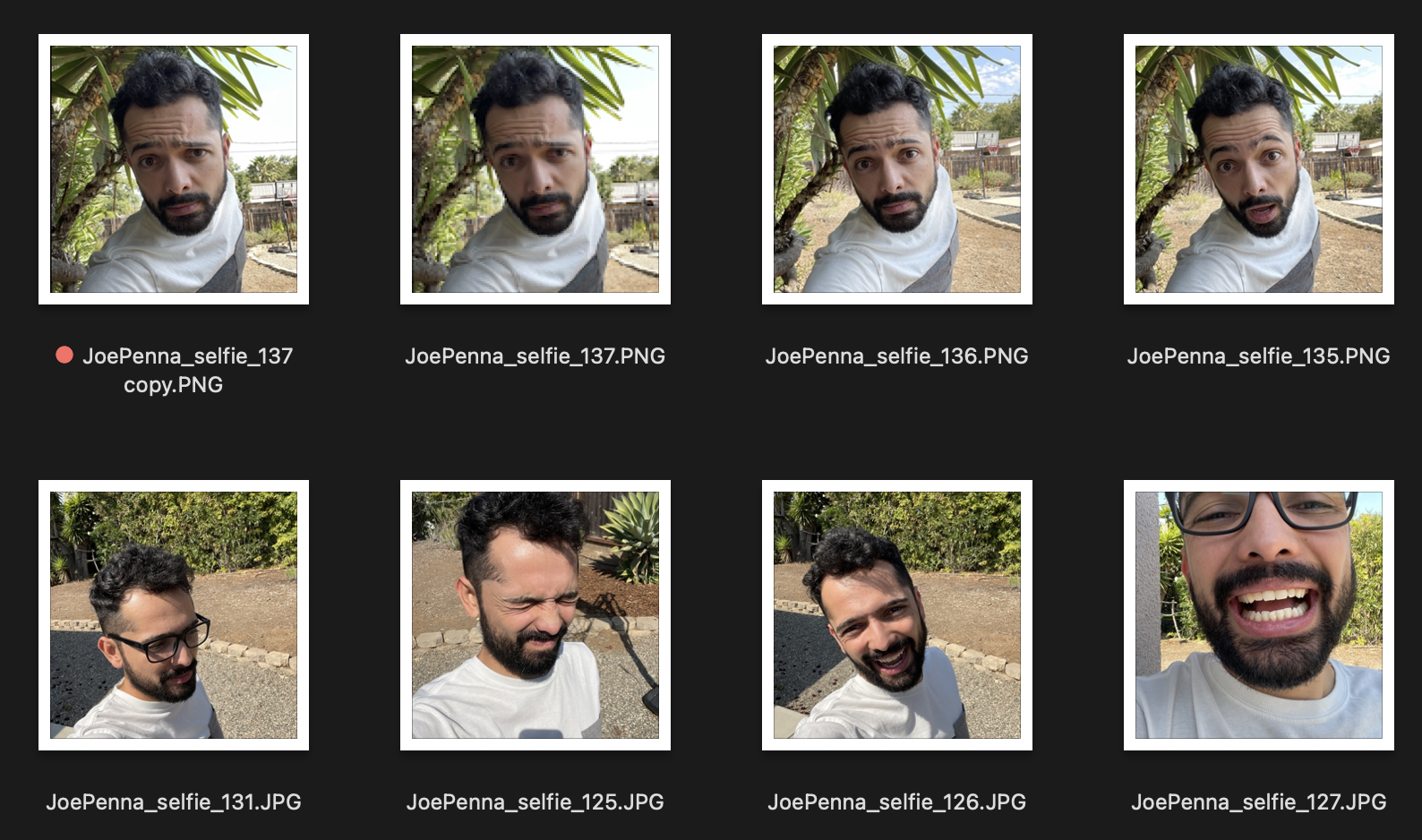
당신은 흰색과 회색 셔츠를 입고, 셀카 사진의 스타일로 뾰족한 나무 옆에 여러분의 세대를 얻을 것입니다.
대신이 교육 세트는 훨씬 좋습니다.
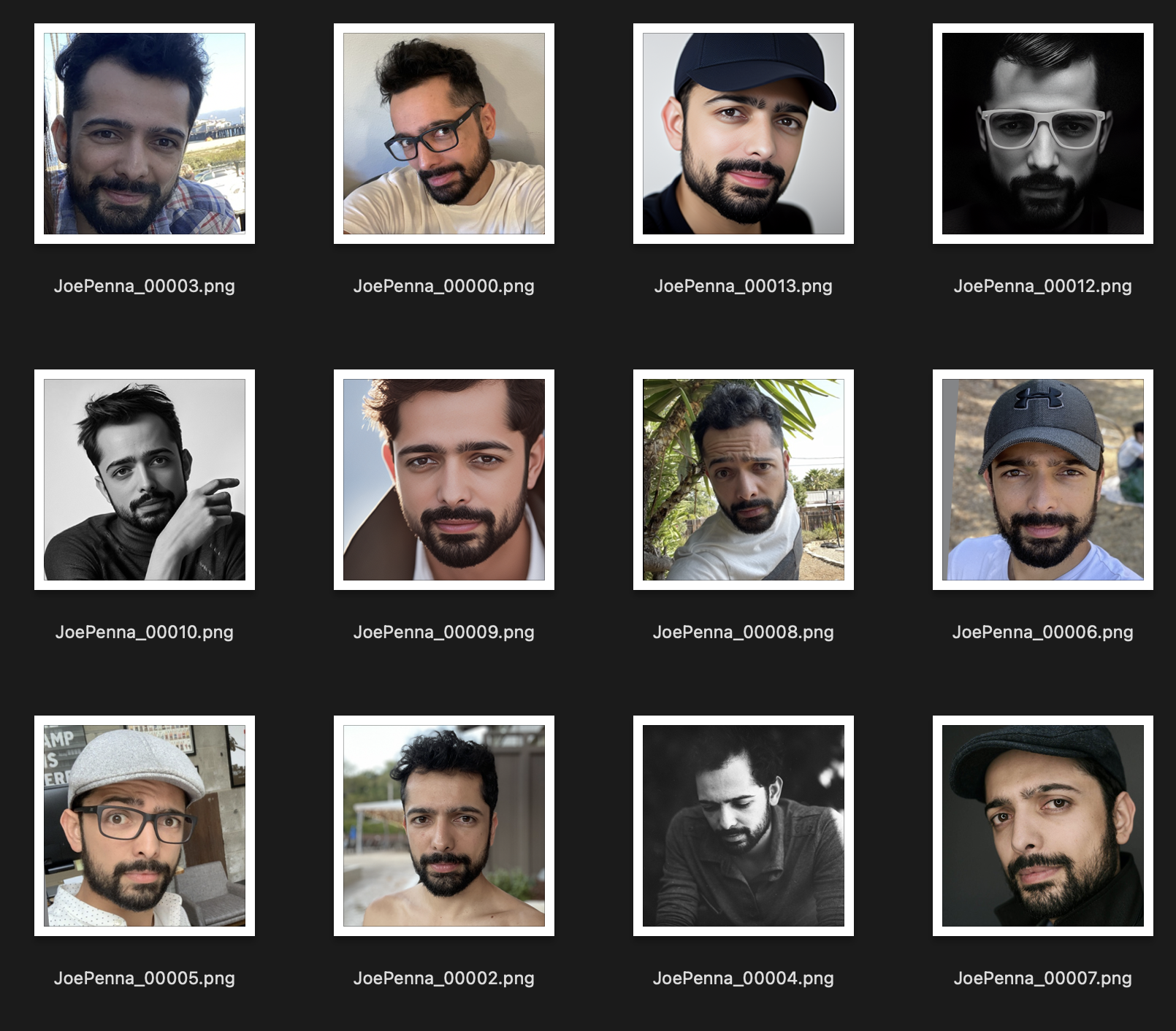
이미지간에 일관된 유일한 것은 주제입니다. 따라서 안정적인 것은 이미지를 살펴보고 얼굴 만 배우면 다른 스타일로 "편집"할 수 있습니다.
당신이 그것을 제대로 홍보하고 있다고 확신합니까?
<token> <class> 이 아니라 <token> <class> 여야합니다. 예를 들어:
JoePenna person, portrait photograph, 85mm medium format photo
여전히 당신처럼 보이지 않으면 오랫동안 훈련하지 않았습니다.
좋아, 몇 가지 이유 : 당신은 너무 오랫동안 훈련했을 수도 있습니다 ... 또는 이미지가 너무 비슷했거나 이미지가 충분한 이미지로 훈련하지 않았습니다.
괜찮아요. 프롬프트로 문제를 해결할 수 있습니다. 안정적인 확산은 먼저 입력 한 것에 많은 장점을 가져옵니다. 따라서 나중에 저장하십시오.
an exquisite portrait photograph, 85mm medium format photo of JoePenna person with a classic haircut
당신은 충분히 오랫동안 훈련하지 않았습니다 ...
괜찮아요. 프롬프트로이를 고칠 수 있습니다.
JoePenna person in a portrait photograph, JoePenna person in a 85mm medium format photo of JoePenna person
Dreambooth는 이제 안정된 확산으로 훈련하기위한 Huggingface Diffusers에서 지원됩니다.
여기에서 시도해보십시오.





