VoiceprintRecognition Pytorch
1.0.0

Simplified Chinese | English
This branch is version 1.1. If you want to use the previous version 1.0, please use it in the 1.0 branch. This project uses various advanced voiceprint recognition models such as EcapaTdnn, ResNetSE, ERes2Net, and CAM++. It is not ruled out that more models will be supported in the future. At the same time, this project also supports various data preprocessing methods such as MelSpectrogram, Spectrogram, MFCC, and Fbank. ArcFace Loss, ArcFace loss: Additive Angular Margin Loss (additive angle interval loss function), corresponding to the AAMLoss in the project, normalizes the eigenvectors and weights, and adds the angle interval m to θ. The angle interval has a more direct impact on the angle than the cosine interval. In addition, it also supports various loss functions such as AMLoss, ARMLoss, and CELoss.
If this project is helpful to you, welcome Star to avoid it not being found later.
Everyone is welcome to scan the code to enter the Knowledge Planet or QQ group to discuss. Knowledge Planet provides project model files and bloggers' other related projects model files, as well as other resources.
Usage environment:
Model paper:
| Model | Params(M) | Dataset | train speakers | threshold | EER | MinDCF | Model download |
|---|---|---|---|---|---|---|---|
| ERes2NetV2 | 6.6 | CN-Celeb | 2796 | 0.20089 | 0.08071 | 0.45705 | Join the knowledge planet to obtain |
| ERes2Net | 6.6 | CN-Celeb | 2796 | 0.20014 | 0.08132 | 0.45544 | Join the knowledge planet to obtain |
| CAM++ | 6.8 | CN-Celeb | 2796 | 0.23323 | 0.08332 | 0.48536 | Join the knowledge planet to obtain |
| ResNetSE | 7.8 | CN-Celeb | 2796 | 0.19066 | 0.08544 | 0.49142 | Join the knowledge planet to obtain |
| EcapaTdnn | 6.1 | CN-Celeb | 2796 | 0.23646 | 0.09259 | 0.51378 | Join the knowledge planet to obtain |
| TDNN | 2.6 | CN-Celeb | 2796 | 0.23858 | 0.10825 | 0.59545 | Join the knowledge planet to obtain |
| Res2Net | 5.0 | CN-Celeb | 2796 | 0.19526 | 0.12436 | 0.65347 | Join the knowledge planet to obtain |
| CAM++ | 6.8 | Larger data set | 2W+ | 0.33 | 0.07874 | 0.52524 | Join the knowledge planet to obtain |
| ERes2Net | 55.1 | Other data sets | 20W+ | 0.36 | 0.02936 | 0.18355 | Join the knowledge planet to obtain |
| ERes2NetV2 | 56.2 | Other data sets | 20W+ | 0.36 | 0.03847 | 0.24301 | Join the knowledge planet to obtain |
| CAM++ | 6.8 | Other data sets | 20W+ | 0.29 | 0.04765 | 0.31436 | Join the knowledge planet to obtain |
illustrate:
speed_perturb_3_class: True .Fbank and the loss function is AAMLoss .| Model | Params(M) | Dataset | train speakers | threshold | EER | MinDCF | Model download |
|---|---|---|---|---|---|---|---|
| CAM++ | 6.8 | VoxCeleb1&2 | 7205 | 0.22504 | 0.02436 | 0.15543 | Join the knowledge planet to obtain |
| EcapaTdnn | 6.1 | VoxCeleb1&2 | 7205 | 0.24877 | 0.02480 | 0.16188 | Join the knowledge planet to obtain |
| ERes2NetV2 | 6.6 | VoxCeleb1&2 | 7205 | 0.20710 | 0.02742 | 0.17709 | Join the knowledge planet to obtain |
| ERes2Net | 6.6 | VoxCeleb1&2 | 7205 | 0.20233 | 0.02954 | 0.17377 | Join the knowledge planet to obtain |
| ResNetSE | 7.8 | VoxCeleb1&2 | 7205 | 0.22567 | 0.03189 | 0.23040 | Join the knowledge planet to obtain |
| TDNN | 2.6 | VoxCeleb1&2 | 7205 | 0.23834 | 0.03486 | 0.26792 | Join the knowledge planet to obtain |
| Res2Net | 5.0 | VoxCeleb1&2 | 7205 | 0.19472 | 0.04370 | 0.40072 | Join the knowledge planet to obtain |
| CAM++ | 6.8 | Larger data set | 2W+ | 0.28 | 0.03182 | 0.23731 | Join the knowledge planet to obtain |
| ERes2Net | 55.1 | Other data sets | 20W+ | 0.53 | 0.08904 | 0.62130 | Join the knowledge planet to obtain |
| ERes2NetV2 | 56.2 | Other data sets | 20W+ | 0.52 | 0.08649 | 0.64193 | Join the knowledge planet to obtain |
| CAM++ | 6.8 | Other data sets | 20W+ | 0.49 | 0.10334 | 0.71200 | Join the knowledge planet to obtain |
illustrate:
speed_perturb_3_class: True .Fbank and the loss function is AAMLoss .| Preprocessing method | Dataset | train speakers | threshold | EER | MinDCF | Model download |
|---|---|---|---|---|---|---|
| Fbank | CN-Celeb | 2796 | 0.14574 | 0.10988 | 0.58955 | Join the knowledge planet to obtain |
| MFCC | CN-Celeb | 2796 | 0.14868 | 0.11483 | 0.61275 | Join the knowledge planet to obtain |
| Spectrogram | CN-Celeb | 2796 | 0.14962 | 0.11613 | 0.60057 | Join the knowledge planet to obtain |
| MelSpectrogram | CN-Celeb | 2796 | 0.13458 | 0.12498 | 0.60741 | Join the knowledge planet to obtain |
| wavlm-base-plus | CN-Celeb | 2796 | 0.14166 | 0.13247 | 0.62451 | Join the knowledge planet to obtain |
| w2v-bert-2.0 | CN-Celeb | 2796 | Join the knowledge planet to obtain | |||
| wav2vec2-large-xlsr-53 | CN-Celeb | 2796 | Join the knowledge planet to obtain | |||
| wavlm-large | CN-Celeb | 2796 | Join the knowledge planet to obtain |
illustrate:
CAM++ , and the loss function is AAMLoss .extract_features.py to extract features in advance, which means that data enhancement to audio is not used during training.w2v-bert-2.0 , wav2vec2-large-xlsr-53 are obtained from pre-training of multilingual data. The pre-training data of wavlm-base-plus and wavlm-large are only in English.| Loss function | Dataset | train speakers | threshold | EER | MinDCF | Model download |
|---|---|---|---|---|---|---|
| AAMLoss | CN-Celeb | 2796 | 0.14574 | 0.10988 | 0.58955 | Join the knowledge planet to obtain |
| SphereFace2 | CN-Celeb | 2796 | 0.20377 | 0.11309 | 0.61536 | Join the knowledge planet to obtain |
| TripletAngularMarginLoss | CN-Celeb | 2796 | 0.28940 | 0.11749 | 0.63735 | Join the knowledge planet to obtain |
| SubCenterLoss | CN-Celeb | 2796 | 0.13126 | 0.11775 | 0.56995 | Join the knowledge planet to obtain |
| ARMLLoss | CN-Celeb | 2796 | 0.14563 | 0.11805 | 0.57171 | Join the knowledge planet to obtain |
| AMLoss | CN-Celeb | 2796 | 0.12870 | 0.12301 | 0.63263 | Join the knowledge planet to obtain |
| CELoss | CN-Celeb | 2796 | 0.13607 | 0.12684 | 0.65176 | Join the knowledge planet to obtain |
illustrate:
CAM++ , and the preprocessing method is Fbank .extract_features.py to extract features in advance, which means that data enhancement to audio is not used during training. conda install pytorch==2.4.0 torchvision==0.19.0 torchaudio==2.4.0 pytorch-cuda=11.8 -c pytorch -c nvidiaUse pip to install, the command is as follows:
python -m pip install mvector -U -i https://pypi.tuna.tsinghua.edu.cn/simpleIt is recommended to install the source code , which can ensure the use of the latest code.
git clone https://github.com/yeyupiaoling/VoiceprintRecognition-Pytorch.git
cd VoiceprintRecognition-Pytorch/
pip install . The author uses CN-Celeb in this tutorial. This data set has a total of about 3,000 voice data and 65W+ voice data. After downloading, you need to decompress the dataset to the dataset directory. In addition, if you want to evaluate, you also need to download the CN-Celeb test set. If the reader has other better data sets, it can be mixed together, but it is best to use python's tool module aukit to process audio, noise reduction and mute.
The first is to create a data list. The format of the data list is <语音文件路径t语音分类标签> . Creating this list is mainly for the convenience of later reading and the convenience of reading using other voice data sets. Voice classification tags refer to the speaker's unique ID. Different voice data sets can be written in the same data list by writing corresponding functions to generate data lists.
Execute the create_data.py program to complete data preparation.
python create_data.pyAfter executing the above program, the following data format will be generated. If you want to customize the data, refer to the following data list. The front is the relative path of the audio, and the back is the label of the speaker corresponding to the audio, which is the same as the classification. Note that the ID of the test data list does not need to be the same as the training ID, which means that the speaker of the test data may not need to appear in the training set, as long as the same person in the test data list is ensured that the same person has the same ID.
 dataset/CN-Celeb2_flac/data/id11999/recitation-03-019.flac      2795
dataset/CN-Celeb2_flac/data/id11999/recitation-10-023.flac      2795
dataset/CN-Celeb2_flac/data/id11999/recitation-06-025.flac      2795
dataset/CN-Celeb2_flac/data/id11999/recitation-04-014.flac      2795
dataset/CN-Celeb2_flac/data/id11999/recitation-06-030.flac      2795
dataset/CN-Celeb2_flac/data/id11999/recitation-10-032.flac      2795
dataset/CN-Celeb2_flac/data/id11999/recitation-06-028.flac      2795
dataset/CN-Celeb2_flac/data/id11999/recitation-10-031.flac      2795
dataset/CN-Celeb2_flac/data/id11999/recitation-05-003.flac      2795
dataset/CN-Celeb2_flac/data/id11999/recitation-04-017.flac      2795
dataset/CN-Celeb2_flac/data/id11999/recitation-10-016.flac      2795
dataset/CN-Celeb2_flac/data/id11999/recitation-09-001.flac      2795
dataset/CN-Celeb2_flac/data/id11999/recitation-05-010.flac      2795
The default Fbank preprocessing method is used in the configuration file. If you want to use other preprocessing methods, you can modify the installation method in the configuration file. The specific value can be modified according to your own situation. If you are not sure how to set parameters, you can delete this part directly and use the default value directly.
 # 数据预处理参数
preprocess_conf :
  # 是否使用HF上的Wav2Vec2类似模型提取音频特征
  use_hf_model : False
  # 音频预处理方法,也可以叫特征提取方法
  # 当use_hf_model为False时,支持:MelSpectrogram、Spectrogram、MFCC、Fbank
  # 当use_hf_model为True时,指定的是HuggingFace的模型或者本地路径,比如facebook/w2v-bert-2.0或者./feature_models/w2v-bert-2.0
  feature_method : ' Fbank '
  # 当use_hf_model为False时,设置API参数,更参数查看对应API,不清楚的可以直接删除该部分,直接使用默认值。
  # 当use_hf_model为True时,可以设置参数use_gpu,指定是否使用GPU提取特征
  method_args :
    sample_frequency : 16000
num_mel_bins : 80During the training process, the first thing is to read the audio data, then extract the features, and finally carry out training. Among them, reading audio data and extracting features is also time-consuming, so we can choose to extract features in advance. If we train the model, we can directly load and extract the features, so that the training speed will be faster. This extracted feature is optional. If no good features are extracted, the training model will start by reading the audio data and then extracting the features. The steps to extract features are as follows:
extract_features.py to extract features. The features will be saved in the dataset/features directory and generate a new data list train_list_features.txt , enroll_list_features.txt and trials_list_features.txt . python extract_features.py --configs=configs/cam++.yml --save_dir=dataset/featuresdataset_conf.train_list , dataset_conf.enroll_list , and dataset_conf.trials_list to train_list_features.txt , enroll_list_features.txt , and trials_list_features.txt . Using train.py to train the model, this project supports multiple audio preprocessing methods. The parameters preprocess_conf.feature_method of configs/ecapa_tdnn.yml configuration file can be specified. MelSpectrogram is the Mel spectrum, Spectrogram is the spectrum graph, MFCC Mel spectrum cepspectral coefficient, etc. The data enhancement method can be specified by the parameter augment_conf_path . During the training process, VisualDL will be used to save the training log. By starting VisualDL, you can view the training results at any time. The startup command visualdl --logdir=log --host 0.0.0.0
 # 单卡训练
CUDA_VISIBLE_DEVICES=0 python train.py
# 多卡训练
CUDA_VISIBLE_DEVICES=0,1 torchrun --standalone --nnodes=1 --nproc_per_node=2 train.py
Training output log:
 [2023-08-05 09:52:06.497988 INFO   ] utils:print_arguments:13 - ----------- 额外配置参数 -----------
[2023-08-05 09:52:06.498094 INFO   ] utils:print_arguments:15 - configs: configs/ecapa_tdnn.yml
[2023-08-05 09:52:06.498149 INFO   ] utils:print_arguments:15 - do_eval: True
[2023-08-05 09:52:06.498191 INFO   ] utils:print_arguments:15 - local_rank: 0
[2023-08-05 09:52:06.498230 INFO   ] utils:print_arguments:15 - pretrained_model: None
[2023-08-05 09:52:06.498269 INFO   ] utils:print_arguments:15 - resume_model: None
[2023-08-05 09:52:06.498306 INFO   ] utils:print_arguments:15 - save_model_path: models/
[2023-08-05 09:52:06.498342 INFO   ] utils:print_arguments:15 - use_gpu: True
[2023-08-05 09:52:06.498378 INFO   ] utils:print_arguments:16 - ------------------------------------------------
[2023-08-05 09:52:06.513761 INFO   ] utils:print_arguments:18 - ----------- 配置文件参数 -----------
[2023-08-05 09:52:06.513906 INFO   ] utils:print_arguments:21 - dataset_conf:
[2023-08-05 09:52:06.513957 INFO   ] utils:print_arguments:24 -         dataLoader:
[2023-08-05 09:52:06.513995 INFO   ] utils:print_arguments:26 -                 batch_size: 64
[2023-08-05 09:52:06.514031 INFO   ] utils:print_arguments:26 -                 num_workers: 4
[2023-08-05 09:52:06.514066 INFO   ] utils:print_arguments:28 -         do_vad: False
[2023-08-05 09:52:06.514101 INFO   ] utils:print_arguments:28 -         enroll_list: dataset/enroll_list.txt
[2023-08-05 09:52:06.514135 INFO   ] utils:print_arguments:24 -         eval_conf:
[2023-08-05 09:52:06.514169 INFO   ] utils:print_arguments:26 -                 batch_size: 1
[2023-08-05 09:52:06.514203 INFO   ] utils:print_arguments:26 -                 max_duration: 20
[2023-08-05 09:52:06.514237 INFO   ] utils:print_arguments:28 -         max_duration: 3
[2023-08-05 09:52:06.514274 INFO   ] utils:print_arguments:28 -         min_duration: 0.5
[2023-08-05 09:52:06.514308 INFO   ] utils:print_arguments:28 -         noise_aug_prob: 0.2
[2023-08-05 09:52:06.514342 INFO   ] utils:print_arguments:28 -         noise_dir: dataset/noise
[2023-08-05 09:52:06.514374 INFO   ] utils:print_arguments:28 -         num_speakers: 3242
[2023-08-05 09:52:06.514408 INFO   ] utils:print_arguments:28 -         sample_rate: 16000
[2023-08-05 09:52:06.514441 INFO   ] utils:print_arguments:28 -         speed_perturb: True
[2023-08-05 09:52:06.514475 INFO   ] utils:print_arguments:28 -         target_dB: -20
[2023-08-05 09:52:06.514508 INFO   ] utils:print_arguments:28 -         train_list: dataset/train_list.txt
[2023-08-05 09:52:06.514542 INFO   ] utils:print_arguments:28 -         trials_list: dataset/trials_list.txt
[2023-08-05 09:52:06.514575 INFO   ] utils:print_arguments:28 -         use_dB_normalization: True
[2023-08-05 09:52:06.514609 INFO   ] utils:print_arguments:21 - loss_conf:
[2023-08-05 09:52:06.514643 INFO   ] utils:print_arguments:24 -         args:
[2023-08-05 09:52:06.514678 INFO   ] utils:print_arguments:26 -                 easy_margin: False
[2023-08-05 09:52:06.514713 INFO   ] utils:print_arguments:26 -                 margin: 0.2
[2023-08-05 09:52:06.514746 INFO   ] utils:print_arguments:26 -                 scale: 32
[2023-08-05 09:52:06.514779 INFO   ] utils:print_arguments:24 -         margin_scheduler_args:
[2023-08-05 09:52:06.514814 INFO   ] utils:print_arguments:26 -                 final_margin: 0.3
[2023-08-05 09:52:06.514848 INFO   ] utils:print_arguments:28 -         use_loss: AAMLoss
[2023-08-05 09:52:06.514882 INFO   ] utils:print_arguments:28 -         use_margin_scheduler: True
[2023-08-05 09:52:06.514915 INFO   ] utils:print_arguments:21 - model_conf:
[2023-08-05 09:52:06.514950 INFO   ] utils:print_arguments:24 -         backbone:
[2023-08-05 09:52:06.514984 INFO   ] utils:print_arguments:26 -                 embd_dim: 192
[2023-08-05 09:52:06.515017 INFO   ] utils:print_arguments:26 -                 pooling_type: ASP
[2023-08-05 09:52:06.515050 INFO   ] utils:print_arguments:24 -         classifier:
[2023-08-05 09:52:06.515084 INFO   ] utils:print_arguments:26 -                 num_blocks: 0
[2023-08-05 09:52:06.515118 INFO   ] utils:print_arguments:21 - optimizer_conf:
[2023-08-05 09:52:06.515154 INFO   ] utils:print_arguments:28 -         learning_rate: 0.001
[2023-08-05 09:52:06.515188 INFO   ] utils:print_arguments:28 -         optimizer: Adam
[2023-08-05 09:52:06.515221 INFO   ] utils:print_arguments:28 -         scheduler: CosineAnnealingLR
[2023-08-05 09:52:06.515254 INFO   ] utils:print_arguments:28 -         scheduler_args: None
[2023-08-05 09:52:06.515289 INFO   ] utils:print_arguments:28 -         weight_decay: 1e-06
[2023-08-05 09:52:06.515323 INFO   ] utils:print_arguments:21 - preprocess_conf:
[2023-08-05 09:52:06.515357 INFO   ] utils:print_arguments:28 -         feature_method: MelSpectrogram
[2023-08-05 09:52:06.515390 INFO   ] utils:print_arguments:24 -         method_args:
[2023-08-05 09:52:06.515426 INFO   ] utils:print_arguments:26 -                 f_max: 14000.0
[2023-08-05 09:52:06.515460 INFO   ] utils:print_arguments:26 -                 f_min: 50.0
[2023-08-05 09:52:06.515493 INFO   ] utils:print_arguments:26 -                 hop_length: 320
[2023-08-05 09:52:06.515527 INFO   ] utils:print_arguments:26 -                 n_fft: 1024
[2023-08-05 09:52:06.515560 INFO   ] utils:print_arguments:26 -                 n_mels: 64
[2023-08-05 09:52:06.515593 INFO   ] utils:print_arguments:26 -                 sample_rate: 16000
[2023-08-05 09:52:06.515626 INFO   ] utils:print_arguments:26 -                 win_length: 1024
[2023-08-05 09:52:06.515660 INFO   ] utils:print_arguments:21 - train_conf:
[2023-08-05 09:52:06.515694 INFO   ] utils:print_arguments:28 -         log_interval: 100
[2023-08-05 09:52:06.515728 INFO   ] utils:print_arguments:28 -         max_epoch: 30
[2023-08-05 09:52:06.515761 INFO   ] utils:print_arguments:30 - use_model: EcapaTdnn
[2023-08-05 09:52:06.515794 INFO   ] utils:print_arguments:31 - ------------------------------------------------
······
===============================================================================================
Layer (type:depth-idx)                        Output Shape              Param #
===============================================================================================
Sequential                                    [1, 9726]                 --
├─EcapaTdnn: 1-1                              [1, 192]                  --
│    └─Conv1dReluBn: 2-1                      [1, 512, 98]              --
│    │    └─Conv1d: 3-1                       [1, 512, 98]              163,840
│    │    └─BatchNorm1d: 3-2                  [1, 512, 98]              1,024
│    └─Sequential: 2-2                        [1, 512, 98]              --
│    │    └─Conv1dReluBn: 3-3                 [1, 512, 98]              263,168
│    │    └─Res2Conv1dReluBn: 3-4             [1, 512, 98]              86,912
│    │    └─Conv1dReluBn: 3-5                 [1, 512, 98]              263,168
│    │    └─SE_Connect: 3-6                   [1, 512, 98]              262,912
│    └─Sequential: 2-3                        [1, 512, 98]              --
│    │    └─Conv1dReluBn: 3-7                 [1, 512, 98]              263,168
│    │    └─Res2Conv1dReluBn: 3-8             [1, 512, 98]              86,912
│    │    └─Conv1dReluBn: 3-9                 [1, 512, 98]              263,168
│    │    └─SE_Connect: 3-10                  [1, 512, 98]              262,912
│    └─Sequential: 2-4                        [1, 512, 98]              --
│    │    └─Conv1dReluBn: 3-11                [1, 512, 98]              263,168
│    │    └─Res2Conv1dReluBn: 3-12            [1, 512, 98]              86,912
│    │    └─Conv1dReluBn: 3-13                [1, 512, 98]              263,168
│    │    └─SE_Connect: 3-14                  [1, 512, 98]              262,912
│    └─Conv1d: 2-5                            [1, 1536, 98]             2,360,832
│    └─AttentiveStatsPool: 2-6                [1, 3072]                 --
│    │    └─Conv1d: 3-15                      [1, 128, 98]              196,736
│    │    └─Conv1d: 3-16                      [1, 1536, 98]             198,144
│    └─BatchNorm1d: 2-7                       [1, 3072]                 6,144
│    └─Linear: 2-8                            [1, 192]                  590,016
│    └─BatchNorm1d: 2-9                       [1, 192]                  384
├─SpeakerIdentification: 1-2                  [1, 9726]                 1,867,392
===============================================================================================
Total params: 8,012,992
Trainable params: 8,012,992
Non-trainable params: 0
Total mult-adds (M): 468.81
===============================================================================================
Input size (MB): 0.03
Forward/backward pass size (MB): 10.36
Params size (MB): 32.05
Estimated Total Size (MB): 42.44
===============================================================================================
[2023-08-05 09:52:08.084231 INFO   ] trainer:train:388 - 训练数据:874175
[2023-08-05 09:52:09.186542 INFO   ] trainer:__train_epoch:334 - Train epoch: [1/30], batch: [0/13659], loss: 11.95824, accuracy: 0.00000, learning rate: 0.00100000, speed: 58.09 data/sec, eta: 5 days, 5:24:08
[2023-08-05 09:52:22.477905 INFO   ] trainer:__train_epoch:334 - Train epoch: [1/30], batch: [100/13659], loss: 10.35675, accuracy: 0.00278, learning rate: 0.00100000, speed: 481.65 data/sec, eta: 15:07:15
[2023-08-05 09:52:35.948581 INFO   ] trainer:__train_epoch:334 - Train epoch: [1/30], batch: [200/13659], loss: 10.22089, accuracy: 0.00505, learning rate: 0.00100000, speed: 475.27 data/sec, eta: 15:19:12
[2023-08-05 09:52:49.249098 INFO   ] trainer:__train_epoch:334 - Train epoch: [1/30], batch: [300/13659], loss: 10.00268, accuracy: 0.00706, learning rate: 0.00100000, speed: 481.45 data/sec, eta: 15:07:11
[2023-08-05 09:53:03.716015 INFO   ] trainer:__train_epoch:334 - Train epoch: [1/30], batch: [400/13659], loss: 9.76052, accuracy: 0.00830, learning rate: 0.00100000, speed: 442.74 data/sec, eta: 16:26:16
[2023-08-05 09:53:18.258807 INFO   ] trainer:__train_epoch:334 - Train epoch: [1/30], batch: [500/13659], loss: 9.50189, accuracy: 0.01060, learning rate: 0.00100000, speed: 440.46 data/sec, eta: 16:31:08
[2023-08-05 09:53:31.618354 INFO   ] trainer:__train_epoch:334 - Train epoch: [1/30], batch: [600/13659], loss: 9.26083, accuracy: 0.01256, learning rate: 0.00100000, speed: 479.50 data/sec, eta: 15:10:12
[2023-08-05 09:53:45.439642 INFO   ] trainer:__train_epoch:334 - Train epoch: [1/30], batch: [700/13659], loss: 9.03548, accuracy: 0.01449, learning rate: 0.00099999, speed: 463.63 data/sec, eta: 15:41:08
Start VisualDL: visualdl --logdir=log --host 0.0.0.0 , the VisualDL page is as follows:
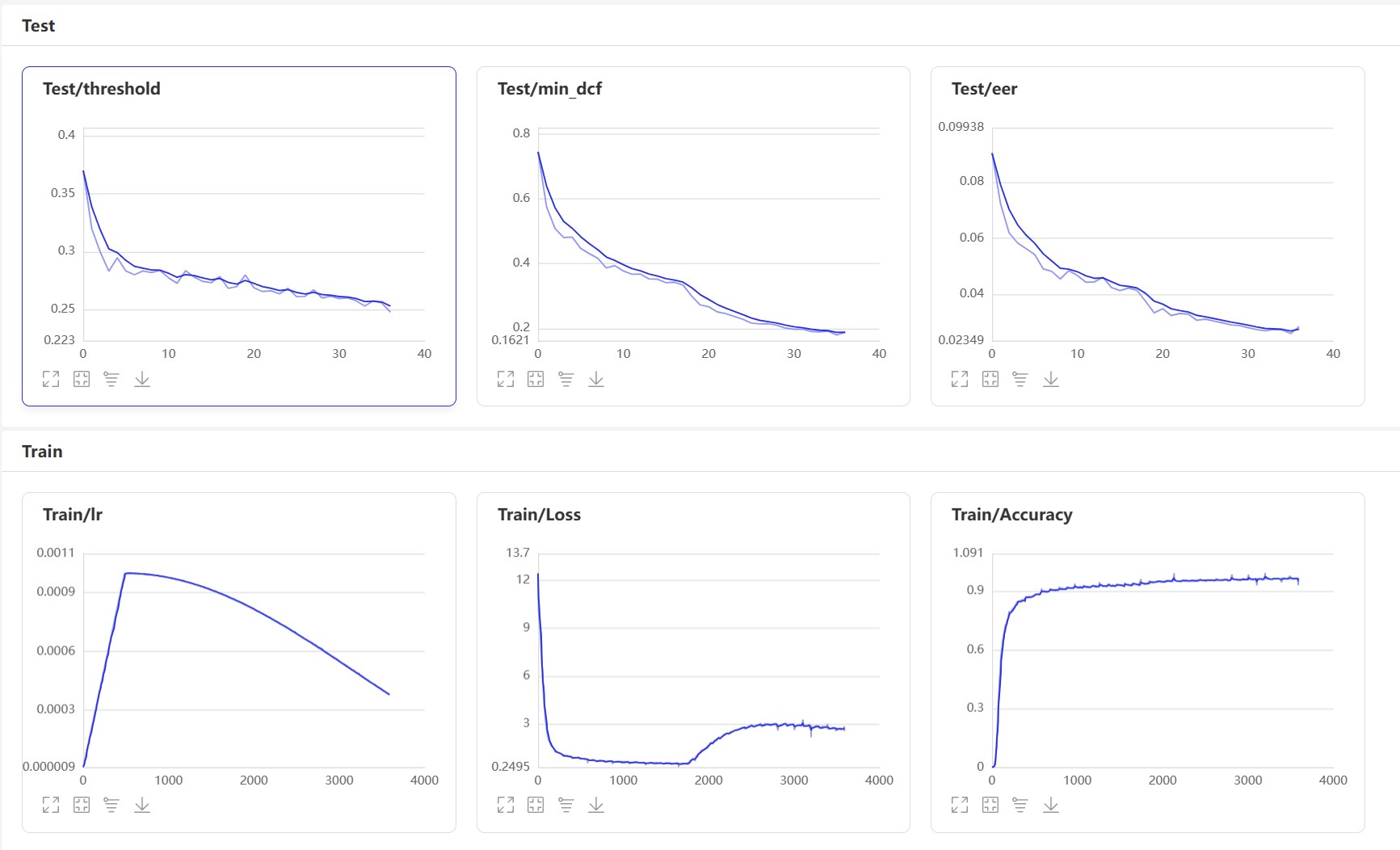
After training, the prediction model will be saved. We use the prediction model to predict the audio features in the test set, and then use the audio features to compare them in pairs to calculate EER and MinDCF.
python eval.pyThe output is similar to the following:
 ······
------------------------------------------------
W0425 08:27:32.057426 17654 device_context.cc:447] Please NOTE: device: 0, GPU Compute Capability: 7.5, Driver API Version: 11.6, Runtime API Version: 10.2
W0425 08:27:32.065165 17654 device_context.cc:465] device: 0, cuDNN Version: 7.6.
[2023-03-16 20:20:47.195908 INFO   ] trainer:evaluate:341 - 成功加载模型:models/EcapaTdnn_Fbank/best_model/model.pth
100%|███████████████████████████| 84/84 [00:28<00:00,  2.95it/s]
开始两两对比音频特征...
100%|███████████████████████████| 5332/5332 [00:05<00:00, 1027.83it/s]
评估消耗时间:65s,threshold:0.26,EER: 0.14739, MinDCF: 0.41999
Here are several commonly used interfaces. For more interfaces, please refer to mvector/predict.py . You can also look at the examples of声纹对比声纹识别.
 from mvector . predict import MVectorPredictor

predictor = MVectorPredictor ( configs = 'configs/cam++.yml' ,
                             model_path = 'models/CAMPPlus_Fbank/best_model/' )
# 获取音频特征
embedding = predictor . predict ( audio_data = 'dataset/a_1.wav' )
# 获取两个音频的相似度
similarity = predictor . contrast ( audio_data1 = 'dataset/a_1.wav' , audio_data2 = 'dataset/a_2.wav' )

# 注册用户音频
predictor . register ( user_name = '夜雨飘零' , audio_data = 'dataset/test.wav' )
# 识别用户音频
name , score = predictor . recognition ( audio_data = 'dataset/test1.wav' )
# 获取所有用户
users_name = predictor . get_users ()
# 删除用户音频
predictor . remove_user ( user_name = '夜雨飘零' ) Let’s start to implement voiceprint comparison and create an infer_contrast.py program. First, we introduce several important functions. predict() function can obtain voiceprint features, predict_batch() function can obtain a batch of voiceprint features, contrast() function can compare the similarity between two audios, register() function registers an audio into the voiceprint library, enters an audio from recognition() function and compares and recognizes it from the voiceprint library, remove_user() function and removes it. Register in the Voiceprint Library. We enter two speeches and obtain their feature data through the prediction function. Using this feature data, we can find their diagonal cosine value, and the result can be used as their acquaintance. For this threshold of recognition, readers can modify it according to the accuracy requirements of their projects.
python infer_contrast.py --audio_path1=audio/a_1.wav --audio_path2=audio/b_2.wavThe output is similar to the following:
 [2023-04-02 18:30:48.009149 INFO   ] utils:print_arguments:13 - ----------- 额外配置参数 -----------
[2023-04-02 18:30:48.009149 INFO   ] utils:print_arguments:15 - audio_path1: dataset/a_1.wav
[2023-04-02 18:30:48.009149 INFO   ] utils:print_arguments:15 - audio_path2: dataset/b_2.wav
[2023-04-02 18:30:48.009149 INFO   ] utils:print_arguments:15 - configs: configs/ecapa_tdnn.yml
[2023-04-02 18:30:48.009149 INFO   ] utils:print_arguments:15 - model_path: models/EcapaTdnn_Fbank/best_model/
[2023-04-02 18:30:48.009149 INFO   ] utils:print_arguments:15 - threshold: 0.6
[2023-04-02 18:30:48.009149 INFO   ] utils:print_arguments:15 - use_gpu: True
[2023-04-02 18:30:48.009149 INFO   ] utils:print_arguments:16 - ------------------------------------------------
······································································
W0425 08:29:10.006249 21121 device_context.cc:447] Please NOTE: device: 0, GPU Compute Capability: 7.5, Driver API Version: 11.6, Runtime API Version: 10.2
W0425 08:29:10.008555 21121 device_context.cc:465] device: 0, cuDNN Version: 7.6.
成功加载模型参数和优化方法参数:models/EcapaTdnn_Fbank/best_model/model.pth
audio/a_1.wav 和 audio/b_2.wav 不是同一个人,相似度为:-0.09565544128417969
At the same time, a voiceprint comparison program with a GUI interface is also provided. Execute infer_contrast_gui.py to start the program. The interface is as follows. Select two audios respectively. Click to start to judge to determine whether they are the same person.
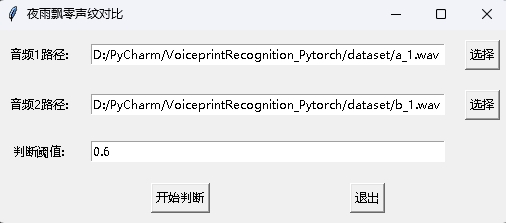
In news recognition, the register() function and recognition() function are mainly used. First, use register() function to register the audio into the voiceprint library. You can also directly add the file to the audio_db folder. When using it, you can initiate recognition through the recognition() function. Enter an audio and you can identify the required speaker from the voiceprint library.
With the above voiceprint recognition function, readers can complete voiceprint recognition according to their own project needs. For example, what I provide below is to complete voiceprint recognition through recording. First, the voice in the voice library must be loaded. The voice library folder is audio_db , and then the user will record the sound for 3 seconds after pressing the car. Then the program will automatically record the sound and use the recorded audio for voiceprint recognition to match the voice in the voice library and obtain user information. In this way, readers can also modify it to complete voiceprint recognition through service requests, for example, provide an API for APP to call. When the user logs in through voiceprint on the APP, he sends the recorded voice to the backend to complete voiceprint recognition, and then returns the result to the APP, provided that the user has registered with voiceprint and successfully stores the voice data in the audio_db folder.
python infer_recognition.pyThe output is similar to the following:
 [2023-04-02 18:31:20.521040 INFO   ] utils:print_arguments:13 - ----------- 额外配置参数 -----------
[2023-04-02 18:31:20.521040 INFO   ] utils:print_arguments:15 - audio_db_path: audio_db/
[2023-04-02 18:31:20.521040 INFO   ] utils:print_arguments:15 - configs: configs/ecapa_tdnn.yml
[2023-04-02 18:31:20.521040 INFO   ] utils:print_arguments:15 - model_path: models/EcapaTdnn_Fbank/best_model/
[2023-04-02 18:31:20.521040 INFO   ] utils:print_arguments:15 - record_seconds: 3
[2023-04-02 18:31:20.521040 INFO   ] utils:print_arguments:15 - threshold: 0.6
[2023-04-02 18:31:20.521040 INFO   ] utils:print_arguments:15 - use_gpu: True
[2023-04-02 18:31:20.521040 INFO   ] utils:print_arguments:16 - ------------------------------------------------
······································································
W0425 08:30:13.257884 23889 device_context.cc:447] Please NOTE: device: 0, GPU Compute Capability: 7.5, Driver API Version: 11.6, Runtime API Version: 10.2
W0425 08:30:13.260191 23889 device_context.cc:465] device: 0, cuDNN Version: 7.6.
成功加载模型参数和优化方法参数:models/ecapa_tdnn/model.pth
Loaded 沙瑞金 audio.
Loaded 李达康 audio.
请选择功能,0为注册音频到声纹库,1为执行声纹识别:0
按下回车键开机录音,录音3秒中:
开始录音......
录音已结束!
请输入该音频用户的名称:夜雨飘零
请选择功能,0为注册音频到声纹库,1为执行声纹识别:1
按下回车键开机录音,录音3秒中:
开始录音......
录音已结束!
识别说话的为:夜雨飘零,相似度为:0.920434
At the same time, a voiceprint recognition program with a GUI interface is also provided. Execute infer_recognition_gui.py to start, click注册音频到声纹库button, understand and start speaking, record for 3 seconds, and then enter the name of the registrant. After that, you can执行声纹识别button, and then speak immediately. After recording for 3 seconds, wait for the recognition result. The删除用户button can delete the user. The实时识别button can be recognized in real time, and can be recorded and recognized in real time.
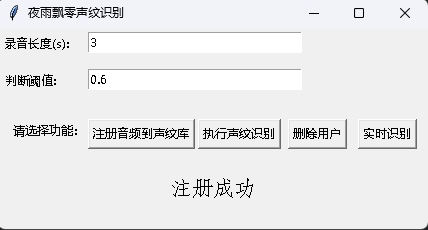
Execute the infer_speaker_diarization.py program, enter the audio path, and you can separate the speaker and display the results. It is recommended that the audio length should not be less than 10 seconds. For more functions, you can view the program parameters.
python infer_speaker_diarization.py --audio_path=dataset/test_long.wavThe output is similar to the following:
 2024-10-10 19:30:40.768 | INFO     | mvector.predict:__init__:61 - 成功加载模型参数:models/CAMPPlus_Fbank/best_model/model.pth
2024-10-10 19:30:40.795 | INFO     | mvector.predict:__create_index:127 - 声纹特征索引创建完成,一共有3个用户,分别是:['沙瑞金', '夜雨飘零', '李达康']
2024-10-10 19:30:40.796 | INFO     | mvector.predict:__load_audio_db:142 - 正在加载声纹库数据...
100%|██████████| 3/3 [00:00<?, ?it/s]
2024-10-10 19:30:40.798 | INFO     | mvector.predict:__create_index:127 - 声纹特征索引创建完成,一共有3个用户,分别是:['沙瑞金', '夜雨飘零', '李达康']
2024-10-10 19:30:40.798 | INFO     | mvector.predict:__load_audio_db:172 - 声纹库数据加载完成!
识别结果:
{'speaker': '沙瑞金', 'start': 0.0, 'end': 2.0}
{'speaker': '陌生人1', 'start': 4.0, 'end': 7.0}
{'speaker': '李达康', 'start': 7.0, 'end': 8.0}
{'speaker': '沙瑞金', 'start': 9.0, 'end': 12.0}
{'speaker': '沙瑞金', 'start': 13.0, 'end': 14.0}
{'speaker': '陌生人1', 'start': 15.0, 'end': 19.0}
The result image is displayed as follows. You can control the playback of audio through空格bar. Click the position to jump to the specified position:
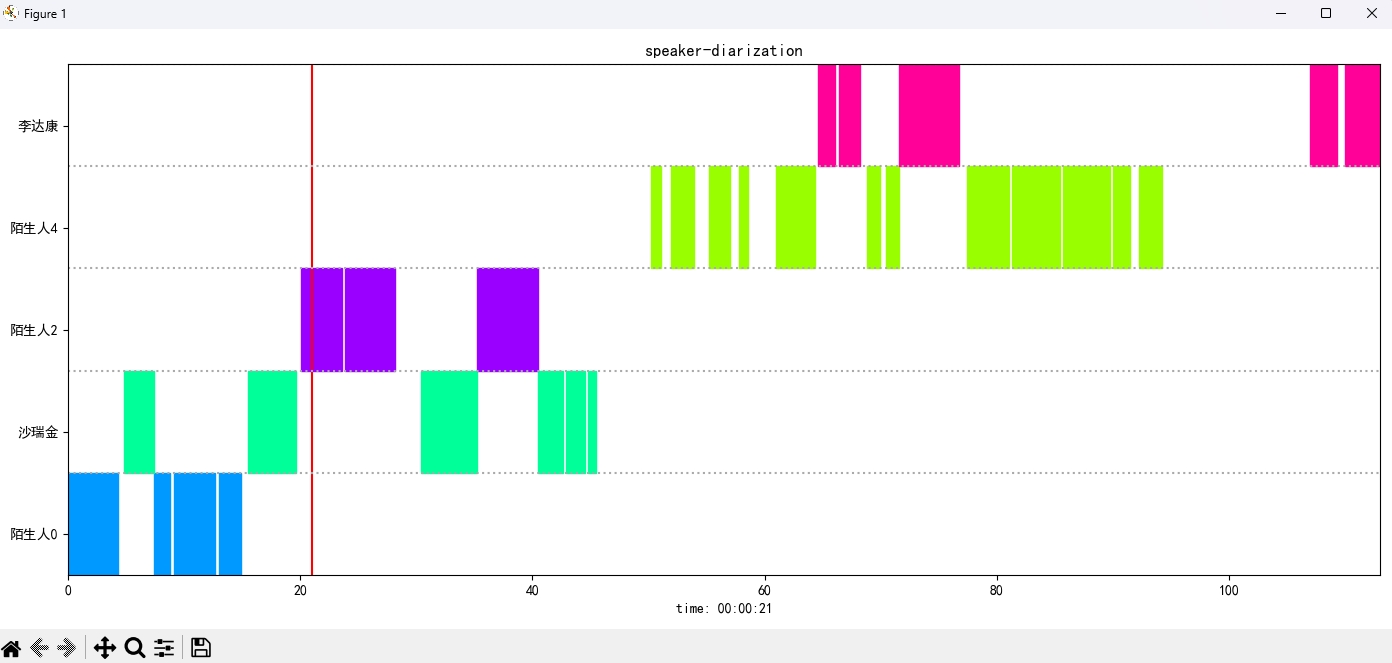
The project also provides a program with the GUI interface, executing the infer_speaker_diarization_gui.py program. For more functions, you can view the program parameters.
python infer_speaker_diarization_gui.pyYou can open such a page to identify the speaker:
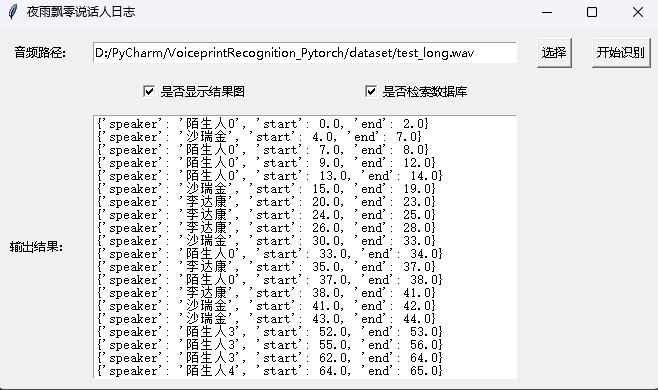
Note: If the speaker's name is in Chinese, you need to set the installation font to display it normally. Generally speaking, Windows does not need to be installed, but Ubuntu needs to be installed. If Windows is indeed missing fonts, you only need to download the .ttf format file here and copy it to C:WindowsFonts . The Ubuntu system operation is as follows.
git clone https://github.com/tracyone/program_font && cd program_font && ./install.sh import matplotlib
import shutil
import os
path = matplotlib . matplotlib_fname ()
path = path . replace ( 'matplotlibrc' , 'fonts/ttf/' )
print ( path )
shutil . copy ( '/usr/share/fonts/MyFonts/simhei.ttf' , path )
user_dir = os . path . expanduser ( '~' )
shutil . rmtree ( f' { user_dir } /.cache/matplotlib' , ignore_errors = True )Reward one dollar to support the author








