albert_zh
1.0.0

An Implementation of A Lite Bert For Self-Supervised Learning Language Representations with TensorFlow
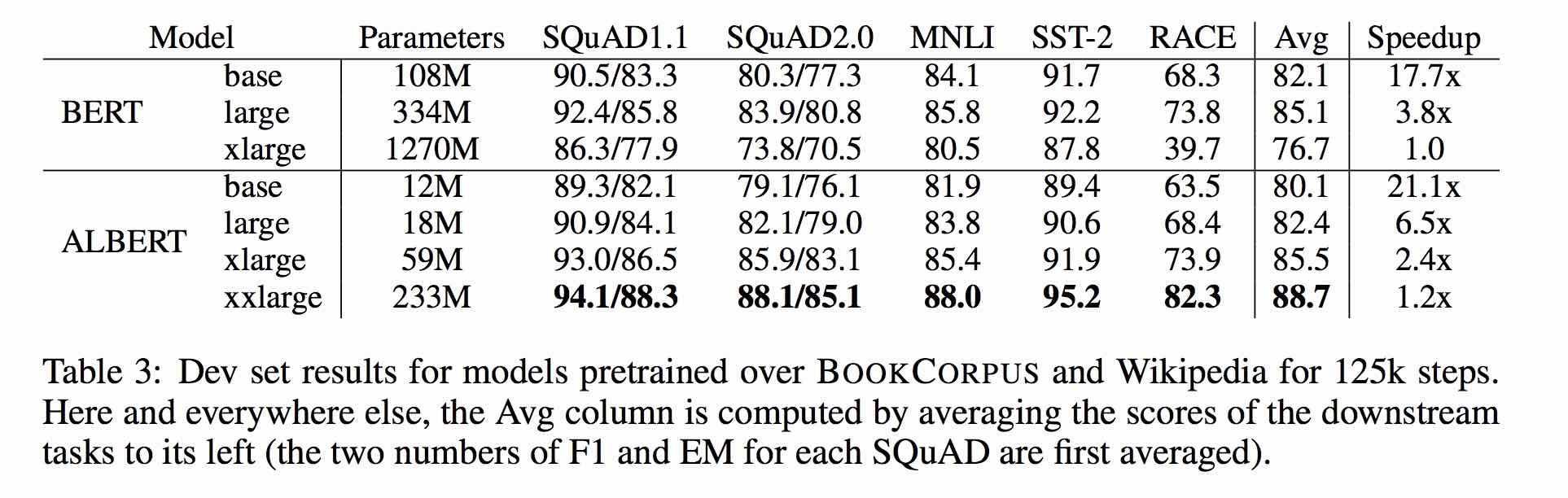
ALBert is based on Bert, but with some improvements. It achieves state of the art performance on main benchmarks with 30% parameters less.
For albert_base_zh it only has ten percentage parameters compared of original bert model, and main accuracy is retained.
Different version of ALBERT pre-trained model for Chinese, including TensorFlow, PyTorch and Keras, is available now.
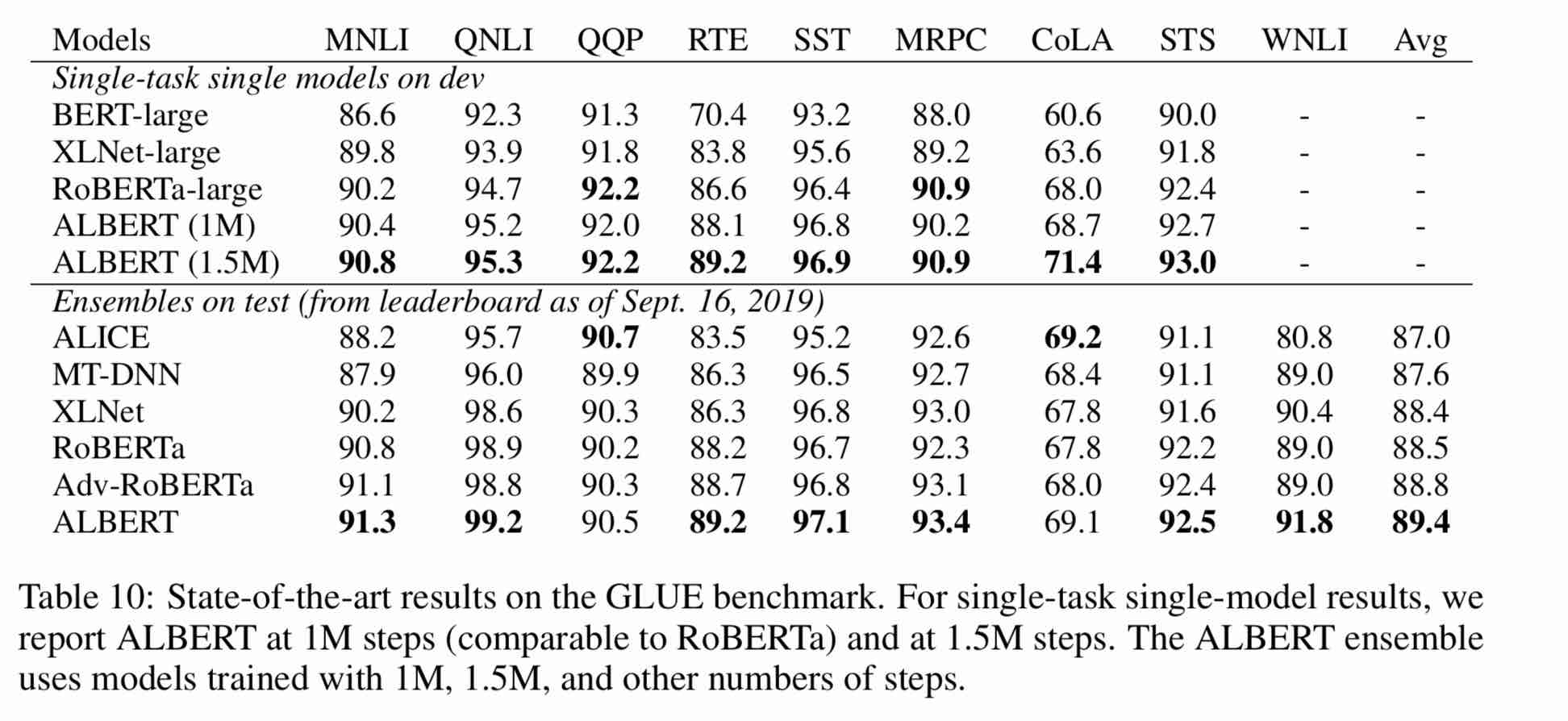
Pre-trained ALBERT model on massive Chinese corpus: fewer parameters and better results. Pre-trained small models can also win 13 NLP tasks, and ALBERT's three major transformations reach the top of the GLUE benchmark
clueai toolkit: three lines of code, customize an NLP API in three minutes (zero sample learning)

A detailed comparison of the model effects on 10 datasets, 9 baseline models, and one-click run, see CLUE benchmark
使用方式:
1、克隆项目
   git clone https://github.com/brightmart/albert_zh.git
2、运行一键运行脚本(GPU方式): 会自动下载模型和所有任务数据并开始运行。
   bash run_classifier_clue.sh
   执行该一键运行脚本将会自动下载所有任务数据,并为所有任务找到最优模型,然后测试得到提交结果
1. albert_tiny_zh, albert_tiny_zh (training longer, accumulating 2 billion samples to learn), file size 16M, parameter is 4M
训练和推理预测速度提升约10倍,精度基本保留,模型大小为bert的1/25;语义相似度数据集LCQMC测试集上达到85.4%,相比bert_base仅下降1.5个点。

lcqmc训练使用如下参数: --max_seq_length=128 --train_batch_size=64   --learning_rate=1e-4   --num_train_epochs=5

albert_tiny使用同样的大规模中文语料数据,层数仅为4层、hidden size等向量维度大幅减少; 尝试使用如下学习率来获得更好效果:{2e-5, 6e-5, 1e-4}

【使用场景】任务相对比较简单一些或实时性要求高的任务,如语义相似度等句子对任务、分类任务;比较难的任务如阅读理解等,可以使用其他大模型。

 例如,可以使用[Tensorflow Lite](https://www.tensorflow.org/lite)在移动端进行部署,本文[随后](#use_tflite)针对这一点进行了介绍,包括如何把模型转换成Tensorflow Lite格式和对其进行性能测试等。

 一键运行albert_tiny_zh(linux,lcqmc任务):
 1) git clone https://github.com/brightmart/albert_zh
 2) cd albert_zh
 3) bash run_classifier_lcqmc.sh
1.1. albert_tiny_google_zh (accumulative learning of 1 billion samples, google version), model size 16M, performance is consistent with albert_tiny_zh
1.2. albert_small_google_zh (accumulative learning of 1 billion samples, google version),
速度比bert_base快4倍;LCQMC测试集上比Bert下降仅0.9个点;去掉adam后模型大小18.5M;使用方法,见 #下游任务 Fine-tuning on Downstream Task
2. albert_large_zh, parameter quantity, number of layers 24, file size is 64M
参数量和模型大小为bert_base的六分之一;在口语化描述相似性数据集LCQMC的测试集上相比bert_base上升0.2个点
3. albert_base_zh (an additional 150 million instances were trained, i.e. 36k steps * batch_size 4096); albert_base_zh (small model experience version), parameter quantity 12M, number of layers 12, size is 40M
参数量为bert_base的十分之一,模型大小也十分之一;在口语化描述相似性数据集LCQMC的测试集上相比bert_base下降约0.6~1个点;
相比未预训练,albert_base提升14个点
4. albert_xlarge_zh_177k; albert_xlarge_zh_183k (priority try) parameter quantity, number of layers 24, file size is 230M
参数量和模型大小为bert_base的二分之一;需要一张大的显卡;完整测试对比将后续添加;batch_size不能太小,否则可能影响精度
Relying on Huggingface-Transformers 2.2.2, the above models can be easily called.
 tokenizer = AutoTokenizer.from_pretrained("MODEL_NAME")
model = AutoModel.from_pretrained("MODEL_NAME")
The corresponding list of MODEL_NAME is as follows:
| Model name | MODEL_NAME |
|---|---|
| albert_tiny_google_zh | voidful/albert_chinese_tiny |
| albert_small_google_zh | voidful/albert_chinese_small |
| albert_base_zh (from google) | voidful/albert_chinese_base |
| albert_large_zh (from google) | voidful/albert_chinese_large |
| albert_xlarge_zh (from google) | voidful/albert_chinese_xlarge |
| albert_xxlarge_zh (from google) | voidful/albert_chinese_xxlarge |
More examples of using albert through transformers
Run following command Run the following command. The project automatically has an example text file (data/news_zh_1.txt)
bash create_pretrain_data.sh
If you have many text files, you can generate multiple files of specific formats by passing in parameters (tfrecords)
 If you are doing pre-train for english or other language,which is not chinese,
you should set hyperparameter of non_chinese to True on create_pretraining_data.py;
otherwise, by default it is doing chinese pre-train using whole word mask of chinese.
 GPU(brightmart版, tiny模型):
export BERT_BASE_DIR=./albert_tiny_zh
nohup python3 run_pretraining.py --input_file=./data/tf*.tfrecord
--output_dir=./my_new_model_path --do_train=True --do_eval=True --bert_config_file=$BERT_BASE_DIR/albert_config_tiny.json
--train_batch_size=4096 --max_seq_length=512 --max_predictions_per_seq=51
--num_train_steps=125000 --num_warmup_steps=12500 --learning_rate=0.00176
--save_checkpoints_steps=2000  --init_checkpoint=$BERT_BASE_DIR/albert_model.ckpt &

GPU(Google版本, small模型):
export BERT_BASE_DIR=./albert_small_zh_google
nohup python3 run_pretraining_google.py --input_file=./data/tf*.tfrecord --eval_batch_size=64
--output_dir=./my_new_model_path --do_train=True --do_eval=True --albert_config_file=$BERT_BASE_DIR/albert_config_small_google.json  --export_dir=./my_new_model_path_export
--train_batch_size=4096 --max_seq_length=512 --max_predictions_per_seq=20
--num_train_steps=125000 --num_warmup_steps=12500 --learning_rate=0.00176
--save_checkpoints_steps=2000 --init_checkpoint=$BERT_BASE_DIR/albert_model.ckpt

TPU, add something like this:
    --use_tpu=True  --tpu_name=grpc://10.240.1.66:8470 --tpu_zone=us-central1-a

注:如果你重头开始训练,可以不指定init_checkpoint;
如果你从现有的模型基础上训练,指定一下BERT_BASE_DIR的路径,并确保bert_config_file和init_checkpoint两个参数的值能对应到相应的文件上;
领域上的预训练,根据数据的大小,可以不用训练特别久。
Use Python3 + Tensorflow 1.x
eg Tensorflow 1.4 or 1.5
Take using albert_base for LCQMC tasks as an example. The LCQMC task is to make text similarity predictions on a colloquial description dataset.
We will use LCQMC dataset for fine-tuning, it is oral language corpus, it is used to train and predict semantic similarity of a pair of sentences.
Download the LCQMC dataset, which contains training, validation and test sets. The training set contains 240,000 Chinese sentence pairs with colloquial descriptions, with labels of 1 or 0. 1 is sentence semantic similarity, and 0 is semantic different.
Do fine-tuning on the LCQMC dataset by running the following command:
 1. Clone this project:

      git clone https://github.com/brightmart/albert_zh.git

2. Fine-tuning by running the following command.
    brightmart版本的tiny模型
    export BERT_BASE_DIR=./albert_tiny_zh
    export TEXT_DIR=./lcqmc
    nohup python3 run_classifier.py   --task_name=lcqmc_pair   --do_train=true   --do_eval=true   --data_dir=$TEXT_DIR   --vocab_file=./albert_config/vocab.txt
    --bert_config_file=./albert_config/albert_config_tiny.json --max_seq_length=128 --train_batch_size=64   --learning_rate=1e-4  --num_train_epochs=5
    --output_dir=./albert_lcqmc_checkpoints --init_checkpoint=$BERT_BASE_DIR/albert_model.ckpt &

    google版本的small模型
    export BERT_BASE_DIR=./albert_small_zh
    export TEXT_DIR=./lcqmc
    nohup python3 run_classifier_sp_google.py --task_name=lcqmc_pair   --do_train=true   --do_eval=true   --data_dir=$TEXT_DIR   --vocab_file=./albert_config/vocab.txt
    --albert_config_file=./$BERT_BASE_DIR/albert_config_small_google.json --max_seq_length=128 --train_batch_size=64   --learning_rate=1e-4   --num_train_epochs=5
    --output_dir=./albert_lcqmc_checkpoints --init_checkpoint=$BERT_BASE_DIR/albert_model.ckpt &

Notice/注:
    1) you need to download pre-trained chinese albert model, and also download LCQMC dataset
    你需要下载预训练的模型,并放入到项目当前项目,假设目录名称为albert_tiny_zh; 需要下载LCQMC数据集,并放入到当前项目,
    假设数据集目录名称为lcqmc

    2) for Fine-tuning, you can try to add small percentage of dropout(e.g. 0.1) by changing parameters of
      attention_probs_dropout_prob & hidden_dropout_prob on albert_config_xxx.json. By default, we set dropout as zero.

    3) you can try different learning rate {2e-5, 6e-5, 1e-4} for better performance
****** 2019-11-03: add google version of albert_small, albert_tiny;
add method to deploy ablert_tiny to mobile devices with only 0.1 second inference time for sequence length 128, 60M memory ******
***** 2019-10-30: add a simple guide about converting the model to Tensorflow Lite for edge deployment *****
***** 2019-10-15: albert_tiny_zh, 10 times fast than bert base for training and inference, accuracy remains *****
***** 2019-10-07: more models of albert *****
add albert_xlarge_zh; albert_base_zh_additional_steps, training with more instances
***** 2019-10-04: PyTorch and Keras versions of albert were supported *****
a.Convert to PyTorch version and do your tasks through albert_pytorch
b.Load pre-trained model with keras using one line of codes through bert4keras
c.Use albert with TensorFlow 2.0: Use or load pre-trained model with tf2.0 through bert-for-tf2
Releasing albert_xlarge on 6th Oct
***** 2019-10-02: albert_large_zh,albert_base_zh *****
Relesed albert_base_zh with only 10% parameters of bert_base, a small model(40M) & training can be very fast.
Relased albert_large_zh with only 16% parameters of bert_base(64M)
***** 2019-09-28: codes and test functions *****
Add codes and test functions for three main changes of albert from bert
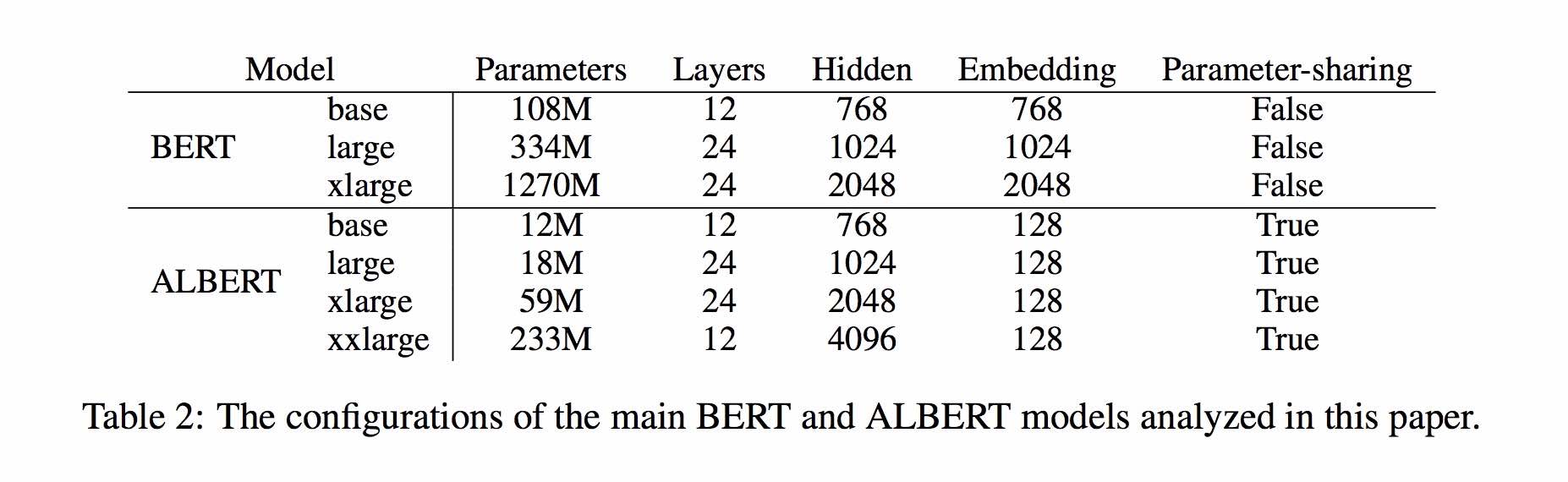
The ALBERT model is an improved version of BERT. Unlike other recent models of the art, this time it is a pre-trained small model, with better results and fewer parameters.
It has made three changes to BERT Three main changes of ALBert from Bert:
1) Factorized embedded parameterization of word embedding vector parameters
 O(V * H) to O(V * E + E * H)

 如以ALBert_xxlarge为例,V=30000, H=4096, E=128

 那么原先参数为V * H= 30000 * 4096 = 1.23亿个参数,现在则为V * E + E * H = 30000*128+128*4096 = 384万 + 52万 = 436万,

 词嵌入相关的参数变化前是变换后的28倍。
2) Cross-Layer Parameter Sharing
参数共享能显著减少参数。共享可以分为全连接层、注意力层的参数共享;注意力层的参数对效果的减弱影响小一点。
3) Paragraph continuity task Inter-sentence coherence loss.
 使用段落连续性任务。正例,使用从一个文档中连续的两个文本段落;负例,使用从一个文档中连续的两个文本段落,但位置调换了。

 避免使用原有的NSP任务,原有的任务包含隐含了预测主题这类过于简单的任务。

  We maintain that inter-sentence modeling is an important aspect of language understanding, but we propose a loss
  based primarily on coherence. That is, for ALBERT, we use a sentence-order prediction (SOP) loss, which avoids topic
  prediction and instead focuses on modeling inter-sentence coherence. The SOP loss uses as positive examples the
  same technique as BERT (two consecutive segments from the same document), and as negative examples the same two
  consecutive segments but with their order swapped. This forces the model to learn finer-grained distinctions about
  discourse-level coherence properties.
Other changes:
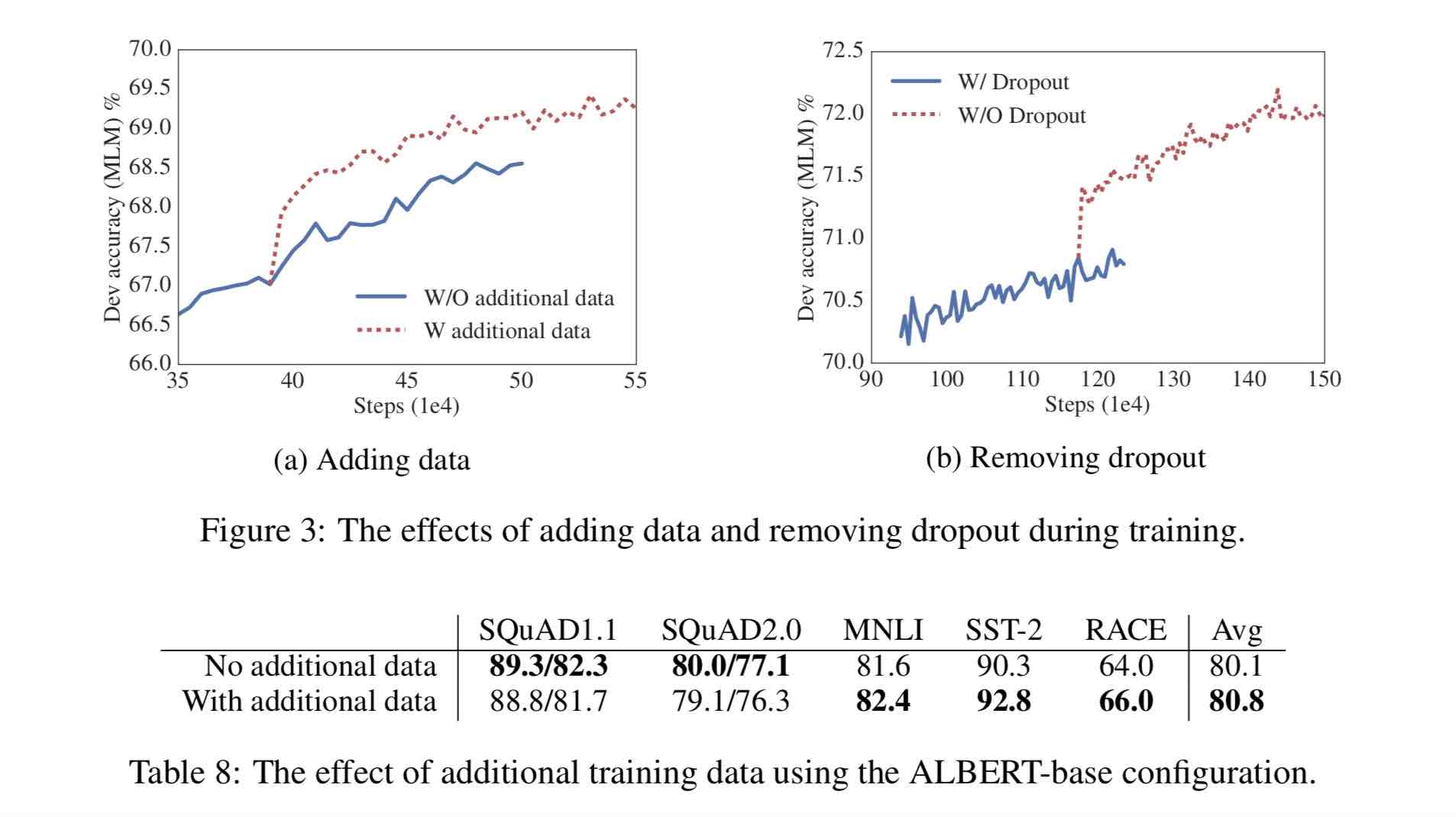
 1)去掉了dropout  Remove dropout to enlarge capacity of model.
    最大的模型,训练了1百万步后,还是没有过拟合训练数据。说明模型的容量还可以更大,就移除了dropout
    (dropout可以认为是随机的去掉网络中的一部分,同时使网络变小一些)
    We also note that, even after training for 1M steps, our largest models still do not overfit to their training data.
    As a result, we decide to remove dropout to further increase our model capacity.
    其他型号的模型,在我们的实现中我们还是会保留原始的dropout的比例,防止模型对训练数据的过拟合。

2)为加快训练速度,使用LAMB做为优化器 Use LAMB as optimizer, to train with big batch size
  使用了大的batch_size来训练(4096)。 LAMB优化器使得我们可以训练,特别大的批次batch_size,如高达6万。

3)使用n-gram(uni-gram,bi-gram, tri-gram)来做遮蔽语言模型 Use n-gram as make language model
   即以不同的概率使用n-gram,uni-gram的概率最大,bi-gram其次,tri-gram概率最小。
   本项目中目前使用的是在中文上做whole word mask,稍后会更新一下与n-gram mask的效果对比。n-gram从spanBERT中来。
30g Chinese corpus, more than 10 billion Chinese characters, including multiple encyclopedias, news, and interactive communities.
The pre-trained sequence length sequence_length is set to 512, the batch batch_size is 4096, and the training generates 350 million training data (instance); each model will train 125k steps by default, and albert_xxlarge will be trained for longer.
For comparison, roberta_zh pre-training generated 250 million training data with a sequence length of 256. Since albert_zh pre-training generates more training data and uses longer sequence lengths,
我们预计albert_zh会有比roberta_zh更好的性能表现,并且能更好处理较长的文本。
Training uses TPU v3 Pod, we are using v3-256, which contains 32 v3-8s. Each v3-8 machine contains 128G of video memory.
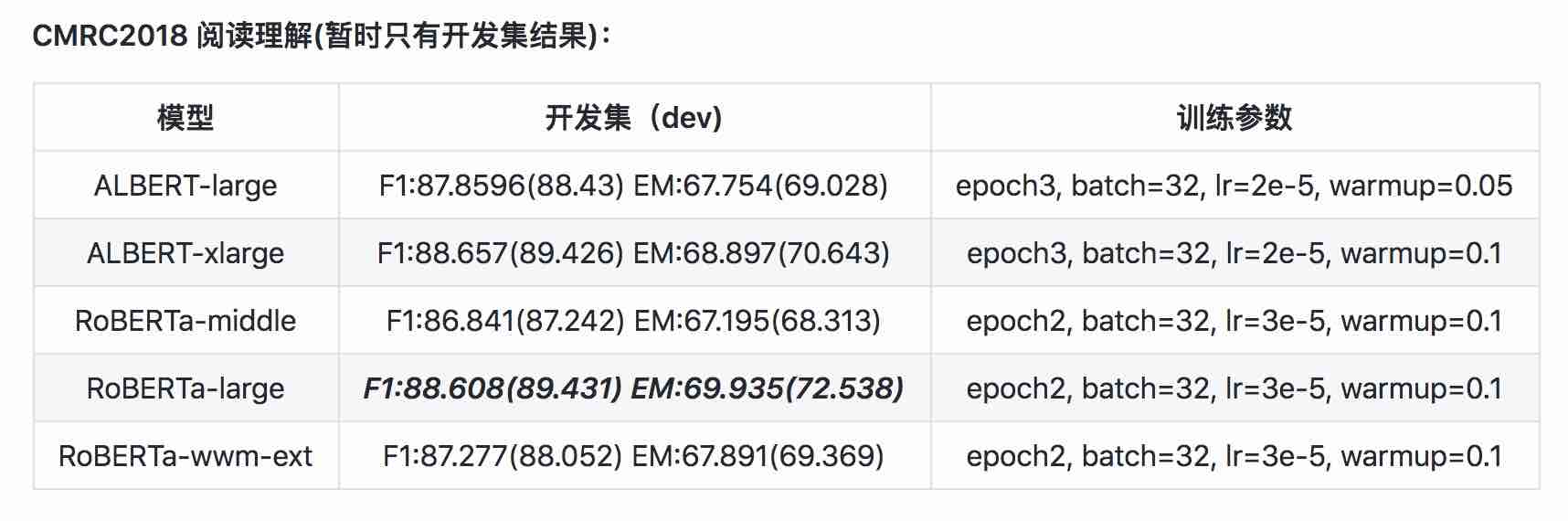
| Model | Development Set (Dev) | Test Set (Test) |
|---|---|---|
| BERT | 89.4(88.4) | 86.9(86.4) |
| ERNIE | 89.8 (89.6) | 87.2 (87.0) |
| BERT-wwm | 89.4 (89.2) | 87.0 (86.8) |
| BERT-wwm-ext | - | - |
| RoBERTa-zh-base | 88.7 | 87.0 |
| RoBERTa-zh-Large | 89.9(89.6) | 87.2(86.7) |
| RoBERTa-zh-Large(20w_steps) | 89.7 | 87.0 |
| ALBERT-zh-tiny | -- | 85.4 |
| ALBERT-zh-small | -- | 86.0 |
| ALBERT-zh-small(Pytorch) | -- | 86.8 |
| ALBERT-zh-base-additional-36k-steps | 87.8 | 86.3 |
| ALBERT-zh-base | 87.2 | 86.3 |
| ALBERT-large | 88.7 | 87.1 |
| ALBERT-xlarge | 87.3 | 87.7 |
Note: I only ran ALBERT-xlarge once, and the effect may be improved
| Model | Development Set | Test set |
|---|---|---|
| BERT | 77.8 (77.4) | 77.8 (77.5) |
| ERNIE | 79.7 (79.4) | 78.6 (78.2) |
| BERT-wwm | 79.0 (78.4) | 78.2 (78.0) |
| BERT-wwm-ext | 79.4 (78.6) | 78.7 (78.3) |
| XLNet | 79.2 | 78.7 |
| RoBERTa-zh-base | 79.8 | 78.8 |
| RoBERTa-zh-Large | 80.2 (80.0) | 79.9 (79.5) |
| ALBERT-base | 77.0 | 77.1 |
| ALBERT-large | 78.0 | 77.5 |
| ALBERT-xlarge | ? | ? |
Note: BERT-wwm-ext comes from here; XLNet comes from here; RoBERTa-zh-base refers to the 12-layer RoBERTa Chinese model
| Model | MLM eval acc | SOP eval acc | Training(Hours) | Loss eval |
|---|---|---|---|---|
| albert_zh_base | 79.1% | 99.0% | 6h | 1.01 |
| albert_zh_large | 80.9% | 98.6% | 22.5h | 0.93 |
| albert_zh_xlarge | ? | ? | 53h (estimated) | ? |
| albert_zh_xxlarge | ? | ? | 106h (estimated) | ? |
Note:? Will be replaced soon
Test the main improvement points by running the following commands, including but not limited to factorization of word embedding vector parameters, cross-layer parameter sharing, paragraph continuity tasks, etc.
python test_changes.py
Here we mainly introduce TFLite model format conversion and performance testing. After converting to TFLite model, for how to use the model on the mobile side, you can refer to the complete Android/iOS application development case tutorial page provided by TFLite. This page currently contains two Android cases: text classification and text Q&A.
The following is an example to introduce the TFLite model format conversion and performance testing:
Ensure to have >=1.14 1.x installed to use the freeze_graph tool as it is removed from 2.x distribution
 pip install tensorflow==1.15

freeze_graph --input_checkpoint=./albert_model.ckpt
  --output_graph=/tmp/albert_tiny_zh.pb
  --output_node_names=cls/predictions/truediv
  --checkpoint_version=1 --input_meta_graph=./albert_model.ckpt.meta --input_binary=true
We are going to use the new experimental tf->tflite converter that's distributed with the Tensorflow nightly build.
 pip install tf-nightly

tflite_convert --graph_def_file=/tmp/albert_tiny_zh.pb
  --input_arrays='input_ids,input_mask,segment_ids,masked_lm_positions,masked_lm_ids,masked_lm_weights'
  --output_arrays='cls/predictions/truediv'
  --input_shapes=1,128:1,128:128:1,128:1,128:1,128
  --output_file=/tmp/albert_tiny_zh.tflite
  --enable_v1_converter --experimental_new_converter
See here for details about the performance benchmark tools in TFLite. For example: after building the benchmark tool binary for an Android phone, do the following to get an idea of how the TFLite model performs on the phone
 adb push /tmp/albert_tiny_zh.tflite /data/local/tmp/
adb shell /data/local/tmp/benchmark_model_performance_options --graph=/data/local/tmp/albert_tiny_zh.tflite --perf_options_list=cpu
On an Android phone w/ Qualcomm's SD845 SoC, via the above benchmark tool, as of 2019/11/01, the inference latency is ~120ms w/ this converted TFLite model using 4 threads on CPU, and the memory usage is ~60MB for the model during inference. Note the performance will improve further with future TFLite implementation optimizations.
 download pre-trained model, and convert to PyTorch using:

  python convert_albert_tf_checkpoint_to_pytorch.py
using albert_pytorch
bert4keras adapts to albert, which can successfully load the weight of albert_zh. You only need to add albert=True to the load_pretrained_model function.
load pre-trained model with bert4keras
bert-for-tf2
Function description: Users can use this example to understand how to load the training set to achieve short text similarity judgment based on user input. Based on this code, you can flexibly expand the program to background services or add text classification and other examples.
Code involved: similarity.py, args.py
step:
1. Use this model to train text similarity and save the model file to the corresponding directory.
2. According to the actual situation, modify the parameters in args.py. The parameters are as follows:
 #模型目录,存放ckpt文件
model_dir = os . path . join ( file_path , 'albert_lcqmc_checkpoints/' )

#config文件,存放模型的json文件
config_name = os . path . join ( file_path , 'albert_config/albert_config_tiny.json' )

#ckpt文件名称
ckpt_name = os . path . join ( model_dir , 'model.ckpt' )

#输出文件目录,训练时的模型输出目录
output_dir = os . path . join ( file_path , 'albert_lcqmc_checkpoints/' )

#vocab文件目录
vocab_file = os . path . join ( file_path , 'albert_config/vocab.txt' )

#数据目录,训练使用的数据集存放目录
data_dir = os . path . join ( file_path , 'data/' )
The file structure in this example is:
 |__args.py

|__similarity.py

|__data

|__albert_config

|__albert_lcqmc_checkpoints

|__lcqmc
3. Modify the user input word
Open similarity.py, and the following code at the bottom:
 if __name__ == '__main__' :
    sim = BertSim ()
    sim . start_model ()
    sim . predict_sentences ([( "我喜欢妈妈做的汤" , "妈妈做的汤我很喜欢喝" )])
where sim.start_model() represents the loading model, and the input of sim.predict_sentences is an array of tuples, and the tuple contains two elements, sentences that need to be judged similar.
4. Run python file: similarity.py
| System | Seq Length | Max Batch Size |
|---|---|---|
albert-base | 64 | 64 |
| ... | 128 | 32 |
| ... | 256 | 16 |
| ... | 320 | 14 |
| ... | 384 | 12 |
| ... | 512 | 6 |
albert-large | 64 | 12 |
| ... | 128 | 6 |
| ... | 256 | 2 |
| ... | 320 | 1 |
| ... | 384 | 0 |
| ... | 512 | 0 |
albert-xlarge | - | - |
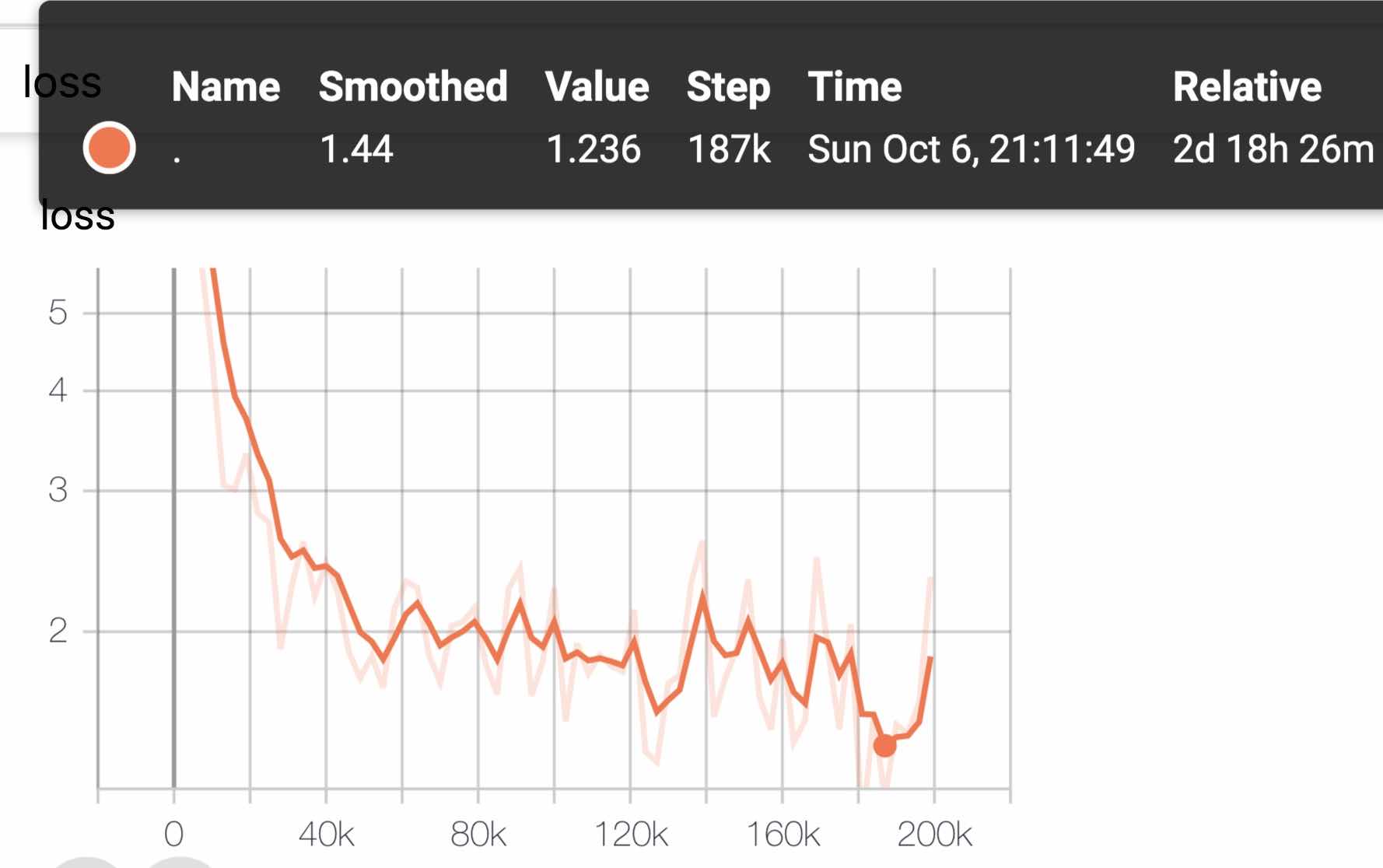
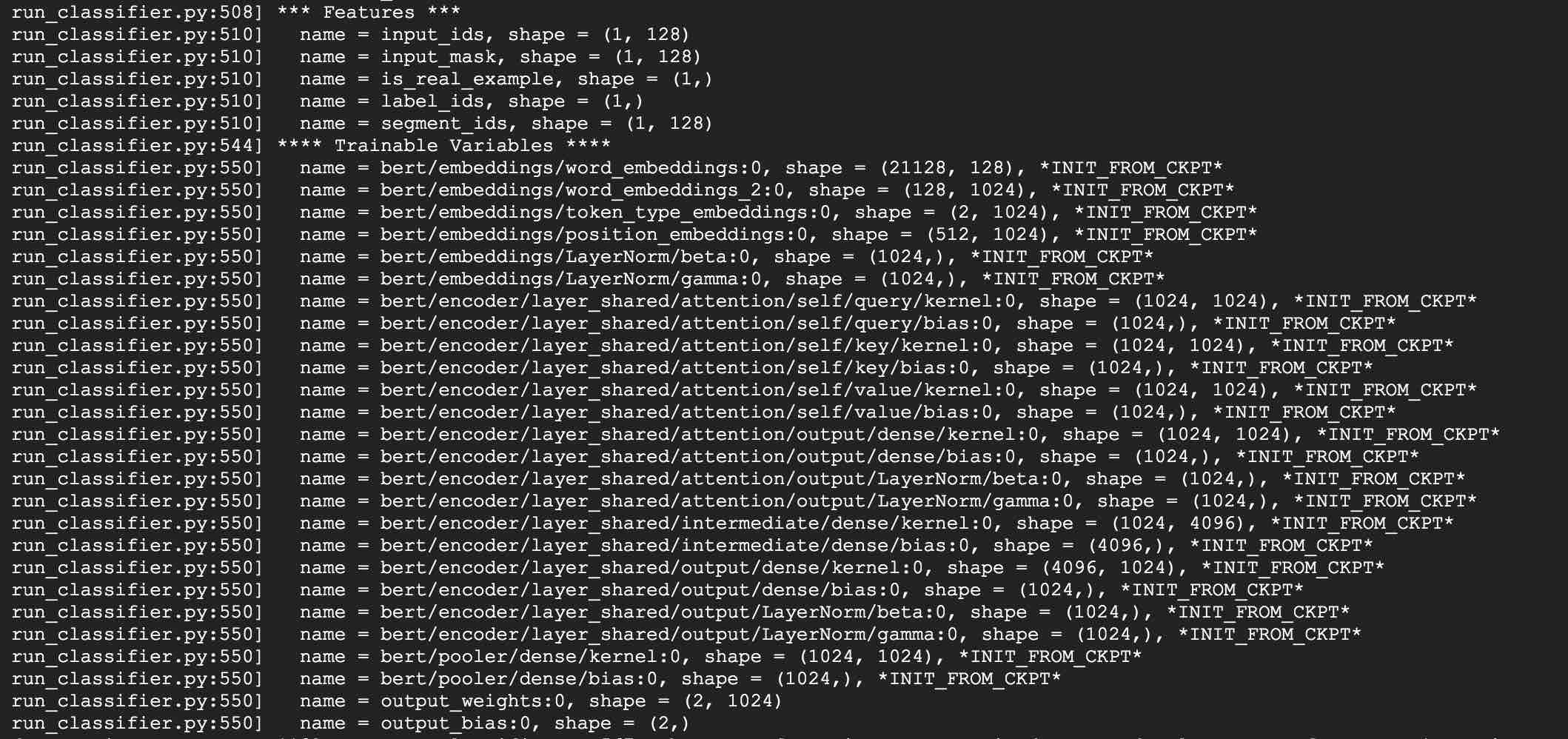
If you have any question, you can raise an issue, or send me an email: [email protected];
Currently how to use PyTorch version of albert is not clear yet, if you know how to do that, just email us or open an issue.
You can also send pull request to report you performance on your task or add methods on how to load models for PyTorch and so on.
If you have ideas for generating best performance pre-training Chinese model, please also let me know.
Bright Liang Xu, albert_zh, (2019), GitHub repository, https://github.com/brightmart/albert_zh
1. ALBERT: A Lite BERT For Self-Supervised Learning Of Language Representations
2. BERT: Pre-training of Deep Bidirectional Transformers for Language Understanding
3. SpanBERT: Improving Pre-training by Representing and Predicting Spans
4. RoBERTa: A Robustly Optimized BERT Pretraining Approach
5. Large Batch Optimization for Deep Learning: Training BERT in 76 minutes(LAMB)
6. LAMB Optimizer,TensorFlow version
7. Pre-trained small models can also win 13 NLP tasks, and ALBERT's three major transformations reach the top of the GLUE benchmark
8. albert_pytorch
9. Load albert with keras
10. load albert with tf2.0
11. Repo of albert from Google
12. chineseGLUE-Chinese task benchmark evaluation: publicly available multiple tasks, baseline models, extensive evaluation and effect comparison








