knn search algorithm comparison
1.0.0

The K-nearest neighbors (k-NN) algorithm, introduced in 1951, has been widely used for both classification and regression tasks. The core concept involves identifying the k most similar instances (neighbors) to a given query point within a dataset and using these neighbors to make predictions or classifications. In recent years, the importance of vector databases and vector indexes has grown, particularly for information retrieval to support large language models (LLMs) in processing extensive datasets of text and other data. A prominent example of this application is retrieval-augmented generation (RAG).
This project compares the performance of different k-NN search algorithms across various dataset sizes and dimensions. The algorithms compared are:
KD-Tree (K-Dimensional Tree):
   y
   |
4  |    C
   |  A   D
2  |    B
   |___________
   0    2    4  x
Points: A(1,3), B(3,1), C(4,3), D(3,3) Tree structure: Root(x=2) -> Left(y=2) -> Right(x=3)
Ball Tree:
   y
   |
4  |    (C)
   |  (A)  (D)
2  |    (B)
   |___________
   0    2    4  x
Outer circle contains all points, inner circles divide subsets.
Full KNN (Brute Force):
   y
   |
4  |    C
   |  A   D
2  |----Q--B
   |___________
   0    2    4  x
Calculate distances: QA=1.41, QB=1, QC=2.24, QD=1.41 Result: Nearest 2 neighbors are B and A (or D)
HNSW (Hierarchical Navigable Small World):
Layer 2:   A --- C
           |
Layer 1:   A --- B --- C
           |    |    |
Layer 0:   A --- B --- C --- D --- E
Search starts at a random point in the top layer and descends, exploring neighbors at each level until reaching the bottom.
The choice between these algorithms depends on the dataset size, dimensionality, required accuracy, and query speed. KD-Tree and Ball Tree provide exact results and are efficient for low to moderate dimensions. Full KNN is simple but becomes slow for large datasets. HNSW offers a good balance between speed and accuracy, especially for high-dimensional data or large datasets.
Clone this repository:
git clone https://github.com/yourusername/knn-search-comparison.git
cd knn-search-comparison
Create a virtual environment (optional but recommended):
python -m venv venv
source venv/bin/activate  # On Windows, use `venvScriptsactivate`
Install the required dependencies:
pip install -r requirements.txt
This will install all necessary packages listed in the requirements.txt file, including numpy, scipy, scikit-learn, hnswlib, tabulate, and tqdm.
To run the comparison tests with default parameters:
python app.py
You can also customize the test parameters using command-line arguments:
python app.py --vectors 1000 10000 100000 --dimensions 4 16 256 --num-tests 5 --k 5
Available arguments:
--vectors: List of vector counts to test (default: 1000, 2000, 5000, 10000, 20000, 50000, 100000, 200000)--dimensions: List of dimensions to test (default: 4 16 256 1024)--num-tests: Number of tests to run for each combination (default: 10)--k: Number of nearest neighbors to search for (default: 10)The script will display a progress bar during execution, giving you an estimate of the remaining time.
The script can be interrupted at any time by pressing Ctrl+C. It will attempt to exit gracefully, even during time-consuming operations like building the HNSW index.
The script will display progress and results in the console. After completion, you'll see:
Example output for a single combination:
Results for 10000 vectors with 256 dimensions:
KD-Tree build time:       0.123456 seconds
Ball Tree build time:     0.234567 seconds
HNSW build time:          0.345678 seconds
KD-Tree search time:      0.001234 seconds
Ball Tree search time:    0.002345 seconds
Brute Force search time:  0.012345 seconds
HNSW search time:         0.000123 seconds
The final results table and CSV file will include both build times and search times for each algorithm, allowing for a comprehensive comparison of performance across different vector counts and dimensions.
You can modify the following variables in app.py to adjust the test parameters:
NUM_VECTORS_LIST: List of vector counts to testNUM_DIMENSIONS_LIST: List of dimensions to testNUM_TESTS: Number of tests to run for each combinationK: Number of nearest neighbors to search forContributions are welcome! Please feel free to submit a Pull Request.
This project is open source and available under the MIT License.
Below is a chart showing the KNN search results:
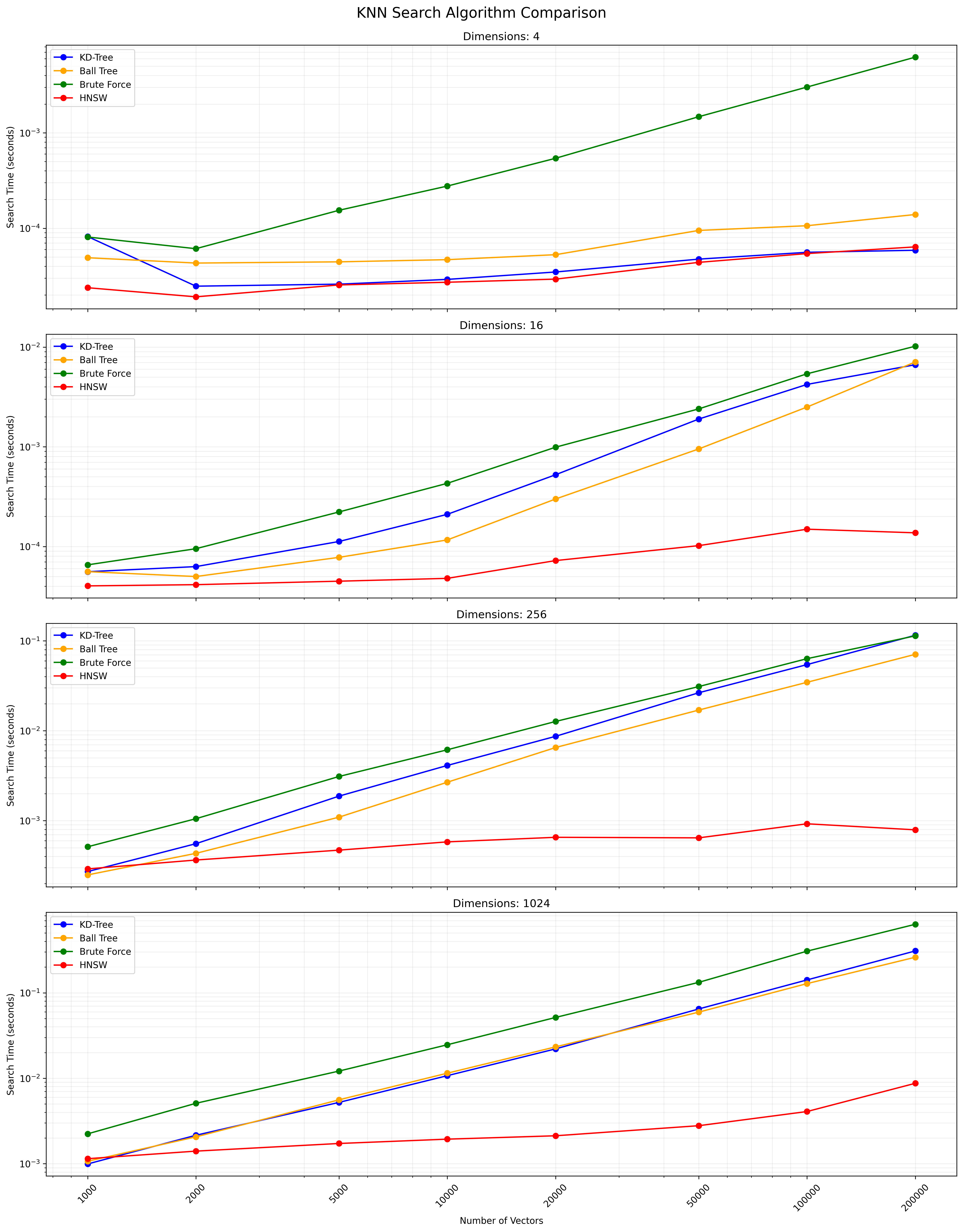
A CSV file containing the detailed results is available here.





