ParallelWaveGAN
Version 0.6.1

該存儲庫提供了以下模型的非官方Pytorch實現:
您可以將這些最先進的非自動迴旋型號結合起來,以構建自己的出色聲碼器!
請在演示HP中檢查我們的樣品。
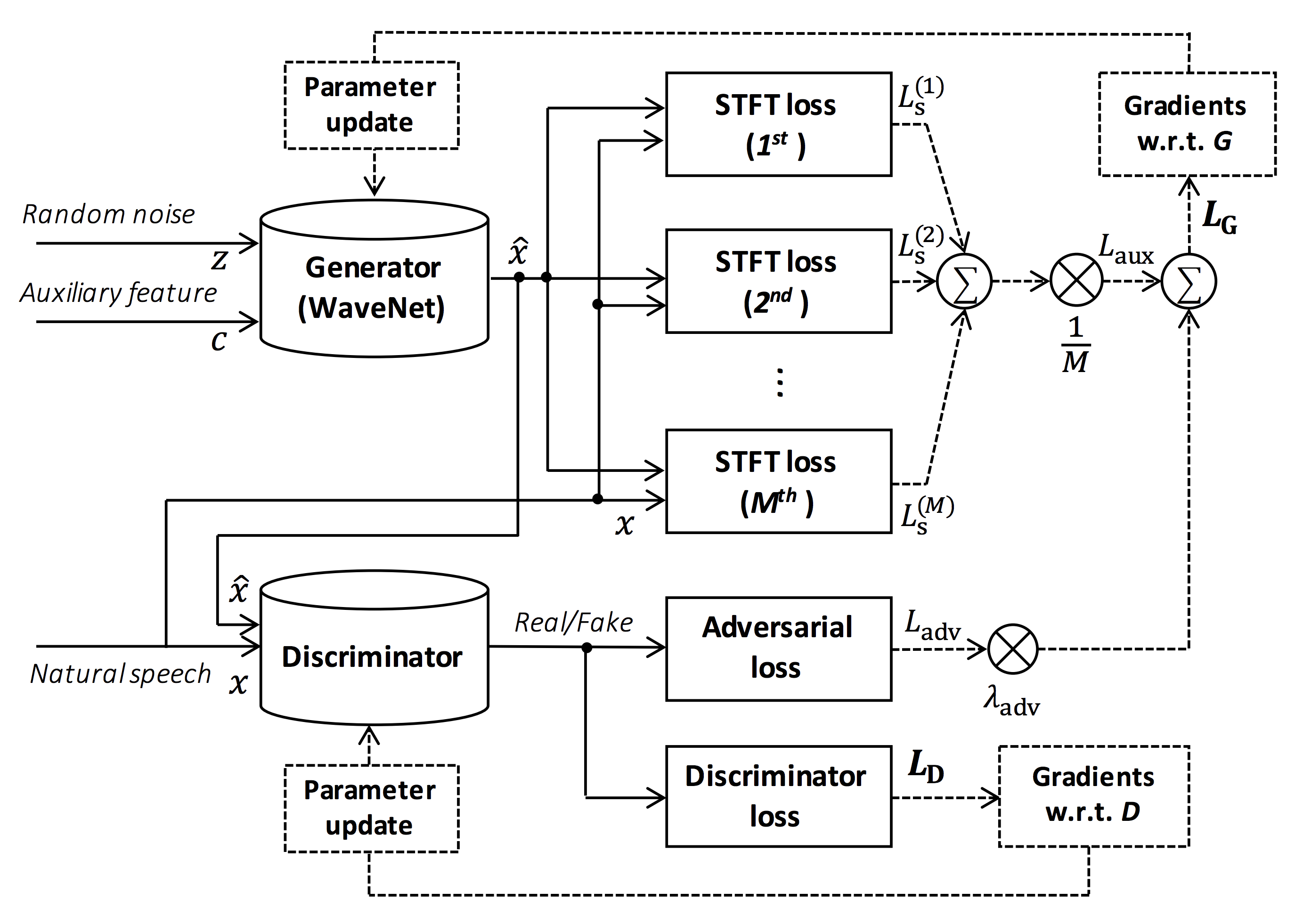
圖的來源:https://arxiv.org/pdf/1910.11480.pdf
該存儲庫的目的是提供實時的神經聲碼器,該神經聲碼器與ESPNET-TT兼容。
此外,該存儲庫可以與基於NVIDIA/TACOTRON2的實現結合使用(請參閱此註釋)。
您可以在Google Colab中嘗試實時的端到端文本到語音和唱歌語音綜合演示!
該存儲庫在Ubuntu 20.04上使用GPU Titan V進行了測試。
sudo apt install libsndfile-dev在ubuntu中安裝)sudo apt install jq安裝)sudo apt install sox )不同的CUDA版本應起作用,但不能明確測試。
所有代碼均在pytorch 1.8.1、1.9、1.10.2、1.11.0、1.12.1、1.13.1、2.0.1和2.1.0上測試。
您可以從兩個替代方案中選擇安裝方法。
$ git clone https://github.com/kan-bayashi/ParallelWaveGAN.git
$ cd ParallelWaveGAN
$ pip install -e .
# If you want to use distributed training, please install
# apex manually by following https://github.com/NVIDIA/apex
$ ...
請注意,您的CUDA版本必須與用於安裝Apex的Pytorch二進製版的版本完全匹配。
要安裝帶有不同CUDA版本的Pytorch,請參見tools/Makefile 。
$ git clone https://github.com/kan-bayashi/ParallelWaveGAN.git
$ cd ParallelWaveGAN/tools
$ make
# If you want to use distributed training, please run following
# command to install apex.
$ make apex
請注意,我們指定用於編譯Pytorch車輪的CUDA版本。
如果您想使用不同的CUDA版本,請檢查tools/Makefile以更改要安裝的pytorch車輪。
該存儲庫提供了與ESPNET相同的Kaldi風格食譜。
目前,支持以下食譜。
要運行食譜,請按照以下說明。
 # Let us move on the recipe directory
$ cd egs/ljspeech/voc1

# Run the recipe from scratch
$ ./run.sh

# You can change config via command line
$ ./run.sh --conf < your_customized_yaml_config >

# You can select the stage to start and stop
$ ./run.sh --stage 2 --stop_stage 2

# If you want to specify the gpu
$ CUDA_VISIBLE_DEVICES=1 ./run.sh --stage 2

# If you want to resume training from 10000 steps checkpoint
$ ./run.sh --stage 2 --resume < path > / < to > /checkpoint-10000steps.pkl
查看有關此讀數中食譜的更多信息。
用Titan V的解碼速度為RTF = 0.016,比實時速度快得多。
[decode]: 100% | ██████████ | 250/250 [00: 30< 00:00,  8.31it/s, RTF = 0.0156]
2019-11-03 09:07:40,480 (decode:127) INFO: finished generation of 250 utterances (RTF = 0.016).
即使在CPU(Intel(R)Xeon(R)Gold 6154 CPU @ 3.00GHz 16線程)中,它也可以生成小於實時的。
[decode]: 100% | ██████████ | 250/250 [22: 16< 00:00,  5.35s/it, RTF = 0.841]
2019-11-06 09:04:56,697 (decode:129) INFO: finished generation of 250 utterances (RTF = 0.734).
如果您使用梅爾根的發電機,解碼速度將更快。
 # On CPU (Intel(R) Xeon(R) Gold 6154 CPU @ 3.00GHz 16 threads)
[decode]: 100% | ██████████ | 250/250 [04: 00< 00:00,  1.04it/s, RTF = 0.0882]
2020-02-08 10:45:14,111 (decode:142) INFO: Finished generation of 250 utterances (RTF = 0.137).

# On GPU (TITAN V)
[decode]: 100% | ██████████ | 250/250 [00: 06< 00:00, 36.38it/s, RTF = 0.00189]
2020-02-08 05:44:42,231 (decode:142) INFO: Finished generation of 250 utterances (RTF = 0.002).
如果您使用多波段梅爾根的發電機,解碼速度將更快。
 # On CPU (Intel(R) Xeon(R) Gold 6154 CPU @ 3.00GHz 16 threads)
[decode]: 100% | ██████████ | 250/250 [01: 47< 00:00,  2.95it/s, RTF = 0.048]
2020-05-22 15:37:19,771 (decode:151) INFO: Finished generation of 250 utterances (RTF = 0.059).

# On GPU (TITAN V)
[decode]: 100% | ██████████ | 250/250 [00: 05< 00:00, 43.67it/s, RTF = 0.000928]
2020-05-22 15:35:13,302 (decode:151) INFO: Finished generation of 250 utterances (RTF = 0.001).
如果您想加快推論,那麼值得嘗試從Pytorch轉換為TensorFlow。
該轉換的示例可在筆記本電腦(由@dathudeptrai提供)中獲得。
在這裡,結果總結在表中。
您可以從鏈接到我們的Google Drive鏈接下載示例並下載驗證的模型。
| 模型 | conf | 朗 | FS [Hz] | MEL範圍[Hz] | FFT / HOP / WIN [PT] | #iTers |
|---|---|---|---|---|---|---|
| ljspeech_parallel_wavegan.v1 | 關聯 | en | 22.05k | 80-7600 | 1024 /256 /無 | 400k |
| ljspeech_parallel_wavegan.v1.long | 關聯 | en | 22.05k | 80-7600 | 1024 /256 /無 | 1m |
| ljspeech_parallel_wavegan.v1.no_limit | 關聯 | en | 22.05k | 沒有任何 | 1024 /256 /無 | 400k |
| ljspeech_parallel_wavegan.v3 | 關聯 | en | 22.05k | 80-7600 | 1024 /256 /無 | 3m |
| ljspeech_melgan.v1 | 關聯 | en | 22.05k | 80-7600 | 1024 /256 /無 | 400k |
| ljspeech_melgan.v1.長 | 關聯 | en | 22.05k | 80-7600 | 1024 /256 /無 | 1m |
| ljspeech_melgan_large.v1 | 關聯 | en | 22.05k | 80-7600 | 1024 /256 /無 | 400k |
| ljspeech_melgan_large.v1.long | 關聯 | en | 22.05k | 80-7600 | 1024 /256 /無 | 1m |
| ljspeech_melgan.v3 | 關聯 | en | 22.05k | 80-7600 | 1024 /256 /無 | 2m |
| ljspeech_melgan.v3.長 | 關聯 | en | 22.05k | 80-7600 | 1024 /256 /無 | 4m |
| ljspeech_full_band_melgan.v1 | 關聯 | en | 22.05k | 80-7600 | 1024 /256 /無 | 1m |
| ljspeech_full_band_melgan.v2 | 關聯 | en | 22.05k | 80-7600 | 1024 /256 /無 | 1m |
| ljspeech_multi_band_melgan.v1 | 關聯 | en | 22.05k | 80-7600 | 1024 /256 /無 | 1m |
| ljspeech_multi_band_melgan.v2 | 關聯 | en | 22.05k | 80-7600 | 1024 /256 /無 | 1m |
| ljspeech_hifigan.v1 | 關聯 | en | 22.05k | 80-7600 | 1024 /256 /無 | 2.5m |
| ljspeech_style_melgan.v1 | 關聯 | en | 22.05k | 80-7600 | 1024 /256 /無 | 1.5m |
| jsut_parallel_wavegan.v1 | 關聯 | JP | 24k | 80-7600 | 2048/300/1200 | 400k |
| jsut_multi_band_melgan.v2 | 關聯 | JP | 24k | 80-7600 | 2048/300/1200 | 1m |
| Just_hifigan.v1 | 關聯 | JP | 24k | 80-7600 | 2048/300/1200 | 2.5m |
| just_style_melgan.v1 | 關聯 | JP | 24k | 80-7600 | 2048/300/1200 | 1.5m |
| csmsc_parallel_wavegan.v1 | 關聯 | ZH | 24k | 80-7600 | 2048/300/1200 | 400k |
| csmsc_multi_band_melgan.v2 | 關聯 | ZH | 24k | 80-7600 | 2048/300/1200 | 1m |
| csmsc_hifigan.v1 | 關聯 | ZH | 24k | 80-7600 | 2048/300/1200 | 2.5m |
| csmsc_style_melgan.v1 | 關聯 | ZH | 24k | 80-7600 | 2048/300/1200 | 1.5m |
| arctic_slt_parallel_wavegan.v1 | 關聯 | en | 16K | 80-7600 | 1024 /256 /無 | 400k |
| jnas_parallel_wavegan.v1 | 關聯 | JP | 16K | 80-7600 | 1024 /256 /無 | 400k |
| VCTK_PARALEL_WAVEGAN.V1 | 關聯 | en | 24k | 80-7600 | 2048/300/1200 | 400k |
| vctk_parallel_wavegan.v1.長 | 關聯 | en | 24k | 80-7600 | 2048/300/1200 | 1m |
| vctk_multi_band_melgan.v2 | 關聯 | en | 24k | 80-7600 | 2048/300/1200 | 1m |
| vctk_hifigan.v1 | 關聯 | en | 24k | 80-7600 | 2048/300/1200 | 2.5m |
| vctk_style_melgan.v1 | 關聯 | en | 24k | 80-7600 | 2048/300/1200 | 1.5m |
| libritts_parallel_wavegan.v1 | 關聯 | en | 24k | 80-7600 | 2048/300/1200 | 400k |
| libritts_parallel_wavegan.v1.long | 關聯 | en | 24k | 80-7600 | 2048/300/1200 | 1m |
| libritts_multi_band_melgan.v2 | 關聯 | en | 24k | 80-7600 | 2048/300/1200 | 1m |
| libritts_hifigan.v1 | 關聯 | en | 24k | 80-7600 | 2048/300/1200 | 2.5m |
| libritts_style_melgan.v1 | 關聯 | en | 24k | 80-7600 | 2048/300/1200 | 1.5m |
| kss_parallel_wavegan.v1 | 關聯 | ko | 24k | 80-7600 | 2048/300/1200 | 400k |
| hui_acg_hokuspokus_parallel_wavegan.v1 | 關聯 | de | 24k | 80-7600 | 2048/300/1200 | 400k |
| ruslan_parallel_wavegan.v1 | 關聯 | ru | 24k | 80-7600 | 2048/300/1200 | 400k |
| oniku_hifigan.v1 | 關聯 | JP | 24k | 80-7600 | 2048/300/1200 | 250k |
| kiritan_hifigan.v1 | 關聯 | JP | 24k | 80-7600 | 2048/300/1200 | 300k |
| ofuton_hifigan.v1 | 關聯 | JP | 24k | 80-7600 | 2048/300/1200 | 300k |
| opencpop_hifigan.v1 | 關聯 | ZH | 24k | 80-7600 | 2048/300/1200 | 250k |
| csd_english_hifigan.v1 | 關聯 | en | 24k | 80-7600 | 2048/300/1200 | 300k |
| csd_korean_hifigan.v1 | 關聯 | en | 24k | 80-7600 | 2048/300/1200 | 250k |
| kising_hifigan.v1 | 關聯 | ZH | 24k | 80-7600 | 2048/300/1200 | 300k |
| m4singer_hifigan.v1 | 關聯 | ZH | 24k | 80-7600 | 2048/300/1200 | 1m |
請在我們的Google Drive訪問以檢查更多結果。
在使用預訓練模型之前,請檢查數據庫的許可(例如,是否適用於商業用法)。
由於使用模型和有關使用數據集的法律糾紛,作者將不承擔任何損失。
在這裡,最小代碼顯示可以使用驗證模型執行分析合成。
# Please make sure you installed `parallel_wavegan`
# If not, please install via pip
$ pip install parallel_wavegan
# You can download the pretrained model from terminal
$ python << EOF
from parallel_wavegan.utils import download_pretrained_model
download_pretrained_model("<pretrained_model_tag>", "pretrained_model")
EOF
# You can get all of available pretrained models as follows:
$ python << EOF
from parallel_wavegan.utils import PRETRAINED_MODEL_LIST
print(PRETRAINED_MODEL_LIST.keys())
EOF
# Now you can find downloaded pretrained model in `pretrained_model/<pretrain_model_tag>/`
$ ls pretrain_model/ < pretrain_model_tag >
checkpoint-400000steps.pkl config.yml stats.h5
# These files can also be downloaded manually from the above results
# Please put an audio file in `sample` directory to perform analysis-synthesis
$ ls sample/
sample.wav
# Then perform feature extraction -> feature normalization -> synthesis
$ parallel-wavegan-preprocess
--config pretrain_model/ < pretrain_model_tag > /config.yml
--rootdir sample
--dumpdir dump/sample/raw
100% | ████████████████████████████████████████ | 1/1 [00: 00< 00:00, 914.19it/s]
$ parallel-wavegan-normalize
--config pretrain_model/ < pretrain_model_tag > /config.yml
--rootdir dump/sample/raw
--dumpdir dump/sample/norm
--stats pretrain_model/ < pretrain_model_tag > /stats.h5
2019-11-13 13:44:29,574 (normalize:87) INFO: the number of files = 1.
100% | ████████████████████████████████████████ | 1/1 [00: 00< 00:00, 513.13it/s]
$ parallel-wavegan-decode
--checkpoint pretrain_model/ < pretrain_model_tag > /checkpoint-400000steps.pkl
--dumpdir dump/sample/norm
--outdir sample
2019-11-13 13:44:31,229 (decode:91) INFO: the number of features to be decoded = 1.
[decode]: 100% | ███████████████████ | 1/1 [00: 00< 00:00, 18.33it/s, RTF = 0.0146]
2019-11-13 13:44:37,132 (decode:129) INFO: finished generation of 1 utterances (RTF = 0.015).
# You can skip normalization step (on-the-fly normalization, feature extraction -> synthesis)
$ parallel-wavegan-preprocess
--config pretrain_model/ < pretrain_model_tag > /config.yml
--rootdir sample
--dumpdir dump/sample/raw
100% | ████████████████████████████████████████ | 1/1 [00: 00< 00:00, 914.19it/s]
$ parallel-wavegan-decode
--checkpoint pretrain_model/ < pretrain_model_tag > /checkpoint-400000steps.pkl
--dumpdir dump/sample/raw
--normalize-before
--outdir sample
2019-11-13 13:44:31,229 (decode:91) INFO: the number of features to be decoded = 1.
[decode]: 100% | ███████████████████ | 1/1 [00: 00< 00:00, 18.33it/s, RTF = 0.0146]
2019-11-13 13:44:37,132 (decode:129) INFO: finished generation of 1 utterances (RTF = 0.015).
# you can find the generated speech in `sample` directory
$ ls sample
sample.wav sample_gen.wav在這裡,我顯示了通過ESPNET-TTS模型生成的功能生成波形的過程。
# Make sure you already finished running the recipe of ESPnet-TTS.
# You must use the same feature settings for both Text2Mel and Mel2Wav models.
# Let us move on "ESPnet" recipe directory
$ cd /path/to/espnet/egs/ < recipe_name > /tts1
$ pwd
/path/to/espnet/egs/ < recipe_name > /tts1
# If you use ESPnet2, move on `egs2/`
$ cd /path/to/espnet/egs2/ < recipe_name > /tts1
$ pwd
/path/to/espnet/egs2/ < recipe_name > /tts1
# Please install this repository in ESPnet conda (or virtualenv) environment
$ . ./path.sh && pip install -U parallel_wavegan
# You can download the pretrained model from terminal
$ python << EOF
from parallel_wavegan.utils import download_pretrained_model
download_pretrained_model("<pretrained_model_tag>", "pretrained_model")
EOF
# You can get all of available pretrained models as follows:
$ python << EOF
from parallel_wavegan.utils import PRETRAINED_MODEL_LIST
print(PRETRAINED_MODEL_LIST.keys())
EOF
# You can find downloaded pretrained model in `pretrained_model/<pretrain_model_tag>/`
$ ls pretrain_model/ < pretrain_model_tag >
checkpoint-400000steps.pkl config.yml stats.h5
# These files can also be downloaded manually from the above results案例1 :如果您對Text2Mel和Mel2Wav都使用相同的數據集
# In this case, you can directly use generated features for decoding.
# Please specify `feats.scp` path for `--feats-scp`, which is located in
# exp/<your_model_dir>/outputs_*_decode/<set_name>/feats.scp.
# Note that do not use outputs_*decode_denorm/<set_name>/feats.scp since
# it is de-normalized features (the input for PWG is normalized features).
$ parallel-wavegan-decode
--checkpoint pretrain_model/ < pretrain_model_tag > /checkpoint-400000steps.pkl
--feats-scp exp/ < your_model_dir > /outputs_ * _decode/ < set_name > /feats.scp
--outdir < path_to_outdir >
# In the case of ESPnet2, the generated feature can be found in
# exp/<your_model_dir>/decode_*/<set_name>/norm/feats.scp.
$ parallel-wavegan-decode
--checkpoint pretrain_model/ < pretrain_model_tag > /checkpoint-400000steps.pkl
--feats-scp exp/ < your_model_dir > /decode_ * / < set_name > /norm/feats.scp
--outdir < path_to_outdir >
# You can find the generated waveforms in <path_to_outdir>/.
$ ls < path_to_outdir >
utt_id_1_gen.wav utt_id_2_gen.wav ... utt_id_N_gen.wav案例2 :如果您對Text2Mel和Mel2Wav模型使用不同的數據集
# In this case, you must provide `--normalize-before` option additionally.
# And use `feats.scp` of de-normalized generated features.
# ESPnet1 case
$ parallel-wavegan-decode
--checkpoint pretrain_model/ < pretrain_model_tag > /checkpoint-400000steps.pkl
--feats-scp exp/ < your_model_dir > /outputs_ * _decode_denorm/ < set_name > /feats.scp
--outdir < path_to_outdir >
--normalize-before
# ESPnet2 case
$ parallel-wavegan-decode
--checkpoint pretrain_model/ < pretrain_model_tag > /checkpoint-400000steps.pkl
--feats-scp exp/ < your_model_dir > /decode_ * / < set_name > /denorm/feats.scp
--outdir < path_to_outdir >
--normalize-before
# You can find the generated waveforms in <path_to_outdir>/.
$ ls < path_to_outdir >
utt_id_1_gen.wav utt_id_2_gen.wav ... utt_id_N_gen.wav如果您想將這些型號結合在Python中,可以在Google Colab中嘗試實時演示!
有時,我們想用傾倒的NPY文件來解碼,這是由TTS模型生成的MEL-SPECTROGRAM。請確保您使用了驗證的Vocoder( fs , fft_size , hop_size , win_length , fmin和fmax )的相同功能提取設置。
只能通過一些後處理(我們使用log 10而不是自然日誌作為默認值)更改log_base的差異。請參閱評論中的詳細信息。
 # Generate dummy npy file of mel-spectrogram
$ ipython
[ins] In [1]: import numpy as np
[ins] In [2]: x = np.random.randn(512, 80)  # (#frames, #mels)
[ins] In [3]: np.save( " dummy_1.npy " , x)
[ins] In [4]: y = np.random.randn(256, 80)  # (#frames, #mels)
[ins] In [5]: np.save( " dummy_2.npy " , y)
[ins] In [6]: exit

# Make scp file (key-path format)
$ find -name " *.npy " | awk ' {print "dummy_" NR " " $1} ' > feats.scp

# Check (<utt_id> <path>)
$ cat feats.scp
dummy_1 ./dummy_1.npy
dummy_2 ./dummy_2.npy

# Decode without feature normalization
# This case assumes that the input mel-spectrogram is normalized with the same statistics of the pretrained model.
$ parallel-wavegan-decode
    --checkpoint /path/to/checkpoint-400000steps.pkl
    --feats-scp ./feats.scp
    --outdir wav
2021-08-10 09:13:07,624 (decode:140) INFO: The number of features to be decoded = 2.
[decode]: 100% | ████████████████████████████████████████ | 2/2 [00: 00< 00:00, 13.84it/s, RTF = 0.00264]
2021-08-10 09:13:29,660 (decode:174) INFO: Finished generation of 2 utterances (RTF = 0.005).

# Decode with feature normalization
# This case assumes that the input mel-spectrogram is not normalized.
$ parallel-wavegan-decode
    --checkpoint /path/to/checkpoint-400000steps.pkl
    --feats-scp ./feats.scp
    --normalize-before
    --outdir wav
2021-08-10 09:13:07,624 (decode:140) INFO: The number of features to be decoded = 2.
[decode]: 100% | ████████████████████████████████████████ | 2/2 [00: 00< 00:00, 13.84it/s, RTF = 0.00264]
2021-08-10 09:13:29,660 (decode:174) INFO: Finished generation of 2 utterances (RTF = 0.005).作者要感謝Yamamoto Ryuichi(@r9Y9)的出色存儲庫,紙和寶貴的討論。
Tomoki Hayashi(@kan-bayashi)
電子郵件: hayashi.tomoki<at>g.sp.m.is.nagoya-u.ac.jp







