ParallelWaveGAN
Version 0.6.1

이 저장소는 다음 모델의 비공식 Pytorch 구현을 제공합니다.
이 최첨단 비 유포리 모델을 결합하여 자신만의 위대한 보코더를 구축 할 수 있습니다!
데모 HP에서 샘플을 확인하십시오.
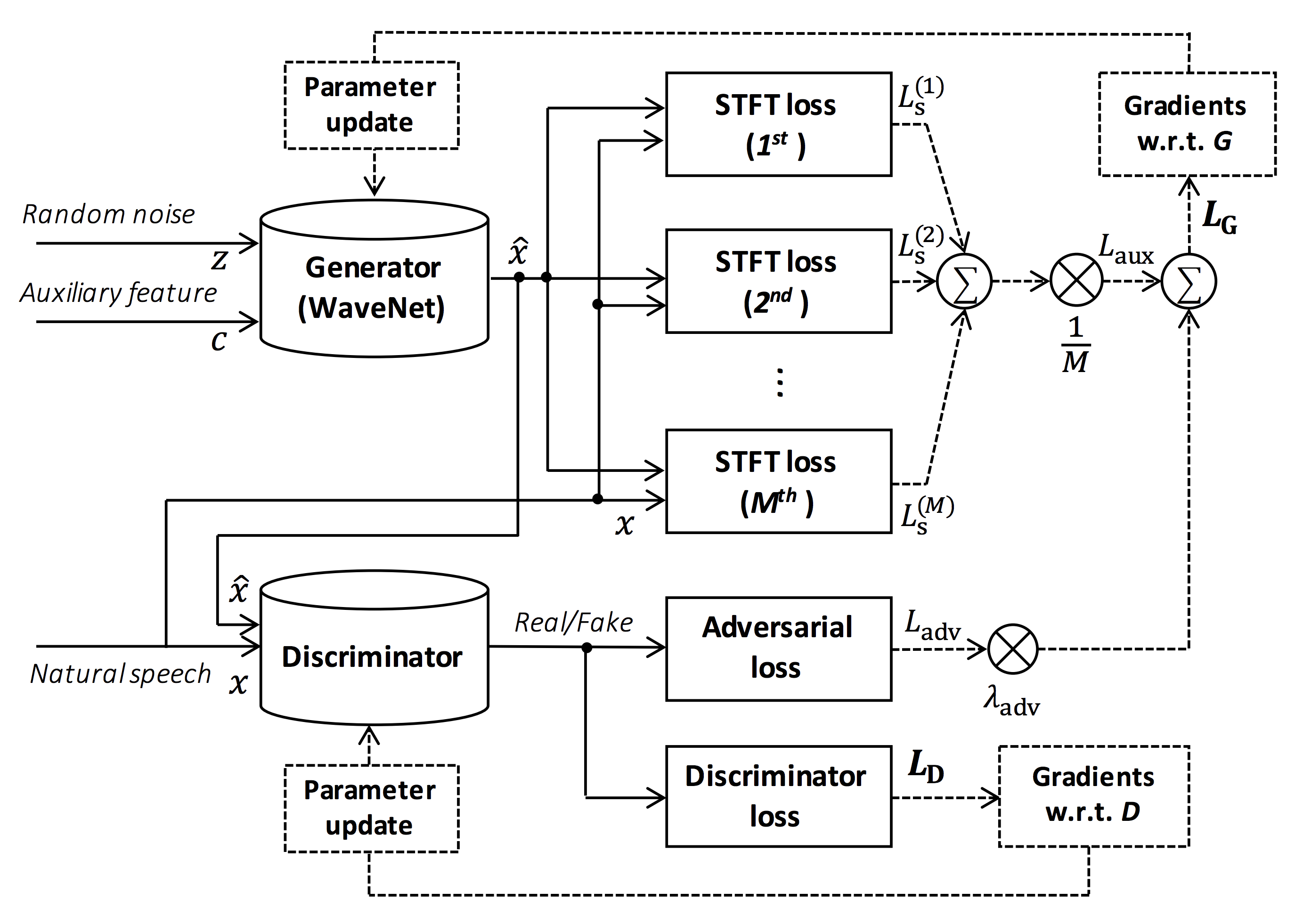
그림의 출처 : https://arxiv.org/pdf/1910.11480.pdf
이 저장소의 목표는 ESPNET-TTS와 호환되는 실시간 신경 보코더를 제공하는 것입니다.
또한이 저장소는 NVIDIA/TACOTRON2 기반 구현과 결합 할 수 있습니다 (이 주석 참조).
Google Colab에서 실시간 엔드 투 엔드 텍스트 음성 연설 및 노래 음성 합성 데모를 시도해 볼 수 있습니다!
이 저장소는 GPU 타이탄 V로 우분투 20.04에서 테스트됩니다.
sudo apt install libsndfile-dev 통해 설치할 수 있습니다)sudo apt install jq 를 통해 설치할 수 있음)sudo apt install sox 통해 설치할 수 있습니다) 다른 CUDA 버전은 작동하지만 명시 적으로 테스트되지 않아야합니다.
모든 코드는 Pytorch 1.8.1, 1.9, 1.10.2, 1.11.0, 1.12.1, 1.13.1, 2.0.1 및 2.1.0에서 테스트됩니다.
두 가지 대안에서 설치 방법을 선택할 수 있습니다.
$ git clone https://github.com/kan-bayashi/ParallelWaveGAN.git
$ cd ParallelWaveGAN
$ pip install -e .
# If you want to use distributed training, please install
# apex manually by following https://github.com/NVIDIA/apex
$ ...
Cuda 버전은 Pytorch Binary에 사용되는 버전과 정확히 일치해야합니다.
다른 CUDA 버전으로 컴파일 된 Pytorch를 설치하려면 tools/Makefile 참조하십시오.
$ git clone https://github.com/kan-bayashi/ParallelWaveGAN.git
$ cd ParallelWaveGAN/tools
$ make
# If you want to use distributed training, please run following
# command to install apex.
$ make apex
Pytorch 휠을 컴파일하는 데 사용되는 CUDA 버전을 지정합니다.
다른 CUDA 버전을 사용하려면 tools/Makefile 확인하여 Pytorch 휠을 설치할 수 있습니다.
이 저장소는 ESPNET와 동일한 Kaldi 스타일 레시피를 제공합니다.
현재 다음 레시피가 지원됩니다.
레시피를 실행하려면 아래 지침을 따르십시오.
 # Let us move on the recipe directory
$ cd egs/ljspeech/voc1

# Run the recipe from scratch
$ ./run.sh

# You can change config via command line
$ ./run.sh --conf < your_customized_yaml_config >

# You can select the stage to start and stop
$ ./run.sh --stage 2 --stop_stage 2

# If you want to specify the gpu
$ CUDA_VISIBLE_DEVICES=1 ./run.sh --stage 2

# If you want to resume training from 10000 steps checkpoint
$ ./run.sh --stage 2 --resume < path > / < to > /checkpoint-10000steps.pkl
이 readme의 레시피에 대한 자세한 정보를 참조하십시오.
디코딩 속도는 Titan V의 RTF = 0.016이며 실시간보다 훨씬 빠릅니다.
[decode]: 100% | ██████████ | 250/250 [00: 30< 00:00,  8.31it/s, RTF = 0.0156]
2019-11-03 09:07:40,480 (decode:127) INFO: finished generation of 250 utterances (RTF = 0.016).
CPU (Intel (R) Xeon (R) Gold 6154 CPU @ 3.00GHz 16 스레드)에서도 실시간보다 적은 생성 할 수 있습니다.
[decode]: 100% | ██████████ | 250/250 [22: 16< 00:00,  5.35s/it, RTF = 0.841]
2019-11-06 09:04:56,697 (decode:129) INFO: finished generation of 250 utterances (RTF = 0.734).
Melgan의 발전기를 사용하면 디코딩 속도가 더 빠릅니다.
 # On CPU (Intel(R) Xeon(R) Gold 6154 CPU @ 3.00GHz 16 threads)
[decode]: 100% | ██████████ | 250/250 [04: 00< 00:00,  1.04it/s, RTF = 0.0882]
2020-02-08 10:45:14,111 (decode:142) INFO: Finished generation of 250 utterances (RTF = 0.137).

# On GPU (TITAN V)
[decode]: 100% | ██████████ | 250/250 [00: 06< 00:00, 36.38it/s, RTF = 0.00189]
2020-02-08 05:44:42,231 (decode:142) INFO: Finished generation of 250 utterances (RTF = 0.002).
멀티 밴드 Melgan의 발전기를 사용하는 경우 디코딩 속도가 훨씬 빠릅니다.
 # On CPU (Intel(R) Xeon(R) Gold 6154 CPU @ 3.00GHz 16 threads)
[decode]: 100% | ██████████ | 250/250 [01: 47< 00:00,  2.95it/s, RTF = 0.048]
2020-05-22 15:37:19,771 (decode:151) INFO: Finished generation of 250 utterances (RTF = 0.059).

# On GPU (TITAN V)
[decode]: 100% | ██████████ | 250/250 [00: 05< 00:00, 43.67it/s, RTF = 0.000928]
2020-05-22 15:35:13,302 (decode:151) INFO: Finished generation of 250 utterances (RTF = 0.001).
추론을 더 가속화하려면 Pytorch에서 Tensorflow로 변환하는 것이 좋습니다.
전환의 예는 노트북 (@dathudeptrai에서 제공)에서 제공됩니다.
여기서 결과는 표에 요약되어 있습니다.
샘플을 듣고 Google 드라이브 링크에서 사전 각인 모델을 다운로드 할 수 있습니다.
| 모델 | 콘크리트 | 랭 | FS [HZ] | Mel Range [HZ] | FFT / HOP / WIN [PT] | # ITERS |
|---|---|---|---|---|---|---|
| ljspeech_parallel_wavegan.v1 | 링크 | en | 22.05K | 80-7600 | 1024 / 256 / 없음 | 400K |
| ljspeech_parallel_wavegan.v1.long | 링크 | en | 22.05K | 80-7600 | 1024 / 256 / 없음 | 1m |
| ljspeech_parallel_wavegan.v1.no_limit | 링크 | en | 22.05K | 없음 | 1024 / 256 / 없음 | 400K |
| ljspeech_parallel_wavegan.v3 | 링크 | en | 22.05K | 80-7600 | 1024 / 256 / 없음 | 3m |
| ljspeech_melgan.v1 | 링크 | en | 22.05K | 80-7600 | 1024 / 256 / 없음 | 400K |
| ljspeech_melgan.v1.long | 링크 | en | 22.05K | 80-7600 | 1024 / 256 / 없음 | 1m |
| ljspeech_melgan_large.v1 | 링크 | en | 22.05K | 80-7600 | 1024 / 256 / 없음 | 400K |
| ljspeech_melgan_large.v1.long | 링크 | en | 22.05K | 80-7600 | 1024 / 256 / 없음 | 1m |
| ljspeech_melgan.v3 | 링크 | en | 22.05K | 80-7600 | 1024 / 256 / 없음 | 2m |
| ljspeech_melgan.v3.long | 링크 | en | 22.05K | 80-7600 | 1024 / 256 / 없음 | 4m |
| ljspeech_full_band_melgan.v1 | 링크 | en | 22.05K | 80-7600 | 1024 / 256 / 없음 | 1m |
| ljspeech_full_band_melgan.v2 | 링크 | en | 22.05K | 80-7600 | 1024 / 256 / 없음 | 1m |
| ljspeech_multi_band_melgan.v1 | 링크 | en | 22.05K | 80-7600 | 1024 / 256 / 없음 | 1m |
| ljspeech_multi_band_melgan.v2 | 링크 | en | 22.05K | 80-7600 | 1024 / 256 / 없음 | 1m |
| ljspeech_hifigan.v1 | 링크 | en | 22.05K | 80-7600 | 1024 / 256 / 없음 | 2.5m |
| ljspeech_style_melgan.v1 | 링크 | en | 22.05K | 80-7600 | 1024 / 256 / 없음 | 1.5m |
| JSUT_PARALLEL_WAVEGAN.V1 | 링크 | JP | 24K | 80-7600 | 2048 / 300 / 1200 | 400K |
| jsut_multi_band_melgan.v2 | 링크 | JP | 24K | 80-7600 | 2048 / 300 / 1200 | 1m |
| Just_hifigan.v1 | 링크 | JP | 24K | 80-7600 | 2048 / 300 / 1200 | 2.5m |
| Just_style_melgan.v1 | 링크 | JP | 24K | 80-7600 | 2048 / 300 / 1200 | 1.5m |
| CSMSC_PARALLEL_WAVEGAN.V1 | 링크 | ZH | 24K | 80-7600 | 2048 / 300 / 1200 | 400K |
| csmsc_multi_band_melgan.v2 | 링크 | ZH | 24K | 80-7600 | 2048 / 300 / 1200 | 1m |
| csmsc_hifigan.v1 | 링크 | ZH | 24K | 80-7600 | 2048 / 300 / 1200 | 2.5m |
| CSMSC_STYLE_MELGAN.V1 | 링크 | ZH | 24K | 80-7600 | 2048 / 300 / 1200 | 1.5m |
| arctic_slt_parallel_wavegan.v1 | 링크 | en | 16k | 80-7600 | 1024 / 256 / 없음 | 400K |
| JNAS_PARALLEL_WAVEGAN.V1 | 링크 | JP | 16k | 80-7600 | 1024 / 256 / 없음 | 400K |
| vctk_parallel_wavegan.v1 | 링크 | en | 24K | 80-7600 | 2048 / 300 / 1200 | 400K |
| vctk_parallel_wavegan.v1.long | 링크 | en | 24K | 80-7600 | 2048 / 300 / 1200 | 1m |
| vctk_multi_band_melgan.v2 | 링크 | en | 24K | 80-7600 | 2048 / 300 / 1200 | 1m |
| vctk_hifigan.v1 | 링크 | en | 24K | 80-7600 | 2048 / 300 / 1200 | 2.5m |
| vctk_style_melgan.v1 | 링크 | en | 24K | 80-7600 | 2048 / 300 / 1200 | 1.5m |
| libritts_parallel_wavegan.v1 | 링크 | en | 24K | 80-7600 | 2048 / 300 / 1200 | 400K |
| libritts_parallel_wavegan.v1.long | 링크 | en | 24K | 80-7600 | 2048 / 300 / 1200 | 1m |
| libritts_multi_band_melgan.v2 | 링크 | en | 24K | 80-7600 | 2048 / 300 / 1200 | 1m |
| libritts_hifigan.v1 | 링크 | en | 24K | 80-7600 | 2048 / 300 / 1200 | 2.5m |
| libritts_style_melgan.v1 | 링크 | en | 24K | 80-7600 | 2048 / 300 / 1200 | 1.5m |
| KSS_PARALLEL_WAVEGAN.V1 | 링크 | 코 | 24K | 80-7600 | 2048 / 300 / 1200 | 400K |
| hui_acg_hokuspokus_parallel_wavegan.v1 | 링크 | 드 | 24K | 80-7600 | 2048 / 300 / 1200 | 400K |
| ruslan_parallel_wavegan.v1 | 링크 | ru | 24K | 80-7600 | 2048 / 300 / 1200 | 400K |
| oniku_hifigan.v1 | 링크 | JP | 24K | 80-7600 | 2048 / 300 / 1200 | 250K |
| Kiritan_hifigan.v1 | 링크 | JP | 24K | 80-7600 | 2048 / 300 / 1200 | 300K |
| ofuton_hifigan.v1 | 링크 | JP | 24K | 80-7600 | 2048 / 300 / 1200 | 300K |
| opencpop_hifigan.v1 | 링크 | ZH | 24K | 80-7600 | 2048 / 300 / 1200 | 250K |
| csd_english_hifigan.v1 | 링크 | en | 24K | 80-7600 | 2048 / 300 / 1200 | 300K |
| CSD_KOREAN_HIFIGAN.V1 | 링크 | en | 24K | 80-7600 | 2048 / 300 / 1200 | 250K |
| kising_hifigan.v1 | 링크 | ZH | 24K | 80-7600 | 2048 / 300 / 1200 | 300K |
| m4singer_hifigan.v1 | 링크 | ZH | 24K | 80-7600 | 2048 / 300 / 1200 | 1m |
더 많은 결과를 확인하려면 Google 드라이브에서 액세스하십시오.
미리 훈련 된 모델을 사용하기 전에 데이터베이스 라이센스 (예 : 상업용 사용에 적합한 지)를 확인하십시오.
저자는 데이터 세트 사용과 관련하여 모델 사용 및 법적 분쟁으로 인한 손실에 대해 책임을지지 않습니다.
여기서 최소한의 코드는 사전에 걸린 모델을 사용하여 분석-합성을 수행하는 것으로 나타났습니다.
# Please make sure you installed `parallel_wavegan`
# If not, please install via pip
$ pip install parallel_wavegan
# You can download the pretrained model from terminal
$ python << EOF
from parallel_wavegan.utils import download_pretrained_model
download_pretrained_model("<pretrained_model_tag>", "pretrained_model")
EOF
# You can get all of available pretrained models as follows:
$ python << EOF
from parallel_wavegan.utils import PRETRAINED_MODEL_LIST
print(PRETRAINED_MODEL_LIST.keys())
EOF
# Now you can find downloaded pretrained model in `pretrained_model/<pretrain_model_tag>/`
$ ls pretrain_model/ < pretrain_model_tag >
checkpoint-400000steps.pkl config.yml stats.h5
# These files can also be downloaded manually from the above results
# Please put an audio file in `sample` directory to perform analysis-synthesis
$ ls sample/
sample.wav
# Then perform feature extraction -> feature normalization -> synthesis
$ parallel-wavegan-preprocess
--config pretrain_model/ < pretrain_model_tag > /config.yml
--rootdir sample
--dumpdir dump/sample/raw
100% | ████████████████████████████████████████ | 1/1 [00: 00< 00:00, 914.19it/s]
$ parallel-wavegan-normalize
--config pretrain_model/ < pretrain_model_tag > /config.yml
--rootdir dump/sample/raw
--dumpdir dump/sample/norm
--stats pretrain_model/ < pretrain_model_tag > /stats.h5
2019-11-13 13:44:29,574 (normalize:87) INFO: the number of files = 1.
100% | ████████████████████████████████████████ | 1/1 [00: 00< 00:00, 513.13it/s]
$ parallel-wavegan-decode
--checkpoint pretrain_model/ < pretrain_model_tag > /checkpoint-400000steps.pkl
--dumpdir dump/sample/norm
--outdir sample
2019-11-13 13:44:31,229 (decode:91) INFO: the number of features to be decoded = 1.
[decode]: 100% | ███████████████████ | 1/1 [00: 00< 00:00, 18.33it/s, RTF = 0.0146]
2019-11-13 13:44:37,132 (decode:129) INFO: finished generation of 1 utterances (RTF = 0.015).
# You can skip normalization step (on-the-fly normalization, feature extraction -> synthesis)
$ parallel-wavegan-preprocess
--config pretrain_model/ < pretrain_model_tag > /config.yml
--rootdir sample
--dumpdir dump/sample/raw
100% | ████████████████████████████████████████ | 1/1 [00: 00< 00:00, 914.19it/s]
$ parallel-wavegan-decode
--checkpoint pretrain_model/ < pretrain_model_tag > /checkpoint-400000steps.pkl
--dumpdir dump/sample/raw
--normalize-before
--outdir sample
2019-11-13 13:44:31,229 (decode:91) INFO: the number of features to be decoded = 1.
[decode]: 100% | ███████████████████ | 1/1 [00: 00< 00:00, 18.33it/s, RTF = 0.0146]
2019-11-13 13:44:37,132 (decode:129) INFO: finished generation of 1 utterances (RTF = 0.015).
# you can find the generated speech in `sample` directory
$ ls sample
sample.wav sample_gen.wav여기에서는 ESPNET-TTS 모델에서 생성 된 기능으로 파형을 생성하는 절차를 보여줍니다.
# Make sure you already finished running the recipe of ESPnet-TTS.
# You must use the same feature settings for both Text2Mel and Mel2Wav models.
# Let us move on "ESPnet" recipe directory
$ cd /path/to/espnet/egs/ < recipe_name > /tts1
$ pwd
/path/to/espnet/egs/ < recipe_name > /tts1
# If you use ESPnet2, move on `egs2/`
$ cd /path/to/espnet/egs2/ < recipe_name > /tts1
$ pwd
/path/to/espnet/egs2/ < recipe_name > /tts1
# Please install this repository in ESPnet conda (or virtualenv) environment
$ . ./path.sh && pip install -U parallel_wavegan
# You can download the pretrained model from terminal
$ python << EOF
from parallel_wavegan.utils import download_pretrained_model
download_pretrained_model("<pretrained_model_tag>", "pretrained_model")
EOF
# You can get all of available pretrained models as follows:
$ python << EOF
from parallel_wavegan.utils import PRETRAINED_MODEL_LIST
print(PRETRAINED_MODEL_LIST.keys())
EOF
# You can find downloaded pretrained model in `pretrained_model/<pretrain_model_tag>/`
$ ls pretrain_model/ < pretrain_model_tag >
checkpoint-400000steps.pkl config.yml stats.h5
# These files can also be downloaded manually from the above results사례 1 : Text2mel 및 Mel2wav 모두에 동일한 데이터 세트를 사용하는 경우
# In this case, you can directly use generated features for decoding.
# Please specify `feats.scp` path for `--feats-scp`, which is located in
# exp/<your_model_dir>/outputs_*_decode/<set_name>/feats.scp.
# Note that do not use outputs_*decode_denorm/<set_name>/feats.scp since
# it is de-normalized features (the input for PWG is normalized features).
$ parallel-wavegan-decode
--checkpoint pretrain_model/ < pretrain_model_tag > /checkpoint-400000steps.pkl
--feats-scp exp/ < your_model_dir > /outputs_ * _decode/ < set_name > /feats.scp
--outdir < path_to_outdir >
# In the case of ESPnet2, the generated feature can be found in
# exp/<your_model_dir>/decode_*/<set_name>/norm/feats.scp.
$ parallel-wavegan-decode
--checkpoint pretrain_model/ < pretrain_model_tag > /checkpoint-400000steps.pkl
--feats-scp exp/ < your_model_dir > /decode_ * / < set_name > /norm/feats.scp
--outdir < path_to_outdir >
# You can find the generated waveforms in <path_to_outdir>/.
$ ls < path_to_outdir >
utt_id_1_gen.wav utt_id_2_gen.wav ... utt_id_N_gen.wav사례 2 : Text2mel 및 Mel2wav 모델에 다른 데이터 세트를 사용하는 경우
# In this case, you must provide `--normalize-before` option additionally.
# And use `feats.scp` of de-normalized generated features.
# ESPnet1 case
$ parallel-wavegan-decode
--checkpoint pretrain_model/ < pretrain_model_tag > /checkpoint-400000steps.pkl
--feats-scp exp/ < your_model_dir > /outputs_ * _decode_denorm/ < set_name > /feats.scp
--outdir < path_to_outdir >
--normalize-before
# ESPnet2 case
$ parallel-wavegan-decode
--checkpoint pretrain_model/ < pretrain_model_tag > /checkpoint-400000steps.pkl
--feats-scp exp/ < your_model_dir > /decode_ * / < set_name > /denorm/feats.scp
--outdir < path_to_outdir >
--normalize-before
# You can find the generated waveforms in <path_to_outdir>/.
$ ls < path_to_outdir >
utt_id_1_gen.wav utt_id_2_gen.wav ... utt_id_N_gen.wav이러한 모델을 Python으로 결합하려면 Google Colab에서 실시간 데모를 시도해 볼 수 있습니다!
때때로 우리는 TTS 모델에서 생성 된 Mel-spectrogram 인 덤프 된 NPY 파일로 디코딩하려고합니다. 사전 배치 된 보코더 ( fs , fft_size , hop_size , win_length , fmin 및 fmax )의 동일한 기능 추출 설정을 사용해야합니다.
일부 사후 처리로 log_base 의 차이 만 변경할 수 있습니다 (당연한 로그 대신 Log 10을 기본값으로 사용). 주석의 세부 사항을 참조하십시오.
 # Generate dummy npy file of mel-spectrogram
$ ipython
[ins] In [1]: import numpy as np
[ins] In [2]: x = np.random.randn(512, 80)  # (#frames, #mels)
[ins] In [3]: np.save( " dummy_1.npy " , x)
[ins] In [4]: y = np.random.randn(256, 80)  # (#frames, #mels)
[ins] In [5]: np.save( " dummy_2.npy " , y)
[ins] In [6]: exit

# Make scp file (key-path format)
$ find -name " *.npy " | awk ' {print "dummy_" NR " " $1} ' > feats.scp

# Check (<utt_id> <path>)
$ cat feats.scp
dummy_1 ./dummy_1.npy
dummy_2 ./dummy_2.npy

# Decode without feature normalization
# This case assumes that the input mel-spectrogram is normalized with the same statistics of the pretrained model.
$ parallel-wavegan-decode
    --checkpoint /path/to/checkpoint-400000steps.pkl
    --feats-scp ./feats.scp
    --outdir wav
2021-08-10 09:13:07,624 (decode:140) INFO: The number of features to be decoded = 2.
[decode]: 100% | ████████████████████████████████████████ | 2/2 [00: 00< 00:00, 13.84it/s, RTF = 0.00264]
2021-08-10 09:13:29,660 (decode:174) INFO: Finished generation of 2 utterances (RTF = 0.005).

# Decode with feature normalization
# This case assumes that the input mel-spectrogram is not normalized.
$ parallel-wavegan-decode
    --checkpoint /path/to/checkpoint-400000steps.pkl
    --feats-scp ./feats.scp
    --normalize-before
    --outdir wav
2021-08-10 09:13:07,624 (decode:140) INFO: The number of features to be decoded = 2.
[decode]: 100% | ████████████████████████████████████████ | 2/2 [00: 00< 00:00, 13.84it/s, RTF = 0.00264]
2021-08-10 09:13:29,660 (decode:174) INFO: Finished generation of 2 utterances (RTF = 0.005).저자는 그의 위대한 저장소, 종이 및 귀중한 토론에 대해 Ryuichi Yamamoto (@r9y9)에게 감사의 말씀을 전합니다.
Tomoki Hayashi (@Kan-Bayashi)
이메일 : hayashi.tomoki<at>g.sp.m.is.nagoya-u.ac.jp







