ParallelWaveGAN
Version 0.6.1

Este repositório fornece implementações não oficiais de Pytorch dos seguintes modelos:
Você pode combinar esses modelos não autorregressivos de ponta para construir seu próprio grande vocoder!
Por favor, verifique nossas amostras em nossa demonstração HP.
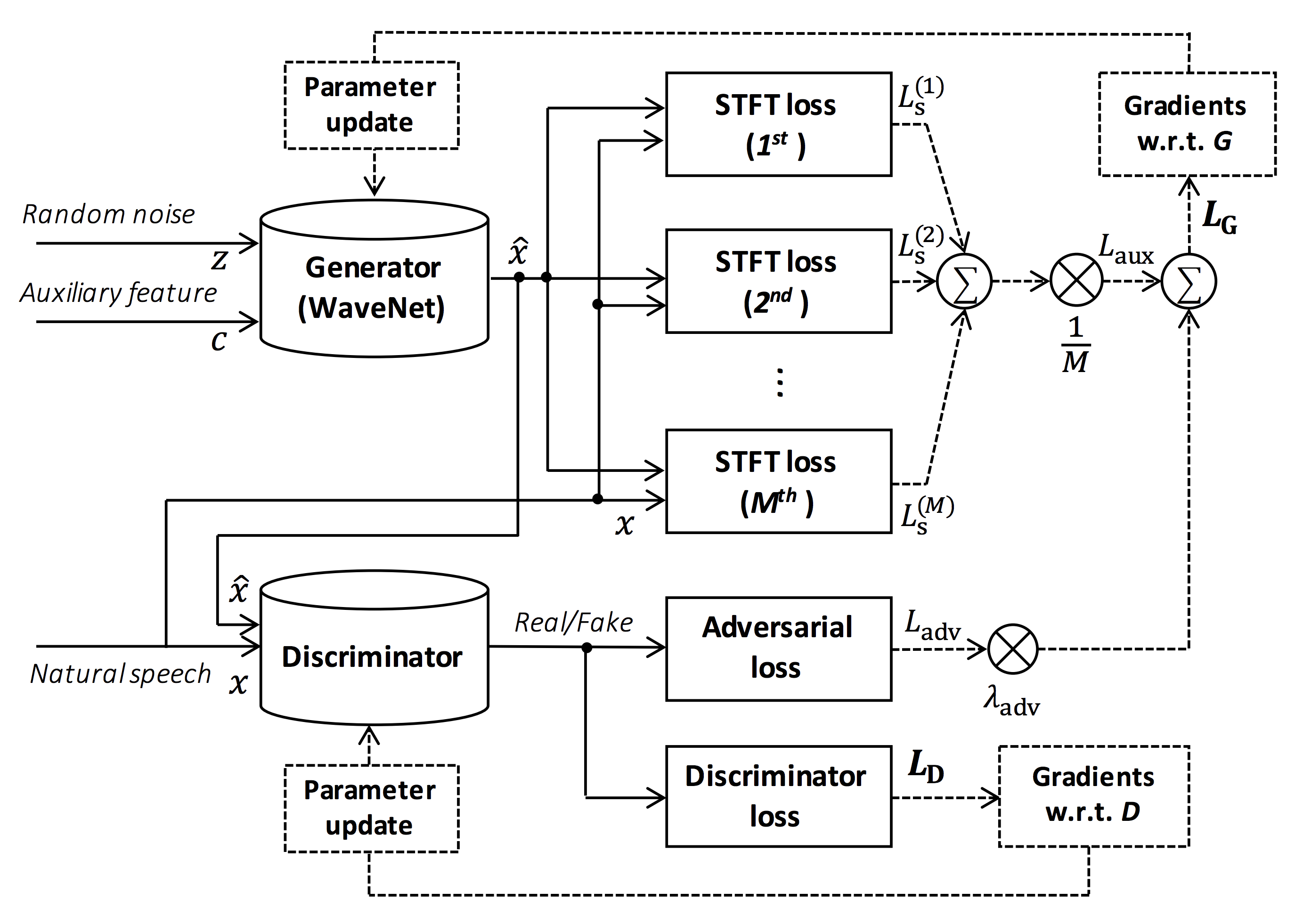
Fonte da figura: https://arxiv.org/pdf/1910.11480.pdf
O objetivo deste repositório é fornecer vocoder neural em tempo real, que é compatível com o ESPNET-TTS.
Além disso, esse repositório pode ser combinado com a implementação baseada em NVIDIA/TACOTRON2 (consulte este comentário).
Você pode experimentar a demonstração de síntese de texto de ponta a ponta em tempo real e síntese de voz no Google Colab!
Este repositório é testado no Ubuntu 20.04 com um Titan GPU V.
sudo apt install libsndfile-dev no Ubuntu)sudo apt install jq no ubuntu)sudo apt install sox no ubuntu) Diferente versão do CUDA deve estar funcionando, mas não testada explicitamente.
Todos os códigos são testados em Pytorch 1.8.1, 1.9, 1.10.2, 1.11.0, 1.12.1, 1.13.1, 2.0.1 e 2.1.0.
Você pode selecionar o método de instalação em duas alternativas.
$ git clone https://github.com/kan-bayashi/ParallelWaveGAN.git
$ cd ParallelWaveGAN
$ pip install -e .
# If you want to use distributed training, please install
# apex manually by following https://github.com/NVIDIA/apex
$ ...
Observe que sua versão CUDA deve ser exatamente correspondida com a versão usada para o binário Pytorch para instalar o APEX.
Para instalar o Pytorch compilado com a versão CUDA diferente, consulte tools/Makefile .
$ git clone https://github.com/kan-bayashi/ParallelWaveGAN.git
$ cd ParallelWaveGAN/tools
$ make
# If you want to use distributed training, please run following
# command to install apex.
$ make apex
Observe que especificamos a versão CUDA usada para compilar a roda Pytorch.
Se você deseja usar a versão CUDA diferente, verifique tools/Makefile para alterar a roda Pytorch a ser instalada.
Este repositório fornece receitas no estilo kaldi, da mesma forma que a ESPNET.
Atualmente, as seguintes receitas são suportadas.
Para executar a receita, siga a instrução abaixo.
 # Let us move on the recipe directory
$ cd egs/ljspeech/voc1

# Run the recipe from scratch
$ ./run.sh

# You can change config via command line
$ ./run.sh --conf < your_customized_yaml_config >

# You can select the stage to start and stop
$ ./run.sh --stage 2 --stop_stage 2

# If you want to specify the gpu
$ CUDA_VISIBLE_DEVICES=1 ./run.sh --stage 2

# If you want to resume training from 10000 steps checkpoint
$ ./run.sh --stage 2 --resume < path > / < to > /checkpoint-10000steps.pkl
Veja mais informações sobre as receitas neste Readme.
A velocidade de decodificação é RTF = 0,016 com Titan V, muito mais rápido que o tempo real.
[decode]: 100% | ██████████ | 250/250 [00: 30< 00:00,  8.31it/s, RTF = 0.0156]
2019-11-03 09:07:40,480 (decode:127) INFO: finished generation of 250 utterances (RTF = 0.016).
Mesmo na CPU (Intel (R) Xeon (R) Gold 6154 CPU @ 3,00GHz 16 threads), ela pode gerar menos do que o tempo real.
[decode]: 100% | ██████████ | 250/250 [22: 16< 00:00,  5.35s/it, RTF = 0.841]
2019-11-06 09:04:56,697 (decode:129) INFO: finished generation of 250 utterances (RTF = 0.734).
Se você usar o gerador de Melgan, a velocidade de decodificação será mais rápida.
 # On CPU (Intel(R) Xeon(R) Gold 6154 CPU @ 3.00GHz 16 threads)
[decode]: 100% | ██████████ | 250/250 [04: 00< 00:00,  1.04it/s, RTF = 0.0882]
2020-02-08 10:45:14,111 (decode:142) INFO: Finished generation of 250 utterances (RTF = 0.137).

# On GPU (TITAN V)
[decode]: 100% | ██████████ | 250/250 [00: 06< 00:00, 36.38it/s, RTF = 0.00189]
2020-02-08 05:44:42,231 (decode:142) INFO: Finished generation of 250 utterances (RTF = 0.002).
Se você usar o gerador de Multi-Band Melgan, a velocidade de decodificação será muito mais rápida.
 # On CPU (Intel(R) Xeon(R) Gold 6154 CPU @ 3.00GHz 16 threads)
[decode]: 100% | ██████████ | 250/250 [01: 47< 00:00,  2.95it/s, RTF = 0.048]
2020-05-22 15:37:19,771 (decode:151) INFO: Finished generation of 250 utterances (RTF = 0.059).

# On GPU (TITAN V)
[decode]: 100% | ██████████ | 250/250 [00: 05< 00:00, 43.67it/s, RTF = 0.000928]
2020-05-22 15:35:13,302 (decode:151) INFO: Finished generation of 250 utterances (RTF = 0.001).
Se você deseja acelerar mais a inferência, vale a pena experimentar a conversão de Pytorch em TensorFlow.
O exemplo da conversão está disponível no notebook (fornecido por @dathudeptrai).
Aqui os resultados estão resumidos na tabela.
Você pode ouvir as amostras e fazer o download de modelos pré -tenhados do link para o nosso Google Drive.
| Modelo | Conf | Lang | FS [Hz] | Alcance MEL [Hz] | FFT / HOP / WIN [PT] | # iters |
|---|---|---|---|---|---|---|
| ljspeech_parallel_wavegan.v1 | link | En | 22.05k | 80-7600 | 1024 /256 / nenhum | 400K |
| ljspeech_parallel_wavegan.v1.long | link | En | 22.05k | 80-7600 | 1024 /256 / nenhum | 1m |
| ljspeech_parallel_wavegan.v1.no_limit | link | En | 22.05k | Nenhum | 1024 /256 / nenhum | 400K |
| ljspeech_parallel_wavegan.v3 | link | En | 22.05k | 80-7600 | 1024 /256 / nenhum | 3m |
| ljspeech_melgan.v1 | link | En | 22.05k | 80-7600 | 1024 /256 / nenhum | 400K |
| ljspeech_melgan.v1.long | link | En | 22.05k | 80-7600 | 1024 /256 / nenhum | 1m |
| ljspeech_melgan_large.v1 | link | En | 22.05k | 80-7600 | 1024 /256 / nenhum | 400K |
| ljspeech_melgan_large.v1.long | link | En | 22.05k | 80-7600 | 1024 /256 / nenhum | 1m |
| ljspeech_melgan.v3 | link | En | 22.05k | 80-7600 | 1024 /256 / nenhum | 2m |
| ljspeech_melgan.v3.long | link | En | 22.05k | 80-7600 | 1024 /256 / nenhum | 4m |
| ljspeech_full_band_melgan.v1 | link | En | 22.05k | 80-7600 | 1024 /256 / nenhum | 1m |
| ljspeech_full_band_melgan.v2 | link | En | 22.05k | 80-7600 | 1024 /256 / nenhum | 1m |
| ljspeech_multi_band_melgan.v1 | link | En | 22.05k | 80-7600 | 1024 /256 / nenhum | 1m |
| ljspeech_multi_band_melgan.v2 | link | En | 22.05k | 80-7600 | 1024 /256 / nenhum | 1m |
| ljspeech_hifigan.v1 | link | En | 22.05k | 80-7600 | 1024 /256 / nenhum | 2,5m |
| ljspeech_style_melgan.v1 | link | En | 22.05k | 80-7600 | 1024 /256 / nenhum | 1,5m |
| jsut_parallel_wavegan.v1 | link | JP | 24k | 80-7600 | 2048 /300 /1200 | 400K |
| jsut_multi_band_melgan.v2 | link | JP | 24k | 80-7600 | 2048 /300 /1200 | 1m |
| Just_hifigan.v1 | link | JP | 24k | 80-7600 | 2048 /300 /1200 | 2,5m |
| Just_style_melgan.v1 | link | JP | 24k | 80-7600 | 2048 /300 /1200 | 1,5m |
| csmsc_parallel_wavegan.v1 | link | Zh | 24k | 80-7600 | 2048 /300 /1200 | 400K |
| csmsc_multi_band_melgan.v2 | link | Zh | 24k | 80-7600 | 2048 /300 /1200 | 1m |
| csmsc_hifigan.v1 | link | Zh | 24k | 80-7600 | 2048 /300 /1200 | 2,5m |
| csmsc_style_melgan.v1 | link | Zh | 24k | 80-7600 | 2048 /300 /1200 | 1,5m |
| arctic_slt_parallel_wavegan.v1 | link | En | 16K | 80-7600 | 1024 /256 / nenhum | 400K |
| jnas_parallel_wavegan.v1 | link | JP | 16K | 80-7600 | 1024 /256 / nenhum | 400K |
| vctk_parallel_wavegan.v1 | link | En | 24k | 80-7600 | 2048 /300 /1200 | 400K |
| vctk_parallel_wavegan.v1.long | link | En | 24k | 80-7600 | 2048 /300 /1200 | 1m |
| vctk_multi_band_melgan.v2 | link | En | 24k | 80-7600 | 2048 /300 /1200 | 1m |
| vctk_hifigan.v1 | link | En | 24k | 80-7600 | 2048 /300 /1200 | 2,5m |
| vctk_style_melgan.v1 | link | En | 24k | 80-7600 | 2048 /300 /1200 | 1,5m |
| libritts_parallel_wavegan.v1 | link | En | 24k | 80-7600 | 2048 /300 /1200 | 400K |
| libitts_parallel_wavegan.v1.long | link | En | 24k | 80-7600 | 2048 /300 /1200 | 1m |
| libitts_multi_band_melgan.v2 | link | En | 24k | 80-7600 | 2048 /300 /1200 | 1m |
| libritts_hifigan.v1 | link | En | 24k | 80-7600 | 2048 /300 /1200 | 2,5m |
| libritts_style_melgan.v1 | link | En | 24k | 80-7600 | 2048 /300 /1200 | 1,5m |
| kss_parallel_wavegan.v1 | link | Ko | 24k | 80-7600 | 2048 /300 /1200 | 400K |
| hui_acg_hokuspokus_parallel_wavegan.v1 | link | De | 24k | 80-7600 | 2048 /300 /1200 | 400K |
| ruslan_parallel_wavegan.v1 | link | Ru | 24k | 80-7600 | 2048 /300 /1200 | 400K |
| oniku_hifigan.v1 | link | JP | 24k | 80-7600 | 2048 /300 /1200 | 250K |
| kiritan_hifigan.v1 | link | JP | 24k | 80-7600 | 2048 /300 /1200 | 300k |
| Ofuton_hifigan.v1 | link | JP | 24k | 80-7600 | 2048 /300 /1200 | 300k |
| OpenCpop_hifigan.v1 | link | Zh | 24k | 80-7600 | 2048 /300 /1200 | 250K |
| csd_english_hifigan.v1 | link | En | 24k | 80-7600 | 2048 /300 /1200 | 300k |
| csd_korean_hifigan.v1 | link | En | 24k | 80-7600 | 2048 /300 /1200 | 250K |
| kising_hifigan.v1 | link | Zh | 24k | 80-7600 | 2048 /300 /1200 | 300k |
| m4singer_hifigan.v1 | link | Zh | 24k | 80-7600 | 2048 /300 /1200 | 1m |
Acesse o nosso Google Drive para verificar mais resultados.
Verifique a licença do banco de dados (por exemplo, seja adequada para uso comercial) antes de usar o modelo pré-treinado.
Os autores não serão responsáveis por nenhuma perda devido ao uso do modelo e disputas legais em relação ao uso do conjunto de dados.
Aqui, o código mínimo é mostrado para executar a síntese da análise usando o modelo pré-treinado.
# Please make sure you installed `parallel_wavegan`
# If not, please install via pip
$ pip install parallel_wavegan
# You can download the pretrained model from terminal
$ python << EOF
from parallel_wavegan.utils import download_pretrained_model
download_pretrained_model("<pretrained_model_tag>", "pretrained_model")
EOF
# You can get all of available pretrained models as follows:
$ python << EOF
from parallel_wavegan.utils import PRETRAINED_MODEL_LIST
print(PRETRAINED_MODEL_LIST.keys())
EOF
# Now you can find downloaded pretrained model in `pretrained_model/<pretrain_model_tag>/`
$ ls pretrain_model/ < pretrain_model_tag >
checkpoint-400000steps.pkl config.yml stats.h5
# These files can also be downloaded manually from the above results
# Please put an audio file in `sample` directory to perform analysis-synthesis
$ ls sample/
sample.wav
# Then perform feature extraction -> feature normalization -> synthesis
$ parallel-wavegan-preprocess
--config pretrain_model/ < pretrain_model_tag > /config.yml
--rootdir sample
--dumpdir dump/sample/raw
100% | ████████████████████████████████████████ | 1/1 [00: 00< 00:00, 914.19it/s]
$ parallel-wavegan-normalize
--config pretrain_model/ < pretrain_model_tag > /config.yml
--rootdir dump/sample/raw
--dumpdir dump/sample/norm
--stats pretrain_model/ < pretrain_model_tag > /stats.h5
2019-11-13 13:44:29,574 (normalize:87) INFO: the number of files = 1.
100% | ████████████████████████████████████████ | 1/1 [00: 00< 00:00, 513.13it/s]
$ parallel-wavegan-decode
--checkpoint pretrain_model/ < pretrain_model_tag > /checkpoint-400000steps.pkl
--dumpdir dump/sample/norm
--outdir sample
2019-11-13 13:44:31,229 (decode:91) INFO: the number of features to be decoded = 1.
[decode]: 100% | ███████████████████ | 1/1 [00: 00< 00:00, 18.33it/s, RTF = 0.0146]
2019-11-13 13:44:37,132 (decode:129) INFO: finished generation of 1 utterances (RTF = 0.015).
# You can skip normalization step (on-the-fly normalization, feature extraction -> synthesis)
$ parallel-wavegan-preprocess
--config pretrain_model/ < pretrain_model_tag > /config.yml
--rootdir sample
--dumpdir dump/sample/raw
100% | ████████████████████████████████████████ | 1/1 [00: 00< 00:00, 914.19it/s]
$ parallel-wavegan-decode
--checkpoint pretrain_model/ < pretrain_model_tag > /checkpoint-400000steps.pkl
--dumpdir dump/sample/raw
--normalize-before
--outdir sample
2019-11-13 13:44:31,229 (decode:91) INFO: the number of features to be decoded = 1.
[decode]: 100% | ███████████████████ | 1/1 [00: 00< 00:00, 18.33it/s, RTF = 0.0146]
2019-11-13 13:44:37,132 (decode:129) INFO: finished generation of 1 utterances (RTF = 0.015).
# you can find the generated speech in `sample` directory
$ ls sample
sample.wav sample_gen.wavAqui, mostro o procedimento para gerar formas de onda com os recursos gerados pelos modelos ESPNET-TTS.
# Make sure you already finished running the recipe of ESPnet-TTS.
# You must use the same feature settings for both Text2Mel and Mel2Wav models.
# Let us move on "ESPnet" recipe directory
$ cd /path/to/espnet/egs/ < recipe_name > /tts1
$ pwd
/path/to/espnet/egs/ < recipe_name > /tts1
# If you use ESPnet2, move on `egs2/`
$ cd /path/to/espnet/egs2/ < recipe_name > /tts1
$ pwd
/path/to/espnet/egs2/ < recipe_name > /tts1
# Please install this repository in ESPnet conda (or virtualenv) environment
$ . ./path.sh && pip install -U parallel_wavegan
# You can download the pretrained model from terminal
$ python << EOF
from parallel_wavegan.utils import download_pretrained_model
download_pretrained_model("<pretrained_model_tag>", "pretrained_model")
EOF
# You can get all of available pretrained models as follows:
$ python << EOF
from parallel_wavegan.utils import PRETRAINED_MODEL_LIST
print(PRETRAINED_MODEL_LIST.keys())
EOF
# You can find downloaded pretrained model in `pretrained_model/<pretrain_model_tag>/`
$ ls pretrain_model/ < pretrain_model_tag >
checkpoint-400000steps.pkl config.yml stats.h5
# These files can also be downloaded manually from the above resultsCaso 1 : se você usar o mesmo conjunto de dados para text2mel e Mel2wav
# In this case, you can directly use generated features for decoding.
# Please specify `feats.scp` path for `--feats-scp`, which is located in
# exp/<your_model_dir>/outputs_*_decode/<set_name>/feats.scp.
# Note that do not use outputs_*decode_denorm/<set_name>/feats.scp since
# it is de-normalized features (the input for PWG is normalized features).
$ parallel-wavegan-decode
--checkpoint pretrain_model/ < pretrain_model_tag > /checkpoint-400000steps.pkl
--feats-scp exp/ < your_model_dir > /outputs_ * _decode/ < set_name > /feats.scp
--outdir < path_to_outdir >
# In the case of ESPnet2, the generated feature can be found in
# exp/<your_model_dir>/decode_*/<set_name>/norm/feats.scp.
$ parallel-wavegan-decode
--checkpoint pretrain_model/ < pretrain_model_tag > /checkpoint-400000steps.pkl
--feats-scp exp/ < your_model_dir > /decode_ * / < set_name > /norm/feats.scp
--outdir < path_to_outdir >
# You can find the generated waveforms in <path_to_outdir>/.
$ ls < path_to_outdir >
utt_id_1_gen.wav utt_id_2_gen.wav ... utt_id_N_gen.wavCaso 2 : Se você usar diferentes conjuntos de dados para modelos Text2mel e Mel2wav
# In this case, you must provide `--normalize-before` option additionally.
# And use `feats.scp` of de-normalized generated features.
# ESPnet1 case
$ parallel-wavegan-decode
--checkpoint pretrain_model/ < pretrain_model_tag > /checkpoint-400000steps.pkl
--feats-scp exp/ < your_model_dir > /outputs_ * _decode_denorm/ < set_name > /feats.scp
--outdir < path_to_outdir >
--normalize-before
# ESPnet2 case
$ parallel-wavegan-decode
--checkpoint pretrain_model/ < pretrain_model_tag > /checkpoint-400000steps.pkl
--feats-scp exp/ < your_model_dir > /decode_ * / < set_name > /denorm/feats.scp
--outdir < path_to_outdir >
--normalize-before
# You can find the generated waveforms in <path_to_outdir>/.
$ ls < path_to_outdir >
utt_id_1_gen.wav utt_id_2_gen.wav ... utt_id_N_gen.wavSe você deseja combinar esses modelos no Python, pode experimentar a demonstração em tempo real no Google Colab!
Às vezes, queremos decodificar com arquivos NPY despejados, que são o espectrograma MEL gerado pelos modelos TTS. Por favor, certifique -se de usar as mesmas configurações de extração de recursos do vocoder pré -treinamento ( fs , fft_size , hop_size , win_length , fmin e fmax ).
Somente a diferença de log_base pode ser alterada com alguns pós-processos (usamos o log 10 em vez do log natural como padrão). Veja detalhes no comentário.
 # Generate dummy npy file of mel-spectrogram
$ ipython
[ins] In [1]: import numpy as np
[ins] In [2]: x = np.random.randn(512, 80)  # (#frames, #mels)
[ins] In [3]: np.save( " dummy_1.npy " , x)
[ins] In [4]: y = np.random.randn(256, 80)  # (#frames, #mels)
[ins] In [5]: np.save( " dummy_2.npy " , y)
[ins] In [6]: exit

# Make scp file (key-path format)
$ find -name " *.npy " | awk ' {print "dummy_" NR " " $1} ' > feats.scp

# Check (<utt_id> <path>)
$ cat feats.scp
dummy_1 ./dummy_1.npy
dummy_2 ./dummy_2.npy

# Decode without feature normalization
# This case assumes that the input mel-spectrogram is normalized with the same statistics of the pretrained model.
$ parallel-wavegan-decode
    --checkpoint /path/to/checkpoint-400000steps.pkl
    --feats-scp ./feats.scp
    --outdir wav
2021-08-10 09:13:07,624 (decode:140) INFO: The number of features to be decoded = 2.
[decode]: 100% | ████████████████████████████████████████ | 2/2 [00: 00< 00:00, 13.84it/s, RTF = 0.00264]
2021-08-10 09:13:29,660 (decode:174) INFO: Finished generation of 2 utterances (RTF = 0.005).

# Decode with feature normalization
# This case assumes that the input mel-spectrogram is not normalized.
$ parallel-wavegan-decode
    --checkpoint /path/to/checkpoint-400000steps.pkl
    --feats-scp ./feats.scp
    --normalize-before
    --outdir wav
2021-08-10 09:13:07,624 (decode:140) INFO: The number of features to be decoded = 2.
[decode]: 100% | ████████████████████████████████████████ | 2/2 [00: 00< 00:00, 13.84it/s, RTF = 0.00264]
2021-08-10 09:13:29,660 (decode:174) INFO: Finished generation of 2 utterances (RTF = 0.005).O autor gostaria de agradecer a Ryuichi Yamamoto (@R9Y9) por seu grande repositório, artigo e discussões valiosas.
Tomoki Hayashi (@Kan-Bayashi)
E-mail: hayashi.tomoki<at>g.sp.m.is.nagoya-u.ac.jp







