ParallelWaveGAN
Version 0.6.1

Repositori ini menyediakan implementasi Pytorch tidak resmi dari model -model berikut:
Anda dapat menggabungkan model non-autoregresif canggih ini untuk membangun vokoder Anda sendiri!
Silakan periksa sampel kami di demo kami.
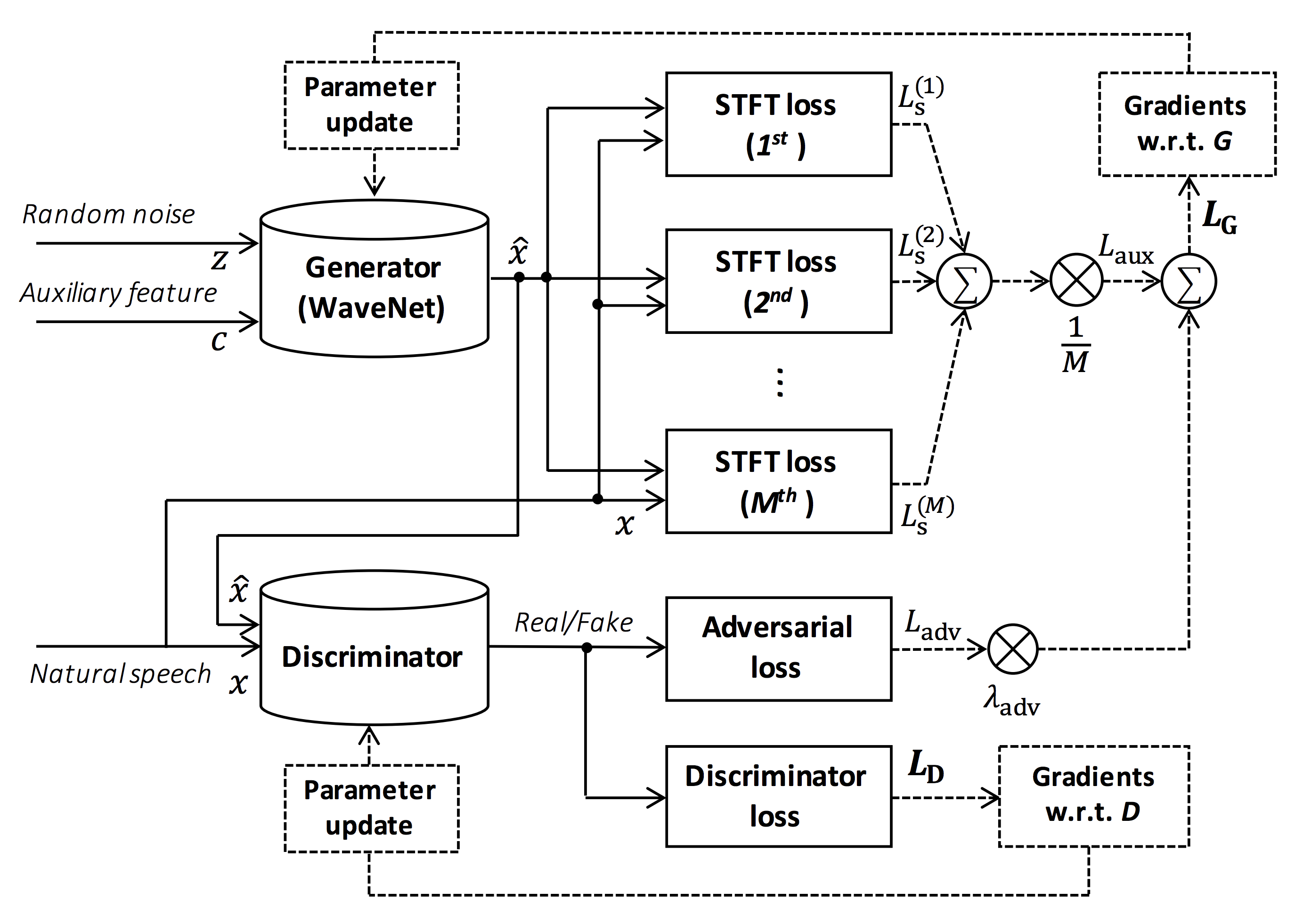
Sumber gambar: https://arxiv.org/pdf/1910.11480.pdf
Tujuan dari repositori ini adalah untuk menyediakan vocoder saraf real-time, yang kompatibel dengan ESPNET-TTS.
Juga, repositori ini dapat dikombinasikan dengan implementasi berbasis NVIDIA/TACOTRON2 (lihat komentar ini).
Anda dapat mencoba demonstrasi sintesis suara end-to-end-time-real-time dan menyanyi di Google Colab!
Repositori ini diuji pada Ubuntu 20.04 dengan GPU Titan V.
sudo apt install libsndfile-dev di ubuntu)sudo apt install jq di ubuntu)sudo apt install sox di ubuntu) Versi CUDA yang berbeda harus berfungsi tetapi tidak diuji secara eksplisit.
Semua kode diuji pada Pytorch 1.8.1, 1.9, 1.10.2, 1.11.0, 1.12.1, 1.13.1, 2.0.1 dan 2.1.0.
Anda dapat memilih metode instalasi dari dua alternatif.
$ git clone https://github.com/kan-bayashi/ParallelWaveGAN.git
$ cd ParallelWaveGAN
$ pip install -e .
# If you want to use distributed training, please install
# apex manually by following https://github.com/NVIDIA/apex
$ ...
Perhatikan bahwa versi CUDA Anda harus persis cocok dengan versi yang digunakan untuk biner Pytorch untuk menginstal Apex.
Untuk menginstal Pytorch yang dikompilasi dengan versi CUDA yang berbeda, lihat tools/Makefile .
$ git clone https://github.com/kan-bayashi/ParallelWaveGAN.git
$ cd ParallelWaveGAN/tools
$ make
# If you want to use distributed training, please run following
# command to install apex.
$ make apex
Perhatikan bahwa kami menentukan versi CUDA yang digunakan untuk mengkompilasi roda Pytorch.
Jika Anda ingin menggunakan versi CUDA yang berbeda, silakan periksa tools/Makefile untuk mengubah roda Pytorch yang akan diinstal.
Repositori ini menyediakan resep gaya Kaldi, sama dengan ESPNET.
Saat ini, resep berikut didukung.
Untuk menjalankan resep, silakan ikuti instruksi di bawah ini.
 # Let us move on the recipe directory
$ cd egs/ljspeech/voc1

# Run the recipe from scratch
$ ./run.sh

# You can change config via command line
$ ./run.sh --conf < your_customized_yaml_config >

# You can select the stage to start and stop
$ ./run.sh --stage 2 --stop_stage 2

# If you want to specify the gpu
$ CUDA_VISIBLE_DEVICES=1 ./run.sh --stage 2

# If you want to resume training from 10000 steps checkpoint
$ ./run.sh --stage 2 --resume < path > / < to > /checkpoint-10000steps.pkl
Lihat info lebih lanjut tentang resep dalam readme ini.
Kecepatan decoding adalah RTF = 0,016 dengan Titan V, jauh lebih cepat daripada waktu-nyata.
[decode]: 100% | ██████████ | 250/250 [00: 30< 00:00,  8.31it/s, RTF = 0.0156]
2019-11-03 09:07:40,480 (decode:127) INFO: finished generation of 250 utterances (RTF = 0.016).
Bahkan pada CPU (Intel (R) Xeon (R) Gold 6154 CPU @ 3.00GHz 16 utas), ia dapat menghasilkan kurang dari waktu nyata.
[decode]: 100% | ██████████ | 250/250 [22: 16< 00:00,  5.35s/it, RTF = 0.841]
2019-11-06 09:04:56,697 (decode:129) INFO: finished generation of 250 utterances (RTF = 0.734).
Jika Anda menggunakan generator Melgan, kecepatan decoding akan lebih cepat.
 # On CPU (Intel(R) Xeon(R) Gold 6154 CPU @ 3.00GHz 16 threads)
[decode]: 100% | ██████████ | 250/250 [04: 00< 00:00,  1.04it/s, RTF = 0.0882]
2020-02-08 10:45:14,111 (decode:142) INFO: Finished generation of 250 utterances (RTF = 0.137).

# On GPU (TITAN V)
[decode]: 100% | ██████████ | 250/250 [00: 06< 00:00, 36.38it/s, RTF = 0.00189]
2020-02-08 05:44:42,231 (decode:142) INFO: Finished generation of 250 utterances (RTF = 0.002).
Jika Anda menggunakan generator Melgan multi-band, kecepatan decoding akan jauh lebih cepat.
 # On CPU (Intel(R) Xeon(R) Gold 6154 CPU @ 3.00GHz 16 threads)
[decode]: 100% | ██████████ | 250/250 [01: 47< 00:00,  2.95it/s, RTF = 0.048]
2020-05-22 15:37:19,771 (decode:151) INFO: Finished generation of 250 utterances (RTF = 0.059).

# On GPU (TITAN V)
[decode]: 100% | ██████████ | 250/250 [00: 05< 00:00, 43.67it/s, RTF = 0.000928]
2020-05-22 15:35:13,302 (decode:151) INFO: Finished generation of 250 utterances (RTF = 0.001).
Jika Anda ingin mempercepat inferensi lebih lanjut, ada baiknya mencoba konversi dari Pytorch ke TensorFlow.
Contoh konversi tersedia di notebook (disediakan oleh @Dathudeptrai).
Di sini hasilnya dirangkum dalam tabel.
Anda dapat mendengarkan sampel dan mengunduh model pretrain dari tautan ke Google Drive kami.
| Model | Conf | Lang | FS [Hz] | Range Mel [Hz] | Fft / hop / win [pt] | # iters |
|---|---|---|---|---|---|---|
| ljspeech_parallel_wavegan.v1 | link | En | 22.05k | 80-7600 | 1024 /256 / tidak ada | 400K |
| ljspeech_parallel_wavegan.v1.long | link | En | 22.05k | 80-7600 | 1024 /256 / tidak ada | 1m |
| ljspeech_parallel_wavegan.v1.no_limit | link | En | 22.05k | Tidak ada | 1024 /256 / tidak ada | 400K |
| ljspeech_parallel_wavegan.v3 | link | En | 22.05k | 80-7600 | 1024 /256 / tidak ada | 3m |
| ljspeech_melgan.v1 | link | En | 22.05k | 80-7600 | 1024 /256 / tidak ada | 400K |
| ljspeech_melgan.v1.long | link | En | 22.05k | 80-7600 | 1024 /256 / tidak ada | 1m |
| ljspeech_melgan_large.v1 | link | En | 22.05k | 80-7600 | 1024 /256 / tidak ada | 400K |
| ljspeech_melgan_large.v1.long | link | En | 22.05k | 80-7600 | 1024 /256 / tidak ada | 1m |
| ljspeech_melgan.v3 | link | En | 22.05k | 80-7600 | 1024 /256 / tidak ada | 2m |
| ljspeech_melgan.v3.long | link | En | 22.05k | 80-7600 | 1024 /256 / tidak ada | 4m |
| ljspeech_full_band_melgan.v1 | link | En | 22.05k | 80-7600 | 1024 /256 / tidak ada | 1m |
| ljspeech_full_band_melgan.v2 | link | En | 22.05k | 80-7600 | 1024 /256 / tidak ada | 1m |
| ljspeech_multi_band_melgan.v1 | link | En | 22.05k | 80-7600 | 1024 /256 / tidak ada | 1m |
| ljspeech_multi_band_melgan.v2 | link | En | 22.05k | 80-7600 | 1024 /256 / tidak ada | 1m |
| ljspeech_hifigan.v1 | link | En | 22.05k | 80-7600 | 1024 /256 / tidak ada | 2.5m |
| ljspeech_style_melgan.v1 | link | En | 22.05k | 80-7600 | 1024 /256 / tidak ada | 1.5m |
| jsut_parallel_wavegan.v1 | link | Jp | 24K | 80-7600 | 2048 / 300/1200 | 400K |
| jsut_multi_band_melgan.v2 | link | Jp | 24K | 80-7600 | 2048 / 300/1200 | 1m |
| just_hifigan.v1 | link | Jp | 24K | 80-7600 | 2048 / 300/1200 | 2.5m |
| just_style_melgan.v1 | link | Jp | 24K | 80-7600 | 2048 / 300/1200 | 1.5m |
| csmsc_parallel_wavegan.v1 | link | ZH | 24K | 80-7600 | 2048 / 300/1200 | 400K |
| csmsc_multi_band_melgan.v2 | link | ZH | 24K | 80-7600 | 2048 / 300/1200 | 1m |
| csmsc_hifigan.v1 | link | ZH | 24K | 80-7600 | 2048 / 300/1200 | 2.5m |
| csmsc_style_melgan.v1 | link | ZH | 24K | 80-7600 | 2048 / 300/1200 | 1.5m |
| arctic_slt_parallel_wavegan.v1 | link | En | 16K | 80-7600 | 1024 /256 / tidak ada | 400K |
| jnas_parallel_wavegan.v1 | link | Jp | 16K | 80-7600 | 1024 /256 / tidak ada | 400K |
| vctk_parallel_wavegan.v1 | link | En | 24K | 80-7600 | 2048 / 300/1200 | 400K |
| vctk_parallel_wavegan.v1.long | link | En | 24K | 80-7600 | 2048 / 300/1200 | 1m |
| vctk_multi_band_melgan.v2 | link | En | 24K | 80-7600 | 2048 / 300/1200 | 1m |
| vctk_hifigan.v1 | link | En | 24K | 80-7600 | 2048 / 300/1200 | 2.5m |
| vctk_style_melgan.v1 | link | En | 24K | 80-7600 | 2048 / 300/1200 | 1.5m |
| libts_parallel_wavegan.v1 | link | En | 24K | 80-7600 | 2048 / 300/1200 | 400K |
| libts_parallel_wavegan.v1.long | link | En | 24K | 80-7600 | 2048 / 300/1200 | 1m |
| libts_multi_band_melgan.v2 | link | En | 24K | 80-7600 | 2048 / 300/1200 | 1m |
| libts_hifigan.v1 | link | En | 24K | 80-7600 | 2048 / 300/1200 | 2.5m |
| libts_style_melgan.v1 | link | En | 24K | 80-7600 | 2048 / 300/1200 | 1.5m |
| kss_parallel_wavegan.v1 | link | Ko | 24K | 80-7600 | 2048 / 300/1200 | 400K |
| HUI_ACG_HOKUSPOKUS_PARALLEL_WAVEGAN.V1 | link | De | 24K | 80-7600 | 2048 / 300/1200 | 400K |
| ruslan_parallel_wavegan.v1 | link | Ru | 24K | 80-7600 | 2048 / 300/1200 | 400K |
| oniku_hifigan.v1 | link | Jp | 24K | 80-7600 | 2048 / 300/1200 | 250k |
| kiritan_hifigan.v1 | link | Jp | 24K | 80-7600 | 2048 / 300/1200 | 300K |
| ofuton_hifigan.v1 | link | Jp | 24K | 80-7600 | 2048 / 300/1200 | 300K |
| opencpop_hifigan.v1 | link | ZH | 24K | 80-7600 | 2048 / 300/1200 | 250k |
| csd_english_hifigan.v1 | link | En | 24K | 80-7600 | 2048 / 300/1200 | 300K |
| csd_korean_hifigan.v1 | link | En | 24K | 80-7600 | 2048 / 300/1200 | 250k |
| kising_hifigan.v1 | link | ZH | 24K | 80-7600 | 2048 / 300/1200 | 300K |
| m4singer_hifigan.v1 | link | ZH | 24K | 80-7600 | 2048 / 300/1200 | 1m |
Harap akses di Google Drive kami untuk memeriksa lebih banyak hasil.
Silakan periksa lisensi database (misalnya, apakah itu tepat untuk penggunaan komersial) sebelum menggunakan model pra-terlatih.
Penulis tidak akan bertanggung jawab atas kerugian apa pun karena penggunaan model dan perselisihan hukum mengenai penggunaan dataset.
Di sini kode minimal terbukti melakukan sintesis analisis menggunakan model pretrained.
# Please make sure you installed `parallel_wavegan`
# If not, please install via pip
$ pip install parallel_wavegan
# You can download the pretrained model from terminal
$ python << EOF
from parallel_wavegan.utils import download_pretrained_model
download_pretrained_model("<pretrained_model_tag>", "pretrained_model")
EOF
# You can get all of available pretrained models as follows:
$ python << EOF
from parallel_wavegan.utils import PRETRAINED_MODEL_LIST
print(PRETRAINED_MODEL_LIST.keys())
EOF
# Now you can find downloaded pretrained model in `pretrained_model/<pretrain_model_tag>/`
$ ls pretrain_model/ < pretrain_model_tag >
checkpoint-400000steps.pkl config.yml stats.h5
# These files can also be downloaded manually from the above results
# Please put an audio file in `sample` directory to perform analysis-synthesis
$ ls sample/
sample.wav
# Then perform feature extraction -> feature normalization -> synthesis
$ parallel-wavegan-preprocess
--config pretrain_model/ < pretrain_model_tag > /config.yml
--rootdir sample
--dumpdir dump/sample/raw
100% | ████████████████████████████████████████ | 1/1 [00: 00< 00:00, 914.19it/s]
$ parallel-wavegan-normalize
--config pretrain_model/ < pretrain_model_tag > /config.yml
--rootdir dump/sample/raw
--dumpdir dump/sample/norm
--stats pretrain_model/ < pretrain_model_tag > /stats.h5
2019-11-13 13:44:29,574 (normalize:87) INFO: the number of files = 1.
100% | ████████████████████████████████████████ | 1/1 [00: 00< 00:00, 513.13it/s]
$ parallel-wavegan-decode
--checkpoint pretrain_model/ < pretrain_model_tag > /checkpoint-400000steps.pkl
--dumpdir dump/sample/norm
--outdir sample
2019-11-13 13:44:31,229 (decode:91) INFO: the number of features to be decoded = 1.
[decode]: 100% | ███████████████████ | 1/1 [00: 00< 00:00, 18.33it/s, RTF = 0.0146]
2019-11-13 13:44:37,132 (decode:129) INFO: finished generation of 1 utterances (RTF = 0.015).
# You can skip normalization step (on-the-fly normalization, feature extraction -> synthesis)
$ parallel-wavegan-preprocess
--config pretrain_model/ < pretrain_model_tag > /config.yml
--rootdir sample
--dumpdir dump/sample/raw
100% | ████████████████████████████████████████ | 1/1 [00: 00< 00:00, 914.19it/s]
$ parallel-wavegan-decode
--checkpoint pretrain_model/ < pretrain_model_tag > /checkpoint-400000steps.pkl
--dumpdir dump/sample/raw
--normalize-before
--outdir sample
2019-11-13 13:44:31,229 (decode:91) INFO: the number of features to be decoded = 1.
[decode]: 100% | ███████████████████ | 1/1 [00: 00< 00:00, 18.33it/s, RTF = 0.0146]
2019-11-13 13:44:37,132 (decode:129) INFO: finished generation of 1 utterances (RTF = 0.015).
# you can find the generated speech in `sample` directory
$ ls sample
sample.wav sample_gen.wavDi sini, saya menunjukkan prosedur untuk menghasilkan bentuk gelombang dengan fitur yang dihasilkan oleh model ESPNET-TTS.
# Make sure you already finished running the recipe of ESPnet-TTS.
# You must use the same feature settings for both Text2Mel and Mel2Wav models.
# Let us move on "ESPnet" recipe directory
$ cd /path/to/espnet/egs/ < recipe_name > /tts1
$ pwd
/path/to/espnet/egs/ < recipe_name > /tts1
# If you use ESPnet2, move on `egs2/`
$ cd /path/to/espnet/egs2/ < recipe_name > /tts1
$ pwd
/path/to/espnet/egs2/ < recipe_name > /tts1
# Please install this repository in ESPnet conda (or virtualenv) environment
$ . ./path.sh && pip install -U parallel_wavegan
# You can download the pretrained model from terminal
$ python << EOF
from parallel_wavegan.utils import download_pretrained_model
download_pretrained_model("<pretrained_model_tag>", "pretrained_model")
EOF
# You can get all of available pretrained models as follows:
$ python << EOF
from parallel_wavegan.utils import PRETRAINED_MODEL_LIST
print(PRETRAINED_MODEL_LIST.keys())
EOF
# You can find downloaded pretrained model in `pretrained_model/<pretrain_model_tag>/`
$ ls pretrain_model/ < pretrain_model_tag >
checkpoint-400000steps.pkl config.yml stats.h5
# These files can also be downloaded manually from the above resultsKasus 1 : Jika Anda menggunakan dataset yang sama untuk Text2Mel dan Mel2Wav
# In this case, you can directly use generated features for decoding.
# Please specify `feats.scp` path for `--feats-scp`, which is located in
# exp/<your_model_dir>/outputs_*_decode/<set_name>/feats.scp.
# Note that do not use outputs_*decode_denorm/<set_name>/feats.scp since
# it is de-normalized features (the input for PWG is normalized features).
$ parallel-wavegan-decode
--checkpoint pretrain_model/ < pretrain_model_tag > /checkpoint-400000steps.pkl
--feats-scp exp/ < your_model_dir > /outputs_ * _decode/ < set_name > /feats.scp
--outdir < path_to_outdir >
# In the case of ESPnet2, the generated feature can be found in
# exp/<your_model_dir>/decode_*/<set_name>/norm/feats.scp.
$ parallel-wavegan-decode
--checkpoint pretrain_model/ < pretrain_model_tag > /checkpoint-400000steps.pkl
--feats-scp exp/ < your_model_dir > /decode_ * / < set_name > /norm/feats.scp
--outdir < path_to_outdir >
# You can find the generated waveforms in <path_to_outdir>/.
$ ls < path_to_outdir >
utt_id_1_gen.wav utt_id_2_gen.wav ... utt_id_N_gen.wavKasus 2 : Jika Anda menggunakan set data yang berbeda untuk model Text2Mel dan Mel2Wav
# In this case, you must provide `--normalize-before` option additionally.
# And use `feats.scp` of de-normalized generated features.
# ESPnet1 case
$ parallel-wavegan-decode
--checkpoint pretrain_model/ < pretrain_model_tag > /checkpoint-400000steps.pkl
--feats-scp exp/ < your_model_dir > /outputs_ * _decode_denorm/ < set_name > /feats.scp
--outdir < path_to_outdir >
--normalize-before
# ESPnet2 case
$ parallel-wavegan-decode
--checkpoint pretrain_model/ < pretrain_model_tag > /checkpoint-400000steps.pkl
--feats-scp exp/ < your_model_dir > /decode_ * / < set_name > /denorm/feats.scp
--outdir < path_to_outdir >
--normalize-before
# You can find the generated waveforms in <path_to_outdir>/.
$ ls < path_to_outdir >
utt_id_1_gen.wav utt_id_2_gen.wav ... utt_id_N_gen.wavJika Anda ingin menggabungkan model-model ini di Python, Anda dapat mencoba demonstrasi real-time di Google Colab!
Terkadang kami ingin memecahkan kode dengan file NPY yang dibuang, yang merupakan Mel-spectrogram yang dihasilkan oleh model TTS. Pastikan Anda menggunakan pengaturan ekstraksi fitur yang sama dari vocoder pretrained ( fs , fft_size , hop_size , win_length , fmin , dan fmax ).
Hanya perbedaan log_base yang dapat diubah dengan beberapa pasca-pemrosesan (kami menggunakan log 10 alih-alih log alami sebagai default). Lihat detail dalam komentar.
 # Generate dummy npy file of mel-spectrogram
$ ipython
[ins] In [1]: import numpy as np
[ins] In [2]: x = np.random.randn(512, 80)  # (#frames, #mels)
[ins] In [3]: np.save( " dummy_1.npy " , x)
[ins] In [4]: y = np.random.randn(256, 80)  # (#frames, #mels)
[ins] In [5]: np.save( " dummy_2.npy " , y)
[ins] In [6]: exit

# Make scp file (key-path format)
$ find -name " *.npy " | awk ' {print "dummy_" NR " " $1} ' > feats.scp

# Check (<utt_id> <path>)
$ cat feats.scp
dummy_1 ./dummy_1.npy
dummy_2 ./dummy_2.npy

# Decode without feature normalization
# This case assumes that the input mel-spectrogram is normalized with the same statistics of the pretrained model.
$ parallel-wavegan-decode
    --checkpoint /path/to/checkpoint-400000steps.pkl
    --feats-scp ./feats.scp
    --outdir wav
2021-08-10 09:13:07,624 (decode:140) INFO: The number of features to be decoded = 2.
[decode]: 100% | ████████████████████████████████████████ | 2/2 [00: 00< 00:00, 13.84it/s, RTF = 0.00264]
2021-08-10 09:13:29,660 (decode:174) INFO: Finished generation of 2 utterances (RTF = 0.005).

# Decode with feature normalization
# This case assumes that the input mel-spectrogram is not normalized.
$ parallel-wavegan-decode
    --checkpoint /path/to/checkpoint-400000steps.pkl
    --feats-scp ./feats.scp
    --normalize-before
    --outdir wav
2021-08-10 09:13:07,624 (decode:140) INFO: The number of features to be decoded = 2.
[decode]: 100% | ████████████████████████████████████████ | 2/2 [00: 00< 00:00, 13.84it/s, RTF = 0.00264]
2021-08-10 09:13:29,660 (decode:174) INFO: Finished generation of 2 utterances (RTF = 0.005).Penulis ingin mengucapkan terima kasih kepada Ryuichi Yamamoto (@r9y9) untuk repositori, kertas, dan diskusi yang berharga.
Tomoki Hayashi (@Kan-Bayashi)
E-mail: hayashi.tomoki<at>g.sp.m.is.nagoya-u.ac.jp







