ParallelWaveGAN
Version 0.6.1

Este repositorio proporciona implementaciones de Pytorch no oficiales de los siguientes modelos:
¡Puede combinar estos modelos no autorregresivos de última generación para construir su propio gran vocoder!
Consulte nuestras muestras en nuestra demostración HP.
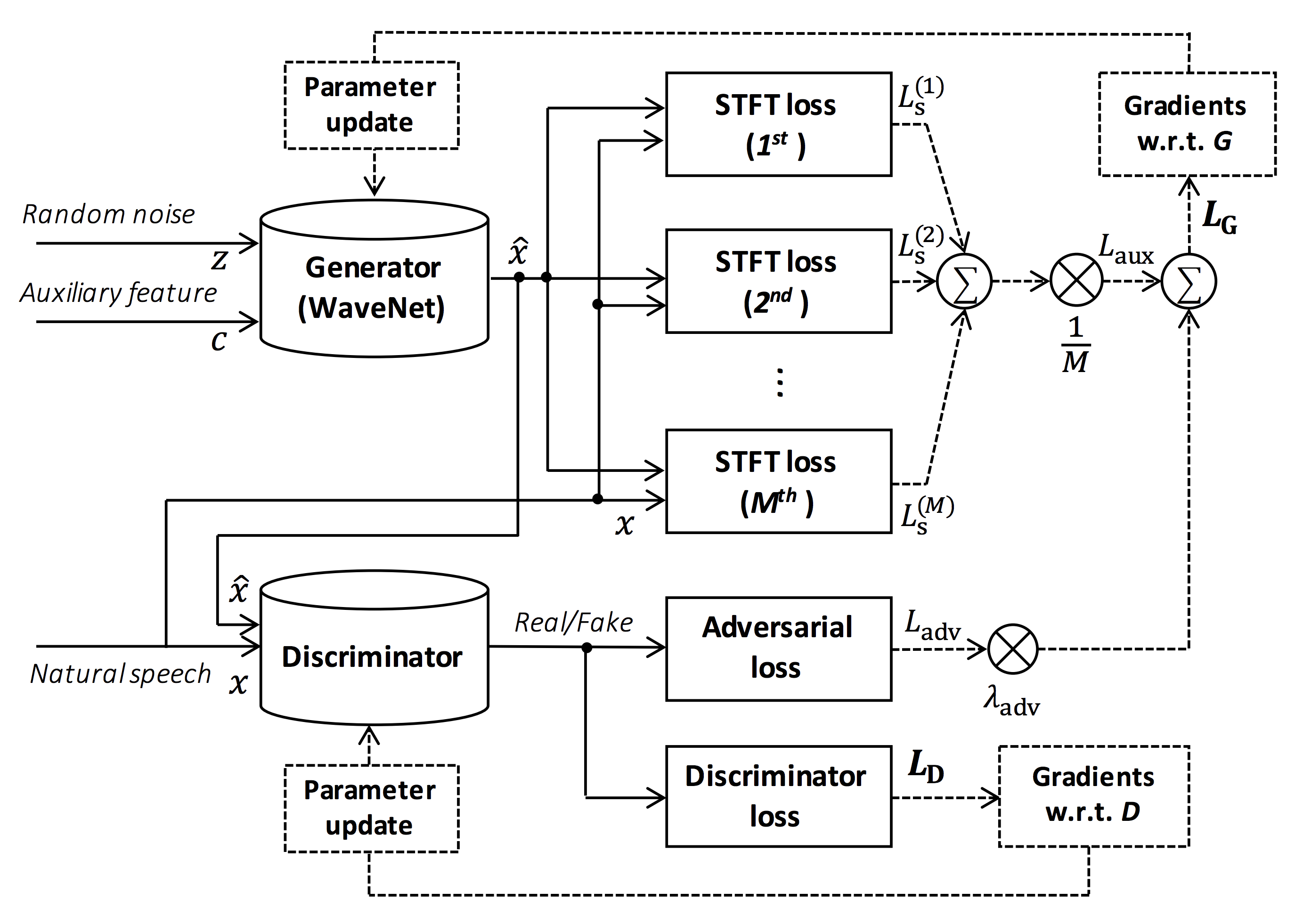
Fuente de la figura: https://arxiv.org/pdf/1910.11480.pdf
El objetivo de este repositorio es proporcionar un vocoder neural en tiempo real, que es compatible con ESPNet-TTS.
Además, este repositorio se puede combinar con la implementación basada en Nvidia/Tacotron2 (ver este comentario).
¡Puede probar la demostración de síntesis de voz de extremo a extremo en tiempo real en Google Colab!
Este repositorio se prueba en Ubuntu 20.04 con una GPU Titan V.
sudo apt install libsndfile-dev en Ubuntu)sudo apt install jq en ubuntu)sudo apt install sox en Ubuntu) Diferente versión de CUDA debería estar funcionando pero no probada explícitamente.
Todos los códigos se prueban en Pytorch 1.8.1, 1.9, 1.10.2, 1.11.0, 1.12.1, 1.13.1, 2.0.1 y 2.1.0.
Puede seleccionar el método de instalación de dos alternativas.
$ git clone https://github.com/kan-bayashi/ParallelWaveGAN.git
$ cd ParallelWaveGAN
$ pip install -e .
# If you want to use distributed training, please install
# apex manually by following https://github.com/NVIDIA/apex
$ ...
Tenga en cuenta que su versión CUDA debe coincidir exactamente con la versión utilizada para el binario Pytorch para instalar Apex.
Para instalar Pytorch compilado con una versión CUDA diferente, consulte tools/Makefile .
$ git clone https://github.com/kan-bayashi/ParallelWaveGAN.git
$ cd ParallelWaveGAN/tools
$ make
# If you want to use distributed training, please run following
# command to install apex.
$ make apex
Tenga en cuenta que especificamos la versión CUDA utilizada para compilar la rueda Pytorch.
Si desea utilizar una versión CUDA diferente, verifique tools/Makefile para cambiar la rueda Pytorch que se instalará.
Este repositorio proporciona recetas de estilo kaldi, como lo mismo que ESPNet.
Actualmente, las siguientes recetas son compatibles.
Para ejecutar la receta, siga las siguientes instrucciones.
 # Let us move on the recipe directory
$ cd egs/ljspeech/voc1

# Run the recipe from scratch
$ ./run.sh

# You can change config via command line
$ ./run.sh --conf < your_customized_yaml_config >

# You can select the stage to start and stop
$ ./run.sh --stage 2 --stop_stage 2

# If you want to specify the gpu
$ CUDA_VISIBLE_DEVICES=1 ./run.sh --stage 2

# If you want to resume training from 10000 steps checkpoint
$ ./run.sh --stage 2 --resume < path > / < to > /checkpoint-10000steps.pkl
Vea más información sobre las recetas en este Readme.
La velocidad de decodificación es RTF = 0.016 con Titan V, mucho más rápido que el en tiempo real.
[decode]: 100% | ██████████ | 250/250 [00: 30< 00:00,  8.31it/s, RTF = 0.0156]
2019-11-03 09:07:40,480 (decode:127) INFO: finished generation of 250 utterances (RTF = 0.016).
Incluso en la CPU (Intel (R) Xeon (R) Gold 6154 CPU @ 3.00Ghz 16 hilos), puede generar menos que el en tiempo real.
[decode]: 100% | ██████████ | 250/250 [22: 16< 00:00,  5.35s/it, RTF = 0.841]
2019-11-06 09:04:56,697 (decode:129) INFO: finished generation of 250 utterances (RTF = 0.734).
Si usa el generador de Melgan, la velocidad de decodificación será más rápida.
 # On CPU (Intel(R) Xeon(R) Gold 6154 CPU @ 3.00GHz 16 threads)
[decode]: 100% | ██████████ | 250/250 [04: 00< 00:00,  1.04it/s, RTF = 0.0882]
2020-02-08 10:45:14,111 (decode:142) INFO: Finished generation of 250 utterances (RTF = 0.137).

# On GPU (TITAN V)
[decode]: 100% | ██████████ | 250/250 [00: 06< 00:00, 36.38it/s, RTF = 0.00189]
2020-02-08 05:44:42,231 (decode:142) INFO: Finished generation of 250 utterances (RTF = 0.002).
Si usa el generador de Melgan de múltiples bandas, la velocidad de decodificación será mucho más rápida.
 # On CPU (Intel(R) Xeon(R) Gold 6154 CPU @ 3.00GHz 16 threads)
[decode]: 100% | ██████████ | 250/250 [01: 47< 00:00,  2.95it/s, RTF = 0.048]
2020-05-22 15:37:19,771 (decode:151) INFO: Finished generation of 250 utterances (RTF = 0.059).

# On GPU (TITAN V)
[decode]: 100% | ██████████ | 250/250 [00: 05< 00:00, 43.67it/s, RTF = 0.000928]
2020-05-22 15:35:13,302 (decode:151) INFO: Finished generation of 250 utterances (RTF = 0.001).
Si desea acelerar más la inferencia, vale la pena probar la conversión de Pytorch a TensorFlow.
El ejemplo de la conversión está disponible en el cuaderno (proporcionado por @DathudePtrai).
Aquí los resultados se resumen en la tabla.
Puede escuchar las muestras y descargar modelos previos a la aparición desde el enlace a nuestro Google Drive.
| Modelo | Confusión | Lang | FS [HZ] | Mel Range [Hz] | FFT / HOP / WIN [PT] | # iters |
|---|---|---|---|---|---|---|
| ljspech_parallel_wavegan.v1 | enlace | Interno | 22.05k | 80-7600 | 1024 /256 / ninguno | 400k |
| ljspech_parallel_wavegan.v1.long | enlace | Interno | 22.05k | 80-7600 | 1024 /256 / ninguno | 1M |
| ljspeech_parallel_wavegan.v1.no_limit | enlace | Interno | 22.05k | Ninguno | 1024 /256 / ninguno | 400k |
| ljspech_parallel_wavegan.v3 | enlace | Interno | 22.05k | 80-7600 | 1024 /256 / ninguno | 3M |
| LJSPEECH_MELGAN.V1 | enlace | Interno | 22.05k | 80-7600 | 1024 /256 / ninguno | 400k |
| LJSPEECH_MELGAN.V1.Long | enlace | Interno | 22.05k | 80-7600 | 1024 /256 / ninguno | 1M |
| LJSPEECH_MELGAN_LARGE.V1 | enlace | Interno | 22.05k | 80-7600 | 1024 /256 / ninguno | 400k |
| LJSPEECH_MELGAN_LARGE.V1.LONG | enlace | Interno | 22.05k | 80-7600 | 1024 /256 / ninguno | 1M |
| LJSPEECH_MELGAN.V3 | enlace | Interno | 22.05k | 80-7600 | 1024 /256 / ninguno | 2m |
| ljspeech_melgan.v3.long | enlace | Interno | 22.05k | 80-7600 | 1024 /256 / ninguno | 4m |
| LJSPEECH_FULL_BAND_MELGAN.V1 | enlace | Interno | 22.05k | 80-7600 | 1024 /256 / ninguno | 1M |
| LJSPEECH_FULL_BAND_MELGAN.V2 | enlace | Interno | 22.05k | 80-7600 | 1024 /256 / ninguno | 1M |
| LJSPEECH_MULTI_BAND_MELGAN.V1 | enlace | Interno | 22.05k | 80-7600 | 1024 /256 / ninguno | 1M |
| LJSPEECH_MULTI_BAND_MELGAN.V2 | enlace | Interno | 22.05k | 80-7600 | 1024 /256 / ninguno | 1M |
| ljspeech_hifigan.v1 | enlace | Interno | 22.05k | 80-7600 | 1024 /256 / ninguno | 2.5m |
| LJSPEECH_STYLE_MELGAN.V1 | enlace | Interno | 22.05k | 80-7600 | 1024 /256 / ninguno | 1,5 m |
| jsut_parallel_wavegan.v1 | enlace | JP | 24k | 80-7600 | 2048/300/1200 | 400k |
| JSUT_MULTI_BAND_MELGAN.V2 | enlace | JP | 24k | 80-7600 | 2048/300/1200 | 1M |
| just_hifigan.v1 | enlace | JP | 24k | 80-7600 | 2048/300/1200 | 2.5m |
| just_style_melgan.v1 | enlace | JP | 24k | 80-7600 | 2048/300/1200 | 1,5 m |
| csmsc_parallel_wavegan.v1 | enlace | Zh | 24k | 80-7600 | 2048/300/1200 | 400k |
| csmsc_multi_band_melgan.v2 | enlace | Zh | 24k | 80-7600 | 2048/300/1200 | 1M |
| csmsc_hifigan.v1 | enlace | Zh | 24k | 80-7600 | 2048/300/1200 | 2.5m |
| csmsc_style_melgan.v1 | enlace | Zh | 24k | 80-7600 | 2048/300/1200 | 1,5 m |
| arctic_slt_parallel_wavegan.v1 | enlace | Interno | 16k | 80-7600 | 1024 /256 / ninguno | 400k |
| JNAS_PARALLEL_WAVEGHE.V1 | enlace | JP | 16k | 80-7600 | 1024 /256 / ninguno | 400k |
| vctk_parallel_wavegan.v1 | enlace | Interno | 24k | 80-7600 | 2048/300/1200 | 400k |
| vctk_parallel_wavegan.v1.long | enlace | Interno | 24k | 80-7600 | 2048/300/1200 | 1M |
| VCTK_MULTI_BAND_MELGAN.V2 | enlace | Interno | 24k | 80-7600 | 2048/300/1200 | 1M |
| vctk_hifigan.v1 | enlace | Interno | 24k | 80-7600 | 2048/300/1200 | 2.5m |
| vctk_style_melgan.v1 | enlace | Interno | 24k | 80-7600 | 2048/300/1200 | 1,5 m |
| libritts_parallel_wavegan.v1 | enlace | Interno | 24k | 80-7600 | 2048/300/1200 | 400k |
| libritts_parallel_wavegan.v1.long | enlace | Interno | 24k | 80-7600 | 2048/300/1200 | 1M |
| libritts_multi_band_melgan.v2 | enlace | Interno | 24k | 80-7600 | 2048/300/1200 | 1M |
| libritts_hifigan.v1 | enlace | Interno | 24k | 80-7600 | 2048/300/1200 | 2.5m |
| libritts_style_melgan.v1 | enlace | Interno | 24k | 80-7600 | 2048/300/1200 | 1,5 m |
| kss_parallel_wavegan.v1 | enlace | KO | 24k | 80-7600 | 2048/300/1200 | 400k |
| hui_acg_hokuspokus_parallel_wavegan.v1 | enlace | Delaware | 24k | 80-7600 | 2048/300/1200 | 400k |
| ruslan_parallel_wavegan.v1 | enlace | Freno | 24k | 80-7600 | 2048/300/1200 | 400k |
| oniku_hifigan.v1 | enlace | JP | 24k | 80-7600 | 2048/300/1200 | 250k |
| kiritan_hifigan.v1 | enlace | JP | 24k | 80-7600 | 2048/300/1200 | 300k |
| ofuton_hifigan.v1 | enlace | JP | 24k | 80-7600 | 2048/300/1200 | 300k |
| opencpop_hifigan.v1 | enlace | Zh | 24k | 80-7600 | 2048/300/1200 | 250k |
| csd_english_hifigan.v1 | enlace | Interno | 24k | 80-7600 | 2048/300/1200 | 300k |
| csd_korean_hifigan.v1 | enlace | Interno | 24k | 80-7600 | 2048/300/1200 | 250k |
| kising_hifigan.v1 | enlace | Zh | 24k | 80-7600 | 2048/300/1200 | 300k |
| m4singer_hifigan.v1 | enlace | Zh | 24k | 80-7600 | 2048/300/1200 | 1M |
Acceda a nuestro Google Drive para verificar más resultados.
Verifique la licencia de la base de datos (por ejemplo, ya sea adecuada para el uso comercial) antes de usar el modelo previamente capacitado.
Los autores no serán responsables de ninguna pérdida debido al uso del modelo y disputas legales con respecto al uso del conjunto de datos.
Aquí se muestra que el código mínimo realiza la síntesis de análisis utilizando el modelo previamente prenedero.
# Please make sure you installed `parallel_wavegan`
# If not, please install via pip
$ pip install parallel_wavegan
# You can download the pretrained model from terminal
$ python << EOF
from parallel_wavegan.utils import download_pretrained_model
download_pretrained_model("<pretrained_model_tag>", "pretrained_model")
EOF
# You can get all of available pretrained models as follows:
$ python << EOF
from parallel_wavegan.utils import PRETRAINED_MODEL_LIST
print(PRETRAINED_MODEL_LIST.keys())
EOF
# Now you can find downloaded pretrained model in `pretrained_model/<pretrain_model_tag>/`
$ ls pretrain_model/ < pretrain_model_tag >
checkpoint-400000steps.pkl config.yml stats.h5
# These files can also be downloaded manually from the above results
# Please put an audio file in `sample` directory to perform analysis-synthesis
$ ls sample/
sample.wav
# Then perform feature extraction -> feature normalization -> synthesis
$ parallel-wavegan-preprocess
--config pretrain_model/ < pretrain_model_tag > /config.yml
--rootdir sample
--dumpdir dump/sample/raw
100% | ████████████████████████████████████████ | 1/1 [00: 00< 00:00, 914.19it/s]
$ parallel-wavegan-normalize
--config pretrain_model/ < pretrain_model_tag > /config.yml
--rootdir dump/sample/raw
--dumpdir dump/sample/norm
--stats pretrain_model/ < pretrain_model_tag > /stats.h5
2019-11-13 13:44:29,574 (normalize:87) INFO: the number of files = 1.
100% | ████████████████████████████████████████ | 1/1 [00: 00< 00:00, 513.13it/s]
$ parallel-wavegan-decode
--checkpoint pretrain_model/ < pretrain_model_tag > /checkpoint-400000steps.pkl
--dumpdir dump/sample/norm
--outdir sample
2019-11-13 13:44:31,229 (decode:91) INFO: the number of features to be decoded = 1.
[decode]: 100% | ███████████████████ | 1/1 [00: 00< 00:00, 18.33it/s, RTF = 0.0146]
2019-11-13 13:44:37,132 (decode:129) INFO: finished generation of 1 utterances (RTF = 0.015).
# You can skip normalization step (on-the-fly normalization, feature extraction -> synthesis)
$ parallel-wavegan-preprocess
--config pretrain_model/ < pretrain_model_tag > /config.yml
--rootdir sample
--dumpdir dump/sample/raw
100% | ████████████████████████████████████████ | 1/1 [00: 00< 00:00, 914.19it/s]
$ parallel-wavegan-decode
--checkpoint pretrain_model/ < pretrain_model_tag > /checkpoint-400000steps.pkl
--dumpdir dump/sample/raw
--normalize-before
--outdir sample
2019-11-13 13:44:31,229 (decode:91) INFO: the number of features to be decoded = 1.
[decode]: 100% | ███████████████████ | 1/1 [00: 00< 00:00, 18.33it/s, RTF = 0.0146]
2019-11-13 13:44:37,132 (decode:129) INFO: finished generation of 1 utterances (RTF = 0.015).
# you can find the generated speech in `sample` directory
$ ls sample
sample.wav sample_gen.wavAquí, muestro el procedimiento para generar formas de onda con características generadas por los modelos ESPNet-TTS.
# Make sure you already finished running the recipe of ESPnet-TTS.
# You must use the same feature settings for both Text2Mel and Mel2Wav models.
# Let us move on "ESPnet" recipe directory
$ cd /path/to/espnet/egs/ < recipe_name > /tts1
$ pwd
/path/to/espnet/egs/ < recipe_name > /tts1
# If you use ESPnet2, move on `egs2/`
$ cd /path/to/espnet/egs2/ < recipe_name > /tts1
$ pwd
/path/to/espnet/egs2/ < recipe_name > /tts1
# Please install this repository in ESPnet conda (or virtualenv) environment
$ . ./path.sh && pip install -U parallel_wavegan
# You can download the pretrained model from terminal
$ python << EOF
from parallel_wavegan.utils import download_pretrained_model
download_pretrained_model("<pretrained_model_tag>", "pretrained_model")
EOF
# You can get all of available pretrained models as follows:
$ python << EOF
from parallel_wavegan.utils import PRETRAINED_MODEL_LIST
print(PRETRAINED_MODEL_LIST.keys())
EOF
# You can find downloaded pretrained model in `pretrained_model/<pretrain_model_tag>/`
$ ls pretrain_model/ < pretrain_model_tag >
checkpoint-400000steps.pkl config.yml stats.h5
# These files can also be downloaded manually from the above resultsCaso 1 : si usa el mismo conjunto de datos para Text2Mel y Mel2Wav
# In this case, you can directly use generated features for decoding.
# Please specify `feats.scp` path for `--feats-scp`, which is located in
# exp/<your_model_dir>/outputs_*_decode/<set_name>/feats.scp.
# Note that do not use outputs_*decode_denorm/<set_name>/feats.scp since
# it is de-normalized features (the input for PWG is normalized features).
$ parallel-wavegan-decode
--checkpoint pretrain_model/ < pretrain_model_tag > /checkpoint-400000steps.pkl
--feats-scp exp/ < your_model_dir > /outputs_ * _decode/ < set_name > /feats.scp
--outdir < path_to_outdir >
# In the case of ESPnet2, the generated feature can be found in
# exp/<your_model_dir>/decode_*/<set_name>/norm/feats.scp.
$ parallel-wavegan-decode
--checkpoint pretrain_model/ < pretrain_model_tag > /checkpoint-400000steps.pkl
--feats-scp exp/ < your_model_dir > /decode_ * / < set_name > /norm/feats.scp
--outdir < path_to_outdir >
# You can find the generated waveforms in <path_to_outdir>/.
$ ls < path_to_outdir >
utt_id_1_gen.wav utt_id_2_gen.wav ... utt_id_N_gen.wavCaso 2 : si usa diferentes conjuntos de datos para los modelos Text2Mel y Mel2Wav
# In this case, you must provide `--normalize-before` option additionally.
# And use `feats.scp` of de-normalized generated features.
# ESPnet1 case
$ parallel-wavegan-decode
--checkpoint pretrain_model/ < pretrain_model_tag > /checkpoint-400000steps.pkl
--feats-scp exp/ < your_model_dir > /outputs_ * _decode_denorm/ < set_name > /feats.scp
--outdir < path_to_outdir >
--normalize-before
# ESPnet2 case
$ parallel-wavegan-decode
--checkpoint pretrain_model/ < pretrain_model_tag > /checkpoint-400000steps.pkl
--feats-scp exp/ < your_model_dir > /decode_ * / < set_name > /denorm/feats.scp
--outdir < path_to_outdir >
--normalize-before
# You can find the generated waveforms in <path_to_outdir>/.
$ ls < path_to_outdir >
utt_id_1_gen.wav utt_id_2_gen.wav ... utt_id_N_gen.wavSi desea combinar estos modelos en Python, ¡puede probar la demostración en tiempo real en Google Colab!
A veces queremos decodificar con archivos NPY volcados, que son el espectrograma MEL generado por los modelos TTS. Asegúrese de utilizar la misma configuración de extracción de características del Vocoder previamente provocado ( fs , fft_size , hop_size , win_length , fmin y fmax ).
Solo la diferencia de log_base se puede cambiar con algunos procesos posteriores (usamos log 10 en lugar de log natural como predeterminado). Ver detalle en el comentario.
 # Generate dummy npy file of mel-spectrogram
$ ipython
[ins] In [1]: import numpy as np
[ins] In [2]: x = np.random.randn(512, 80)  # (#frames, #mels)
[ins] In [3]: np.save( " dummy_1.npy " , x)
[ins] In [4]: y = np.random.randn(256, 80)  # (#frames, #mels)
[ins] In [5]: np.save( " dummy_2.npy " , y)
[ins] In [6]: exit

# Make scp file (key-path format)
$ find -name " *.npy " | awk ' {print "dummy_" NR " " $1} ' > feats.scp

# Check (<utt_id> <path>)
$ cat feats.scp
dummy_1 ./dummy_1.npy
dummy_2 ./dummy_2.npy

# Decode without feature normalization
# This case assumes that the input mel-spectrogram is normalized with the same statistics of the pretrained model.
$ parallel-wavegan-decode
    --checkpoint /path/to/checkpoint-400000steps.pkl
    --feats-scp ./feats.scp
    --outdir wav
2021-08-10 09:13:07,624 (decode:140) INFO: The number of features to be decoded = 2.
[decode]: 100% | ████████████████████████████████████████ | 2/2 [00: 00< 00:00, 13.84it/s, RTF = 0.00264]
2021-08-10 09:13:29,660 (decode:174) INFO: Finished generation of 2 utterances (RTF = 0.005).

# Decode with feature normalization
# This case assumes that the input mel-spectrogram is not normalized.
$ parallel-wavegan-decode
    --checkpoint /path/to/checkpoint-400000steps.pkl
    --feats-scp ./feats.scp
    --normalize-before
    --outdir wav
2021-08-10 09:13:07,624 (decode:140) INFO: The number of features to be decoded = 2.
[decode]: 100% | ████████████████████████████████████████ | 2/2 [00: 00< 00:00, 13.84it/s, RTF = 0.00264]
2021-08-10 09:13:29,660 (decode:174) INFO: Finished generation of 2 utterances (RTF = 0.005).El autor desea agradecer a Ryuichi Yamamoto (@R9Y9) por su gran repositorio, documento y valiosas discusiones.
Tomoki Hayashi (@Kan-Bayashi)
Correo electrónico: hayashi.tomoki<at>g.sp.m.is.nagoya-u.ac.jp







