f5 tts mlx
0.2.3

使用MLX框架實現F5-TT。
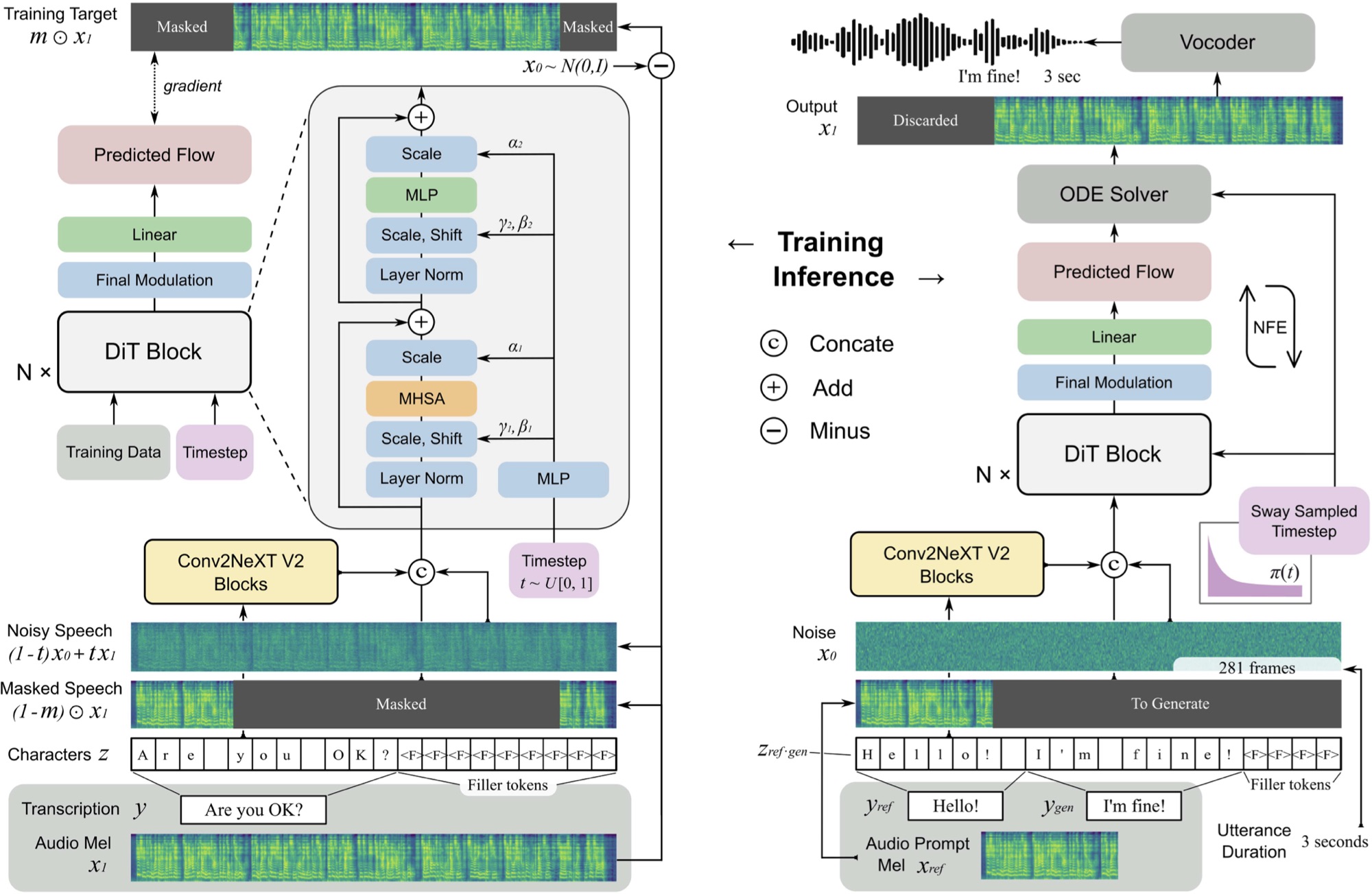
F5 TTS是使用帶有擴散變壓器(DIT)的流量匹配MEL頻譜發電機的非自動回憶性,零擊文本對語音系統。
您可以在此處收聽在M3 Max MacBook Pro上在11秒內生成的示例。
F5是E2 TTS的演變,並通過Convnext V2塊提高了性能,以進行學習文本對齊。該存儲庫基於此處可用的原始Pytorch實現。
pip install f5-tts-mlxpython -m f5_tts_mlx.generate --text " The quick brown fox jumped over the lazy dog. "您還可以使用管道從另一個過程的輸出中生成語音,例如從語言模型中:
mlx_lm.generate --model mlx-community/Llama-3.2-1B-Instruct-4bit --verbose false
 --temp 0 --max-tokens 512 --prompt " Write a concise paragraph explaning wavelets. "
| python -m f5_tts_mlx.generate如果您想使用自己的參考音頻示例,請確保它是一個大約5-10秒的單聲道24kHz WAV文件:
python -m f5_tts_mlx.generate
--text " The quick brown fox jumped over the lazy dog. "
--ref-audio /path/to/audio.wav
--ref-text " This is the caption for the reference audio. "
您可以使用這樣的ffmpeg將音頻文件轉換為正確的格式:
ffmpeg -i /path/to/audio.wav -ac 1 -ar 24000 -sample_fmt s16 -t 10 /path/to/output_audio.wav有關自定義生成的更多選項,請參見此處。
如果您處於帶寬或內存限制的環境中,則可以使用--q選項來加載模型的量化版本。支持4位和8位變體。
python -m f5_tts_mlx.generate --text " The quick brown fox jumped over the lazy dog. " --q 4您可以從Python加載預貼模型:
 from f5_tts_mlx . generate import generate

audio = generate ( text = "Hello world." , ...)
預處理的模型重量也可以在擁抱臉上使用。
Yushen Chen用於F5 TTS的原始Pytorch實施和預驗證的模型。
Phil Wang用於該模型所基於的E2 TTS實現。
 @article { chen-etal-2024-f5tts ,
      title = { F5-TTS: A Fairytaler that Fakes Fluent and Faithful Speech with Flow Matching } ,
      author = { Yushen Chen and Zhikang Niu and Ziyang Ma and Keqi Deng and Chunhui Wang and Jian Zhao and Kai Yu and Xie Chen } ,
      journal = { arXiv preprint arXiv:2410.06885 } ,
      year = { 2024 } ,
}
@inproceedings { Eskimez2024E2TE ,
title = { E2 TTS: Embarrassingly Easy Fully Non-Autoregressive Zero-Shot TTS } ,
author = { Sefik Emre Eskimez and Xiaofei Wang and Manthan Thakker and Canrun Li and Chung-Hsien Tsai and Zhen Xiao and Hemin Yang and Zirun Zhu and Min Tang and Xu Tan and Yanqing Liu and Sheng Zhao and Naoyuki Kanda } ,
year = { 2024 } ,
url = { https://api.semanticscholar.org/CorpusID:270738197 }
}該存儲庫中的代碼按照許可證文件中的MIT許可發布。







