Jlama
v0.8.3


模型支持:
工具:
Jlama需要Java 20或更高版本,並利用新的向量API進行更快的推斷。
將LLM推理直接添加到您的Java應用程序。
JLAMA包含一個命令行工具,該工具易於使用。
CLI可以與Jbang一起運行。
 # Install jbang (or https://www.jbang.dev/download/)
curl -Ls https://sh.jbang.dev | bash -s - app setup

# Install Jlama CLI (will ask if you trust the source)
jbang app install --force jlama@tjake
現在您已經安裝了Jlama,可以從Huggingface下載模型並與之聊天。請注意,我在https://hf.co/tjake上提供了預量化模型
 # Run the openai chat api and UI on a model
jlama restapi tjake/Llama-3.2-1B-Instruct-JQ4 --auto-download
打開瀏覽器http:// localhost:8080/
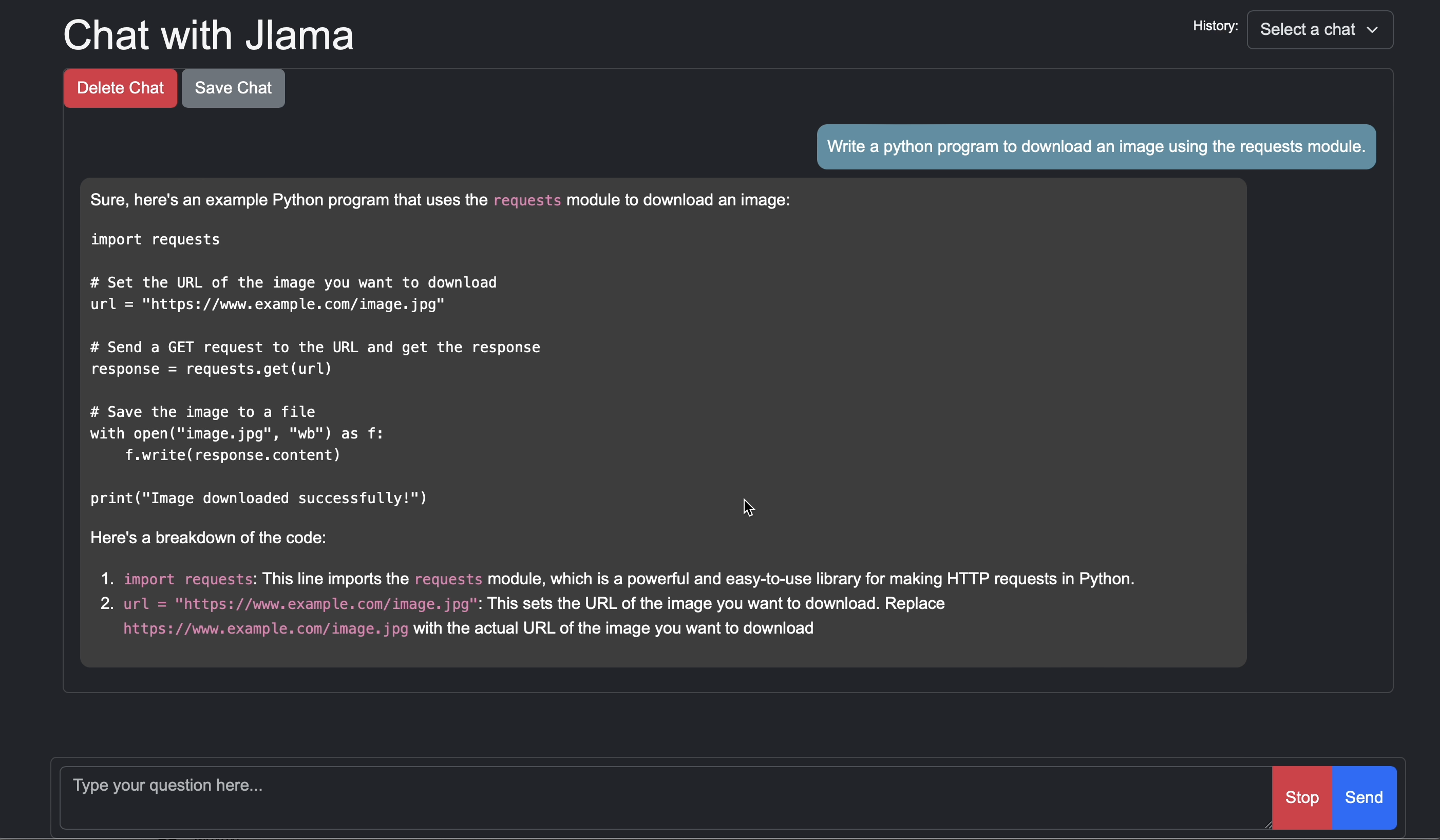
Usage:

jlama [COMMAND]

Description:

Jlama is a modern LLM inference engine for Java !
Quantized models are maintained at https://hf.co/tjake

Choose from the available commands:

Inference:
  chat                 Interact with the specified model
  restapi              Starts a openai compatible rest api for interacting with this model
  complete             Completes a prompt using the specified model

Distributed Inference:
  cluster-coordinator  Starts a distributed rest api for a model using cluster workers
  cluster-worker       Connects to a cluster coordinator to perform distributed inference

Other:
  download             Downloads a HuggingFace model - use owner/name format
  list                 Lists local models
quantize Quantize the specified modelJlama的主要目的是提供一種簡單的方法來在Java中使用大型語言模型。
將Jlama嵌入應用程序中的最簡單方法是與Langchain4J集成在一起。
如果您想在沒有langchain4j的情況下嵌入jlama,請在您的項目中添加以下Maven依賴項:
< dependency >
  < groupId >com.github.tjake</ groupId >
  < artifactId >jlama-core</ artifactId >
  < version >${jlama.version}</ version >
</ dependency >

< dependency >
  < groupId >com.github.tjake</ groupId >
  < artifactId >jlama-native</ artifactId >
  <!-- supports linux-x86_64, macos-x86_64/aarch_64, windows-x86_64
       Use https://github.com/trustin/os-maven-plugin to detect os and arch -->
  < classifier >${os.detected.name}-${os.detected.arch}</ classifier >
  < version >${jlama.version}</ version >
</ dependency >
Jlama使用Java 21預覽功能。您可以在全球範圍內啟用功能:
export JDK_JAVA_OPTIONS= " --add-modules jdk.incubator.vector --enable-preview "或通過配置Maven編譯器和FailSafe插件來啟用預覽功能。
然後,您可以使用模型類運行模型:
 public void sample () throws IOException {
    String model = "tjake/Llama-3.2-1B-Instruct-JQ4" ;
    String workingDirectory = "./models" ;

    String prompt = "What is the best season to plant avocados?" ;

    // Downloads the model or just returns the local path if it's already downloaded
    File localModelPath = new Downloader ( workingDirectory , model ). huggingFaceModel ();

    // Loads the quantized model and specified use of quantized memory
    AbstractModel m = ModelSupport . loadModel ( localModelPath , DType . F32 , DType . I8 );

    PromptContext ctx ;
    // Checks if the model supports chat prompting and adds prompt in the expected format for this model
    if ( m . promptSupport (). isPresent ()) {
        ctx = m . promptSupport ()
                . get ()
                . builder ()
                . addSystemMessage ( "You are a helpful chatbot who writes short responses." )
                . addUserMessage ( prompt )
                . build ();
    } else {
        ctx = PromptContext . of ( prompt );
    }

    System . out . println ( "Prompt: " + ctx . getPrompt () + " n " );
    // Generates a response to the prompt and prints it
    // The api allows for streaming or non-streaming responses
    // The response is generated with a temperature of 0.7 and a max token length of 256
    Generator . Response r = m . generate ( UUID . randomUUID (), ctx , 0.0f , 256 , ( s , f ) -> {});
    System . out . println ( r . responseText );
}如果您願意或正在使用此項目來構建自己的項目,請給我們一顆星星。這是展示您的支持的免費方法。
該代碼可在Apache許可證下獲得。
如果您發現此項目有助於您的研究,請在
 @misc{jlama2024,
    title = {Jlama: A modern Java inference engine for large language models},
    url = {https://github.com/tjake/jlama},
    author = {T Jake Luciani},
    month = {January},
    year = {2024}
}





