Jlama
v0.8.3


Modellunterstützung:
Geräte:
JLAMA benötigt Java 20 oder später und verwendet die neue Vektor -API für eine schnellere Folgerung.
Fügen Sie LLM -Inferenz direkt zu Ihrer Java -Anwendung hinzu.
JLAMA enthält ein Befehlszeilen -Tool, mit dem Sie einfach zu bedienen sind.
Die CLI kann mit Jbang ausgeführt werden.
 # Install jbang (or https://www.jbang.dev/download/)
curl -Ls https://sh.jbang.dev | bash -s - app setup

# Install Jlama CLI (will ask if you trust the source)
jbang app install --force jlama@tjake
Jetzt, da Sie JLAMA installiert haben, können Sie ein Modell von Suggingface herunterladen und damit chatten. Beachten Sie, dass ich vorquantisierte Modelle unter https://hf.co/tjake verfügbar habe
 # Run the openai chat api and UI on a model
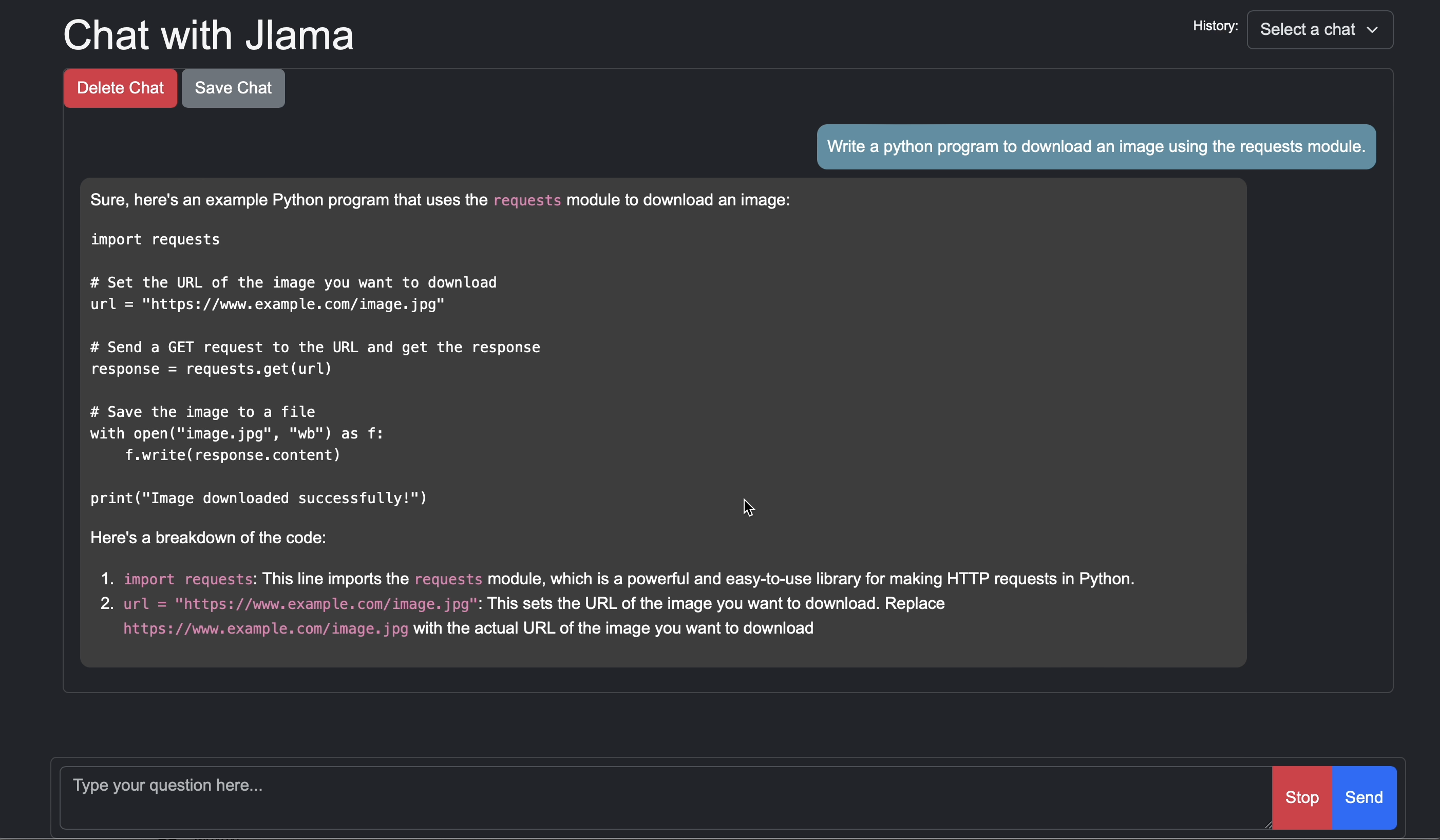
jlama restapi tjake/Llama-3.2-1B-Instruct-JQ4 --auto-download
Öffnen Sie Browser zu http: // localhost: 8080/
Usage:

jlama [COMMAND]

Description:

Jlama is a modern LLM inference engine for Java !
Quantized models are maintained at https://hf.co/tjake

Choose from the available commands:

Inference:
  chat                 Interact with the specified model
  restapi              Starts a openai compatible rest api for interacting with this model
  complete             Completes a prompt using the specified model

Distributed Inference:
  cluster-coordinator  Starts a distributed rest api for a model using cluster workers
  cluster-worker       Connects to a cluster coordinator to perform distributed inference

Other:
  download             Downloads a HuggingFace model - use owner/name format
  list                 Lists local models
quantize Quantize the specified modelDer Hauptzweck von JLAMA ist es, eine einfache Möglichkeit zu bieten, Großsprachenmodelle in Java zu verwenden.
Der einfachste Weg, JLAMA in Ihre App einzubetten, ist die Integration von Langchain4J.
Wenn Sie JLAMA ohne Langchain4J einbetten möchten, fügen Sie Ihrem Projekt die folgenden Maven -Abhängigkeiten hinzu:
< dependency >
  < groupId >com.github.tjake</ groupId >
  < artifactId >jlama-core</ artifactId >
  < version >${jlama.version}</ version >
</ dependency >

< dependency >
  < groupId >com.github.tjake</ groupId >
  < artifactId >jlama-native</ artifactId >
  <!-- supports linux-x86_64, macos-x86_64/aarch_64, windows-x86_64
       Use https://github.com/trustin/os-maven-plugin to detect os and arch -->
  < classifier >${os.detected.name}-${os.detected.arch}</ classifier >
  < version >${jlama.version}</ version >
</ dependency >
JLAMA verwendet Java 21 Preview -Funktionen. Sie können die Funktionen weltweit aktivieren mit:
export JDK_JAVA_OPTIONS= " --add-modules jdk.incubator.vector --enable-preview "oder aktivieren Sie die Vorschaubefunktionen, indem Sie den Maven -Compiler konfigurieren und Plugins fehlschlägen.
Dann können Sie die Modellklassen verwenden, um Modelle auszuführen:
 public void sample () throws IOException {
    String model = "tjake/Llama-3.2-1B-Instruct-JQ4" ;
    String workingDirectory = "./models" ;

    String prompt = "What is the best season to plant avocados?" ;

    // Downloads the model or just returns the local path if it's already downloaded
    File localModelPath = new Downloader ( workingDirectory , model ). huggingFaceModel ();

    // Loads the quantized model and specified use of quantized memory
    AbstractModel m = ModelSupport . loadModel ( localModelPath , DType . F32 , DType . I8 );

    PromptContext ctx ;
    // Checks if the model supports chat prompting and adds prompt in the expected format for this model
    if ( m . promptSupport (). isPresent ()) {
        ctx = m . promptSupport ()
                . get ()
                . builder ()
                . addSystemMessage ( "You are a helpful chatbot who writes short responses." )
                . addUserMessage ( prompt )
                . build ();
    } else {
        ctx = PromptContext . of ( prompt );
    }

    System . out . println ( "Prompt: " + ctx . getPrompt () + " n " );
    // Generates a response to the prompt and prints it
    // The api allows for streaming or non-streaming responses
    // The response is generated with a temperature of 0.7 and a max token length of 256
    Generator . Response r = m . generate ( UUID . randomUUID (), ctx , 0.0f , 256 , ( s , f ) -> {});
    System . out . println ( r . responseText );
}Wenn Sie dieses Projekt mögen oder verwenden, um Ihre eigenen zu erstellen, geben Sie uns bitte einen Stern. Es ist eine kostenlose Möglichkeit, Ihre Unterstützung zu zeigen.
Der Code ist unter Apache -Lizenz verfügbar.
Wenn Sie dieses Projekt in Ihrer Forschung hilfreich finden, zitieren Sie diese Arbeit bei
 @misc{jlama2024,
    title = {Jlama: A modern Java inference engine for large language models},
    url = {https://github.com/tjake/jlama},
    author = {T Jake Luciani},
    month = {January},
    year = {2024}
}





