Jlama
v0.8.3


Support du modèle:
Instructions:
JLAMA nécessite Java 20 ou version ultérieure et utilise la nouvelle API vectorielle pour une inférence plus rapide.
Ajoutez une inférence LLM directement à votre application Java.
JLAMA comprend un outil de ligne de commande qui le rend facile à utiliser.
La CLI peut être exécutée avec Jbang.
 # Install jbang (or https://www.jbang.dev/download/)
curl -Ls https://sh.jbang.dev | bash -s - app setup

# Install Jlama CLI (will ask if you trust the source)
jbang app install --force jlama@tjake
Maintenant que JLAMA installé, vous pouvez télécharger un modèle à partir de HuggingFace et discuter avec. Remarque J'ai des modèles pré-qualifiés disponibles sur https://hf.co/tjake
 # Run the openai chat api and UI on a model
jlama restapi tjake/Llama-3.2-1B-Instruct-JQ4 --auto-download
Ouvrez le navigateur à http: // localhost: 8080 /
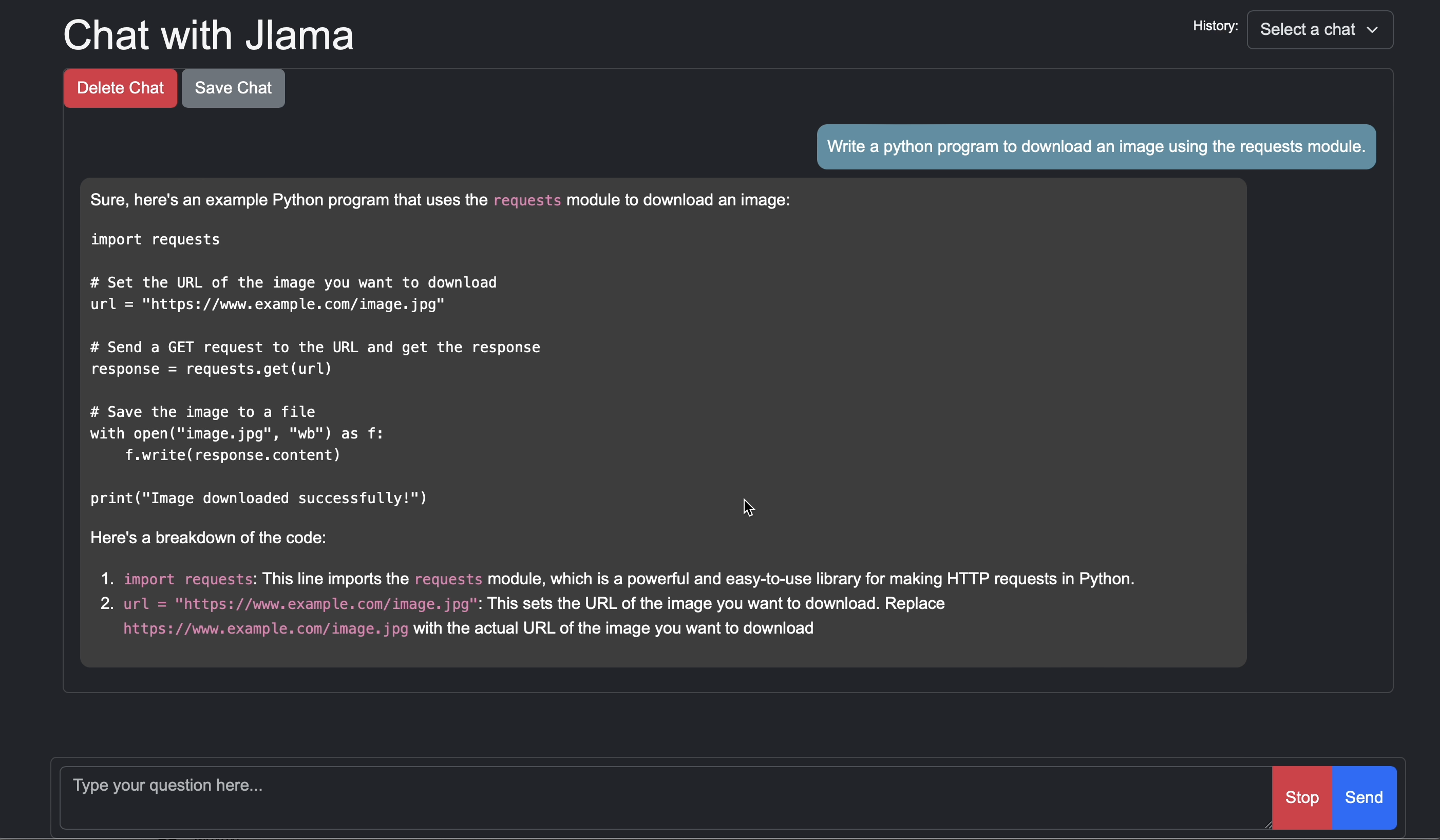
Usage:

jlama [COMMAND]

Description:

Jlama is a modern LLM inference engine for Java !
Quantized models are maintained at https://hf.co/tjake

Choose from the available commands:

Inference:
  chat                 Interact with the specified model
  restapi              Starts a openai compatible rest api for interacting with this model
  complete             Completes a prompt using the specified model

Distributed Inference:
  cluster-coordinator  Starts a distributed rest api for a model using cluster workers
  cluster-worker       Connects to a cluster coordinator to perform distributed inference

Other:
  download             Downloads a HuggingFace model - use owner/name format
  list                 Lists local models
quantize Quantize the specified modelL'objectif principal de JLAMA est de fournir un moyen simple d'utiliser de grands modèles de langue en Java.
Le moyen le plus simple d'incorporer JLAMA dans votre application est avec l'intégration Langchain4j.
Si vous souhaitez intégrer JLAMA sans Langchain4j, ajoutez les dépendances Maven suivantes à votre projet:
< dependency >
  < groupId >com.github.tjake</ groupId >
  < artifactId >jlama-core</ artifactId >
  < version >${jlama.version}</ version >
</ dependency >

< dependency >
  < groupId >com.github.tjake</ groupId >
  < artifactId >jlama-native</ artifactId >
  <!-- supports linux-x86_64, macos-x86_64/aarch_64, windows-x86_64
       Use https://github.com/trustin/os-maven-plugin to detect os and arch -->
  < classifier >${os.detected.name}-${os.detected.arch}</ classifier >
  < version >${jlama.version}</ version >
</ dependency >
JLAMA utilise les fonctionnalités de prévisualisation Java 21. Vous pouvez activer les fonctionnalités à l'échelle mondiale avec:
export JDK_JAVA_OPTIONS= " --add-modules jdk.incubator.vector --enable-preview "ou activez les fonctionnalités de prévisualisation en configurant le compilateur Maven et les plugins en état d'échec.
Ensuite, vous pouvez utiliser les classes de modèle pour exécuter les modèles:
 public void sample () throws IOException {
    String model = "tjake/Llama-3.2-1B-Instruct-JQ4" ;
    String workingDirectory = "./models" ;

    String prompt = "What is the best season to plant avocados?" ;

    // Downloads the model or just returns the local path if it's already downloaded
    File localModelPath = new Downloader ( workingDirectory , model ). huggingFaceModel ();

    // Loads the quantized model and specified use of quantized memory
    AbstractModel m = ModelSupport . loadModel ( localModelPath , DType . F32 , DType . I8 );

    PromptContext ctx ;
    // Checks if the model supports chat prompting and adds prompt in the expected format for this model
    if ( m . promptSupport (). isPresent ()) {
        ctx = m . promptSupport ()
                . get ()
                . builder ()
                . addSystemMessage ( "You are a helpful chatbot who writes short responses." )
                . addUserMessage ( prompt )
                . build ();
    } else {
        ctx = PromptContext . of ( prompt );
    }

    System . out . println ( "Prompt: " + ctx . getPrompt () + " n " );
    // Generates a response to the prompt and prints it
    // The api allows for streaming or non-streaming responses
    // The response is generated with a temperature of 0.7 and a max token length of 256
    Generator . Response r = m . generate ( UUID . randomUUID (), ctx , 0.0f , 256 , ( s , f ) -> {});
    System . out . println ( r . responseText );
}Si vous aimez ou utilisez ce projet pour construire le vôtre, veuillez nous donner une étoile. C'est un moyen gratuit de montrer votre soutien.
Le code est disponible sous la licence Apache.
Si vous trouvez ce projet utile dans vos recherches, veuillez citer ce travail à
 @misc{jlama2024,
    title = {Jlama: A modern Java inference engine for large language models},
    url = {https://github.com/tjake/jlama},
    author = {T Jake Luciani},
    month = {January},
    year = {2024}
}





