Jlama
v0.8.3


การสนับสนุนแบบจำลอง:
ดำเนินการ:
Jlama ต้องการ Java 20 หรือใหม่กว่าและใช้ API เวกเตอร์ใหม่เพื่อการอนุมานที่เร็วขึ้น
เพิ่มการอนุมาน LLM โดยตรงไปยังแอปพลิเคชัน Java ของคุณ
Jlama มีเครื่องมือบรรทัดคำสั่งที่ทำให้ใช้งานง่าย
CLI สามารถทำงานกับ Jbang ได้
 # Install jbang (or https://www.jbang.dev/download/)
curl -Ls https://sh.jbang.dev | bash -s - app setup

# Install Jlama CLI (will ask if you trust the source)
jbang app install --force jlama@tjake
ตอนนี้คุณติดตั้ง Jlama แล้วคุณสามารถดาวน์โหลดรุ่นจาก HuggingFace และแชทกับมันได้ หมายเหตุฉันมีโมเดลล่วงหน้าที่มีอยู่ที่ https://hf.co/tjake
 # Run the openai chat api and UI on a model
jlama restapi tjake/Llama-3.2-1B-Instruct-JQ4 --auto-download
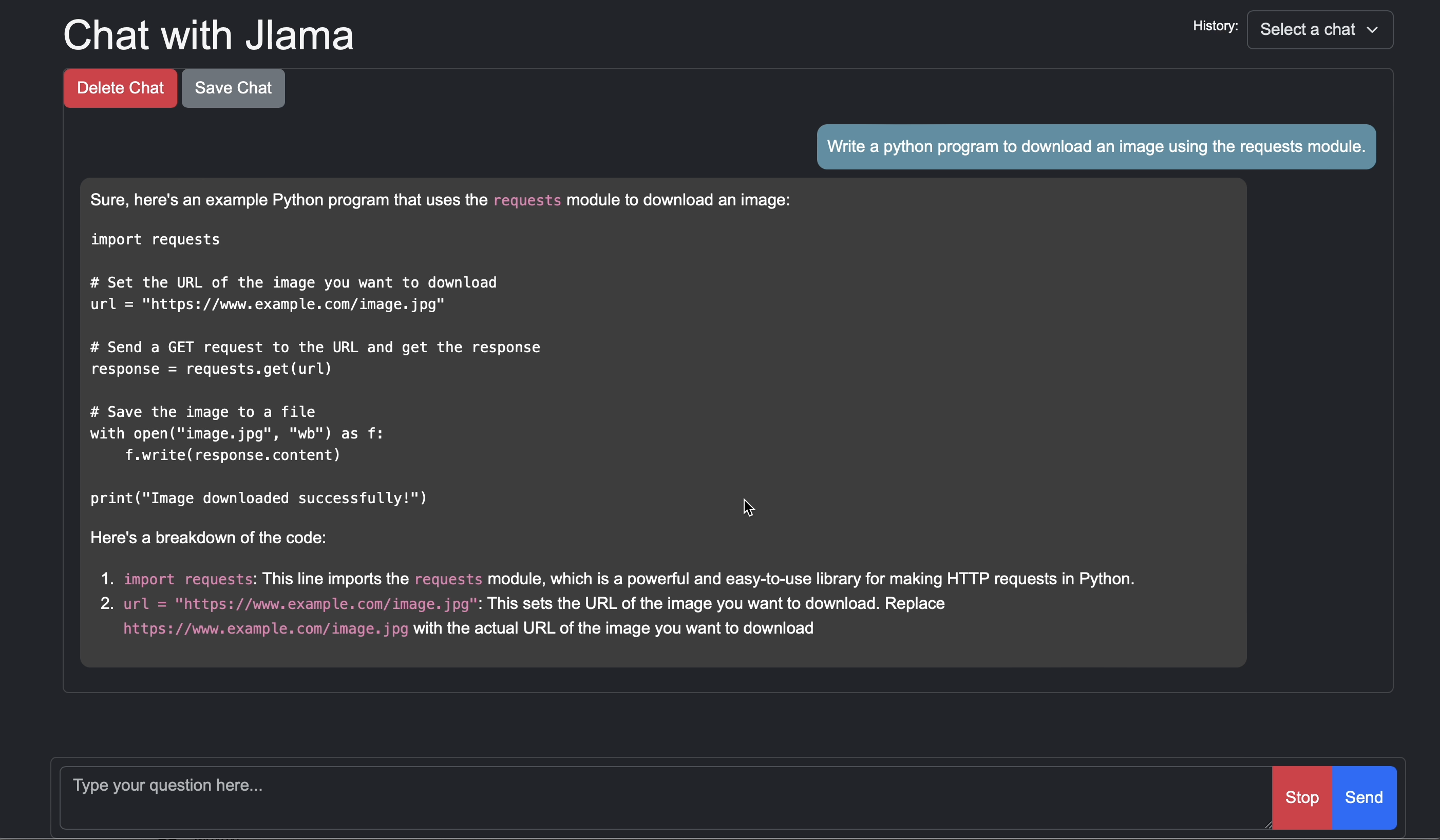
เปิดเบราว์เซอร์ไปที่ http: // localhost: 8080/
Usage:

jlama [COMMAND]

Description:

Jlama is a modern LLM inference engine for Java !
Quantized models are maintained at https://hf.co/tjake

Choose from the available commands:

Inference:
  chat                 Interact with the specified model
  restapi              Starts a openai compatible rest api for interacting with this model
  complete             Completes a prompt using the specified model

Distributed Inference:
  cluster-coordinator  Starts a distributed rest api for a model using cluster workers
  cluster-worker       Connects to a cluster coordinator to perform distributed inference

Other:
  download             Downloads a HuggingFace model - use owner/name format
  list                 Lists local models
quantize Quantize the specified modelจุดประสงค์หลักของ Jlama คือการให้วิธีง่ายๆในการใช้แบบจำลองภาษาขนาดใหญ่ใน Java
วิธีที่ง่ายที่สุดในการฝัง Jlama ในแอพของคุณคือการรวม Langchain4J
หากคุณต้องการฝัง Jlama โดยไม่มี Langchain4j ให้เพิ่มการพึ่งพา Maven ต่อไปนี้ในโครงการของคุณ:
< dependency >
  < groupId >com.github.tjake</ groupId >
  < artifactId >jlama-core</ artifactId >
  < version >${jlama.version}</ version >
</ dependency >

< dependency >
  < groupId >com.github.tjake</ groupId >
  < artifactId >jlama-native</ artifactId >
  <!-- supports linux-x86_64, macos-x86_64/aarch_64, windows-x86_64
       Use https://github.com/trustin/os-maven-plugin to detect os and arch -->
  < classifier >${os.detected.name}-${os.detected.arch}</ classifier >
  < version >${jlama.version}</ version >
</ dependency >
Jlama ใช้คุณสมบัติตัวอย่าง Java 21 คุณสามารถเปิดใช้งานคุณสมบัติทั่วโลกด้วย:
export JDK_JAVA_OPTIONS= " --add-modules jdk.incubator.vector --enable-preview "หรือเปิดใช้งานคุณสมบัติตัวอย่างโดยการกำหนดค่าคอมไพเลอร์ Maven และปลั๊กอิน FailSafe
จากนั้นคุณสามารถใช้คลาสโมเดลเพื่อเรียกใช้โมเดล:
 public void sample () throws IOException {
    String model = "tjake/Llama-3.2-1B-Instruct-JQ4" ;
    String workingDirectory = "./models" ;

    String prompt = "What is the best season to plant avocados?" ;

    // Downloads the model or just returns the local path if it's already downloaded
    File localModelPath = new Downloader ( workingDirectory , model ). huggingFaceModel ();

    // Loads the quantized model and specified use of quantized memory
    AbstractModel m = ModelSupport . loadModel ( localModelPath , DType . F32 , DType . I8 );

    PromptContext ctx ;
    // Checks if the model supports chat prompting and adds prompt in the expected format for this model
    if ( m . promptSupport (). isPresent ()) {
        ctx = m . promptSupport ()
                . get ()
                . builder ()
                . addSystemMessage ( "You are a helpful chatbot who writes short responses." )
                . addUserMessage ( prompt )
                . build ();
    } else {
        ctx = PromptContext . of ( prompt );
    }

    System . out . println ( "Prompt: " + ctx . getPrompt () + " n " );
    // Generates a response to the prompt and prints it
    // The api allows for streaming or non-streaming responses
    // The response is generated with a temperature of 0.7 and a max token length of 256
    Generator . Response r = m . generate ( UUID . randomUUID (), ctx , 0.0f , 256 , ( s , f ) -> {});
    System . out . println ( r . responseText );
}หากคุณชอบหรือกำลังใช้โครงการนี้เพื่อสร้างของคุณเองโปรดให้ดารากับเรา เป็นวิธีฟรีในการแสดงการสนับสนุนของคุณ
รหัสมีอยู่ภายใต้ใบอนุญาต Apache
หากคุณพบว่าโครงการนี้มีประโยชน์ในการวิจัยของคุณโปรดอ้างอิงงานนี้ที่
 @misc{jlama2024,
    title = {Jlama: A modern Java inference engine for large language models},
    url = {https://github.com/tjake/jlama},
    author = {T Jake Luciani},
    month = {January},
    year = {2024}
}





