Jlama
v0.8.3


دعم النموذج:
الأدوات:
تتطلب Jlama Java 20 أو لاحقًا وتستخدم واجهة برمجة تطبيقات Vector الجديدة لاستنتاج أسرع.
أضف استنتاج LLM مباشرة إلى تطبيق Java الخاص بك.
يتضمن Jlama أداة سطر الأوامر تجعلها سهلة الاستخدام.
يمكن تشغيل CLI مع jbang.
 # Install jbang (or https://www.jbang.dev/download/)
curl -Ls https://sh.jbang.dev | bash -s - app setup

# Install Jlama CLI (will ask if you trust the source)
jbang app install --force jlama@tjake
الآن بعد أن قمت بتثبيت Jlama ، يمكنك تنزيل نموذج من Huggingface والدردشة معه. لاحظ أن لدي نماذج مسبقة متوفرة على https://hf.co/tjake
 # Run the openai chat api and UI on a model
jlama restapi tjake/Llama-3.2-1B-Instruct-JQ4 --auto-download
فتح المتصفح إلى http: // localhost: 8080/
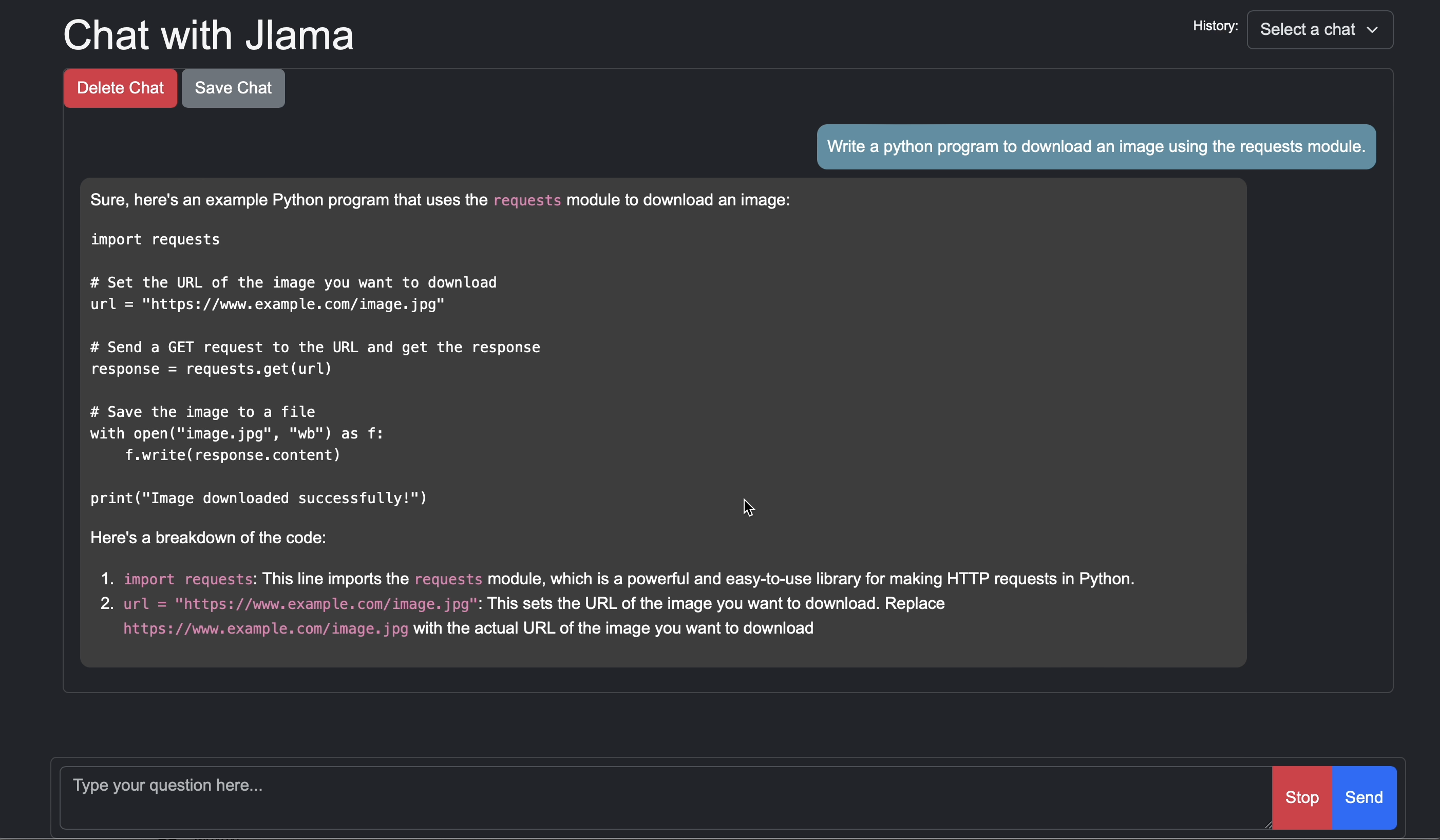
Usage:

jlama [COMMAND]

Description:

Jlama is a modern LLM inference engine for Java !
Quantized models are maintained at https://hf.co/tjake

Choose from the available commands:

Inference:
  chat                 Interact with the specified model
  restapi              Starts a openai compatible rest api for interacting with this model
  complete             Completes a prompt using the specified model

Distributed Inference:
  cluster-coordinator  Starts a distributed rest api for a model using cluster workers
  cluster-worker       Connects to a cluster coordinator to perform distributed inference

Other:
  download             Downloads a HuggingFace model - use owner/name format
  list                 Lists local models
quantize Quantize the specified modelالغرض الرئيسي من Jlama هو توفير طريقة بسيطة لاستخدام نماذج لغة كبيرة في Java.
أبسط طريقة لتضمين Jlama في تطبيقك هي مع تكامل Langchain4J.
إذا كنت ترغب في تضمين Jlama بدون Langchain4J ، فأضف تبعيات Maven التالية إلى مشروعك:
< dependency >
  < groupId >com.github.tjake</ groupId >
  < artifactId >jlama-core</ artifactId >
  < version >${jlama.version}</ version >
</ dependency >

< dependency >
  < groupId >com.github.tjake</ groupId >
  < artifactId >jlama-native</ artifactId >
  <!-- supports linux-x86_64, macos-x86_64/aarch_64, windows-x86_64
       Use https://github.com/trustin/os-maven-plugin to detect os and arch -->
  < classifier >${os.detected.name}-${os.detected.arch}</ classifier >
  < version >${jlama.version}</ version >
</ dependency >
يستخدم Jlama ميزات معاينة Java 21. يمكنك تمكين الميزات على مستوى العالم مع:
export JDK_JAVA_OPTIONS= " --add-modules jdk.incubator.vector --enable-preview "أو تمكين ميزات المعاينة عن طريق تكوين برنامج التحويل البرمجي Maven و Failsafe المكونات الإضافية.
ثم يمكنك استخدام فئات النماذج لتشغيل النماذج:
 public void sample () throws IOException {
    String model = "tjake/Llama-3.2-1B-Instruct-JQ4" ;
    String workingDirectory = "./models" ;

    String prompt = "What is the best season to plant avocados?" ;

    // Downloads the model or just returns the local path if it's already downloaded
    File localModelPath = new Downloader ( workingDirectory , model ). huggingFaceModel ();

    // Loads the quantized model and specified use of quantized memory
    AbstractModel m = ModelSupport . loadModel ( localModelPath , DType . F32 , DType . I8 );

    PromptContext ctx ;
    // Checks if the model supports chat prompting and adds prompt in the expected format for this model
    if ( m . promptSupport (). isPresent ()) {
        ctx = m . promptSupport ()
                . get ()
                . builder ()
                . addSystemMessage ( "You are a helpful chatbot who writes short responses." )
                . addUserMessage ( prompt )
                . build ();
    } else {
        ctx = PromptContext . of ( prompt );
    }

    System . out . println ( "Prompt: " + ctx . getPrompt () + " n " );
    // Generates a response to the prompt and prints it
    // The api allows for streaming or non-streaming responses
    // The response is generated with a temperature of 0.7 and a max token length of 256
    Generator . Response r = m . generate ( UUID . randomUUID (), ctx , 0.0f , 256 , ( s , f ) -> {});
    System . out . println ( r . responseText );
}إذا كنت ترغب في ذلك أو كنت تستخدم هذا المشروع لبناء خاص بك ، فالرجاء إعطائنا نجمة. إنها طريقة مجانية لإظهار دعمك.
الرمز متاح بموجب ترخيص Apache.
إذا وجدت هذا المشروع مفيدًا في بحثك ، فيرجى الاستشهاد بهذا العمل
 @misc{jlama2024,
    title = {Jlama: A modern Java inference engine for large language models},
    url = {https://github.com/tjake/jlama},
    author = {T Jake Luciani},
    month = {January},
    year = {2024}
}





