PAFTS
v1.0.0

该库可以简单地将音频文件处理为适用于TTS培训数据的格式,并简单地执行。 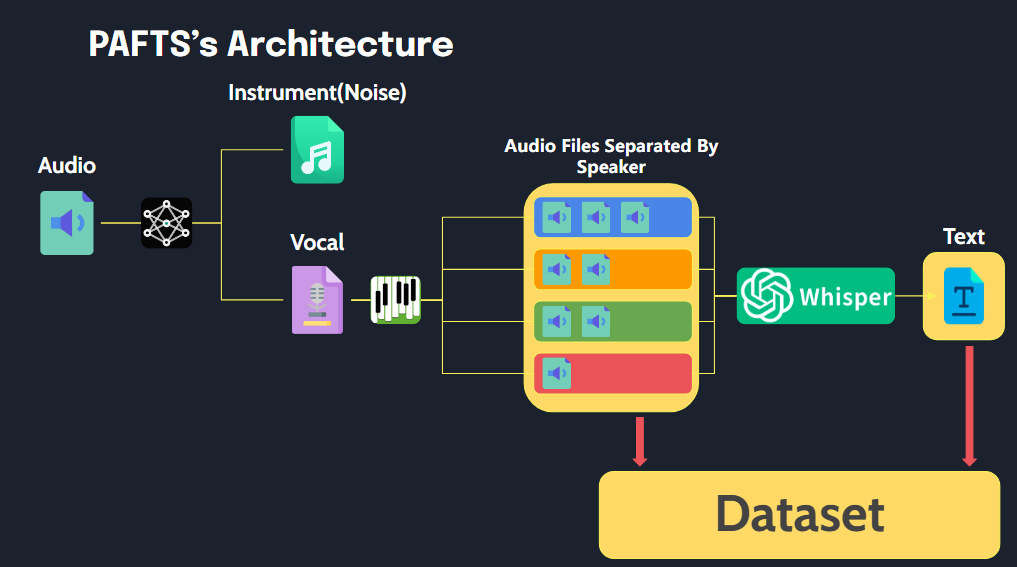
Pafts具有三个功能。
 # before run()

      path
        ├── 1_001.wav # have mr or noise
        ├── 1_002.wav
        ├── 1_003.wav
        ├── 1_004.wav
        └── abc.wav


# after run()

       path
        ├── SPEAKER_00
        │   ├── SPEAKER_00_1.wav # removed mr and noise
        │   ├── SPEAKER_00_2.wav
        │   └── SPEAKER_00_3.wav
        ├── SPEAKER_01
        │   ├── SPEAKER_01_1.wav
        │   └── SPEAKER_01_2.wav
        ├── SPEAKER_02
        │   ├── SPEAKER_02_1.wav
        │   └── SPEAKER_02_2.wav
        └── audio.json

        # audio.json
        {
              'SPEAKER_00_1.wav' : "I have a note.",
              'SPEAKER_00_2.wav' : "I want to eat chicken.",
              'SPEAKER_00_3.wav' : "...",
              'SPEAKER_01_1.wav' : "...",
              'SPEAKER_01_2.wav' : "...",
        }
该库是使用Python 3.10开发的,我们建议使用Python版本3.8至3.10进行兼容。
虽然库与Linux和Windows都兼容,但所有测试均在Windows上进行。对于在Linux上运行时遇到的任何问题或错误,请随时打开问题。
在运行库之前,请确保安装以下内容:
我们强烈建议使用GPU优化性能。对于Pytorch安装,请按照以下命令确保与GPU的兼容性
 # Example for installing PyTorch with CUDA 11.8
pip install torch torchvision torchaudio --index-url https://download.pytorch.org/whl/cu118
FFMPEG是本库中音频处理任务所必需的。请确保从系统的路径上安装并可以访问。安装FFMPEG:
从FFMPEG的官方网站下载最新的FFMPEG版本,然后将BIN文件夹添加到您的系统路径中。
使用以下命令安装FFMPEG:
 sudo apt update
sudo apt install ffmpeg
安装后,您可以通过运行验证
ffmpeg -version
要启用诊断功能,请完成以下步骤
pyannote/segmentation-3.0用户条件pyannote/speaker-diarization-3.1用户条件hf.co/settings/tokens上创建访问令牌。 from pafts.pafts import PAFTS
p = PAFTS(
path = 'your_audio_directory_path',
output_path = 'output_path',
hf_token="HUGGINGFACE_ACCESS_TOKEN_GOES_HERE"
)
完成上面的设置步骤后,您可以通过运行来安装此库
pip install pafts
 from pafts import PAFTS

p = PAFTS(
    path = 'your_audio_directory_path',
    output_path = 'output_path',
    hf_token="HUGGINGFACE_ACCESS_TOKEN_GOES_HERE" # if you use diarization

)

# Separator
p.separator()

# Diarization
p.diarization()

# STT
p.STT(model_size='small')

# One-Click Process
p.run()
PAFTS的代码是MIT许可的







