PAFTS
v1.0.0

This library enables easy processing of audio files into a format suitable for TTS training data with a simple execution.
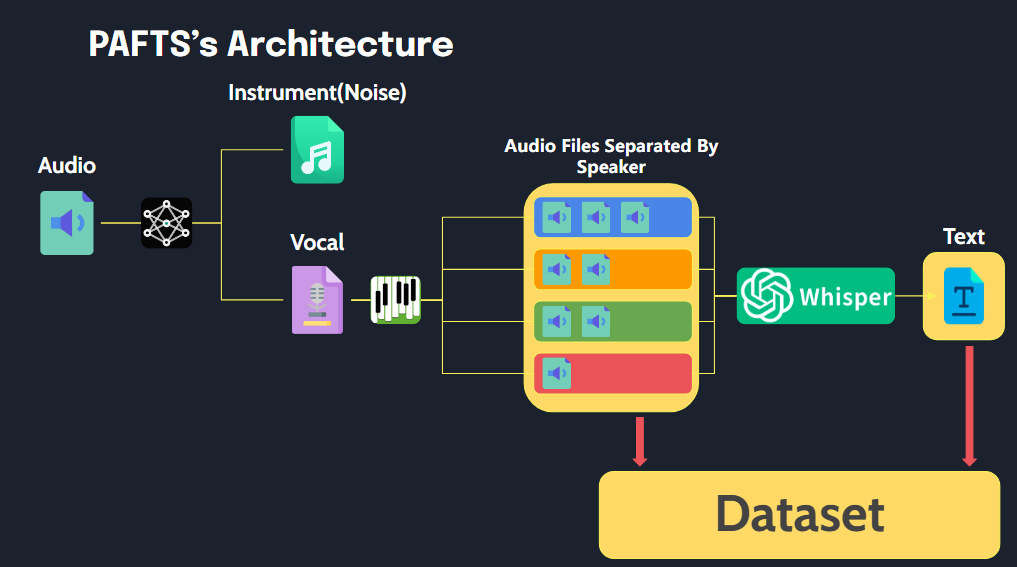
PAFTS have three features.
# before run()

      path
        ├── 1_001.wav # have mr or noise
        ├── 1_002.wav
        ├── 1_003.wav
        ├── 1_004.wav
        └── abc.wav


# after run()

       path
        ├── SPEAKER_00
        │   ├── SPEAKER_00_1.wav # removed mr and noise
        │   ├── SPEAKER_00_2.wav
        │   └── SPEAKER_00_3.wav
        ├── SPEAKER_01
        │   ├── SPEAKER_01_1.wav
        │   └── SPEAKER_01_2.wav
        ├── SPEAKER_02
        │   ├── SPEAKER_02_1.wav
        │   └── SPEAKER_02_2.wav
        └── audio.json

        # audio.json
        {
              'SPEAKER_00_1.wav' : "I have a note.",
              'SPEAKER_00_2.wav' : "I want to eat chicken.",
              'SPEAKER_00_3.wav' : "...",
              'SPEAKER_01_1.wav' : "...",
              'SPEAKER_01_2.wav' : "...",
        }
This library was developed using Python 3.10, and we recommend using Python versions 3.8 to 3.10 for compatibility.
While the library is compatible with both Linux and Windows, all testing was conducted on Windows. For any issues or errors encountered while running on Linux, please feel free to open an issue.
Before running the library, please ensure the following are installed:
We highly recommend using a GPU to optimize performance. For PyTorch installation, please follow the commands below to ensure compatibility with your GPU
# Example for installing PyTorch with CUDA 11.8
pip install torch torchvision torchaudio --index-url https://download.pytorch.org/whl/cu118
ffmpeg is required for audio processing tasks within this library. Please ensure it is installed and accessible from your system’s PATH. To install ffmpeg:
Download the latest FFmpeg release from FFmpeg’s official website, and add the bin folder to your system’s PATH.
Use the following command to install FFmpeg:
sudo apt update
sudo apt install ffmpeg
After installation, you can verify by running
ffmpeg -version
To enable diarization functionality, please complete the following steps
pyannote/segmentation-3.0 user conditionspyannote/speaker-diarization-3.1 user conditionshf.co/settings/tokens.from pafts.pafts import PAFTS
p = PAFTS(
path = 'your_audio_directory_path',
output_path = 'output_path',
hf_token="HUGGINGFACE_ACCESS_TOKEN_GOES_HERE"
)
After completing the setup steps above, you can install this library by running
pip install pafts
from pafts import PAFTS

p = PAFTS(
    path = 'your_audio_directory_path',
    output_path = 'output_path',
    hf_token="HUGGINGFACE_ACCESS_TOKEN_GOES_HERE" # if you use diarization

)

# Separator
p.separator()

# Diarization
p.diarization()

# STT
p.STT(model_size='small')

# One-Click Process
p.run()
The code of PAFTS is MIT-licensed







