whisper timestamped
v1.15.8

具有单语言自动语音识别,具有单词级的时间戳和信心。
Whisper是一组由OpenAI训练的多语言,强大的语音识别模型,可实现最先进的语言。对耳语模型进行了训练,可以预测语音段上的近似时间戳(大多数情况下,具有1秒的精度),但它们最初不能预测单词时间戳。该存储库提出了一个实现,以预测单词时间戳,并在使用耳语模型转录时对语音段进行更准确的估计。此外,将置信度得分分配给每个单词和每个段。
该方法基于Jong Wook Kim的笔记本表明,该笔记本的动态时间翘曲(DTW)应用于交叉注意权重。此笔记本有一些补充:
whisper-timestamped能够处理长的文件,几乎没有其他内存。 whisper-timestamped是openai-whisper Python包的扩展,旨在与任何版本的openai-whisper兼容。它提供更有效/准确的单词时间戳以及这些其他功能:
免责声明:请注意,此扩展名用于实验目的,可能会对性能产生重大影响。我们对其使用产生的任何问题或低效率概不负责。
恢复单词级时间戳的另一种相关方法涉及使用预测字符的WAV2VEC模型,如Whisperx中成功实现。但是,这些方法具有基于跨注意权重的方法(例如whisper_timestamped )中的几个缺点。这些缺点包括:
一种不需要其他模型的替代方法是查看每次(子)单词令牌估计的时间戳令牌的概率。例如,在whisper.cpp和稳定-TS中实现了这一点。但是,这种方法缺乏鲁棒性,因为在每个单词之后,尚未对耳语模型进行训练以输出有意义的时间戳。耳语模型仅在预测一定数量的单词(通常在句子的末尾)后才预测时间戳,并且在这种情况之外的时间戳的概率分布可能不准确。在实践中,这些方法可以产生在某些时期完全不同步的结果(我们观察到了这一点,尤其是在有叮当音乐的情况下)。同样,耳语模型的时间戳精度往往会被舍入到1秒钟(如许多视频字幕),这对于单词来说太不准确了,并且达到更好的准确性是棘手的。
要求:
python3 (更高或等于3.7的版本,建议至少3.9)ffmpeg (请参阅在耳语存储库上安装的说明)您可以通过使用PIP安装whisper-timestamped :
pip3 install whisper-timestamped或通过克隆此存储库并运行安装:
git clone https://github.com/linto-ai/whisper-timestamped
cd whisper-timestamped/
python3 setup.py install如果要绘制音频时间戳和单词之间的对齐(如本节中),则还需要matplotlib:
pip3 install matplotlib如果您想使用VAD选项(在运行Whisper模型之前进行语音活动检测),则还需要Torchaudio和OnnxRuntime:
pip3 install onnxruntime torchaudio如果您想从拥抱面枢纽中使用固定的耳语模型,您还需要变形金刚:
pip3 install transformers可以使用以下方式构建大约9GB的码头图像
git clone https://github.com/linto-ai/whisper-timestamped
cd whisper-timestamped/
docker build -t whisper_timestamped:latest .如果您没有GPU(或不想使用它),则无需安装CUDA依赖项。然后,您应该只需安装光线的轻型版本,然后再安装Whisper-Timestamp,例如:
pip3 install
     torch==1.13.1+cpu
     torchaudio==0.13.1+cpu
     -f https://download.pytorch.org/whl/torch_stable.html
也可以使用以下方式构建约3.5GB的特定Docker图像:
git clone https://github.com/linto-ai/whisper-timestamped
cd whisper-timestamped/
docker build -t whisper_timestamped_cpu:latest -f Dockerfile.cpu .使用PIP时,可以使用以下方式将库更新到最新版本:
pip3 install --upgrade --no-deps --force-reinstall git+https://github.com/linto-ai/whisper-timestamped
可以通过运行来使用特定版本的openai-whisper ,例如:
pip3 install openai-whisper==20230124在Python中,您可以使用whisper_timestamped.transcribe()函数,该函数类似于whisper.transcribe() :
 import whisper_timestamped
help ( whisper_timestamped . transcribe ) whisper.transcribe()的主要区别在于,输出将包含所有片段的关键"words" ,并带有单词的启动和终点位置。请注意,该词将包括标点符号。请参见下面的示例。
此外,默认的解码选项不同于有效的解码(贪婪解码而不是梁搜索,而没有温度采样的后备)。要具有与whisper相同的默认值,请使用beam_size=5, best_of=5, temperature=(0.0, 0.2, 0.4, 0.6, 0.8, 1.0) 。
还有与单词对齐相关的其他选项。
通常,如果您导入whisper_timestamped ,而不是在python脚本中whisper ,并使用transcribe(model, ...) model.transcribe(...)不是模型。
 import whisper_timestamped as whisper

audio = whisper . load_audio ( "AUDIO.wav" )

model = whisper . load_model ( "tiny" , device = "cpu" )

result = whisper . transcribe ( model , audio , language = "fr" )

import json
print ( json . dumps ( result , indent = 2 , ensure_ascii = False ))请注意,您可以使用whisper_timestamped的load_model方法使用HuggingFace或本地文件夹中的Finetuned Wishper模型。例如,如果您想使用hisper-large-v2-nob,则只需进行以下操作:
 import whisper_timestamped as whisper

model = whisper . load_model ( "NbAiLab/whisper-large-v2-nob" , device = "cpu" )

# ...您也可以在命令行上使用whisper_timestamped ,类似于whisper 。请参阅帮助:
whisper_timestamped --help whisper CLI的主要区别是:
--output_dir .对于耳语默认。--verbose True用于窃窃私语。--accurate (这是--beam_size 5 --temperature_increment_on_fallback 0.2 --best_of 5 )。--compute_confidence启用/禁用每个单词的置信分数计算。--punctuations_with_words决定是否应包含标点符号。一个示例命令使用tiny模型处理多个文件并在当前文件夹中输出结果,默认情况下是用窃窃私语来处理的,如下:
whisper_timestamped audio1.flac audio2.mp3 audio3.wav --model tiny --output_dir .
请注意,您可以使用HuggingFace或本地文件夹的微调耳语模型。例如,如果您想使用窃窃私语-V2-NOB模型,则可以简单地执行以下操作:
whisper_timestamped --model NbAiLab/whisper-large-v2-nob <...>
除了主要的transcribe功能外,hisper-Timestamped还提供了一些实用功能:
remove_non_speech使用语音活动检测(VAD)从音频中删除非语音段。
 from whisper_timestamped import remove_non_speech

audio_speech , segments , convert_timestamps = remove_non_speech ( audio , vad = "silero" )load_model从给定名称或路径上加载耳语模型,包括对HuggingFace的微调模型的支持。
 from whisper_timestamped import load_model

model = load_model ( "NbAiLab/whisper-large-v2-nob" , device = "cpu" )请注意,您可以使用plot_word_alignment选项whisper_timestamped.transcribe() python函数或whisper_timestamped cli的--plot选项,以查看每个段的单词对齐单词。
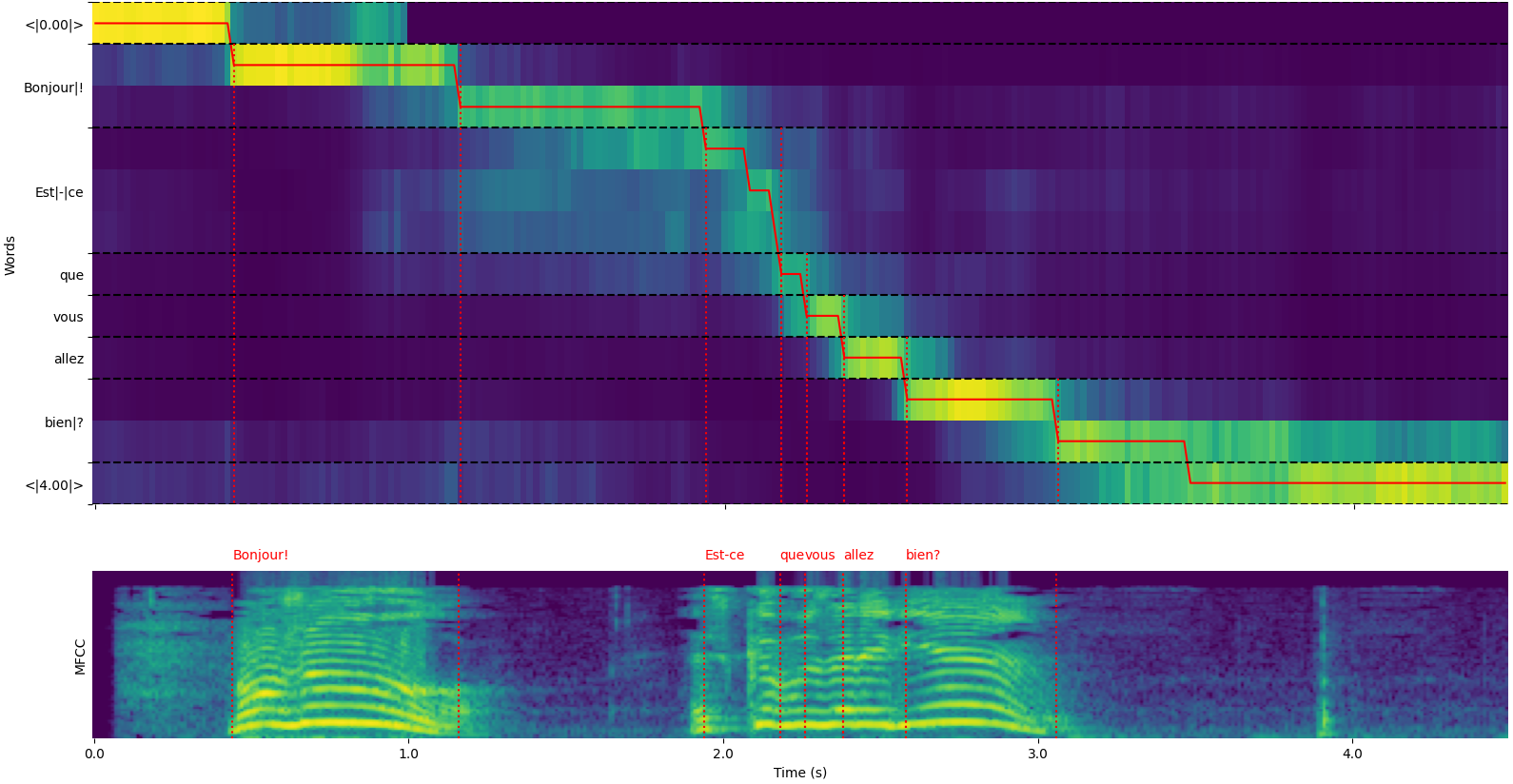
whisper_timestamped.transcribe()函数的输出是Python词典,可以使用CLI以JSON格式查看。
可以在测试/JSON_SCHEMA.JSON中看到JSON模式。
这是一个示例输出:
whisper_timestamped AUDIO_FILE.wav --model tiny --language fr{
"text" : " Bonjour! Est-ce que vous allez bien? " ,
"segments" : [
{
"id" : 0 ,
"seek" : 0 ,
"start" : 0.5 ,
"end" : 1.2 ,
"text" : " Bonjour! " ,
"tokens" : [ 25431 , 2298 ],
"temperature" : 0.0 ,
"avg_logprob" : -0.6674491882324218 ,
"compression_ratio" : 0.8181818181818182 ,
"no_speech_prob" : 0.10241222381591797 ,
"confidence" : 0.51 ,
"words" : [
{
"text" : " Bonjour! " ,
"start" : 0.5 ,
"end" : 1.2 ,
"confidence" : 0.51
}
]
},
{
"id" : 1 ,
"seek" : 200 ,
"start" : 2.02 ,
"end" : 4.48 ,
"text" : " Est-ce que vous allez bien? " ,
"tokens" : [ 50364 , 4410 , 12 , 384 , 631 , 2630 , 18146 , 3610 , 2506 , 50464 ],
"temperature" : 0.0 ,
"avg_logprob" : -0.43492694334550336 ,
"compression_ratio" : 0.7714285714285715 ,
"no_speech_prob" : 0.06502953916788101 ,
"confidence" : 0.595 ,
"words" : [
{
"text" : " Est-ce " ,
"start" : 2.02 ,
"end" : 3.78 ,
"confidence" : 0.441
},
{
"text" : " que " ,
"start" : 3.78 ,
"end" : 3.84 ,
"confidence" : 0.948
},
{
"text" : " vous " ,
"start" : 3.84 ,
"end" : 4.0 ,
"confidence" : 0.935
},
{
"text" : " allez " ,
"start" : 4.0 ,
"end" : 4.14 ,
"confidence" : 0.347
},
{
"text" : " bien? " ,
"start" : 4.14 ,
"end" : 4.48 ,
"confidence" : 0.998
}
]
}
],
"language" : " fr "
}如果未指定语言(例如,CLI中的--language fr ),您将找到一个具有语言概率的其他键:
{
  ...
  "language" : " fr " ,
  "language_probs" : {
    "en" : 0.027954353019595146 ,
    "zh" : 0.02743500843644142 ,
    ...
    "fr" : 0.9196318984031677 ,
    ...
    "su" : 3.0119704064190955e-08 ,
    "yue" : 2.2565967810805887e-05
  }
}transcribe_timestamped(model, audio, **kwargs)使用耳语模型转录音频并计算单词级时间戳。
model :耳语模型实例用于转录的耳语模型。
audio :联合[str,np.ndarray,torch.tensor]要转录音频文件的路径,或者作为numpy阵列或pytorch张量的音频波形。
language :str,可选(默认值:无)音频的语言。如果没有,将执行语言检测。
task :str,默认“转录”要执行的任务:“转录”语音识别或“翻译”以翻译为英语。
vad :联合[bool,str,列表[元组[float,float]]],可选(默认值:false)是否使用语音活动检测(VAD)来删除非语音段。可以:
detect_disfluencies :bool,默认错误是否在转录中检测和标记分裂(犹豫,填充单词等)。
trust_whisper_timestamps :bool,默认情况下,是否依靠耳语的时间戳来初始段位置。
compute_word_confidence :bool,默认情况下,是否要计算单词的置信度得分。
include_punctuation_in_confidence :bool,默认错误是否在计算单词置信度时是否包括标点符号概率。
refine_whisper_precision :float,默认值0.5在几秒钟内,要精炼窃窃私语段位置多少。必须是0.02的倍数。
min_word_duration :float,默认值为0.02单词的最小持续时间,以秒为单词。
plot_word_alignment :bool或str,默认错误是否绘制每个段的单词对齐。如果是字符串,请将绘图保存到给定文件。
word_alignement_most_top_layers :int,可选(默认值:无)用于单词对齐的顶层数量。如果没有,请使用所有层。
remove_empty_words :bool,默认为false是否删除段末尾没有持续时间的单词。
naive_approach :bool,默认错误力量解码两次的天真方法(一次转录,一次进行对齐)。
use_backend_timestamps :BOOL,默认错误是否使用后端提供的单词时间戳(Openai-Whisper或Transformers),而不是由窃窃私语timestamp的更复杂的启发式方法计算出的。
temperature :联合[float,list [float]],抽样默认温度0.0温度。可以是单个价值或后备温度的列表。
compression_ratio_threshold :float,默认2.4如果GZIP压缩比高于此值,请将解码视为失败。
logprob_threshold :float,默认值-1.0如果平均日志概率低于此值,请将解码视为失败。
no_speech_threshold :float,默认的0.6概率阈值<| nospeech |>令牌。
condition_on_previous_text :bool,默认情况下,是否提供先前的输出作为下一个窗口的提示。
initial_prompt :str,可选(默认值:无)可选文本,以作为第一个窗口的提示提供。
suppress_tokens :str,默认“ -1”逗号分隔的令牌ID列表,以抑制采样期间。
fp16 :Bool,可选(默认值:无)是否在FP16 Precision中执行推断。
verbose :布尔或无,默认为false是否显示要解码为控制台的文本。如果为true,请显示所有细节。如果是错误的,则显示最小的细节。如果没有,则不显示任何内容。
包含的字典:
text :str-完整的转录文本segments :列表[dict] - 段词典列表,每个词典包含:id :int-细分IDseek :INT-在音频文件中启动位置(在样本中)start :float-段的开始时间(以秒为单位)end :浮点 - 段的结束时间(以秒为单位)text :str-段的抄录文本tokens :列表[int] - 该细分的令牌IDtemperature :浮点 - 该细分市场的温度avg_logprob :float-段的平均日志概率compression_ratio :float-段的压缩比no_speech_prob :float-细分市场中无语音的概率confidence :浮点 - 该细分市场的信心评分words :列表[dict] - 单词词典列表,每个词典包含:start :float-单词的开始时间(以秒为单位)end :float-单词的结尾时间(以秒为单位)text :str-单词文字confidence :浮点 - 单词的置信度得分(如果计算)language :str-检测或指定语言language_probs :DICS-语言检测概率(如果适用) RuntimeError :如果VAD方法未正确安装或配置。ValueError :如果refine_whisper_precision不是0.02的正倍。AssertionError :如果音频持续时间短于预期,或者段数的数量不一致。 naive_approach参数可用于调试或处理特定音频特征时有用,但可能比默认方法慢。use_efficient_by_default为True时,默认情况下将某些参数(例如best_of , beam_size和temperature_increment_on_fallback设置为none,以进行更有效的处理。remove_non_speech(audio, **kwargs)使用语音活动检测(VAD)从音频中删除非语音段。
audio :TORCH.TENSOR音频数据作为Pytorch张量。
use_sample :bool,默认为false,如果为true,请在样本中返回开始和结束时间,而不是秒。
min_speech_duration :FLOAT,默认情况下,语音段的最小持续时间为几秒钟。
min_silence_duration :float,默认的1秒钟内静音段的最小持续时间。
dilatation :浮动,默认为0.5,要在几秒钟内将VAD检测到的每个语音段放大多少。
sample_rate :int,默认音频的默认样本率。
method :str或列表[元组[float,float]],使用默认的“ Silero” VAD方法。可以是“ Silero”,“ Auditok”或时间戳列表。
avoid_empty_speech :bool,默认为false如果为true,请避免返回空的语音段。
plot :联合[bool,str],默认为false,如果为true,请绘制VAD结果。如果是字符串,请将绘图保存到给定文件。
包含元组:
ImportError :如果未安装所需的VAD库(例如,审核)。ValueError :如果指定了无效的VAD方法。 load_model(name, device=None, backend="openai-whisper", download_root=None, in_memory=False)从给定名称或路径上加载耳语模型。
name :模型的str名称或模型路径。可以:
device :Union [Str,Torch.device],可选(默认:无)可以使用的设备。如果没有,请使用CUDA如果可用,则使用CPU。
backend :STR,默认“ openai-whisper”后端使用。 “变形金刚”或“ openai-whisper”。
download_root :str,可选(默认值:无)root文件夹以下载该模型。如果没有,请使用默认下载root。
in_memory :bool,默认错误是否将模型权重预加载到主机内存中。
加载的耳语模型。
ValueError :如果指定了无效的后端。ImportError :如果使用“变形金刚”后端时未安装变压器库。RuntimeError :如果无法从指定源找到或下载模型。OSError :如果有问题,请阅读模型文件或访问指定的路径。 get_alignment_heads(model, max_top_layer=3)获取给定模型的对齐头。
model :耳语模型实例的耳语模型,该模型要检索对齐头。
max_top_layer :INT,默认情况下3个最多要考虑对齐头的顶层数量。
代表对齐头的稀疏张量。
以下功能可用于为各种文件格式编写成绩单:
write_csv(transcript, file, sep=",", text_first=True, format_timestamps=None, header=False)将成绩单数据写入CSV文件。
transcript :列表[dict]笔录段词典列表。
file :类似文件的对象文件,将CSV数据写入。
sep :str,默认为“”,用于在CSV文件中使用的分隔符。
text_first :bool,默认为true,如果为true,请在开始/结束时间之前写入文本列。
format_timestamps :可呼叫,可选(默认值:无)函数以格式化时间戳值。
header :union [bool,list [str]],默认为false,如果为true,请写入默认标题。如果列表,请用作自定义标头。
IOError :如果有问题写入指定文件。ValueError :如果成绩单数据不采用预期格式。 format_timestamps参数允许定制时间戳值的格式,这可能有助于特定的用例或数据分析要求。 write_srt(transcript, file)将成绩单数据写入SRT(子幕字幕)文件。
transcript :列表[dict]笔录段词典列表。
file :类似文件的对象文件,将SRT数据写入。
IOError :如果有问题写入指定文件。ValueError :如果成绩单数据不采用预期格式。 write_vtt(transcript, file)将成绩单数据写入VTT(WebVTT)文件。
transcript :列表[dict]笔录段词典列表。
file :类似文件的对象文件,将VTT数据写入。
IOError :如果有问题写入指定文件。ValueError :如果成绩单数据不采用预期格式。 write_tsv(transcript, file)将成绩单数据写入TSV(TAB分隔值)文件。
transcript :列表[dict]笔录段词典列表。
file :类似文件的对象文件,将TSV数据写入。
IOError :如果有问题写入指定文件。ValueError :如果成绩单数据不采用预期格式。 以下是默认情况下未启用但可能会改善结果的一些选项。
如前所述,默认情况下禁用了一些解码选项,以提高效率。但是,这可能会影响转录的质量。要运行具有提供良好转录的最佳机会的选项,请使用以下选项。
results = whisper_timestamped . transcribe ( model , audio , beam_size = 5 , best_of = 5 , temperature = ( 0.0 , 0.2 , 0.4 , 0.6 , 0.8 , 1.0 ), ...)whisper_timestamped --accurate ...当给出一段没有言语的细分市场时,耳语模型可以“幻觉”文本。在使用耳语模型转录之前,可以通过将VAD和将语音段粘合在一起来避免使用。窃窃私语可以通过whisper-timestamped 。
results = whisper_timestamped . transcribe ( model , audio , vad = True , ...)whisper_timestamped --vad True ...默认情况下,使用的VAD方法为Silero。但是可以使用其他方法,例如Silero或Auditok的早期版本。引入了这些方法,因为最新版本的Silero VAD可能会在某些音频上有很多错误的警报(在沉默中检测到语音)。
 results = whisper_timestamped . transcribe ( model , audio , vad = "silero:v3.1" , ...)
results = whisper_timestamped . transcribe ( model , audio , vad = "auditok" , ...)whisper_timestamped --vad silero:v3.1 ...
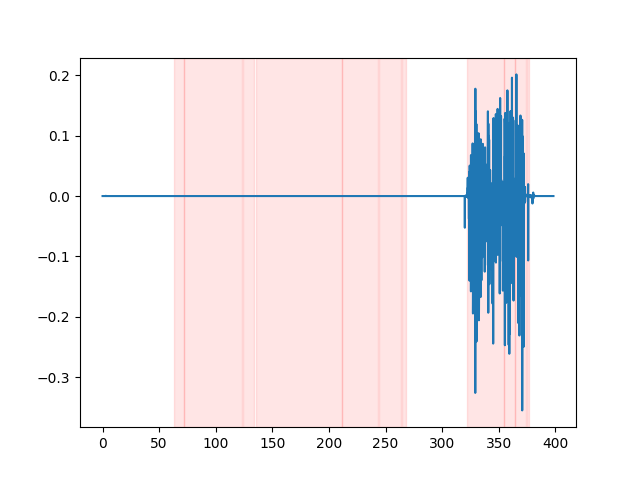
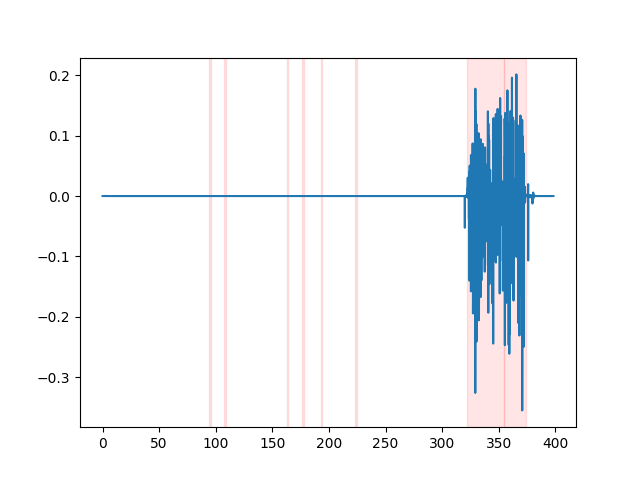
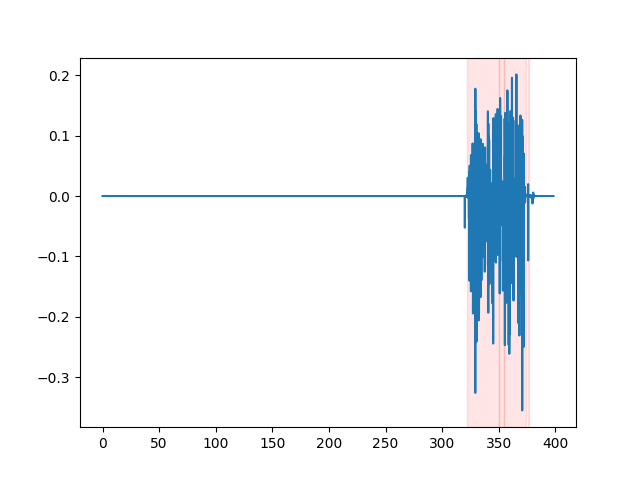
whisper_timestamped --vad auditok ...为了观看VAD结果,您可以使用whisper_timestamped cli的--plot选项,或plot_word_alignment选项的whisper_timestamped.transcribe() python函数。它将在输入音频信号上显示VAD结果如下(x轴以秒为单位):
| vad =“ silero:v4.0” | vad =“ silero:v3.1” | vad =“ auditok” |
|---|---|---|
 |  |  |
耳语模型倾向于消除言语爆发(填充单词,犹豫,重复等)。如果没有预防措施,未转录的漏洞将影响以下单词的时间戳:单词开头的时间戳实际上将是分裂开始的时间戳。 whisper-timestamped可以避免这种启发式方法。
results = whisper_timestamped . transcribe ( model , audio , detect_disfluencies = True , ...)whisper_timestamped --detect_disfluencies True ...重要:请注意,当使用这些选项时,可能会出现在转录中,以特殊的“ [*] ”字出现。
如果您在研究中使用它,请引用回购:
 @misc { lintoai2023whispertimestamped ,
  title = { whisper-timestamped } ,
  author = { Louradour, J{'e}r{^o}me } ,
  journal = { GitHub repository } ,
  year = { 2023 } ,
  publisher = { GitHub } ,
  howpublished = { url{https://github.com/linto-ai/whisper-timestamped} }
}
以及Openai Whisper纸:
 @article { radford2022robust ,
  title = { Robust speech recognition via large-scale weak supervision } ,
  author = { Radford, Alec and Kim, Jong Wook and Xu, Tao and Brockman, Greg and McLeavey, Christine and Sutskever, Ilya } ,
  journal = { arXiv preprint arXiv:2212.04356 } ,
  year = { 2022 }
}
和动态时间弯曲的本文:
 @article { JSSv031i07 ,
  title = { Computing and Visualizing Dynamic Time Warping Alignments in R: The dtw Package } ,
  author = { Giorgino, Toni } ,
  journal = { Journal of Statistical Software } ,
  year = { 2009 } ,
  volume = { 31 } ,
  number = { 7 } ,
  doi = { 10.18637/jss.v031.i07 }
}







