pytorch mixtures
1.0.0

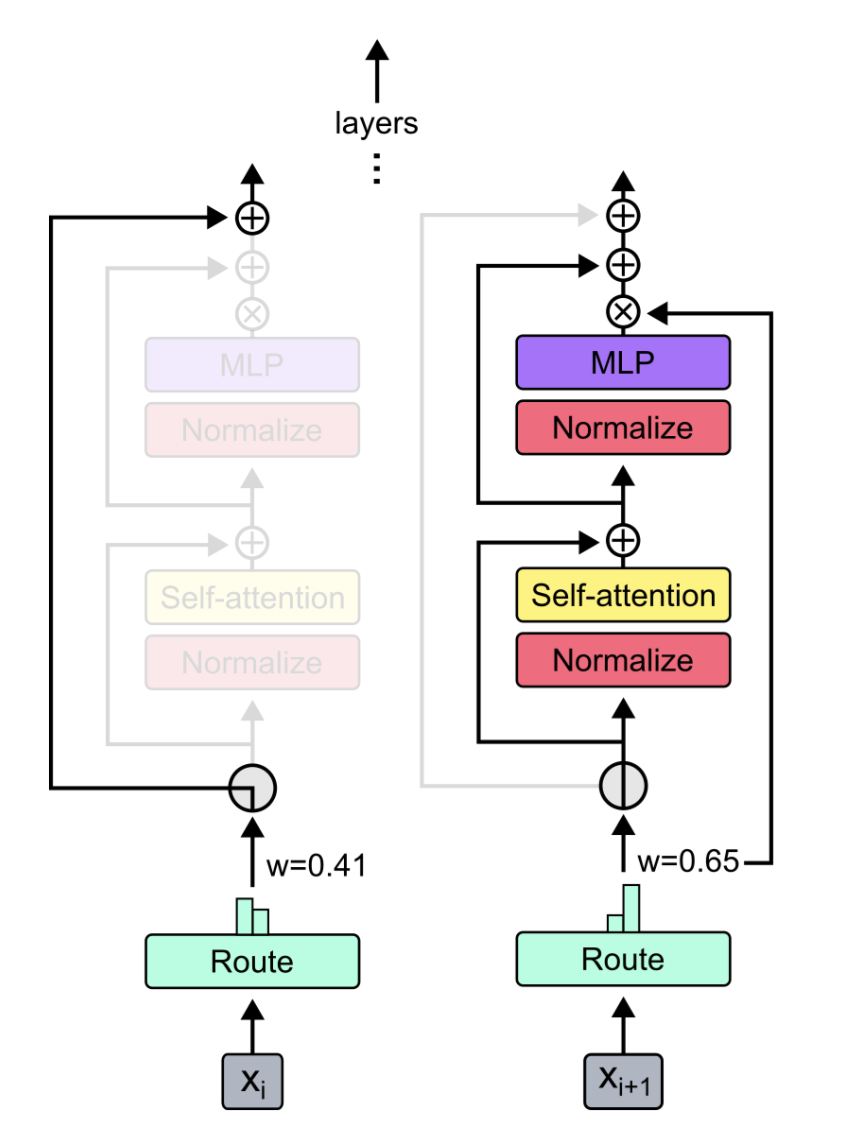
โมดูลปลั๊กแอนด์เพลย์สำหรับส่วนผสมของ experts และส่วนผสมของความลึกใน pytorch โซลูชันแบบครบวงจรของคุณสำหรับการแทรกเลเยอร์ MOE/MOD ลงในเครือข่ายประสาทที่กำหนดเองได้อย่างง่ายดาย!
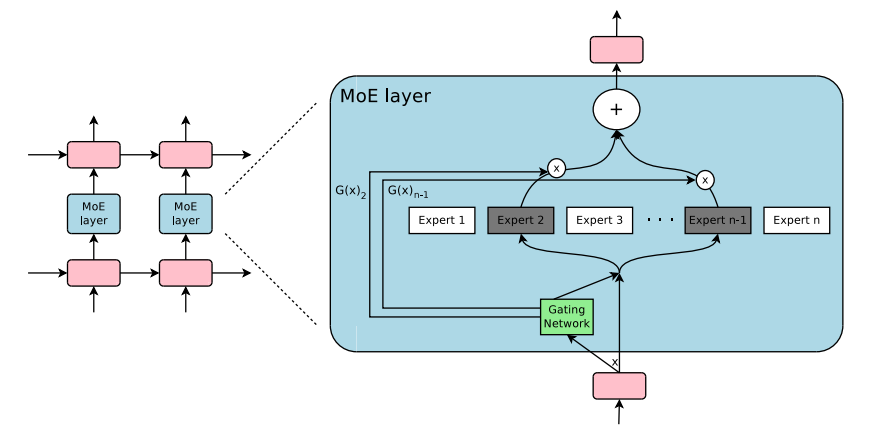 -
- 
แหล่งที่มา:
เพียงแค่ใช้ pip3 install pytorch-mixtures จะติดตั้งแพ็คเกจนี้ โปรดทราบว่าสิ่งนี้ต้องการให้ torch และ einops ติดตั้งไว้ล่วงหน้าเป็นการพึ่งพา หากคุณต้องการสร้างแพ็คเกจนี้จากแหล่งที่มาให้เรียกใช้คำสั่งต่อไปนี้:
git clone https://github.com/jaisidhsingh/pytorch-mixtures.git
cd pytorch-mixtures
pip3 install . pytorch-mixtures ได้รับการออกแบบมาเพื่อรวมเข้ากับรหัสที่มีอยู่ของคุณอย่างง่ายดายสำหรับเครือข่ายประสาทใด ๆ ที่คุณเลือกเช่น
 from pytorch_mixtures . routing import ExpertChoiceRouter
from pytorch_mixtures . moe_layer import MoELayer

import torch
import torch . nn as nn


# define some config
BATCH_SIZE = 16
SEQ_LEN = 128
DIM = 768
NUM_EXPERTS = 8
CAPACITY_FACTOR = 1.25

# first initialize the router
router = ExpertChoiceRouter ( dim = DIM , num_experts = NUM_EXPERTS )

# choose the experts you want: pytorch-mixtures just needs a list of `nn.Module` experts
# for e.g. our experts are just linear layers
experts = [ nn . Linear ( DIM , DIM ) for _ in range ( NUM_EXPERTS )]

# supply the router and experts to the MoELayer for modularity
moe = MoELayer (
    num_experts = NUM_EXPERTS ,
    router = router ,
    experts = experts ,
    capacity_factor = CAPACITY_FACTOR
)

# initialize some test input
x = torch . randn ( BATCH_SIZE , SEQ_LEN , DIM )

# pass through moe
moe_output , aux_loss , router_z_loss = moe ( x ) # shape: [BATCH_SIZE, SEQ_LEN, DIM]
คุณยังสามารถใช้สิ่งนี้ได้อย่างง่ายดายภายในคลาส nn.Module ของคุณเอง
 from pytorch_mixtures . routing import ExpertChoiceRouter
from pytorch_mixtures . moe import MoELayer
from pytorch_mixtures . utils import MHSA # multi-head self-attention layer provided for ease
import torch
import torch . nn as nn


class CustomMoEAttentionBlock ( nn . Module ):
    def __init__ ( self , dim , num_heads , num_experts , capacity_factor , experts ):
        super (). __init__ ()
        self . attn = MHSA ( dim , num_heads )
        router = ExpertChoiceRouter ( dim , num_experts )
        self . moe = MoELayer ( dim , router , experts , capacity_factor )

        self . norm1 = nn . LayerNorm ( dim )
        self . norm2 = nn . LayerNorm ( dim )

    def forward ( self , x ):
        x = self . norm1 ( self . attn ( x ) + x )
        moe_output , aux_loss , router_z_loss = self . moe ( x )
        x = self . norm2 ( moe_output + x )
        return x , aux_loss , router_z_loss


experts = [ nn . Linear ( 768 , 768 ) for _ in range ( 8 )]
my_block = CustomMoEAttentionBlock (
    dim = 768 ,
    num_heads = 8 ,
    num_experts = 8 ,
    capacity_factor = 1.25 ,
    experts = experts
)

# some test input
x = torch . randn ( 16 , 128 , 768 )
output , aux_loss , router_z_loss = my_block ( x ) # output shape: [16, 128, 768] แพ็คเกจนี้ให้ผู้ใช้เรียกใช้ absl test ที่ง่าย แต่เชื่อถือได้สำหรับรหัส MOE หากผู้เชี่ยวชาญทุกคนเริ่มต้นเป็นโมดูลเดียวกันเอาต์พุตของ MoELayer ควรเท่ากับเทนเซอร์อินพุตที่ผ่านผู้เชี่ยวชาญใด ๆ ทั้ง ExpertChoiceRouter และ TopkRouter ได้รับการทดสอบและประสบความสำเร็จในการทดสอบ ผู้ใช้สามารถเรียกใช้การทดสอบเหล่านี้ด้วยตนเองโดยเรียกใช้สิ่งต่อไปนี้:
 from pytorch_mixtures import run_tests

run_tests ()
หมายเหตุ: การทดสอบทั้งหมดผ่านอย่างถูกต้อง หากการทดสอบล้มเหลวอาจเป็นเพราะกรณีขอบในการเริ่มต้นแบบสุ่ม ลองอีกครั้งและมันจะผ่านไป
หากคุณพบว่าแพ็คเกจนี้มีประโยชน์โปรดอ้างอิงในงานของคุณ:
 @misc { JaisidhSingh2024 ,
  author = { Singh, Jaisidh } ,
  title = { pytorch-mixtures } ,
  year = { 2024 } ,
  publisher = { GitHub } ,
  journal = { GitHub repository } ,
  howpublished = { url{https://github.com/jaisidhsingh/pytorch-mixtures} } ,
}แพ็คเกจนี้ถูกสร้างขึ้นด้วยความช่วยเหลือของรหัสโอเพนซอร์ซที่กล่าวถึงด้านล่าง:







