pytorch mixtures
1.0.0

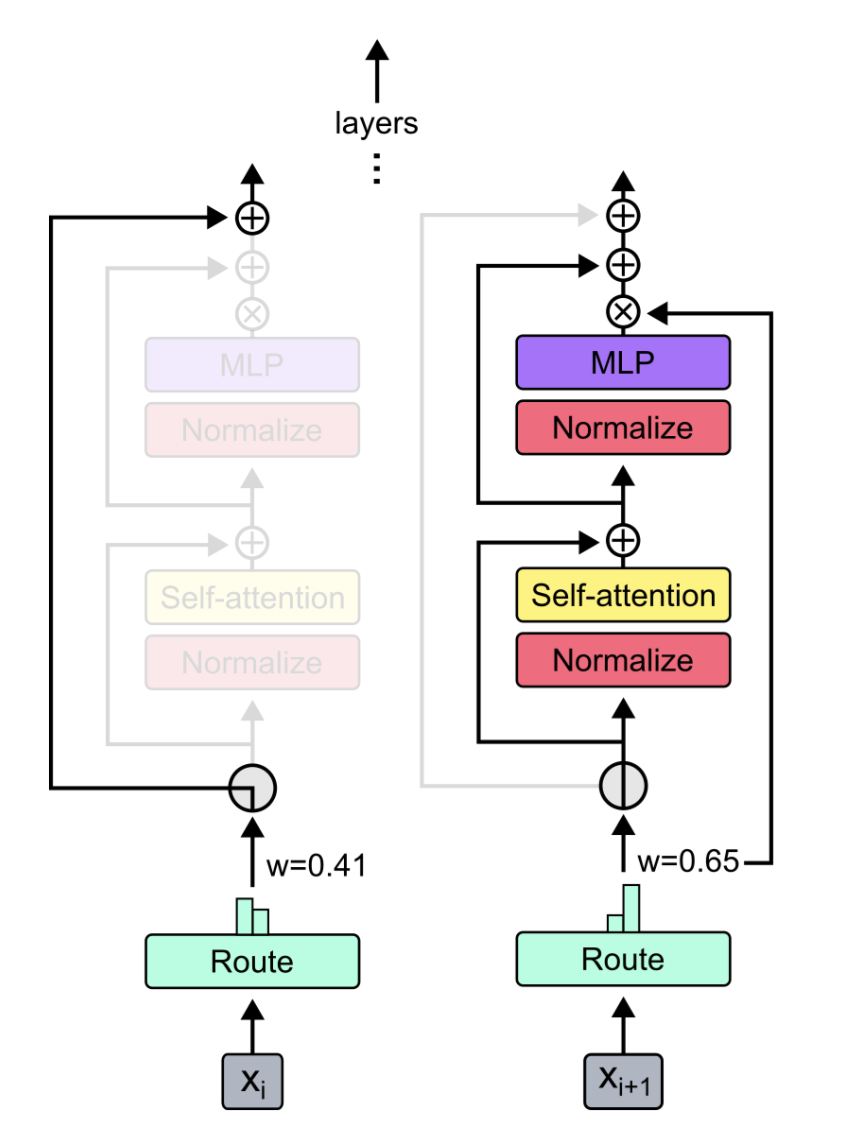
Pytorchの混合物の混合物と詳細な混合物のプラグアンドプレイモジュール。 MOE/MODレイヤーをカスタムニューラルネットワークに簡単に挿入するためのワンストップソリューション!
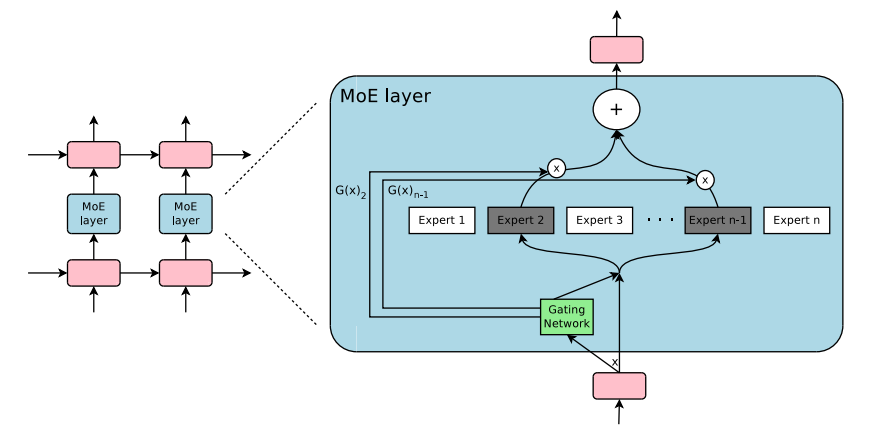 -
- 
出典:
単にpip3 install pytorch-mixturesこのパッケージがインストールされます。これには、 torchとeinops依存関係として事前にインストールされる必要があることに注意してください。このパッケージをソースから構築したい場合は、次のコマンドを実行します。
git clone https://github.com/jaisidhsingh/pytorch-mixtures.git
cd pytorch-mixtures
pip3 install . pytorch-mixtures 、たとえば、選択したニューラルネットワークのために既存のコードに簡単に統合するように設計されています。
 from pytorch_mixtures . routing import ExpertChoiceRouter
from pytorch_mixtures . moe_layer import MoELayer

import torch
import torch . nn as nn


# define some config
BATCH_SIZE = 16
SEQ_LEN = 128
DIM = 768
NUM_EXPERTS = 8
CAPACITY_FACTOR = 1.25

# first initialize the router
router = ExpertChoiceRouter ( dim = DIM , num_experts = NUM_EXPERTS )

# choose the experts you want: pytorch-mixtures just needs a list of `nn.Module` experts
# for e.g. our experts are just linear layers
experts = [ nn . Linear ( DIM , DIM ) for _ in range ( NUM_EXPERTS )]

# supply the router and experts to the MoELayer for modularity
moe = MoELayer (
    num_experts = NUM_EXPERTS ,
    router = router ,
    experts = experts ,
    capacity_factor = CAPACITY_FACTOR
)

# initialize some test input
x = torch . randn ( BATCH_SIZE , SEQ_LEN , DIM )

# pass through moe
moe_output , aux_loss , router_z_loss = moe ( x ) # shape: [BATCH_SIZE, SEQ_LEN, DIM]これを自分のnn.Moduleクラス内で簡単に使用することもできます
 from pytorch_mixtures . routing import ExpertChoiceRouter
from pytorch_mixtures . moe import MoELayer
from pytorch_mixtures . utils import MHSA # multi-head self-attention layer provided for ease
import torch
import torch . nn as nn


class CustomMoEAttentionBlock ( nn . Module ):
    def __init__ ( self , dim , num_heads , num_experts , capacity_factor , experts ):
        super (). __init__ ()
        self . attn = MHSA ( dim , num_heads )
        router = ExpertChoiceRouter ( dim , num_experts )
        self . moe = MoELayer ( dim , router , experts , capacity_factor )

        self . norm1 = nn . LayerNorm ( dim )
        self . norm2 = nn . LayerNorm ( dim )

    def forward ( self , x ):
        x = self . norm1 ( self . attn ( x ) + x )
        moe_output , aux_loss , router_z_loss = self . moe ( x )
        x = self . norm2 ( moe_output + x )
        return x , aux_loss , router_z_loss


experts = [ nn . Linear ( 768 , 768 ) for _ in range ( 8 )]
my_block = CustomMoEAttentionBlock (
    dim = 768 ,
    num_heads = 8 ,
    num_experts = 8 ,
    capacity_factor = 1.25 ,
    experts = experts
)

# some test input
x = torch . randn ( 16 , 128 , 768 )
output , aux_loss , router_z_loss = my_block ( x ) # output shape: [16, 128, 768]このパッケージは、MOEコードのシンプルでありながら信頼性の高いabsl testを実行できるようにユーザーに提供されます。すべての専門家が同じモジュールとして初期化されている場合、 MoELayerの出力は、専門家に渡された入力テンソルに等しくなければなりません。したがって、 ExpertChoiceRouterとTopkRouter両方がテストされ、テストで成功します。ユーザーは、以下を実行することにより、これらのテストを自分で実行できます。
 from pytorch_mixtures import run_tests

run_tests ()
注:すべてのテストは正しく渡されます。テストが失敗した場合、ランダムな初期化のエッジケースが原因である可能性があります。もう一度やり直してください。通過します。
このパッケージが便利だと思った場合は、作業で引用してください。
 @misc { JaisidhSingh2024 ,
  author = { Singh, Jaisidh } ,
  title = { pytorch-mixtures } ,
  year = { 2024 } ,
  publisher = { GitHub } ,
  journal = { GitHub repository } ,
  howpublished = { url{https://github.com/jaisidhsingh/pytorch-mixtures} } ,
}このパッケージは、以下のオープンソースコードの助けを借りて構築されました。







