pytorch mixtures
1.0.0

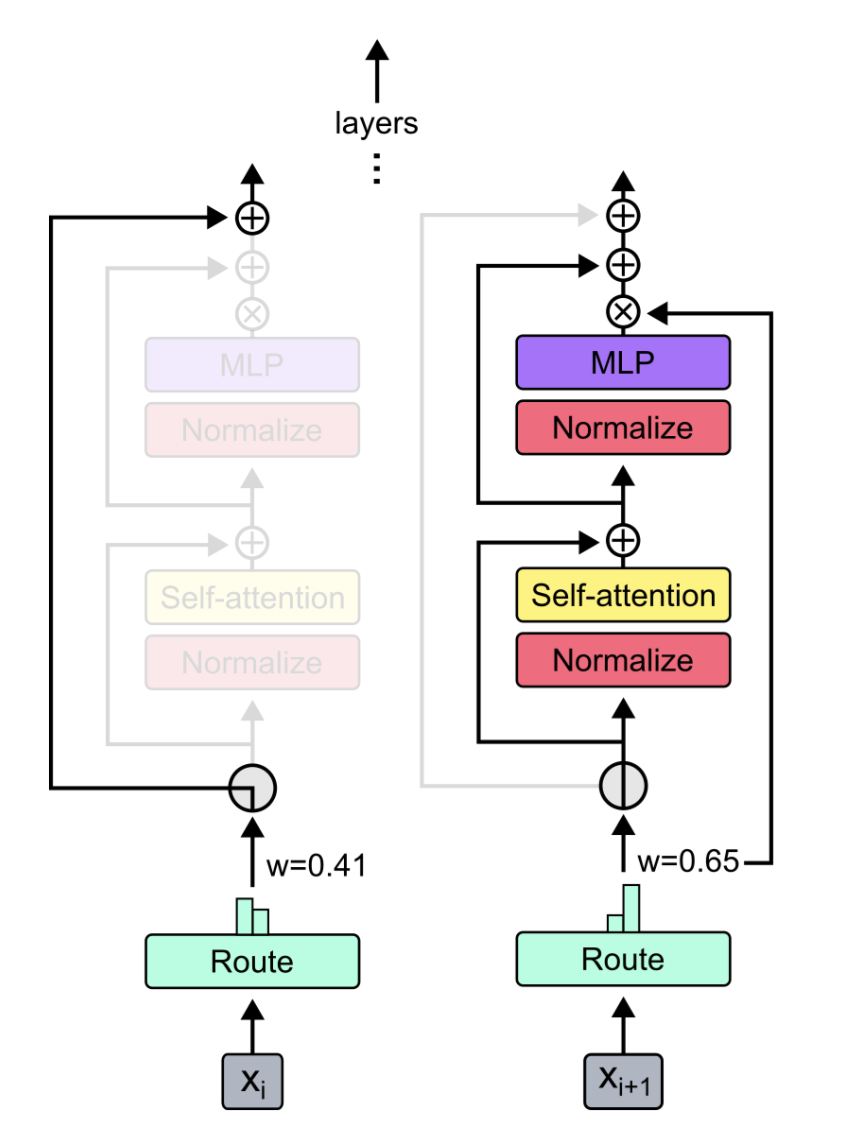
Pytorch의 혼합 및 혼합 내심의 혼합을위한 플러그 앤 플레이 모듈. MOE/MOD 레이어를 사용자 정의 신경 네트워크에 쉽게 삽입하기위한 원 스톱 솔루션!
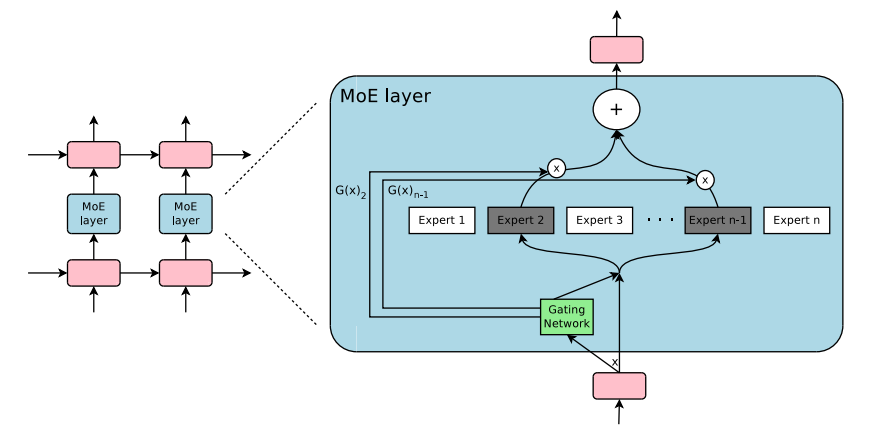 -
- 
출처 :
pip3 install pytorch-mixtures 이 패키지가 설치됩니다. 이를 위해서는 torch 와 einops 종속성으로 사전 설치되어야합니다. 소스 에서이 패키지를 작성하려면 다음 명령을 실행하십시오.
git clone https://github.com/jaisidhsingh/pytorch-mixtures.git
cd pytorch-mixtures
pip3 install . pytorch-mixtures 원하는 신경 네트워크를 위해 기존 코드에 쉽게 통합하도록 설계되었습니다.
 from pytorch_mixtures . routing import ExpertChoiceRouter
from pytorch_mixtures . moe_layer import MoELayer

import torch
import torch . nn as nn


# define some config
BATCH_SIZE = 16
SEQ_LEN = 128
DIM = 768
NUM_EXPERTS = 8
CAPACITY_FACTOR = 1.25

# first initialize the router
router = ExpertChoiceRouter ( dim = DIM , num_experts = NUM_EXPERTS )

# choose the experts you want: pytorch-mixtures just needs a list of `nn.Module` experts
# for e.g. our experts are just linear layers
experts = [ nn . Linear ( DIM , DIM ) for _ in range ( NUM_EXPERTS )]

# supply the router and experts to the MoELayer for modularity
moe = MoELayer (
    num_experts = NUM_EXPERTS ,
    router = router ,
    experts = experts ,
    capacity_factor = CAPACITY_FACTOR
)

# initialize some test input
x = torch . randn ( BATCH_SIZE , SEQ_LEN , DIM )

# pass through moe
moe_output , aux_loss , router_z_loss = moe ( x ) # shape: [BATCH_SIZE, SEQ_LEN, DIM]
자신의 nn.Module 클래스 내에서 쉽게 사용할 수 있습니다.
 from pytorch_mixtures . routing import ExpertChoiceRouter
from pytorch_mixtures . moe import MoELayer
from pytorch_mixtures . utils import MHSA # multi-head self-attention layer provided for ease
import torch
import torch . nn as nn


class CustomMoEAttentionBlock ( nn . Module ):
    def __init__ ( self , dim , num_heads , num_experts , capacity_factor , experts ):
        super (). __init__ ()
        self . attn = MHSA ( dim , num_heads )
        router = ExpertChoiceRouter ( dim , num_experts )
        self . moe = MoELayer ( dim , router , experts , capacity_factor )

        self . norm1 = nn . LayerNorm ( dim )
        self . norm2 = nn . LayerNorm ( dim )

    def forward ( self , x ):
        x = self . norm1 ( self . attn ( x ) + x )
        moe_output , aux_loss , router_z_loss = self . moe ( x )
        x = self . norm2 ( moe_output + x )
        return x , aux_loss , router_z_loss


experts = [ nn . Linear ( 768 , 768 ) for _ in range ( 8 )]
my_block = CustomMoEAttentionBlock (
    dim = 768 ,
    num_heads = 8 ,
    num_experts = 8 ,
    capacity_factor = 1.25 ,
    experts = experts
)

# some test input
x = torch . randn ( 16 , 128 , 768 )
output , aux_loss , router_z_loss = my_block ( x ) # output shape: [16, 128, 768] 이 패키지는 사용자에게 MOE 코드에 대한 간단하면서도 안정적인 absl test 실행할 수 있도록합니다. 모든 전문가가 동일한 모듈로 초기화되면 MoELayer 의 출력은 전문가를 통과 한 입력 텐서와 동일해야합니다. ExpertChoiceRouter 와 TopkRouter 모두 테스트되어 테스트에서 성공합니다. 사용자는 다음을 실행하여 이러한 테스트를 스스로 실행할 수 있습니다.
 from pytorch_mixtures import run_tests

run_tests ()
참고 : 모든 테스트가 올바르게 전달됩니다. 테스트가 실패하면 임의의 초기화에서 에지 케이스로 인한 것일 수 있습니다. 다시 시도하면 통과합니다.
이 패키지가 유용하다고 생각되면 작업에서 인용하십시오.
 @misc { JaisidhSingh2024 ,
  author = { Singh, Jaisidh } ,
  title = { pytorch-mixtures } ,
  year = { 2024 } ,
  publisher = { GitHub } ,
  journal = { GitHub repository } ,
  howpublished = { url{https://github.com/jaisidhsingh/pytorch-mixtures} } ,
}이 패키지는 아래에 언급 된 오픈 소스 코드의 도움으로 구축되었습니다.







