pytorch mixtures
1.0.0

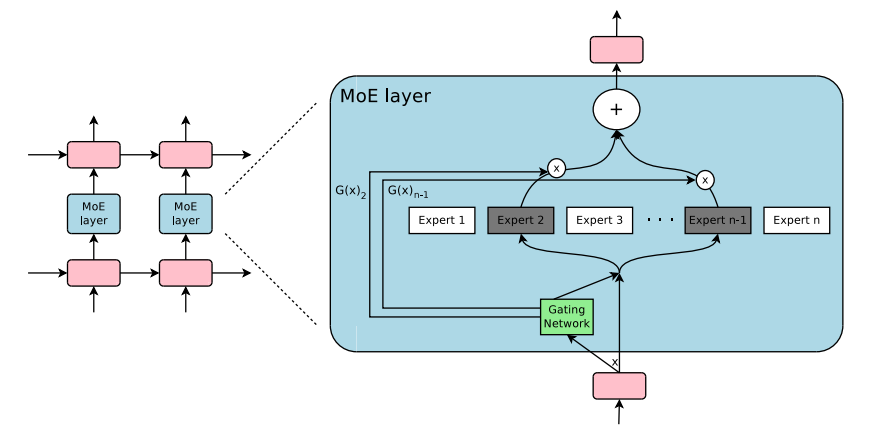
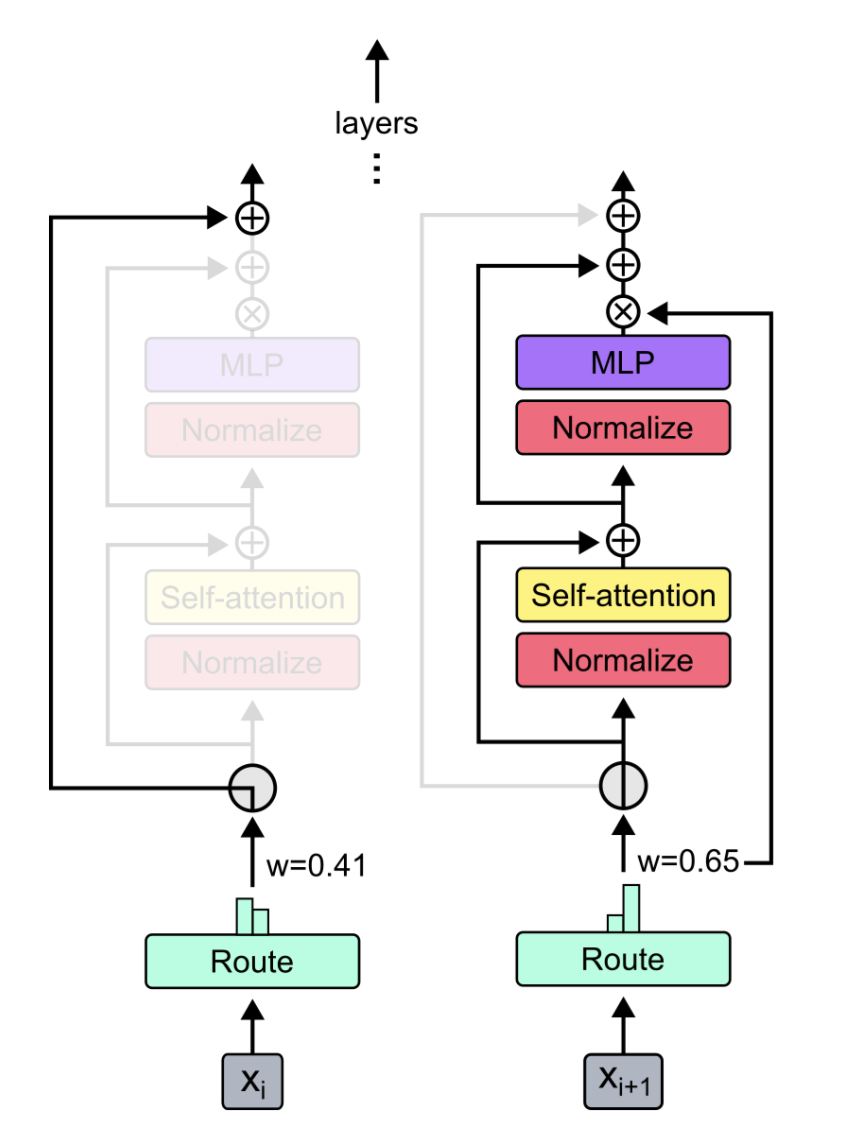
Modul plug-and-play untuk campuran-ekspert dan campuran-kedalaman di Pytorch. Solusi satu atap Anda untuk memasukkan lapisan MOE/mod ke jaringan saraf khusus dengan mudah!
 -
- 
Sumber:
Cukup menggunakan pip3 install pytorch-mixtures akan menginstal paket ini. Perhatikan bahwa ini membutuhkan torch dan einops untuk diinstal sebelumnya sebagai dependensi. Jika Anda ingin membangun paket ini dari sumber, jalankan perintah berikut:
git clone https://github.com/jaisidhsingh/pytorch-mixtures.git
cd pytorch-mixtures
pip3 install . pytorch-mixtures dirancang untuk mengintegrasikan dengan mudah ke dalam kode Anda yang ada untuk jaringan saraf pilihan Anda, misalnya
 from pytorch_mixtures . routing import ExpertChoiceRouter
from pytorch_mixtures . moe_layer import MoELayer

import torch
import torch . nn as nn


# define some config
BATCH_SIZE = 16
SEQ_LEN = 128
DIM = 768
NUM_EXPERTS = 8
CAPACITY_FACTOR = 1.25

# first initialize the router
router = ExpertChoiceRouter ( dim = DIM , num_experts = NUM_EXPERTS )

# choose the experts you want: pytorch-mixtures just needs a list of `nn.Module` experts
# for e.g. our experts are just linear layers
experts = [ nn . Linear ( DIM , DIM ) for _ in range ( NUM_EXPERTS )]

# supply the router and experts to the MoELayer for modularity
moe = MoELayer (
    num_experts = NUM_EXPERTS ,
    router = router ,
    experts = experts ,
    capacity_factor = CAPACITY_FACTOR
)

# initialize some test input
x = torch . randn ( BATCH_SIZE , SEQ_LEN , DIM )

# pass through moe
moe_output , aux_loss , router_z_loss = moe ( x ) # shape: [BATCH_SIZE, SEQ_LEN, DIM]
Anda juga dapat menggunakan ini dengan mudah di dalam kelas nn.Module Anda sendiri
 from pytorch_mixtures . routing import ExpertChoiceRouter
from pytorch_mixtures . moe import MoELayer
from pytorch_mixtures . utils import MHSA # multi-head self-attention layer provided for ease
import torch
import torch . nn as nn


class CustomMoEAttentionBlock ( nn . Module ):
    def __init__ ( self , dim , num_heads , num_experts , capacity_factor , experts ):
        super (). __init__ ()
        self . attn = MHSA ( dim , num_heads )
        router = ExpertChoiceRouter ( dim , num_experts )
        self . moe = MoELayer ( dim , router , experts , capacity_factor )

        self . norm1 = nn . LayerNorm ( dim )
        self . norm2 = nn . LayerNorm ( dim )

    def forward ( self , x ):
        x = self . norm1 ( self . attn ( x ) + x )
        moe_output , aux_loss , router_z_loss = self . moe ( x )
        x = self . norm2 ( moe_output + x )
        return x , aux_loss , router_z_loss


experts = [ nn . Linear ( 768 , 768 ) for _ in range ( 8 )]
my_block = CustomMoEAttentionBlock (
    dim = 768 ,
    num_heads = 8 ,
    num_experts = 8 ,
    capacity_factor = 1.25 ,
    experts = experts
)

# some test input
x = torch . randn ( 16 , 128 , 768 )
output , aux_loss , router_z_loss = my_block ( x ) # output shape: [16, 128, 768] Paket ini menyediakan pengguna untuk menjalankan absl test yang sederhana namun andal untuk kode MOE. Jika semua ahli diinisialisasi sebagai modul yang sama, output dari MoELayer harus sama dengan input tensor yang melewati pakar mana pun. Baik ExpertChoiceRouter dan TopkRouter diuji dengan demikian, dan berhasil dalam tes. Pengguna dapat menjalankan tes ini untuk diri mereka sendiri dengan menjalankan yang berikut:
 from pytorch_mixtures import run_tests

run_tests ()
Catatan: Semua tes lulus dengan benar. Jika tes gagal, kemungkinan karena kasus tepi dalam inisialisasi acak. Coba lagi, dan itu akan berlalu.
Jika Anda menemukan paket ini bermanfaat, silakan mengutipnya dalam pekerjaan Anda:
 @misc { JaisidhSingh2024 ,
  author = { Singh, Jaisidh } ,
  title = { pytorch-mixtures } ,
  year = { 2024 } ,
  publisher = { GitHub } ,
  journal = { GitHub repository } ,
  howpublished = { url{https://github.com/jaisidhsingh/pytorch-mixtures} } ,
}Paket ini dibangun dengan bantuan kode sumber terbuka yang disebutkan di bawah ini:







