TinyLLaVA_Factory
1.0.0

Наша лучшая модель Tinyyllava-Phi-2-Siglip-3,1b достигает лучшей общей производительности против существующих моделей 7b, таких как Llava-1,5 и Qwen-VL.
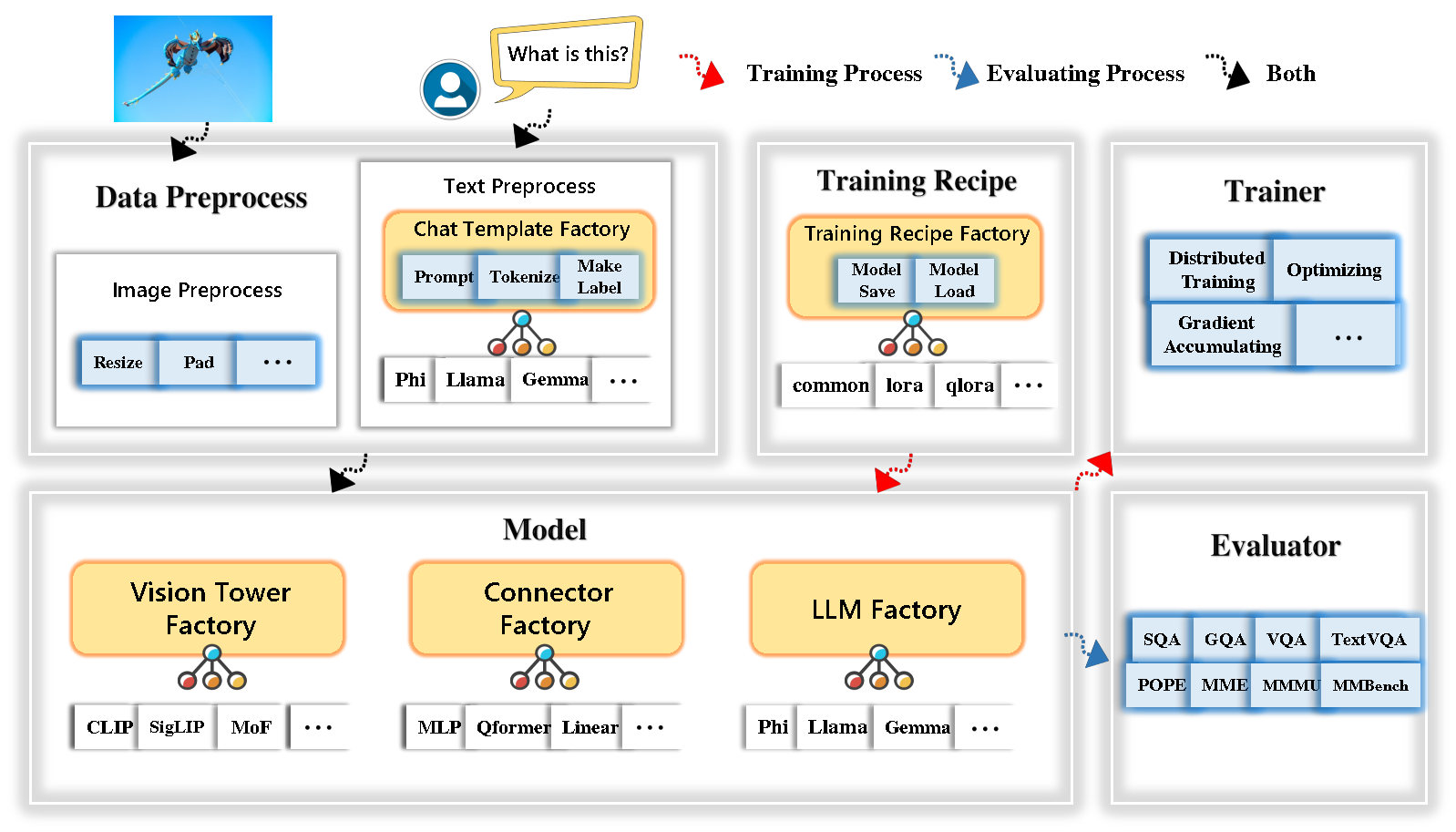
Tinylylava Factory-это модульная кодовая база с открытым исходным кодом для мелких крупных мультимодальных моделей (LMM), реализованной в Pytorch и Huggingface, с акцентом на простоту реализаций кода, расширяемой функции и воспроизводимости результатов обучения.
С фабрикой Tinylyllava вы можете настроить свои собственные большие мультимодальные модели с меньшим количеством усилий по кодированию и меньшими ошибками кодирования.
Фабрика Tinylylava интегрирует набор передовых моделей и методов.
В настоящее время LLM поддерживает Openelm , Tinylyma , Stablelm , Qwen , Gemma и Phi .
Vision Tower в настоящее время поддерживает Clip, Siglip , Dino и комбинацию Clip и Dino .
Connector в настоящее время поддерживает MLP , Qformer и Resampler .
Тренировочный рецепт в настоящее время поддерживает замороженную/полностью/частично настройку и настройку Lora/Qlora .
Обратите внимание, что наши требования к окружающей среде отличаются от требований к окружающей среде Llava. Мы настоятельно рекомендуем вам создать среду с нуля следующим образом.
git clone https://github.com/TinyLLaVA/TinyLLaVA_Factory.git
cd TinyLLaVA_Factoryconda create -n tinyllava_factory python=3.10 -y
conda activate tinyllava_factory
pip install --upgrade pip # enable PEP 660 support
pip install -e .pip install flash-attn --no-build-isolationgit pull
pip install -e . Пожалуйста, обратитесь к разделу подготовки данных в нашей документации.
Вот пример для обучения LMM с использованием PHI-2.
scripts/train/train_phi.shoutput_dir на ваши в scripts/train/pretrain.shpretrained_model_path и output_dir с вашим в scripts/train/finetune.shper_device_train_batch_size в scripts/train/pretrain.sh и scripts/train/finetune.sh bash scripts/train/train_phi.shВажные гиперпараметры, используемые в предварительной подготовке и создании, приведены ниже.
| Учебная стадия | Глобальный размер партии | Скорость обучения | Convision |
|---|---|---|---|
| Предварительная подготовка | 256 | 1E-3 | предварительный |
| Тонкая настройка | 128 | 2E-5 | физ |
Советы:
Глобальный размер партии = num of GPU * per_device_train_batch_size * gradient_accumulation_steps , мы рекомендуем вам всегда сохранять глобальный размер партии и скорость обучения, как указано выше, за исключением Lora, настраивающей вашу модель.
conv_version - это гиперпараметр, используемый для выбора разных шаблонов чата для разных LLMS. На стадии предварительной подготовки conv_version одинаково для всех LLMS, используя pretrain . На стадии создания мы используем
phi для Phi-2, Stablelm, Qwen-1.5
llama for tinyllama, openelm
gemma для Джеммы
Пожалуйста, обратитесь к разделу оценки в нашей документации.
которые обучаются с использованием фабрики Tinyyllava.
| Vt (путь HF) | LLM (путь HF) | Рецепт | VQA-V2 | GQA | SQA-Image | Textvqa | Мм-вете | Папа | Май | МММУ-ВАЛ |
|---|---|---|---|---|---|---|---|---|---|---|
| Openai/Clip-Vit-Large-Patch14-336 | Apple/Openelm-450M-Instruct | база | 69,5 | 52,1 | 50.6 | 40.4 | 20.0 | 83,6 | 1052,9 | 23.9 |
| Google/Siglip-So400m-Patch14-384 | Apple/Openelm-450M-Instruct | база | 71.7 | 53,9 | 54.1 | 44,0 | 20.0 | 85,4 | 1118.8 | 24.0 |
| Google/Siglip-So400m-Patch14-384 | QWEN/QWEN2-0.5B | база | 72,3 | 55,8 | 60.1 | 45,2 | 19.5 | 86.6 | 1153.0 | 29,7 |
| Google/Siglip-So400m-Patch14-384 | QWEN/QWEN2.5-0.5b | база | 75.3 | 59,5 | 60.3 | 48.3 | 23.9 | 86.1 | 1253.0 | 33,3 |
| Google/Siglip-So400m-Patch14-384 | QWEN/QWEN2.5-3B | база | 79,4 | 62,5 | 74.1 | 58.3 | 34,8 | 87.4 | 1438.7 | 39,9 |
| Openai/Clip-Vit-Large-Patch14-336 | Tinylymalma/tinylymalma-1.1b-Chat-V1.0 | база | 73,7 | 58.0 | 59,9 | 46.3 | 23.2 | 85,5 | 1284,6 | 27,9 |
| Google/Siglip-So400m-Patch14-384 | Tinylymalma/tinylymalma-1.1b-Chat-V1.0 | база | 75,5 | 58.6 | 64,0 | 49,6 | 23.5 | 86.3 | 1256.5 | 28.3 |
| Openai/Clip-Vit-Large-Patch14-336 | стабильность/stablelm-2-Zephyr-1_6b | база | 75,9 | 59,5 | 64,6 | 50,5 | 27.3 | 86.1 | 1368.1 | 31.8 |
| Google/Siglip-So400m-Patch14-384 | стабильность/stablelm-2-Zephyr-1_6b | база | 78.2 | 60.7 | 66.7 | 56.0 | 29,4 | 86.3 | 1319.3 | 32,6 |
| Google/Siglip-So400m-Patch14-384 | Google/Gemma-2b-It | база | 78.4 | 61.6 | 64,4 | 53,6 | 26.9 | 86.4 | 1339.0 | 31.7 |
| Openai/Clip-Vit-Large-Patch14-336 | Microsoft/Phi-2 | база | 76.8 | 59,4 | 71.2 | 53,4 | 31.7 | 86.8 | 1448.6 | 36.3 |
| Google/Siglip-So400m-Patch14-384 | Microsoft/Phi-2 | база | 79,2 | 61.6 | 71.9 | 57.4 | 35,0 | 87.2 | 1462.4 | 38.2 |
| Google/Siglip-So400m-Patch14-384 | Microsoft/Phi-2 | База и Лора | 77.6 | 59,7 | 71.6 | 53,8 | 33,3 | 87.9 | 1413.2 | 35,6 |
| Google/Siglip-So400m-Patch14-384 | Microsoft/Phi-2 | делиться | 80.1 | 62.1 | 73,0 | 60.3 | 37.5 | 87.2 | 1466.4 | 38.4 |
которые обучаются с использованием старой кодовой базы Tinylyavabench.
Если у вас есть модели, обученные нашей старой кодовой базой Tinylyavabench, и вы все еще хотите их использовать, мы приведем пример Tinylylava-3.1b для использования устаревших моделей.
 from tinyllava . eval . run_tiny_llava import eval_model
from tinyllava . model . convert_legecy_weights_to_tinyllavafactory import *

model = convert_legecy_weights_to_tinyllavafactory ( 'bczhou/TinyLLaVA-3.1B' )

prompt = "What are the things I should be cautious about when I visit here?"
image_file = "https://llava-vl.github.io/static/images/view.jpg"

args = type ( 'Args' , (), {
    "model_path" : None ,
    "model" : model ,
    "query" : prompt ,
    "conv_mode" : "phi" , # the same as conv_version in the training stage. Different LLMs have different conv_mode/conv_version, please replace it
    "image_file" : image_file ,
    "sep" : "," ,
    "temperature" : 0 ,
    "top_p" : None ,
    "num_beams" : 1 ,
    "max_new_tokens" : 512
})()

eval_model ( args )

"""
Output:
When visiting this serene lakeside location with a wooden dock, there are a few things to be cautious about. First, ensure that the dock is stable and secure before stepping onto it, as it might be slippery or wet, especially if it's a wooden structure. Second, be mindful of the surrounding water, as it can be deep or have hidden obstacles, such as rocks or debris, that could pose a risk. Additionally, be aware of the weather conditions, as sudden changes in weather can make the area more dangerous. Lastly, respect the natural environment and wildlife, and avoid littering or disturbing the ecosystem.
""" Запустите локальную веб -демонстрацию, работая:
python tinyllava/serve/app.py --model-path tinyllava/TinyLLaVA-Phi-2-SigLIP-3.1BМы также поддерживаем выполнение вывода с CLI. Чтобы использовать нашу модель, запустите:
python -m tinyllava.serve.cli
   --model-path tinyllava/TinyLLaVA-Phi-2-SigLIP-3.1B
--image-file " ./tinyllava/serve/examples/extreme_ironing.jpg " Если вы хотите запустить модель, обученную самим собой или нами на местном уровне, вот пример.
 from tinyllava . eval . run_tiny_llava import eval_model

model_path = "/absolute/path/to/your/model/"
prompt = "What are the things I should be cautious about when I visit here?"
image_file = "https://llava-vl.github.io/static/images/view.jpg"
conv_mode = "phi" # or llama, gemma, etc

args = type ( 'Args' , (), {
    "model_path" : model_path ,
    "model" : None ,
    "query" : prompt ,
    "conv_mode" : conv_mode ,
    "image_file" : image_file ,
    "sep" : "," ,
    "temperature" : 0 ,
    "top_p" : None ,
    "num_beams" : 1 ,
    "max_new_tokens" : 512
})()

eval_model ( args )

"""
Output:
XXXXXXXXXXXXXXXXX
""" from transformers import AutoTokenizer , AutoModelForCausalLM
hf_path = 'tinyllava/TinyLLaVA-Phi-2-SigLIP-3.1B'
model = AutoModelForCausalLM . from_pretrained ( hf_path , trust_remote_code = True )
model . cuda ()
config = model . config
tokenizer = AutoTokenizer . from_pretrained ( hf_path , use_fast = False , model_max_length = config . tokenizer_model_max_length , padding_side = config . tokenizer_padding_side )
prompt = "What are these?"
image_url = "http://images.cocodataset.org/val2017/000000039769.jpg"
output_text , genertaion_time = model . chat ( prompt = prompt , image = image_url , tokenizer = tokenizer )
print ( 'model output:' , output_text )
print ( 'runing time:' , genertaion_time )Если вы хотите получить Tinyllava с помощью пользовательских наборов данных, пожалуйста, обратитесь к здесь.
Если вы хотите добавить новый LLM самостоятельно, вам необходимо создать два файла: один для шаблона чата, а другой для языковой модели, в папках tinyllava/data/template/ и tinyllava/model/llm/ .
Вот пример добавления модели Джеммы.
Во -первых, создайте tinyllava/data/template/gemma_template.py , который будет использоваться для стадии создания.
 from dataclasses import dataclass
from typing import TYPE_CHECKING , Dict , List , Optional , Sequence , Tuple , Union
from packaging import version

from . formatter import EmptyFormatter , StringFormatter
from . base import Template
from . formatter import Formatter
from . import register_template
from ... utils . constants import *

from transformers import PreTrainedTokenizer
import torch
import tokenizers


system = "A chat between a curious user and an artificial intelligence assistant. The assistant gives helpful, detailed, and polite answers to the user's questions."

@ register_template ( 'gemma' ) # Enable the TemplateFactory to obtain the added template by this string ('gemma').
@ dataclass
class GemmaTemplate ( Template ):
    format_image_token : "Formatter" = StringFormatter ( slot = "<image> n {{content}}" )
    format_user : "Formatter" = StringFormatter ( slot = "USER" + ": " + "{{content}}" + " " )
    format_assistant : "Formatter" = StringFormatter ( slot = "ASSISTANT" + ": " + "{{content}}" + "<eos>" ) # to be modified according to the tokenizer you choose
    system : "Formatter" = EmptyFormatter ( slot = system + " " )
    separator : "Formatter" = EmptyFormatter ( slot = [ ' ASSISTANT: ' , '<eos>' ]) # to be modified according to the tokenizer you choose

    def _make_masks ( self , labels , tokenizer , sep , eos_token_length , rounds ):
        # your code here
        return labels , cur_len
Советы:
Пожалуйста, убедитесь, что labels (возвращаемые функцией _make_masks ) следует за этим форматом: Ответы и идентификатор токена EOS не замаскированы, а другие жетоны замаскированы -100 .
Во -вторых, создайте tinyllava/model/llm/gemma.py .
 from transformers import GemmaForCausalLM , AutoTokenizer
# The LLM you want to add along with its corresponding tokenizer.

from . import register_llm

# Add GemmaForCausalLM along with its corresponding tokenizer and handle special tokens.
@ register_llm ( 'gemma' ) # Enable the LLMFactory to obtain the added LLM by this string ('gemma').
def return_gemmaclass ():
    def tokenizer_and_post_load ( tokenizer ):
        tokenizer . pad_token = tokenizer . unk_token
        return tokenizer
    return ( GemmaForCausalLM , ( AutoTokenizer , tokenizer_and_post_load ))
Наконец, создайте scripts/train/train_gemma.sh с соответствующим LLM_VERSION и CONV_VERSION .
Если вы хотите добавить новую башню Vision, вам необходимо внедрить новый класс Tower, который должен быть унаследован от VisionTower базового класса. Вот пример башни Vision MOF.
Во -первых, создайте tinyllava/model/vision_tower/mof.py
 @ register_vision_tower ( 'mof' )
class MoFVisionTower ( VisionTower ):
    def __init__ ( self , cfg ):
        super (). __init__ ( cfg )

        self . _vision_tower = MoF ( cfg )
        self . _image_processor = # your image processor

    def _load_model ( self , vision_tower_name , ** kwargs ):
        # your code here, make sure your model can be correctly loaded from pretrained parameters either by huggingface or pytorch loading

    def forward ( self , x , ** kwargs ):
        # your code here
Затем измените свои тренировочные сценарии с помощью соответствующей VT_VERSION .
Если вы хотите добавить новый разъем, вам необходимо внедрить новый класс Connector, который должен быть унаследован от Connector базового класса. Вот пример линейного разъема.
Во -первых, создайте tinyllava/model/connector/linear.py
 import torch . nn as nn

from . import register_connector
from . base import Connector

@ register_connector ( 'linear' ) #Enable the ConnectorMFactory to obtain the added connector by this string ('linear').
class LinearConnector ( Connector ):
    def __init__ ( self , config ):
        super (). __init__ ()
        self . _connector =  nn . Linear ( config . vision_hidden_size , config . hidden_size ) # define your connector model
Затем измените свои тренировочные сценарии с помощью соответствующей CN_VERSION .
Мы выражаем особую благодарность Лей Чжао, Луче Вангу, Кайджун Луо и Джунчуну Ванну за создание демонстрации.
Если у вас есть какие -либо вопросы, не стесняйтесь либо инициировать проблему , либо свяжитесь с нами от WeChat (WeChatid: Tinylylava ).
Если вы найдете нашу статью и код полезными в своем исследовании, пожалуйста, рассмотрите возможность предоставить звезду и цитирующие.
 @misc { zhou2024tinyllava ,
      title = { TinyLLaVA: A Framework of Small-scale Large Multimodal Models } ,
      author = { Baichuan Zhou and Ying Hu and Xi Weng and Junlong Jia and Jie Luo and Xien Liu and Ji Wu and Lei Huang } ,
      year = { 2024 } ,
      eprint = { 2402.14289 } ,
      archivePrefix = { arXiv } ,
      primaryClass = { cs.LG }
}
@article { jia2024tinyllava ,
title = { TinyLLaVA Factory: A Modularized Codebase for Small-scale Large Multimodal Models } ,
author = { Jia, Junlong and Hu, Ying and Weng, Xi and Shi, Yiming and Li, Miao and Zhang, Xingjian and Zhou, Baichuan and Liu, Ziyu and Luo, Jie and Huang, Lei and Wu, Ji } ,
journal = { arXiv preprint arXiv:2405.11788 } ,
year = { 2024 }
}




