TinyLLaVA_Factory
1.0.0

Nuestro mejor modelo, TinyllaVa-Phi-2-Siglip-3.1b, logra un mejor rendimiento general contra los modelos 7B existentes como Llava-1.5 y Qwen-VL.
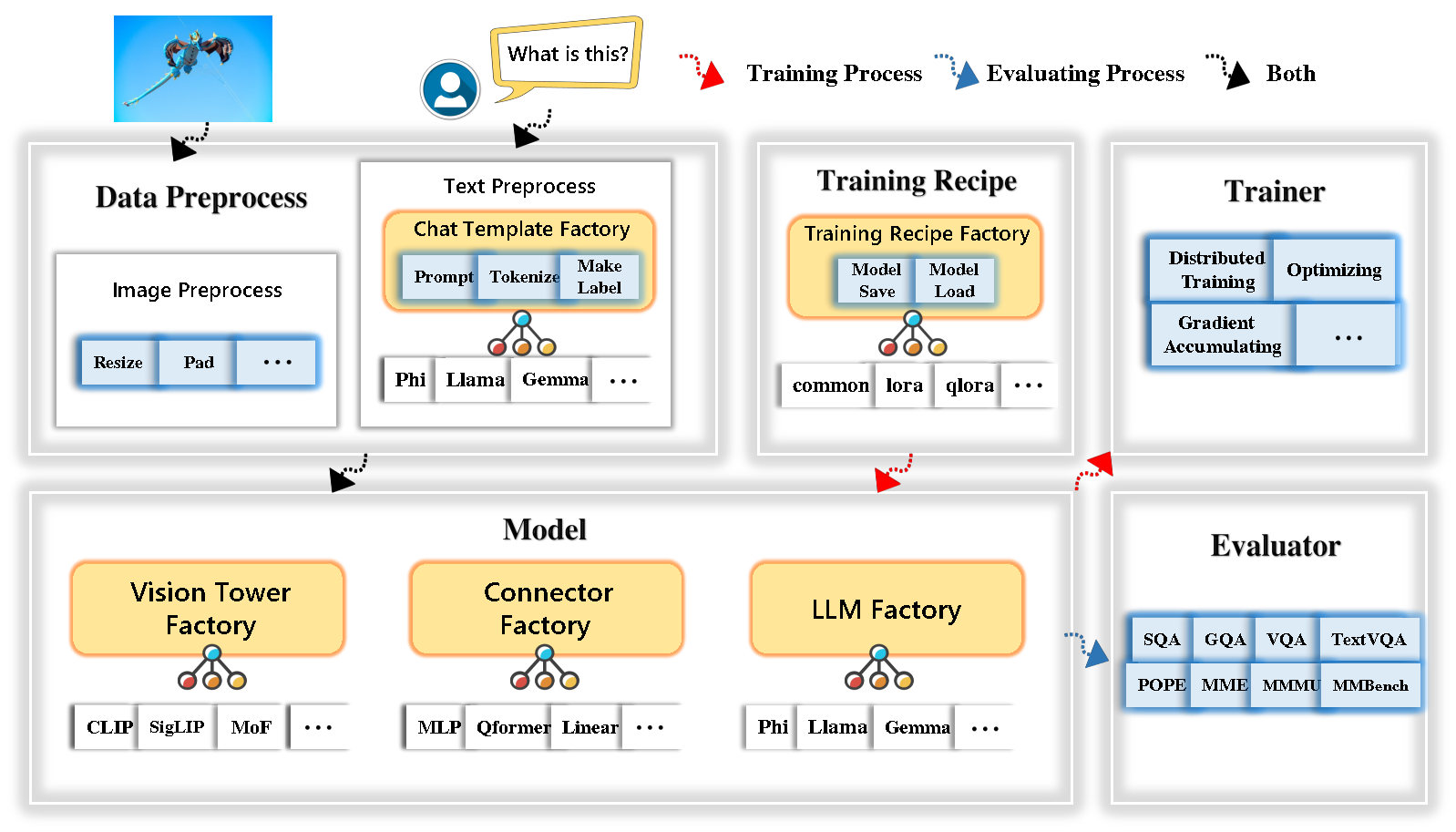
Tinyllava Factory es una base de código modular de código abierto para modelos multimodales grandes a gran escala (LMM), implementado en Pytorch y Huggingface, con un enfoque en la simplicidad de las implementaciones de código, la extensibilidad de las nuevas características y la reproducibilidad de los resultados de la capacitación.
Con Tinyllava Factory, puede personalizar sus propios modelos multimodales grandes con menos esfuerzo de codificación y menos errores de codificación.
Tinyllava Factory integra un conjunto de modelos y métodos de vanguardia.
Actualmente, LLM es compatible con OpenElm , Tinyllama , Stablelm , Qwen , Gemma y Phi .
Vision Tower actualmente es compatible con Clip, Siglip , Dino y Combinación de Clip y Dino .
El conector actualmente es compatible con MLP , Qformer y RESAMPLER .
La receta de entrenamiento actualmente admite ajuste congelado/total/parcialmente y ajuste de Lora/Qora .
Tenga en cuenta que nuestros requisitos de entorno son diferentes de los requisitos de entorno de Llava. Le recomendamos encarecidamente que cree el entorno desde cero de la siguiente manera.
git clone https://github.com/TinyLLaVA/TinyLLaVA_Factory.git
cd TinyLLaVA_Factoryconda create -n tinyllava_factory python=3.10 -y
conda activate tinyllava_factory
pip install --upgrade pip # enable PEP 660 support
pip install -e .pip install flash-attn --no-build-isolationgit pull
pip install -e . Consulte la sección de preparación de datos en nuestra documentación.
Aquí hay un ejemplo para entrenar un LMM usando PHI-2.
scripts/train/train_phi.shoutput_dir con el suyo en scripts/train/pretrain.shpretrained_model_path y output_dir con el suyo en scripts/train/finetune.shper_device_train_batch_size en scripts/train/pretrain.sh y scripts/train/finetune.sh bash scripts/train/train_phi.shA continuación se proporcionan hiperparámetros importantes utilizados en el pretratamiento y la fineta.
| Etapa de entrenamiento | Tamaño de lote global | Tasa de aprendizaje | Conv_versión |
|---|---|---|---|
| Preventiva | 256 | 1e-3 | predicha |
| Sintonia FINA | 128 | 2E-5 | fi |
Consejos:
Tamaño del lote global = num de GPU * per_device_train_batch_size * gradient_accumulation_steps , recomendamos que siempre mantenga el tamaño global de lotes y la tasa de aprendizaje como se indica arriba, excepto para que Lora ajuste su modelo.
conv_version es un hiperparámetro utilizado para elegir diferentes plantillas de chat para diferentes LLM. En la etapa previa a la altura, conv_version es la misma para todos los LLM, usando pretrain . En la etapa de sintonización, usamos
phi para PHI-2, Stablelm, Qwen-1.5
llama para Tinyllama, Openelm
gemma para Gemma
Consulte la sección de evaluación en nuestra documentación.
que están entrenados con tinyllava fábrica.
| VT (ruta HF) | LLM (ruta HF) | Receta | VQA-V2 | GQA | IMAGE SQA | Textvqa | Mm-vet | PAPA | Mete | Mmmu-val |
|---|---|---|---|---|---|---|---|---|---|---|
| OPERAI/Clip-Vit-Large-Patch14-336 | Apple/OpenElm-450m-Instructo | base | 69.5 | 52.1 | 50.6 | 40.4 | 20.0 | 83.6 | 1052.9 | 23.9 |
| Google/Siglip-So400m-Patch14-384 | Apple/OpenElm-450m-Instructo | base | 71.7 | 53.9 | 54.1 | 44.0 | 20.0 | 85.4 | 1118.8 | 24.0 |
| Google/Siglip-So400m-Patch14-384 | QWEN/QWEN2-0.5B | base | 72.3 | 55.8 | 60.1 | 45.2 | 19.5 | 86.6 | 1153.0 | 29.7 |
| Google/Siglip-So400m-Patch14-384 | QWEN/QWEN2.5-0.5B | base | 75.3 | 59.5 | 60.3 | 48.3 | 23.9 | 86.1 | 1253.0 | 33.3 |
| Google/Siglip-So400m-Patch14-384 | Qwen/Qwen2.5-3b | base | 79.4 | 62.5 | 74.1 | 58.3 | 34.8 | 87.4 | 1438.7 | 39.9 |
| OPERAI/Clip-Vit-Large-Patch14-336 | Tinyllama/tinyllama-1.1b-chat-v1.0 | base | 73.7 | 58.0 | 59.9 | 46.3 | 23.2 | 85.5 | 1284.6 | 27.9 |
| Google/Siglip-So400m-Patch14-384 | Tinyllama/tinyllama-1.1b-chat-v1.0 | base | 75.5 | 58.6 | 64.0 | 49.6 | 23.5 | 86.3 | 1256.5 | 28.3 |
| OPERAI/Clip-Vit-Large-Patch14-336 | stabilidadi/stablelm-2-zephyr-1_6b | base | 75.9 | 59.5 | 64.6 | 50.5 | 27.3 | 86.1 | 1368.1 | 31.8 |
| Google/Siglip-So400m-Patch14-384 | stabilidadi/stablelm-2-zephyr-1_6b | base | 78.2 | 60.7 | 66.7 | 56.0 | 29.4 | 86.3 | 1319.3 | 32.6 |
| Google/Siglip-So400m-Patch14-384 | Google/Gemma-2B-IT | base | 78.4 | 61.6 | 64.4 | 53.6 | 26.9 | 86.4 | 1339.0 | 31.7 |
| OPERAI/Clip-Vit-Large-Patch14-336 | Microsoft/Phi-2 | base | 76.8 | 59.4 | 71.2 | 53.4 | 31.7 | 86.8 | 1448.6 | 36.3 |
| Google/Siglip-So400m-Patch14-384 | Microsoft/Phi-2 | base | 79.2 | 61.6 | 71.9 | 57.4 | 35.0 | 87.2 | 1462.4 | 38.2 |
| Google/Siglip-So400m-Patch14-384 | Microsoft/Phi-2 | base y lora | 77.6 | 59.7 | 71.6 | 53.8 | 33.3 | 87.9 | 1413.2 | 35.6 |
| Google/Siglip-So400m-Patch14-384 | Microsoft/Phi-2 | compartir | 80.1 | 62.1 | 73.0 | 60.3 | 37.5 | 87.2 | 1466.4 | 38.4 |
que se entrenan utilizando la antigua base de código TinylLavabench.
Si tiene modelos entrenados por nuestra antigua base de código TinylLavabench y aún desea usarlos, proporcionamos un ejemplo de TinylLav-3.1b sobre cómo usar modelos heredados.
 from tinyllava . eval . run_tiny_llava import eval_model
from tinyllava . model . convert_legecy_weights_to_tinyllavafactory import *

model = convert_legecy_weights_to_tinyllavafactory ( 'bczhou/TinyLLaVA-3.1B' )

prompt = "What are the things I should be cautious about when I visit here?"
image_file = "https://llava-vl.github.io/static/images/view.jpg"

args = type ( 'Args' , (), {
    "model_path" : None ,
    "model" : model ,
    "query" : prompt ,
    "conv_mode" : "phi" , # the same as conv_version in the training stage. Different LLMs have different conv_mode/conv_version, please replace it
    "image_file" : image_file ,
    "sep" : "," ,
    "temperature" : 0 ,
    "top_p" : None ,
    "num_beams" : 1 ,
    "max_new_tokens" : 512
})()

eval_model ( args )

"""
Output:
When visiting this serene lakeside location with a wooden dock, there are a few things to be cautious about. First, ensure that the dock is stable and secure before stepping onto it, as it might be slippery or wet, especially if it's a wooden structure. Second, be mindful of the surrounding water, as it can be deep or have hidden obstacles, such as rocks or debris, that could pose a risk. Additionally, be aware of the weather conditions, as sudden changes in weather can make the area more dangerous. Lastly, respect the natural environment and wildlife, and avoid littering or disturbing the ecosystem.
""" Iniciar una demostración web local ejecutando:
python tinyllava/serve/app.py --model-path tinyllava/TinyLLaVA-Phi-2-SigLIP-3.1BTambién apoyamos la ejecución de la inferencia con CLI. Para usar nuestro modelo, ejecute:
python -m tinyllava.serve.cli
   --model-path tinyllava/TinyLLaVA-Phi-2-SigLIP-3.1B
--image-file " ./tinyllava/serve/examples/extreme_ironing.jpg " Si desea lanzar el modelo entrenado por usted o nosotros localmente, aquí hay un ejemplo.
 from tinyllava . eval . run_tiny_llava import eval_model

model_path = "/absolute/path/to/your/model/"
prompt = "What are the things I should be cautious about when I visit here?"
image_file = "https://llava-vl.github.io/static/images/view.jpg"
conv_mode = "phi" # or llama, gemma, etc

args = type ( 'Args' , (), {
    "model_path" : model_path ,
    "model" : None ,
    "query" : prompt ,
    "conv_mode" : conv_mode ,
    "image_file" : image_file ,
    "sep" : "," ,
    "temperature" : 0 ,
    "top_p" : None ,
    "num_beams" : 1 ,
    "max_new_tokens" : 512
})()

eval_model ( args )

"""
Output:
XXXXXXXXXXXXXXXXX
""" from transformers import AutoTokenizer , AutoModelForCausalLM
hf_path = 'tinyllava/TinyLLaVA-Phi-2-SigLIP-3.1B'
model = AutoModelForCausalLM . from_pretrained ( hf_path , trust_remote_code = True )
model . cuda ()
config = model . config
tokenizer = AutoTokenizer . from_pretrained ( hf_path , use_fast = False , model_max_length = config . tokenizer_model_max_length , padding_side = config . tokenizer_padding_side )
prompt = "What are these?"
image_url = "http://images.cocodataset.org/val2017/000000039769.jpg"
output_text , genertaion_time = model . chat ( prompt = prompt , image = image_url , tokenizer = tokenizer )
print ( 'model output:' , output_text )
print ( 'runing time:' , genertaion_time )Si desea Finetune TinylLava con sus conjuntos de datos personalizados, consulte aquí.
Si desea agregar un nuevo LLM por usted mismo, debe crear dos archivos: uno para la plantilla de chat y el otro para el modelo de idioma, en las carpetas tinyllava/data/template/ y tinyllava/model/llm/ .
Aquí hay un ejemplo de agregar el modelo Gemma.
En primer lugar, cree tinyllava/data/template/gemma_template.py , que se utilizará para la etapa de fineciring.
 from dataclasses import dataclass
from typing import TYPE_CHECKING , Dict , List , Optional , Sequence , Tuple , Union
from packaging import version

from . formatter import EmptyFormatter , StringFormatter
from . base import Template
from . formatter import Formatter
from . import register_template
from ... utils . constants import *

from transformers import PreTrainedTokenizer
import torch
import tokenizers


system = "A chat between a curious user and an artificial intelligence assistant. The assistant gives helpful, detailed, and polite answers to the user's questions."

@ register_template ( 'gemma' ) # Enable the TemplateFactory to obtain the added template by this string ('gemma').
@ dataclass
class GemmaTemplate ( Template ):
    format_image_token : "Formatter" = StringFormatter ( slot = "<image> n {{content}}" )
    format_user : "Formatter" = StringFormatter ( slot = "USER" + ": " + "{{content}}" + " " )
    format_assistant : "Formatter" = StringFormatter ( slot = "ASSISTANT" + ": " + "{{content}}" + "<eos>" ) # to be modified according to the tokenizer you choose
    system : "Formatter" = EmptyFormatter ( slot = system + " " )
    separator : "Formatter" = EmptyFormatter ( slot = [ ' ASSISTANT: ' , '<eos>' ]) # to be modified according to the tokenizer you choose

    def _make_masks ( self , labels , tokenizer , sep , eos_token_length , rounds ):
        # your code here
        return labels , cur_len
Consejos:
Asegúrese de que las labels (devueltas por la función _make_masks ) sigan este formato: las respuestas y la ID de token EOS no se enmascaran, y los otros tokens están enmascarados con -100 .
En segundo lugar, cree tinyllava/model/llm/gemma.py .
 from transformers import GemmaForCausalLM , AutoTokenizer
# The LLM you want to add along with its corresponding tokenizer.

from . import register_llm

# Add GemmaForCausalLM along with its corresponding tokenizer and handle special tokens.
@ register_llm ( 'gemma' ) # Enable the LLMFactory to obtain the added LLM by this string ('gemma').
def return_gemmaclass ():
    def tokenizer_and_post_load ( tokenizer ):
        tokenizer . pad_token = tokenizer . unk_token
        return tokenizer
    return ( GemmaForCausalLM , ( AutoTokenizer , tokenizer_and_post_load ))
Finalmente, cree scripts/train/train_gemma.sh con el correspondiente LLM_VERSION y CONV_VERSION .
Si desea agregar una nueva torre de visión, debe implementar una nueva clase de torre de visión que debe heredarse de la clase VisionTower de la clase base. Aquí hay un ejemplo de la Torre MOF Vision.
Primero, cree tinyllava/model/vision_tower/mof.py
 @ register_vision_tower ( 'mof' )
class MoFVisionTower ( VisionTower ):
    def __init__ ( self , cfg ):
        super (). __init__ ( cfg )

        self . _vision_tower = MoF ( cfg )
        self . _image_processor = # your image processor

    def _load_model ( self , vision_tower_name , ** kwargs ):
        # your code here, make sure your model can be correctly loaded from pretrained parameters either by huggingface or pytorch loading

    def forward ( self , x , ** kwargs ):
        # your code here
Luego, modifique sus scripts de entrenamiento con la VT_VERSION correspondiente.
Si desea agregar un nuevo conector, debe implementar una nueva clase de conector que debe heredarse del Connector de clase base. Aquí hay un ejemplo del conector lineal.
Primero, cree tinyllava/model/connector/linear.py
 import torch . nn as nn

from . import register_connector
from . base import Connector

@ register_connector ( 'linear' ) #Enable the ConnectorMFactory to obtain the added connector by this string ('linear').
class LinearConnector ( Connector ):
    def __init__ ( self , config ):
        super (). __init__ ()
        self . _connector =  nn . Linear ( config . vision_hidden_size , config . hidden_size ) # define your connector model
Luego, modifique sus scripts de entrenamiento con la CN_VERSION correspondiente.
Damos un agradecimiento especial a Lei Zhao, Luche Wang, Kaijun Luo y Junchen Wang por construir la demostración.
Si tiene alguna pregunta, no dude en iniciar un problema o contactarnos con WeChat (WeChatid: TinyllaVa ).
Si encuentra útiles nuestro documento y código en su investigación, considere dar una estrella y una cita.
 @misc { zhou2024tinyllava ,
      title = { TinyLLaVA: A Framework of Small-scale Large Multimodal Models } ,
      author = { Baichuan Zhou and Ying Hu and Xi Weng and Junlong Jia and Jie Luo and Xien Liu and Ji Wu and Lei Huang } ,
      year = { 2024 } ,
      eprint = { 2402.14289 } ,
      archivePrefix = { arXiv } ,
      primaryClass = { cs.LG }
}
@article { jia2024tinyllava ,
title = { TinyLLaVA Factory: A Modularized Codebase for Small-scale Large Multimodal Models } ,
author = { Jia, Junlong and Hu, Ying and Weng, Xi and Shi, Yiming and Li, Miao and Zhang, Xingjian and Zhou, Baichuan and Liu, Ziyu and Luo, Jie and Huang, Lei and Wu, Ji } ,
journal = { arXiv preprint arXiv:2405.11788 } ,
year = { 2024 }
}




