TinyLLaVA_Factory
1.0.0

当社の最高のモデルであるTinyLlava-Phi-2-Siglip-3.1bは、LLAVA-1.5やQwen-VLなどの既存の7Bモデルに対して全体的なパフォーマンスを向上させます。
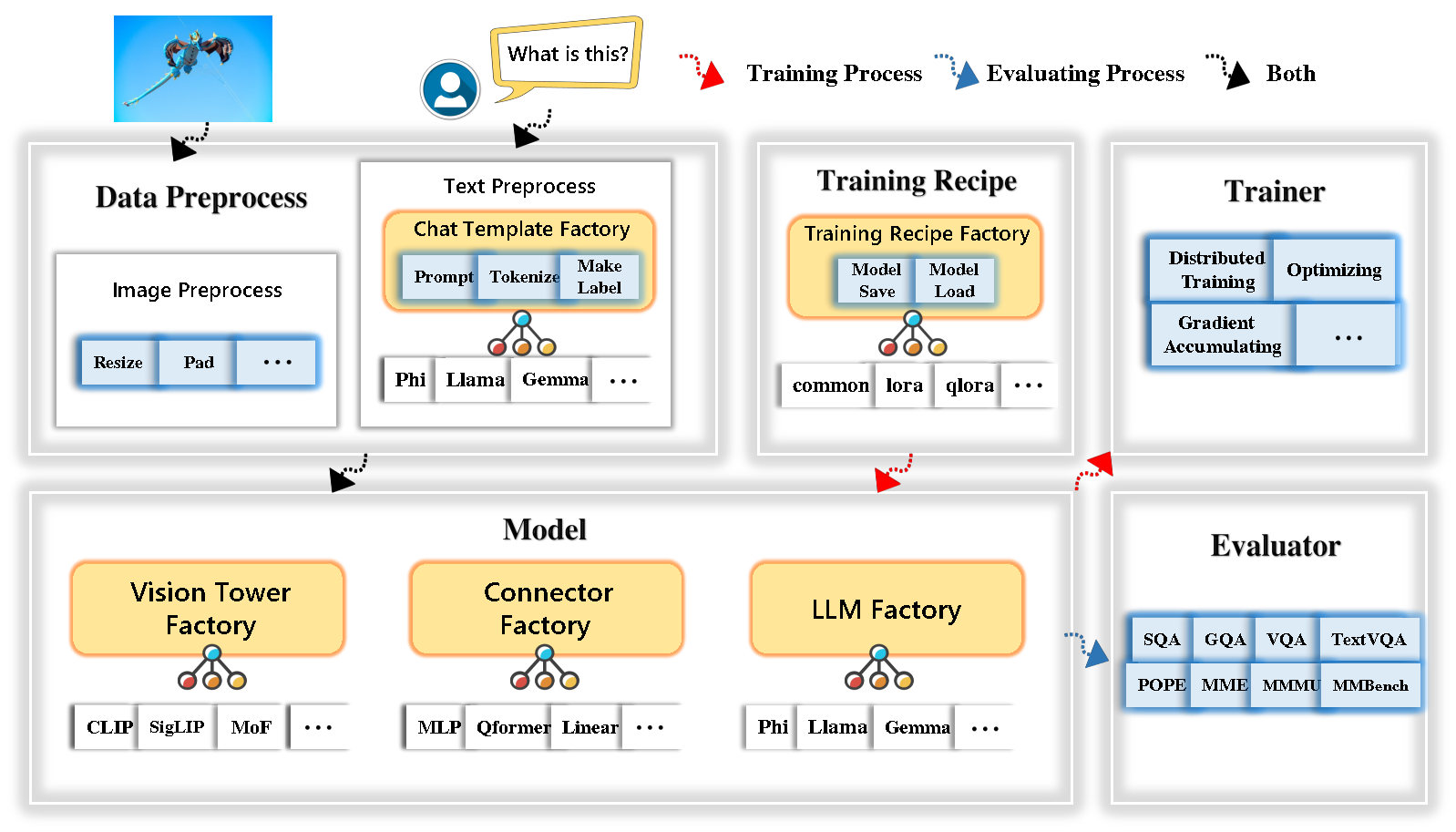
TinyLlava Factoryは、PytorchとHuggingfaceで実装された小規模な大規模なマルチモードモデル(LMMS)のオープンソースモジュラーコードベースであり、コード実装の単純さ、新機能の拡張性、およびトレーニング結果の再現性に焦点を当てています。
TinyLlava Factoryを使用すると、コーディングの労力が少なく、コード化のミスが少ない独自の大規模なマルチモーダルモデルをカスタマイズできます。
Tinyllava Factoryは、一連の最先端のモデルと方法を統合しています。
LLMは現在、 Openelm 、 Tinyllama 、 Stablelm 、 Qwen 、 Gemma 、およびPhiをサポートしています。
Vision Towerは現在、Clip、 Siglip 、 Dino 、およびClipとDinoの組み合わせをサポートしています。
現在、コネクタはMLP 、 QFORMER 、およびResamplerをサポートしています。
現在、トレーニングレシピは、冷凍/完全/部分的にチューニングとロラ/Qloraチューニングをサポートしています。
当社の環境要件は、Llavaの環境要件とは異なることに注意してください。次のように、ゼロから環境を作成することを強くお勧めします。
git clone https://github.com/TinyLLaVA/TinyLLaVA_Factory.git
cd TinyLLaVA_Factoryconda create -n tinyllava_factory python=3.10 -y
conda activate tinyllava_factory
pip install --upgrade pip # enable PEP 660 support
pip install -e .pip install flash-attn --no-build-isolationgit pull
pip install -e . 文書化のデータ準備セクションを参照してください。
PHI-2を使用してLMMをトレーニングする例を次に示します。
scripts/train/train_phi.shでデータパスを自分のものに置き換えますscripts/train/pretrain.shでoutput_dirあなたのものと交換しますpretrained_model_pathとoutput_dir scripts/train/finetune.shに置き換えますper_device_train_batch_size scripts/train/pretrain.shおよびscripts/train/finetune.shで調整します。 bash scripts/train/train_phi.sh以下に、事前トレーニングおよび微調整で使用される重要なハイパーパラメーターを以下に示します。
| トレーニング段階 | グローバルバッチサイズ | 学習率 | Conv_version |
|---|---|---|---|
| 事前脱出 | 256 | 1E-3 | プレレイン |
| 微調整 | 128 | 2E-5 | ファイ |
ヒント:
グローバルバッチサイズ= gpus * per_device_train_batch_size * gradient_accumulation_stepsのnumを推奨
conv_version 、異なるLLMの異なるチャットテンプレートを選択するために使用されるハイパーパラメーターです。 pretrainトレーニング段階では、 conv_versionすべてのLLMで同じです。 Finetuning段階では、使用します
Phi-2のphi 、Stablelm、Qwen-1.5
Tinyllamaのllama 、Openelm
ジェマのgemma
文書化の評価セクションを参照してください。
Tinyllavaファクトリーを使用して訓練されています。
| VT(HFパス) | LLM(HFパス) | レシピ | VQA-V2 | GQA | sqa-image | textVqa | MM-VET | 法王 | mme | mmmu-val |
|---|---|---|---|---|---|---|---|---|---|---|
| Openai/Clip-Vit-Large-Patch14-336 | Apple/OpenELM-450M-Instruct | ベース | 69.5 | 52.1 | 50.6 | 40.4 | 20.0 | 83.6 | 1052.9 | 23.9 |
| Google/siglip-so400m-patch14-384 | Apple/OpenELM-450M-Instruct | ベース | 71.7 | 53.9 | 54.1 | 44.0 | 20.0 | 85.4 | 1118.8 | 24.0 |
| Google/siglip-so400m-patch14-384 | Qwen/qwen2-0.5b | ベース | 72.3 | 55.8 | 60.1 | 45.2 | 19.5 | 86.6 | 1153.0 | 29.7 |
| Google/siglip-so400m-patch14-384 | Qwen/qwen2.5-0.5b | ベース | 75.3 | 59.5 | 60.3 | 48.3 | 23.9 | 86.1 | 1253.0 | 33.3 |
| Google/siglip-so400m-patch14-384 | Qwen/qwen2.5-3b | ベース | 79.4 | 62.5 | 74.1 | 58.3 | 34.8 | 87.4 | 1438.7 | 39.9 |
| Openai/Clip-Vit-Large-Patch14-336 | Tinyllama/tinyllama-1.1b-chat-v1.0 | ベース | 73.7 | 58.0 | 59.9 | 46.3 | 23.2 | 85.5 | 1284.6 | 27.9 |
| Google/siglip-so400m-patch14-384 | Tinyllama/tinyllama-1.1b-chat-v1.0 | ベース | 75.5 | 58.6 | 64.0 | 49.6 | 23.5 | 86.3 | 1256.5 | 28.3 |
| Openai/Clip-Vit-Large-Patch14-336 | stabilityai/stablelm-2-zephyr-1_6b | ベース | 75.9 | 59.5 | 64.6 | 50.5 | 27.3 | 86.1 | 1368.1 | 31.8 |
| Google/siglip-so400m-patch14-384 | stabilityai/stablelm-2-zephyr-1_6b | ベース | 78.2 | 60.7 | 66.7 | 56.0 | 29.4 | 86.3 | 1319.3 | 32.6 |
| Google/siglip-so400m-patch14-384 | Google/gemma-2b-it | ベース | 78.4 | 61.6 | 64.4 | 53.6 | 26.9 | 86.4 | 1339.0 | 31.7 |
| Openai/Clip-Vit-Large-Patch14-336 | Microsoft/Phi-2 | ベース | 76.8 | 59.4 | 71.2 | 53.4 | 31.7 | 86.8 | 1448.6 | 36.3 |
| Google/siglip-so400m-patch14-384 | Microsoft/Phi-2 | ベース | 79.2 | 61.6 | 71.9 | 57.4 | 35.0 | 87.2 | 1462.4 | 38.2 |
| Google/siglip-so400m-patch14-384 | Microsoft/Phi-2 | ベース&ロラ | 77.6 | 59.7 | 71.6 | 53.8 | 33.3 | 87.9 | 1413.2 | 35.6 |
| Google/siglip-so400m-patch14-384 | Microsoft/Phi-2 | 共有 | 80.1 | 62.1 | 73.0 | 60.3 | 37.5 | 87.2 | 1466.4 | 38.4 |
古いコードベースのtinyllavabenchを使用してトレーニングされています。
古いコードベースTinyLlavabenchによってトレーニングされているモデルがあり、それらを使用したい場合は、レガシーモデルの使用方法についてはTinyLlava-3.1bの例を提供します。
 from tinyllava . eval . run_tiny_llava import eval_model
from tinyllava . model . convert_legecy_weights_to_tinyllavafactory import *

model = convert_legecy_weights_to_tinyllavafactory ( 'bczhou/TinyLLaVA-3.1B' )

prompt = "What are the things I should be cautious about when I visit here?"
image_file = "https://llava-vl.github.io/static/images/view.jpg"

args = type ( 'Args' , (), {
    "model_path" : None ,
    "model" : model ,
    "query" : prompt ,
    "conv_mode" : "phi" , # the same as conv_version in the training stage. Different LLMs have different conv_mode/conv_version, please replace it
    "image_file" : image_file ,
    "sep" : "," ,
    "temperature" : 0 ,
    "top_p" : None ,
    "num_beams" : 1 ,
    "max_new_tokens" : 512
})()

eval_model ( args )

"""
Output:
When visiting this serene lakeside location with a wooden dock, there are a few things to be cautious about. First, ensure that the dock is stable and secure before stepping onto it, as it might be slippery or wet, especially if it's a wooden structure. Second, be mindful of the surrounding water, as it can be deep or have hidden obstacles, such as rocks or debris, that could pose a risk. Additionally, be aware of the weather conditions, as sudden changes in weather can make the area more dangerous. Lastly, respect the natural environment and wildlife, and avoid littering or disturbing the ecosystem.
""" 実行してローカルWebデモを起動します:
python tinyllava/serve/app.py --model-path tinyllava/TinyLLaVA-Phi-2-SigLIP-3.1Bまた、CLIとの実行の実行をサポートしています。モデルを使用するには、実行してください。
python -m tinyllava.serve.cli
   --model-path tinyllava/TinyLLaVA-Phi-2-SigLIP-3.1B
--image-file " ./tinyllava/serve/examples/extreme_ironing.jpg " 地元で自分自身または米国によって訓練されたモデルを起動したい場合は、例を示します。
 from tinyllava . eval . run_tiny_llava import eval_model

model_path = "/absolute/path/to/your/model/"
prompt = "What are the things I should be cautious about when I visit here?"
image_file = "https://llava-vl.github.io/static/images/view.jpg"
conv_mode = "phi" # or llama, gemma, etc

args = type ( 'Args' , (), {
    "model_path" : model_path ,
    "model" : None ,
    "query" : prompt ,
    "conv_mode" : conv_mode ,
    "image_file" : image_file ,
    "sep" : "," ,
    "temperature" : 0 ,
    "top_p" : None ,
    "num_beams" : 1 ,
    "max_new_tokens" : 512
})()

eval_model ( args )

"""
Output:
XXXXXXXXXXXXXXXXX
""" from transformers import AutoTokenizer , AutoModelForCausalLM
hf_path = 'tinyllava/TinyLLaVA-Phi-2-SigLIP-3.1B'
model = AutoModelForCausalLM . from_pretrained ( hf_path , trust_remote_code = True )
model . cuda ()
config = model . config
tokenizer = AutoTokenizer . from_pretrained ( hf_path , use_fast = False , model_max_length = config . tokenizer_model_max_length , padding_side = config . tokenizer_padding_side )
prompt = "What are these?"
image_url = "http://images.cocodataset.org/val2017/000000039769.jpg"
output_text , genertaion_time = model . chat ( prompt = prompt , image = image_url , tokenizer = tokenizer )
print ( 'model output:' , output_text )
print ( 'runing time:' , genertaion_time )カスタムデータセットでTinyLlavaをFintuneする場合は、こちらを参照してください。
自分で新しいLLMを追加する場合は、2つのファイルを作成する必要があります。1つはtinyllava/data/template/テンプレート用、もう1つは言語tinyllava/model/llm/用です。
Gemmaモデルを追加する例を以下に示します。
まず、finetuning段階に使用されるtinyllava/data/template/gemma_template.pyを作成します。
 from dataclasses import dataclass
from typing import TYPE_CHECKING , Dict , List , Optional , Sequence , Tuple , Union
from packaging import version

from . formatter import EmptyFormatter , StringFormatter
from . base import Template
from . formatter import Formatter
from . import register_template
from ... utils . constants import *

from transformers import PreTrainedTokenizer
import torch
import tokenizers


system = "A chat between a curious user and an artificial intelligence assistant. The assistant gives helpful, detailed, and polite answers to the user's questions."

@ register_template ( 'gemma' ) # Enable the TemplateFactory to obtain the added template by this string ('gemma').
@ dataclass
class GemmaTemplate ( Template ):
    format_image_token : "Formatter" = StringFormatter ( slot = "<image> n {{content}}" )
    format_user : "Formatter" = StringFormatter ( slot = "USER" + ": " + "{{content}}" + " " )
    format_assistant : "Formatter" = StringFormatter ( slot = "ASSISTANT" + ": " + "{{content}}" + "<eos>" ) # to be modified according to the tokenizer you choose
    system : "Formatter" = EmptyFormatter ( slot = system + " " )
    separator : "Formatter" = EmptyFormatter ( slot = [ ' ASSISTANT: ' , '<eos>' ]) # to be modified according to the tokenizer you choose

    def _make_masks ( self , labels , tokenizer , sep , eos_token_length , rounds ):
        # your code here
        return labels , cur_len
ヒント:
labels ( _make_masks関数によって返される)がこの形式に従うことを確認してください:回答とEOSトークンIDがマスクされておらず、他のトークンは-100でマスクされています。
第二に、 tinyllava/model/llm/gemma.pyを作成します。
 from transformers import GemmaForCausalLM , AutoTokenizer
# The LLM you want to add along with its corresponding tokenizer.

from . import register_llm

# Add GemmaForCausalLM along with its corresponding tokenizer and handle special tokens.
@ register_llm ( 'gemma' ) # Enable the LLMFactory to obtain the added LLM by this string ('gemma').
def return_gemmaclass ():
    def tokenizer_and_post_load ( tokenizer ):
        tokenizer . pad_token = tokenizer . unk_token
        return tokenizer
return ( GemmaForCausalLM , ( AutoTokenizer , tokenizer_and_post_load ))最後に、対応するLLM_VERSIONとCONV_VERSIONを使用して、 scripts/train/train_gemma.shを作成します。
新しいVision Towerを追加する場合は、基本クラスのVisionTowerから継承する必要がある新しいVision Towerクラスを実装する必要があります。これがMOFビジョンタワーの例です。
まず、 tinyllava/model/vision_tower/mof.pyを作成します
 @ register_vision_tower ( 'mof' )
class MoFVisionTower ( VisionTower ):
    def __init__ ( self , cfg ):
        super (). __init__ ( cfg )

        self . _vision_tower = MoF ( cfg )
        self . _image_processor = # your image processor

    def _load_model ( self , vision_tower_name , ** kwargs ):
        # your code here, make sure your model can be correctly loaded from pretrained parameters either by huggingface or pytorch loading

    def forward ( self , x , ** kwargs ):
# your code here次に、対応するVT_VERSIONでトレーニングスクリプトを変更します。
新しいコネクタを追加する場合は、ベースクラスConnectorから継承する必要がある新しいコネクタクラスを実装する必要があります。これが線形コネクタの例です。
まず、 tinyllava/model/connector/linear.pyを作成します
 import torch . nn as nn

from . import register_connector
from . base import Connector

@ register_connector ( 'linear' ) #Enable the ConnectorMFactory to obtain the added connector by this string ('linear').
class LinearConnector ( Connector ):
    def __init__ ( self , config ):
        super (). __init__ ()
self . _connector = nn . Linear ( config . vision_hidden_size , config . hidden_size ) # define your connector model次に、対応するCN_VERSIONでトレーニングスクリプトを変更します。
デモを構築してくれたLei Zhao、Luche Wang、Kaijun Luo、Junchen Wangに感謝します。
ご質問がある場合は、問題を開始するか、WeChat(WeChatid: TinyLlava )でお問い合わせください。
私たちの論文とコードがあなたの研究で役立つと思うなら、星と引用を与えることを検討してください。
 @misc { zhou2024tinyllava ,
      title = { TinyLLaVA: A Framework of Small-scale Large Multimodal Models } ,
      author = { Baichuan Zhou and Ying Hu and Xi Weng and Junlong Jia and Jie Luo and Xien Liu and Ji Wu and Lei Huang } ,
      year = { 2024 } ,
      eprint = { 2402.14289 } ,
      archivePrefix = { arXiv } ,
      primaryClass = { cs.LG }
}
@article { jia2024tinyllava ,
title = { TinyLLaVA Factory: A Modularized Codebase for Small-scale Large Multimodal Models } ,
author = { Jia, Junlong and Hu, Ying and Weng, Xi and Shi, Yiming and Li, Miao and Zhang, Xingjian and Zhou, Baichuan and Liu, Ziyu and Luo, Jie and Huang, Lei and Wu, Ji } ,
journal = { arXiv preprint arXiv:2405.11788 } ,
year = { 2024 }
}




