TinyLLaVA_Factory
1.0.0

Notre meilleur modèle, Tinyllava-Phi-2-Siglip-3.1b, réalise de meilleures performances globales par rapport aux modèles 7B existants tels que LLAVA-1.5 et QWEN-VL.
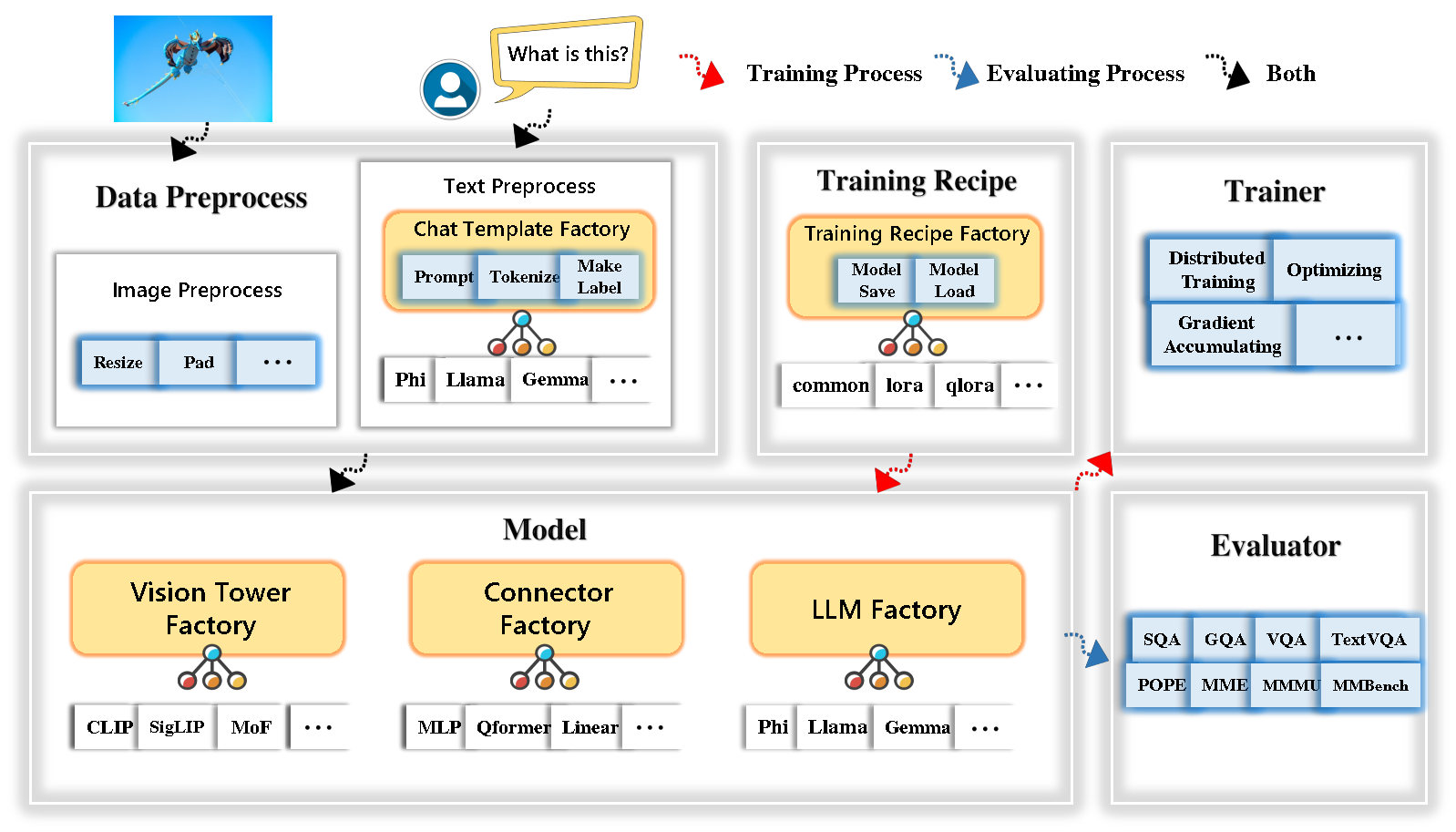
Tinyllava Factory est une base de code modulaire open source pour les grands modèles multimodaux (LMM) à petite échelle, implémentés en pytorch et en étreinte, en mettant l'accent sur la simplicité des implémentations de code, l'extensibilité des nouvelles fonctionnalités et la reproductibilité des résultats de formation.
Avec Tinyllava Factory, vous pouvez personnaliser vos propres grands modèles multimodaux avec moins d'efforts de codage et moins d'erreurs de codage.
L'usine Tinyllava intègre une suite de modèles et de méthodes de pointe.
LLM prend actuellement en charge OpenElm , TinyLlama , Stablelm , Qwen , Gemma et Phi .
Vision Tower prend actuellement en charge Clip, Siglip , Dino et combinaison de clip et de dino .
Le connecteur prend actuellement en charge MLP , QFORMER et Resampler .
La recette de formation prend actuellement en charge les réglages congelés / entièrement / partiellement et le réglage de Lora / Qlora .
Veuillez noter que nos exigences en matière d'environnement sont différentes des exigences de l'environnement de Llava. Nous vous recommandons fortement de créer l'environnement à partir de zéro comme suit.
git clone https://github.com/TinyLLaVA/TinyLLaVA_Factory.git
cd TinyLLaVA_Factoryconda create -n tinyllava_factory python=3.10 -y
conda activate tinyllava_factory
pip install --upgrade pip # enable PEP 660 support
pip install -e .pip install flash-attn --no-build-isolationgit pull
pip install -e . Veuillez vous référer à la section de préparation des données dans notre documentation.
Voici un exemple pour la formation d'un LMM en utilisant PHI-2.
scripts/train/train_phi.shoutput_dir par le vôtre dans scripts/train/pretrain.shpretrained_model_path et output_dir par le vôtre dans scripts/train/finetune.shper_device_train_batch_size dans scripts/train/pretrain.sh et scripts/train/finetune.sh bash scripts/train/train_phi.shDes hyperparamètres importants utilisés dans la pré-entraînement et le finetuning sont fournis ci-dessous.
| Étape de formation | Taille du lot mondial | Taux d'apprentissage | conv_version |
|---|---|---|---|
| Pré-formation | 256 | 1E-3 | présager |
| Réglage fin | 128 | 2E-5 | phi |
Conseils:
Taille globale du lot = Num of GPU * per_device_train_batch_size * gradient_accumulation_steps , nous vous recommandons toujours de garder la taille globale du lot et le taux d'apprentissage comme ci-dessus, sauf pour LORA Tuning votre modèle.
conv_version est un hyperparamètre utilisé pour choisir différents modèles de chat pour différents LLM. Au stade de pré-formation, conv_version est la même pour tous les LLM, en utilisant pretrain . Au stade de la finetuning, nous utilisons
phi pour PHI-2, Stablelm, Qwen-1.5
llama pour tinyllama, openelm
gemma pour Gemma
Veuillez vous référer à la section d'évaluation de notre documentation.
qui sont formés à l'aide de l'usine Tinyllava.
| VT (chemin HF) | LLM (chemin HF) | Recette | VQA-V2 | GQA | Sqa-image | Textvqa | Mm-vet | PAPE | Mme | MMMU-VAL |
|---|---|---|---|---|---|---|---|---|---|---|
| Openai / Clip-Vit-Garn-Patch14-336 | Apple / OpenELM-450M-Istruct | base | 69.5 | 52.1 | 50.6 | 40.4 | 20.0 | 83.6 | 1052.9 | 23.9 |
| Google / Siglip-SO400M-Patch14-384 | Apple / OpenELM-450M-Istruct | base | 71.7 | 53.9 | 54.1 | 44.0 | 20.0 | 85.4 | 1118.8 | 24.0 |
| Google / Siglip-SO400M-Patch14-384 | Qwen / qwen2-0.5b | base | 72.3 | 55.8 | 60.1 | 45.2 | 19.5 | 86.6 | 1153.0 | 29.7 |
| Google / Siglip-SO400M-Patch14-384 | Qwen / qwen2.5-0.5b | base | 75.3 | 59.5 | 60.3 | 48.3 | 23.9 | 86.1 | 1253.0 | 33.3 |
| Google / Siglip-SO400M-Patch14-384 | Qwen / qwen2.5-3b | base | 79.4 | 62.5 | 74.1 | 58.3 | 34.8 | 87.4 | 1438.7 | 39.9 |
| Openai / Clip-Vit-Garn-Patch14-336 | Tinyllama / tinyllama-1.1b-chat-v1.0 | base | 73.7 | 58.0 | 59.9 | 46.3 | 23.2 | 85,5 | 1284.6 | 27.9 |
| Google / Siglip-SO400M-Patch14-384 | Tinyllama / tinyllama-1.1b-chat-v1.0 | base | 75,5 | 58.6 | 64.0 | 49.6 | 23.5 | 86.3 | 1256.5 | 28.3 |
| Openai / Clip-Vit-Garn-Patch14-336 | stabilitéi / stablelm-2-zéphyr-1_6b | base | 75.9 | 59.5 | 64.6 | 50.5 | 27.3 | 86.1 | 1368.1 | 31.8 |
| Google / Siglip-SO400M-Patch14-384 | stabilitéi / stablelm-2-zéphyr-1_6b | base | 78.2 | 60.7 | 66.7 | 56.0 | 29.4 | 86.3 | 1319.3 | 32.6 |
| Google / Siglip-SO400M-Patch14-384 | google / gemma-2b-it | base | 78.4 | 61.6 | 64.4 | 53.6 | 26.9 | 86.4 | 1339.0 | 31.7 |
| Openai / Clip-Vit-Garn-Patch14-336 | Microsoft / PHI-2 | base | 76.8 | 59.4 | 71.2 | 53.4 | 31.7 | 86.8 | 1448.6 | 36.3 |
| Google / Siglip-SO400M-Patch14-384 | Microsoft / PHI-2 | base | 79.2 | 61.6 | 71.9 | 57.4 | 35.0 | 87.2 | 1462.4 | 38.2 |
| Google / Siglip-SO400M-Patch14-384 | Microsoft / PHI-2 | base et lora | 77.6 | 59.7 | 71.6 | 53.8 | 33.3 | 87.9 | 1413.2 | 35.6 |
| Google / Siglip-SO400M-Patch14-384 | Microsoft / PHI-2 | partager | 80.1 | 62.1 | 73.0 | 60.3 | 37.5 | 87.2 | 1466.4 | 38.4 |
qui sont formés à l'aide de l'ancienne base de code Tinyllavabench.
Si vous avez des modèles formés par notre ancienne base de code Tinyllavabench et que vous souhaitez toujours les utiliser, nous fournissons un exemple de Tinyllava-3.1b pour utiliser les modèles hérités.
 from tinyllava . eval . run_tiny_llava import eval_model
from tinyllava . model . convert_legecy_weights_to_tinyllavafactory import *

model = convert_legecy_weights_to_tinyllavafactory ( 'bczhou/TinyLLaVA-3.1B' )

prompt = "What are the things I should be cautious about when I visit here?"
image_file = "https://llava-vl.github.io/static/images/view.jpg"

args = type ( 'Args' , (), {
    "model_path" : None ,
    "model" : model ,
    "query" : prompt ,
    "conv_mode" : "phi" , # the same as conv_version in the training stage. Different LLMs have different conv_mode/conv_version, please replace it
    "image_file" : image_file ,
    "sep" : "," ,
    "temperature" : 0 ,
    "top_p" : None ,
    "num_beams" : 1 ,
    "max_new_tokens" : 512
})()

eval_model ( args )

"""
Output:
When visiting this serene lakeside location with a wooden dock, there are a few things to be cautious about. First, ensure that the dock is stable and secure before stepping onto it, as it might be slippery or wet, especially if it's a wooden structure. Second, be mindful of the surrounding water, as it can be deep or have hidden obstacles, such as rocks or debris, that could pose a risk. Additionally, be aware of the weather conditions, as sudden changes in weather can make the area more dangerous. Lastly, respect the natural environment and wildlife, and avoid littering or disturbing the ecosystem.
"""
Lancez une démo Web locale en fonctionnant:
python tinyllava/serve/app.py --model-path tinyllava/TinyLLaVA-Phi-2-SigLIP-3.1BNous prenons également en charge l'inférence de la CLI. Pour utiliser notre modèle, exécutez:
python -m tinyllava.serve.cli
   --model-path tinyllava/TinyLLaVA-Phi-2-SigLIP-3.1B
--image-file " ./tinyllava/serve/examples/extreme_ironing.jpg " Si vous souhaitez lancer le modèle formé par vous-même ou par nous localement, voici un exemple.
 from tinyllava . eval . run_tiny_llava import eval_model

model_path = "/absolute/path/to/your/model/"
prompt = "What are the things I should be cautious about when I visit here?"
image_file = "https://llava-vl.github.io/static/images/view.jpg"
conv_mode = "phi" # or llama, gemma, etc

args = type ( 'Args' , (), {
    "model_path" : model_path ,
    "model" : None ,
    "query" : prompt ,
    "conv_mode" : conv_mode ,
    "image_file" : image_file ,
    "sep" : "," ,
    "temperature" : 0 ,
    "top_p" : None ,
    "num_beams" : 1 ,
    "max_new_tokens" : 512
})()

eval_model ( args )

"""
Output:
XXXXXXXXXXXXXXXXX
""" from transformers import AutoTokenizer , AutoModelForCausalLM
hf_path = 'tinyllava/TinyLLaVA-Phi-2-SigLIP-3.1B'
model = AutoModelForCausalLM . from_pretrained ( hf_path , trust_remote_code = True )
model . cuda ()
config = model . config
tokenizer = AutoTokenizer . from_pretrained ( hf_path , use_fast = False , model_max_length = config . tokenizer_model_max_length , padding_side = config . tokenizer_padding_side )
prompt = "What are these?"
image_url = "http://images.cocodataset.org/val2017/000000039769.jpg"
output_text , genertaion_time = model . chat ( prompt = prompt , image = image_url , tokenizer = tokenizer )
print ( 'model output:' , output_text )
print ( 'runing time:' , genertaion_time )Si vous souhaitez Finetune Tinyllava avec vos ensembles de données personnalisés, veuillez vous référer à ICI.
Si vous souhaitez ajouter un nouveau LLM par vous-même, vous devez créer deux fichiers: l'un pour le modèle de chat et l'autre modèle de langue, sous les dossiers tinyllava/data/template/ et tinyllava/model/llm/ .
Voici un exemple d'ajout du modèle Gemma.
Tout d'abord, créez tinyllava/data/template/gemma_template.py , qui sera utilisé pour l'étape de la finetuning.
 from dataclasses import dataclass
from typing import TYPE_CHECKING , Dict , List , Optional , Sequence , Tuple , Union
from packaging import version

from . formatter import EmptyFormatter , StringFormatter
from . base import Template
from . formatter import Formatter
from . import register_template
from ... utils . constants import *

from transformers import PreTrainedTokenizer
import torch
import tokenizers


system = "A chat between a curious user and an artificial intelligence assistant. The assistant gives helpful, detailed, and polite answers to the user's questions."

@ register_template ( 'gemma' ) # Enable the TemplateFactory to obtain the added template by this string ('gemma').
@ dataclass
class GemmaTemplate ( Template ):
    format_image_token : "Formatter" = StringFormatter ( slot = "<image> n {{content}}" )
    format_user : "Formatter" = StringFormatter ( slot = "USER" + ": " + "{{content}}" + " " )
    format_assistant : "Formatter" = StringFormatter ( slot = "ASSISTANT" + ": " + "{{content}}" + "<eos>" ) # to be modified according to the tokenizer you choose
    system : "Formatter" = EmptyFormatter ( slot = system + " " )
    separator : "Formatter" = EmptyFormatter ( slot = [ ' ASSISTANT: ' , '<eos>' ]) # to be modified according to the tokenizer you choose

    def _make_masks ( self , labels , tokenizer , sep , eos_token_length , rounds ):
        # your code here
        return labels , cur_len
Conseils:
Veuillez vous assurer que les labels (renvoyées par la fonction _make_masks ) suit ce format: les réponses et l'ID de jeton EOS ne sont pas masqués, et les autres jetons sont masqués avec -100 .
Deuxièmement, créez tinyllava/model/llm/gemma.py .
 from transformers import GemmaForCausalLM , AutoTokenizer
# The LLM you want to add along with its corresponding tokenizer.

from . import register_llm

# Add GemmaForCausalLM along with its corresponding tokenizer and handle special tokens.
@ register_llm ( 'gemma' ) # Enable the LLMFactory to obtain the added LLM by this string ('gemma').
def return_gemmaclass ():
    def tokenizer_and_post_load ( tokenizer ):
        tokenizer . pad_token = tokenizer . unk_token
        return tokenizer
    return ( GemmaForCausalLM , ( AutoTokenizer , tokenizer_and_post_load ))
Enfin, créez scripts/train/train_gemma.sh avec le LLM_VERSION et CONV_VERSION correspondants.
Si vous souhaitez ajouter une nouvelle tour de vision, vous devez mettre en œuvre une nouvelle classe de tour de vision qui devrait être héritée de la classe de base VisionTower . Voici un exemple de la tour de vision MOF.
Créez d'abord tinyllava/model/vision_tower/mof.py
 @ register_vision_tower ( 'mof' )
class MoFVisionTower ( VisionTower ):
    def __init__ ( self , cfg ):
        super (). __init__ ( cfg )

        self . _vision_tower = MoF ( cfg )
        self . _image_processor = # your image processor

    def _load_model ( self , vision_tower_name , ** kwargs ):
        # your code here, make sure your model can be correctly loaded from pretrained parameters either by huggingface or pytorch loading

    def forward ( self , x , ** kwargs ):
        # your code here
Ensuite, modifiez vos scripts de formation avec la VT_VERSION correspondante.
Si vous souhaitez ajouter un nouveau connecteur, vous devez implémenter une nouvelle classe de connecteur qui doit être héritée du Connector de classe de base. Voici un exemple du connecteur linéaire.
Créez d'abord tinyllava/model/connector/linear.py
 import torch . nn as nn

from . import register_connector
from . base import Connector

@ register_connector ( 'linear' ) #Enable the ConnectorMFactory to obtain the added connector by this string ('linear').
class LinearConnector ( Connector ):
    def __init__ ( self , config ):
        super (). __init__ ()
        self . _connector =  nn . Linear ( config . vision_hidden_size , config . hidden_size ) # define your connector model
Ensuite, modifiez vos scripts de formation avec le CN_VERSION correspondant.
Nous remercions particulièrement Lei Zhao, Luche Wang, Kaijun Luo et Junchen Wang pour la création de la démo.
Si vous avez des questions, n'hésitez pas à lancer un problème ou à nous contacter par WeChat (WeChatid: Tinyllava ).
Si vous trouvez notre article et notre code utiles dans vos recherches, veuillez envisager de donner une étoile et une citation.
 @misc { zhou2024tinyllava ,
      title = { TinyLLaVA: A Framework of Small-scale Large Multimodal Models } ,
      author = { Baichuan Zhou and Ying Hu and Xi Weng and Junlong Jia and Jie Luo and Xien Liu and Ji Wu and Lei Huang } ,
      year = { 2024 } ,
      eprint = { 2402.14289 } ,
      archivePrefix = { arXiv } ,
      primaryClass = { cs.LG }
}
@article { jia2024tinyllava ,
title = { TinyLLaVA Factory: A Modularized Codebase for Small-scale Large Multimodal Models } ,
author = { Jia, Junlong and Hu, Ying and Weng, Xi and Shi, Yiming and Li, Miao and Zhang, Xingjian and Zhou, Baichuan and Liu, Ziyu and Luo, Jie and Huang, Lei and Wu, Ji } ,
journal = { arXiv preprint arXiv:2405.11788 } ,
year = { 2024 }
}




