TinyLLaVA_Factory
1.0.0

Unser bestes Modell, Tinyllava-Phi-2-siglip-3.1b, erzielt eine bessere Gesamtleistung gegen vorhandene 7B-Modelle wie LLAVA-1.5 und Qwen-VL.
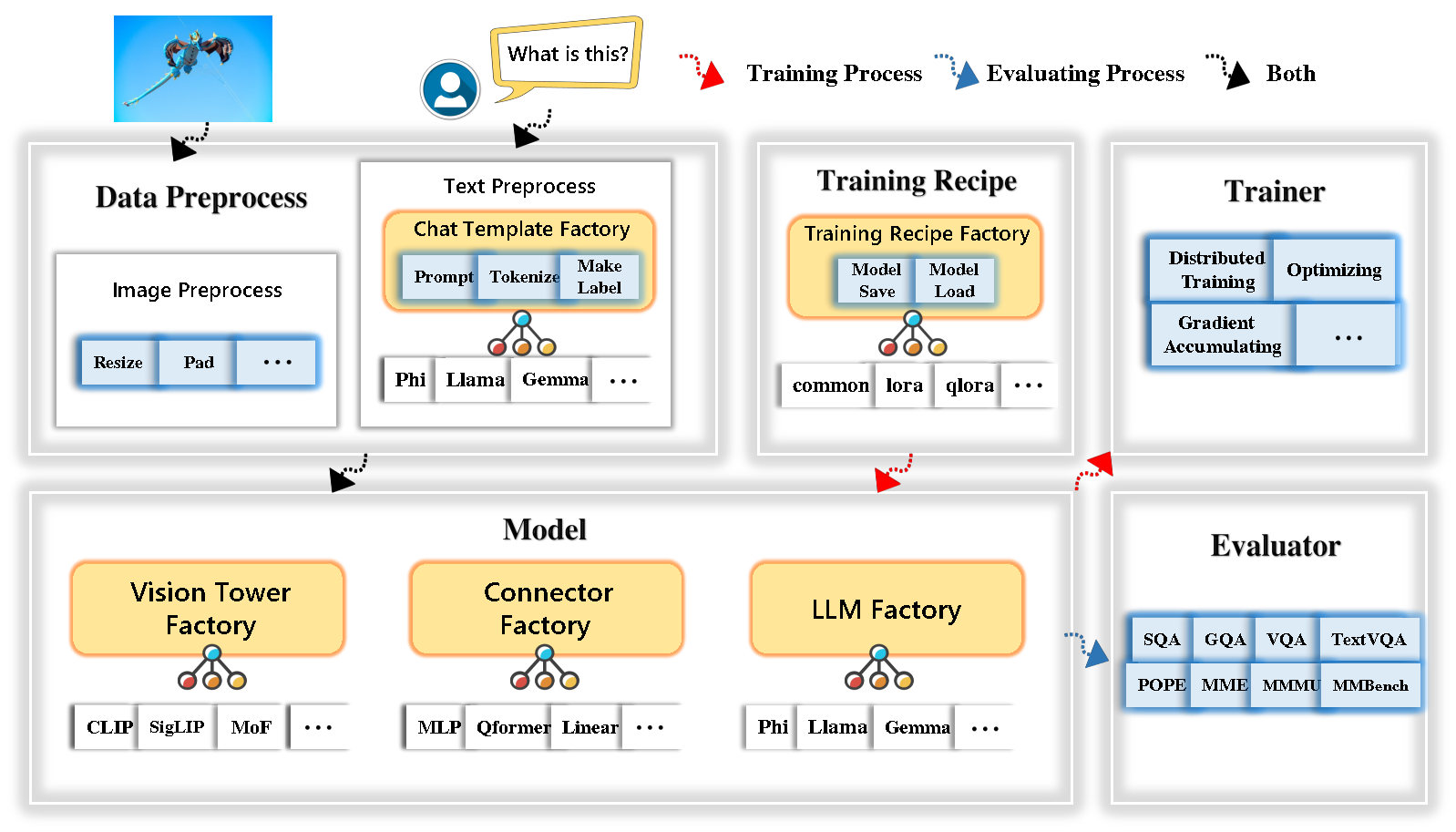
Tinyllava Factory ist eine open-Source-modulare Codular-Codebasis für kleine große multimodale Modelle (LMMs), die in Pytorch und Huggingface implementiert ist und sich auf die Einfachheit der Codeimplementierungen, die Erweiterbarkeit neuer Merkmale und die Reproduzierbarkeit der Trainingsergebnisse konzentriert.
Mit Tinyllava Factory können Sie Ihre eigenen großen multimodalen Modelle mit weniger codierender Aufwand und weniger Codierungsfehlern anpassen.
Tinyllava Factory integriert eine Reihe hochmoderner Modelle und Methoden.
LLM unterstützt derzeit OpenLM , Tinyllama , Stablelm , Qwen , Gemma und Phi .
Der Vision Tower unterstützt derzeit Clip, Siglip , Dino und Kombination aus Clip und Dino .
Connector unterstützt derzeit MLP , Qformer und Resampler .
Das Trainingsrezept unterstützt derzeit Frozen/Voll/teilweise Tuning und Lora/Qlora -Tuning .
Bitte beachten Sie, dass sich unsere Umgebungsanforderungen von den Umgebungsanforderungen von LLAVA unterscheiden. Wir empfehlen dringend, die Umgebung von Grund auf neu zu schaffen wie folgt.
git clone https://github.com/TinyLLaVA/TinyLLaVA_Factory.git
cd TinyLLaVA_Factoryconda create -n tinyllava_factory python=3.10 -y
conda activate tinyllava_factory
pip install --upgrade pip # enable PEP 660 support
pip install -e .pip install flash-attn --no-build-isolationgit pull
pip install -e . Weitere Informationen finden Sie in unserer Dokumentation im Abschnitt Datenvorbereitung.
Hier ist ein Beispiel für das Training A LMM mit PHI-2.
scripts/train/train_phi.shoutput_dir durch Ihre in scripts/train/pretrain.shpretrained_model_path output_dir scripts/train/finetune.shper_device_train_batch_size in scripts/train/pretrain.sh und scripts/train/finetune.sh bash scripts/train/train_phi.shWichtige Hyperparameter, die bei Vorab- und Finetuning verwendet werden, finden Sie unten.
| Trainingsphase | Globale Chargengröße | Lernrate | conv_version |
|---|---|---|---|
| Vorab | 256 | 1e-3 | Vorrain |
| Feinabstimmung | 128 | 2E-5 | Phi |
Tipps:
Global batch size = num of gpus * per_device_train_batch_size * gradient_accumulation_steps , wir empfehlen, dass Sie immer die globale Stapelgröße und die Lernrate wie oben aufnehmen, mit Ausnahme von LORA -Tuning Ihr Modell.
conv_version ist ein Hyperparameter, der zur Auswahl verschiedener Chat -Vorlagen für verschiedene LLMs verwendet wird. In der Vorbereitungsstufe ist conv_version für alle LLMs unter Verwendung von pretrain gleich. In der Finetuning -Phase verwenden wir
phi für PHI-2, Stablelm, Qwen-1.5
llama für Tinyllama, OpenElm
gemma für Gemma
In unserer Dokumentation finden Sie im Abschnitt Evaluierung.
die mit Tinyllava -Fabrik ausgebildet werden.
| VT (HF -Pfad) | LLM (HF -Pfad) | Rezept | VQA-V2 | GQA | SQA-Image | Textvqa | MM-VET | PAPST | Mme | MMMU-VAL |
|---|---|---|---|---|---|---|---|---|---|---|
| OpenAI/Clip-vit-large-patch14-336 | Apfel/OpenLM-450M-Struktur | Base | 69,5 | 52.1 | 50.6 | 40.4 | 20.0 | 83.6 | 1052.9 | 23.9 |
| Google/Siglip-SO400M-Patch14-384 | Apfel/OpenLM-450M-Struktur | Base | 71.7 | 53.9 | 54.1 | 44.0 | 20.0 | 85.4 | 1118.8 | 24.0 |
| Google/Siglip-SO400M-Patch14-384 | Qwen/Qwen2-0.5b | Base | 72.3 | 55.8 | 60.1 | 45,2 | 19.5 | 86.6 | 1153.0 | 29.7 |
| Google/Siglip-SO400M-Patch14-384 | Qwen/Qwen2.5-0.5b | Base | 75,3 | 59,5 | 60.3 | 48.3 | 23.9 | 86.1 | 1253.0 | 33.3 |
| Google/Siglip-SO400M-Patch14-384 | Qwen/Qwen2.5-3b | Base | 79,4 | 62,5 | 74.1 | 58,3 | 34.8 | 87,4 | 1438.7 | 39.9 |
| OpenAI/Clip-vit-large-patch14-336 | Tinyllama/Tinyllama-1.1b-chat-v1.0 | Base | 73.7 | 58.0 | 59,9 | 46,3 | 23.2 | 85,5 | 1284.6 | 27.9 |
| Google/Siglip-SO400M-Patch14-384 | Tinyllama/Tinyllama-1.1b-chat-v1.0 | Base | 75,5 | 58.6 | 64.0 | 49,6 | 23.5 | 86.3 | 1256.5 | 28.3 |
| OpenAI/Clip-vit-large-patch14-336 | Stabilityai/Stablelm-2-Zephyr-1_6B | Base | 75,9 | 59,5 | 64.6 | 50,5 | 27.3 | 86.1 | 1368.1 | 31.8 |
| Google/Siglip-SO400M-Patch14-384 | Stabilityai/Stablelm-2-Zephyr-1_6B | Base | 78,2 | 60.7 | 66,7 | 56.0 | 29.4 | 86,3 | 1319.3 | 32.6 |
| Google/Siglip-SO400M-Patch14-384 | Google/Gemma-2B-it | Base | 78,4 | 61.6 | 64.4 | 53.6 | 26.9 | 86,4 | 1339.0 | 31.7 |
| OpenAI/Clip-vit-large-patch14-336 | Microsoft/Phi-2 | Base | 76,8 | 59.4 | 71.2 | 53.4 | 31.7 | 86,8 | 1448.6 | 36.3 |
| Google/Siglip-SO400M-Patch14-384 | Microsoft/Phi-2 | Base | 79,2 | 61.6 | 71,9 | 57,4 | 35.0 | 87,2 | 1462.4 | 38.2 |
| Google/Siglip-SO400M-Patch14-384 | Microsoft/Phi-2 | Basis & Lora | 77,6 | 59.7 | 71.6 | 53,8 | 33.3 | 87,9 | 1413.2 | 35.6 |
| Google/Siglip-SO400M-Patch14-384 | Microsoft/Phi-2 | Aktie | 80.1 | 62.1 | 73.0 | 60.3 | 37,5 | 87,2 | 1466.4 | 38,4 |
die mit dem alten Codebasis Tinyllavabench trainiert werden.
Wenn Sie Modelle haben, die von unserem alten Codebasis Tinyllavabench trainiert wurden und sie weiterhin verwenden möchten, bieten wir ein Beispiel für Tinyllava-3.1b für die Verwendung von Legacy-Modellen.
 from tinyllava . eval . run_tiny_llava import eval_model
from tinyllava . model . convert_legecy_weights_to_tinyllavafactory import *

model = convert_legecy_weights_to_tinyllavafactory ( 'bczhou/TinyLLaVA-3.1B' )

prompt = "What are the things I should be cautious about when I visit here?"
image_file = "https://llava-vl.github.io/static/images/view.jpg"

args = type ( 'Args' , (), {
    "model_path" : None ,
    "model" : model ,
    "query" : prompt ,
    "conv_mode" : "phi" , # the same as conv_version in the training stage. Different LLMs have different conv_mode/conv_version, please replace it
    "image_file" : image_file ,
    "sep" : "," ,
    "temperature" : 0 ,
    "top_p" : None ,
    "num_beams" : 1 ,
    "max_new_tokens" : 512
})()

eval_model ( args )

"""
Output:
When visiting this serene lakeside location with a wooden dock, there are a few things to be cautious about. First, ensure that the dock is stable and secure before stepping onto it, as it might be slippery or wet, especially if it's a wooden structure. Second, be mindful of the surrounding water, as it can be deep or have hidden obstacles, such as rocks or debris, that could pose a risk. Additionally, be aware of the weather conditions, as sudden changes in weather can make the area more dangerous. Lastly, respect the natural environment and wildlife, and avoid littering or disturbing the ecosystem.
"""
Starten Sie eine lokale Web -Demo durch Laufen:
python tinyllava/serve/app.py --model-path tinyllava/TinyLLaVA-Phi-2-SigLIP-3.1BWir unterstützen auch die laufende Schlussfolgerung mit CLI. Um unser Modell zu verwenden, rennen Sie:
python -m tinyllava.serve.cli
   --model-path tinyllava/TinyLLaVA-Phi-2-SigLIP-3.1B
--image-file " ./tinyllava/serve/examples/extreme_ironing.jpg " Wenn Sie das von Ihnen oder uns vor Ort ausgebildete Modell starten möchten, finden Sie hier ein Beispiel.
 from tinyllava . eval . run_tiny_llava import eval_model

model_path = "/absolute/path/to/your/model/"
prompt = "What are the things I should be cautious about when I visit here?"
image_file = "https://llava-vl.github.io/static/images/view.jpg"
conv_mode = "phi" # or llama, gemma, etc

args = type ( 'Args' , (), {
    "model_path" : model_path ,
    "model" : None ,
    "query" : prompt ,
    "conv_mode" : conv_mode ,
    "image_file" : image_file ,
    "sep" : "," ,
    "temperature" : 0 ,
    "top_p" : None ,
    "num_beams" : 1 ,
    "max_new_tokens" : 512
})()

eval_model ( args )

"""
Output:
XXXXXXXXXXXXXXXXX
""" from transformers import AutoTokenizer , AutoModelForCausalLM
hf_path = 'tinyllava/TinyLLaVA-Phi-2-SigLIP-3.1B'
model = AutoModelForCausalLM . from_pretrained ( hf_path , trust_remote_code = True )
model . cuda ()
config = model . config
tokenizer = AutoTokenizer . from_pretrained ( hf_path , use_fast = False , model_max_length = config . tokenizer_model_max_length , padding_side = config . tokenizer_padding_side )
prompt = "What are these?"
image_url = "http://images.cocodataset.org/val2017/000000039769.jpg"
output_text , genertaion_time = model . chat ( prompt = prompt , image = image_url , tokenizer = tokenizer )
print ( 'model output:' , output_text )
print ( 'runing time:' , genertaion_time )Wenn Sie Tinyllava mit Ihren benutzerdefinierten Datensätzen beenden möchten, finden Sie hier hier.
Wenn Sie selbst einen neuen LLM hinzufügen möchten, müssen Sie zwei Dateien erstellen: eine für die Chat -Vorlage und die andere für Sprachmodell, unter den Ordnern tinyllava/data/template/ und tinyllava/model/llm/ .
Hier ist ein Beispiel für das Hinzufügen des Gemma -Modells.
Erstellen Sie zunächst tinyllava/data/template/gemma_template.py , die für die Finetuning -Stufe verwendet wird.
 from dataclasses import dataclass
from typing import TYPE_CHECKING , Dict , List , Optional , Sequence , Tuple , Union
from packaging import version

from . formatter import EmptyFormatter , StringFormatter
from . base import Template
from . formatter import Formatter
from . import register_template
from ... utils . constants import *

from transformers import PreTrainedTokenizer
import torch
import tokenizers


system = "A chat between a curious user and an artificial intelligence assistant. The assistant gives helpful, detailed, and polite answers to the user's questions."

@ register_template ( 'gemma' ) # Enable the TemplateFactory to obtain the added template by this string ('gemma').
@ dataclass
class GemmaTemplate ( Template ):
    format_image_token : "Formatter" = StringFormatter ( slot = "<image> n {{content}}" )
    format_user : "Formatter" = StringFormatter ( slot = "USER" + ": " + "{{content}}" + " " )
    format_assistant : "Formatter" = StringFormatter ( slot = "ASSISTANT" + ": " + "{{content}}" + "<eos>" ) # to be modified according to the tokenizer you choose
    system : "Formatter" = EmptyFormatter ( slot = system + " " )
    separator : "Formatter" = EmptyFormatter ( slot = [ ' ASSISTANT: ' , '<eos>' ]) # to be modified according to the tokenizer you choose

    def _make_masks ( self , labels , tokenizer , sep , eos_token_length , rounds ):
        # your code here
        return labels , cur_len
Tipps:
Bitte stellen Sie sicher, dass die labels (zurückgegeben von der Funktion _make_masks ) diesem Format folgen: Antworten und die EOS -Token -ID sind nicht maskiert und die anderen Token werden mit -100 maskiert.
Zweitens erstellen Sie tinyllava/model/llm/gemma.py .
 from transformers import GemmaForCausalLM , AutoTokenizer
# The LLM you want to add along with its corresponding tokenizer.

from . import register_llm

# Add GemmaForCausalLM along with its corresponding tokenizer and handle special tokens.
@ register_llm ( 'gemma' ) # Enable the LLMFactory to obtain the added LLM by this string ('gemma').
def return_gemmaclass ():
    def tokenizer_and_post_load ( tokenizer ):
        tokenizer . pad_token = tokenizer . unk_token
        return tokenizer
    return ( GemmaForCausalLM , ( AutoTokenizer , tokenizer_and_post_load ))
Erstellen Sie schließlich scripts/train/train_gemma.sh mit der entsprechenden LLM_VERSION und CONV_VERSION .
Wenn Sie einen neuen Vision -Turm hinzufügen möchten, müssen Sie eine neue Vision Tower -Klasse implementieren, die von der Basisklasse VisionTower geerbt werden sollte. Hier ist ein Beispiel für den MoF Vision Tower.
Erstellen Sie zunächst tinyllava/model/vision_tower/mof.py
 @ register_vision_tower ( 'mof' )
class MoFVisionTower ( VisionTower ):
    def __init__ ( self , cfg ):
        super (). __init__ ( cfg )

        self . _vision_tower = MoF ( cfg )
        self . _image_processor = # your image processor

    def _load_model ( self , vision_tower_name , ** kwargs ):
        # your code here, make sure your model can be correctly loaded from pretrained parameters either by huggingface or pytorch loading

    def forward ( self , x , ** kwargs ):
        # your code here
Ändern Sie dann Ihre Trainingsskripte mit der entsprechenden VT_VERSION .
Wenn Sie einen neuen Connector hinzufügen möchten, müssen Sie eine neue Connector -Klasse implementieren, die vom Connector geerbt werden sollte. Hier ist ein Beispiel für den linearen Anschluss.
Erstellen Sie zunächst tinyllava/model/connector/linear.py
 import torch . nn as nn

from . import register_connector
from . base import Connector

@ register_connector ( 'linear' ) #Enable the ConnectorMFactory to obtain the added connector by this string ('linear').
class LinearConnector ( Connector ):
    def __init__ ( self , config ):
        super (). __init__ ()
        self . _connector =  nn . Linear ( config . vision_hidden_size , config . hidden_size ) # define your connector model
Ändern Sie dann Ihre Trainingsskripte mit der entsprechenden CN_VERSION .
Wir danken Lei Zhao, Luche Wang, Kaijun Luo und Junken Wang für den Bau der Demo.
Wenn Sie Fragen haben, können Sie entweder ein Problem initiieren oder uns von WeChat (WeChatid: Tinyllava ) kontaktieren.
Wenn Sie unser Papier und Code in Ihrer Forschung nützlich finden, sollten Sie einen Stern und Zitat geben.
 @misc { zhou2024tinyllava ,
      title = { TinyLLaVA: A Framework of Small-scale Large Multimodal Models } ,
      author = { Baichuan Zhou and Ying Hu and Xi Weng and Junlong Jia and Jie Luo and Xien Liu and Ji Wu and Lei Huang } ,
      year = { 2024 } ,
      eprint = { 2402.14289 } ,
      archivePrefix = { arXiv } ,
      primaryClass = { cs.LG }
}
@article { jia2024tinyllava ,
title = { TinyLLaVA Factory: A Modularized Codebase for Small-scale Large Multimodal Models } ,
author = { Jia, Junlong and Hu, Ying and Weng, Xi and Shi, Yiming and Li, Miao and Zhang, Xingjian and Zhou, Baichuan and Liu, Ziyu and Luo, Jie and Huang, Lei and Wu, Ji } ,
journal = { arXiv preprint arXiv:2405.11788 } ,
year = { 2024 }
}




