TinyLLaVA_Factory
1.0.0

최상의 모델 인 Tinyllava-Phi-2-Siglip-3.1B는 LLAVA-1.5 및 QWEN-VL과 같은 기존 7B 모델에 대해 더 나은 전체 성능을 달성합니다.
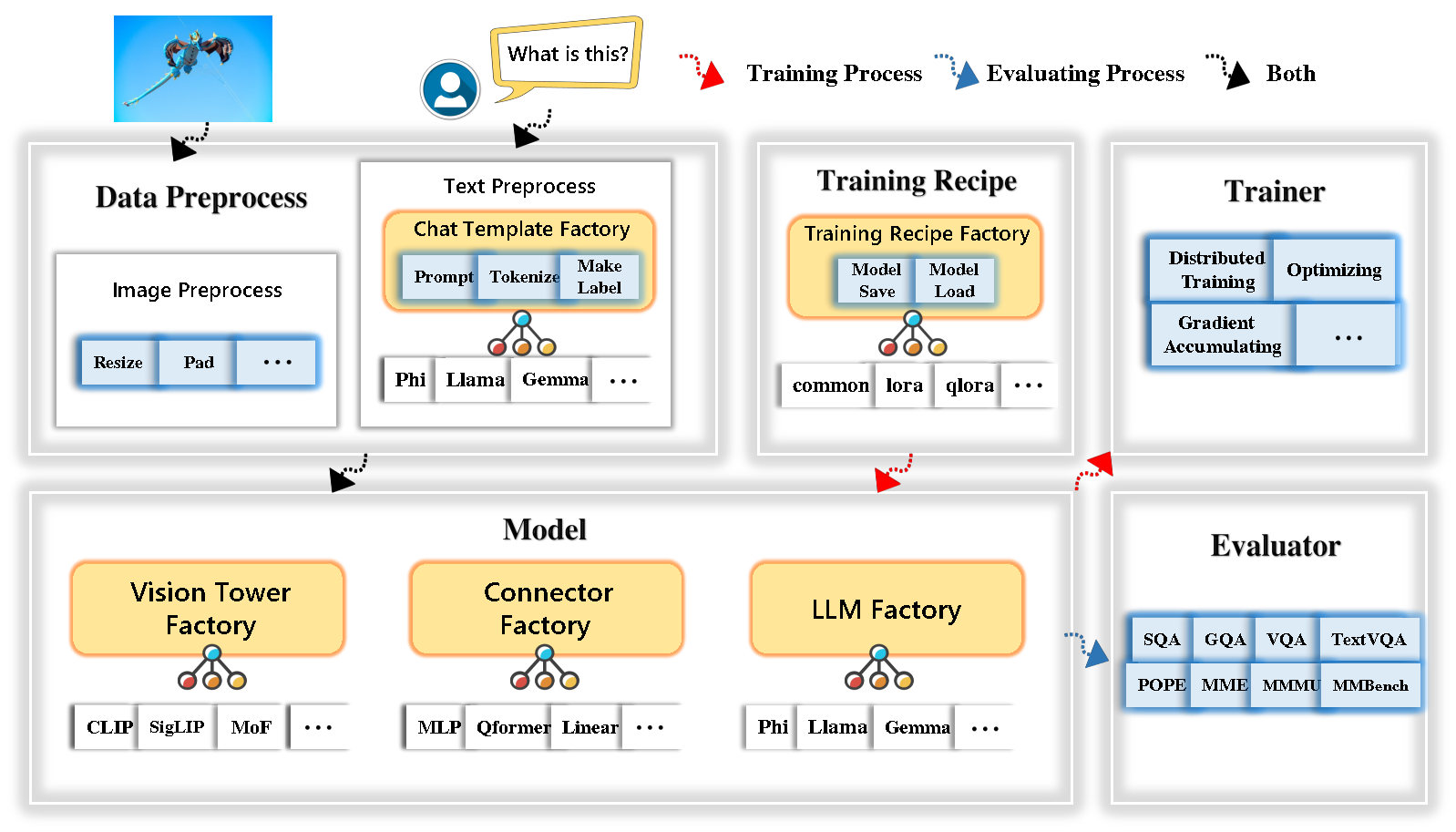
Tinyllava Factory는 코드 구현의 단순성, 새로운 기능의 확장 성 및 교육 결과의 재현성에 중점을 둔 Pytorch 및 Huggingface에서 구현 된 소규모 대형 멀티 모드 모델 (LMM)을위한 오픈 소스 모듈 식 코드베이스입니다.
Tinyllava Factory를 사용하면 코딩 노력이 적고 코딩 실수가 적은 대형 멀티 모달 모델을 사용자 정의 할 수 있습니다.
Tinyllava Factory는 최첨단 모델과 방법을 통합합니다.
LLM은 현재 OpenElm , Tinyllama , Stablelm , Qwen , Gemma 및 Phi를 지원합니다.
Vision Tower는 현재 Clip, Siglip , Dino 및 Clip과 Dino의 조합을 지원합니다.
커넥터는 현재 MLP , QFormer 및 리샘플러를 지원합니다.
훈련 레시피는 현재 냉동/완전/부분 조정 및 lora/qlora 튜닝을 지원합니다.
환경 요구 사항은 LLAVA의 환경 요구 사항과 다릅니다. 다음과 같이 처음부터 환경을 만드는 것이 좋습니다.
git clone https://github.com/TinyLLaVA/TinyLLaVA_Factory.git
cd TinyLLaVA_Factoryconda create -n tinyllava_factory python=3.10 -y
conda activate tinyllava_factory
pip install --upgrade pip # enable PEP 660 support
pip install -e .pip install flash-attn --no-build-isolationgit pull
pip install -e . Documenation의 데이터 준비 섹션을 참조하십시오.
다음은 PHI-2를 사용하여 LMM을 훈련시키는 예입니다.
scripts/train/train_phi.sh 에서 데이터 경로를 귀하의 것으로 바꾸십시오scripts/train/pretrain.sh 에서 output_dir 귀하의 것으로 바꾸십시오pretrained_model_path 및 output_dir scripts/train/finetune.sh 로 귀하의 것으로 바꾸십시오scripts/train/pretrain.sh 에서 GPU ID (LocalHost) 및 per_device_train_batch_size 조정 및 scripts/train/finetune.sh 조정하십시오. bash scripts/train/train_phi.sh사전 여과 및 미세 조정에 사용되는 중요한 초라미터가 아래에 제공됩니다.
| 훈련 단계 | 글로벌 배치 크기 | 학습 속도 | conv_version |
|---|---|---|---|
| 사전 조정 | 256 | 1E-3 | 프리 트레인 |
| FINETUNING | 128 | 2E-5 | 피 |
팁 :
글로벌 배치 크기 = gpus * per_device_train_batch_size * gradient_accumulation_steps 의 num, 우리는 lora 모델을 조정하는 것을 제외하고는 항상 전역 배치 크기와 학습 속도를 유지하는 것이 좋습니다.
conv_version 다른 LLM에 대해 다른 채팅 템플릿을 선택하는 데 사용되는 하이퍼 파라미터입니다. 사전 여지가있는 단계에서 conv_version pretrain 사용하는 모든 LLM에 대해 동일합니다. 결합 단계에서 우리는 사용합니다
Phi-2, Stablelm, Qwen-1.5 용 phi
llama for tinyllama, Openelm
젬마를위한 gemma
Documenation의 평가 섹션을 참조하십시오.
Tinyllava Factory를 사용하여 교육을받습니다.
| VT (HF Path) | LLM (HF Path) | 레시피 | VQA-V2 | GQA | SQA- 이미지 | TextVqa | MM-VET | 로마 교황 | mme | 음 |
|---|---|---|---|---|---|---|---|---|---|---|
| Openai/Clip-Vit-Large-Patch14-336 | Apple/OpenElm-450m 강조 | 베이스 | 69.5 | 52.1 | 50.6 | 40.4 | 20.0 | 83.6 | 1052.9 | 23.9 |
| Google/Siglip-So400m-Patch14-384 | Apple/OpenElm-450m 강조 | 베이스 | 71.7 | 53.9 | 54.1 | 44.0 | 20.0 | 85.4 | 1118.8 | 24.0 |
| Google/Siglip-So400m-Patch14-384 | Qwen/Qwen2-0.5b | 베이스 | 72.3 | 55.8 | 60.1 | 45.2 | 19.5 | 86.6 | 1153.0 | 29.7 |
| Google/Siglip-So400m-Patch14-384 | Qwen/Qwen2.5-0.5b | 베이스 | 75.3 | 59.5 | 60.3 | 48.3 | 23.9 | 86.1 | 1253.0 | 33.3 |
| Google/Siglip-So400m-Patch14-384 | Qwen/Qwen2.5-3b | 베이스 | 79.4 | 62.5 | 74.1 | 58.3 | 34.8 | 87.4 | 1438.7 | 39.9 |
| Openai/Clip-Vit-Large-Patch14-336 | Tinyllama/Tinyllama-1.1B-Chat-V1.0 | 베이스 | 73.7 | 58.0 | 59.9 | 46.3 | 23.2 | 85.5 | 1284.6 | 27.9 |
| Google/Siglip-So400m-Patch14-384 | Tinyllama/Tinyllama-1.1B-Chat-V1.0 | 베이스 | 75.5 | 58.6 | 64.0 | 49.6 | 23.5 | 86.3 | 1256.5 | 28.3 |
| Openai/Clip-Vit-Large-Patch14-336 | 안정성/Stablelm-2-Zephyr-1_6b | 베이스 | 75.9 | 59.5 | 64.6 | 50.5 | 27.3 | 86.1 | 1368.1 | 31.8 |
| Google/Siglip-So400m-Patch14-384 | 안정성/Stablelm-2-Zephyr-1_6b | 베이스 | 78.2 | 60.7 | 66.7 | 56.0 | 29.4 | 86.3 | 1319.3 | 32.6 |
| Google/Siglip-So400m-Patch14-384 | Google/Gemma-2B-It | 베이스 | 78.4 | 61.6 | 64.4 | 53.6 | 26.9 | 86.4 | 1339.0 | 31.7 |
| Openai/Clip-Vit-Large-Patch14-336 | Microsoft/Phi-2 | 베이스 | 76.8 | 59.4 | 71.2 | 53.4 | 31.7 | 86.8 | 1448.6 | 36.3 |
| Google/Siglip-So400m-Patch14-384 | Microsoft/Phi-2 | 베이스 | 79.2 | 61.6 | 71.9 | 57.4 | 35.0 | 87.2 | 1462.4 | 38.2 |
| Google/Siglip-So400m-Patch14-384 | Microsoft/Phi-2 | 베이스 & 로라 | 77.6 | 59.7 | 71.6 | 53.8 | 33.3 | 87.9 | 1413.2 | 35.6 |
| Google/Siglip-So400m-Patch14-384 | Microsoft/Phi-2 | 공유하다 | 80.1 | 62.1 | 73.0 | 60.3 | 37.5 | 87.2 | 1466.4 | 38.4 |
오래된 코드베이스 Tinyllavabench를 사용하여 교육을받습니다.
오래된 코드베이스 Tinyllavabench에서 교육을받은 모델이 있고 여전히 사용하려는 경우 레거시 모델 사용 방법에 대한 Tinyllava-3.1B의 예를 제공합니다.
 from tinyllava . eval . run_tiny_llava import eval_model
from tinyllava . model . convert_legecy_weights_to_tinyllavafactory import *

model = convert_legecy_weights_to_tinyllavafactory ( 'bczhou/TinyLLaVA-3.1B' )

prompt = "What are the things I should be cautious about when I visit here?"
image_file = "https://llava-vl.github.io/static/images/view.jpg"

args = type ( 'Args' , (), {
    "model_path" : None ,
    "model" : model ,
    "query" : prompt ,
    "conv_mode" : "phi" , # the same as conv_version in the training stage. Different LLMs have different conv_mode/conv_version, please replace it
    "image_file" : image_file ,
    "sep" : "," ,
    "temperature" : 0 ,
    "top_p" : None ,
    "num_beams" : 1 ,
    "max_new_tokens" : 512
})()

eval_model ( args )

"""
Output:
When visiting this serene lakeside location with a wooden dock, there are a few things to be cautious about. First, ensure that the dock is stable and secure before stepping onto it, as it might be slippery or wet, especially if it's a wooden structure. Second, be mindful of the surrounding water, as it can be deep or have hidden obstacles, such as rocks or debris, that could pose a risk. Additionally, be aware of the weather conditions, as sudden changes in weather can make the area more dangerous. Lastly, respect the natural environment and wildlife, and avoid littering or disturbing the ecosystem.
""" 실행하여 로컬 웹 데모를 시작하십시오.
python tinyllava/serve/app.py --model-path tinyllava/TinyLLaVA-Phi-2-SigLIP-3.1B또한 CLI와의 추론을 지원합니다. 우리의 모델을 사용하려면 실행 :
python -m tinyllava.serve.cli
   --model-path tinyllava/TinyLLaVA-Phi-2-SigLIP-3.1B
--image-file " ./tinyllava/serve/examples/extreme_ironing.jpg " 직접 훈련 한 모델을 현지에서 시작하려면 다음은 예입니다.
 from tinyllava . eval . run_tiny_llava import eval_model

model_path = "/absolute/path/to/your/model/"
prompt = "What are the things I should be cautious about when I visit here?"
image_file = "https://llava-vl.github.io/static/images/view.jpg"
conv_mode = "phi" # or llama, gemma, etc

args = type ( 'Args' , (), {
    "model_path" : model_path ,
    "model" : None ,
    "query" : prompt ,
    "conv_mode" : conv_mode ,
    "image_file" : image_file ,
    "sep" : "," ,
    "temperature" : 0 ,
    "top_p" : None ,
    "num_beams" : 1 ,
    "max_new_tokens" : 512
})()

eval_model ( args )

"""
Output:
XXXXXXXXXXXXXXXXX
""" from transformers import AutoTokenizer , AutoModelForCausalLM
hf_path = 'tinyllava/TinyLLaVA-Phi-2-SigLIP-3.1B'
model = AutoModelForCausalLM . from_pretrained ( hf_path , trust_remote_code = True )
model . cuda ()
config = model . config
tokenizer = AutoTokenizer . from_pretrained ( hf_path , use_fast = False , model_max_length = config . tokenizer_model_max_length , padding_side = config . tokenizer_padding_side )
prompt = "What are these?"
image_url = "http://images.cocodataset.org/val2017/000000039769.jpg"
output_text , genertaion_time = model . chat ( prompt = prompt , image = image_url , tokenizer = tokenizer )
print ( 'model output:' , output_text )
print ( 'runing time:' , genertaion_time )사용자 정의 데이터 세트로 작은 틸 라바를 미세하려면 여기를 참조하십시오.
새로운 LLM을 직접 추가하려면 두 개의 파일을 만들어야합니다. 하나는 채팅 템플릿 용 및 다른 하나는 폴더 아래에 tinyllava/data/template/ 및 tinyllava/model/llm/ .
다음은 Gemma 모델을 추가하는 예입니다.
먼저, tinyllava/data/template/gemma_template.py 작성하십시오.
 from dataclasses import dataclass
from typing import TYPE_CHECKING , Dict , List , Optional , Sequence , Tuple , Union
from packaging import version

from . formatter import EmptyFormatter , StringFormatter
from . base import Template
from . formatter import Formatter
from . import register_template
from ... utils . constants import *

from transformers import PreTrainedTokenizer
import torch
import tokenizers


system = "A chat between a curious user and an artificial intelligence assistant. The assistant gives helpful, detailed, and polite answers to the user's questions."

@ register_template ( 'gemma' ) # Enable the TemplateFactory to obtain the added template by this string ('gemma').
@ dataclass
class GemmaTemplate ( Template ):
    format_image_token : "Formatter" = StringFormatter ( slot = "<image> n {{content}}" )
    format_user : "Formatter" = StringFormatter ( slot = "USER" + ": " + "{{content}}" + " " )
    format_assistant : "Formatter" = StringFormatter ( slot = "ASSISTANT" + ": " + "{{content}}" + "<eos>" ) # to be modified according to the tokenizer you choose
    system : "Formatter" = EmptyFormatter ( slot = system + " " )
    separator : "Formatter" = EmptyFormatter ( slot = [ ' ASSISTANT: ' , '<eos>' ]) # to be modified according to the tokenizer you choose

    def _make_masks ( self , labels , tokenizer , sep , eos_token_length , rounds ):
        # your code here
        return labels , cur_len
팁 :
labels ( _make_masks 함수로 반환) 이이 형식을 따르는지 확인하십시오. 답변과 EOS 토큰 ID는 마스크되지 않았으며 다른 토큰은 -100 으로 마스킹됩니다.
둘째, tinyllava/model/llm/gemma.py 만듭니다.
 from transformers import GemmaForCausalLM , AutoTokenizer
# The LLM you want to add along with its corresponding tokenizer.

from . import register_llm

# Add GemmaForCausalLM along with its corresponding tokenizer and handle special tokens.
@ register_llm ( 'gemma' ) # Enable the LLMFactory to obtain the added LLM by this string ('gemma').
def return_gemmaclass ():
    def tokenizer_and_post_load ( tokenizer ):
        tokenizer . pad_token = tokenizer . unk_token
        return tokenizer
    return ( GemmaForCausalLM , ( AutoTokenizer , tokenizer_and_post_load ))
마지막으로 해당 LLM_VERSION 및 CONV_VERSION 으로 scripts/train/train_gemma.sh 작성하십시오.
새로운 비전 타워를 추가하려면 기본 클래스 VisionTower 에서 상속되어야하는 새로운 비전 타워 클래스를 구현해야합니다. 다음은 MOF 비전 타워의 예입니다.
먼저 tinyllava/model/vision_tower/mof.py 만듭니다
 @ register_vision_tower ( 'mof' )
class MoFVisionTower ( VisionTower ):
    def __init__ ( self , cfg ):
        super (). __init__ ( cfg )

        self . _vision_tower = MoF ( cfg )
        self . _image_processor = # your image processor

    def _load_model ( self , vision_tower_name , ** kwargs ):
        # your code here, make sure your model can be correctly loaded from pretrained parameters either by huggingface or pytorch loading

    def forward ( self , x , ** kwargs ):
        # your code here
그런 다음 해당 VT_VERSION 으로 교육 스크립트를 수정하십시오.
새 커넥터를 추가하려면 기본 클래스 Connector 에서 상속 해야하는 새 커넥터 클래스를 구현해야합니다. 다음은 선형 커넥터의 예입니다.
먼저 tinyllava/model/connector/linear.py 만듭니다
 import torch . nn as nn

from . import register_connector
from . base import Connector

@ register_connector ( 'linear' ) #Enable the ConnectorMFactory to obtain the added connector by this string ('linear').
class LinearConnector ( Connector ):
    def __init__ ( self , config ):
        super (). __init__ ()
        self . _connector =  nn . Linear ( config . vision_hidden_size , config . hidden_size ) # define your connector model
그런 다음 해당 CN_VERSION 으로 교육 스크립트를 수정하십시오.
데모를 구축 한 Lei Zhao, Luche Wang, Kaijun Luo 및 Junchen Wang에게 특별한 감사를드립니다.
궁금한 점이 있으시면 Wechat (Wechatid : Tinyllava )로 문제를 시작하거나 저희에게 연락하십시오.
연구에 우리의 논문과 코드가 유용하다고 생각되면 별과 인용을하는 것을 고려하십시오.
 @misc { zhou2024tinyllava ,
      title = { TinyLLaVA: A Framework of Small-scale Large Multimodal Models } ,
      author = { Baichuan Zhou and Ying Hu and Xi Weng and Junlong Jia and Jie Luo and Xien Liu and Ji Wu and Lei Huang } ,
      year = { 2024 } ,
      eprint = { 2402.14289 } ,
      archivePrefix = { arXiv } ,
      primaryClass = { cs.LG }
}
@article { jia2024tinyllava ,
title = { TinyLLaVA Factory: A Modularized Codebase for Small-scale Large Multimodal Models } ,
author = { Jia, Junlong and Hu, Ying and Weng, Xi and Shi, Yiming and Li, Miao and Zhang, Xingjian and Zhou, Baichuan and Liu, Ziyu and Luo, Jie and Huang, Lei and Wu, Ji } ,
journal = { arXiv preprint arXiv:2405.11788 } ,
year = { 2024 }
}




