TinyLLaVA_Factory
1.0.0

Model terbaik kami, Tinyllava-PHI-2-SIGLIP-3.1B, mencapai kinerja keseluruhan yang lebih baik terhadap model 7B yang ada seperti LLAVA-1.5 dan Qwen-VL.
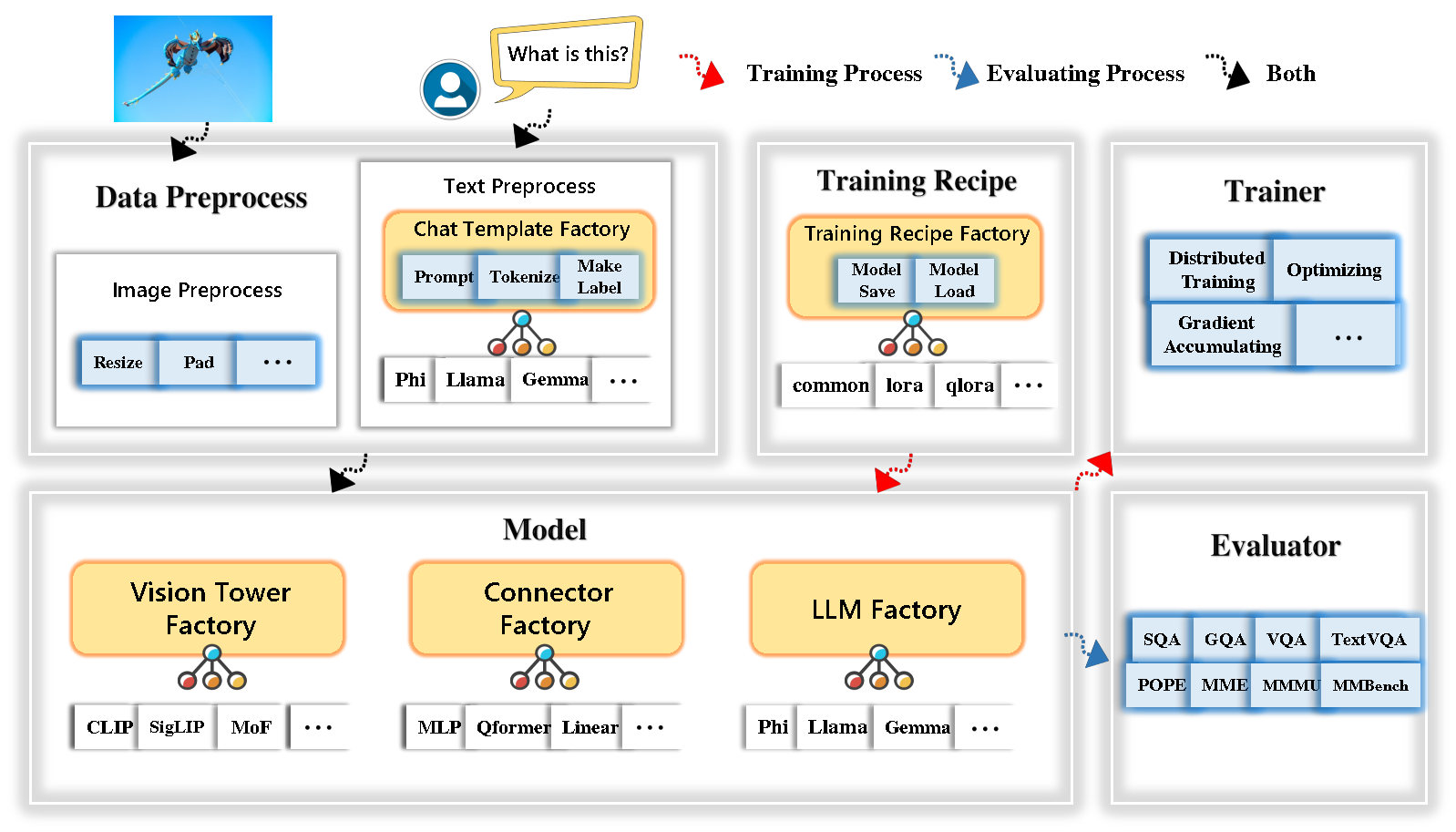
Tinyllava Factory adalah basis kode modular open-source untuk model multimodal skala kecil (LMM), diimplementasikan dalam pytorch dan huggingface, dengan fokus pada kesederhanaan implementasi kode, ekstensibilitas fitur baru, dan reproduktifitas hasil pelatihan.
Dengan Tinyllava Factory, Anda dapat menyesuaikan model multimodal besar Anda sendiri dengan upaya pengkodean yang lebih sedikit dan kesalahan pengkodean yang lebih sedikit.
Tinyllava Factory mengintegrasikan serangkaian model dan metode mutakhir.
LLM saat ini mendukung OpenElm , Tinyllama , Stablelm , Qwen , Gemma , dan Phi .
Vision Tower saat ini mendukung Clip, Siglip , Dino , dan Kombinasi Clip dan Dino .
Connector saat ini mendukung MLP , Qformer , dan Resampler .
Resep pelatihan saat ini mendukung penyetelan beku/sepenuhnya/sebagian dan tuning Lora/Qlora .
Harap dicatat bahwa persyaratan lingkungan kami berbeda dari persyaratan lingkungan LLAVA. Kami sangat menyarankan Anda menciptakan lingkungan dari awal sebagai berikut.
git clone https://github.com/TinyLLaVA/TinyLLaVA_Factory.git
cd TinyLLaVA_Factoryconda create -n tinyllava_factory python=3.10 -y
conda activate tinyllava_factory
pip install --upgrade pip # enable PEP 660 support
pip install -e .pip install flash-attn --no-build-isolationgit pull
pip install -e . Silakan merujuk ke bagian persiapan data di dokumen kami.
Berikut adalah contoh untuk melatih LMM menggunakan phi-2.
scripts/train/train_phi.shoutput_dir dengan Anda di scripts/train/pretrain.shpretrained_model_path dan output_dir dengan Anda di scripts/train/finetune.shper_device_train_batch_size dalam scripts/train/pretrain.sh dan scripts/train/finetune.sh bash scripts/train/train_phi.shHyperparameter penting yang digunakan dalam pretraining dan finetuning disediakan di bawah ini.
| Tahap pelatihan | Ukuran batch global | Tingkat pembelajaran | Conversion |
|---|---|---|---|
| Pretraining | 256 | 1E-3 | pretrain |
| Finetuning | 128 | 2e-5 | phi |
Tips:
Ukuran Batch Global = BUM GPU * per_device_train_batch_size * gradient_accumulation_steps , kami merekomendasikan Anda selalu menjaga ukuran batch global dan tingkat pembelajaran seperti di atas kecuali untuk Lora Tuning Model Anda.
conv_version adalah hiperparameter yang digunakan untuk memilih berbagai templat obrolan untuk LLM yang berbeda. Pada tahap pretraining, conv_version adalah sama untuk semua LLM, menggunakan pretrain . Pada tahap finetuning, kami menggunakan
phi untuk phi-2, stablelm, qwen-1.5
llama untuk Tinyllama, Openelm
gemma untuk Gemma
Silakan merujuk ke bagian evaluasi di dokumen kami.
yang dilatih menggunakan pabrik Tinyllava.
| VT (HF Path) | LLM (jalur HF) | Resep | VQA-V2 | GQA | SQA-Image | Textvqa | Mm-vet | PAUS | Nyonya | MMMU-VAL |
|---|---|---|---|---|---|---|---|---|---|---|
| OpenAI/Clip-Vit-Large-Patch14-336 | Apple/OpenElm-450m-instruct | basis | 69.5 | 52.1 | 50.6 | 40.4 | 20.0 | 83.6 | 1052.9 | 23.9 |
| Google/Siglip-SO400M-Patch14-384 | Apple/OpenElm-450m-instruct | basis | 71.7 | 53.9 | 54.1 | 44.0 | 20.0 | 85.4 | 1118.8 | 24.0 |
| Google/Siglip-SO400M-Patch14-384 | QWEN/QWEN2-0.5B | basis | 72.3 | 55.8 | 60.1 | 45.2 | 19.5 | 86.6 | 1153.0 | 29.7 |
| Google/Siglip-SO400M-Patch14-384 | QWEN/QWEN2.5-0.5B | basis | 75.3 | 59.5 | 60.3 | 48.3 | 23.9 | 86.1 | 1253.0 | 33.3 |
| Google/Siglip-SO400M-Patch14-384 | QWEN/QWEN2.5-3B | basis | 79.4 | 62.5 | 74.1 | 58.3 | 34.8 | 87.4 | 1438.7 | 39.9 |
| OpenAI/Clip-Vit-Large-Patch14-336 | Tinyllama/Tinyllama-1.1b-CHAT-V1.0 | basis | 73.7 | 58.0 | 59.9 | 46.3 | 23.2 | 85.5 | 1284.6 | 27.9 |
| Google/Siglip-SO400M-Patch14-384 | Tinyllama/Tinyllama-1.1b-CHAT-V1.0 | basis | 75.5 | 58.6 | 64.0 | 49.6 | 23.5 | 86.3 | 1256.5 | 28.3 |
| OpenAI/Clip-Vit-Large-Patch14-336 | stabilityai/stablelm-2-zephyr-1_6b | basis | 75.9 | 59.5 | 64.6 | 50.5 | 27.3 | 86.1 | 1368.1 | 31.8 |
| Google/Siglip-SO400M-Patch14-384 | stabilityai/stablelm-2-zephyr-1_6b | basis | 78.2 | 60.7 | 66.7 | 56.0 | 29.4 | 86.3 | 1319.3 | 32.6 |
| Google/Siglip-SO400M-Patch14-384 | Google/GEMMA-2B-IT | basis | 78.4 | 61.6 | 64.4 | 53.6 | 26.9 | 86.4 | 1339.0 | 31.7 |
| OpenAI/Clip-Vit-Large-Patch14-336 | Microsoft/Phi-2 | basis | 76.8 | 59.4 | 71.2 | 53.4 | 31.7 | 86.8 | 1448.6 | 36.3 |
| Google/Siglip-SO400M-Patch14-384 | Microsoft/Phi-2 | basis | 79.2 | 61.6 | 71.9 | 57.4 | 35.0 | 87.2 | 1462.4 | 38.2 |
| Google/Siglip-SO400M-Patch14-384 | Microsoft/Phi-2 | Base & Lora | 77.6 | 59.7 | 71.6 | 53.8 | 33.3 | 87.9 | 1413.2 | 35.6 |
| Google/Siglip-SO400M-Patch14-384 | Microsoft/Phi-2 | membagikan | 80.1 | 62.1 | 73.0 | 60.3 | 37.5 | 87.2 | 1466.4 | 38.4 |
yang dilatih menggunakan basis kode lama Tinyllavabench.
Jika Anda memiliki model yang dilatih oleh basis kode lama kami Tinyllavabench dan Anda masih ingin menggunakannya, kami memberikan contoh Tinyllava-3.1b untuk cara menggunakan model Legacy.
 from tinyllava . eval . run_tiny_llava import eval_model
from tinyllava . model . convert_legecy_weights_to_tinyllavafactory import *

model = convert_legecy_weights_to_tinyllavafactory ( 'bczhou/TinyLLaVA-3.1B' )

prompt = "What are the things I should be cautious about when I visit here?"
image_file = "https://llava-vl.github.io/static/images/view.jpg"

args = type ( 'Args' , (), {
    "model_path" : None ,
    "model" : model ,
    "query" : prompt ,
    "conv_mode" : "phi" , # the same as conv_version in the training stage. Different LLMs have different conv_mode/conv_version, please replace it
    "image_file" : image_file ,
    "sep" : "," ,
    "temperature" : 0 ,
    "top_p" : None ,
    "num_beams" : 1 ,
    "max_new_tokens" : 512
})()

eval_model ( args )

"""
Output:
When visiting this serene lakeside location with a wooden dock, there are a few things to be cautious about. First, ensure that the dock is stable and secure before stepping onto it, as it might be slippery or wet, especially if it's a wooden structure. Second, be mindful of the surrounding water, as it can be deep or have hidden obstacles, such as rocks or debris, that could pose a risk. Additionally, be aware of the weather conditions, as sudden changes in weather can make the area more dangerous. Lastly, respect the natural environment and wildlife, and avoid littering or disturbing the ecosystem.
"""
Luncurkan demo web lokal dengan menjalankan:
python tinyllava/serve/app.py --model-path tinyllava/TinyLLaVA-Phi-2-SigLIP-3.1BKami juga mendukung menjalankan inferensi dengan CLI. Untuk menggunakan model kami, jalankan:
python -m tinyllava.serve.cli
   --model-path tinyllava/TinyLLaVA-Phi-2-SigLIP-3.1B
--image-file " ./tinyllava/serve/examples/extreme_ironing.jpg " Jika Anda ingin meluncurkan model yang dilatih sendiri atau kami secara lokal, inilah contohnya.
 from tinyllava . eval . run_tiny_llava import eval_model

model_path = "/absolute/path/to/your/model/"
prompt = "What are the things I should be cautious about when I visit here?"
image_file = "https://llava-vl.github.io/static/images/view.jpg"
conv_mode = "phi" # or llama, gemma, etc

args = type ( 'Args' , (), {
    "model_path" : model_path ,
    "model" : None ,
    "query" : prompt ,
    "conv_mode" : conv_mode ,
    "image_file" : image_file ,
    "sep" : "," ,
    "temperature" : 0 ,
    "top_p" : None ,
    "num_beams" : 1 ,
    "max_new_tokens" : 512
})()

eval_model ( args )

"""
Output:
XXXXXXXXXXXXXXXXX
""" from transformers import AutoTokenizer , AutoModelForCausalLM
hf_path = 'tinyllava/TinyLLaVA-Phi-2-SigLIP-3.1B'
model = AutoModelForCausalLM . from_pretrained ( hf_path , trust_remote_code = True )
model . cuda ()
config = model . config
tokenizer = AutoTokenizer . from_pretrained ( hf_path , use_fast = False , model_max_length = config . tokenizer_model_max_length , padding_side = config . tokenizer_padding_side )
prompt = "What are these?"
image_url = "http://images.cocodataset.org/val2017/000000039769.jpg"
output_text , genertaion_time = model . chat ( prompt = prompt , image = image_url , tokenizer = tokenizer )
print ( 'model output:' , output_text )
print ( 'runing time:' , genertaion_time )Jika Anda ingin finetune tinyllava dengan kumpulan data khusus Anda, silakan merujuk di sini.
Jika Anda ingin menambahkan LLM baru sendiri, Anda perlu membuat dua file: satu untuk templat obrolan dan yang lainnya untuk model bahasa, di bawah folder tinyllava/data/template/ dan tinyllava/model/llm/ .
Berikut adalah contoh menambahkan model Gemma.
Pertama, buat tinyllava/data/template/gemma_template.py , yang akan digunakan untuk tahap finetuning.
 from dataclasses import dataclass
from typing import TYPE_CHECKING , Dict , List , Optional , Sequence , Tuple , Union
from packaging import version

from . formatter import EmptyFormatter , StringFormatter
from . base import Template
from . formatter import Formatter
from . import register_template
from ... utils . constants import *

from transformers import PreTrainedTokenizer
import torch
import tokenizers


system = "A chat between a curious user and an artificial intelligence assistant. The assistant gives helpful, detailed, and polite answers to the user's questions."

@ register_template ( 'gemma' ) # Enable the TemplateFactory to obtain the added template by this string ('gemma').
@ dataclass
class GemmaTemplate ( Template ):
    format_image_token : "Formatter" = StringFormatter ( slot = "<image> n {{content}}" )
    format_user : "Formatter" = StringFormatter ( slot = "USER" + ": " + "{{content}}" + " " )
    format_assistant : "Formatter" = StringFormatter ( slot = "ASSISTANT" + ": " + "{{content}}" + "<eos>" ) # to be modified according to the tokenizer you choose
    system : "Formatter" = EmptyFormatter ( slot = system + " " )
    separator : "Formatter" = EmptyFormatter ( slot = [ ' ASSISTANT: ' , '<eos>' ]) # to be modified according to the tokenizer you choose

    def _make_masks ( self , labels , tokenizer , sep , eos_token_length , rounds ):
        # your code here
        return labels , cur_len
Tips:
Harap pastikan bahwa labels (dikembalikan oleh fungsi _make_masks ) mengikuti format ini: Jawaban dan ID token EOS tidak bertopeng, dan token lainnya bertopeng dengan -100 .
Kedua, buat tinyllava/model/llm/gemma.py .
 from transformers import GemmaForCausalLM , AutoTokenizer
# The LLM you want to add along with its corresponding tokenizer.

from . import register_llm

# Add GemmaForCausalLM along with its corresponding tokenizer and handle special tokens.
@ register_llm ( 'gemma' ) # Enable the LLMFactory to obtain the added LLM by this string ('gemma').
def return_gemmaclass ():
    def tokenizer_and_post_load ( tokenizer ):
        tokenizer . pad_token = tokenizer . unk_token
        return tokenizer
    return ( GemmaForCausalLM , ( AutoTokenizer , tokenizer_and_post_load ))
Akhirnya, buat scripts/train/train_gemma.sh dengan LLM_VERSION dan CONV_VERSION yang sesuai.
Jika Anda ingin menambahkan menara visi baru, Anda perlu mengimplementasikan kelas menara visi baru yang harus diwarisi dari kelas dasar VisionTower . Berikut adalah contoh Menara Visi MOF.
Pertama, buat tinyllava/model/vision_tower/mof.py
 @ register_vision_tower ( 'mof' )
class MoFVisionTower ( VisionTower ):
    def __init__ ( self , cfg ):
        super (). __init__ ( cfg )

        self . _vision_tower = MoF ( cfg )
        self . _image_processor = # your image processor

    def _load_model ( self , vision_tower_name , ** kwargs ):
        # your code here, make sure your model can be correctly loaded from pretrained parameters either by huggingface or pytorch loading

    def forward ( self , x , ** kwargs ):
        # your code here
Kemudian, ubah skrip pelatihan Anda dengan VT_VERSION yang sesuai.
Jika Anda ingin menambahkan konektor baru, Anda perlu mengimplementasikan kelas konektor baru yang harus diwarisi dari Connector kelas dasar. Berikut adalah contoh konektor linier.
Pertama, buat tinyllava/model/connector/linear.py
 import torch . nn as nn

from . import register_connector
from . base import Connector

@ register_connector ( 'linear' ) #Enable the ConnectorMFactory to obtain the added connector by this string ('linear').
class LinearConnector ( Connector ):
    def __init__ ( self , config ):
        super (). __init__ ()
        self . _connector =  nn . Linear ( config . vision_hidden_size , config . hidden_size ) # define your connector model
Kemudian, ubah skrip pelatihan Anda dengan CN_VERSION yang sesuai.
Kami mengucapkan terima kasih khusus kepada Lei Zhao, Luche Wang, Kaijun Luo, dan Junchen Wang yang telah membangun demo.
Jika Anda memiliki pertanyaan, jangan ragu untuk memulai masalah atau hubungi kami oleh WeChat (WeChatid: Tinyllava ).
Jika Anda menemukan makalah dan kode kami yang berguna dalam penelitian Anda, silakan pertimbangkan untuk memberikan bintang dan kutipan.
 @misc { zhou2024tinyllava ,
      title = { TinyLLaVA: A Framework of Small-scale Large Multimodal Models } ,
      author = { Baichuan Zhou and Ying Hu and Xi Weng and Junlong Jia and Jie Luo and Xien Liu and Ji Wu and Lei Huang } ,
      year = { 2024 } ,
      eprint = { 2402.14289 } ,
      archivePrefix = { arXiv } ,
      primaryClass = { cs.LG }
}
@article { jia2024tinyllava ,
title = { TinyLLaVA Factory: A Modularized Codebase for Small-scale Large Multimodal Models } ,
author = { Jia, Junlong and Hu, Ying and Weng, Xi and Shi, Yiming and Li, Miao and Zhang, Xingjian and Zhou, Baichuan and Liu, Ziyu and Luo, Jie and Huang, Lei and Wu, Ji } ,
journal = { arXiv preprint arXiv:2405.11788 } ,
year = { 2024 }
}




