ms swift
v3.0.0


ModelScope 커뮤니티 웹 사이트
中文 中文 영어
종이 | 영어 문서 | 中文文档
Swift2.x en doc x swift2.x 中文文档
우리 그룹을 추가하여 저희에게 연락하고 우리와 의사 소통 할 수 있습니다.
| 불화 그룹 | WeChat 그룹 |
|---|---|
 |  |
? MS-Swift는 대형 언어 모델과 멀티 모달 대형 모델을 미세 조정하고 배포하기 위해 ModelScope 커뮤니티가 제공하는 공식 프레임 워크입니다. 현재 400 개 이상의 대형 모델 및 150 개 이상의 멀티 모달 대형 모델의 훈련 (사전 훈련, 미세 조정, 인간 정렬), 추론, 평가, 양자화 및 배치를 지원합니다. 이러한 대형 언어 모델 (LLM)에는 QWEN2.5, LLAMA3.3, GLM4, InternLM2.5, YI1.5, Mistral, Deepseek2.5, Baichuan2, Gemma2 및 Telechat2와 같은 모델이 포함됩니다. 다중 모달 LLM에는 QWEN2-VL, QWEN2-AUDIO, LLAMA3.2-VISION, LLAVA, InternVL2.5, MINICPM-V-2.6, GLM4V, Xcomposer2.5, Yi-VL, Deepseek-VL2, Phi3.5-Vision 및 GOT-ARC2와 같은 모델이 포함됩니다.
? 또한 MS-Swift는 Lora, Qlora, Llama-Pro, Longlora, Galore, Q-Galore, Lora+, Lisa, Dora, Fourierft, Reft, Unsloth 및 Liger를 포함한 최신 교육 기술을 수집합니다. MS-Swift는 VLLM 및 LMDEPLOY를 사용하여 추론, 평가 및 배포 모듈의 가속도를 지원하며 GPTQ, AWQ 및 BNB와 같은 기술을 사용하여 대형 모델 및 다중 모달 대형 모델의 양자화를 지원합니다. 연구원과 개발자가 대형 모델을보다 쉽게 조정하고 적용 할 수 있도록 MS-SWIFT는 그라데이오 기반 웹 UI 인터페이스와 풍부한 모범 사례를 제공합니다.
MS-Swift를 선택하는 이유는 무엇입니까?
--infer_backend vllm/lmdeploy 지정할 수 있습니다.PIP를 사용하여 설치하려면 :
pip install ms-swift -U소스에서 설치하려면 :
 # pip install git+https://github.com/modelscope/ms-swift.git

git clone https://github.com/modelscope/ms-swift.git
cd ms-swift
pip install -e . 단일 3090 GPU에서 QWEN2.5-7B-비교의 10 분의 자기 인식 미세 조정 :
 # 22GB
CUDA_VISIBLE_DEVICES=0
swift sft
    --model Qwen/Qwen2.5-7B-Instruct
    --train_type lora
    --dataset ' AI-ModelScope/alpaca-gpt4-data-zh#500 '
              ' AI-ModelScope/alpaca-gpt4-data-en#500 '
              ' swift/self-cognition#500 '
    --torch_dtype bfloat16
    --num_train_epochs 1
    --per_device_train_batch_size 1
    --per_device_eval_batch_size 1
    --learning_rate 1e-4
    --lora_rank 8
    --lora_alpha 32
    --target_modules all-linear
    --gradient_accumulation_steps 16
    --eval_steps 50
    --save_steps 50
    --save_total_limit 2
    --logging_steps 5
    --max_length 2048
    --output_dir output
    --system ' You are a helpful assistant. '
    --warmup_ratio 0.05
    --dataloader_num_workers 4
    --model_author swift
    --model_name swift-robot
훈련이 완료된 후 다음 명령을 사용하여 훈련 된 무게에 대한 추론을 수행하십시오. --adapters 옵션은 교육에서 생성 된 마지막 체크 포인트 폴더로 대체해야합니다. 어댑터 폴더에는 훈련의 매개 변수 파일이 포함되어 있으므로 --model 또는 --system 별도로 지정할 필요가 없습니다.
 # Using an interactive command line for inference.
CUDA_VISIBLE_DEVICES=0
swift infer
    --adapters output/vx-xxx/checkpoint-xxx
    --stream true
    --temperature 0
    --max_new_tokens 2048

# merge-lora and use vLLM for inference acceleration
CUDA_VISIBLE_DEVICES=0
swift infer
    --adapters output/vx-xxx/checkpoint-xxx
    --stream true
    --merge_lora true
    --infer_backend vllm
    --max_model_len 8192
    --temperature 0
--max_new_tokens 2048Web-UI는 Gradio 인터페이스 기술을 기반으로 한 제로 임계 값 교육 및 배포 인터페이스 솔루션입니다. 자세한 내용은 여기를 확인하십시오.
SWIFT_UI_LANG=en swift web-ui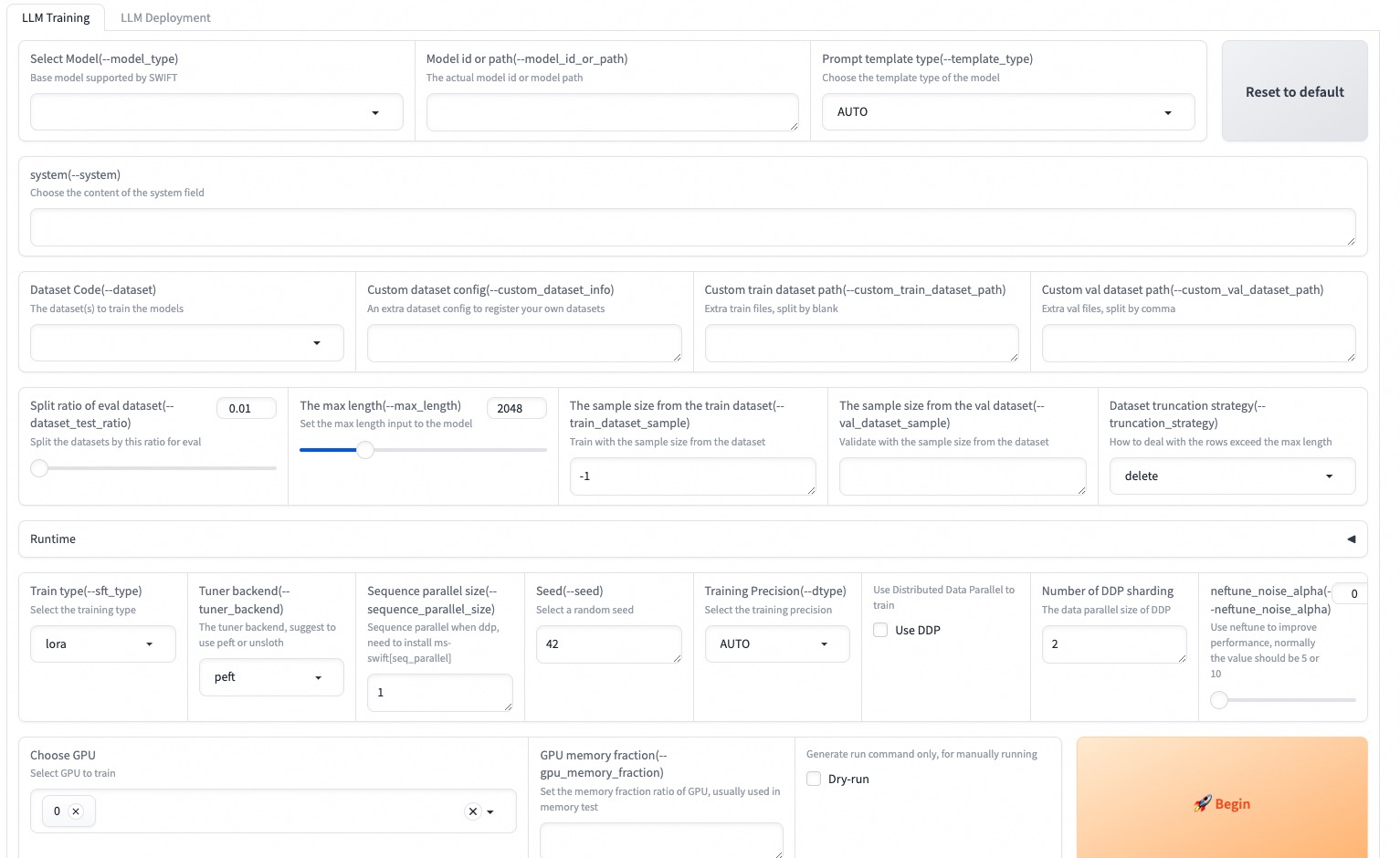
MS-Swift는 또한 Python을 사용한 교육 및 추론을 지원합니다. 아래는 훈련 및 추론을위한 의사 코드입니다. 자세한 내용은 여기를 참조하십시오.
훈련:
 # Retrieve the model and template, and add a trainable LoRA module
model , tokenizer = get_model_tokenizer ( model_id_or_path , ...)
template = get_template ( model . model_meta . template , tokenizer , ...)
model = Swift . prepare_model ( model , lora_config )

# Download and load the dataset, and encode the text into tokens
train_dataset , val_dataset = load_dataset ( dataset_id_or_path , ...)
train_dataset = EncodePreprocessor ( template = template )( train_dataset , num_proc = num_proc )
val_dataset = EncodePreprocessor ( template = template )( val_dataset , num_proc = num_proc )

# Train the model
trainer = Seq2SeqTrainer (
    model = model ,
    args = training_args ,
    data_collator = template . data_collator ,
    train_dataset = train_dataset ,
    eval_dataset = val_dataset ,
    template = template ,
)
trainer . train ()
추론:
 # Perform inference using the native PyTorch engine
engine = PtEngine ( model_id_or_path , adapters = [ lora_checkpoint ])
infer_request = InferRequest ( messages = [{ 'role' : 'user' , 'content' : 'who are you?' }])
request_config = RequestConfig ( max_tokens = max_new_tokens , temperature = temperature )

resp_list = engine . infer ([ infer_request ], request_config )
print ( f'response: { resp_list [ 0 ]. choices [ 0 ]. message . content } ' )다음은 MS-Swift를 사용하여 배포에 대한 교육의 가장 간단한 예입니다. 자세한 내용은 예제를 확인할 수 있습니다.
| 유용한 링크 |
|---|
| 명령 줄 매개 변수 |
| 지원되는 모델 및 데이터 세트 |
| 사용자 정의 모델, 사용자 정의 데이터 세트 |
| LLM 튜토리얼 |
사전 훈련 :
 # 8*A100
NPROC_PER_NODE=8
CUDA_VISIBLE_DEVICES=0,1,2,3,4,5,6,7
swift pt
    --model Qwen/Qwen2.5-7B
    --dataset swift/chinese-c4
    --streaming true
    --train_type full
    --deepspeed zero2
    --output_dir output
    --max_steps 100000
    ...
미세 조정 :
CUDA_VISIBLE_DEVICES=0 swift sft
    --model Qwen/Qwen2.5-7B-Instruct
    --dataset AI-ModelScope/alpaca-gpt4-data-en
    --train_type lora
    --output_dir output
    ...
RLHF :
CUDA_VISIBLE_DEVICES=0 swift rlhf
    --rlhf_type dpo
    --model Qwen/Qwen2.5-7B-Instruct
    --dataset hjh0119/shareAI-Llama3-DPO-zh-en-emoji:en
    --train_type lora
    --output_dir output
...CUDA_VISIBLE_DEVICES=0 swift infer
--model Qwen/Qwen2.5-7B-Instruct
--stream true
--infer_backend pt
--max_new_tokens 2048
# LoRA
CUDA_VISIBLE_DEVICES=0 swift infer
--model Qwen/Qwen2.5-7B-Instruct
--adapters swift/test_lora
--stream true
--infer_backend pt
--temperature 0
--max_new_tokens 2048CUDA_VISIBLE_DEVICES=0 swift deploy
--model Qwen/Qwen2.5-7B-Instruct
--infer_backend vllmCUDA_VISIBLE_DEVICES=0 swift eval
--model Qwen/Qwen2.5-7B-Instruct
--infer_backend lmdeploy
--eval_dataset ARC_cCUDA_VISIBLE_DEVICES=0 swift export
--model Qwen/Qwen2.5-7B-Instruct
--quant_bits 4 --quant_method awq
--dataset AI-ModelScope/alpaca-gpt4-data-zh
--output_dir Qwen2.5-7B-Instruct-AWQ이 프레임 워크는 Apache 라이센스 (버전 2.0)에 따라 라이센스가 부여됩니다. 모델 및 데이터 세트의 경우 원래 리소스 페이지를 참조하고 해당 라이센스를 따르십시오.
 @misc { zhao2024swiftascalablelightweightinfrastructure ,
      title = { SWIFT:A Scalable lightWeight Infrastructure for Fine-Tuning } ,
      author = { Yuze Zhao and Jintao Huang and Jinghan Hu and Xingjun Wang and Yunlin Mao and Daoze Zhang and Zeyinzi Jiang and Zhikai Wu and Baole Ai and Ang Wang and Wenmeng Zhou and Yingda Chen } ,
      year = { 2024 } ,
      eprint = { 2408.05517 } ,
      archivePrefix = { arXiv } ,
      primaryClass = { cs.CL } ,
      url = { https://arxiv.org/abs/2408.05517 } ,
}






