ms swift
v3.0.0


Modelscopeコミュニティのウェブサイト
中文英語
論文|英語のドキュメンテーション|
swift2.x en doc | swift2.x中文文档
あなたは私たちに連絡し、私たちのグループを追加することで私たちとコミュニケーションをとることができます:
| 不一致グループ | WeChat Group |
|---|---|
 |  |
? MS-Swiftは、大規模な言語モデルとマルチモーダルの大規模モデルを微調整および展開するために、ModelScopeコミュニティが提供する公式フレームワークです。現在、トレーニング(トレーニング前、微調整、人間のアラインメント)、推論、評価、量子化、および400以上の大型モデルと150+のマルチモーダル大規模モデルの展開をサポートしています。これらの大規模な言語モデル(LLMS)には、QWEN2.5、LLAMA3.3、GLM4、INTERNLM2.5、YI1.5、MISTRAL、DEEPSEEK2.5、BAICHUAN2、GEMMA2、TELECHAT2などのモデルが含まれます。マルチモーダルLLMSには、QWEN2-VL、QWEN2-AUDIO、LLAMA3.2-VISION、LLAVA、INTERNVL2.5、MINICPM-V-2.6、GLM4V、XCOCRPOSER2.5、YI-VL、DeepSeek-VL2、Phi3.5-vision、およびGot-coR2などのモデルが含まれます。
?さらに、MS-Swiftは、Lora、Qlora、Llama-Pro、Longlora、Galore、Q-Galore、Lora+、Lisa、Dora、Fheierft、Reft、Unsloth、Ligerなどの最新のトレーニングテクノロジーを集めています。 MS-Swiftは、VLLMとLMDEPLOYを使用した推論、評価、および展開モジュールの加速をサポートし、GPTQ、AWQ、BNBなどのテクノロジーを使用して、大規模モデルとマルチモーダル大規模モデルの量子化をサポートします。研究者と開発者が大規模なモデルをより簡単に微調整して適用できるようにするために、MS-SwiftはグラデーションベースのWeb-UIインターフェイスと豊富なベストプラクティスも提供します。
なぜMS-Swiftを選ぶのですか?
--infer_backend vllm/lmdeploy指定できます。PIPを使用してインストールするには:
pip install ms-swift -Uソースからインストールするには:
 # pip install git+https://github.com/modelscope/ms-swift.git

git clone https://github.com/modelscope/ms-swift.git
cd ms-swift
pip install -e . 単一の3090 GPUでのQWEN2.5-7B-Instructの10分間の自己認知微調整:
 # 22GB
CUDA_VISIBLE_DEVICES=0
swift sft
    --model Qwen/Qwen2.5-7B-Instruct
    --train_type lora
    --dataset ' AI-ModelScope/alpaca-gpt4-data-zh#500 '
              ' AI-ModelScope/alpaca-gpt4-data-en#500 '
              ' swift/self-cognition#500 '
    --torch_dtype bfloat16
    --num_train_epochs 1
    --per_device_train_batch_size 1
    --per_device_eval_batch_size 1
    --learning_rate 1e-4
    --lora_rank 8
    --lora_alpha 32
    --target_modules all-linear
    --gradient_accumulation_steps 16
    --eval_steps 50
    --save_steps 50
    --save_total_limit 2
    --logging_steps 5
    --max_length 2048
    --output_dir output
    --system ' You are a helpful assistant. '
    --warmup_ratio 0.05
    --dataloader_num_workers 4
    --model_author swift
    --model_name swift-robot
トレーニングが完了したら、次のコマンドを使用して、訓練された重量で推論を実行します。 --adaptersオプションは、トレーニングから生成された最後のチェックポイントフォルダーに置き換える必要があります。 Adaptersフォルダーにはトレーニングのパラメーターファイルが含まれているため、 --modelまたは--systemを個別に指定する必要はありません。
 # Using an interactive command line for inference.
CUDA_VISIBLE_DEVICES=0
swift infer
    --adapters output/vx-xxx/checkpoint-xxx
    --stream true
    --temperature 0
    --max_new_tokens 2048

# merge-lora and use vLLM for inference acceleration
CUDA_VISIBLE_DEVICES=0
swift infer
    --adapters output/vx-xxx/checkpoint-xxx
    --stream true
    --merge_lora true
    --infer_backend vllm
    --max_model_len 8192
    --temperature 0
--max_new_tokens 2048Web-UIは、Gradio Interfaceテクノロジーに基づいたゼロ授業トレーニングおよび展開インターフェイスソリューションです。詳細については、こちらを確認できます。
SWIFT_UI_LANG=en swift web-ui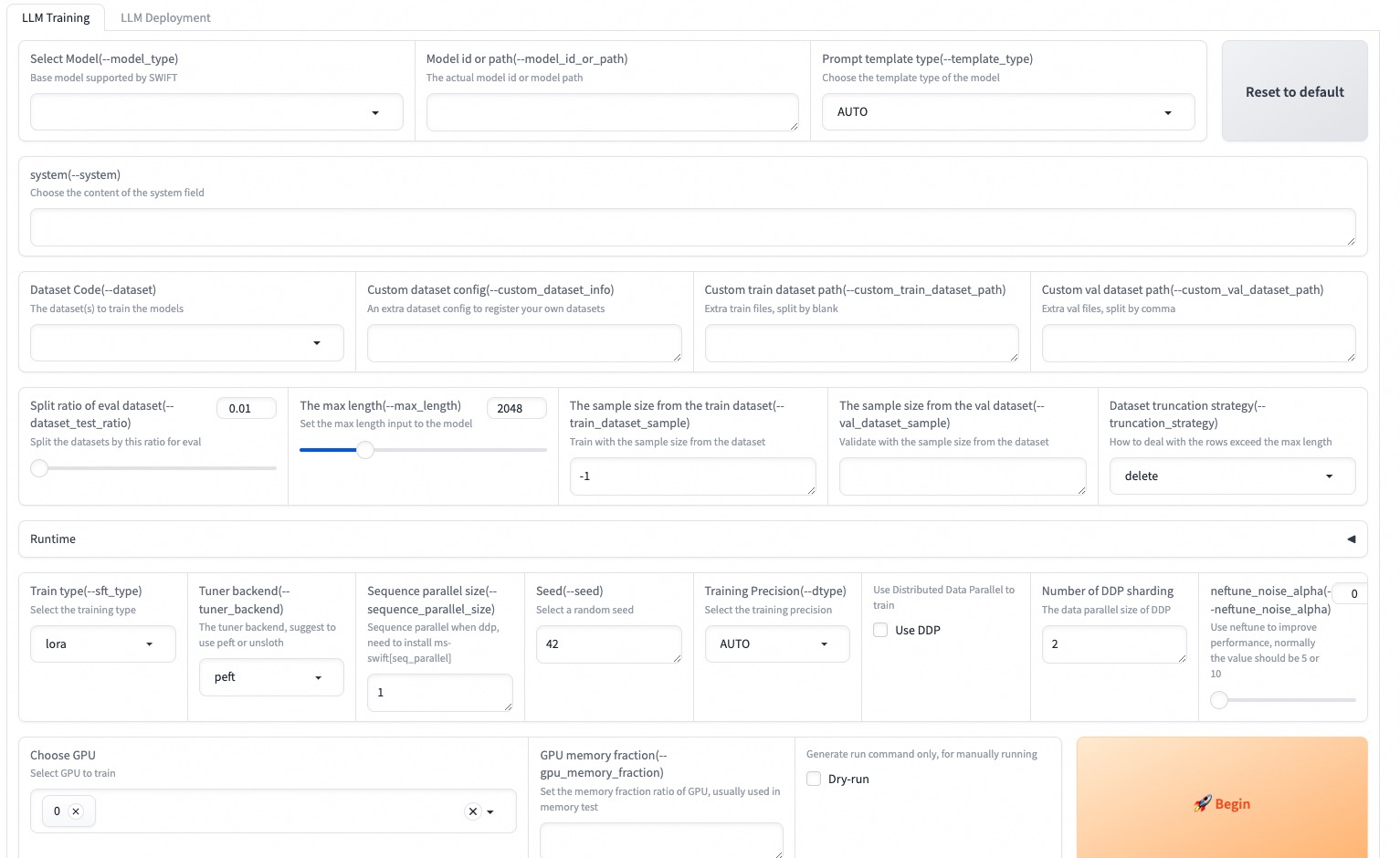
MS-Swiftは、Pythonを使用したトレーニングと推論もサポートしています。以下は、トレーニングと推論のための擬似コードです。詳細については、こちらを参照してください。
トレーニング:
 # Retrieve the model and template, and add a trainable LoRA module
model , tokenizer = get_model_tokenizer ( model_id_or_path , ...)
template = get_template ( model . model_meta . template , tokenizer , ...)
model = Swift . prepare_model ( model , lora_config )

# Download and load the dataset, and encode the text into tokens
train_dataset , val_dataset = load_dataset ( dataset_id_or_path , ...)
train_dataset = EncodePreprocessor ( template = template )( train_dataset , num_proc = num_proc )
val_dataset = EncodePreprocessor ( template = template )( val_dataset , num_proc = num_proc )

# Train the model
trainer = Seq2SeqTrainer (
    model = model ,
    args = training_args ,
    data_collator = template . data_collator ,
    train_dataset = train_dataset ,
    eval_dataset = val_dataset ,
    template = template ,
)
trainer . train ()
推論:
 # Perform inference using the native PyTorch engine
engine = PtEngine ( model_id_or_path , adapters = [ lora_checkpoint ])
infer_request = InferRequest ( messages = [{ 'role' : 'user' , 'content' : 'who are you?' }])
request_config = RequestConfig ( max_tokens = max_new_tokens , temperature = temperature )

resp_list = engine . infer ([ infer_request ], request_config )
print ( f'response: { resp_list [ 0 ]. choices [ 0 ]. message . content } ' )MS-Swiftを使用して展開するためのトレーニングの最も簡単な例を次に示します。詳細については、例を確認できます。
| 便利なリンク |
|---|
| コマンドラインパラメーター |
| サポートされているモデルとデータセット |
| カスタムモデル、カスタムデータセット |
| LLMチュートリアル |
トレーニング前:
 # 8*A100
NPROC_PER_NODE=8
CUDA_VISIBLE_DEVICES=0,1,2,3,4,5,6,7
swift pt
    --model Qwen/Qwen2.5-7B
    --dataset swift/chinese-c4
    --streaming true
    --train_type full
    --deepspeed zero2
    --output_dir output
    --max_steps 100000
    ...
微調整:
CUDA_VISIBLE_DEVICES=0 swift sft
    --model Qwen/Qwen2.5-7B-Instruct
    --dataset AI-ModelScope/alpaca-gpt4-data-en
    --train_type lora
    --output_dir output
    ...
RLHF:
CUDA_VISIBLE_DEVICES=0 swift rlhf
    --rlhf_type dpo
    --model Qwen/Qwen2.5-7B-Instruct
    --dataset hjh0119/shareAI-Llama3-DPO-zh-en-emoji:en
    --train_type lora
    --output_dir output
...CUDA_VISIBLE_DEVICES=0 swift infer
--model Qwen/Qwen2.5-7B-Instruct
--stream true
--infer_backend pt
--max_new_tokens 2048
# LoRA
CUDA_VISIBLE_DEVICES=0 swift infer
--model Qwen/Qwen2.5-7B-Instruct
--adapters swift/test_lora
--stream true
--infer_backend pt
--temperature 0
--max_new_tokens 2048CUDA_VISIBLE_DEVICES=0 swift deploy
--model Qwen/Qwen2.5-7B-Instruct
--infer_backend vllmCUDA_VISIBLE_DEVICES=0 swift eval
--model Qwen/Qwen2.5-7B-Instruct
--infer_backend lmdeploy
--eval_dataset ARC_cCUDA_VISIBLE_DEVICES=0 swift export
--model Qwen/Qwen2.5-7B-Instruct
--quant_bits 4 --quant_method awq
--dataset AI-ModelScope/alpaca-gpt4-data-zh
--output_dir Qwen2.5-7B-Instruct-AWQこのフレームワークは、Apacheライセンス(バージョン2.0)に基づいてライセンスされています。モデルとデータセットについては、元のリソースページを参照して、対応するライセンスに従ってください。
 @misc { zhao2024swiftascalablelightweightinfrastructure ,
      title = { SWIFT:A Scalable lightWeight Infrastructure for Fine-Tuning } ,
      author = { Yuze Zhao and Jintao Huang and Jinghan Hu and Xingjun Wang and Yunlin Mao and Daoze Zhang and Zeyinzi Jiang and Zhikai Wu and Baole Ai and Ang Wang and Wenmeng Zhou and Yingda Chen } ,
      year = { 2024 } ,
      eprint = { 2408.05517 } ,
      archivePrefix = { arXiv } ,
      primaryClass = { cs.CL } ,
      url = { https://arxiv.org/abs/2408.05517 } ,
}






