pytorch widedeep
mps backend support and more rec models


マルチモーダルデープラーニングのための柔軟なパッケージで、Pytorchの広いモデルと深いモデルを使用して、表現データとテキストと画像を組み合わせて
ドキュメント: https://pytorch-wideep.readthedocs.io
コンパニオン投稿とチュートリアル: infinitoml
LightGBMとの実験と比較:Tabulardl vs LightGBM
Slack :貢献したい場合、または私たちとチャットしたい場合は、Slackに参加してください
このドキュメントの内容は、次のように整理されています。
deeptabular成分recモジュールpytorch-widedeep 、マルチモーダルデータセット用に調整されたGoogleの幅広い深いアルゴリズムに基づいています。
一般的に、 pytorch-widedeep表形式データを使用して深い学習を使用するパッケージです。特に、広いモデルと深いモデルを使用して、対応する表形式のデータとテキストと画像の組み合わせを促進することを目的としています。それを念頭に置いて、ライブラリで実装できるアーキテクチャがいくつかあります。これらのアーキテクチャの主なコンポーネントを以下の図に示します。
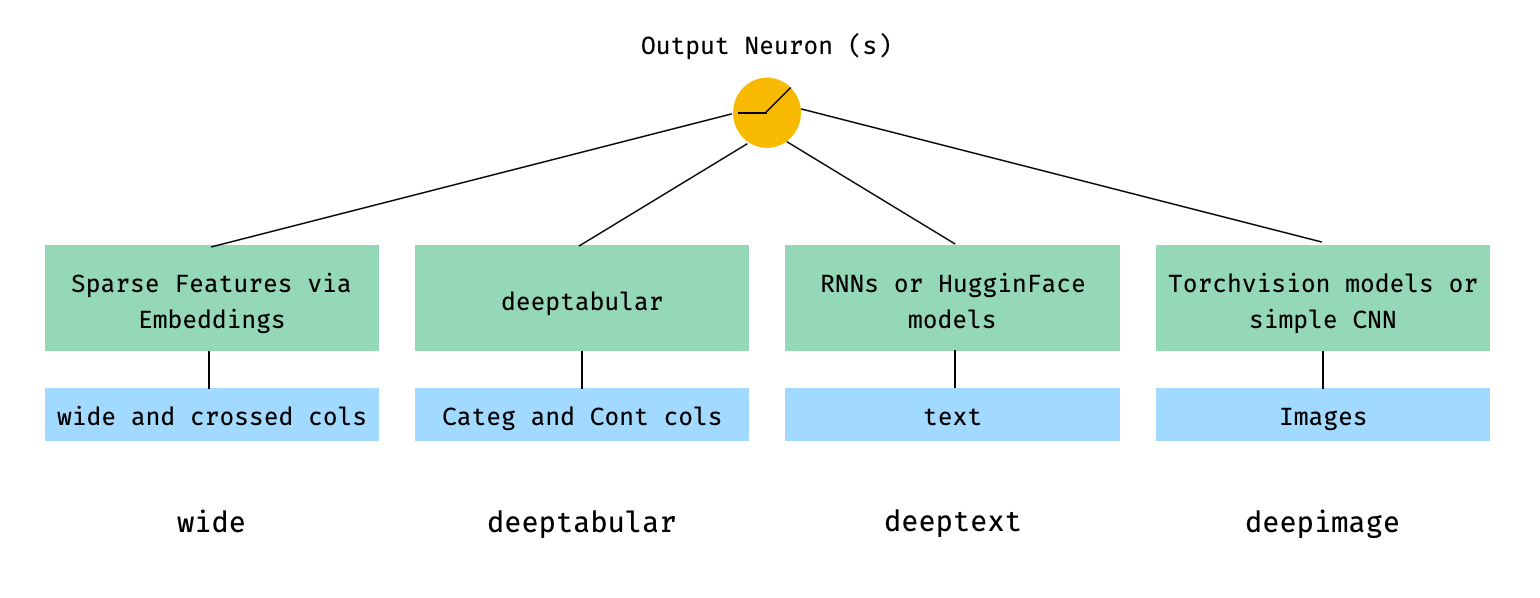
数学の用語では、論文の表記に従って、 deepheadコンポーネントのないアーキテクチャの表現は、次のように策定できます。

ここで、σはシグモイド関数であり、 「w」はワイドモデルとディープモデルの最終的なアクティベーションに適用される重み行列であり、 'A'はこれらの最終的なアクティベーションであり、φ(x)は元の特徴「x」のクロス製品変換であり、 「b」はバイアス用語です。 「クロス製品の変換」とは何かを疑問に思っている場合、 「バイナリ機能の場合、クロス製品((性別=女性、言語= en)など)が1つの場合にのみ、バイナリの特徴については、「gender = female = en」の場合にのみ1つの場合にのみ、「クロス製品の変換」とは引用されています。
カスタムモデルにアクティベーションの最後のレイヤーのサイズのoutput_dimと呼ばれるプロパティを持っている限り、カスタムモデル(必ずしもWideDeepのものではない)を使用することが完全に可能です。カスタムコンポーネントの使用方法に関する例は、例フォルダーと以下のセクションにあります。
pytorch-widedeep Libraryには、さまざまなアーキテクチャがあります。このセクションでは、対応するコードスニペットを使用して、それらのいくつかを最も単純な形式(ほとんどの場合、デフォルトのPARAM値を持つ)に示します。 Shoudの下のすべてのスニペットがローカルで実行されることに注意してください。さまざまなコンポーネントとそのパラメーターのより詳細な説明については、ドキュメントを参照してください。
以下の例では、次のように生成されたおもちゃデータセットを使用します。
 import os
import random

import numpy as np
import pandas as pd
from PIL import Image
from faker import Faker


def create_and_save_random_image ( image_number , size = ( 32 , 32 )):

    if not os . path . exists ( "images" ):
        os . makedirs ( "images" )

    array = np . random . randint ( 0 , 256 , ( size [ 0 ], size [ 1 ], 3 ), dtype = np . uint8 )

    image = Image . fromarray ( array )

    image_name = f"image_ { image_number } .png"
    image . save ( os . path . join ( "images" , image_name ))

    return image_name


fake = Faker ()

cities = [ "New York" , "Los Angeles" , "Chicago" , "Houston" ]
names = [ "Alice" , "Bob" , "Charlie" , "David" , "Eva" ]

data = {
    "city" : [ random . choice ( cities ) for _ in range ( 100 )],
    "name" : [ random . choice ( names ) for _ in range ( 100 )],
    "age" : [ random . uniform ( 18 , 70 ) for _ in range ( 100 )],
    "height" : [ random . uniform ( 150 , 200 ) for _ in range ( 100 )],
    "sentence" : [ fake . sentence () for _ in range ( 100 )],
    "other_sentence" : [ fake . sentence () for _ in range ( 100 )],
    "image_name" : [ create_and_save_random_image ( i ) for i in range ( 100 )],
    "target" : [ random . choice ([ 0 , 1 ]) for _ in range ( 100 )],
}

df = pd . DataFrame ( data )これにより、100のランダム画像(またはノイズだけの画像)を備えたimagesと呼ばれるローカルフォルダーに100行のデータフレームとDIRが作成されます。
おそらくdeeptext最も単純なwideは、それ自体でも可能ですが、標準的なワイドアーキテクチャdeeptabular例deepimage始めましょう。そこから、1つのコンポーネントのみで構成されるモデルを構築する方法は簡単です。
以下に示す例は、ライブラリで利用可能なモデルのいずれかを使用してほぼ同じであることに注意してください。たとえば、 TabMlp TabResnet 、 TabNet 、 TabTransformerなどに置き換えることができます。同様に、 BasicRNN 、Hugging Face Modelsの場合の対応するパラメーターとプリプロセッサーを使用して、 AttentiveRNN 、 StackedAttentiveRNN 、またはHFModelに置き換えることができます。
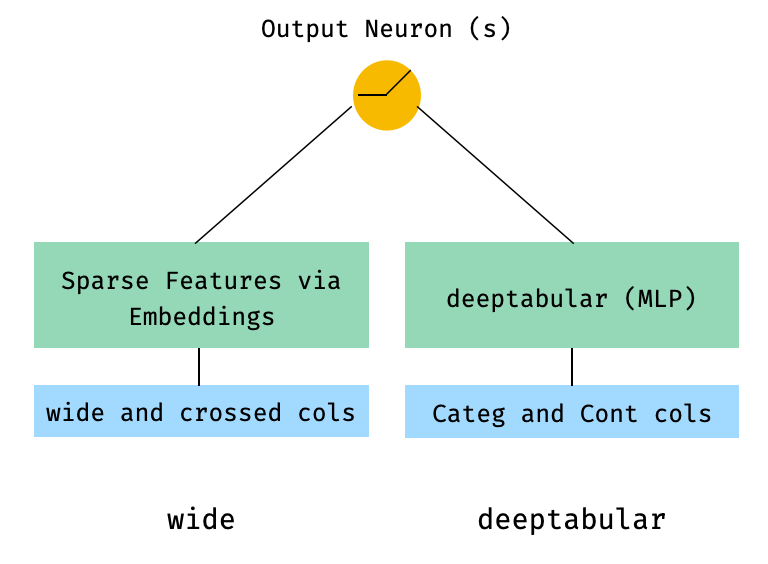
1。幅と表の成分(別名深層)
 from pytorch_widedeep . preprocessing import TabPreprocessor , WidePreprocessor
from pytorch_widedeep . models import Wide , TabMlp , WideDeep
from pytorch_widedeep . training import Trainer

# Wide
wide_cols = [ "city" ]
crossed_cols = [( "city" , "name" )]
wide_preprocessor = WidePreprocessor ( wide_cols = wide_cols , crossed_cols = crossed_cols )
X_wide = wide_preprocessor . fit_transform ( df )
wide = Wide ( input_dim = np . unique ( X_wide ). shape [ 0 ])

# Tabular
tab_preprocessor = TabPreprocessor (
    embed_cols = [ "city" , "name" ], continuous_cols = [ "age" , "height" ]
)
X_tab = tab_preprocessor . fit_transform ( df )
tab_mlp = TabMlp (
    column_idx = tab_preprocessor . column_idx ,
    cat_embed_input = tab_preprocessor . cat_embed_input ,
    continuous_cols = tab_preprocessor . continuous_cols ,
    mlp_hidden_dims = [ 64 , 32 ],
)

# WideDeep
model = WideDeep ( wide = wide , deeptabular = tab_mlp )

# Train
trainer = Trainer ( model , objective = "binary" )

trainer . fit (
    X_wide = X_wide ,
    X_tab = X_tab ,
    target = df [ "target" ]. values ,
    n_epochs = 1 ,
    batch_size = 32 ,
)
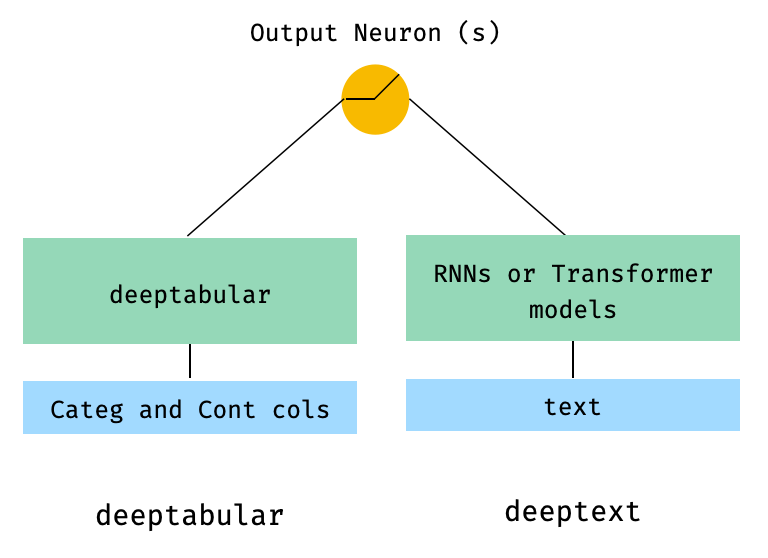
2。表形式およびテキストデータ
 from pytorch_widedeep . preprocessing import TabPreprocessor , TextPreprocessor
from pytorch_widedeep . models import TabMlp , BasicRNN , WideDeep
from pytorch_widedeep . training import Trainer

# Tabular
tab_preprocessor = TabPreprocessor (
    embed_cols = [ "city" , "name" ], continuous_cols = [ "age" , "height" ]
)
X_tab = tab_preprocessor . fit_transform ( df )
tab_mlp = TabMlp (
    column_idx = tab_preprocessor . column_idx ,
    cat_embed_input = tab_preprocessor . cat_embed_input ,
    continuous_cols = tab_preprocessor . continuous_cols ,
    mlp_hidden_dims = [ 64 , 32 ],
)

# Text
text_preprocessor = TextPreprocessor (
    text_col = "sentence" , maxlen = 20 , max_vocab = 100 , n_cpus = 1
)
X_text = text_preprocessor . fit_transform ( df )
rnn = BasicRNN (
    vocab_size = len ( text_preprocessor . vocab . itos ),
    embed_dim = 16 ,
    hidden_dim = 8 ,
    n_layers = 1 ,
)

# WideDeep
model = WideDeep ( deeptabular = tab_mlp , deeptext = rnn )

# Train
trainer = Trainer ( model , objective = "binary" )

trainer . fit (
    X_tab = X_tab ,
    X_text = X_text ,
    target = df [ "target" ]. values ,
    n_epochs = 1 ,
    batch_size = 32 ,
)
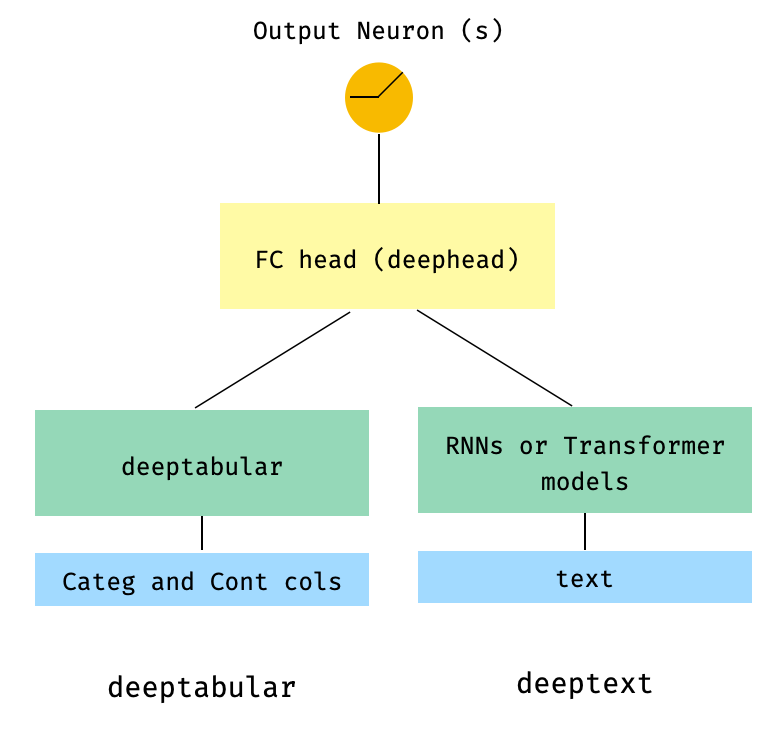
3。head_hidden_dims param head_hidden_dims介してfcヘッドを上に置いた表とテキストWideDeep
 from pytorch_widedeep . preprocessing import TabPreprocessor , TextPreprocessor
from pytorch_widedeep . models import TabMlp , BasicRNN , WideDeep
from pytorch_widedeep . training import Trainer

# Tabular
tab_preprocessor = TabPreprocessor (
    embed_cols = [ "city" , "name" ], continuous_cols = [ "age" , "height" ]
)
X_tab = tab_preprocessor . fit_transform ( df )
tab_mlp = TabMlp (
    column_idx = tab_preprocessor . column_idx ,
    cat_embed_input = tab_preprocessor . cat_embed_input ,
    continuous_cols = tab_preprocessor . continuous_cols ,
    mlp_hidden_dims = [ 64 , 32 ],
)

# Text
text_preprocessor = TextPreprocessor (
    text_col = "sentence" , maxlen = 20 , max_vocab = 100 , n_cpus = 1
)
X_text = text_preprocessor . fit_transform ( df )
rnn = BasicRNN (
    vocab_size = len ( text_preprocessor . vocab . itos ),
    embed_dim = 16 ,
    hidden_dim = 8 ,
    n_layers = 1 ,
)

# WideDeep
model = WideDeep ( deeptabular = tab_mlp , deeptext = rnn , head_hidden_dims = [ 32 , 16 ])

# Train
trainer = Trainer ( model , objective = "binary" )

trainer . fit (
    X_tab = X_tab ,
    X_text = X_text ,
    target = df [ "target" ]. values ,
    n_epochs = 1 ,
    batch_size = 32 ,
) WideDeepに直接渡される表と複数のテキスト列
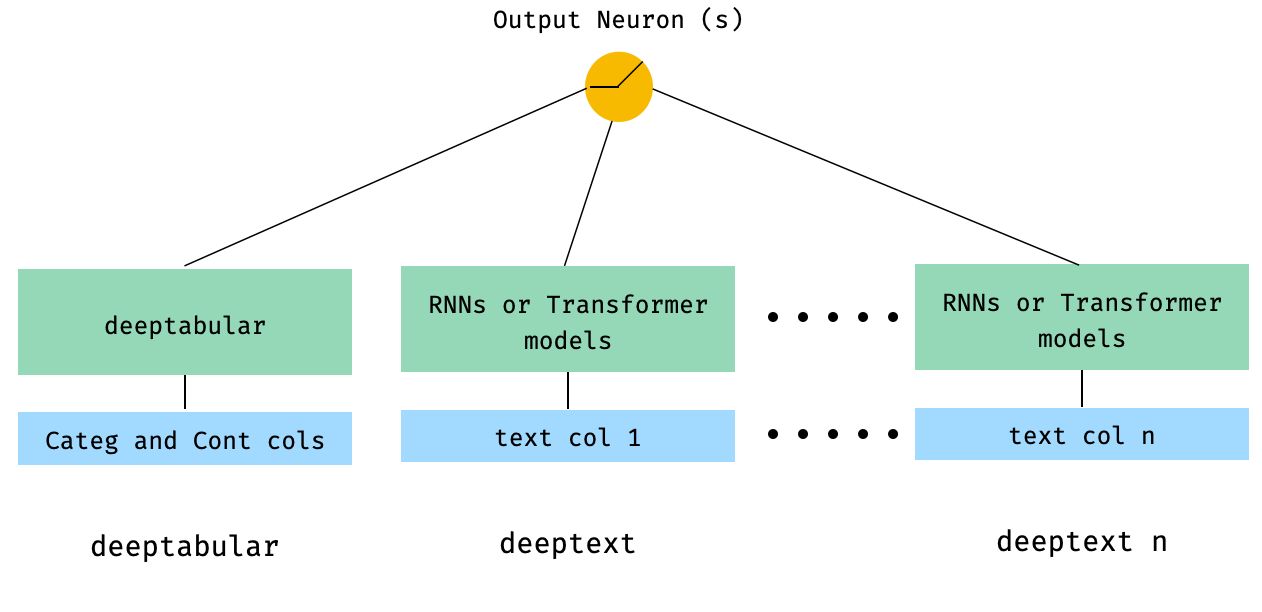
 from pytorch_widedeep . preprocessing import TabPreprocessor , TextPreprocessor
from pytorch_widedeep . models import TabMlp , BasicRNN , WideDeep
from pytorch_widedeep . training import Trainer


# Tabular
tab_preprocessor = TabPreprocessor (
    embed_cols = [ "city" , "name" ], continuous_cols = [ "age" , "height" ]
)
X_tab = tab_preprocessor . fit_transform ( df )
tab_mlp = TabMlp (
    column_idx = tab_preprocessor . column_idx ,
    cat_embed_input = tab_preprocessor . cat_embed_input ,
    continuous_cols = tab_preprocessor . continuous_cols ,
    mlp_hidden_dims = [ 64 , 32 ],
)

# Text
text_preprocessor_1 = TextPreprocessor (
    text_col = "sentence" , maxlen = 20 , max_vocab = 100 , n_cpus = 1
)
X_text_1 = text_preprocessor_1 . fit_transform ( df )
text_preprocessor_2 = TextPreprocessor (
    text_col = "other_sentence" , maxlen = 20 , max_vocab = 100 , n_cpus = 1
)
X_text_2 = text_preprocessor_2 . fit_transform ( df )
rnn_1 = BasicRNN (
    vocab_size = len ( text_preprocessor_1 . vocab . itos ),
    embed_dim = 16 ,
    hidden_dim = 8 ,
    n_layers = 1 ,
)
rnn_2 = BasicRNN (
    vocab_size = len ( text_preprocessor_2 . vocab . itos ),
    embed_dim = 16 ,
    hidden_dim = 8 ,
    n_layers = 1 ,
)

# WideDeep
model = WideDeep ( deeptabular = tab_mlp , deeptext = [ rnn_1 , rnn_2 ])

# Train
trainer = Trainer ( model , objective = "binary" )

trainer . fit (
    X_tab = X_tab ,
    X_text = [ X_text_1 , X_text_2 ],
    target = df [ "target" ]. values ,
    n_epochs = 1 ,
    batch_size = 32 ,
) 5。ライブラリのModelFuserクラスを介して融合された表のデータと複数のテキスト列
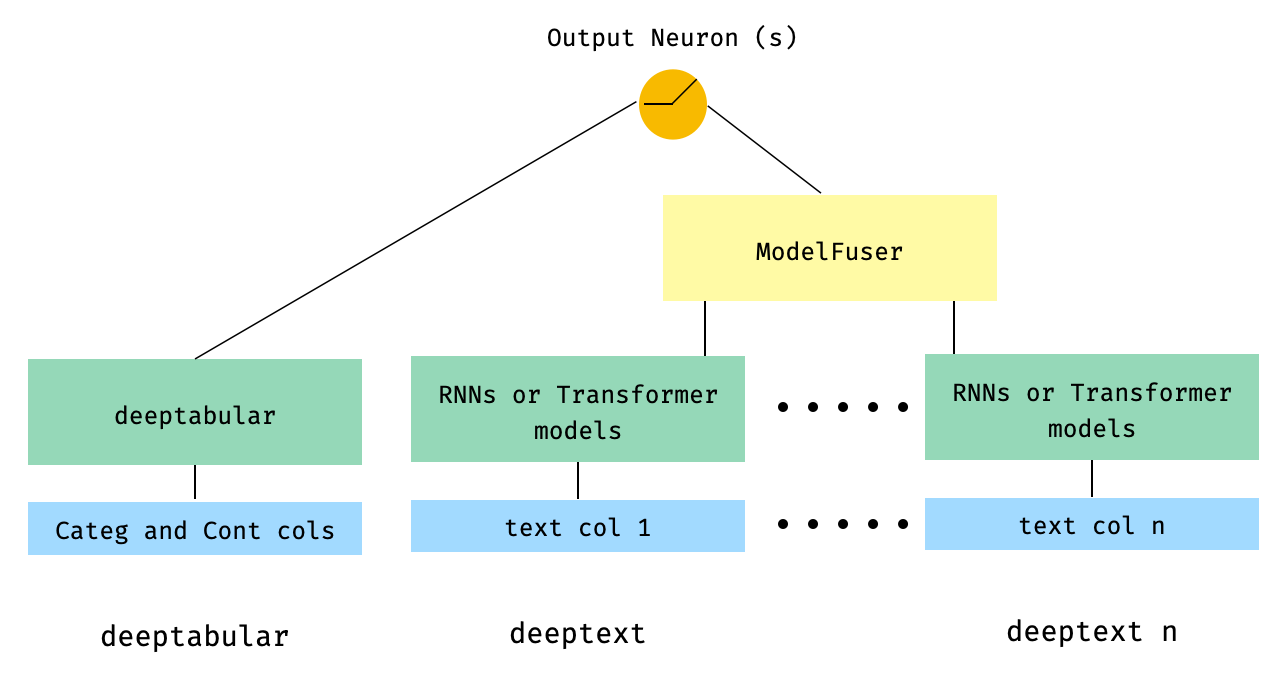
 from pytorch_widedeep . preprocessing import TabPreprocessor , TextPreprocessor
from pytorch_widedeep . models import TabMlp , BasicRNN , WideDeep , ModelFuser
from pytorch_widedeep import Trainer

# Tabular
tab_preprocessor = TabPreprocessor (
    embed_cols = [ "city" , "name" ], continuous_cols = [ "age" , "height" ]
)
X_tab = tab_preprocessor . fit_transform ( df )
tab_mlp = TabMlp (
    column_idx = tab_preprocessor . column_idx ,
    cat_embed_input = tab_preprocessor . cat_embed_input ,
    continuous_cols = tab_preprocessor . continuous_cols ,
    mlp_hidden_dims = [ 64 , 32 ],
)

# Text
text_preprocessor_1 = TextPreprocessor (
    text_col = "sentence" , maxlen = 20 , max_vocab = 100 , n_cpus = 1
)
X_text_1 = text_preprocessor_1 . fit_transform ( df )
text_preprocessor_2 = TextPreprocessor (
    text_col = "other_sentence" , maxlen = 20 , max_vocab = 100 , n_cpus = 1
)
X_text_2 = text_preprocessor_2 . fit_transform ( df )

rnn_1 = BasicRNN (
    vocab_size = len ( text_preprocessor_1 . vocab . itos ),
    embed_dim = 16 ,
    hidden_dim = 8 ,
    n_layers = 1 ,
)
rnn_2 = BasicRNN (
    vocab_size = len ( text_preprocessor_2 . vocab . itos ),
    embed_dim = 16 ,
    hidden_dim = 8 ,
    n_layers = 1 ,
)

models_fuser = ModelFuser ( models = [ rnn_1 , rnn_2 ], fusion_method = "mult" )

# WideDeep
model = WideDeep ( deeptabular = tab_mlp , deeptext = models_fuser )

# Train
trainer = Trainer ( model , objective = "binary" )

trainer . fit (
    X_tab = X_tab ,
    X_text = [ X_text_1 , X_text_2 ],
    target = df [ "target" ]. values ,
    n_epochs = 1 ,
    batch_size = 32 ,
) 6。画像列付きの表列と複数のテキスト列。テキスト列は、ライブラリのModelFuserを介して融合され、すべてがユーザーがコーディングしたカスタムModelFuserであるWideDeepのDeephead Paramenterを介して融合します。
これはおそらく、ユーザーによるカスタムコンポーネントと「着信」テンソルをスライスすることによるカスタムコンポーネントを含むため、あまりエレガントではないソリューションです。将来的には、このプロセスをより簡単にするために、 TextAndImageModelFuserを含めます。それでも、実際には複雑ではなく、 pytorch-widedeepでカスタムコンポーネントを使用する方法の良い例です。
カスタムコンポーネントの唯一の要件は、アクティベーションの最後のレイヤーのサイズを返すoutput_dimというプロパティがあることです。言い換えれば、 BaseWDModelComponentから継承する必要はありません。この基本クラスは、そのようなプロパティの存在を単純にチェックし、内部的にいくつかのタイピングエラーを回避します。
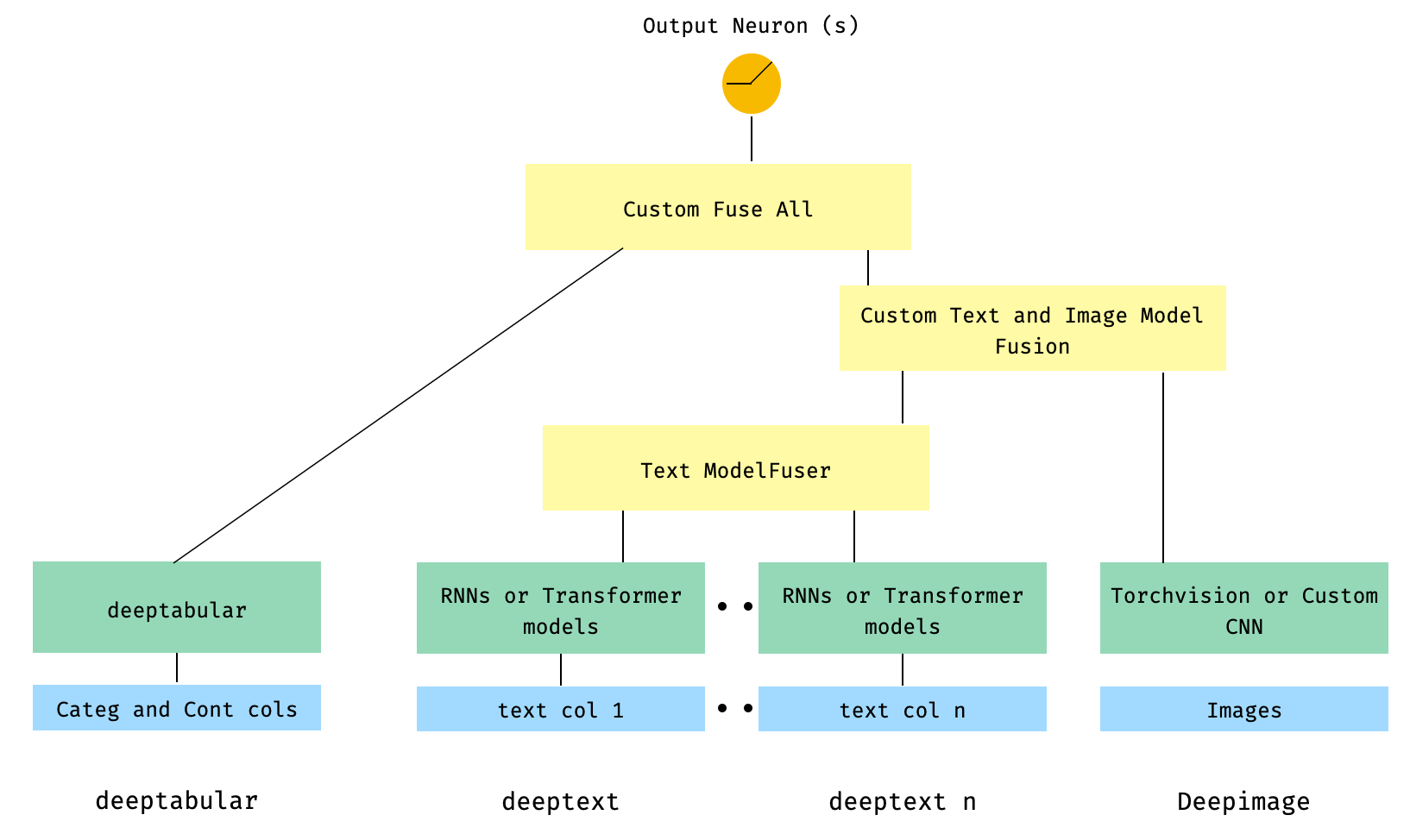
 import torch

from pytorch_widedeep . preprocessing import TabPreprocessor , TextPreprocessor , ImagePreprocessor
from pytorch_widedeep . models import TabMlp , BasicRNN , WideDeep , ModelFuser , Vision
from pytorch_widedeep . models . _base_wd_model_component import BaseWDModelComponent
from pytorch_widedeep import Trainer

# Tabular
tab_preprocessor = TabPreprocessor (
    embed_cols = [ "city" , "name" ], continuous_cols = [ "age" , "height" ]
)
X_tab = tab_preprocessor . fit_transform ( df )
tab_mlp = TabMlp (
    column_idx = tab_preprocessor . column_idx ,
    cat_embed_input = tab_preprocessor . cat_embed_input ,
    continuous_cols = tab_preprocessor . continuous_cols ,
    mlp_hidden_dims = [ 16 , 8 ],
)

# Text
text_preprocessor_1 = TextPreprocessor (
    text_col = "sentence" , maxlen = 20 , max_vocab = 100 , n_cpus = 1
)
X_text_1 = text_preprocessor_1 . fit_transform ( df )
text_preprocessor_2 = TextPreprocessor (
    text_col = "other_sentence" , maxlen = 20 , max_vocab = 100 , n_cpus = 1
)
X_text_2 = text_preprocessor_2 . fit_transform ( df )
rnn_1 = BasicRNN (
    vocab_size = len ( text_preprocessor_1 . vocab . itos ),
    embed_dim = 16 ,
    hidden_dim = 8 ,
    n_layers = 1 ,
)
rnn_2 = BasicRNN (
    vocab_size = len ( text_preprocessor_2 . vocab . itos ),
    embed_dim = 16 ,
    hidden_dim = 8 ,
    n_layers = 1 ,
)
models_fuser = ModelFuser (
    models = [ rnn_1 , rnn_2 ],
    fusion_method = "mult" ,
)

# Image
image_preprocessor = ImagePreprocessor ( img_col = "image_name" , img_path = "images" )
X_img = image_preprocessor . fit_transform ( df )
vision = Vision ( pretrained_model_setup = "resnet18" , head_hidden_dims = [ 16 , 8 ])

# deephead (custom model fuser)
class MyModelFuser ( BaseWDModelComponent ):
    """
    Simply a Linear + Relu sequence on top of the text + images followed by a
    Linear -> Relu -> Linear for the concatenation of tabular slice of the
    tensor and the output of the text and image sequential model
    """
    def __init__ (
        self ,
        tab_incoming_dim : int ,
        text_incoming_dim : int ,
        image_incoming_dim : int ,
        output_units : int ,
    ):

        super ( MyModelFuser , self ). __init__ ()

        self . tab_incoming_dim = tab_incoming_dim
        self . text_incoming_dim = text_incoming_dim
        self . image_incoming_dim = image_incoming_dim
        self . output_units = output_units
        self . text_and_image_fuser = torch . nn . Sequential (
            torch . nn . Linear ( text_incoming_dim + image_incoming_dim , output_units ),
            torch . nn . ReLU (),
        )
        self . out = torch . nn . Sequential (
            torch . nn . Linear ( output_units + tab_incoming_dim , output_units * 4 ),
            torch . nn . ReLU (),
            torch . nn . Linear ( output_units * 4 , output_units ),
        )

    def forward ( self , X : torch . Tensor ) -> torch . Tensor :
        tab_slice = slice ( 0 , self . tab_incoming_dim )
        text_slice = slice (
            self . tab_incoming_dim , self . tab_incoming_dim + self . text_incoming_dim
        )
        image_slice = slice (
            self . tab_incoming_dim + self . text_incoming_dim ,
            self . tab_incoming_dim + self . text_incoming_dim + self . image_incoming_dim ,
        )
        X_tab = X [:, tab_slice ]
        X_text = X [:, text_slice ]
        X_img = X [:, image_slice ]
        X_text_and_image = self . text_and_image_fuser ( torch . cat ([ X_text , X_img ], dim = 1 ))
        return self . out ( torch . cat ([ X_tab , X_text_and_image ], dim = 1 ))

    @ property
    def output_dim ( self ):
        return self . output_units


deephead = MyModelFuser (
    tab_incoming_dim = tab_mlp . output_dim ,
    text_incoming_dim = models_fuser . output_dim ,
    image_incoming_dim = vision . output_dim ,
    output_units = 8 ,
)

# WideDeep
model = WideDeep (
    deeptabular = tab_mlp ,
    deeptext = models_fuser ,
    deepimage = vision ,
    deephead = deephead ,
)

# Train
trainer = Trainer ( model , objective = "binary" )

trainer . fit (
    X_tab = X_tab ,
    X_text = [ X_text_1 , X_text_2 ],
    X_img = X_img ,
    target = df [ "target" ]. values ,
    n_epochs = 1 ,
    batch_size = 32 ,
)
7。ツータワーモデル
これは、推奨システムのコンテキストで人気のあるモデルです。私のトリプル(ユーザー機能、アイテム機能、ターゲット)を形成した表形式のデータセットがあるとしましょう。ユーザーとアイテムの機能が2つの別々のモデルに渡され、DOT製品を介して「融合」する2塔モデルを作成できます。
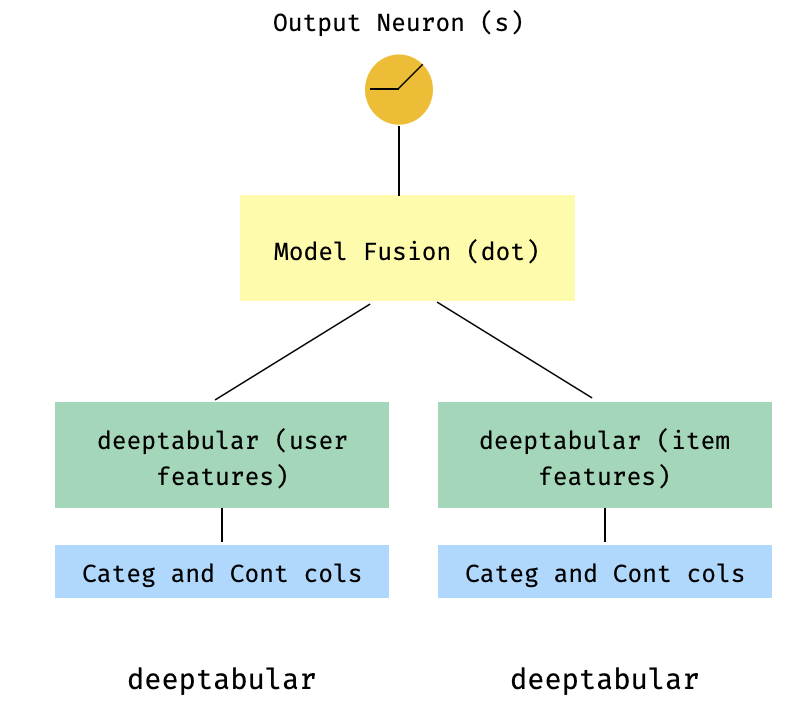
 import numpy as np
import pandas as pd

from pytorch_widedeep import Trainer
from pytorch_widedeep . preprocessing import TabPreprocessor
from pytorch_widedeep . models import TabMlp , WideDeep , ModelFuser

# Let's create the interaction dataset
# user_features dataframe
np . random . seed ( 42 )
user_ids = np . arange ( 1 , 101 )
ages = np . random . randint ( 18 , 60 , size = 100 )
genders = np . random . choice ([ "male" , "female" ], size = 100 )
locations = np . random . choice ([ "city_a" , "city_b" , "city_c" , "city_d" ], size = 100 )
user_features = pd . DataFrame (
    { "id" : user_ids , "age" : ages , "gender" : genders , "location" : locations }
)

# item_features dataframe
item_ids = np . arange ( 1 , 101 )
prices = np . random . uniform ( 10 , 500 , size = 100 ). round ( 2 )
colors = np . random . choice ([ "red" , "blue" , "green" , "black" ], size = 100 )
categories = np . random . choice ([ "electronics" , "clothing" , "home" , "toys" ], size = 100 )

item_features = pd . DataFrame (
    { "id" : item_ids , "price" : prices , "color" : colors , "category" : categories }
)

# Interactions dataframe
interaction_user_ids = np . random . choice ( user_ids , size = 1000 )
interaction_item_ids = np . random . choice ( item_ids , size = 1000 )
purchased = np . random . choice ([ 0 , 1 ], size = 1000 , p = [ 0.7 , 0.3 ])
interactions = pd . DataFrame (
    {
        "user_id" : interaction_user_ids ,
        "item_id" : interaction_item_ids ,
        "purchased" : purchased ,
    }
)
user_item_purchased = interactions . merge (
    user_features , left_on = "user_id" , right_on = "id"
). merge ( item_features , left_on = "item_id" , right_on = "id" )

# Users
tab_preprocessor_user = TabPreprocessor (
    cat_embed_cols = [ "gender" , "location" ],
    continuous_cols = [ "age" ],
)
X_user = tab_preprocessor_user . fit_transform ( user_item_purchased )
tab_mlp_user = TabMlp (
    column_idx = tab_preprocessor_user . column_idx ,
    cat_embed_input = tab_preprocessor_user . cat_embed_input ,
    continuous_cols = [ "age" ],
    mlp_hidden_dims = [ 16 , 8 ],
    mlp_dropout = [ 0.2 , 0.2 ],
)

# Items
tab_preprocessor_item = TabPreprocessor (
    cat_embed_cols = [ "color" , "category" ],
    continuous_cols = [ "price" ],
)
X_item = tab_preprocessor_item . fit_transform ( user_item_purchased )
tab_mlp_item = TabMlp (
    column_idx = tab_preprocessor_item . column_idx ,
    cat_embed_input = tab_preprocessor_item . cat_embed_input ,
    continuous_cols = [ "price" ],
    mlp_hidden_dims = [ 16 , 8 ],
    mlp_dropout = [ 0.2 , 0.2 ],
)

two_tower_model = ModelFuser ([ tab_mlp_user , tab_mlp_item ], fusion_method = "dot" )

model = WideDeep ( deeptabular = two_tower_model )

trainer = Trainer ( model , objective = "binary" )

trainer . fit (
    X_tab = [ X_user , X_item ],
    target = interactions . purchased . values ,
    n_epochs = 1 ,
    batch_size = 32 ,
)
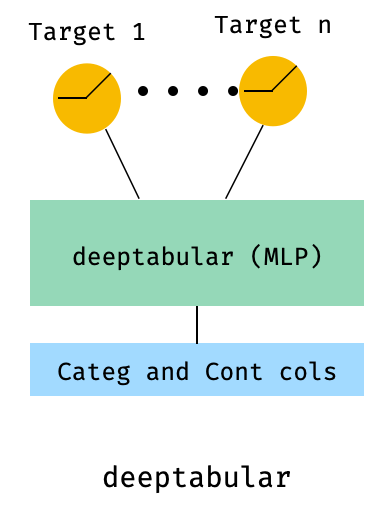
8。多ターゲット損失を伴う表
これは、実際には異なるアーキテクチャではなく、マルチターゲット損失の使用を説明する「ボーナス」です。
 from pytorch_widedeep . preprocessing import TabPreprocessor , TextPreprocessor , ImagePreprocessor
from pytorch_widedeep . models import TabMlp , BasicRNN , WideDeep , ModelFuser , Vision
from pytorch_widedeep . losses_multitarget import MultiTargetClassificationLoss
from pytorch_widedeep . models . _base_wd_model_component import BaseWDModelComponent
from pytorch_widedeep import Trainer

# let's add a second target to the dataframe
df [ "target2" ] = [ random . choice ([ 0 , 1 ]) for _ in range ( 100 )]

# Tabular
tab_preprocessor = TabPreprocessor (
    embed_cols = [ "city" , "name" ], continuous_cols = [ "age" , "height" ]
)
X_tab = tab_preprocessor . fit_transform ( df )
tab_mlp = TabMlp (
    column_idx = tab_preprocessor . column_idx ,
    cat_embed_input = tab_preprocessor . cat_embed_input ,
    continuous_cols = tab_preprocessor . continuous_cols ,
    mlp_hidden_dims = [ 64 , 32 ],
)

# 'pred_dim=2' because we have two binary targets. For other types of targets,
#  please, see the documentation
model = WideDeep ( deeptabular = tab_mlp , pred_dim = 2 ).

loss = MultiTargetClassificationLoss ( binary_config = [ 0 , 1 ], reduction = "mean" )

# When a multi-target loss is used, 'custom_loss_function' must not be None.
# See the docs
trainer = Trainer ( model , objective = "multitarget" , custom_loss_function = loss )

trainer . fit (
    X_tab = X_tab ,
    target = df [[ "target" , "target2" ]]. values ,
    n_epochs = 1 ,
    batch_size = 32 ,
)deeptabular成分個々のコンポーネント、 wide 、 deeptabular 、 deeptext 、 deepimageが独立して単独で使用できることを再度強調することが重要です。たとえば、単に線形モデルにあるwideのみを使用できます。実際、 pytorch-widedeepで最も興味深い機能の1つは、それ自体でdeeptabularコンポーネントを使用することです。つまり、通常、表のデータの深い学習と呼ばれるものです。現在、 pytorch-widedeepそのコンポーネントの次の異なるモデルを提供しています。
私たちが呼ぶ2つのよりシンプルな注意ベースのモデル:
Tabformerファミリー、つまり表形式データのための変圧器:
ニューラルネットワークの体重の不確実性に基づいた表形式データの確率的DLモデル:
Wideモデルの確率的適応。TabMlpモデルの確率的適応Tabstransformer、Saint、およびFT-Transformerの科学的出版物がありますが、TabfasfformerとTabperceiverは、表形式データのアルゴリズムの独自の適応であることに注意してください。
さらに、 TabPerceiverを除き、すべてのdeeptabularモデルに自己監視前のプリトレーニングを使用できます。自己教師の事前トレーニングは、エンコーダデコーダーメソッドとコントラシティブデノイズ法と呼ばれる2つの方法またはルーチンを介して使用できます。この機能の詳細については、ライブラリ内のすべてのオプションについては、ドキュメントと例をご覧ください。
recモジュールこのモジュールは、ライブラリの既存のコンポーネントの拡張として導入され、推奨システムに関連する質問と問題に対処しました。まだアクティブな開発中ですが、現在、選択した数の強力な推奨モデルが含まれています。
このライブラリは、既存のコンポーネントを使用してさまざまな推奨アルゴリズムの実装をすでにサポートしていることは注目に値します。たとえば、ワイドおよびディープ、ツータワー、またはニューラルコラボレーションフィルタリングなどのモデルは、ライブラリのコア機能を使用して構築できます。
recモジュールの推奨アルゴリズムは次のとおりです。
これらのモデルの使用方法の詳細については、例を参照してください。
テキストコンポーネントのdeeptextについては、ライブラリは次のモデルを提供します。
画像コンポーネント、 deepimageの場合、ライブラリは次のファミリからのモデルをサポートしています:「resnet」、「shufflenet」、 'resnext'、 'wide_resnet'、 'regnet'、 'densenet'、 'mobilenetv2'、 'mnasnet'、 'efficientnet' ''、 'mobilenetv2'、 'bobilenetv2'、 'bovilenetv2'、 "これらはtorchvisionを介して提供され、 Visionクラスに包まれています。
PIPを使用してインストール:
pip install pytorch-widedeepまたは、GitHubから直接インストールします
pip install git+https://github.com/jrzaurin/pytorch-widedeep.git # Clone the repository
git clone https://github.com/jrzaurin/pytorch-widedeep
cd pytorch-widedeep
# Install in dev mode
pip install -e .Wide and DeepDenseおよびデフォルト設定を使用して、アダルトデータセットを使用したバイナリ分類のエンドツーエンドの例を次に示します。
pytorch-widedeepを使用して、広い(線形)および深いモデルを構築する:
 import numpy as np
import torch
from sklearn . model_selection import train_test_split

from pytorch_widedeep import Trainer
from pytorch_widedeep . preprocessing import WidePreprocessor , TabPreprocessor
from pytorch_widedeep . models import Wide , TabMlp , WideDeep
from pytorch_widedeep . metrics import Accuracy
from pytorch_widedeep . datasets import load_adult


df = load_adult ( as_frame = True )
df [ "income_label" ] = ( df [ "income" ]. apply ( lambda x : ">50K" in x )). astype ( int )
df . drop ( "income" , axis = 1 , inplace = True )
df_train , df_test = train_test_split ( df , test_size = 0.2 , stratify = df . income_label )

# Define the 'column set up'
wide_cols = [
    "education" ,
    "relationship" ,
    "workclass" ,
    "occupation" ,
    "native-country" ,
    "gender" ,
]
crossed_cols = [( "education" , "occupation" ), ( "native-country" , "occupation" )]

cat_embed_cols = [
    "workclass" ,
    "education" ,
    "marital-status" ,
    "occupation" ,
    "relationship" ,
    "race" ,
    "gender" ,
    "capital-gain" ,
    "capital-loss" ,
    "native-country" ,
]
continuous_cols = [ "age" , "hours-per-week" ]
target = "income_label"
target = df_train [ target ]. values

# prepare the data
wide_preprocessor = WidePreprocessor ( wide_cols = wide_cols , crossed_cols = crossed_cols )
X_wide = wide_preprocessor . fit_transform ( df_train )

tab_preprocessor = TabPreprocessor (
    cat_embed_cols = cat_embed_cols , continuous_cols = continuous_cols  # type: ignore[arg-type]
)
X_tab = tab_preprocessor . fit_transform ( df_train )

# build the model
wide = Wide ( input_dim = np . unique ( X_wide ). shape [ 0 ], pred_dim = 1 )
tab_mlp = TabMlp (
    column_idx = tab_preprocessor . column_idx ,
    cat_embed_input = tab_preprocessor . cat_embed_input ,
    continuous_cols = continuous_cols ,
)
model = WideDeep ( wide = wide , deeptabular = tab_mlp )

# train and validate
trainer = Trainer ( model , objective = "binary" , metrics = [ Accuracy ])
trainer . fit (
    X_wide = X_wide ,
    X_tab = X_tab ,
    target = target ,
    n_epochs = 5 ,
    batch_size = 256 ,
)

# predict on test
X_wide_te = wide_preprocessor . transform ( df_test )
X_tab_te = tab_preprocessor . transform ( df_test )
preds = trainer . predict ( X_wide = X_wide_te , X_tab = X_tab_te )

# Save and load

# Option 1: this will also save training history and lr history if the
# LRHistory callback is used
trainer . save ( path = "model_weights" , save_state_dict = True )

# Option 2: save as any other torch model
torch . save ( model . state_dict (), "model_weights/wd_model.pt" )

# From here in advance, Option 1 or 2 are the same. I assume the user has
# prepared the data and defined the new model components:
# 1. Build the model
model_new = WideDeep ( wide = wide , deeptabular = tab_mlp )
model_new . load_state_dict ( torch . load ( "model_weights/wd_model.pt" ))

# 2. Instantiate the trainer
trainer_new = Trainer ( model_new , objective = "binary" )

# 3. Either start the fit or directly predict
preds = trainer_new . predict ( X_wide = X_wide , X_tab = X_tab , batch_size = 32 )もちろん、もっと多くのことができます。パッケージのコンテンツとその機能をよりよく理解するために、例フォルダー、ドキュメント、またはコンパニオン投稿を参照してください。
pytest tests
貢献ページを確認してください。
このライブラリは他の一連のライブラリから取得しているので、ここでreadmeでそれらについて言及するのは公正だと思います(特定の言及もコードに含まれています)。
CallbacksとInitializers構造とコードは、それ自体がKerasに部分的に触発されたtorchsampleライブラリに触発されています。
このライブラリのTextProcessorクラスでは、 fastaiのTokenizerとVocabを使用しています。 utils.fastai_transformsのコードは、コードのマイナーな適応であるため、このライブラリ内で機能します。私の経験にとって、彼らのTokenizerクラスで最高です。
このライブラリのImageProcessorクラスは、Adrian RosebrockによるFantastic Deep Learning for Computer Vision(DL4CV)ブックのコードを使用しています。
この作業は、Apache 2.0およびMIT(または任意の後のバージョン)で二重ライセンスされています。この作業を使用する場合、それらのいずれかを選択できます。
SPDX-License-Identifier: Apache-2.0 AND MIT
 @article{Zaurin_pytorch-widedeep_A_flexible_2023,
author = {Zaurin, Javier Rodriguez and Mulinka, Pavol},
doi = {10.21105/joss.05027},
journal = {Journal of Open Source Software},
month = jun,
number = {86},
pages = {5027},
title = {{pytorch-widedeep: A flexible package for multimodal deep learning}},
url = {https://joss.theoj.org/papers/10.21105/joss.05027},
volume = {8},
year = {2023}
}
 Zaurin, J. R., & Mulinka, P. (2023). pytorch-widedeep: A flexible package for
multimodal deep learning. Journal of Open Source Software, 8(86), 5027.
https://doi.org/10.21105/joss.05027








