pytorch widedeep
mps backend support and more rec models


Paket fleksibel untuk multimodal-deep-learning untuk menggabungkan data tabel dengan teks dan gambar menggunakan model lebar dan dalam di pytorch
Dokumentasi: https://pytorch-widedeep.readthedocs.io
Posting dan tutorial pendamping: Infinitoml
Eksperimen dan perbandingan dengan LightGBM : Tabulardl vs LightGBM
Slack : Jika Anda ingin berkontribusi atau hanya ingin mengobrol dengan kami, bergabunglah dengan Slack
Isi dokumen ini disusun sebagai berikut:
deeptabularrec pytorch-widedeep didasarkan pada algoritma Google yang luas dan dalam, disesuaikan untuk set data multi-modal.
Secara umum, pytorch-widedeep adalah paket untuk menggunakan pembelajaran mendalam dengan data tabel. Secara khusus, dimaksudkan untuk memfasilitasi kombinasi teks dan gambar dengan data tabular yang sesuai menggunakan model lebar dan dalam. Dengan pemikiran itu ada sejumlah arsitektur yang dapat diimplementasikan dengan perpustakaan. Komponen utama arsitektur tersebut ditunjukkan pada gambar di bawah ini:
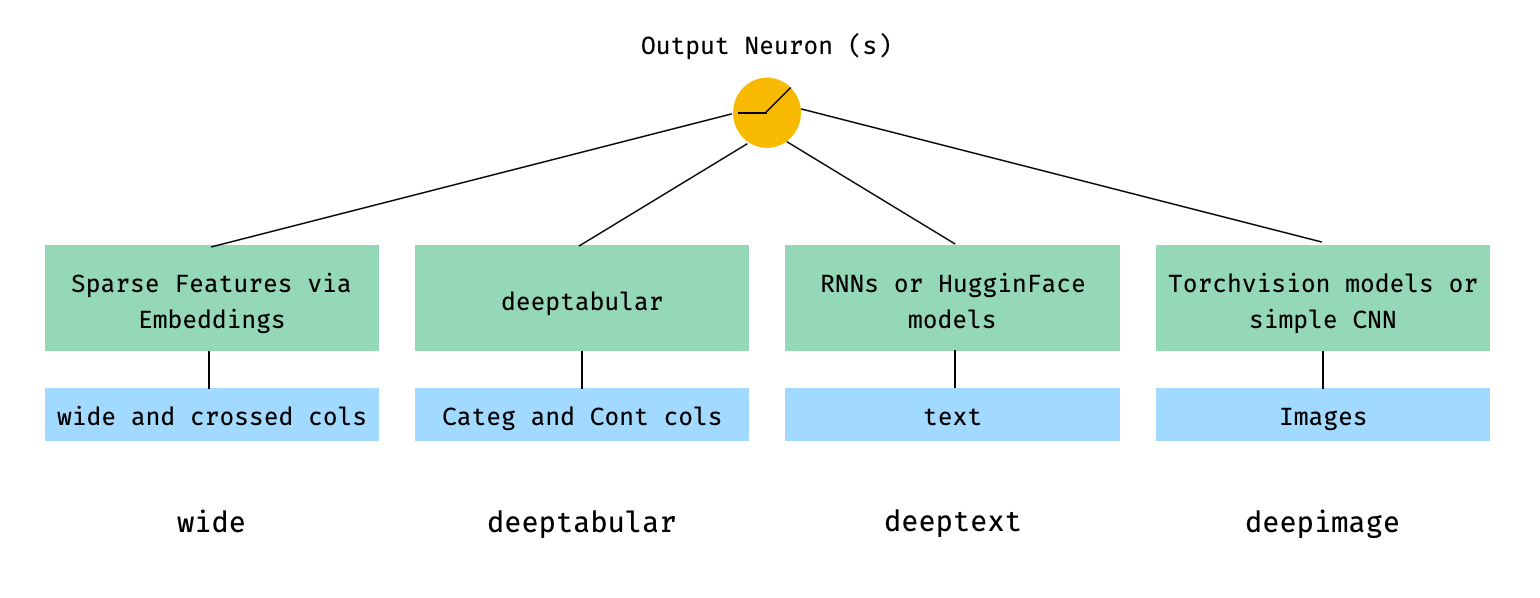
Dalam istilah matematika, dan mengikuti notasi dalam makalah, ekspresi untuk arsitektur tanpa komponen deephead dapat diformulasikan sebagai:

Di mana σ adalah fungsi sigmoid, 'W' adalah matriks bobot yang diterapkan pada model lebar dan ke aktivasi akhir dari model dalam, 'a' adalah aktivasi akhir ini, φ (x) adalah transformasi produk lintas dari fitur asli 'x' , dan, dan 'b' adalah istilah bias. Jika Anda bertanya-tanya apa yang "transformasi produk silang" , berikut adalah kutipan yang diambil langsung dari kertas: "Untuk fitur biner, transformasi produk silang (misalnya," dan (gender = perempuan, bahasa = en) ") adalah 1 jika dan hanya jika fitur konstituen (" gender = perempuan "dan" bahasa = en ") semuanya adalah 1, dan 0 sebaliknya".
Sangat mungkin untuk menggunakan model khusus (dan belum tentu yang ada di perpustakaan) selama model kustom memiliki properti yang disebut output_dim dengan ukuran lapisan aktivasi terakhir, sehingga WideDeep dapat dibangun. Contoh tentang cara menggunakan komponen khusus dapat ditemukan di folder contoh dan bagian di bawah ini.
Perpustakaan pytorch-widedeep menawarkan sejumlah arsitektur yang berbeda. Di bagian ini kami akan menunjukkan beberapa dari mereka dalam bentuk paling sederhana (yaitu dengan nilai param default dalam kebanyakan kasus) dengan cuplikan kode yang sesuai. Perhatikan bahwa semua cuplikan di bawah harus berjalan secara lokal. Untuk penjelasan yang lebih rinci tentang berbagai komponen dan parameternya, silakan merujuk ke dokumentasi.
Untuk contoh di bawah ini kami akan menggunakan dataset mainan yang dihasilkan sebagai berikut:
 import os
import random

import numpy as np
import pandas as pd
from PIL import Image
from faker import Faker


def create_and_save_random_image ( image_number , size = ( 32 , 32 )):

    if not os . path . exists ( "images" ):
        os . makedirs ( "images" )

    array = np . random . randint ( 0 , 256 , ( size [ 0 ], size [ 1 ], 3 ), dtype = np . uint8 )

    image = Image . fromarray ( array )

    image_name = f"image_ { image_number } .png"
    image . save ( os . path . join ( "images" , image_name ))

    return image_name


fake = Faker ()

cities = [ "New York" , "Los Angeles" , "Chicago" , "Houston" ]
names = [ "Alice" , "Bob" , "Charlie" , "David" , "Eva" ]

data = {
    "city" : [ random . choice ( cities ) for _ in range ( 100 )],
    "name" : [ random . choice ( names ) for _ in range ( 100 )],
    "age" : [ random . uniform ( 18 , 70 ) for _ in range ( 100 )],
    "height" : [ random . uniform ( 150 , 200 ) for _ in range ( 100 )],
    "sentence" : [ fake . sentence () for _ in range ( 100 )],
    "other_sentence" : [ fake . sentence () for _ in range ( 100 )],
    "image_name" : [ create_and_save_random_image ( i ) for i in range ( 100 )],
    "target" : [ random . choice ([ 0 , 1 ]) for _ in range ( 100 )],
}

df = pd . DataFrame ( data )
Ini akan membuat DataFrame 100 ROWS dan Dir di folder lokal Anda, yang disebut images dengan 100 gambar acak (atau gambar hanya dengan noise).
Mungkin arsitektur paling sederhana hanya satu komponen, wide , deeptabular , deeptext atau deepimage sendiri, yang juga dimungkinkan, tetapi mari kita mulai contoh dengan arsitektur standar lebar dan dalam. Dari sana, cara membangun model yang hanya terdiri dari satu komponen yang akan langsung.
Perhatikan bahwa contoh yang ditunjukkan di bawah ini akan hampir identik menggunakan salah satu model yang tersedia di perpustakaan. Misalnya, TabMlp dapat diganti dengan TabResnet , TabNet , TabTransformer , dll. Demikian pula, BasicRNN dapat diganti dengan AttentiveRNN , StackedAttentiveRNN , atau HFModel dengan parameter yang sesuai dan preprocessor dalam kasus model wajah yang memeluk.
1. Komponen lebar dan tabel (alias deeptabular)
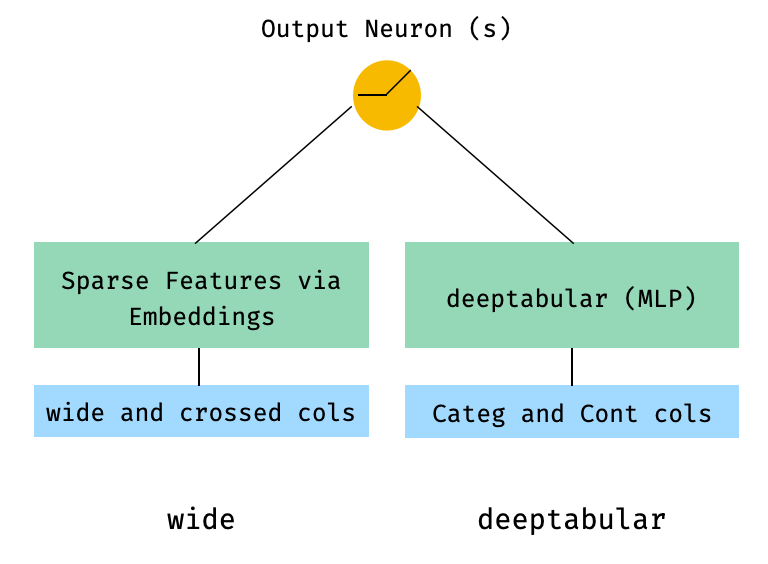
 from pytorch_widedeep . preprocessing import TabPreprocessor , WidePreprocessor
from pytorch_widedeep . models import Wide , TabMlp , WideDeep
from pytorch_widedeep . training import Trainer

# Wide
wide_cols = [ "city" ]
crossed_cols = [( "city" , "name" )]
wide_preprocessor = WidePreprocessor ( wide_cols = wide_cols , crossed_cols = crossed_cols )
X_wide = wide_preprocessor . fit_transform ( df )
wide = Wide ( input_dim = np . unique ( X_wide ). shape [ 0 ])

# Tabular
tab_preprocessor = TabPreprocessor (
    embed_cols = [ "city" , "name" ], continuous_cols = [ "age" , "height" ]
)
X_tab = tab_preprocessor . fit_transform ( df )
tab_mlp = TabMlp (
    column_idx = tab_preprocessor . column_idx ,
    cat_embed_input = tab_preprocessor . cat_embed_input ,
    continuous_cols = tab_preprocessor . continuous_cols ,
    mlp_hidden_dims = [ 64 , 32 ],
)

# WideDeep
model = WideDeep ( wide = wide , deeptabular = tab_mlp )

# Train
trainer = Trainer ( model , objective = "binary" )

trainer . fit (
    X_wide = X_wide ,
    X_tab = X_tab ,
    target = df [ "target" ]. values ,
    n_epochs = 1 ,
    batch_size = 32 ,
)
2. Data Tabular dan Teks
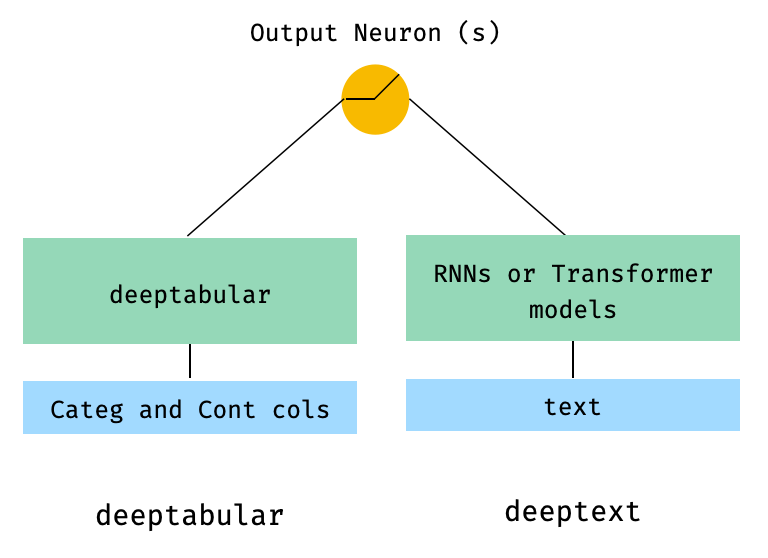
 from pytorch_widedeep . preprocessing import TabPreprocessor , TextPreprocessor
from pytorch_widedeep . models import TabMlp , BasicRNN , WideDeep
from pytorch_widedeep . training import Trainer

# Tabular
tab_preprocessor = TabPreprocessor (
    embed_cols = [ "city" , "name" ], continuous_cols = [ "age" , "height" ]
)
X_tab = tab_preprocessor . fit_transform ( df )
tab_mlp = TabMlp (
    column_idx = tab_preprocessor . column_idx ,
    cat_embed_input = tab_preprocessor . cat_embed_input ,
    continuous_cols = tab_preprocessor . continuous_cols ,
    mlp_hidden_dims = [ 64 , 32 ],
)

# Text
text_preprocessor = TextPreprocessor (
    text_col = "sentence" , maxlen = 20 , max_vocab = 100 , n_cpus = 1
)
X_text = text_preprocessor . fit_transform ( df )
rnn = BasicRNN (
    vocab_size = len ( text_preprocessor . vocab . itos ),
    embed_dim = 16 ,
    hidden_dim = 8 ,
    n_layers = 1 ,
)

# WideDeep
model = WideDeep ( deeptabular = tab_mlp , deeptext = rnn )

# Train
trainer = Trainer ( model , objective = "binary" )

trainer . fit (
    X_tab = X_tab ,
    X_text = X_text ,
    target = df [ "target" ]. values ,
    n_epochs = 1 ,
    batch_size = 32 ,
)
3. Tabular dan teks dengan kepala FC di atas melalui head_hidden_dims param di WideDeep
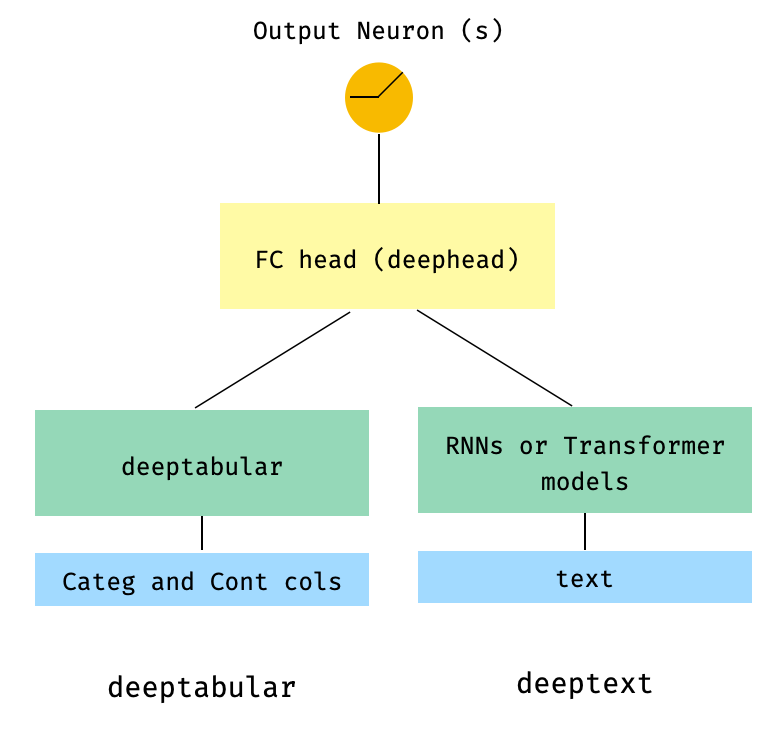
 from pytorch_widedeep . preprocessing import TabPreprocessor , TextPreprocessor
from pytorch_widedeep . models import TabMlp , BasicRNN , WideDeep
from pytorch_widedeep . training import Trainer

# Tabular
tab_preprocessor = TabPreprocessor (
    embed_cols = [ "city" , "name" ], continuous_cols = [ "age" , "height" ]
)
X_tab = tab_preprocessor . fit_transform ( df )
tab_mlp = TabMlp (
    column_idx = tab_preprocessor . column_idx ,
    cat_embed_input = tab_preprocessor . cat_embed_input ,
    continuous_cols = tab_preprocessor . continuous_cols ,
    mlp_hidden_dims = [ 64 , 32 ],
)

# Text
text_preprocessor = TextPreprocessor (
    text_col = "sentence" , maxlen = 20 , max_vocab = 100 , n_cpus = 1
)
X_text = text_preprocessor . fit_transform ( df )
rnn = BasicRNN (
    vocab_size = len ( text_preprocessor . vocab . itos ),
    embed_dim = 16 ,
    hidden_dim = 8 ,
    n_layers = 1 ,
)

# WideDeep
model = WideDeep ( deeptabular = tab_mlp , deeptext = rnn , head_hidden_dims = [ 32 , 16 ])

# Train
trainer = Trainer ( model , objective = "binary" )

trainer . fit (
    X_tab = X_tab ,
    X_text = X_text ,
    target = df [ "target" ]. values ,
    n_epochs = 1 ,
    batch_size = 32 ,
)
4. Tabular dan beberapa kolom teks yang diteruskan langsung ke WideDeep
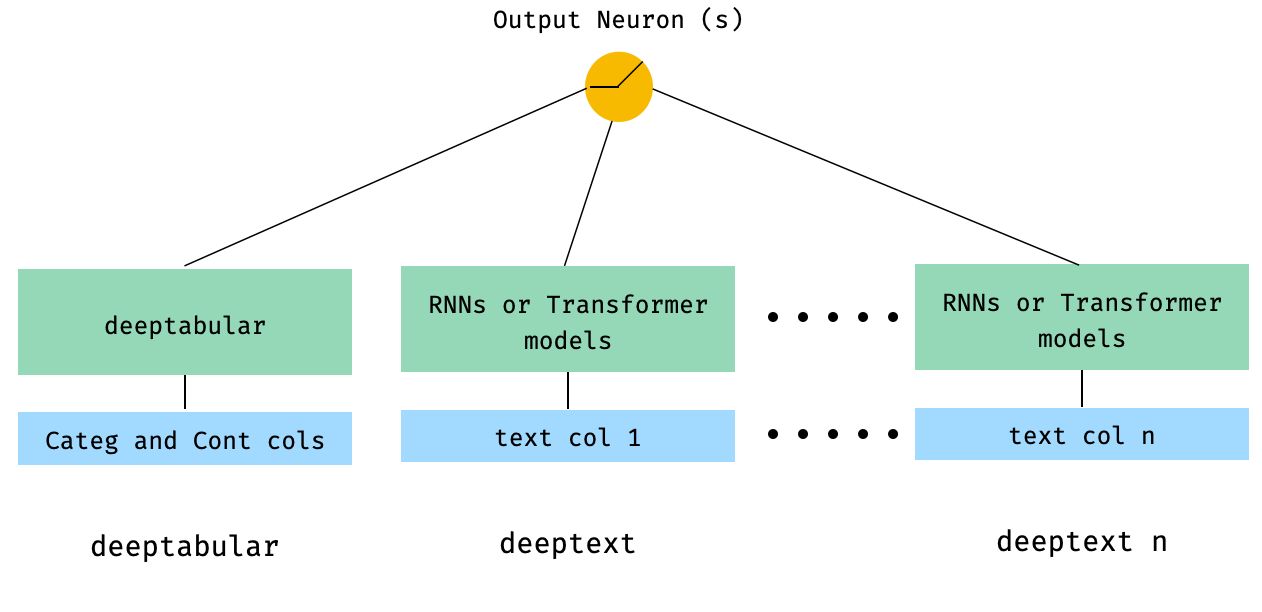
 from pytorch_widedeep . preprocessing import TabPreprocessor , TextPreprocessor
from pytorch_widedeep . models import TabMlp , BasicRNN , WideDeep
from pytorch_widedeep . training import Trainer


# Tabular
tab_preprocessor = TabPreprocessor (
    embed_cols = [ "city" , "name" ], continuous_cols = [ "age" , "height" ]
)
X_tab = tab_preprocessor . fit_transform ( df )
tab_mlp = TabMlp (
    column_idx = tab_preprocessor . column_idx ,
    cat_embed_input = tab_preprocessor . cat_embed_input ,
    continuous_cols = tab_preprocessor . continuous_cols ,
    mlp_hidden_dims = [ 64 , 32 ],
)

# Text
text_preprocessor_1 = TextPreprocessor (
    text_col = "sentence" , maxlen = 20 , max_vocab = 100 , n_cpus = 1
)
X_text_1 = text_preprocessor_1 . fit_transform ( df )
text_preprocessor_2 = TextPreprocessor (
    text_col = "other_sentence" , maxlen = 20 , max_vocab = 100 , n_cpus = 1
)
X_text_2 = text_preprocessor_2 . fit_transform ( df )
rnn_1 = BasicRNN (
    vocab_size = len ( text_preprocessor_1 . vocab . itos ),
    embed_dim = 16 ,
    hidden_dim = 8 ,
    n_layers = 1 ,
)
rnn_2 = BasicRNN (
    vocab_size = len ( text_preprocessor_2 . vocab . itos ),
    embed_dim = 16 ,
    hidden_dim = 8 ,
    n_layers = 1 ,
)

# WideDeep
model = WideDeep ( deeptabular = tab_mlp , deeptext = [ rnn_1 , rnn_2 ])

# Train
trainer = Trainer ( model , objective = "binary" )

trainer . fit (
    X_tab = X_tab ,
    X_text = [ X_text_1 , X_text_2 ],
    target = df [ "target" ]. values ,
    n_epochs = 1 ,
    batch_size = 32 ,
)
5. Data Tabel dan beberapa kolom teks yang menyatu melalui kelas ModelFuser perpustakaan
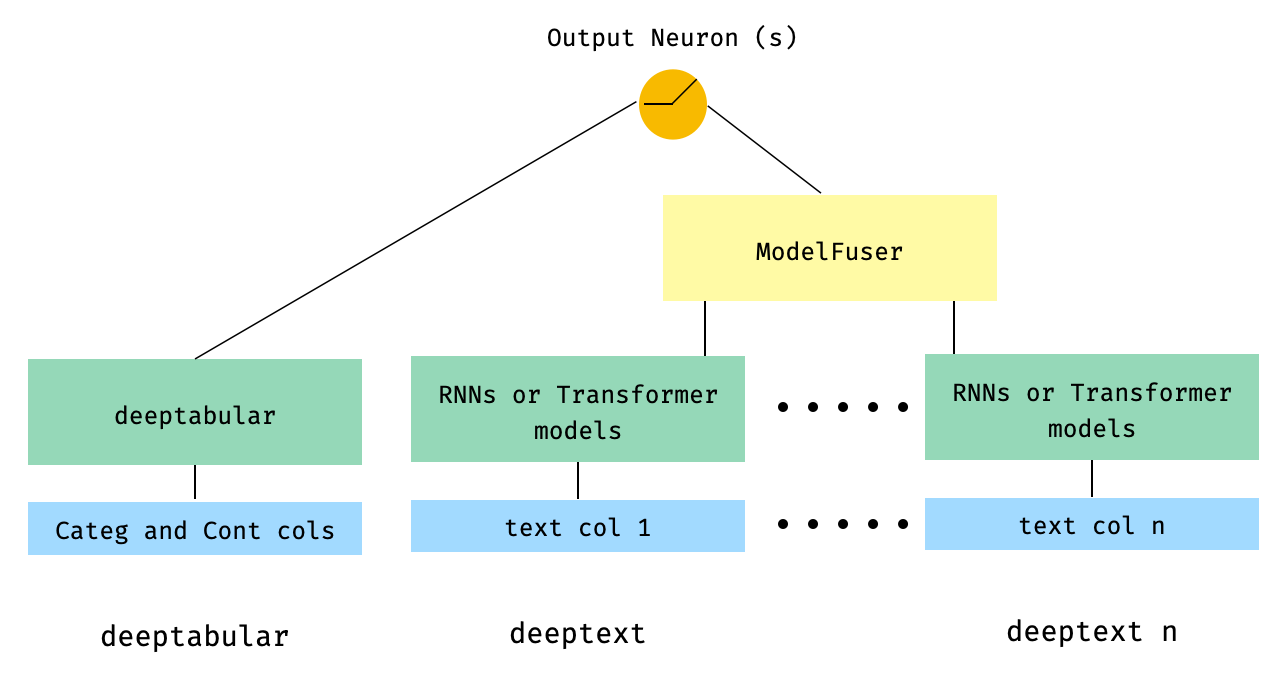
 from pytorch_widedeep . preprocessing import TabPreprocessor , TextPreprocessor
from pytorch_widedeep . models import TabMlp , BasicRNN , WideDeep , ModelFuser
from pytorch_widedeep import Trainer

# Tabular
tab_preprocessor = TabPreprocessor (
    embed_cols = [ "city" , "name" ], continuous_cols = [ "age" , "height" ]
)
X_tab = tab_preprocessor . fit_transform ( df )
tab_mlp = TabMlp (
    column_idx = tab_preprocessor . column_idx ,
    cat_embed_input = tab_preprocessor . cat_embed_input ,
    continuous_cols = tab_preprocessor . continuous_cols ,
    mlp_hidden_dims = [ 64 , 32 ],
)

# Text
text_preprocessor_1 = TextPreprocessor (
    text_col = "sentence" , maxlen = 20 , max_vocab = 100 , n_cpus = 1
)
X_text_1 = text_preprocessor_1 . fit_transform ( df )
text_preprocessor_2 = TextPreprocessor (
    text_col = "other_sentence" , maxlen = 20 , max_vocab = 100 , n_cpus = 1
)
X_text_2 = text_preprocessor_2 . fit_transform ( df )

rnn_1 = BasicRNN (
    vocab_size = len ( text_preprocessor_1 . vocab . itos ),
    embed_dim = 16 ,
    hidden_dim = 8 ,
    n_layers = 1 ,
)
rnn_2 = BasicRNN (
    vocab_size = len ( text_preprocessor_2 . vocab . itos ),
    embed_dim = 16 ,
    hidden_dim = 8 ,
    n_layers = 1 ,
)

models_fuser = ModelFuser ( models = [ rnn_1 , rnn_2 ], fusion_method = "mult" )

# WideDeep
model = WideDeep ( deeptabular = tab_mlp , deeptext = models_fuser )

# Train
trainer = Trainer ( model , objective = "binary" )

trainer . fit (
    X_tab = X_tab ,
    X_text = [ X_text_1 , X_text_2 ],
    target = df [ "target" ]. values ,
    n_epochs = 1 ,
    batch_size = 32 ,
)
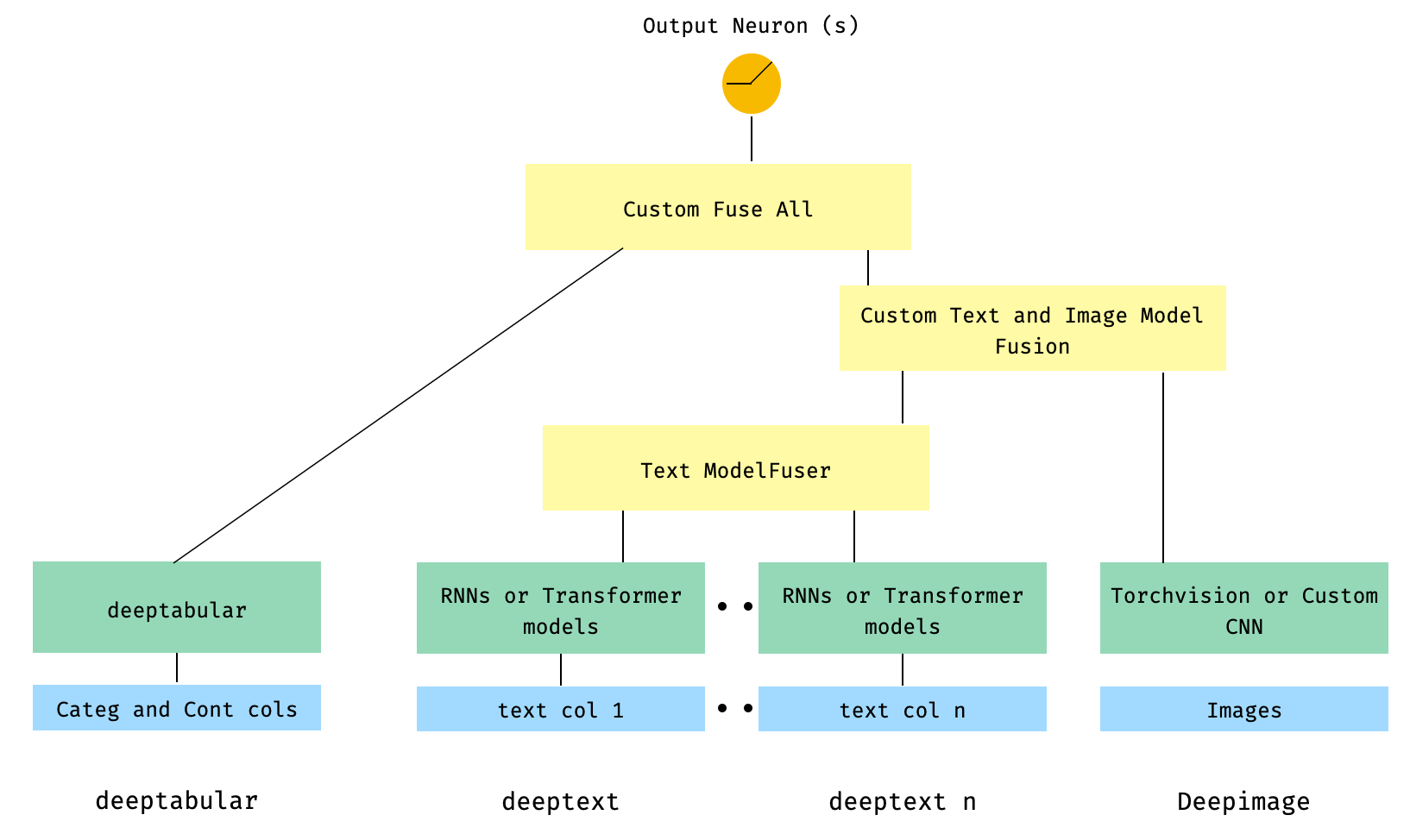
6. Tabular dan beberapa kolom teks, dengan kolom gambar. Kolom teks disatukan melalui ModelFuser perpustakaan dan kemudian semua menyatu melalui deephead paramenter di WideDeep yang merupakan ModelFuser khusus yang dikodekan oleh pengguna
Ini mungkin solusi yang kurang elegan karena melibatkan komponen khusus oleh pengguna dan mengiris tensor 'masuk'. Di masa depan, kami akan menyertakan TextAndImageModelFuser untuk membuat proses ini lebih mudah. Tetap saja, tidak terlalu rumit dan itu adalah contoh yang baik tentang cara menggunakan komponen khusus di pytorch-widedeep .
Perhatikan bahwa satu -satunya persyaratan untuk komponen khusus adalah bahwa ia memiliki properti yang disebut output_dim yang mengembalikan ukuran lapisan aktivasi terakhir. Dengan kata lain, itu tidak perlu mewarisi dari BaseWDModelComponent . Kelas dasar ini hanya memeriksa keberadaan properti tersebut dan menghindari beberapa kesalahan pengetikan secara internal.
 import torch

from pytorch_widedeep . preprocessing import TabPreprocessor , TextPreprocessor , ImagePreprocessor
from pytorch_widedeep . models import TabMlp , BasicRNN , WideDeep , ModelFuser , Vision
from pytorch_widedeep . models . _base_wd_model_component import BaseWDModelComponent
from pytorch_widedeep import Trainer

# Tabular
tab_preprocessor = TabPreprocessor (
    embed_cols = [ "city" , "name" ], continuous_cols = [ "age" , "height" ]
)
X_tab = tab_preprocessor . fit_transform ( df )
tab_mlp = TabMlp (
    column_idx = tab_preprocessor . column_idx ,
    cat_embed_input = tab_preprocessor . cat_embed_input ,
    continuous_cols = tab_preprocessor . continuous_cols ,
    mlp_hidden_dims = [ 16 , 8 ],
)

# Text
text_preprocessor_1 = TextPreprocessor (
    text_col = "sentence" , maxlen = 20 , max_vocab = 100 , n_cpus = 1
)
X_text_1 = text_preprocessor_1 . fit_transform ( df )
text_preprocessor_2 = TextPreprocessor (
    text_col = "other_sentence" , maxlen = 20 , max_vocab = 100 , n_cpus = 1
)
X_text_2 = text_preprocessor_2 . fit_transform ( df )
rnn_1 = BasicRNN (
    vocab_size = len ( text_preprocessor_1 . vocab . itos ),
    embed_dim = 16 ,
    hidden_dim = 8 ,
    n_layers = 1 ,
)
rnn_2 = BasicRNN (
    vocab_size = len ( text_preprocessor_2 . vocab . itos ),
    embed_dim = 16 ,
    hidden_dim = 8 ,
    n_layers = 1 ,
)
models_fuser = ModelFuser (
    models = [ rnn_1 , rnn_2 ],
    fusion_method = "mult" ,
)

# Image
image_preprocessor = ImagePreprocessor ( img_col = "image_name" , img_path = "images" )
X_img = image_preprocessor . fit_transform ( df )
vision = Vision ( pretrained_model_setup = "resnet18" , head_hidden_dims = [ 16 , 8 ])

# deephead (custom model fuser)
class MyModelFuser ( BaseWDModelComponent ):
    """
    Simply a Linear + Relu sequence on top of the text + images followed by a
    Linear -> Relu -> Linear for the concatenation of tabular slice of the
    tensor and the output of the text and image sequential model
    """
    def __init__ (
        self ,
        tab_incoming_dim : int ,
        text_incoming_dim : int ,
        image_incoming_dim : int ,
        output_units : int ,
    ):

        super ( MyModelFuser , self ). __init__ ()

        self . tab_incoming_dim = tab_incoming_dim
        self . text_incoming_dim = text_incoming_dim
        self . image_incoming_dim = image_incoming_dim
        self . output_units = output_units
        self . text_and_image_fuser = torch . nn . Sequential (
            torch . nn . Linear ( text_incoming_dim + image_incoming_dim , output_units ),
            torch . nn . ReLU (),
        )
        self . out = torch . nn . Sequential (
            torch . nn . Linear ( output_units + tab_incoming_dim , output_units * 4 ),
            torch . nn . ReLU (),
            torch . nn . Linear ( output_units * 4 , output_units ),
        )

    def forward ( self , X : torch . Tensor ) -> torch . Tensor :
        tab_slice = slice ( 0 , self . tab_incoming_dim )
        text_slice = slice (
            self . tab_incoming_dim , self . tab_incoming_dim + self . text_incoming_dim
        )
        image_slice = slice (
            self . tab_incoming_dim + self . text_incoming_dim ,
            self . tab_incoming_dim + self . text_incoming_dim + self . image_incoming_dim ,
        )
        X_tab = X [:, tab_slice ]
        X_text = X [:, text_slice ]
        X_img = X [:, image_slice ]
        X_text_and_image = self . text_and_image_fuser ( torch . cat ([ X_text , X_img ], dim = 1 ))
        return self . out ( torch . cat ([ X_tab , X_text_and_image ], dim = 1 ))

    @ property
    def output_dim ( self ):
        return self . output_units


deephead = MyModelFuser (
    tab_incoming_dim = tab_mlp . output_dim ,
    text_incoming_dim = models_fuser . output_dim ,
    image_incoming_dim = vision . output_dim ,
    output_units = 8 ,
)

# WideDeep
model = WideDeep (
    deeptabular = tab_mlp ,
    deeptext = models_fuser ,
    deepimage = vision ,
    deephead = deephead ,
)

# Train
trainer = Trainer ( model , objective = "binary" )

trainer . fit (
    X_tab = X_tab ,
    X_text = [ X_text_1 , X_text_2 ],
    X_img = X_img ,
    target = df [ "target" ]. values ,
    n_epochs = 1 ,
    batch_size = 32 ,
)
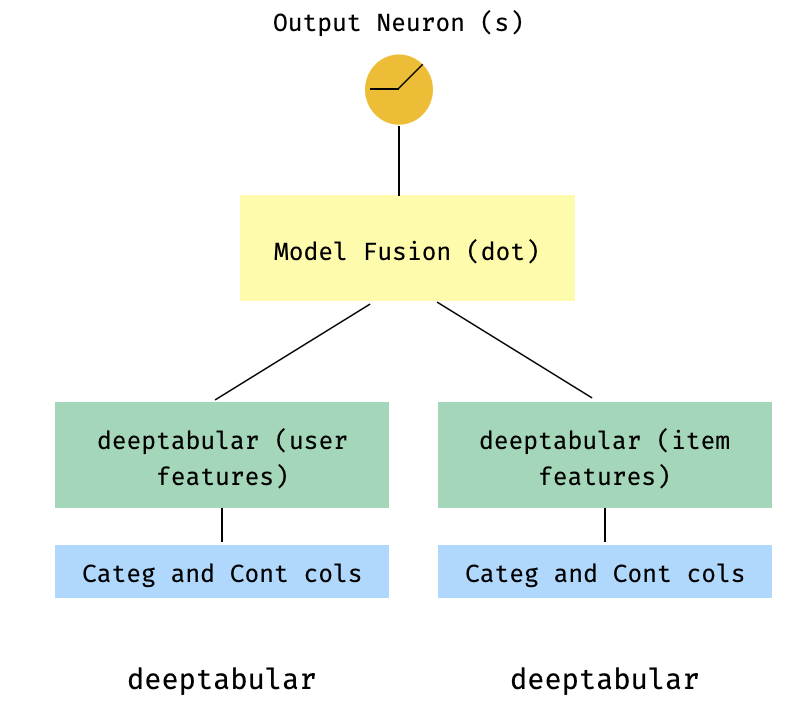
7. Model dua menara
Ini adalah model populer dalam konteks sistem rekomendasi. Katakanlah kami memiliki dataset tabular yang membentuk tiga kali lipat saya (fitur pengguna, fitur item, target). Kami dapat membuat model dua menara di mana fitur pengguna dan item dilewatkan melalui dua model terpisah dan kemudian "menyatu" melalui produk titik.
 import numpy as np
import pandas as pd

from pytorch_widedeep import Trainer
from pytorch_widedeep . preprocessing import TabPreprocessor
from pytorch_widedeep . models import TabMlp , WideDeep , ModelFuser

# Let's create the interaction dataset
# user_features dataframe
np . random . seed ( 42 )
user_ids = np . arange ( 1 , 101 )
ages = np . random . randint ( 18 , 60 , size = 100 )
genders = np . random . choice ([ "male" , "female" ], size = 100 )
locations = np . random . choice ([ "city_a" , "city_b" , "city_c" , "city_d" ], size = 100 )
user_features = pd . DataFrame (
    { "id" : user_ids , "age" : ages , "gender" : genders , "location" : locations }
)

# item_features dataframe
item_ids = np . arange ( 1 , 101 )
prices = np . random . uniform ( 10 , 500 , size = 100 ). round ( 2 )
colors = np . random . choice ([ "red" , "blue" , "green" , "black" ], size = 100 )
categories = np . random . choice ([ "electronics" , "clothing" , "home" , "toys" ], size = 100 )

item_features = pd . DataFrame (
    { "id" : item_ids , "price" : prices , "color" : colors , "category" : categories }
)

# Interactions dataframe
interaction_user_ids = np . random . choice ( user_ids , size = 1000 )
interaction_item_ids = np . random . choice ( item_ids , size = 1000 )
purchased = np . random . choice ([ 0 , 1 ], size = 1000 , p = [ 0.7 , 0.3 ])
interactions = pd . DataFrame (
    {
        "user_id" : interaction_user_ids ,
        "item_id" : interaction_item_ids ,
        "purchased" : purchased ,
    }
)
user_item_purchased = interactions . merge (
    user_features , left_on = "user_id" , right_on = "id"
). merge ( item_features , left_on = "item_id" , right_on = "id" )

# Users
tab_preprocessor_user = TabPreprocessor (
    cat_embed_cols = [ "gender" , "location" ],
    continuous_cols = [ "age" ],
)
X_user = tab_preprocessor_user . fit_transform ( user_item_purchased )
tab_mlp_user = TabMlp (
    column_idx = tab_preprocessor_user . column_idx ,
    cat_embed_input = tab_preprocessor_user . cat_embed_input ,
    continuous_cols = [ "age" ],
    mlp_hidden_dims = [ 16 , 8 ],
    mlp_dropout = [ 0.2 , 0.2 ],
)

# Items
tab_preprocessor_item = TabPreprocessor (
    cat_embed_cols = [ "color" , "category" ],
    continuous_cols = [ "price" ],
)
X_item = tab_preprocessor_item . fit_transform ( user_item_purchased )
tab_mlp_item = TabMlp (
    column_idx = tab_preprocessor_item . column_idx ,
    cat_embed_input = tab_preprocessor_item . cat_embed_input ,
    continuous_cols = [ "price" ],
    mlp_hidden_dims = [ 16 , 8 ],
    mlp_dropout = [ 0.2 , 0.2 ],
)

two_tower_model = ModelFuser ([ tab_mlp_user , tab_mlp_item ], fusion_method = "dot" )

model = WideDeep ( deeptabular = two_tower_model )

trainer = Trainer ( model , objective = "binary" )

trainer . fit (
    X_tab = [ X_user , X_item ],
    target = interactions . purchased . values ,
    n_epochs = 1 ,
    batch_size = 32 ,
)
8. Tabular dengan kerugian multi-target
Yang ini adalah "bonus" untuk menggambarkan penggunaan kerugian multi-target, lebih dari sebenarnya arsitektur yang berbeda.
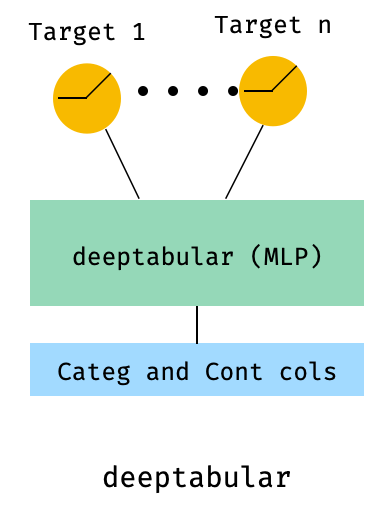
 from pytorch_widedeep . preprocessing import TabPreprocessor , TextPreprocessor , ImagePreprocessor
from pytorch_widedeep . models import TabMlp , BasicRNN , WideDeep , ModelFuser , Vision
from pytorch_widedeep . losses_multitarget import MultiTargetClassificationLoss
from pytorch_widedeep . models . _base_wd_model_component import BaseWDModelComponent
from pytorch_widedeep import Trainer

# let's add a second target to the dataframe
df [ "target2" ] = [ random . choice ([ 0 , 1 ]) for _ in range ( 100 )]

# Tabular
tab_preprocessor = TabPreprocessor (
    embed_cols = [ "city" , "name" ], continuous_cols = [ "age" , "height" ]
)
X_tab = tab_preprocessor . fit_transform ( df )
tab_mlp = TabMlp (
    column_idx = tab_preprocessor . column_idx ,
    cat_embed_input = tab_preprocessor . cat_embed_input ,
    continuous_cols = tab_preprocessor . continuous_cols ,
    mlp_hidden_dims = [ 64 , 32 ],
)

# 'pred_dim=2' because we have two binary targets. For other types of targets,
#  please, see the documentation
model = WideDeep ( deeptabular = tab_mlp , pred_dim = 2 ).

loss = MultiTargetClassificationLoss ( binary_config = [ 0 , 1 ], reduction = "mean" )

# When a multi-target loss is used, 'custom_loss_function' must not be None.
# See the docs
trainer = Trainer ( model , objective = "multitarget" , custom_loss_function = loss )

trainer . fit (
    X_tab = X_tab ,
    target = df [[ "target" , "target2" ]]. values ,
    n_epochs = 1 ,
    batch_size = 32 ,
)deeptabular Penting untuk ditekankan lagi bahwa setiap komponen individu, wide , deeptabular , deeptext dan deepimage , dapat digunakan secara mandiri dan terpisah. Misalnya, seseorang hanya bisa menggunakan wide , yang hanya dalam model linier. Faktanya, salah satu fungsi paling menarik di pytorch-widedeep adalah penggunaan komponen deeptabular dengan sendirinya, yaitu apa yang biasanya dirujuk sebagai pembelajaran mendalam untuk data tabel. Saat ini, pytorch-widedeep menawarkan model yang berbeda untuk komponen itu:
Dua model berbasis perhatian yang lebih sederhana yang kami sebut:
Keluarga Tabformer , IE Transformers untuk Data Tabel:
Dan model DL probabilistik untuk data tabel berdasarkan ketidakpastian berat dalam jaringan saraf:
Wide .TabMlpPerhatikan bahwa walaupun ada publikasi ilmiah untuk TabTransformer, Saint dan FT-Transformer, TabFasfformer dan Tabperceiver adalah adaptasi kita sendiri dari algoritma untuk data tabel.
Selain itu, pra-pelatihan yang di-swadaya dapat digunakan untuk semua model deeptabular , dengan pengecualian TabPerceiver . Pra-pelatihan yang di-pelatihan sendiri dapat digunakan melalui dua metode atau rutin yang kami sebut sebagai: metode encoder-decoder dan metode denoisasi konstruktif. Silakan, lihat dokumentasi dan contoh untuk detail tentang fungsi ini, dan semua opsi lain di perpustakaan.
recModul ini diperkenalkan sebagai ekstensi ke komponen yang ada di perpustakaan, menangani pertanyaan dan masalah yang terkait dengan sistem rekomendasi. Meskipun masih dalam pengembangan aktif, saat ini mencakup sejumlah model rekomendasi yang kuat.
Perlu dicatat bahwa perpustakaan ini sudah mendukung implementasi berbagai algoritma rekomendasi menggunakan komponen yang ada. Misalnya, model seperti penyaringan kolaboratif yang luas dan dalam, dua menara, atau saraf dapat dibangun menggunakan fungsi inti perpustakaan.
Algoritma rekomendasi dalam modul rec adalah:
Lihat contoh untuk detail tentang cara menggunakan model ini.
Untuk komponen teks, deeptext , perpustakaan menawarkan model berikut:
Untuk komponen gambar, deepimage , perpustakaan mendukung model dari keluarga berikut: 'resnet', 'shufflenet', 'resnext', 'wide_resnet', 'reagnet', 'densenet', 'mobilenetv3', 'mobilenetv2', 'mnasnet', 'dan efisiensi' dan mobilenetv2 '. Ini ditawarkan melalui torchvision dan dibungkus di kelas Vision .
Instal menggunakan PIP:
pip install pytorch-widedeepAtau instal langsung dari github
pip install git+https://github.com/jrzaurin/pytorch-widedeep.git # Clone the repository
git clone https://github.com/jrzaurin/pytorch-widedeep
cd pytorch-widedeep
# Install in dev mode
pip install -e . Berikut adalah contoh ujung ke ujung dari klasifikasi biner dengan dataset dewasa menggunakan pengaturan Wide dan DeepDense dan default.
Membangun model yang luas (linier) dan dalam dengan pytorch-widedeep :
 import numpy as np
import torch
from sklearn . model_selection import train_test_split

from pytorch_widedeep import Trainer
from pytorch_widedeep . preprocessing import WidePreprocessor , TabPreprocessor
from pytorch_widedeep . models import Wide , TabMlp , WideDeep
from pytorch_widedeep . metrics import Accuracy
from pytorch_widedeep . datasets import load_adult


df = load_adult ( as_frame = True )
df [ "income_label" ] = ( df [ "income" ]. apply ( lambda x : ">50K" in x )). astype ( int )
df . drop ( "income" , axis = 1 , inplace = True )
df_train , df_test = train_test_split ( df , test_size = 0.2 , stratify = df . income_label )

# Define the 'column set up'
wide_cols = [
    "education" ,
    "relationship" ,
    "workclass" ,
    "occupation" ,
    "native-country" ,
    "gender" ,
]
crossed_cols = [( "education" , "occupation" ), ( "native-country" , "occupation" )]

cat_embed_cols = [
    "workclass" ,
    "education" ,
    "marital-status" ,
    "occupation" ,
    "relationship" ,
    "race" ,
    "gender" ,
    "capital-gain" ,
    "capital-loss" ,
    "native-country" ,
]
continuous_cols = [ "age" , "hours-per-week" ]
target = "income_label"
target = df_train [ target ]. values

# prepare the data
wide_preprocessor = WidePreprocessor ( wide_cols = wide_cols , crossed_cols = crossed_cols )
X_wide = wide_preprocessor . fit_transform ( df_train )

tab_preprocessor = TabPreprocessor (
    cat_embed_cols = cat_embed_cols , continuous_cols = continuous_cols  # type: ignore[arg-type]
)
X_tab = tab_preprocessor . fit_transform ( df_train )

# build the model
wide = Wide ( input_dim = np . unique ( X_wide ). shape [ 0 ], pred_dim = 1 )
tab_mlp = TabMlp (
    column_idx = tab_preprocessor . column_idx ,
    cat_embed_input = tab_preprocessor . cat_embed_input ,
    continuous_cols = continuous_cols ,
)
model = WideDeep ( wide = wide , deeptabular = tab_mlp )

# train and validate
trainer = Trainer ( model , objective = "binary" , metrics = [ Accuracy ])
trainer . fit (
    X_wide = X_wide ,
    X_tab = X_tab ,
    target = target ,
    n_epochs = 5 ,
    batch_size = 256 ,
)

# predict on test
X_wide_te = wide_preprocessor . transform ( df_test )
X_tab_te = tab_preprocessor . transform ( df_test )
preds = trainer . predict ( X_wide = X_wide_te , X_tab = X_tab_te )

# Save and load

# Option 1: this will also save training history and lr history if the
# LRHistory callback is used
trainer . save ( path = "model_weights" , save_state_dict = True )

# Option 2: save as any other torch model
torch . save ( model . state_dict (), "model_weights/wd_model.pt" )

# From here in advance, Option 1 or 2 are the same. I assume the user has
# prepared the data and defined the new model components:
# 1. Build the model
model_new = WideDeep ( wide = wide , deeptabular = tab_mlp )
model_new . load_state_dict ( torch . load ( "model_weights/wd_model.pt" ))

# 2. Instantiate the trainer
trainer_new = Trainer ( model_new , objective = "binary" )

# 3. Either start the fit or directly predict
preds = trainer_new . predict ( X_wide = X_wide , X_tab = X_tab , batch_size = 32 )
Tentu saja, seseorang dapat melakukan lebih banyak lagi . Lihat Folder Contoh, dokumentasi atau posting pendamping untuk pemahaman yang lebih baik tentang konten paket dan fungsinya.
pytest tests
Periksa halaman yang berkontribusi.
Perpustakaan ini mengambil dari serangkaian perpustakaan lain, jadi saya pikir cukup adil untuk menyebutkannya di sini di ReadMe (sebutan khusus juga termasuk dalam kode).
Struktur dan kode Callbacks dan Initializers terinspirasi oleh pustaka torchsample , yang dengan sendirinya sebagian terinspirasi oleh Keras .
Kelas TextProcessor di perpustakaan ini menggunakan Tokenizer dan Vocab fastai . Kode di utils.fastai_transforms adalah adaptasi kecil dari kode mereka sehingga berfungsi dalam perpustakaan ini. Untuk pengalaman saya Tokenizer mereka adalah yang terbaik di kelasnya.
Kelas ImageProcessor di perpustakaan ini menggunakan kode dari buku pembelajaran mendalam yang fantastis untuk visi komputer (DL4CV) oleh Adrian Rosebrock.
Karya ini berlisensi ganda di bawah Apache 2.0 dan MIT (atau versi selanjutnya). Anda dapat memilih di antara mereka jika Anda menggunakan pekerjaan ini.
SPDX-License-Identifier: Apache-2.0 AND MIT
 @article{Zaurin_pytorch-widedeep_A_flexible_2023,
author = {Zaurin, Javier Rodriguez and Mulinka, Pavol},
doi = {10.21105/joss.05027},
journal = {Journal of Open Source Software},
month = jun,
number = {86},
pages = {5027},
title = {{pytorch-widedeep: A flexible package for multimodal deep learning}},
url = {https://joss.theoj.org/papers/10.21105/joss.05027},
volume = {8},
year = {2023}
}
 Zaurin, J. R., & Mulinka, P. (2023). pytorch-widedeep: A flexible package for
multimodal deep learning. Journal of Open Source Software, 8(86), 5027.
https://doi.org/10.21105/joss.05027








