nx100 remote control
Release - 1.0.3

Yaskawa Motoman NX100 Robot Industri Remote Control Perpustakaan Python. Perpustakaan ini awalnya dikembangkan untuk Proyek Pengembangan Kontrol Visi Mesin. Lihat lebih banyak di video demo YouTube.
Dokumen untuk pengembangan
Video -video ini adalah bagian dari dokumentasi.
- Do changes with your own risk! in case you brick your robot or your setup is different and it doesn't work. I cannot help. System info -> Security -> Select Management Mode ->
But do not enter Management Mode password but instead Yaskawa emperor password.
FD078 => bit set to 1 (Ethernet WWW)
LAN0 (next to serial COM port)
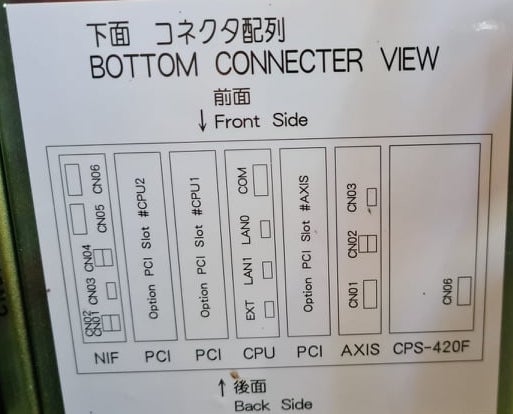
 1. Power off NX100 -> press down pendant "MAIN MENU" button while powering on NX100
2. Release "MAIN MENU" after seeing Motoman screen on pendant.
3. Login with Yaskawa emperor password from System -> Security.
4. SYSTEM -> SETUP -> OPTION FUNCTION -> TCP -> "USED"
5. SYSTEM -> SETUP -> OPTION FUNCTION -> NETWORK -> Give details.
6. Under network also find HOST SETUP -> Provide address details.
7. See that your changes have been saved.
8. Reboot NX100 and ping your NX100 ip address.
9. Test out this library.
pip install nx100-remote-control
pip install --upgrade nx100-remote-control import nx100_remote_control
nx100_remote_control . NX100_IP_ADDRESS = '192.168.2.28'
nx100_remote_control . NX100_TCP_PORT = 80
nx100_remote_control . MOCK_RESPONSE = False http://localhost:8080/ yang terlihat seperti ini di gambar di bawah ini. import nx100_remote_control
from nx100_remote_control . module import WebServer
nx100_remote_control . MOCK_RESPONSE = True
WebServer . run ( addr = "localhost" , port = 8080 )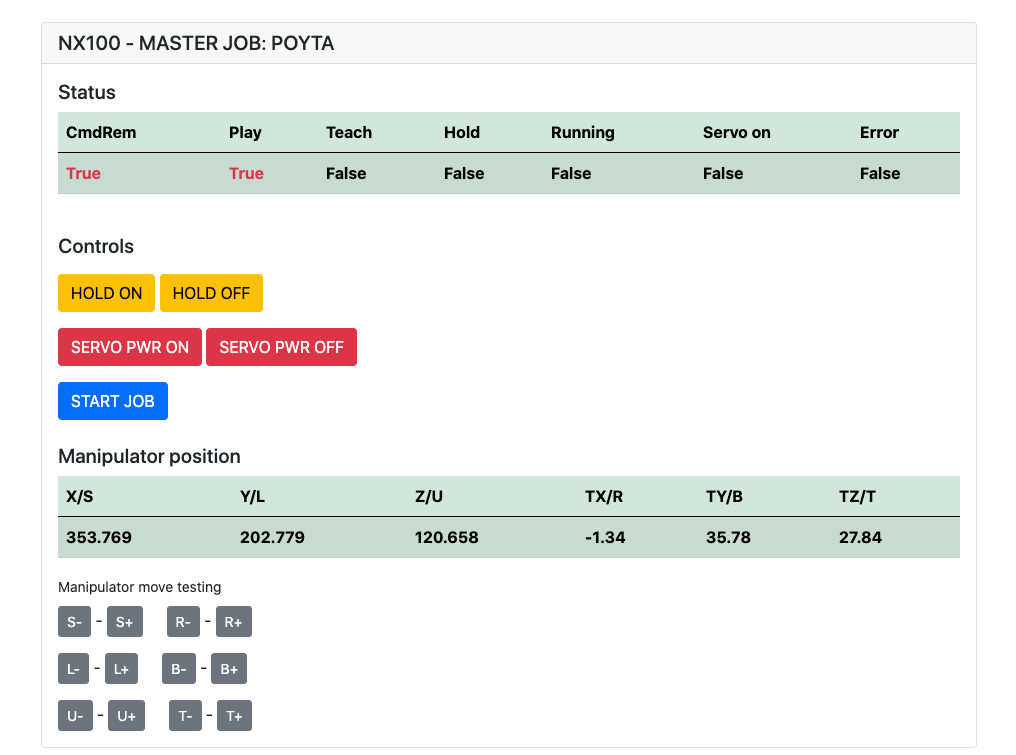
Harus diinstal: pip install flake8 pytest
Serat: flake8 ./nx100_remote_control --count --select=E9,F63,F7,F82 --show-source --statistics
Tes: pytest
Build: python -m build
Testing.py => digunakan untuk pengembangan dan pengujian perintah individu.
XboxController.py => seperti yang dikatakan nama, dapat menggunakan controller untuk mengontrol robot, hanya demo. Perhatikan bahwa pergerakan kikuk karena NX100 tidak mendukung pengendalian waktu nyata.
Sampel cepat untuk perintah MOVL untuk melakukan gerakan linier dengan robot. Lihat Objek MOVEL untuk detail lebih lanjut atau Baca Ethernet Server Function Manual .
 from nx100_remote_control . module import Commands , Utils
from nx100_remote_control . objects import MoveL

Commands . write_linear_move ( MoveL . MoveL (
    MoveL . MoveL . motion_speed_selection_posture_speed ,
    5 ,
    MoveL . MoveL . coordinate_specification_base_coordinate ,
    353.769 , 202.779 , 120.658 ,
    - 1.34 , 35.78 , 27.84 ,
    Utils . binary_to_decimal ( 0x00000001 ),
    0 , 0 , 0 , 0 , 0 , 0 , 0
))
Gunakan objek movel.movel untuk melihat opsi untuk motion_speed_selection_ dan untuk coordinate_specification_
Kemudian untuk menunggu pindah untuk diselesaikan, Anda dapat menggunakan fungsi panggilan balik sebagai contoh:
 from nx100_remote_control . module import Commands , Utils
from nx100_remote_control . objects import MoveL


def callback_success ():
    print ( 'MoveL position has been reached' )


def callback_failed ():
    print ( 'MoveL error or position not reached on given timeout' )


move_l = MoveL . MoveL (
    MoveL . MoveL . motion_speed_selection_posture_speed ,
    5 ,
    MoveL . MoveL . coordinate_specification_base_coordinate ,
    353.769 , 202.779 , 120.658 ,
    - 1.34 , 35.78 , 27.84 ,
    Utils . binary_to_decimal ( 0x00000001 ),
    0 , 0 , 0 , 0 , 0 , 0 , 0
)

Commands . robot_in_target_point_callback (
    move_l = move_l , timeout = 10 , _callback_success = callback_success , _callback_failed = callback_failed
)
Jadi ini akan mengeksekusi _callback_success jika posisi dicapai dalam waktu terbatas atau menjalankan _callback_failed jika tidak.
Cara Kelas Komandan Lain
 from nx100_remote_control . module import LinearMove , Utils
from nx100_remote_control . objects import MoveL

move_l = MoveL . MoveL (
    MoveL . MoveL . motion_speed_selection_posture_speed ,
    5 ,
    MoveL . MoveL . coordinate_specification_base_coordinate ,
    352.769 , 202.779 , 120.658 ,
    - 1.34 , 35.78 , 27.84 ,
    Utils . binary_to_decimal ( 0x00000001 ),
    0 , 0 , 0 , 0 , 0 , 0 , 0
)

linear_move = LinearMove . LinearMove ()
linear_move . go ( move_l = move_l , wait = True , poll_limit_seconds = 10 )
print ( 'finished' ) Sampel cepat untuk perintah MOVJ untuk melakukan gerakan gerakan bersama dengan robot. Baca Ethernet Server Function Manual untuk detail lebih lanjut tentang MOVJ
- !!! BE CAREFUL WITH MOVJ COMMAND AND IT'S SPEED SETTING !!! from nx100_remote_control . module import JointMove , Utils
from nx100_remote_control . objects import MoveJ
move_j = MoveJ . MoveJ (
25 , # speed %
MoveJ . MoveJ . coordinate_specification_base_coordinate ,
352.769 , 202.779 , 120.658 ,
- 1.34 , 35.78 , 27.84 ,
Utils . binary_to_decimal ( 0x00000001 ),
0 , 0 , 0 , 0 , 0 , 0 , 0
)
linear_move = JointMove . JointMove ()
linear_move . go ( move_j = move_j , wait = True , poll_limit_seconds = 10 )
print ( 'finished' )Folder Arduino berisi kode dan sketsa untuk gripper khusus yang terintegrasi untuk NX100 Motoman.
NX100 Ladder Config memiliki secara default GRP yang berarti sinyal dikelompokkan sehingga harus tidak mengelupasinya untuk mendapatkan akses ke output relay #30052 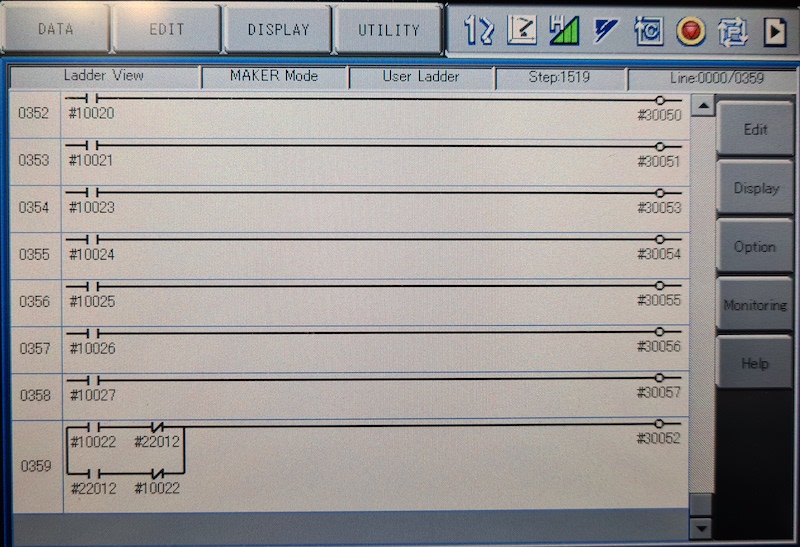
Gagasan di sini adalah bahwa saya harus dapat mengontrol relai relai #30052 dengan stok #10022 sinyal output universal tetapi juga dengan input jaringan #22012 sinyal dan ini membutuhkan STR + tidak menangani kedua kasus (lihat garis tangga gambar 0359)
Bekerja dalam proses dengan Gripper.
 from nx100_remote_control . module import Gripper

Gripper . write_gripper_close ()
Gripper . write_gripper_open ()
Gripper . read_gripper_closed_command_register ()
Gripper . read_gripper_acknowledge ()
Gripper . read_gripper_hit ()Bit yang jelas adalah satu input dan dua output. Keputusan perangkat keras tidak masalah, kode dapat diubah sesuai.
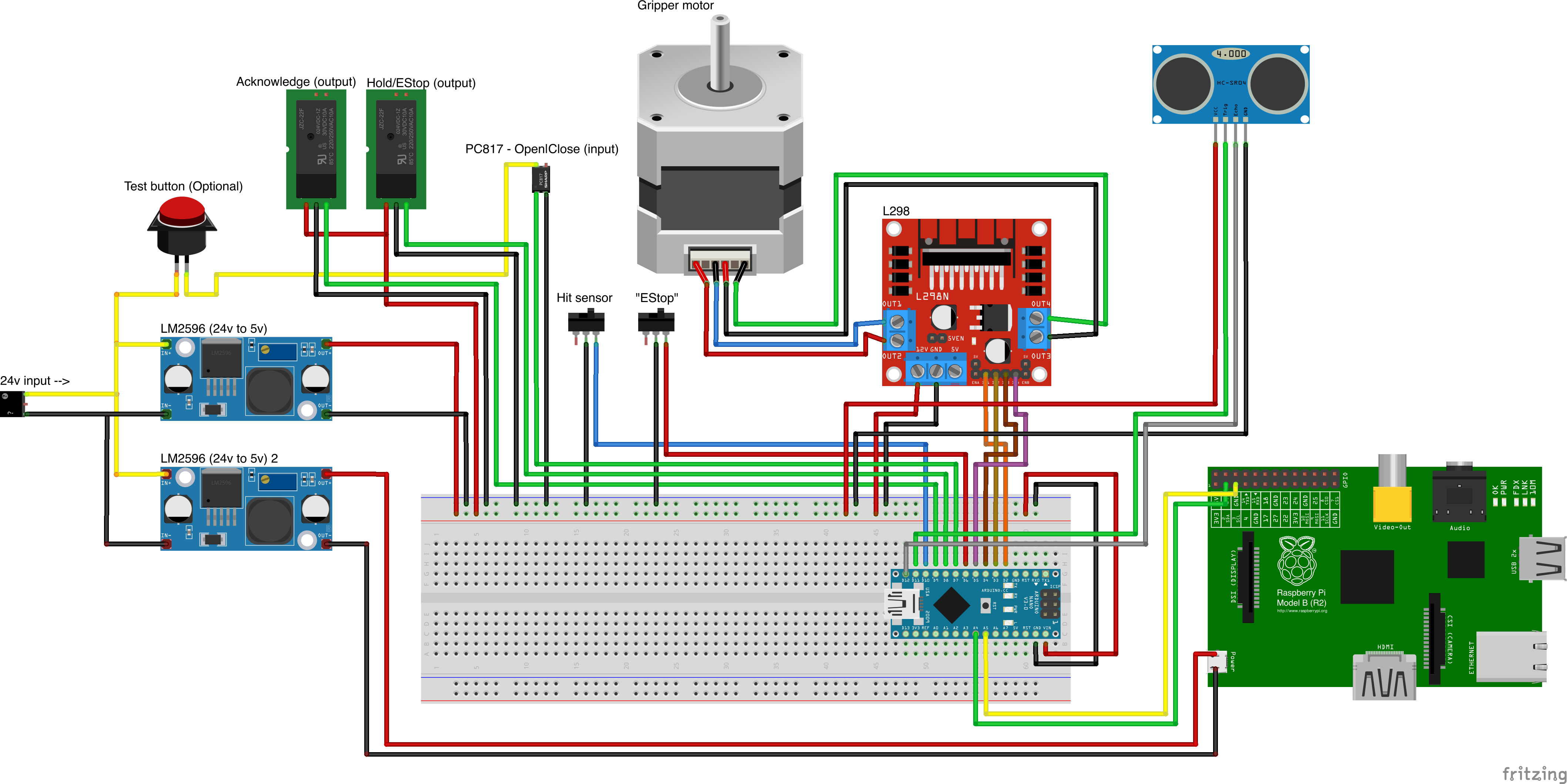
Sumber Bagian Kustom
- Remember to increment setup.cfg version before release tag!






