voice dataset creation
1.0.0

This repo outlines the steps and scripts necessary to create your own text-to-speech dataset for training a voice model. The final output is in LJSpeech format.
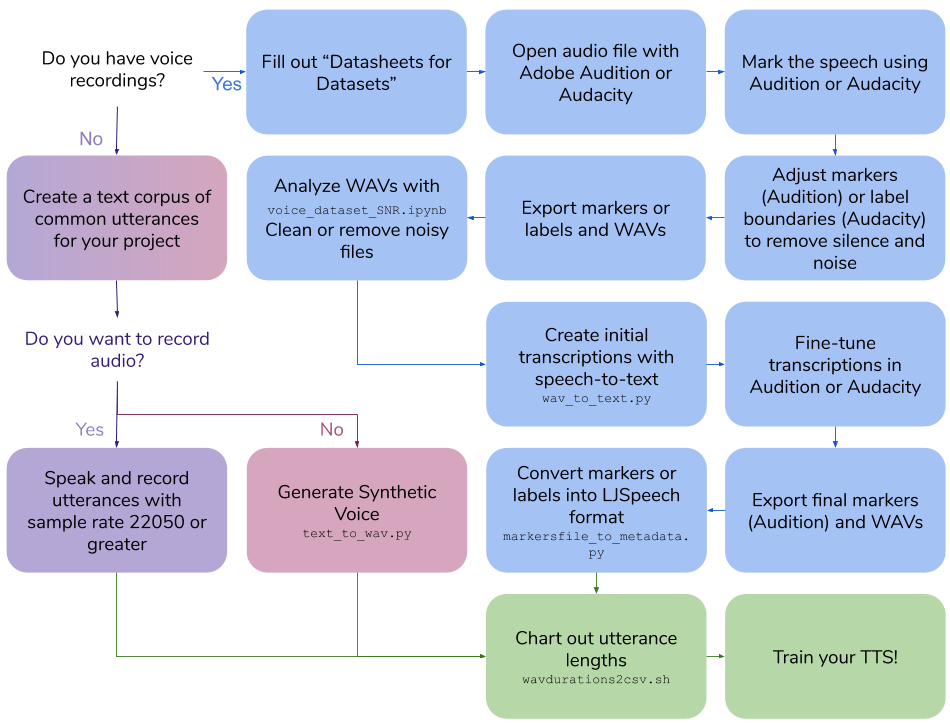
 Create Your Own Voice Recordings
100|this is an example sentenceRun scripts/wavdurations2csv.sh to chart out sentence length and verify that you have a good distribution of WAV file lengths.
 Create a Synthetic Voice Dataset
Cloud API access scopes select Allow full access to all Cloud APIsCreate Conda Environment on GCP Instance
conda create -n tts python=3.7
conda activate tts
pip install google-cloud-texttospeech==2.1.0 tqdm pandas100|this is an example sentencepython text_to_wav.py tts_generateRun scripts/wavdurations2csv.sh to chart out sentence length and verify that you have a good distribution of WAV file lengths.
 Create Transcriptions for Existing Voice Recordings
Cloud API access scopes select Allow full access to all Cloud APIsCreate Conda Environment on GCP Instance
conda create -n stt python=3.7
conda activate stt
pip install google-cloud-speech tqdm pandasIn Adobe Audition, open audio file:
Diagnostics -> Mark AudioMark the Speech presetScanFind LevelsScan againMark AllOr, in Audacity, open audio file:
Analyze->Sound FinderIn Audition:
Markers TabIn Audition:
In Audition:
Export Selected Markers to CSV and save as Markers.csvPreferences -> Media & Disk Cache and Untick Save Peak FilesExport Audio of Selected Range Markers with the following options:
Use marker names in filenamesWAV PCM22050 Hz Mono, 16-bitwavs_exportOr, in Audacity:
Export multiple...
wavs_exportExport labels to Label Track.txtFor Audition, using the exported Markers.csv and wavs folder run:
cd scripts
python wav_to_text.py audition
The script generates a new file, Markers_STT.csv.
For Audacity, using the exported Label Track.txt and wavs folder run:
cd scripts
python wav_to_text.py audacity
The script generates a new file, Label Track STT.csv.
For Audition:
Import Markers from File and select file with STT transcriptions: Markers_STT.csvFor Audacity:
Label Track STT.txt in a text editor.For Audition:
Export Selected Markers to CSV and save as Markers.csvExport Audio of Selected Range Markers with the following options:
Use marker names in filenamesWAV PCM22050 Hz Mono, 16-bitwavs_exportFor Audacity:
Export multiple...
wavs_exportUsing the exported Markers.csv(Audition) or Label Track STT.txt (Audacity) and WAVs in wavs_export, scripts/markersfile_to_metadata.py will create a metadata.csv and folder of WAVs to train your TTS model:
For Audition:
python markersfile_to_metadata.py auditionFor Audacity:
python markersfile_to_metadata.py audacityRun scripts/wavdurations2csv.sh to chart out sentence length and verify that you have a good distribution of WAV file lengths.
ffmpeg: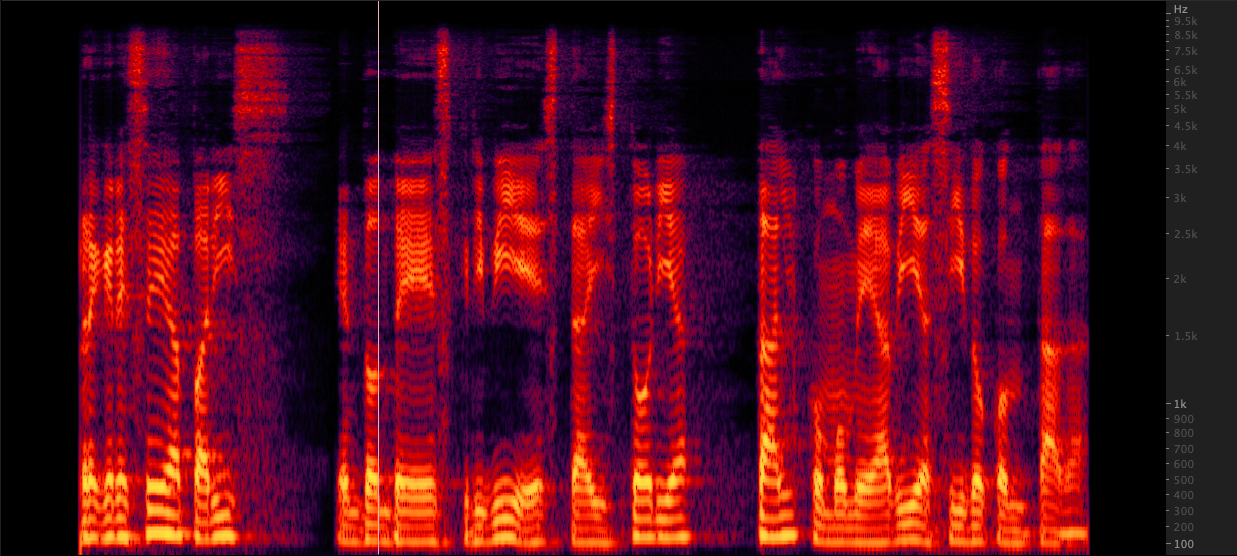 resampy:
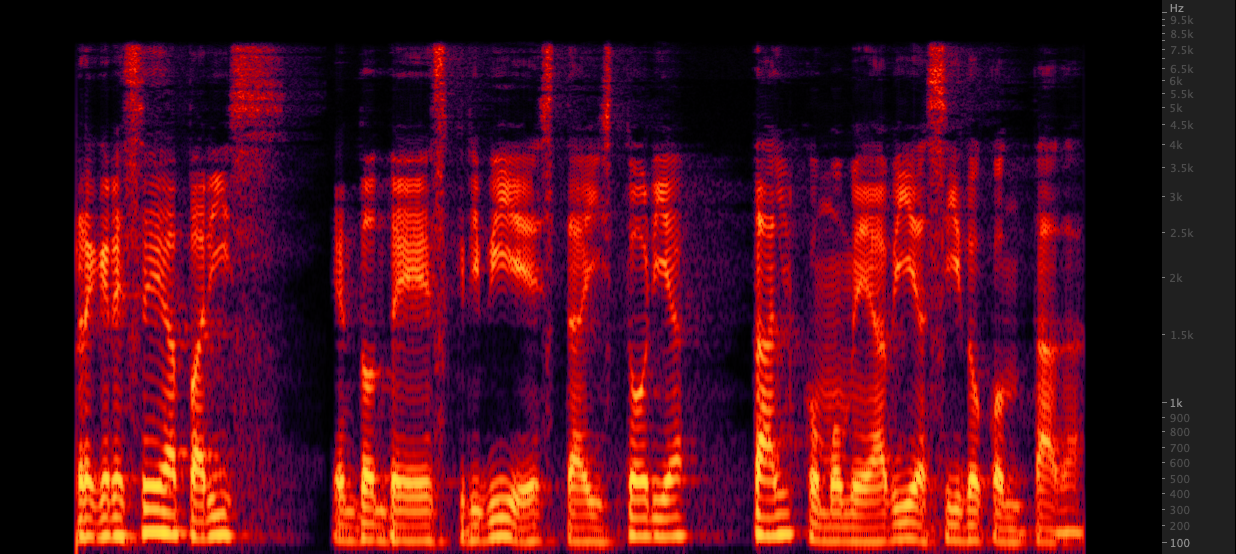 We tested three methods to upsample WAV files from 16,000 to 22,050 Hz. After reviewing the spectrograms, we selected ffmpeg for upsampling as it includes another 2 KHz of high end information when compared to resampy. scripts/resamplewav.sh
scripts/resamplewav.sh







