Introduction
- The purpose of this project is to expand the usage boundaries of Bert-VITS2, such as TTS synchronously generating facial expression data.
- See the effect
- Demo Bilibili Youtube
- TTS with Audio2PhotoReal --> MetaHuman
- Generate emoticon tests from singing; comparison of emoticons when talking to Azure TTS
- TTS generated emoji first version, fitted with MotionGPT
Extend to CosyVoice
Extended to GPT-SoVITS
- GPT-SoVITS Expression Test
- Retraining directly on GPT-SoVITS, the actual test results are relatively bad
- The temporary method is to directly copy the posterior part and expression generation part model from Bert-VITS2-ext to GPT-SoVITS for testing.
- This results in a repeated calculation and more predictions
TTS
TTS code originated from Bert-VITS2 v2.3 Final Release [Dec 20, 2023]
- https://github.com/fishaudio/Bert-VITS2/commit/7ebc1aa28a055608f7e31da93928cf295fdffeba
After testing, I personally feel that the training effect of pure Chinese materials 2.1-2.3 is slightly worse than that of 1.0. You can consider reducing the version or mixing it with pure Chinese.
The training method of TTS itself is shown in the original text (each version is different)
- Recommended version 1.0 https://github.com/YYuX-1145/Bert-VITS2-Integration-package
TTS synchronous output emoji
Ideas
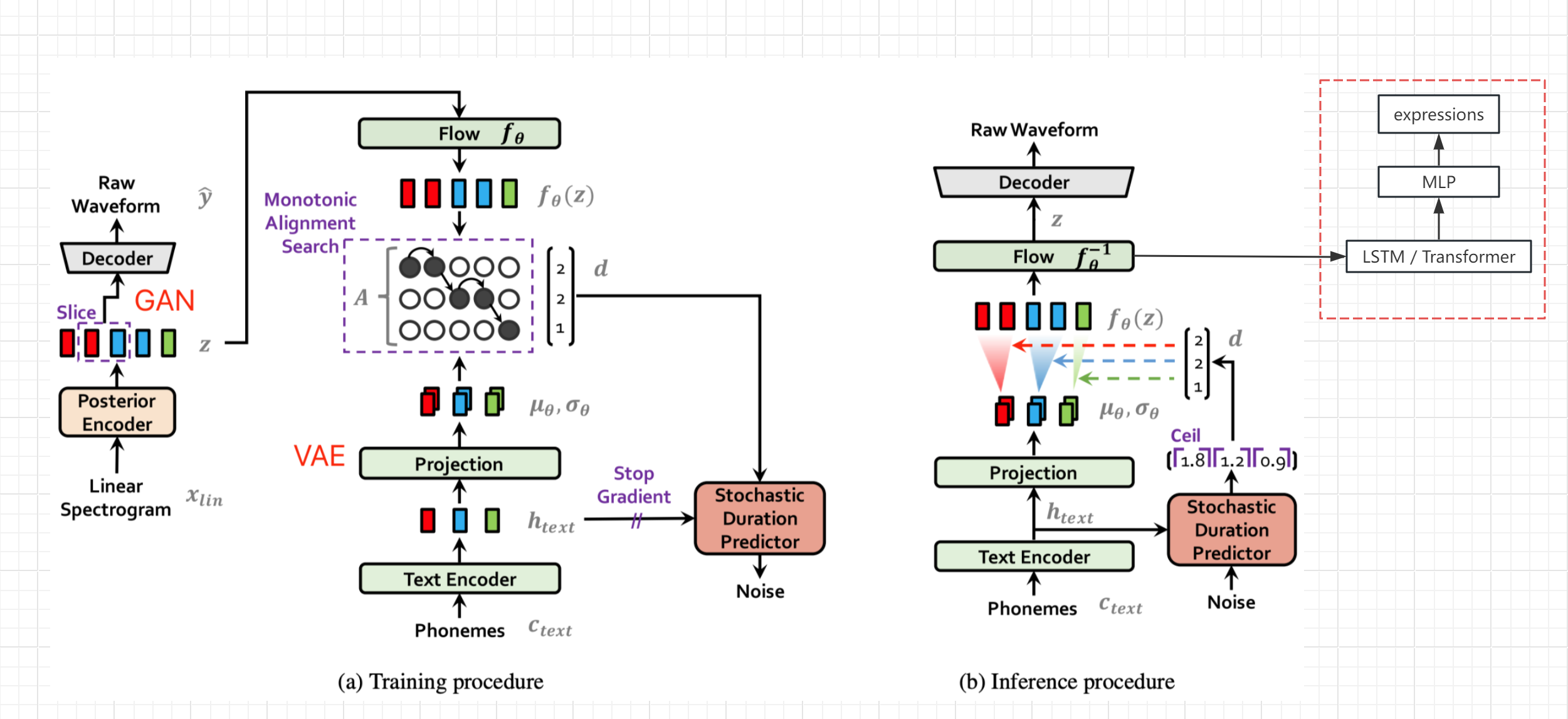
- Refer to the network structure diagram of the VITS paper (not bert-vits2, but the general structure is the same), obtain the hidden variable z after text encoding and transformation and before decoding, and output the expression value from the bypass (Live Link Face value)
- Freeze the parameters of the original network, add LSTM and MLP processing separately, and complete seq2seq generation and mapping of z-to-expression
- Of course, if there is high-quality expression data, the expression can also be added to the original TTS network training, which should improve the audio quality
Data collection
- Set the Targets of Live Link Face to the native IP, and the port defaults to 11111
- Synchronously collect voice and corresponding expression values output by Live Link, and store them into the records folder respectively
- Execute script collection for 20 seconds each time
- Audio defaults to 44100 Hz
- Audio and expression collection may be offset
- Comparison of the loss of the verification set to find the optimal offset position for the same data source
python ./motion/record.py
python ./motion/tts2ue.py --bs_npy_file ./records/2023-12-23-17-19-54.npy --wav_file ./records/2023-12-23-17-19-54.wav --fps 60
Data preprocessing
- Read all audio files in records, use the posterior encoder to store the hidden variable z encoded by the audio into *.z.npy
- Write to the list of files for training and verification
- fileslists/val_visemes.list
- fileslists/train_visemes.list
python ./motion/prepare_visemes.py
train
- Add --visemes after train_ms.py to distinguish between training from mainnet
python train_ms.py -m OUTPUT_MODEL --config ./configs/config.json --visemes
reasoning
- When webui.py is executed, the output audio, hidden variables, and animation data are written to the current directory. You can use tts2ue.py to view the generated effect
- The default fps of the generated animation is the same as the hidden variable 86.1328125
- 44100/86.1328125 = 512, just divisible, this is determined by Bert-VITS2 audio sampling frequency, network structure and hidden_channels
python ./motion/tts2ue.py --bs_npy_file ./tmp.npy --wav_file ./tmp.wav --delay_ms 700
Voice to expression
- Use the posterior encoder to convert the sound to z, and then convert the z into an expression
- Audio needs to be converted into a 44100hz wav file and only one channel is retained (ffmpeg)
 # 音频截取转换
ffmpeg -i input_file -ss 00:00:00 -t 00:00:10 -ar 44100 -f wav test.wav

# 保留通道1
ffmpeg -i test.wav -map_channel 0.0.0 output.wav

python  ./motion/wav_to_visemes.py output.wav
Body animation
MotionGPT
- With voice and expressions, you can also generate a matching action description under LLM drive, and then use the text to motion model to generate body animations that match the speech content, and even interact with the scene and others.
- The project used for text to motion testing is MotionGPT
- No animation overprocessing has been done yet. The motion in-between is supported by the introduction model.
- The flan-t5-base used by MotionGPT cannot understand Chinese, so it cannot generate animations with high synchronization with speaking text (the word order changes somewhat after translation into English)
- Whether it is possible to use the speaking text or hidden variable z to guide the generation of the action is not yet known
- MotionGPT outputs the bone position, which cannot be directly connected to the UE's skeleton animation.
- Currently, simplified methods are used to estimate the movement value, and there will be considerable position losses
- Calculate the amount of rotation change of the bone relative to the parent node (quaternion)
- Send it to the VMCtoMOP program through the OSC protocol, and preview the animation and perform protocol conversion
- Map MOP data to MetaHuman with the help of the Mop plugin
- The test version is UE5.3
audio2photoreal
- Modify on the basis of the original project, export animation data to local files during web interface inference
- Export process
- Code https://github.com/see2023/audio2photoreal
Bert-VITS2 Original Statement
VITS2 Backbone with multilingual bert
For quick guide, please refer to webui_preprocess.py .
For a simple tutorial, see webui_preprocess.py .
Please note that the core idea of this project comes from anyvoiceai/MassTTS a very good tts project
MassTTS' demo demo for Ai version of Feng Ge, and regained his lost waist in the Golden Triangle
Mature Traveler/Trail Blazers/Captain/Doctor/sensei/Wormurhunter/Meowloon/V should refer to the code to learn how to train yourself.
This project is strictly prohibited from being used for all purposes that violate the Constitution of the People's Republic of China, the Criminal Law of the People's Republic of China, the Punishment Law of the People's Republic of China, and the Civil Code of the People's Republic of China.
It is strictly prohibited for any politically related purpose.
Video:https://www.bilibili.com/video/BV1hp4y1K78E
Demo: https://www.bilibili.com/video/BV1TF411k78w
References
- anyvoiceai/MassTTS
- jaywalnut310/vits
- p0p4k/vits2_pytorch
- svc-develop-team/so-vits-svc
- PaddlePaddle/PaddleSpeech
- emotional-vits
- fish-speech
- Bert-VITS2-UI
Thanks to all contributors for their efforts








