Build a big model RAG knowledge base from scratch
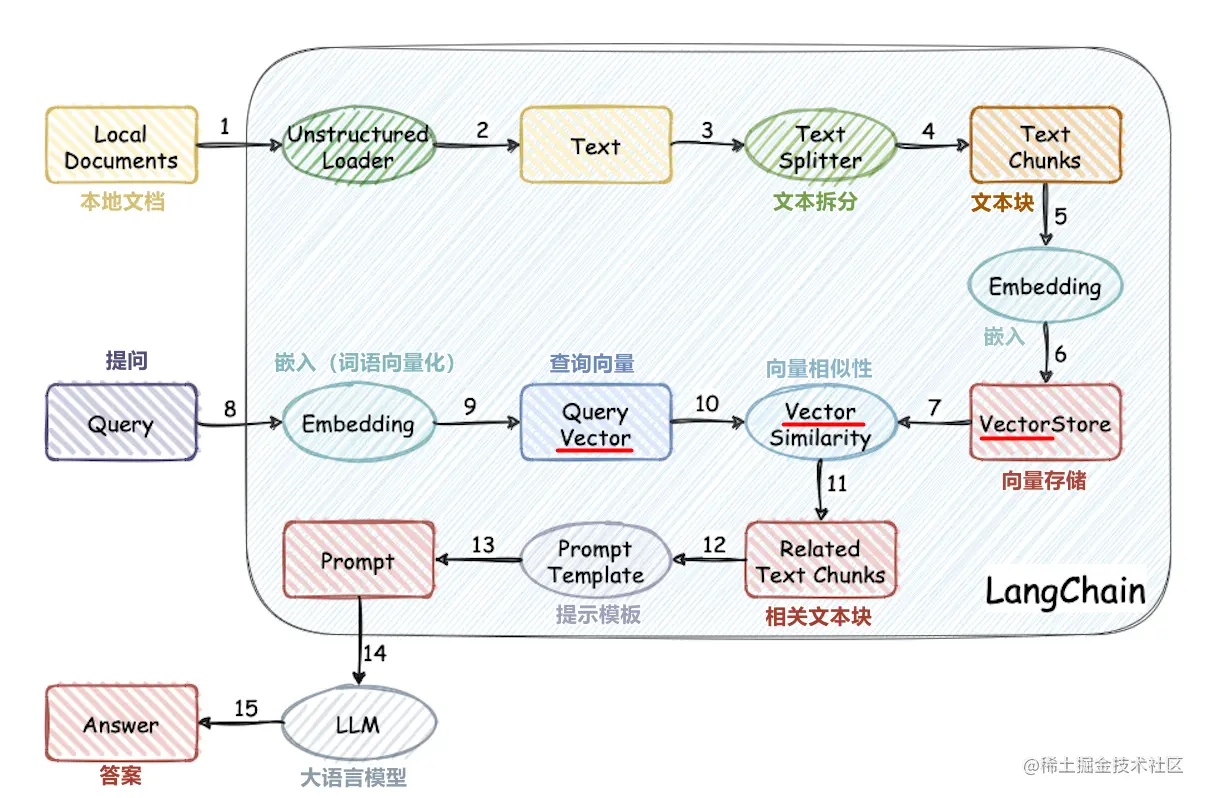
This project implements the process of using the external knowledge base for large-models from scratch:
- Chinese data set processing
- Word vector model training
- Document vectorization
- Vector database storage knowledge base
- Local ChatGLM2-6B big model deployment
- Simple knowledge base application
Project structure
- corpus: The folder where the knowledge base documents are stored
- data: data related to word vector model training (the model file is large, please download the model yourself)
- doc: source code and documentation for word vector model training
- llm_server: Simple knowledge base application
- vector_db: Save the document in corpus into the qdrant vector database
- config.json: Some configurations of the project
- OPENAI_API_KEY: openai's api key
- EMBEDDING_MODEL_TYPE: Text vectorized model openai or word2vec
- CHAT_MODEL_TYPE: Dialogue mockup openai or chatglm
- CHATGLM_PORT: Port for local deployment of ChatGLM
- **PATH: Some paths, starting from the project root directory
- COLLECTION_NAME: Name of vector database collection
run
Generate persistent knowledge base
 cd vector_db
pip install -r requirements.txt
python main.py
main.py will automatically create a vector database named COLLECTION_NAME and store the document vectors in the corpus folder into the database
Run the application
 cd llm_server
pip install -r requirements.txt
python main.py
Run locally deployed ChatGLM2-6B
Refer to the official document of ChatGLM2-6B
Tutorial






