literary alpaca2
1.0.0


From vocabulary to fine-tuning, this is everything you need
This repository will show how to build your own vocabulary from the vocabulary and use the dock model pre-training and fine-tuning the code examples in the repository are mainly trained based on the Hugging Face version of Llama2, providing training examples for GPU and TPU. Due to the limited energy of the author, there are bugs in the TPU script, which is for reference only.
| type | describe |
|---|---|
| Online novels | High-quality long text data |
| Math23K | Chinese Mathematics Problems |
| LCCC | Chinese open source dialogue set |
How to use LCCC dataset:
 from datasets import load_dataset
dataset = load_dataset("lccc", "base")  # or "large"
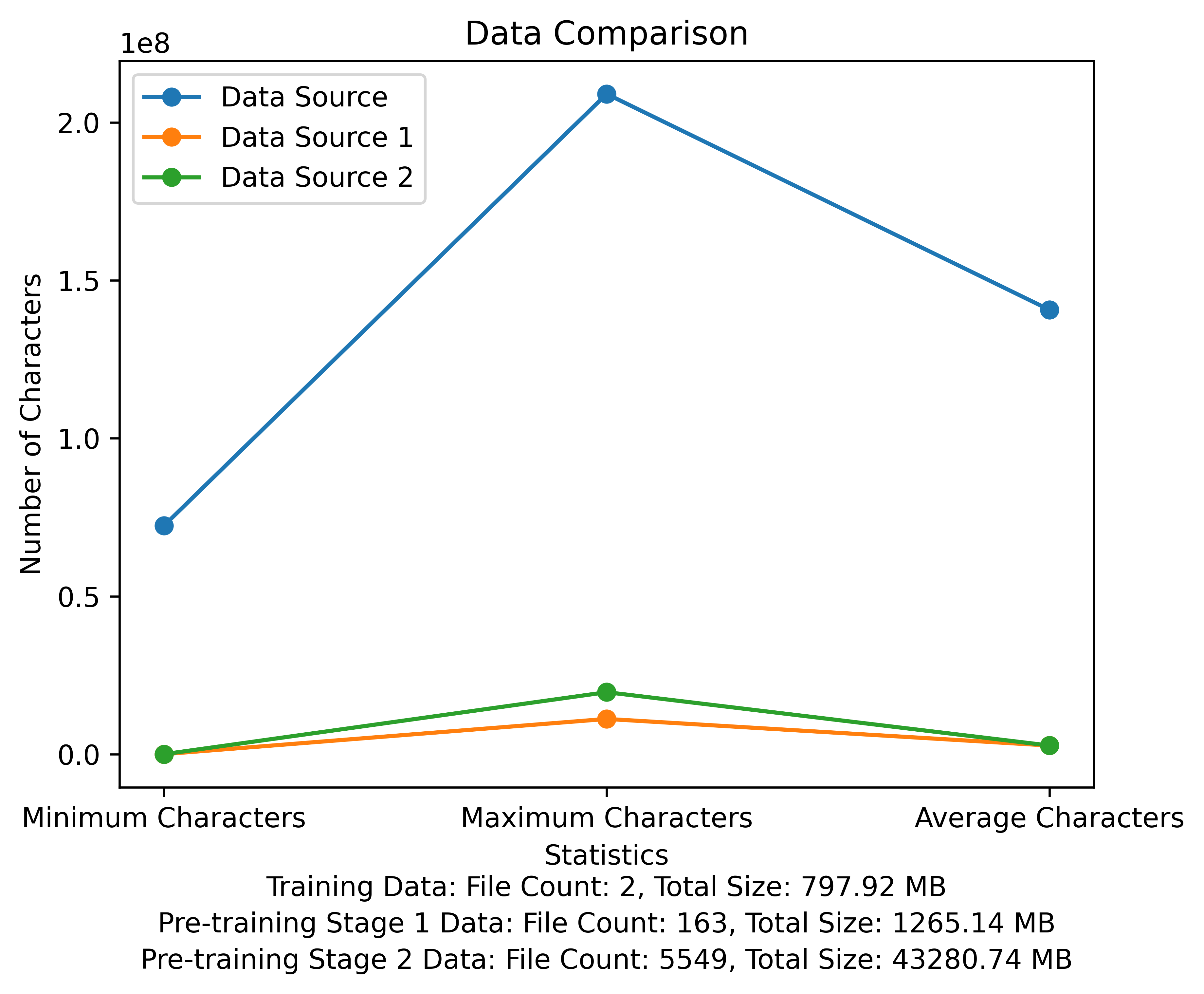
The vocabulary list and the data comparison diagram of the pre-training stage. The figure shows the number of files and total file sizes of each data source, and compares the minimum and maximum characters and the average number of characters in each file:
Meta official download link: https://huggingface.co/meta-llama
The Chinese pre-trained model, LoRA parameters, and chat models have all been uploaded to Hugging Face. Currently, there are only 13B models.
| category | ?Model name | Base model | Download address |
|---|---|---|---|
| Pre-training | taotie1/literary-alpaca2-13B | meta-llama/Llama-2-13b-hf | Model download |
| LoRA | taotie1/literary-alpaca2-13B-lora | taotie1/literary-alpaca2-13B | Model download |
| category | ?Model name | Download address |
|---|---|---|
| Chat | taotie1/literary-alpaca2-13B-chat | Model download |
According to requirements.txt installation environment dependencies, please select the version of torch installation according to your device.
 import torch
from transformers import AutoTokenizer , AutoModelForCausalLM
model = AutoModelForCausalLM . from_pretrained ( 'taotie1/literary-alpaca2-13B-chat' , device_map = 'auto' , torch_dtype = torch . float16 , load_in_8bit = True )
model = model . eval ()
tokenizer = AutoTokenizer . from_pretrained ( 'taotie1/literary-alpaca2-13B-chat' , use_fast = False )
tokenizer . pad_token = tokenizer . eos_token
input_ids = tokenizer ([ '<s>Human: 什么是计算机n </s><s>Assistant: ' ], return_tensors = "pt" , add_special_tokens = False ). input_ids . to ( 'cuda' )
generate_input = {
    "input_ids" : input_ids ,
    "max_new_tokens" : 512 ,
    "do_sample" : True ,
    "top_k" : 50 ,
    "top_p" : 0.95 ,
    "temperature" : 0.3 ,
    "repetition_penalty" : 1.3 ,
    "eos_token_id" : tokenizer . eos_token_id ,
    "bos_token_id" : tokenizer . bos_token_id ,
    "pad_token_id" : tokenizer . pad_token_id
}
generate_ids  = model . generate ( ** generate_input )
text = tokenizer . decode ( generate_ids [ 0 ])
print ( text ) First name and clean your training data [optional]
Choose to run the random cleaning code or clean it all, and you can customize your rules in ill_ocr_regex.txt.
Run full_sample_extraction.py to merge the data into a file.
Refer to train-chinese-tokenizer.ipynb for vocabulary training, and you can modify the code according to your own needs. After the training is completed, put your vocabulary list into the my-tokenizer directory. Merge with the tokenizer of the original llama2 in the following way
 bash运行
'
Set PROTOCOL_BUFFERS_PYTHON_IMPLEMENTATION=python
python incorporation.py
'
Run text.py to test the vocabulary effect
This repository training code uses DeepSpeed to speed up
如两机8卡:torchrun --nnodes 2 --nproc_per_node 8
    for name, param in model.named_parameters():
        if "model.embed_tokens" not in name:
            param.requires_grad = False
        else:
            param.requires_grad = True
      --load_in_kbits 设置量化,不为4或8则不启用量化
      --bf16 | --fp16 启用bf16需要gpu硬件支持
如果出现OOM请在deepspeed_config_peft2.json配置中添加:
    "zero_optimization": {
        "stage": 3,
        "offload_optimizer": {
            "device": "cpu",
            "pin_memory": true
        },
        "offload_param": {
            "device": "cpu",
            "pin_memory": true
        },
        "overlap_comm": true,
        "contiguous_gradients": true,
        "sub_group_size": 1e9,
        "reduce_bucket_size": "auto",
        "stage3_prefetch_bucket_size": "auto",
        "stage3_param_persistence_threshold": "auto",
        "stage3_max_live_parameters": 1e9,
        "stage3_max_reuse_distance": 1e9,
        "stage3_gather_16bit_weights_on_model_save": true
    },
- Using pretrain script 2 pretrain-peft2.sh will generate lora parameters. You can run the merge_lora_low_mem.py script modified from Chinese-LLaMA-Alpaca-2 to merge
 python merge_lora_low_mem.py
    --base_model /root/LiteraryAlpaca2
    --lora_model /root/autodl-tmp/LiteraryAlpaca2-lora
    --output_type huggingface
    --output_dir /root/autodl-tmp/LiteraryAlpaca2
Display of personalized adjustments to simple data sets:

Use the conversion script in the sft directory to convert the dataset into the required training format. The original datasets used in this project are all in json format. Please modify the conversion script as needed:
The generated json file format is:
 [
  {"instruction" : ...,
   "input" : ...,
   "output" : ...},
  ...
]
For example:
  {
    "instruction": "下面是人类之间的对话与交流",
    "input": "火锅 我 在 重庆 成都 吃 了 七八 顿 火锅",
    "output": [
      "哈哈哈哈 ! 那 我 的 嘴巴 可能 要 烂掉 !",
      "不会 的 就是 好 油腻"
    ]
  }
The converted csv file contains a column of "text", each behavior is a training example, and each training example is organized into the input of the model in the following format:
"<s>Human: "+...+"n</s><s>Assistant: "+...
For example:
 <s>Human: 镇海雅乐学校二年级的小朋友到一条小路的一边植树.小朋友们每隔2米种一棵树(马路两头都种了树),最后发现一共种了11棵,这条小路长多少米.</s><s>Assistant: 根据方程式x=(11-1)*2解得:
20</s>
Run sft/sft-peft.sh in the sft directory to start training. For the specific implementation code, see sft/sft-peft.py





