ai00_server
v0.5.9


AI00 RWKV Server is an inference API server for the RWKV language model based upon the web-rwkv inference engine.
It supports Vulkan parallel and concurrent batched inference and can run on all GPUs that support Vulkan. No need for Nvidia cards!!! AMD cards and even integrated graphics can be accelerated!!!
No need for bulky pytorch, CUDA and other runtime environments, it's compact and ready to use out of the box!
Compatible with OpenAI's ChatGPT API interface.
100% open source and commercially usable, under the MIT license.
If you are looking for a fast, efficient, and easy-to-use LLM API server, then AI00 RWKV Server is your best choice. It can be used for various tasks, including chatbots, text generation, translation, and Q&A.
Join the AI00 RWKV Server community now and experience the charm of AI!
QQ Group for communication: 30920262
RWKV model, it has high performance and accuracyVulkan inference acceleration, you can enjoy GPU acceleration without the need for CUDA! Supports AMD cards, integrated graphics, and all GPUs that support Vulkan
pytorch, CUDA and other runtime environments, it's compact and ready to use out of the box!Directly download the latest version from Release
After downloading the model, place the model in the assets/models/ path, for example, assets/models/RWKV-x060-World-3B-v2-20240228-ctx4096.st
Optionally modify assets/configs/Config.toml for model configurations like model path, quantization layers, etc.
Run in the command line
$ ./ai00_rwkv_serverOpen the browser and visit the WebUI at http://localhost:65530 (https://localhost:65530 if tls is enabled)
Install Rust
Clone this repository
$ git clone https://github.com/cgisky1980/ai00_rwkv_server.git
$ cd ai00_rwkv_server
After downloading the model, place the model in the assets/models/ path, for example, assets/models/RWKV-x060-World-3B-v2-20240228-ctx4096.st
Compile
$ cargo build --releaseAfter compilation, run
$ cargo run --releaseOpen the browser and visit the WebUI at http://localhost:65530 (https://localhost:65530 if tls is enabled)
It only supports Safetensors models with the .st extension now. Models saved with the .pth extension using torch need to be converted before use.
Download the .pth model
(Recommended) Run the python script convert2ai00.py or convert_safetensors.py:
$ python ./convert2ai00.py --input /path/to/model.pth --output /path/to/model.stRequirements: Python, with torch and safetensors installed.
If you do not want to install python, In the Release you could find an executable called converter. Run
$ ./converter --input /path/to/model.pth --output /path/to/model.st$ cargo run --release --package converter -- --input /path/to/model.pth --output /path/to/model.st.st model in the assets/models/ path and modify the model path in assets/configs/Config.toml
--config: Configure file path (default: assets/configs/Config.toml)--ip: The IP address the server is bound to--port: Running portThe API service starts at port 65530, and the data input and output format follow the Openai API specification.
Note that some APIs like chat and completions have additional optional fields for advanced functionalities. Visit http://localhost:65530/api-docs for API schema.
/api/oai/v1/models/api/oai/models/api/oai/v1/chat/completions/api/oai/chat/completions/api/oai/v1/completions/api/oai/completions/api/oai/v1/embeddings/api/oai/embeddingsThe following is an out-of-box example of Ai00 API invocations in Python:
import openai

class Ai00:
    def __init__(self,model="model",port=65530,api_key="JUSTSECRET_KEY") :
        openai.api_base = f"http://127.0.0.1:{port}/api/oai"
        openai.api_key = api_key
        self.ctx = []
        self.params = {
            "system_name": "System",
            "user_name": "User",
            "assistant_name": "Assistant",
            "model": model,
            "max_tokens": 4096,
            "top_p": 0.6,
            "temperature": 1,
            "presence_penalty": 0.3,
            "frequency_penalty": 0.3,
            "half_life": 400,
            "stop": ['x00','nn']
        }

    def set_params(self,**kwargs):
        self.params.update(kwargs)

    def clear_ctx(self):
        self.ctx = []

    def get_ctx(self):
        return self.ctx

    def continuation(self, message):
        response = openai.Completion.create(
            model=self.params['model'],
            prompt=message,
            max_tokens=self.params['max_tokens'],
            half_life=self.params['half_life'],
            top_p=self.params['top_p'],
            temperature=self.params['temperature'],
            presence_penalty=self.params['presence_penalty'],
            frequency_penalty=self.params['frequency_penalty'],
            stop=self.params['stop']
        )
        result = response.choices[0].text
        return result

    def append_ctx(self,role,content):
        self.ctx.append({
            "role": role,
            "content": content
        })

    def send_message(self, message,role="user"):
        self.ctx.append({
            "role": role,
            "content": message
        })
        result = openai.ChatCompletion.create(
            model=self.params['model'],
            messages=self.ctx,
            names={
                "system": self.params['system_name'],
                "user": self.params['user_name'],
                "assistant": self.params['assistant_name']
            },
            max_tokens=self.params['max_tokens'],
            half_life=self.params['half_life'],
            top_p=self.params['top_p'],
            temperature=self.params['temperature'],
            presence_penalty=self.params['presence_penalty'],
            frequency_penalty=self.params['frequency_penalty'],
            stop=self.params['stop']
        )
        result = result.choices[0].message['content']
        self.ctx.append({
            "role": "assistant",
            "content": result
        })
        return result

ai00 = Ai00()
ai00.set_params(
    max_tokens = 4096,
    top_p = 0.55,
    temperature = 2,
    presence_penalty = 0.3,
    frequency_penalty = 0.8,
    half_life = 400,
    stop = ['x00','nn']
)
print(ai00.send_message("how are you?"))
print(ai00.send_message("me too!"))
print(ai00.get_ctx())
ai00.clear_ctx()
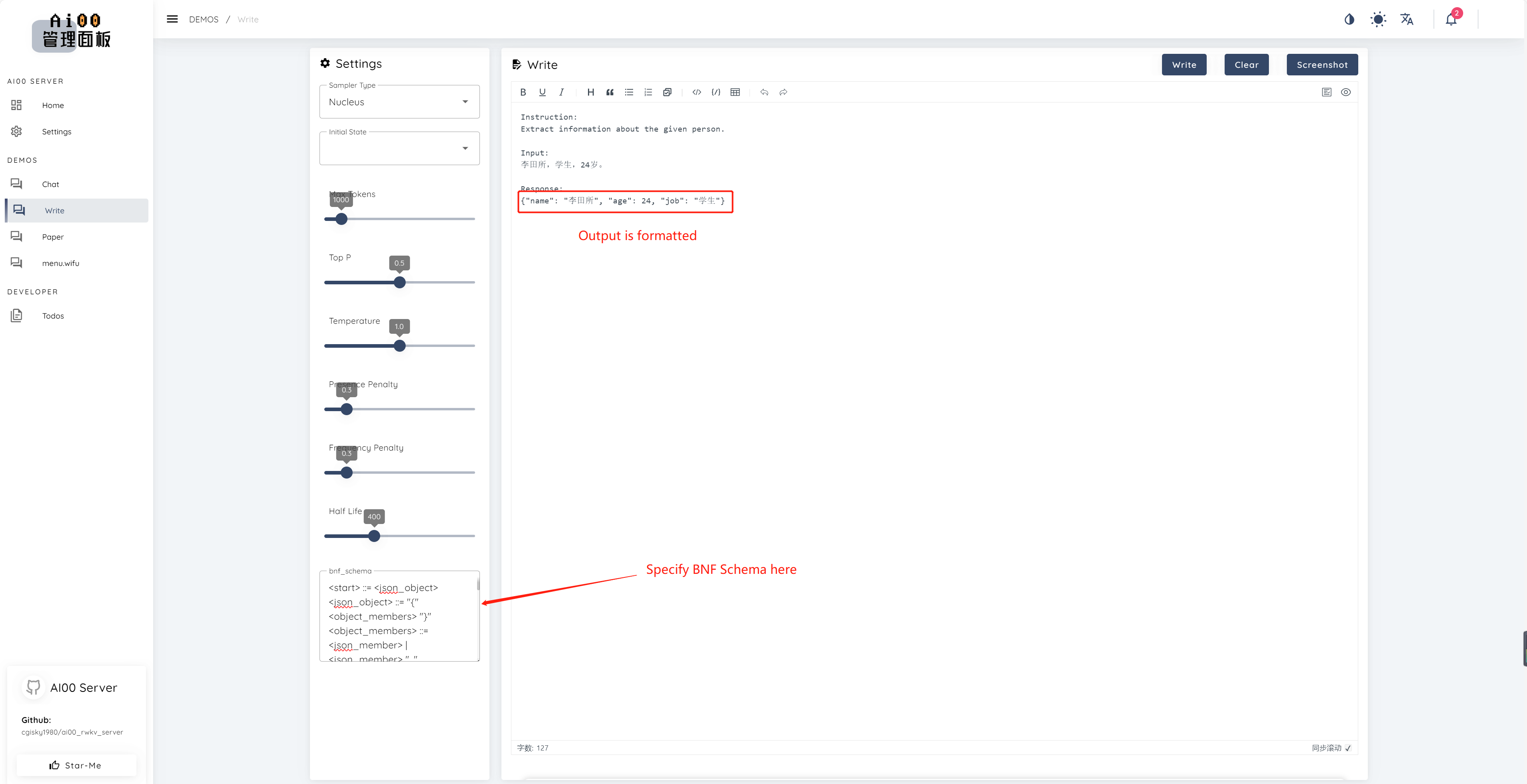
print(ai00.continuation("i like"))Since v0.5, Ai00 has a unique feature called BNF sampling. BNF forces the model to output in specified formats (e.g., JSON or markdown with specified fields) by limiting the possible next tokens the model can choose from.
Here is an example BNF for JSON with fields "name", "age" and "job":
<start> ::= <json_object>
<json_object> ::= "{" <object_members> "}"
<object_members> ::= <json_member> | <json_member> ", " <object_members>
<json_member> ::= <json_key> ": " <json_value>
<json_key> ::= '"' "name" '"' | '"' "age" '"' | '"' "job" '"'
<json_value> ::= <json_string> | <json_number>
<json_string>::='"'<content>'"'
<content>::=<except!([escaped_literals])>|<except!([escaped_literals])><content>|'\"'<content>|'\"'
<escaped_literals>::='t'|'n'|'r'|'"'
<json_number> ::= <positive_digit><digits>|'0'
<digits>::=<digit>|<digit><digits>
<digit>::='0'|<positive_digit>
<positive_digit>::="1"|"2"|"3"|"4"|"5"|"6"|"7"|"8"|"9"
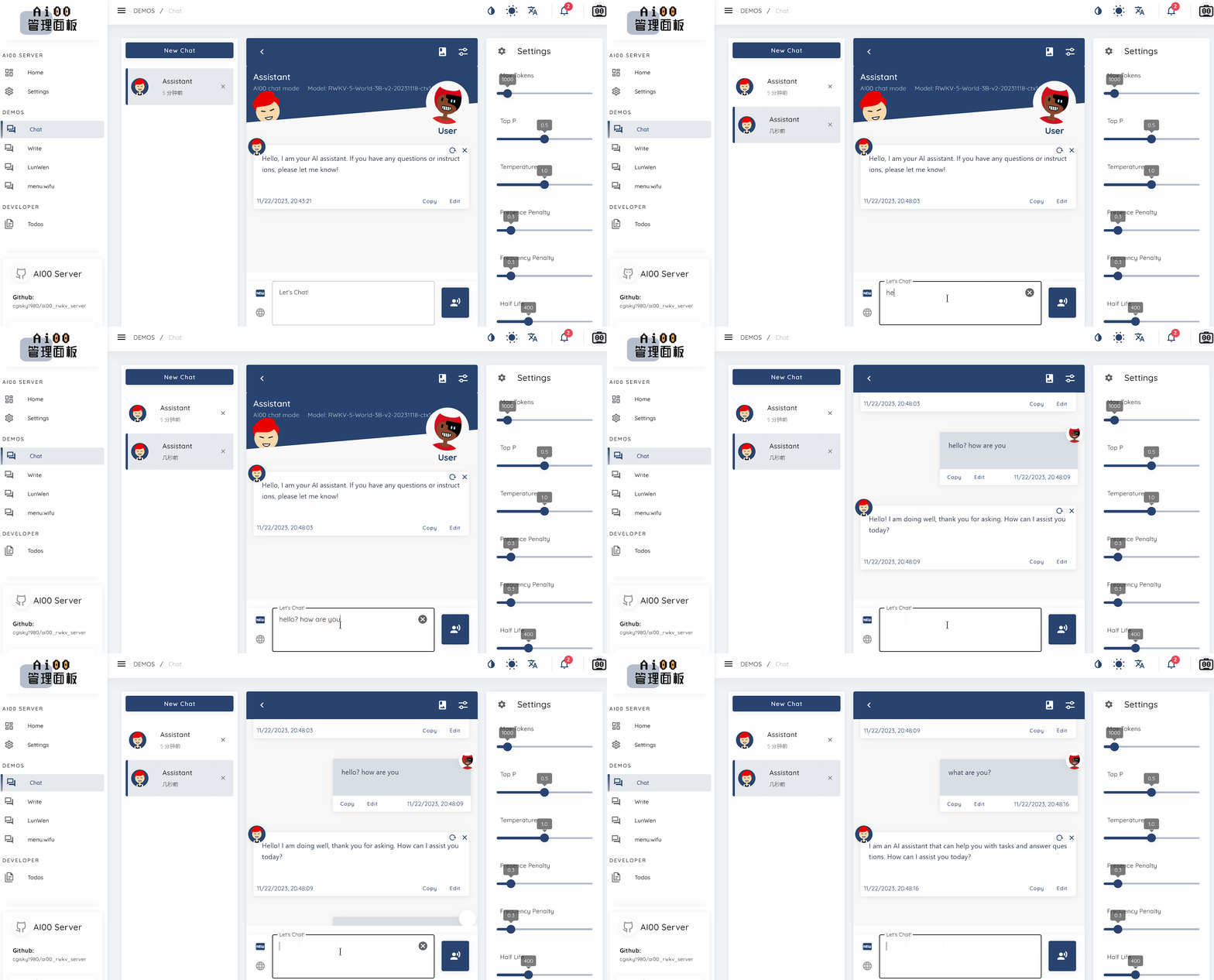
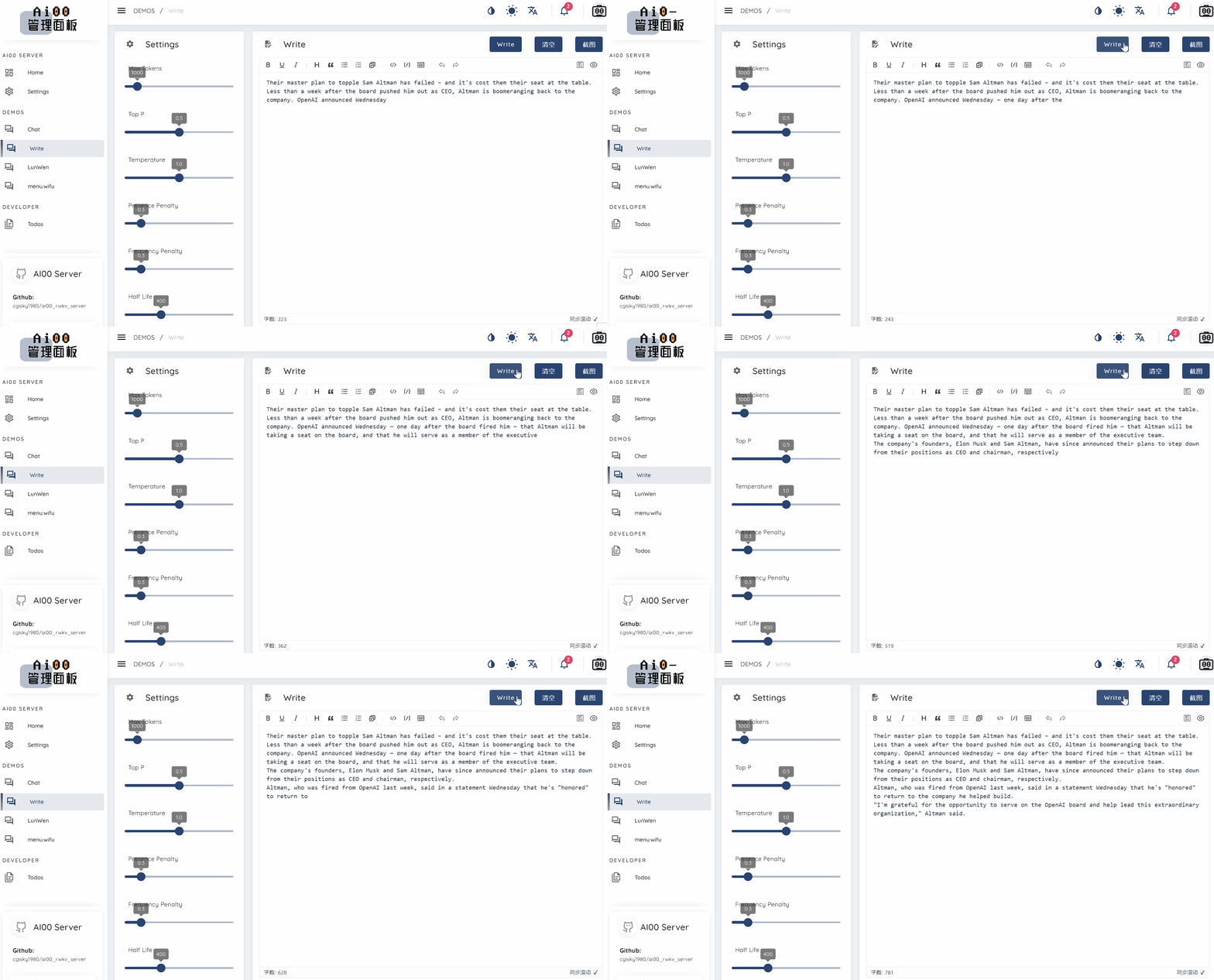
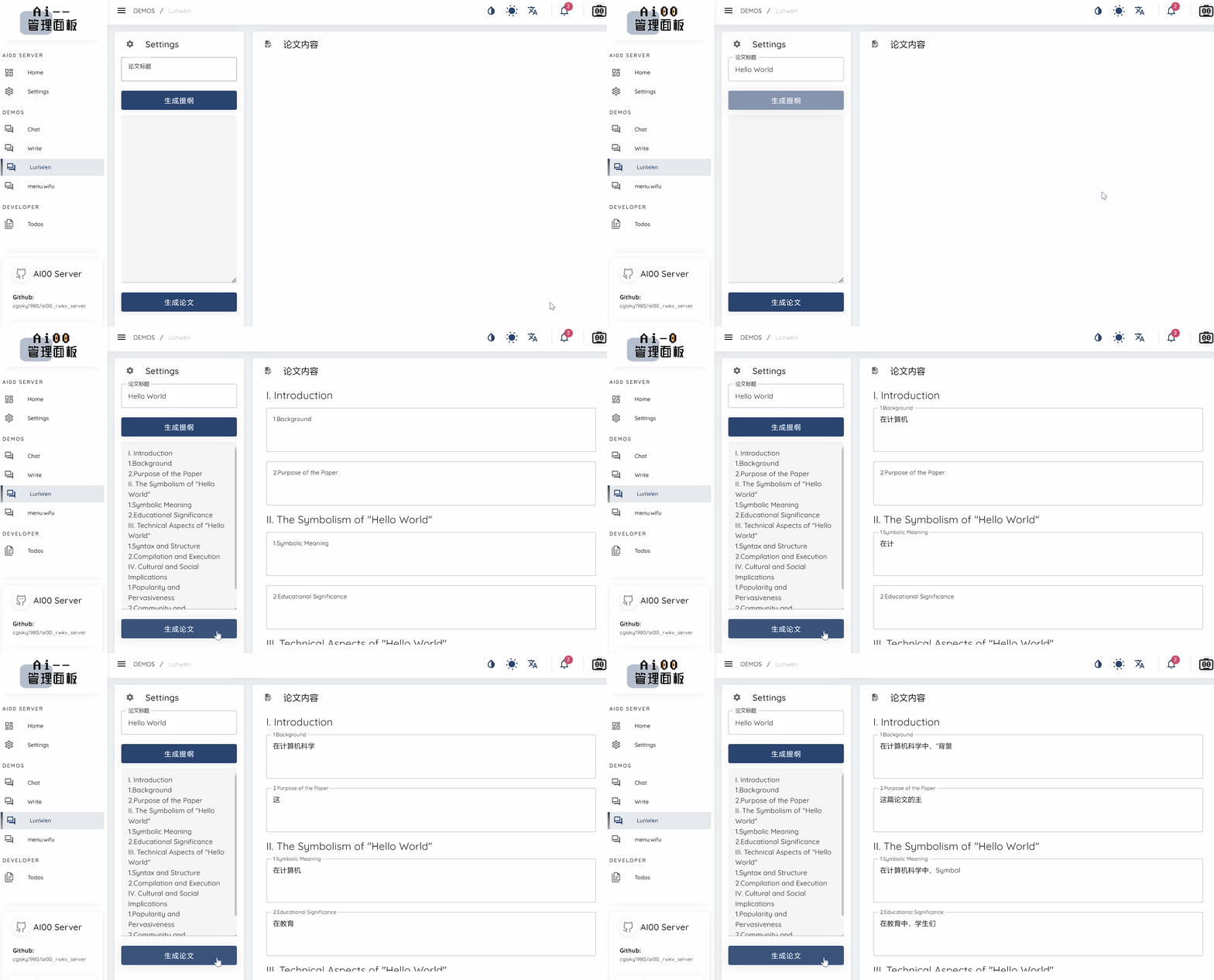
text_completions and chat_completions
batch serve
int8 quantizationNF4 quantizationLoRA modelLoRA modelWe are always looking for people interested in helping us improve the project. If you are interested in any of the following, please join us!
No matter your skill level, we welcome you to join us. You can join us in the following ways:
We can't wait to work with you to make this project better! We hope the project is helpful to you!
Thank you to these awesome individuals who are insightful and outstanding for their support and selfless dedication to the project!
|
顾真牛 ? ? ?? |
研究社交 ? ? ? ? |
josc146 ? ? ? |
l15y ? ? |
Cahya Wirawan ? |
yuunnn_w |
longzou ?️ |
|
luoqiqi |





