CSharp ChatUI Winforms
1.0.0

我正在尋找C#Winform的美麗聊天泡沫,但是我唯一能找到的是Telerik的聊天泡沫,這不是免費的。所以我決定寫一個。
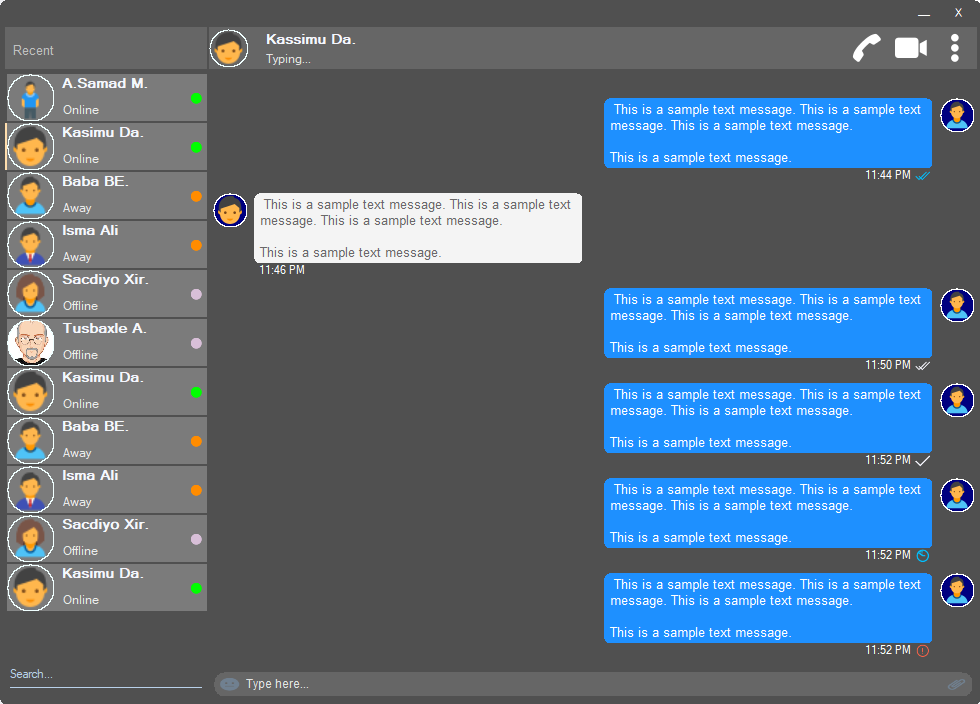
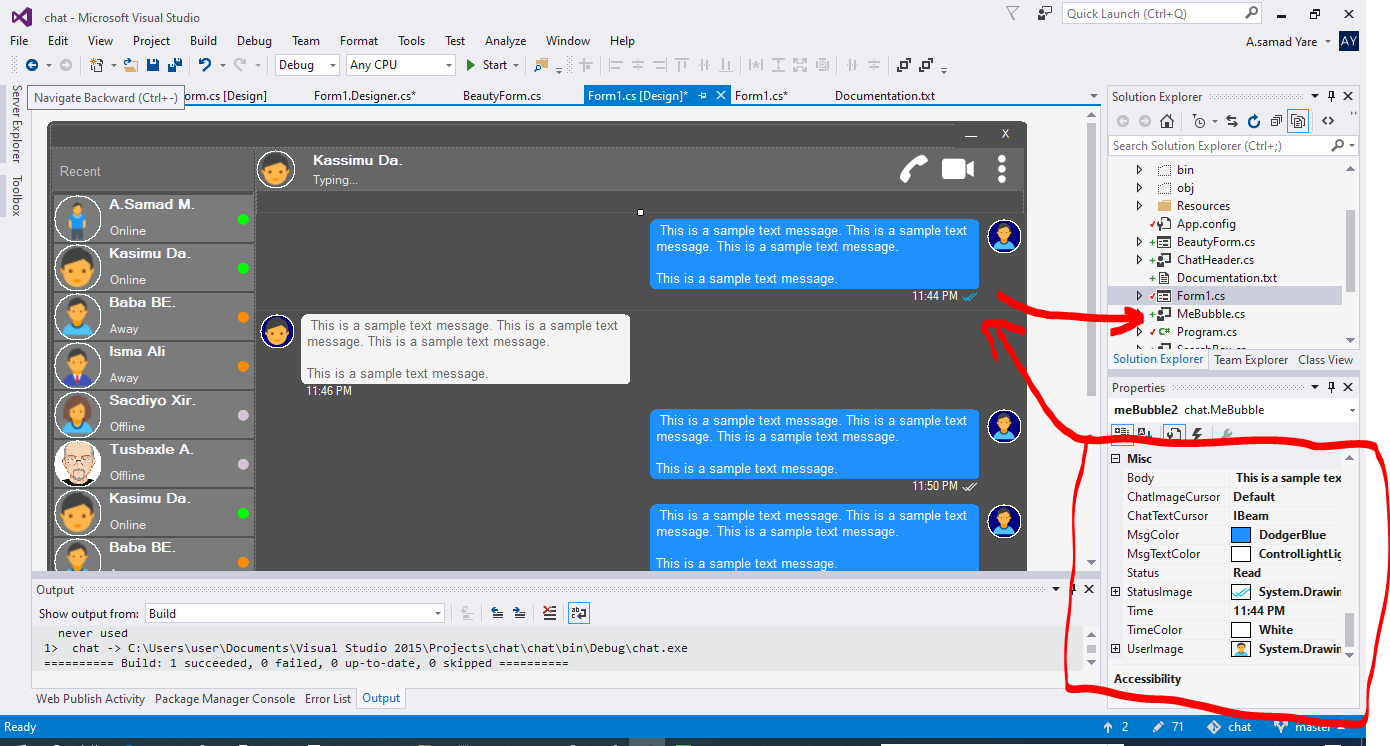
該項目中的所有組件都響應迅速,您不必擔心您的窗口或容器何時調整大小。他們還將以相同的空間百分比進行調整大小,並且外觀相同。
一個美麗的形式,帶有圓角。請參閱上面的屏幕截圖。
 public partial class Form1 : chat . BeautyForm
   {
       public Form1 ( )
       {
           InitializeComponent ( ) ;
} 請參閱上面的屏幕截圖,是顯示用戶詳細信息的最上部分。它具有用戶個人資料圖像,標題,狀態,呼叫,視頻通話,點菜單。
 chat . ChatHeader chatHeader1 = new chat . ChatHeader ( ) ;

chatHeader1 . UserTitle = "Abdisamad Moh." ; // Gets/Sets user title
chatHeader1 . UserStatusText = "Typing..." ; // Gets/Sets User status text.
chatHeader1 . UserImage = Some_Image ; // Gets/Sets User profile image

chatHeader1 . OnCallClick += Double tab to complete . // Fires when user clicks  Call icon
chatHeader1 . OnVideoCallClick += Double tab to complete . // Fires when user clicks Video Call icon
chatHeader1 . OnUserImageClick += Double tab to complete . // Fires when user clicks  Profile Image
chatHeader1 . OnUserStatusTextClick += Double tab to complete . // Fires when user clicks User status Text
chatHeader1 . OnUserTitleClick += Double tab to complete . // Fires when user clicks User Title Text
chatHeader1 . OnMenuDotClick += Double tab to complete . // Fires when user clicks Dot menu 帶有嵌入式表情符號圖標的美麗用戶打字框,文件附件圖標。
 chat . TypingBox typingBox1 = new chat . TypingBox ( ) ;

typingBox1 . Value = "Hi" ; //Gets/Sets text of the typingBox.

typingBox1 . OnTypingTextChanged += Double tab to complete . // Fires when user writes something into the typingBox. This fires per character.
typingBox1 . OnHitEnter += Double tab to complete . // Fires when user hits ENTER key while the typingBox is focused. This fires before newline is created in the typingBox. SHIFT+ENTER will also create newline without firing this event.
typingBox1 . OnEmojiClicked += Double tab to complete . // Fires when user clicks Emoji icon in the typingBox.
typingBox1 . OnAttachmentClicked += Double tab to complete . // Fires when user clicks File attachment icon in the typingBox. 請參閱上面的屏幕截圖,即帶有“搜索水印”和下劃線的文本框,即搜索框。
 chat . SearchBox searchBox1 = new chat . SearchBox ( ) ;

searchBox1 . Value = "Something" ; //Gets/Sets value in the searchBox.
searchBox1 . TextColor = Color . GradientActiveCaption ; //Gets/Sets text color and the bottom line color of the searchBox.
searchBox1 . FocusedColor =  Color . WhiteSmoke ; //Gets/Sets text color and the bottom line color of the searchBox when it is focused.
searchBox1 . UnFocusedColor = Color . GradientActiveCaption ; //Gets/Sets text color and the bottom line color of the searchBox when it is not focused.

searchBox1 . OnSearchTextChanged += Double tab to complete . // Fires when user writes something into the typingBox. This fires per character.
searchBox1 . OnHitEnter += Double tab to complete . // Fires when user hits ENTER key while the searchBox is focused. 帶有個人資料圖像,用戶名(標題名稱),用戶狀態文本,用戶狀態模式的美麗且可自定義的用戶控制。請參閱上面屏幕截圖的左側用戶。
 chat . Users user1 = new chat . Users ( ) ;

user1 . Username = "Abdisamad Moh." ; // Gets/Sets username or user title.
user1 . UserStatus = Status . Online ; //Option/Enum, Gets/Sets user status mode. Online, Away, Offline. U can add more if u want.
user1 . StatusMessage = "Online" ; //Gets/Sets status message
user1 . UserImage = Some_Image ; //Gets/Sets User profile image.
user1 . ProfileImageCursor = Cursors . Hand ; //Gets/Sets mouse cursor when user hovers mouse pointer over userImage.

user1 . OnClick +=  Double tab to complete . // Fires when anywhere on the user is clicked Including Username, statusText and StatusMode. However they will be excluded if u give them their own event.
user1 . OnUserTitleClick +=  Double tab to complete . // will fire when user clicks Username/Title. In this case, user1.OnClick will not be fired when user clicks on Username/Title.
user1 . OnUserStatusClick +=  Double tab to complete . // will fire when user clicks user status text. In this case, user1.OnClick will not be fired when user clicks on user status text..
user1 . OnUserStatusClick +=  Double tab to complete . // will fire when user clicks user status mode icon. In this case, user1.OnClick will not be fired when user clicks on user status mode icon.
user1 . OnProfileImageClick +=  Double tab to complete . // will fire when user clicks user profile image. In this case, user1.OnClick will not be fired when user clicks on user profile image.

//NOTE: Always use 'OnClick' event for this control instead of 'Click' event. 'OnClick' will take care of all other sub events. Double clicking this control on design time will generate 'Click' event instead of 'OnClick' event which is not recommended. In your Properties explorer find 'OnClick' event and double click to generate 'OnClick' event.請參閱屏幕截圖,那些攪動消息是語音泡沫。在這個項目中,有兩個氣泡,“ mebubble”和“ yoububble”。兩者都有相同的屬性和事件,但是它們的用法不同。 “ mebubble”是為了發出的聊天,而'yoububble'是為了傳入的聊天。
在此示例中,我將使用“ mebubble”。兩者都可以使用相同的方式,具有相同的屬性和事件。只有名稱和用法不同。
 chat . MeBubble meBubble1 = new chat . MeBubble ( ) ;

meBubble1 . Body = "This is a sample message text" ; //Gets/Sets message body.
meBubble1 . MsgColor = Color . DodgerBlue ; //Gets/Sets Message background color.
//NOTE: 'BackColor' will change the whole control's background color while 'MsgColor' will only change the message Body part.
meBubble1 . MsgTextColor = Color . White ; //Gets/Sets message text color.
meBubble1 . ChatImageCursor = Cursors . Default ; //Gets/Sets mouse cursor when it hovers over Bubble profile image.
meBubble1 . ChatTextCursor = Cursors . IBeam ; //Gets/Sets mouse cursor when it hovers over chat body.
meBubble1 . Status = MessageStatus . Delivered ; //Option/Enum, Gets/Sets Message status. This is the tick option. Options:  Sending, Sent, Delivered, Read,  Error,  None, Custom. where None will hide the tick option and Custom will give u option to put what u want.
meBubble1 . StatusImage = Some_Image ; //Gets/Sets custom image for the message status option, that is the tick option.
meBubble1 . Time = "11:44 PM" ; //Gets/Sets time of the chat bubble.
meBubble1 . TimeColor = Color . White ; //Gets/Sets Text Color of the time.
meBubble1 . UserImage = Some_Image ; //Gets/Sets Image of the bubble profile image.

meBubble1 . OnChatTextClick += Double tab to complete . //Fires when user clicks message body part.
meBubble1 . OnChatImageClick += Double tab to complete . //Fires when user clicks the Profile picture of the bubble..
版權(C)Abdisamad MOH
特此免費授予獲得此軟件副本和相關文檔文件副本(“軟件”)的任何人,以無限制處理該軟件,包括無限制的使用權,複製,複製,修改,合併,合併,發布,分發,分發,分發,訂婚,和/或允許軟件的副本,並允許對以下條件提供以下條件,以下是以下條件。
上述版權通知和此許可通知可以(或不)包含在軟件的所有副本或大量部分中。
該軟件是“原樣”提供的,沒有任何形式的明示或暗示保證,包括但不限於適銷性,特定目的的適用性和非侵權的保證。在任何情況下,作者或版權持有人都不應對任何索賠,損害賠償或其他責任責任,無論是在合同,侵權的訴訟中還是其他責任,是由軟件,使用或與軟件中的使用或其他交易有關的。







