CSharp ChatUI Winforms
1.0.0

私はC#Winformの美しいチャットバブルを探していましたが、私が見つけることができるのは無料ではなかったTelerikのものだけでした。だから私はそれを書くことにしました。
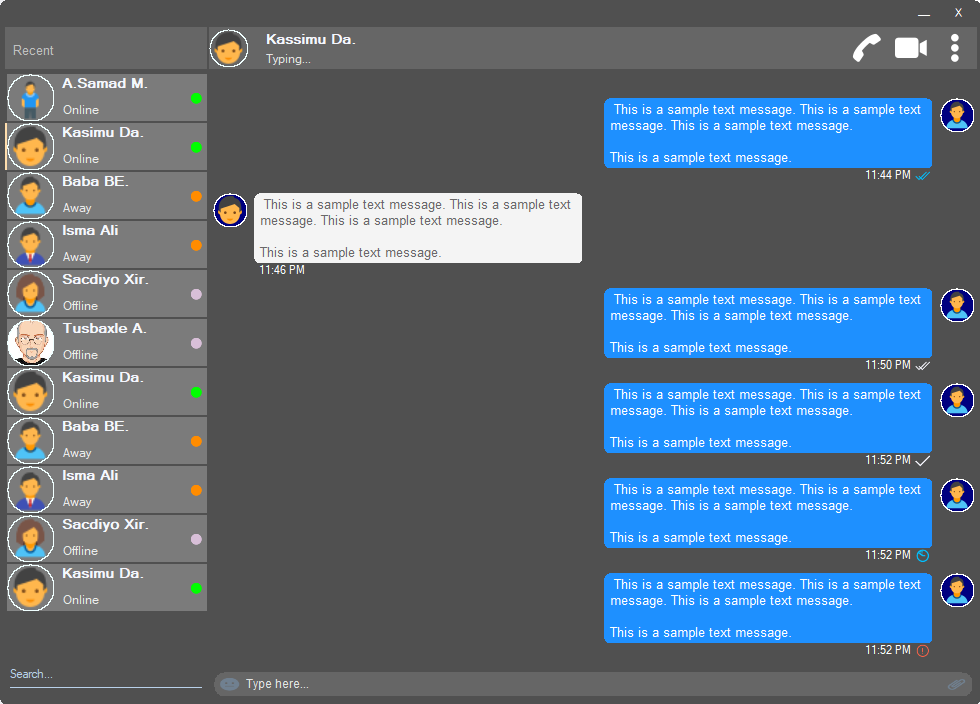
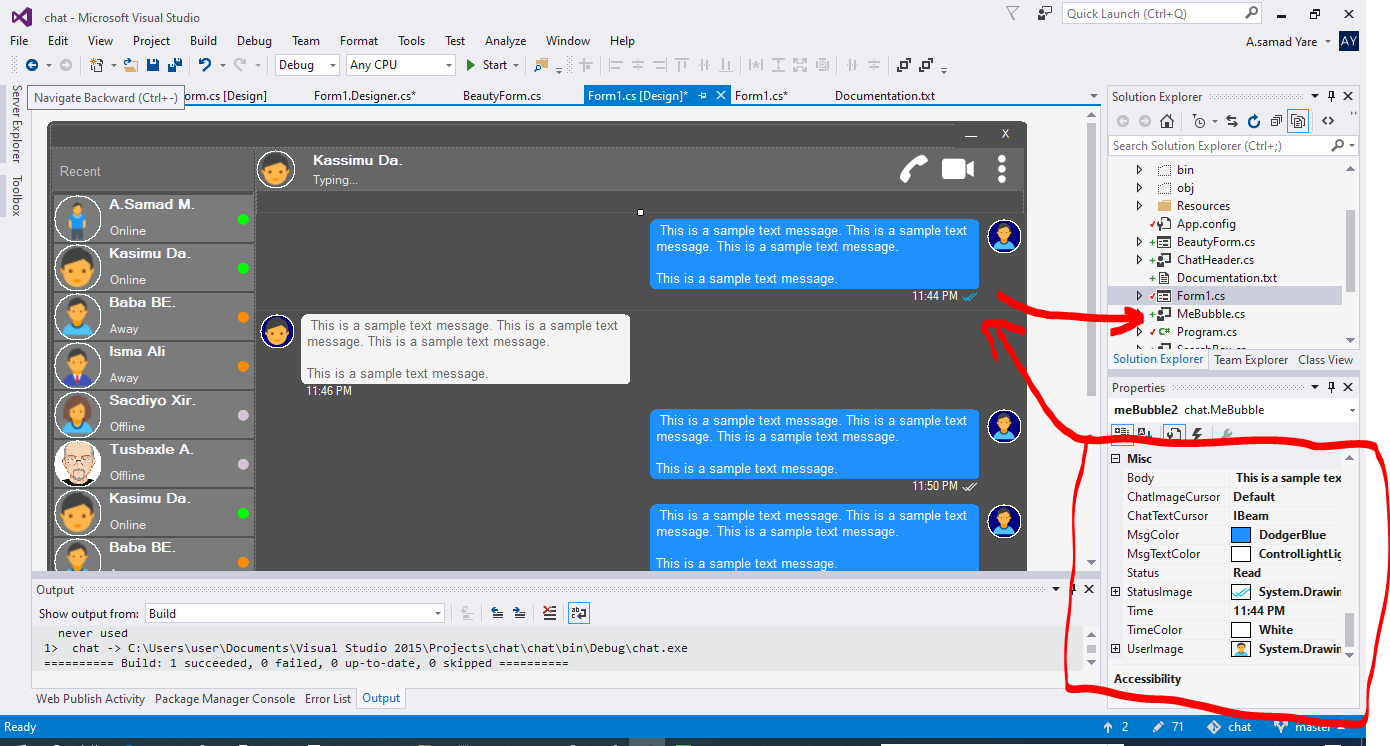
このプロジェクトのすべてのコンポーネントは応答性が高く、windowまたはコンテナがサイズするときを心配する必要はありません。彼らはまた、同じスペース率でそれらをサイズ変更し、それらの外観は同じになります。
丸い角がある美しい形。上記のスクリーンショットを参照してください。
 public partial class Form1 : chat . BeautyForm
   {
       public Form1 ( )
       {
           InitializeComponent ( ) ;
} ユーザーの詳細が表示されている最上部の上記のスクリーンショットを参照してください。ユーザープロファイルの画像、タイトル、ステータス、通話、ビデオ通話、ドットメニューがあります。
 chat . ChatHeader chatHeader1 = new chat . ChatHeader ( ) ;

chatHeader1 . UserTitle = "Abdisamad Moh." ; // Gets/Sets user title
chatHeader1 . UserStatusText = "Typing..." ; // Gets/Sets User status text.
chatHeader1 . UserImage = Some_Image ; // Gets/Sets User profile image

chatHeader1 . OnCallClick += Double tab to complete . // Fires when user clicks  Call icon
chatHeader1 . OnVideoCallClick += Double tab to complete . // Fires when user clicks Video Call icon
chatHeader1 . OnUserImageClick += Double tab to complete . // Fires when user clicks  Profile Image
chatHeader1 . OnUserStatusTextClick += Double tab to complete . // Fires when user clicks User status Text
chatHeader1 . OnUserTitleClick += Double tab to complete . // Fires when user clicks User Title Text
chatHeader1 . OnMenuDotClick += Double tab to complete . // Fires when user clicks Dot menu 埋め込まれた絵文字アイコン、ファイルアタッチメントアイコンを備えた美しいユーザータイピングボックス。
 chat . TypingBox typingBox1 = new chat . TypingBox ( ) ;

typingBox1 . Value = "Hi" ; //Gets/Sets text of the typingBox.

typingBox1 . OnTypingTextChanged += Double tab to complete . // Fires when user writes something into the typingBox. This fires per character.
typingBox1 . OnHitEnter += Double tab to complete . // Fires when user hits ENTER key while the typingBox is focused. This fires before newline is created in the typingBox. SHIFT+ENTER will also create newline without firing this event.
typingBox1 . OnEmojiClicked += Double tab to complete . // Fires when user clicks Emoji icon in the typingBox.
typingBox1 . OnAttachmentClicked += Double tab to complete . // Fires when user clicks File attachment icon in the typingBox. 上記のスクリーンショットを参照してください。「検索透かし」と下線の下線、つまり検索ボックスを備えたテキストボックスを参照してください。
 chat . SearchBox searchBox1 = new chat . SearchBox ( ) ;

searchBox1 . Value = "Something" ; //Gets/Sets value in the searchBox.
searchBox1 . TextColor = Color . GradientActiveCaption ; //Gets/Sets text color and the bottom line color of the searchBox.
searchBox1 . FocusedColor =  Color . WhiteSmoke ; //Gets/Sets text color and the bottom line color of the searchBox when it is focused.
searchBox1 . UnFocusedColor = Color . GradientActiveCaption ; //Gets/Sets text color and the bottom line color of the searchBox when it is not focused.

searchBox1 . OnSearchTextChanged += Double tab to complete . // Fires when user writes something into the typingBox. This fires per character.
searchBox1 . OnHitEnter += Double tab to complete . // Fires when user hits ENTER key while the searchBox is focused. プロファイル画像、ユーザー名(タイトル名)、ユーザーステータステキスト、ユーザーステータスモードを備えた美しくカスタマイズ可能なユーザーコントロール。上記のスクリーンショットの左側のユーザーを参照してください。
 chat . Users user1 = new chat . Users ( ) ;

user1 . Username = "Abdisamad Moh." ; // Gets/Sets username or user title.
user1 . UserStatus = Status . Online ; //Option/Enum, Gets/Sets user status mode. Online, Away, Offline. U can add more if u want.
user1 . StatusMessage = "Online" ; //Gets/Sets status message
user1 . UserImage = Some_Image ; //Gets/Sets User profile image.
user1 . ProfileImageCursor = Cursors . Hand ; //Gets/Sets mouse cursor when user hovers mouse pointer over userImage.

user1 . OnClick +=  Double tab to complete . // Fires when anywhere on the user is clicked Including Username, statusText and StatusMode. However they will be excluded if u give them their own event.
user1 . OnUserTitleClick +=  Double tab to complete . // will fire when user clicks Username/Title. In this case, user1.OnClick will not be fired when user clicks on Username/Title.
user1 . OnUserStatusClick +=  Double tab to complete . // will fire when user clicks user status text. In this case, user1.OnClick will not be fired when user clicks on user status text..
user1 . OnUserStatusClick +=  Double tab to complete . // will fire when user clicks user status mode icon. In this case, user1.OnClick will not be fired when user clicks on user status mode icon.
user1 . OnProfileImageClick +=  Double tab to complete . // will fire when user clicks user profile image. In this case, user1.OnClick will not be fired when user clicks on user profile image.

//NOTE: Always use 'OnClick' event for this control instead of 'Click' event. 'OnClick' will take care of all other sub events. Double clicking this control on design time will generate 'Click' event instead of 'OnClick' event which is not recommended. In your Properties explorer find 'OnClick' event and double click to generate 'OnClick' event.スクリーンショットを参照してください。これらのチャートメッセージはスピーチバブルです。このプロジェクトには、2つのバブル「Mebubble」と「Yoububble」があります。どちらも同じプロパティとイベントを持っていますが、それらの使用法は異なります。 「Mebubble」は発信チャット用であり、「YouBubble」はチャットのためのものです。
この例では、「Mebubble」を使用します。どちらも同じように機能し、同じプロパティとイベントを持っています。名前と使用法のみが異なります。
 chat . MeBubble meBubble1 = new chat . MeBubble ( ) ;

meBubble1 . Body = "This is a sample message text" ; //Gets/Sets message body.
meBubble1 . MsgColor = Color . DodgerBlue ; //Gets/Sets Message background color.
//NOTE: 'BackColor' will change the whole control's background color while 'MsgColor' will only change the message Body part.
meBubble1 . MsgTextColor = Color . White ; //Gets/Sets message text color.
meBubble1 . ChatImageCursor = Cursors . Default ; //Gets/Sets mouse cursor when it hovers over Bubble profile image.
meBubble1 . ChatTextCursor = Cursors . IBeam ; //Gets/Sets mouse cursor when it hovers over chat body.
meBubble1 . Status = MessageStatus . Delivered ; //Option/Enum, Gets/Sets Message status. This is the tick option. Options:  Sending, Sent, Delivered, Read,  Error,  None, Custom. where None will hide the tick option and Custom will give u option to put what u want.
meBubble1 . StatusImage = Some_Image ; //Gets/Sets custom image for the message status option, that is the tick option.
meBubble1 . Time = "11:44 PM" ; //Gets/Sets time of the chat bubble.
meBubble1 . TimeColor = Color . White ; //Gets/Sets Text Color of the time.
meBubble1 . UserImage = Some_Image ; //Gets/Sets Image of the bubble profile image.

meBubble1 . OnChatTextClick += Double tab to complete . //Fires when user clicks message body part.
meBubble1 . OnChatImageClick += Double tab to complete . //Fires when user clicks the Profile picture of the bubble..
著作権(c)Abdisamad Moh
このソフトウェアと関連するドキュメントファイル(「ソフトウェア」)のコピーを入手して、制限なしにソフトウェアを扱うために、このソフトウェアを制限する権利を含め、ソフトウェアのコピーをコピー、変更、公開、配布、販売する、ソフトウェアのコピーを許可する人を許可する人を許可することを含めて、許可が無料で許可されます。
上記の著作権通知とこの許可通知は、ソフトウェアのすべてのコピーまたはかなりの部分に含まれる可能性があります(またはそうでない)。
このソフトウェアは、商品性、特定の目的への適合性、および非侵害の保証を含むがこれらに限定されない、明示的または黙示的なものを保証することなく、「現状のまま」提供されます。いかなる場合でも、著者または著作権所有者は、契約、不法行為、またはその他の訴訟、ソフトウェアまたはソフトウェアの使用またはその他の取引に関連する、またはその他の契約、またはその他の請求、またはその他の責任について責任を負いません。







