CSharp ChatUI Winforms
1.0.0

كنت أبحث عن فقاعة دردشة جميلة لـ C# winform ، لكن الفقرة الوحيدة التي يمكنني العثور عليها هي تلك التي لم تكن مجانية. لذلك قررت أن أكتب واحدة.
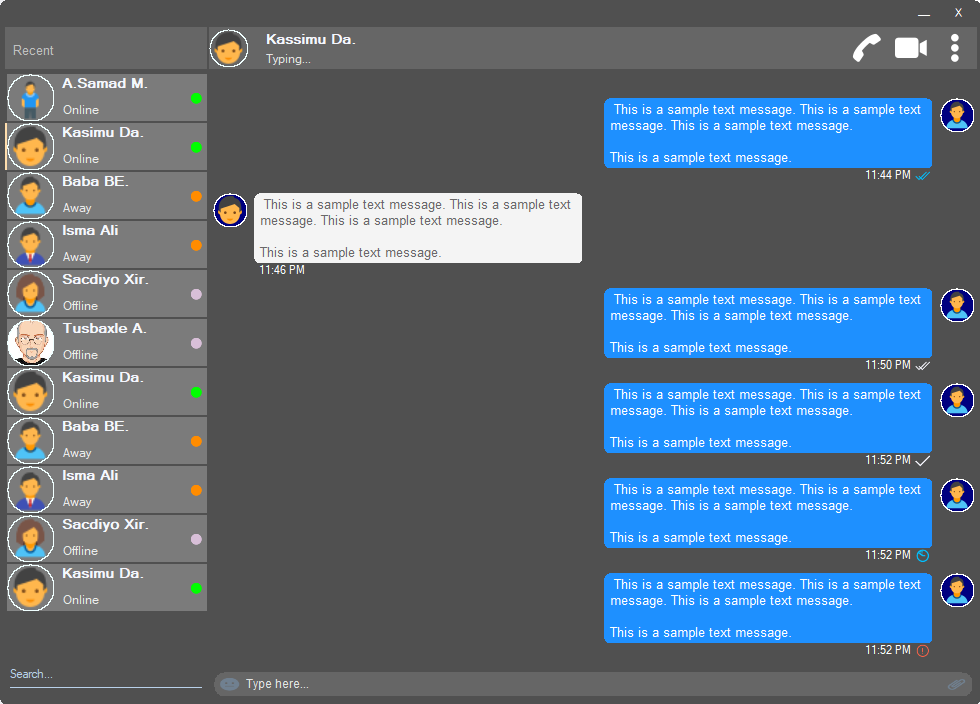
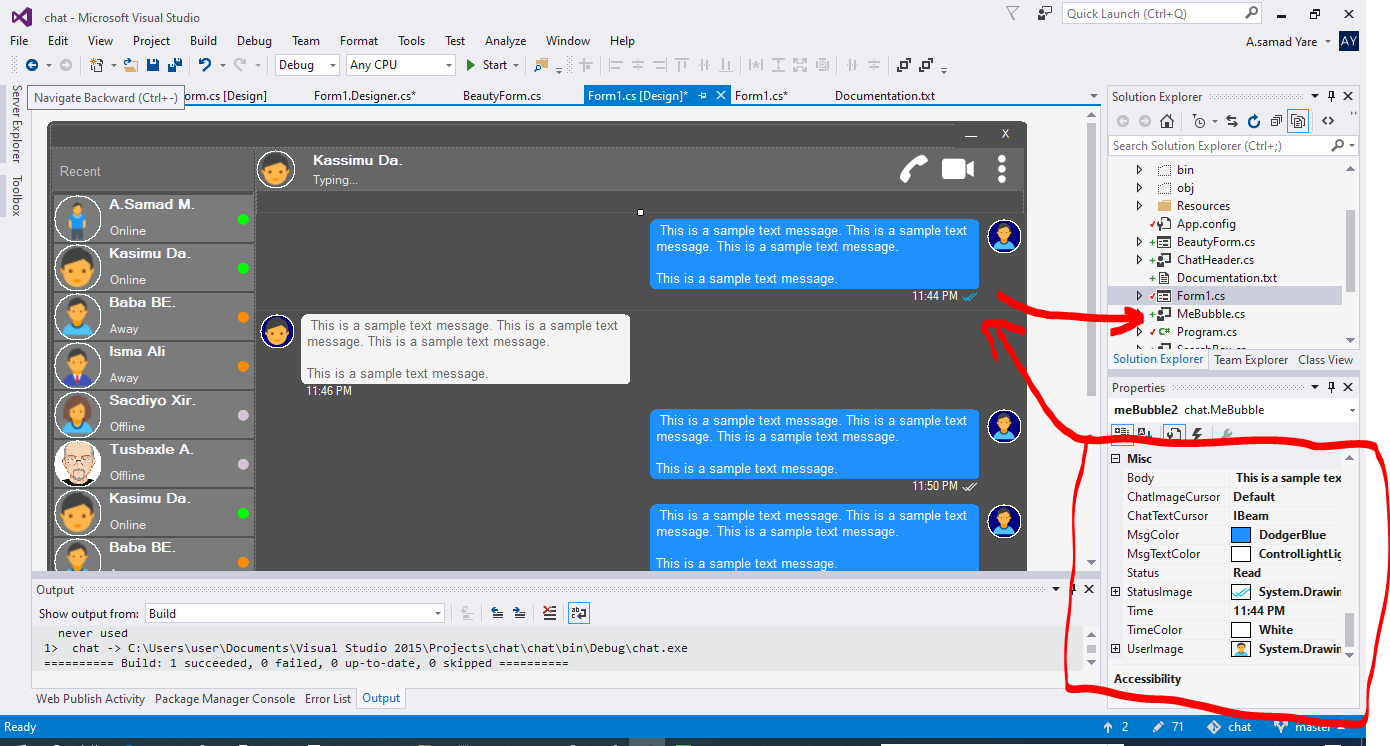
جميع المكونات في هذا المشروع تستجيب ولا داعي للقلق عندما يتم تغيير حجم نافذة أو حاوية. سيقومون أيضًا بتغيير حجمها بنفس نسبة المساحة ، وستكون مظهرهم هي نفسها.
شكل جميل مع زوايا مستديرة. انظر لقطات الشاشة أعلاه.
 public partial class Form1 : chat . BeautyForm
   {
       public Form1 ( )
       {
           InitializeComponent ( ) ;
} انظر لقطات الشاشة أعلاه ، الجزء العلوي الذي يتم فيه عرض تفاصيل المستخدم. يحتوي على صورة ملف تعريف المستخدم ، العنوان ، الحالة ، المكالمة ، مكالمة الفيديو ، قائمة DOT.
 chat . ChatHeader chatHeader1 = new chat . ChatHeader ( ) ;

chatHeader1 . UserTitle = "Abdisamad Moh." ; // Gets/Sets user title
chatHeader1 . UserStatusText = "Typing..." ; // Gets/Sets User status text.
chatHeader1 . UserImage = Some_Image ; // Gets/Sets User profile image

chatHeader1 . OnCallClick += Double tab to complete . // Fires when user clicks  Call icon
chatHeader1 . OnVideoCallClick += Double tab to complete . // Fires when user clicks Video Call icon
chatHeader1 . OnUserImageClick += Double tab to complete . // Fires when user clicks  Profile Image
chatHeader1 . OnUserStatusTextClick += Double tab to complete . // Fires when user clicks User status Text
chatHeader1 . OnUserTitleClick += Double tab to complete . // Fires when user clicks User Title Text
chatHeader1 . OnMenuDotClick += Double tab to complete . // Fires when user clicks Dot menu مربع كتابة المستخدم الجميل مع أيقونة exoji المدمجة ، أيقونة مرفق الملفات.
 chat . TypingBox typingBox1 = new chat . TypingBox ( ) ;

typingBox1 . Value = "Hi" ; //Gets/Sets text of the typingBox.

typingBox1 . OnTypingTextChanged += Double tab to complete . // Fires when user writes something into the typingBox. This fires per character.
typingBox1 . OnHitEnter += Double tab to complete . // Fires when user hits ENTER key while the typingBox is focused. This fires before newline is created in the typingBox. SHIFT+ENTER will also create newline without firing this event.
typingBox1 . OnEmojiClicked += Double tab to complete . // Fires when user clicks Emoji icon in the typingBox.
typingBox1 . OnAttachmentClicked += Double tab to complete . // Fires when user clicks File attachment icon in the typingBox. راجع لقطات الشاشة أعلاه ، مربع النص هذا مع "Search Watermark" وخط التوطين ، وهو SearchBox.
 chat . SearchBox searchBox1 = new chat . SearchBox ( ) ;

searchBox1 . Value = "Something" ; //Gets/Sets value in the searchBox.
searchBox1 . TextColor = Color . GradientActiveCaption ; //Gets/Sets text color and the bottom line color of the searchBox.
searchBox1 . FocusedColor =  Color . WhiteSmoke ; //Gets/Sets text color and the bottom line color of the searchBox when it is focused.
searchBox1 . UnFocusedColor = Color . GradientActiveCaption ; //Gets/Sets text color and the bottom line color of the searchBox when it is not focused.

searchBox1 . OnSearchTextChanged += Double tab to complete . // Fires when user writes something into the typingBox. This fires per character.
searchBox1 . OnHitEnter += Double tab to complete . // Fires when user hits ENTER key while the searchBox is focused. تحكم مستخدم جميل وقابل للتخصيص مع صورة الملف الشخصي ، اسم المستخدم (اسم العنوان) ، نص حالة المستخدم ، وضع حالة المستخدم. انظر المستخدمين على الجانب الأيسر في لقطات الشاشة أعلاه.
 chat . Users user1 = new chat . Users ( ) ;

user1 . Username = "Abdisamad Moh." ; // Gets/Sets username or user title.
user1 . UserStatus = Status . Online ; //Option/Enum, Gets/Sets user status mode. Online, Away, Offline. U can add more if u want.
user1 . StatusMessage = "Online" ; //Gets/Sets status message
user1 . UserImage = Some_Image ; //Gets/Sets User profile image.
user1 . ProfileImageCursor = Cursors . Hand ; //Gets/Sets mouse cursor when user hovers mouse pointer over userImage.

user1 . OnClick +=  Double tab to complete . // Fires when anywhere on the user is clicked Including Username, statusText and StatusMode. However they will be excluded if u give them their own event.
user1 . OnUserTitleClick +=  Double tab to complete . // will fire when user clicks Username/Title. In this case, user1.OnClick will not be fired when user clicks on Username/Title.
user1 . OnUserStatusClick +=  Double tab to complete . // will fire when user clicks user status text. In this case, user1.OnClick will not be fired when user clicks on user status text..
user1 . OnUserStatusClick +=  Double tab to complete . // will fire when user clicks user status mode icon. In this case, user1.OnClick will not be fired when user clicks on user status mode icon.
user1 . OnProfileImageClick +=  Double tab to complete . // will fire when user clicks user profile image. In this case, user1.OnClick will not be fired when user clicks on user profile image.

//NOTE: Always use 'OnClick' event for this control instead of 'Click' event. 'OnClick' will take care of all other sub events. Double clicking this control on design time will generate 'Click' event instead of 'OnClick' event which is not recommended. In your Properties explorer find 'OnClick' event and double click to generate 'OnClick' event.انظر لقطات الشاشة ، هذه الرسائل التي تشير إلى فقاعة الكلام. في هذا المشروع ، هناك فقاعات ، "Mebubble" و "YouBubble". كلاهما لهما نفس الخصائص والأحداث ولكن استخدامهما مختلف. "Mebubble" مخصصة للدردشات الصادرة و "YouBubble" هي الدردشات الواردة.
في هذا المثال ، سأستخدم "mebubble". كلا يعملان بنفس الطريقة ، ولديهما نفس الخصائص والأحداث. فقط الاسم والاستخدام مختلفان.
 chat . MeBubble meBubble1 = new chat . MeBubble ( ) ;

meBubble1 . Body = "This is a sample message text" ; //Gets/Sets message body.
meBubble1 . MsgColor = Color . DodgerBlue ; //Gets/Sets Message background color.
//NOTE: 'BackColor' will change the whole control's background color while 'MsgColor' will only change the message Body part.
meBubble1 . MsgTextColor = Color . White ; //Gets/Sets message text color.
meBubble1 . ChatImageCursor = Cursors . Default ; //Gets/Sets mouse cursor when it hovers over Bubble profile image.
meBubble1 . ChatTextCursor = Cursors . IBeam ; //Gets/Sets mouse cursor when it hovers over chat body.
meBubble1 . Status = MessageStatus . Delivered ; //Option/Enum, Gets/Sets Message status. This is the tick option. Options:  Sending, Sent, Delivered, Read,  Error,  None, Custom. where None will hide the tick option and Custom will give u option to put what u want.
meBubble1 . StatusImage = Some_Image ; //Gets/Sets custom image for the message status option, that is the tick option.
meBubble1 . Time = "11:44 PM" ; //Gets/Sets time of the chat bubble.
meBubble1 . TimeColor = Color . White ; //Gets/Sets Text Color of the time.
meBubble1 . UserImage = Some_Image ; //Gets/Sets Image of the bubble profile image.

meBubble1 . OnChatTextClick += Double tab to complete . //Fires when user clicks message body part.
meBubble1 . OnChatImageClick += Double tab to complete . //Fires when user clicks the Profile picture of the bubble..
حقوق الطبع والنشر (ج) عبد الأسماد موه
يتم منح الإذن بموجب هذا ، مجانًا ، لأي شخص يحصل على نسخة من هذا البرنامج وملفات الوثائق المرتبطة به ("البرنامج") ، للتعامل في البرنامج دون تقييد ، بما في ذلك على سبيل المثال لا الحصر حقوق استخدام الأشخاص ونسخها ودمجها ودمجها وتوزيعها وتوزيعها على ما يلي:
قد يتم تضمين إشعار حقوق الطبع والنشر أعلاه وإشعار الإذن هذا (أو لا) في جميع النسخ أو الأجزاء الكبيرة من البرنامج.
يتم توفير البرنامج "كما هو" ، دون أي ضمان من أي نوع ، صريح أو ضمني ، بما في ذلك على سبيل المثال لا الحصر ضمانات القابلية للتسويق واللياقة لغرض معين وعدم الانفجار. لا يجوز بأي حال من الأحوال أن يكون المؤلفون أو حاملي حقوق الطبع والنشر مسؤولاً عن أي مطالبة أو أضرار أو مسؤولية أخرى ، سواء في إجراء عقد أو ضرر أو غير ذلك ، ناشئة عن أو خارج البرنامج أو الاستخدام أو غيرها من المعاملات في البرنامج.







