CSharp ChatUI Winforms
1.0.0

Ich suchte nach einer schönen Chat -Blase für C# Winform, aber der einzige, den ich finden konnte, war das von Telerik, das nicht frei war. Also habe ich beschlossen, einen zu schreiben.
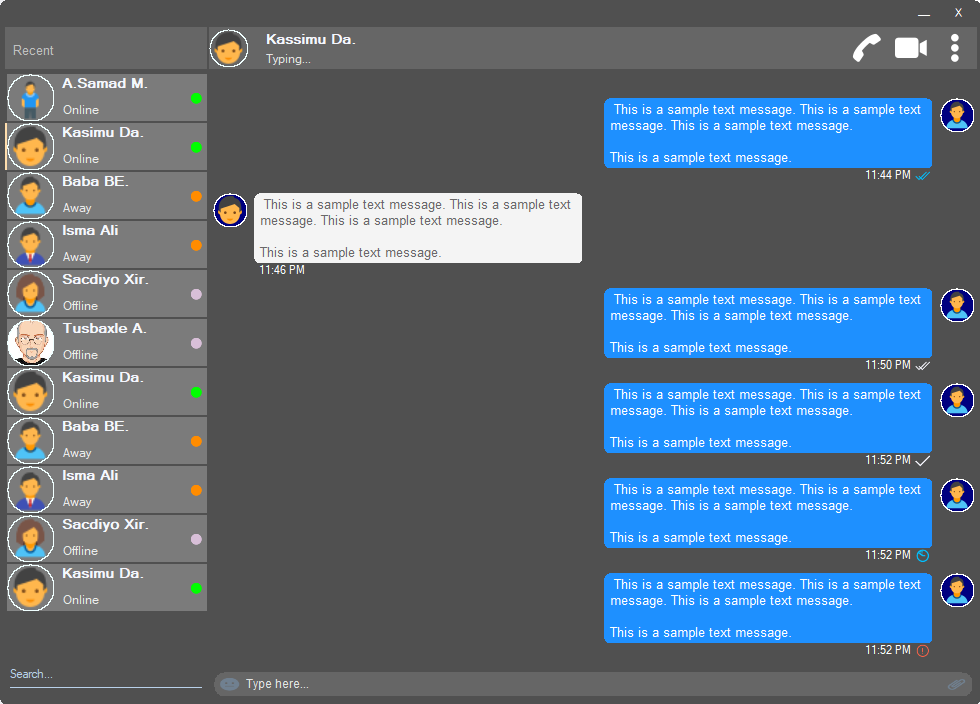
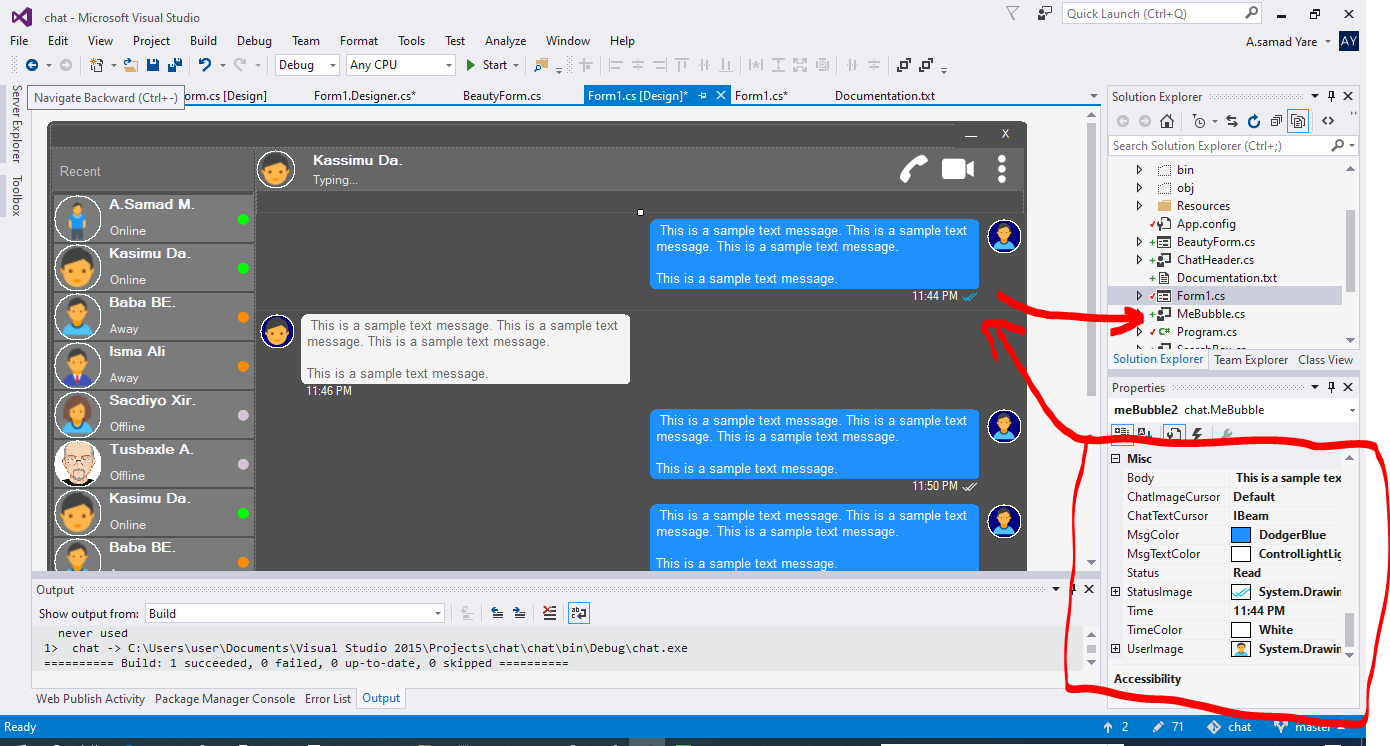
Alle Komponenten in diesem Projekt sind reaktionsschnell und Sie müssen sich keine Sorgen machen, wann Ihr Fenster oder Container ändert. Sie werden sie auch mit dem gleichen Raumprozentsatz ändern, und ihr Aussehen wird gleich sein.
Eine schöne Form mit runden Ecken. Siehe Screenshots oben.
 public partial class Form1 : chat . BeautyForm
   {
       public Form1 ( )
       {
           InitializeComponent ( ) ;
} Siehe Screenshots oben, der oberste Teil, in dem Benutzerdetails angezeigt werden. Es verfügt über ein Benutzerprofilbild, den Titel, den Status, den Anruf, den Videoanruf, das DOT -Menü.
 chat . ChatHeader chatHeader1 = new chat . ChatHeader ( ) ;

chatHeader1 . UserTitle = "Abdisamad Moh." ; // Gets/Sets user title
chatHeader1 . UserStatusText = "Typing..." ; // Gets/Sets User status text.
chatHeader1 . UserImage = Some_Image ; // Gets/Sets User profile image

chatHeader1 . OnCallClick += Double tab to complete . // Fires when user clicks  Call icon
chatHeader1 . OnVideoCallClick += Double tab to complete . // Fires when user clicks Video Call icon
chatHeader1 . OnUserImageClick += Double tab to complete . // Fires when user clicks  Profile Image
chatHeader1 . OnUserStatusTextClick += Double tab to complete . // Fires when user clicks User status Text
chatHeader1 . OnUserTitleClick += Double tab to complete . // Fires when user clicks User Title Text
chatHeader1 . OnMenuDotClick += Double tab to complete . // Fires when user clicks Dot menu Schöne Benutzer -Tippbox mit eingebettetem Emoji -Symbol, Dateianhangsymbol.
 chat . TypingBox typingBox1 = new chat . TypingBox ( ) ;

typingBox1 . Value = "Hi" ; //Gets/Sets text of the typingBox.

typingBox1 . OnTypingTextChanged += Double tab to complete . // Fires when user writes something into the typingBox. This fires per character.
typingBox1 . OnHitEnter += Double tab to complete . // Fires when user hits ENTER key while the typingBox is focused. This fires before newline is created in the typingBox. SHIFT+ENTER will also create newline without firing this event.
typingBox1 . OnEmojiClicked += Double tab to complete . // Fires when user clicks Emoji icon in the typingBox.
typingBox1 . OnAttachmentClicked += Double tab to complete . // Fires when user clicks File attachment icon in the typingBox. Siehe die Screenshots oben, diese Textbox mit 'Search Watermark' und Unterstreichungslinie, dh Searchbox.
 chat . SearchBox searchBox1 = new chat . SearchBox ( ) ;

searchBox1 . Value = "Something" ; //Gets/Sets value in the searchBox.
searchBox1 . TextColor = Color . GradientActiveCaption ; //Gets/Sets text color and the bottom line color of the searchBox.
searchBox1 . FocusedColor =  Color . WhiteSmoke ; //Gets/Sets text color and the bottom line color of the searchBox when it is focused.
searchBox1 . UnFocusedColor = Color . GradientActiveCaption ; //Gets/Sets text color and the bottom line color of the searchBox when it is not focused.

searchBox1 . OnSearchTextChanged += Double tab to complete . // Fires when user writes something into the typingBox. This fires per character.
searchBox1 . OnHitEnter += Double tab to complete . // Fires when user hits ENTER key while the searchBox is focused. Schöne und anpassbare Benutzersteuerung mit Profilbild, Benutzername (Titelname), Benutzerstatustext, Benutzerzustandsmodus. Sehen Sie Benutzer auf der linken Seite in den Screenshots oben.
 chat . Users user1 = new chat . Users ( ) ;

user1 . Username = "Abdisamad Moh." ; // Gets/Sets username or user title.
user1 . UserStatus = Status . Online ; //Option/Enum, Gets/Sets user status mode. Online, Away, Offline. U can add more if u want.
user1 . StatusMessage = "Online" ; //Gets/Sets status message
user1 . UserImage = Some_Image ; //Gets/Sets User profile image.
user1 . ProfileImageCursor = Cursors . Hand ; //Gets/Sets mouse cursor when user hovers mouse pointer over userImage.

user1 . OnClick +=  Double tab to complete . // Fires when anywhere on the user is clicked Including Username, statusText and StatusMode. However they will be excluded if u give them their own event.
user1 . OnUserTitleClick +=  Double tab to complete . // will fire when user clicks Username/Title. In this case, user1.OnClick will not be fired when user clicks on Username/Title.
user1 . OnUserStatusClick +=  Double tab to complete . // will fire when user clicks user status text. In this case, user1.OnClick will not be fired when user clicks on user status text..
user1 . OnUserStatusClick +=  Double tab to complete . // will fire when user clicks user status mode icon. In this case, user1.OnClick will not be fired when user clicks on user status mode icon.
user1 . OnProfileImageClick +=  Double tab to complete . // will fire when user clicks user profile image. In this case, user1.OnClick will not be fired when user clicks on user profile image.

//NOTE: Always use 'OnClick' event for this control instead of 'Click' event. 'OnClick' will take care of all other sub events. Double clicking this control on design time will generate 'Click' event instead of 'OnClick' event which is not recommended. In your Properties explorer find 'OnClick' event and double click to generate 'OnClick' event.Siehe Screenshots, diese Chating -Nachrichten sind die Sprachblase. In diesem Projekt gibt es zwei Blasen "Mebubble" und "YouBubble". Beide haben die gleichen Eigenschaften und Ereignisse, aber ihre Verwendung ist anders. "Mebubble" ist für ausgehende Chats und "YouBubble" für eingehende Chats.
In diesem Beispiel werde ich 'Mebubble' verwenden. Beide funktionieren genauso, haben die gleichen Eigenschaften und Ereignisse. Nur der Name und die Verwendung sind unterschiedlich.
 chat . MeBubble meBubble1 = new chat . MeBubble ( ) ;

meBubble1 . Body = "This is a sample message text" ; //Gets/Sets message body.
meBubble1 . MsgColor = Color . DodgerBlue ; //Gets/Sets Message background color.
//NOTE: 'BackColor' will change the whole control's background color while 'MsgColor' will only change the message Body part.
meBubble1 . MsgTextColor = Color . White ; //Gets/Sets message text color.
meBubble1 . ChatImageCursor = Cursors . Default ; //Gets/Sets mouse cursor when it hovers over Bubble profile image.
meBubble1 . ChatTextCursor = Cursors . IBeam ; //Gets/Sets mouse cursor when it hovers over chat body.
meBubble1 . Status = MessageStatus . Delivered ; //Option/Enum, Gets/Sets Message status. This is the tick option. Options:  Sending, Sent, Delivered, Read,  Error,  None, Custom. where None will hide the tick option and Custom will give u option to put what u want.
meBubble1 . StatusImage = Some_Image ; //Gets/Sets custom image for the message status option, that is the tick option.
meBubble1 . Time = "11:44 PM" ; //Gets/Sets time of the chat bubble.
meBubble1 . TimeColor = Color . White ; //Gets/Sets Text Color of the time.
meBubble1 . UserImage = Some_Image ; //Gets/Sets Image of the bubble profile image.

meBubble1 . OnChatTextClick += Double tab to complete . //Fires when user clicks message body part.
meBubble1 . OnChatImageClick += Double tab to complete . //Fires when user clicks the Profile picture of the bubble..
Copyright (c) Abdisamad Moh
Die Erlaubnis wird hiermit einer Person, die eine Kopie dieser Software und zugehörigen Dokumentationsdateien (der "Software") erhält, kostenlos erteilt, um die Software ohne Einschränkung zu behandeln, einschließlich ohne Einschränkung der Rechte, zu verwenden, zu kopieren, zu modifizieren, zusammenzufassen, zu veröffentlichen, zu veröffentlichen, zu verteilen, zu verteilt, und/oder Kopien der Software zu ermöglichen, um Personen zu beanstanden, an denen die Software zugänglich ist, um die folgenden Bedingungen zu beantragen.
Die oben genannte Copyright -Mitteilung und diese Berechtigungsbekanntmachung kann (oder nicht) in allen Kopien oder wesentlichen Teilen der Software aufgenommen werden.
Die Software wird "wie es ist" ohne Garantie jeglicher Art, ausdrücklich oder stillschweigend bereitgestellt, einschließlich, aber nicht beschränkt auf die Gewährleistung der Handelsfähigkeit, die Eignung für einen bestimmten Zweck und die Nichtverletzung. In keinem Fall sind die Autoren oder Urheberrechtsinhaber für Ansprüche, Schäden oder andere Haftungen haftbar, sei es in einer Vertragsklage, unerbittlich oder auf andere Weise, die sich aus oder im Zusammenhang mit der Software oder anderen Geschäften in der Software ergeben.







