CSharp ChatUI Winforms
1.0.0

나는 c# winform의 아름다운 채팅 버블을 찾고 있었지만, 내가 찾을 수있는 유일한 것은 무료가 아닌 Telerik의 것이었다. 그래서 나는 하나를 쓰기로 결정했습니다.
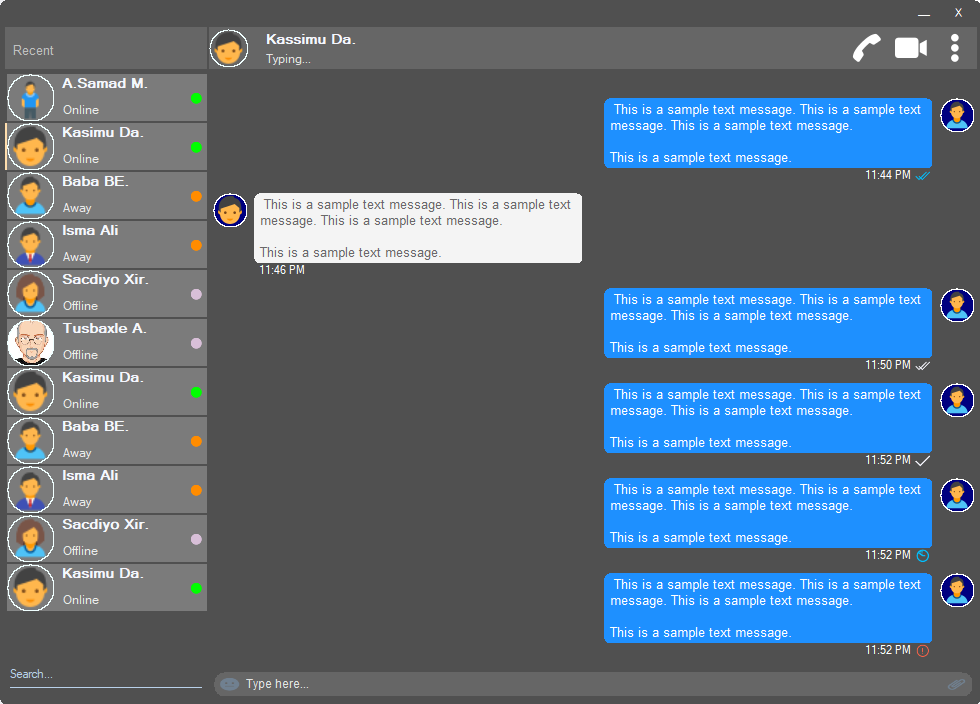
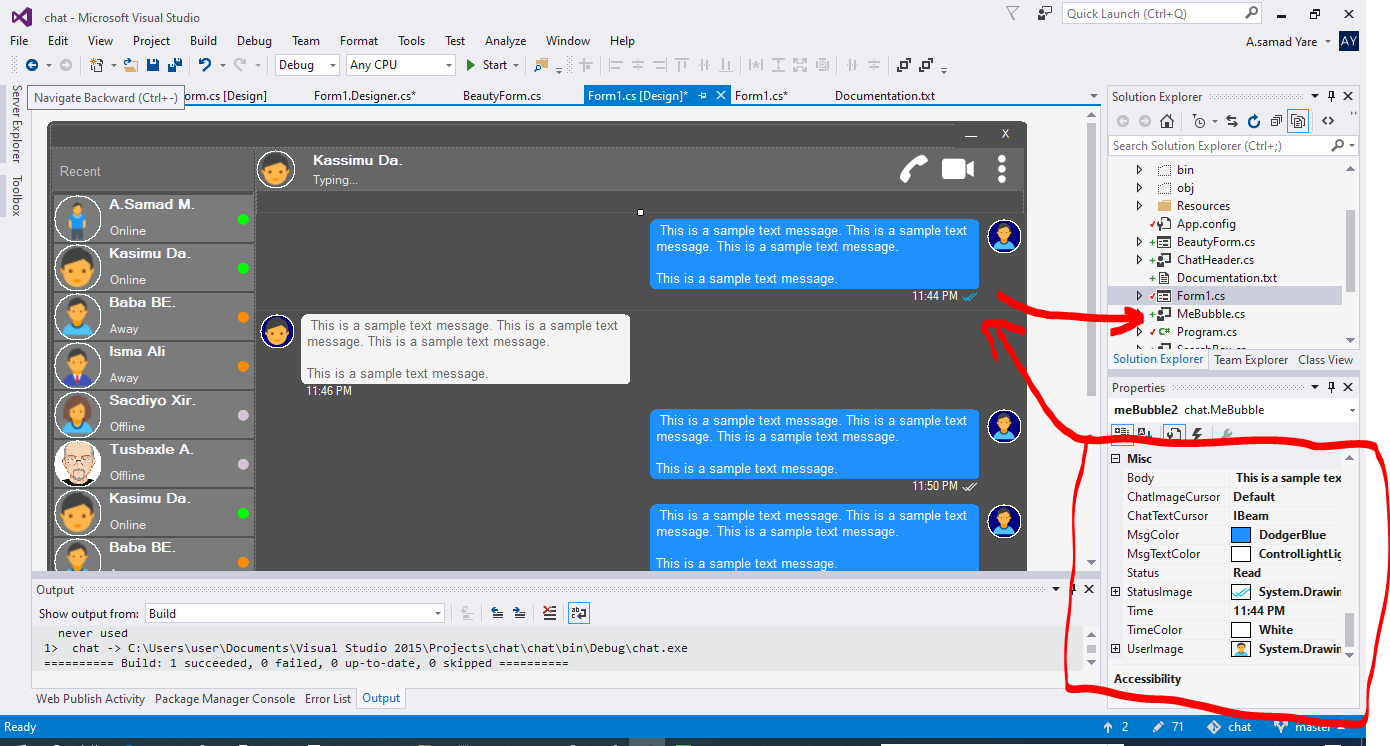
이 프로젝트의 모든 구성 요소는 반응이 좋으며 UR 창이나 컨테이너 크기가 크기에 대해 걱정할 필요가 없습니다. 또한 동일한 공간 비율로 크기를 조정할 수 있으며, 외관은 동일합니다.
둥근 모서리가있는 아름다운 형태. 위의 스크린 샷을 참조하십시오.
 public partial class Form1 : chat . BeautyForm
   {
       public Form1 ( )
       {
           InitializeComponent ( ) ;
} 위의 스크린 샷을 참조하십시오. 사용자 세부 사항이 표시되는 가장 중요한 부분입니다. 사용자 프로필 이미지, 제목, 상태, 전화, 화상 통화, 도트 메뉴가 있습니다.
 chat . ChatHeader chatHeader1 = new chat . ChatHeader ( ) ;

chatHeader1 . UserTitle = "Abdisamad Moh." ; // Gets/Sets user title
chatHeader1 . UserStatusText = "Typing..." ; // Gets/Sets User status text.
chatHeader1 . UserImage = Some_Image ; // Gets/Sets User profile image

chatHeader1 . OnCallClick += Double tab to complete . // Fires when user clicks  Call icon
chatHeader1 . OnVideoCallClick += Double tab to complete . // Fires when user clicks Video Call icon
chatHeader1 . OnUserImageClick += Double tab to complete . // Fires when user clicks  Profile Image
chatHeader1 . OnUserStatusTextClick += Double tab to complete . // Fires when user clicks User status Text
chatHeader1 . OnUserTitleClick += Double tab to complete . // Fires when user clicks User Title Text
chatHeader1 . OnMenuDotClick += Double tab to complete . // Fires when user clicks Dot menu 내장 된 이모티콘 아이콘이있는 아름다운 사용자 입력 상자, 파일 첨부 아이콘.
 chat . TypingBox typingBox1 = new chat . TypingBox ( ) ;

typingBox1 . Value = "Hi" ; //Gets/Sets text of the typingBox.

typingBox1 . OnTypingTextChanged += Double tab to complete . // Fires when user writes something into the typingBox. This fires per character.
typingBox1 . OnHitEnter += Double tab to complete . // Fires when user hits ENTER key while the typingBox is focused. This fires before newline is created in the typingBox. SHIFT+ENTER will also create newline without firing this event.
typingBox1 . OnEmojiClicked += Double tab to complete . // Fires when user clicks Emoji icon in the typingBox.
typingBox1 . OnAttachmentClicked += Double tab to complete . // Fires when user clicks File attachment icon in the typingBox. 위의 스크린 샷, '검색 워터 마크'가있는 해당 텍스트 상자와 검색 상자 인 밑줄이있는 줄을 참조하십시오.
 chat . SearchBox searchBox1 = new chat . SearchBox ( ) ;

searchBox1 . Value = "Something" ; //Gets/Sets value in the searchBox.
searchBox1 . TextColor = Color . GradientActiveCaption ; //Gets/Sets text color and the bottom line color of the searchBox.
searchBox1 . FocusedColor =  Color . WhiteSmoke ; //Gets/Sets text color and the bottom line color of the searchBox when it is focused.
searchBox1 . UnFocusedColor = Color . GradientActiveCaption ; //Gets/Sets text color and the bottom line color of the searchBox when it is not focused.

searchBox1 . OnSearchTextChanged += Double tab to complete . // Fires when user writes something into the typingBox. This fires per character.
searchBox1 . OnHitEnter += Double tab to complete . // Fires when user hits ENTER key while the searchBox is focused. 프로필 이미지, 사용자 이름 (제목 이름), 사용자 상태 텍스트, 사용자 상태 모드를 사용하여 아름답고 사용자 정의 가능한 사용자 컨트롤. 위의 스크린 샷에서 왼쪽의 사용자를 참조하십시오.
 chat . Users user1 = new chat . Users ( ) ;

user1 . Username = "Abdisamad Moh." ; // Gets/Sets username or user title.
user1 . UserStatus = Status . Online ; //Option/Enum, Gets/Sets user status mode. Online, Away, Offline. U can add more if u want.
user1 . StatusMessage = "Online" ; //Gets/Sets status message
user1 . UserImage = Some_Image ; //Gets/Sets User profile image.
user1 . ProfileImageCursor = Cursors . Hand ; //Gets/Sets mouse cursor when user hovers mouse pointer over userImage.

user1 . OnClick +=  Double tab to complete . // Fires when anywhere on the user is clicked Including Username, statusText and StatusMode. However they will be excluded if u give them their own event.
user1 . OnUserTitleClick +=  Double tab to complete . // will fire when user clicks Username/Title. In this case, user1.OnClick will not be fired when user clicks on Username/Title.
user1 . OnUserStatusClick +=  Double tab to complete . // will fire when user clicks user status text. In this case, user1.OnClick will not be fired when user clicks on user status text..
user1 . OnUserStatusClick +=  Double tab to complete . // will fire when user clicks user status mode icon. In this case, user1.OnClick will not be fired when user clicks on user status mode icon.
user1 . OnProfileImageClick +=  Double tab to complete . // will fire when user clicks user profile image. In this case, user1.OnClick will not be fired when user clicks on user profile image.

//NOTE: Always use 'OnClick' event for this control instead of 'Click' event. 'OnClick' will take care of all other sub events. Double clicking this control on design time will generate 'Click' event instead of 'OnClick' event which is not recommended. In your Properties explorer find 'OnClick' event and double click to generate 'OnClick' event.스크린 샷을 참조하십시오. 그 중환자 메시지는 음성 버블입니다. 이 프로젝트에는 'mebubble'과 'yoububble'의 두 가지 거품이 있습니다. 둘 다 동일한 속성과 이벤트가 있지만 사용량은 다릅니다. 'Mebubble'은 나가는 채팅을위한 것이며 'YouBubble'은 들어오는 채팅을위한 것입니다.
이 예에서는 'mebubble'을 사용합니다. 둘 다 같은 방식으로 작동하며 동일한 속성과 이벤트가 있습니다. 이름과 사용법 만 다릅니다.
 chat . MeBubble meBubble1 = new chat . MeBubble ( ) ;

meBubble1 . Body = "This is a sample message text" ; //Gets/Sets message body.
meBubble1 . MsgColor = Color . DodgerBlue ; //Gets/Sets Message background color.
//NOTE: 'BackColor' will change the whole control's background color while 'MsgColor' will only change the message Body part.
meBubble1 . MsgTextColor = Color . White ; //Gets/Sets message text color.
meBubble1 . ChatImageCursor = Cursors . Default ; //Gets/Sets mouse cursor when it hovers over Bubble profile image.
meBubble1 . ChatTextCursor = Cursors . IBeam ; //Gets/Sets mouse cursor when it hovers over chat body.
meBubble1 . Status = MessageStatus . Delivered ; //Option/Enum, Gets/Sets Message status. This is the tick option. Options:  Sending, Sent, Delivered, Read,  Error,  None, Custom. where None will hide the tick option and Custom will give u option to put what u want.
meBubble1 . StatusImage = Some_Image ; //Gets/Sets custom image for the message status option, that is the tick option.
meBubble1 . Time = "11:44 PM" ; //Gets/Sets time of the chat bubble.
meBubble1 . TimeColor = Color . White ; //Gets/Sets Text Color of the time.
meBubble1 . UserImage = Some_Image ; //Gets/Sets Image of the bubble profile image.

meBubble1 . OnChatTextClick += Double tab to complete . //Fires when user clicks message body part.
meBubble1 . OnChatImageClick += Double tab to complete . //Fires when user clicks the Profile picture of the bubble..
저작권 (C) 압 디사 마드 모
이에 따라이 소프트웨어 및 관련 문서 파일 ( "소프트웨어")의 사본을 얻는 사람에게는 허가가 부여됩니다. 소프트웨어의 사용, 복사, 수정, 합병, 배포, 배포, 숭고 및/또는 소프트웨어의 사본을 판매 할 권한을 포함하여 제한없이 소프트웨어를 처리 할 수 있도록 소프트웨어를 제공 할 권한이 없습니다.
위의 저작권 통지 및이 권한 통지는 소프트웨어의 모든 사본 또는 실질적인 부분에 포함될 수 있습니다.
이 소프트웨어는 상업성, 특정 목적에 대한 적합성 및 비 침해에 대한 보증을 포함하여 명시 적 또는 묵시적 보증없이 "그대로"제공됩니다. 어떠한 경우에도 저자 또는 저작권 보유자는 계약, 불법 행위 또는 기타, 소프트웨어 또는 소프트웨어의 사용 또는 기타 거래에서 발생하는 계약, 불법 행위 또는 기타의 행동에 관계없이 청구, 손해 또는 기타 책임에 대해 책임을지지 않습니다.







