CSharp ChatUI Winforms
1.0.0

ฉันกำลังค้นหาฟองแชทที่สวยงามสำหรับ C# Winform แต่สิ่งเดียวที่ฉันสามารถหาได้คือ Telerik ซึ่งไม่ฟรี ดังนั้นฉันจึงตัดสินใจเขียน
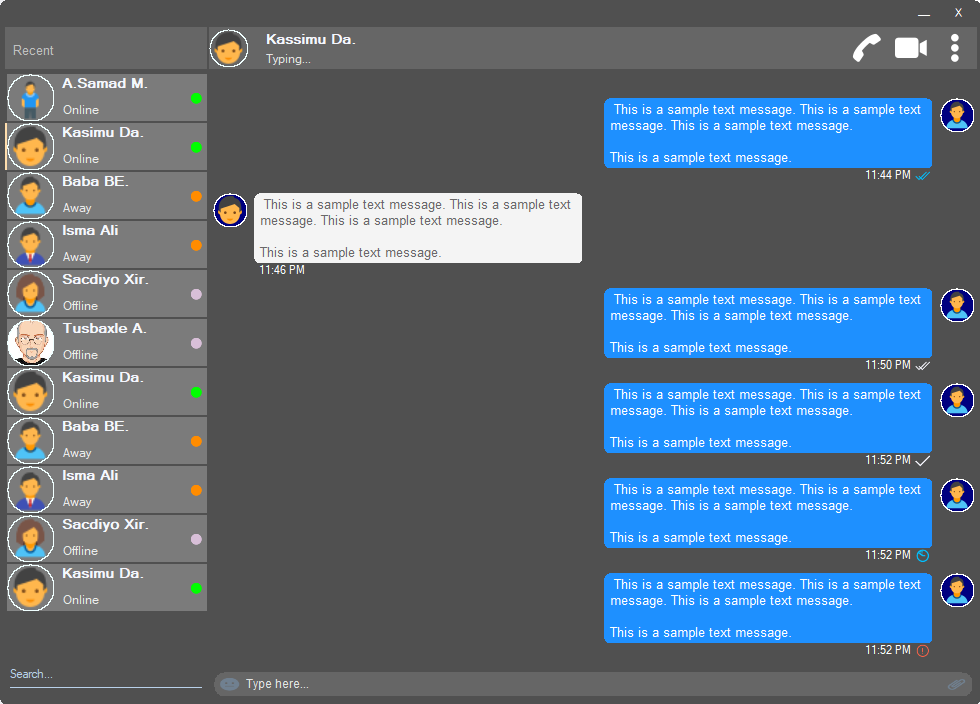
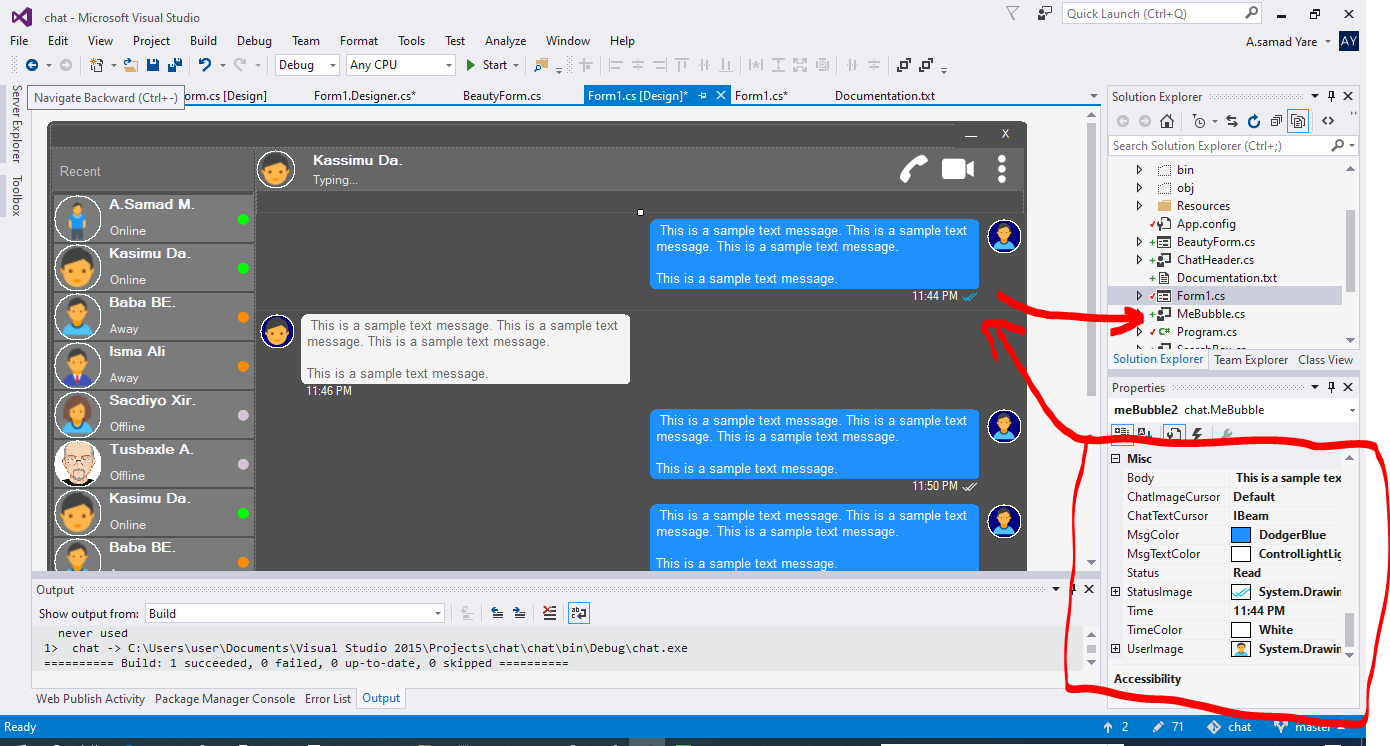
ส่วนประกอบทั้งหมดในโครงการนี้ตอบสนองและคุณไม่จำเป็นต้องกังวลเมื่อหน้าต่างหรือคอนเทนเนอร์ของคุณปรับขนาด พวกเขาจะปรับขนาดพวกเขาด้วยเปอร์เซ็นต์พื้นที่เท่ากันและรูปลักษณ์ของพวกเขาจะเหมือนกัน
รูปแบบที่สวยงามพร้อมมุมกลม ดูภาพหน้าจอด้านบน
 public partial class Form1 : chat . BeautyForm
   {
       public Form1 ( )
       {
           InitializeComponent ( ) ;
} ดูภาพหน้าจอด้านบนส่วนบนสุดที่มีรายละเอียดผู้ใช้ปรากฏขึ้น มันมีรูปภาพโปรไฟล์ผู้ใช้ชื่อเรื่องสถานะการโทรการโทรวิดีโอเมนู DOT
 chat . ChatHeader chatHeader1 = new chat . ChatHeader ( ) ;

chatHeader1 . UserTitle = "Abdisamad Moh." ; // Gets/Sets user title
chatHeader1 . UserStatusText = "Typing..." ; // Gets/Sets User status text.
chatHeader1 . UserImage = Some_Image ; // Gets/Sets User profile image

chatHeader1 . OnCallClick += Double tab to complete . // Fires when user clicks  Call icon
chatHeader1 . OnVideoCallClick += Double tab to complete . // Fires when user clicks Video Call icon
chatHeader1 . OnUserImageClick += Double tab to complete . // Fires when user clicks  Profile Image
chatHeader1 . OnUserStatusTextClick += Double tab to complete . // Fires when user clicks User status Text
chatHeader1 . OnUserTitleClick += Double tab to complete . // Fires when user clicks User Title Text
chatHeader1 . OnMenuDotClick += Double tab to complete . // Fires when user clicks Dot menu กล่องพิมพ์ผู้ใช้ที่สวยงามพร้อมไอคอนอิโมจิฝังไอคอนไฟล์แนบไฟล์
 chat . TypingBox typingBox1 = new chat . TypingBox ( ) ;

typingBox1 . Value = "Hi" ; //Gets/Sets text of the typingBox.

typingBox1 . OnTypingTextChanged += Double tab to complete . // Fires when user writes something into the typingBox. This fires per character.
typingBox1 . OnHitEnter += Double tab to complete . // Fires when user hits ENTER key while the typingBox is focused. This fires before newline is created in the typingBox. SHIFT+ENTER will also create newline without firing this event.
typingBox1 . OnEmojiClicked += Double tab to complete . // Fires when user clicks Emoji icon in the typingBox.
typingBox1 . OnAttachmentClicked += Double tab to complete . // Fires when user clicks File attachment icon in the typingBox. ดูภาพหน้าจอด้านบนกล่องข้อความที่มี 'การค้นหาลายน้ำ' และเส้นขีดเส้นใต้นั่นคือกล่องค้นหา
 chat . SearchBox searchBox1 = new chat . SearchBox ( ) ;

searchBox1 . Value = "Something" ; //Gets/Sets value in the searchBox.
searchBox1 . TextColor = Color . GradientActiveCaption ; //Gets/Sets text color and the bottom line color of the searchBox.
searchBox1 . FocusedColor =  Color . WhiteSmoke ; //Gets/Sets text color and the bottom line color of the searchBox when it is focused.
searchBox1 . UnFocusedColor = Color . GradientActiveCaption ; //Gets/Sets text color and the bottom line color of the searchBox when it is not focused.

searchBox1 . OnSearchTextChanged += Double tab to complete . // Fires when user writes something into the typingBox. This fires per character.
searchBox1 . OnHitEnter += Double tab to complete . // Fires when user hits ENTER key while the searchBox is focused. การควบคุมผู้ใช้ที่สวยงามและปรับแต่งได้ด้วยรูปภาพโปรไฟล์ชื่อผู้ใช้ (ชื่อชื่อ) ข้อความสถานะผู้ใช้โหมดสถานะผู้ใช้ ดูผู้ใช้ทางด้านซ้ายในภาพหน้าจอด้านบน
 chat . Users user1 = new chat . Users ( ) ;

user1 . Username = "Abdisamad Moh." ; // Gets/Sets username or user title.
user1 . UserStatus = Status . Online ; //Option/Enum, Gets/Sets user status mode. Online, Away, Offline. U can add more if u want.
user1 . StatusMessage = "Online" ; //Gets/Sets status message
user1 . UserImage = Some_Image ; //Gets/Sets User profile image.
user1 . ProfileImageCursor = Cursors . Hand ; //Gets/Sets mouse cursor when user hovers mouse pointer over userImage.

user1 . OnClick +=  Double tab to complete . // Fires when anywhere on the user is clicked Including Username, statusText and StatusMode. However they will be excluded if u give them their own event.
user1 . OnUserTitleClick +=  Double tab to complete . // will fire when user clicks Username/Title. In this case, user1.OnClick will not be fired when user clicks on Username/Title.
user1 . OnUserStatusClick +=  Double tab to complete . // will fire when user clicks user status text. In this case, user1.OnClick will not be fired when user clicks on user status text..
user1 . OnUserStatusClick +=  Double tab to complete . // will fire when user clicks user status mode icon. In this case, user1.OnClick will not be fired when user clicks on user status mode icon.
user1 . OnProfileImageClick +=  Double tab to complete . // will fire when user clicks user profile image. In this case, user1.OnClick will not be fired when user clicks on user profile image.

//NOTE: Always use 'OnClick' event for this control instead of 'Click' event. 'OnClick' will take care of all other sub events. Double clicking this control on design time will generate 'Click' event instead of 'OnClick' event which is not recommended. In your Properties explorer find 'OnClick' event and double click to generate 'OnClick' event.ดูภาพหน้าจอข้อความ chating เหล่านั้นเป็นฟองพูด ในโครงการนี้มีฟองสองฟองคือ 'Mebubble' และ 'YouBubble' ทั้งสองมีคุณสมบัติและเหตุการณ์เหมือนกัน แต่การใช้งานของพวกเขาแตกต่างกัน 'Mebubble' ใช้สำหรับการแชทขาออกและ 'YouBubble' สำหรับการแชทที่เข้ามา
ในตัวอย่างนี้ฉันจะใช้ 'mebubble' ทั้งสองทำงานในลักษณะเดียวกันมีคุณสมบัติและกิจกรรมเดียวกัน เฉพาะชื่อและการใช้งานที่แตกต่างกัน
 chat . MeBubble meBubble1 = new chat . MeBubble ( ) ;

meBubble1 . Body = "This is a sample message text" ; //Gets/Sets message body.
meBubble1 . MsgColor = Color . DodgerBlue ; //Gets/Sets Message background color.
//NOTE: 'BackColor' will change the whole control's background color while 'MsgColor' will only change the message Body part.
meBubble1 . MsgTextColor = Color . White ; //Gets/Sets message text color.
meBubble1 . ChatImageCursor = Cursors . Default ; //Gets/Sets mouse cursor when it hovers over Bubble profile image.
meBubble1 . ChatTextCursor = Cursors . IBeam ; //Gets/Sets mouse cursor when it hovers over chat body.
meBubble1 . Status = MessageStatus . Delivered ; //Option/Enum, Gets/Sets Message status. This is the tick option. Options:  Sending, Sent, Delivered, Read,  Error,  None, Custom. where None will hide the tick option and Custom will give u option to put what u want.
meBubble1 . StatusImage = Some_Image ; //Gets/Sets custom image for the message status option, that is the tick option.
meBubble1 . Time = "11:44 PM" ; //Gets/Sets time of the chat bubble.
meBubble1 . TimeColor = Color . White ; //Gets/Sets Text Color of the time.
meBubble1 . UserImage = Some_Image ; //Gets/Sets Image of the bubble profile image.

meBubble1 . OnChatTextClick += Double tab to complete . //Fires when user clicks message body part.
meBubble1 . OnChatImageClick += Double tab to complete . //Fires when user clicks the Profile picture of the bubble..
ลิขสิทธิ์ (c) Abdisamad Moh
ได้รับอนุญาตโดยไม่ต้องเสียค่าใช้จ่ายสำหรับบุคคลใด ๆ ที่ได้รับสำเนาซอฟต์แวร์นี้และไฟล์เอกสารที่เกี่ยวข้อง ("ซอฟต์แวร์") เพื่อจัดการในซอฟต์แวร์โดยไม่มีการ จำกัด รวมถึง แต่ไม่ จำกัด เฉพาะสิทธิ์ในการใช้สำเนาดัดแปลงผสานเผยแพร่เผยแพร่
ประกาศลิขสิทธิ์ข้างต้นและการแจ้งเตือนการอนุญาตนี้อาจรวมอยู่ในสำเนาทั้งหมดหรือส่วนสำคัญของซอฟต์แวร์
ซอฟต์แวร์มีให้ "ตามสภาพ" โดยไม่มีการรับประกันใด ๆ ไม่ว่าโดยชัดแจ้งหรือโดยนัยรวมถึง แต่ไม่ จำกัด เฉพาะการรับประกันความสามารถในการค้าการออกกำลังกายสำหรับวัตถุประสงค์เฉพาะและการไม่เข้าร่วม ไม่ว่าในกรณีใดผู้เขียนหรือผู้ถือลิขสิทธิ์จะต้องรับผิดชอบต่อการเรียกร้องความเสียหายหรือความรับผิดอื่น ๆ ไม่ว่าจะเป็นการกระทำของสัญญาการละเมิดหรืออื่น ๆ ที่เกิดขึ้นจากหรือเกี่ยวข้องกับซอฟต์แวร์หรือการใช้งานหรือการติดต่ออื่น ๆ ในซอฟต์แวร์







